Humans in the Loop…But Where? Lessons from AI in Education, Retail, Financial Services, Utilities, Government, and Health
The Luddites Reconsidered: Lessons from the Industrial Revolution

The speaker opens with the historical story of the Luddites, reframing them not as anti-technology but as skilled workers resisting a shift in power from craftspeople to factory owners focused on profit. She notes that those who survived didn't just resist machines but identified what machines couldn't do, leaning into hand stitching and bespoke craft to retain their livelihood and social esteem. This sets up the talk's central theme: finding where humans must remain in the loop as AI reshapes work.

The Mass Production of Answers and the Value of Struggle

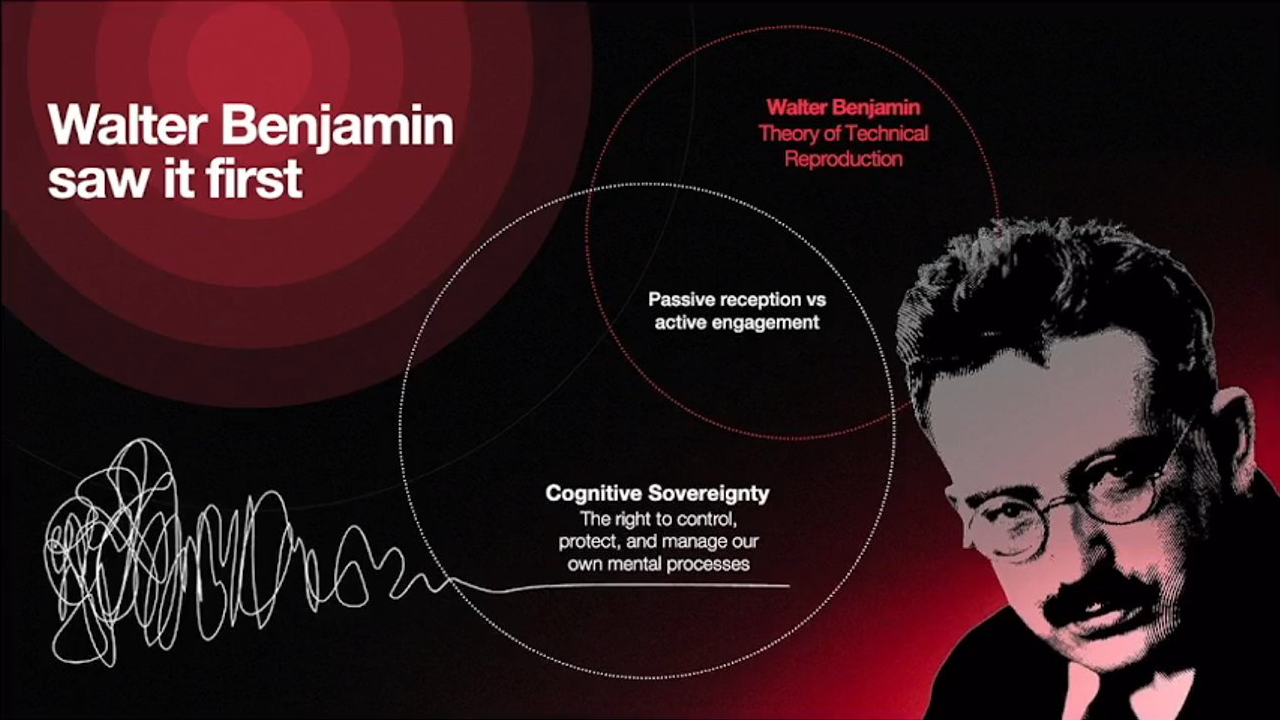
Drawing on Walter Benjamin's idea of lost 'essence' in mass-produced art, the speaker argues that today we face mass production of answers via AI rather than art. She warns that outsourcing problem-solving to AI robs us of the 'messy middle' and the euphoria of solving problems ourselves, citing Darwin and Einstein's habit of walking to think through problems as an example of valuable cognitive struggle.

Twenty-Five Years of Human-Centered Design Experience

The speaker reflects on her 25-year career working with diverse people—from convicted murderers to surgeons and parliamentarians—to understand how design must adapt to unique human contexts. She introduces the structure for the rest of the talk: five case studies demonstrating where AI has been incorporated and why human-in-the-loop involvement remains essential.

Case Study: Zero Gravity Bookings and Emotional Sensitivity

The speaker describes working with iFly, a zero-gravity flight experience company, to implement AI for answering customer questions. She recounts two critical examples—a woman asking about wearing a hijab and a grieving father seeking a refund after a family death—where AI responses were rerouted to humans to ensure cultural respect and emotional compassion, illustrating the need for human judgment in sensitive situations.

Case Study: Financial Forensics and the Problem of Intent

In a government financial forensics project, the speaker explains how AI was used to detect patterns and flag irregularities in financial documents, freeing specialists to focus on legal judgment calls. She emphasizes that AI struggles to interpret intent, meaning human oversight is crucial to avoid unfairly penalizing people who make honest mistakes rather than intentionally violating compliance rules.

Case Study: Many Rivers and Indigenous Cultural Nuance

The speaker shares her work with Many Rivers, a nonprofit providing microfinance to Indigenous small businesses, where AI helped staff locate documents on SharePoint and saved hours of work weekly. She highlights the challenge that many AI models are trained on North American Indigenous contexts, missing local cultural nuances and oral knowledge, reinforcing the need for human oversight to preserve accuracy and cultural respect.

Case Study: Tacit Knowledge in Complex Consulting Processes

Using the analogy of not knowing which arm you put into your shirt first, the speaker explains how tacit, habitual knowledge is hard to codify for AI. She describes a failed early attempt to automate a consulting firm's complex analysis process, which only succeeded after shadowing employees to identify four distinct types of activities and their proper sequencing—demonstrating the necessity of human-in-the-loop design for capturing unwritten expertise.

Case Study: Utilities Company and Field Experience in Infrastructure

The speaker discusses building a document comparison tool for a utilities company managing over a million power poles, where AI identifies necessary updates from legislative and documentation changes. She stresses that human field experience remains essential for judging context-specific decisions, such as how environmental factors like coastal salt air affect pole material choices.

Human Ingenuity Through History: Empathy-Driven Problem Solving

Shifting to celebrate human problem-solving, the speaker recounts historical and modern examples of empathetic ingenuity: Scottish fishing villages using unique sweater stitches to identify drowned sailors, 1960s wheelchair activists building their own curb cuts, a Seattle book exchange repurposed to feed the homeless, and prams left for Ukrainian refugee families. She emphasizes that AI cannot replicate the lived, embodied empathy behind these solutions.

Closing Reflections: Balancing AI Efficiency with Human Purpose

The speaker closes with a humorous story about a Brazilian jail using geese instead of guard dogs to prevent escapes, illustrating creative, low-tech problem solving. She concludes by cautioning against using AI merely for efficiency given its high resource costs, urging the audience to reserve AI for tasks it excels at while relying on human empathy and 'cognitive sovereignty' to solve complex problems and build a more inclusive, happier society.

So we've been here all day, 4PM, well done. It's kind of a lot. Very exciting things that we've heard so far. We're we're building this plane as we're learning to fly it. It feels a bit overwhelming. But these feelings are not new.

We're going to go back in time, a few hundred years. Where in England, and all over the country, there's highly skilled textile workers, masters of their craft, esteemed in society. Life is pretty good. And then, we've got the industrial revolution coming in.

Absolute transformation, factories being replaced with the highly skilled workers, with lower skilled workers, and bringing in the looms. So as you can imagine, people are not happy. Actually, they're really angry. They start smashing up the machines. All over England, the factories are set on fire.

Some of you are nodding and I reckon you know who I'm talking about. So this group of people, the Luddites. Now, we use that word today, Luddites, to describe people who are against technology, who resist progress, but that isn't what they were. They were challenging this shift in power from the people who knew the craft, the materials, to the factory owners who are more concerned about profit. Now, the people who survived during that time and retained their livelihood, they didn't just resist the machines.

They learned what can't the machines do. And so, they leaned into hand stitching, embroidery, bespoke pieces. And by doing this, they were able to not only retain their craft but regain some of that esteem in society. So, it's very similar to where we are today.

Today, I'm going to share stories of where I've incorporated AI and where we need to have a human in the loop, trying to think about what we have as humans and the value that we bring. So moving forward in the industrial revolution in the nineteen thirties, we had the beginning of art that began to be mass produced.

People could suddenly have a print in their house, and philosopher Walter Benjamin noticed something unusual was happening. There was something that was lost from when you reproduced the art, this essence. So I'd like you all to think about a time when you were in a museum and you encountered a piece of art and you looked at the layers, the brush strokes, this active engagement with that piece of art.

It that moment in time that you saw that piece of art, it had something. It had this capturing. Now, where we are now is not about mass production of art. We've got mass production of something else and a lot of people have referenced it here today. And that is the mass production of answers.

So many answers, answers, answers, answers, answers. We put something into Claude. That's a good answer. We cross check it with Chatty G. We've got six, seven, eight, nine, 10 answers. It's hard to know which answer is actually right. We've moved away from spending time in that problem space in the, already referenced today, messy middle, where we're breaking that problem down into chunks, deconstructing it. Darwin and Einstein had both walking paths near their house, where when they had a problem, they would walk it out.

Thinking about it, turning it over in their mind, really spending time in that space to unpack that problem. And then, when they got that answer, boom, euphoria. Such an amazing feeling when we've all solved problems. Solving a problem is not something we want to outsource to AI.

You can't get the AI to do the problem solving and retain the euphoria of when we get the answer. They're the same process. For the last twenty five years, I've spent time with all sorts of people.

Hold on. Let's go back. Oh, spoiler, spoiler, spoiler. Okay. There they are. All sorts of different people. I've been able to have the opportunity to spend a day with someone who was a convicted murderer serving sentence, a parliamentarian, surgeons, lots of different types of experiences, lots of different ways to solve the problem for them. It's very different when you're designing something for someone to use in the back of a tractor versus a busy GP's office with lots of people coming and going.

And what I've learned from that time working with different people in their backgrounds is always trying to think about how can we get technology to make things easier, but also retaining our unique context and the things that are gonna make it easy to use and better for us. Today, I'm gonna share stories, five case studies of where we've incorporated AI and share where the human in the loop is integral, that lived experience, that empathy to getting solutions for people.

Imagine you've just booked tickets to float. You're about to experience zero gravity. Now, because this is something that is unlike most something people have ever done before, this company iFly who offered this experience, people have a lot of questions calling up on the phone, DMing them through socials, sending them emails, what do I wear, what do I eat, when do you open, can I do this, I have something kind of weird with my knee?

If you can imagine it, someone's asked it. And they were spending so long trying to answer all of these questions, they wanted to bring in AI so that they could have the people on the ground have more time for their customers. So when the team started doing this and putting it together, the first stage was, oh, what do we know?

Let's codify all the things that we know and that are known and common questions, and that was fine. But once they started testing and watching the questions come in, a woman wrote in asking, can I wear my hijab? Totally reasonable question but something that they wanted to make sure was answered answered with cultural respect.

So it was rerouted to a team member. Another one that came in while they were testing it, a father had booked a special day for his family. But in that time between booking and the day, someone in his family had passed away. So he wrote in in grief to try to find out about the refund policy. Now that refund policy was already codified and you could imagine the team were kind of freaking out stopping it and rerouting it to a team member because wanting to make sure that that question was answered in a way that thought about what he must be going through.

Okay. Someone in my family has just died and now I've got to go through and like cancel stuff. Making sure that there is people available to provide that one to one empathy and compassion during a moment in time. People engage with our services in complex lives and things that are unexpected. So whenever we have situations where there's sensitive topics, it's really important to have a human in the loop.

This next case study, was for it was for a government department. I can't share exactly who it is, but it's in the area of the area of, financial forensics. And the challenge that they had was, how do we have these highly trained government specialists, but spend so much of their time combing through PDFs looking for things that aren't quite right.

Trying to see if there's money coming through the organization that could be linked to corruption or other areas that are not correct. So we looked at the end to end cycle, where do we need a human in the loop, and how can we do the things that AI is great at? It's so good at recognizing patterns. It can notify when something isn't quite right and when things don't match up based on the historical data.

And so we use the AI to do all of those rule based things so that the specialists, the people that are trained in in legislation and trained, in legal responses could have everything set up to make the, the call. Because what is really difficult for the AI to understand is intent.

So what we don't want to have happening in this situation is that everyone is painted with the same brush and they receive enforcement language. What we want, especially in government, is to try to ensure that we help people make make their help them through the compliance and then support them to be able to make the right decisions and to make sure that when they are filling in the forms that there isn't something that's just an accident.

Because the AI can't tell whether it's someone with low digital literacy that is struggling to understand what the fields mean versus someone who's actually doing the wrong thing. That's where we need a human in the loop, whenever there is a challenge around intent. If any of you have ever worked in a not for profit, you're probably familiar with doing quite a lot with not very much.

So we got brought in to work with Many Rivers. They're a not for profit that provides microfinance to indigenous, small businesses. Now, the challenge for them was to try to be able to provide their team to have more time to serve customers, and they were spending a lot of time just trying to find things on SharePoint. Highly legislated industry providing finance, lots of areas where information was and very process driven.

And so when people would start at the organization, they couldn't find things and they needed to follow the right process because it's step by step by step. The other thing that had happened when they had tried to do a a I before is that a lot of the models are trained on North American, and they're grounded on North American, indigenous context.

So there was things, cultural nuances that just weren't right. So we work with them to try to understand, again, something kind of small, trying to help them find things, but something that gave four to five hours a week back to their staff members. So I think, you know, something that's important to think about is sometimes the AI isn't doing this amazing innovation and transforming the way we've ever done our ways of working.

Sometimes it's just about trying to solve a simple problem, doing the things that it does well, which is pattern recognition, trying to find, trying to source using code words, and then that overlay of making sure that when we do have those nuances and things that are an oral language that won't live in an LLM, something that is that understanding of terms that are used by people that haven't been documented, it's important to have a human in the loop.

If I ask you which arm you put into your shirt first this morning, it might be difficult for you to tell me straight away unless you do it again. Oh, know? Do you know? Okay.

Left hander.

Left hander. Left hander. Good. I bet that that piece of information isn't written down anywhere. It's something that's just part of you. It's something you do. It's part of your lived experience. It's not an algorithm yet. This is the same problem that we encountered when working with these consultants to try to help them with their processes of a really complex application around, providing an analysis on the consulting.

So what we learned from that is we couldn't just guess what they were doing. Even when we asked them questions, there was a lot of things that were habitual, were intuitive, that they just did by doing it because they've been doing it for twenty years. They didn't even know they were doing it. And when we first started, we thought we had it right.

So we tested it and it was a disaster, total mess. We couldn't just kind of plug everything that they did into one agent and get it to do it. It didn't work. There was four different discrete types of activities that they did And it wasn't until we sat with them, watched them, shadowed them that we could understand what those different types of activities were so that we could get the agent grounded and trained on those activities, and then also the ordering so that one step was done before the other.

So again, this tacit knowledge that comes from the doing, things again that aren't written down but that those specialists know by doing. So it's important whenever you're designing these types of things where there is that tacit knowledge that isn't written down, that you have a human in the loop. This next one is for a utilities company.

So very big responsibility. I don't know if any of you have ever had the power go out in your house. Did you scream? It can be pretty scary. So their role, really important role, keeping over a million power poles active, running, keeping the, the grid going.

So then they sell the electricity to all the retailers which is where you and businesses buy their electricity from. So you can imagine with over a million power poles and all those kilometers of cable, whenever there's a change to any of the parts, change to legislation, all of the documentation, all of the different drawings that that that help the teams decide how to keep these polls going, it's a it's a lot.

It's a lot to keep up with. And so we worked with them to build out a comparison tool. So when there was a new change that it could compare documents, identify where those updates needed to be made, but then having the human in the loop so that they could apply their field experience to know whether that's the right answer or not.

So when you're talking about things like power poles and you've got different materials, it's very different for how you're going to replace that pole if it's near the seaside and you've got that salty air coming in versus somewhere that's out in regional area where it's very dry. So at this point, when you have challenges where you need to make sure that you've got that industry and that field experience, it's important to have human in the loop.

This next section is about how cool humans are. We've always been incredible problem solvers. We're going to go back in time again. A few hundred years ago, all of the fishing villages around Scotland, Ireland, UK, Wales, it was really unusual for men to ever die on land. I know that sounds grim.

They mainly died by drowning, mainly in fishing boats. And if we think about what life was like for them, big open boats, no safety equipment, no radio, no way to be able to get help when they needed it. And the challenge here was, after they drowned, they would often wash up hundreds of kilometers away from their village.

And most of the people in this area were from a Christian background, and they wanted to give them a proper burial. So, god, they're smart. So the women, would have a particular sweater stitch in the waterproof wool and that stitch related to the village that they came from.

And generation to generation, the mothers would change would would train the the daughters. It's kind of the olden days, if, you know, women got stuck doing that. And change train the daughters about that stitch of the village so that when the body washed up, they would know how to return that body back to the village. We're naturally empathetic. In the sixties in California, wheelchair users got tired of lobbying the local council to put in curb cuts, and so they put out a call for action.

People showed up. In the middle of the night, they used jackhammers, sledgehammers, and they busted down the the curbs and then relayed the ramps for wheelchairs. This middle one is near, my sister's house in Seattle. You've probably seen these around. They have It's kind of like a book exchange. Well, people in the neighborhood noticed that they weren't getting used anymore.

The same books are still sitting there with Seattle, so you can imagine they were they're pretty soggy. The neighborhood did notice that there's quite a few people living in the area that were struggling with homelessness. So they filled it with food and that's how it operates now. The last one from a few years ago, you might be familiar with this image, when families were escaping Ukraine and smashing onto trains and buses to try to get towards Poland, Women put prams at the stations, at the bus stations and the train stations, so that when they arrived, they were able to have a pram to to move their family around.

The AI doesn't know what it's like to be hungry and to be able to get access to food with dignity without having to beg. The AI doesn't know what it's like to carry a kid all day long and the weight that that puts on you. That's something that we do as humans.

We're always solving problems in inventive ways. Moving down to Brazil, they had a challenge in a jail. The prisoners kept escaping. So they tried to get guard dogs on. Guard dogs, expensive vet bills and can be bribed.

But there's an animal that hates everyone equally regardless if you're the person who feeds it, and they're really loud, and that's a goose. So they put geese all around the perimeter of the jail and these geese, they don't even sleep. It's like they it's baffling to the the people working there.

And since that time, they're frightened. None of those inmates want to come out and it's all apparently the jobs in jail, it goes like in terms of what they like to do and what they don't like to do, cooking, cleaning the toilets, feeding the geese.

I hate everyone. So AI takes a lot of electricity, a lot of power, a lot of resources, a lot of water. You know, we have a responsibility when we use it to not just make things more efficient.

I don't think that's what we should be aiming for. I think we should be aiming for using the AI for what it's really good at doing. A lot of the stuff that we just don't have the time to do. And you know what? It's kind of boring, so let it do that. And then using our own lived experience, our empathy, staying with our cognitive sovereignty, trying to solve those problems.

Because if we can do those two things, we cannot just do efficiency gains. We can have access to solve the more complex problems, ideally make it a more inclusive society, and big stretch, hopefully have a happier society. Thank you.

LEARNINGS FROM THE FIELD

Humans in
but where?

Melissa Voderberg

X

publicis sapient

LEARNINGS FROM THE FIELD

Humans in the loop...
but where?

Melissa Voderberg

Publicis Sapient

An abstract red wave graphic appears on the right side of the slide.

LEARNINGS FROM THE FIELD

Humans in the loop...
but where?

Melissa Vorderberg

publicis sapient

Abstract red wavy lines on a black background. Publicis Sapient logo with an 'X' symbol.

LEARNINGS FROM THE FIELD

Humans in the loop... but where?

Melissa Voderberg

publicis sapient

A title slide with a dark background featuring abstract red, flowing wave-like shapes on the right. The Publicis Sapient logo is in the bottom left corner.

LEARNINGS FROM THE FIELD

Humans in the loop...

but where?

Melissa Voderberg

publicis sapient

Humans vs machines

  • What is essentially human?
  • What can't machines do?

Humans vs machines

What is essentially human?

What can't machines do?

Illustration of two human-like figures interacting with complex industrial machinery, depicted in a glowing red line art style on a dark background.

Humans vs machines

What is essentially human?

What can't machines do?

An illustration in red on a black background depicts two human-like figures in an industrial setting with complex machinery. One figure is seen wielding a large hammer, appearing to strike the machinery, while the other is positioned near the machines.

Humans vs machines

  • What is essentially human?
  • What can't machines do?
An illustration in red depicts two figures, possibly human, one holding a hammer, seemingly interacting with or breaking machinery. The background is dark.

Humans vs machines

  • What is essentially human?
  • What can't machines do?
An illustration in red depicts two stylized figures. One figure wields a large hammer, appearing to strike a machine, while another figure interacts with a complex, glowing red machine structure in the background.

Humans vs machines

What is essentially human?

What can't machines do?

An illustration in red showing two human-like figures interacting with or operating industrial machinery. One figure is holding a hammer, appearing to strike something, while the other is pushing on a part of the machine.

Humans vs machines

What is essentially human?

What can't machines do?

An illustration in red depicts two human-like figures interacting with complex industrial machinery. One figure on the left is holding a hammer and appears to be striking the machinery, while another figure on the right is pushing against it.

Humans vs machines

What is essentially human?

What can't machines do?

An illustration in glowing red depicts two stylized human figures interacting with complex industrial machinery. The figure on the left appears to be striking something with a hammer, while the figure on the right is pushing or operating a part of the machine, all against a backdrop of more machinery.

Walter Benjamin saw it first

Walter Benjamin: Theory of Technical Reproduction

Passive reception vs active engagement

Cognitive Sovereignty: The right to control, protect, and manage our own mental processes

A stylized, monochromatic portrait of philosopher Walter Benjamin. A diagram with three overlapping red circles illustrates the concepts mentioned. A hand-drawn squiggly white line on the bottom left gradually straightens into a thin line.

Walter Benjamin saw it first

Walter Benjamin: Theory of Technical Reproduction

Passive reception vs active engagement

Cognitive Sovereignty: The right to control, protect, and manage our own mental processes

A stylized, high-contrast portrait of philosopher Walter Benjamin on the right side of the slide. On the left, a diagram with three overlapping circles illustrates key concepts. An abstract, scribbled line illustration is in the bottom left corner.

Walter Benjamin saw it first

Walter Benjamin: Theory of Technical Reproduction

Passive reception vs active engagement

Cognitive Sovereignty: The right to control, protect, and manage our own mental processes

A halftone portrait of Walter Benjamin is on the right side of the slide. Three overlapping circles form a diagram, each containing one of the conceptual texts. A wavy, scribbled line on the left connects to one of the circles, visually representing mental processes.

Walter Benjamin saw it first

  • Walter Benjamin
    Theory of Technical Reproduction
  • Passive reception vs active engagement
  • Cognitive Sovereignty
    The right to control, protect, and manage our own mental processes
A stylized black and white portrait of philosopher Walter Benjamin, depicted from the chest up with glasses and a mustache. To the left, a diagram features three overlapping circles, each containing a key concept. Below the circles, a white squiggly line transitions into a smoother, more ordered line, visually representing a journey towards cognitive sovereignty.

Walter Benjamin saw it first

Walter Benjamin: Theory of Technical Reproduction

Passive reception vs active engagement

Cognitive Sovereignty: The right to control, protect, and manage our own mental processes

A stylized portrait of Walter Benjamin is shown on the right side of the slide. On the left, a diagram features three overlapping circles with text: "Walter Benjamin Theory of Technical Reproduction", "Passive reception vs active engagement", and "Cognitive Sovereignty". A squiggly line, resembling a tangled thought or waveform, also appears on the left.

Walter Benjamin saw it first

  • Walter Benjamin Theory of Technical Reproduction
  • Passive reception vs active engagement
  • Cognitive Sovereignty The right to control, protect, and manage our own mental processes

A diagram featuring three overlapping circles, each containing a concept. To the right is a stylized grayscale portrait of Walter Benjamin wearing glasses. Below the circles, a chaotic, squiggly line gradually smooths into a single, ordered line.

Walter Benjamin saw it first

Walter Benjamin
Theory of Technical Reproduction

Passive reception vs active engagement

Cognitive Sovereignty
The right to control, protect, and manage our own mental processes

A stylized portrait of Walter Benjamin is on the right side of the slide. On the left, a Venn diagram shows three overlapping circles. One circle contains text related to Walter Benjamin's theory. Another circle contains "Passive reception vs active engagement". A third circle, which overlaps the "Passive reception" circle, contains "Cognitive Sovereignty" and its definition. Below the circles, a squiggly, scribbled line gradually straightens into a clear, horizontal line.

Walter Benjamin saw it first

  • Walter Benjamin, Theory of Technical Reproduction
  • Passive reception vs active engagement
  • Cognitive Sovereignty: The right to control, protect, and manage our own mental processes
A stylized, two-tone portrait of Walter Benjamin appears on the right. On the left, a conceptual diagram uses three overlapping red circles to illustrate the connections between "Walter Benjamin, Theory of Technical Reproduction", "Passive reception vs active engagement", and "Cognitive Sovereignty". A white line below the circles begins as a complex, squiggly scribble and gradually straightens out, symbolizing a transition from a messy to a clear state.

Walter Benjamin saw it first

  • Walter Benjamin: Theory of Technical Reproduction
  • Passive reception vs active engagement
  • Cognitive Sovereignty: The right to control, protect, and manage our own mental processes

A stylized black and white portrait of Walter Benjamin is on the right side of the slide. A Venn diagram with three intersecting circles is overlaid on the image and the dark red background. The circles are labeled "Walter Benjamin Theory of Technical Reproduction", "Passive reception vs active engagement", and "Cognitive Sovereignty". On the left, a white, messy, scribbled line gradually transforms into a clear, smooth line.

A day in the life

A red curved line over a background of black rectangular 3D blocks.

A day in the life

A slide title overlaying a background of irregularly arranged dark, glossy rectangular blocks, with a large red curved arc.

A day in the life

Abstract background featuring dark, glossy square blocks and a large red arc. Logos for AI x Design, Web Directions, and UX Australia are visible at the bottom.
<section class='slide-text'> <h3>Case study 01</h3> <ul> <li><strong>Experience company</strong></li> <li><strong>Aim:</strong> improve the management of inbound queries and decrease response time</li> </ul> <p>iFLY</p> <h4>iFLY Customer Query Resolution Process</h4> <ol> <li>Initial query received via "Email / webform".</li> <li>"Repository + LLM" performs "AI triage + intent classification".</li> <li>A decision point asks "Sensitive topic?".</li> <li> Based on this decision: <ul> <li>One path (labeled 'Yes' in the diagram) leads to automated resolution by "iFLY Tone of Voice + LLM" for queries on topics

Case study 01

Experience company: iFLY

Aim: Improve the management of inbound queries and decrease response time

AI-driven Query Resolution Process Flowchart

The process starts with an Email / webform submission, which is then sent to a Repository + LLM for AI triage and intent classification.

A decision point asks: Is the query about a Sensitive topic that can be handled by the specialized AI?

  • If Yes:

    The query is processed by the iFLY Tone of Voice + LLM, which addresses specific common topics such as:

    1. Opening hours (including locations and closures)
    2. How to book (details on steps, pricing, and availability)
    3. Cancellations & refunds (for rescheduling, cancelling, or requesting refunds)

    Once processed, the Query resolved state is reached.

  • If No:

    The query is identified as a more complex Sensitive query and is rerouted to a Human agent.

    The human agent Handles edge cases, and if appropriate, a New FAQ created, with the response codified for future use.

    This also leads to the Query resolved state.

In both resolution paths, the outcome Feeds back to the repository.

The slide presents "Case study 01" for the experience company iFLY. On the left is a screenshot of the iFLY indoor skydiving website, featuring a person in a red suit mid-air inside a wind tunnel. Overlay text includes "DON'T JUST HOP, FLY." and "ARE YOU READY TO FLY?". The iFLY logo and "iFLY London" are also visible.

On the right is a flowchart illustrating an AI-driven customer query resolution process. It starts with an "Email / webform" input which proceeds to a "Repository + LLM" for AI triage and intent classification. A decision diamond asks "Sensitive topic?". If the answer is 'Yes', the query is handled by "iFLY Tone of Voice + LLM" for specific topics like "Opening hours", "How to book", and "Cancellations & refunds", leading to "Query resolved". If the answer is 'No', the query is labeled "Sensitive query" and "Reroute to human". A "Human" then "Handles edge cases", potentially leading to a "New FAQ created" with the "Response codified for future", which also leads to "Query resolved". A red arrow indicates that all resolved queries "Feeds back to repository".

LEARNINGS FROM THE FIELD

Case studies

05

Abstract red graphic on the right side of the slide.

Case study 03

  • Not for Profit
  • Aim: More time for staff to support small business clients

MANYRIVERS

Many Rivers supports Indigenous and other Australians to build economic independence through business.

CONTEXT

Microfinance to Indigenous small businesses

CHALLENGE

How to incorporate AI in a way that is safe and adds value

LEARNINGS

  • Start small, get context and cultural nuances right
  • Language models mainly built on North American context
  • Watch and iterate, test and learn
Screenshot of the Many Rivers website showing images of people and business-related content.

Case study 01

Experience company

Aim: improve the management of inbound queries and decrease response time

iFLY

Query Resolution Process Flow

  • Input: Email / webform
  • Processing: Repository + LLM (AI triage + intent classification)
  • Decision: Sensitive topic?
    • If Yes: iFLY Tone of Voice + LLM handles:
      1. Opening hours (Hours, locations, closures)
      2. How to book (Steps, pricing, availability)
      3. Cancellations & refunds (Reschedule, cancel, refunds)
      Result: Query resolved
    • If No: Sensitive query rerouted to Human. Human handles edge cases. A New FAQ is created (response codified for future), which feeds back to the repository. Result: Query resolved
A screenshot of the iFLY website showing people doing indoor skydiving, with the text "DON'T JUST HOP, FLY". Adjacent to it is a flowchart diagram illustrating a customer query resolution process. It begins with "Email / webform" input, proceeds to "Repository + LLM" for AI triage and intent classification. A decision point "Sensitive topic?" leads to two branches: a "Yes" path handled by "iFLY Tone of Voice + LLM" for common topics (opening hours, booking, cancellations), resulting in "Query resolved"; and a "No" path where a "Sensitive query" is rerouted to a "Human" to "Handle edge cases", leading to a "New FAQ created" that "Feeds back to repository", also resulting in "Query resolved".

LEARNINGS FROM THE FIELD

Case studies

A day in the life

  • Rice Farmers
  • Accountants
  • Surgeons
  • Real Estate Developers
  • Nurses
  • People Struggling with Homelessness
  • Youth Workers
  • Incarcerated People
  • Doctors
  • Justice Workers
  • Dairy Farmers
  • Mechanics
  • Cleaners
  • Agronomists
  • Retail Workers
  • Primary School Teachers
  • Biotech Entrepreneurs
  • Multi-lingual speakers
  • Electricians
  • Wealth-Impaired People
  • Disability Support Workers
  • Parliamentarians
  • IT Workers
  • Academics
  • Engineers
  • Cattle Farmers
  • Child Protection Workers
  • Real Estate Agents
  • Miners
  • Hospitality Workers
  • Veterinarians
  • Social Workers
  • Primary Producers
  • Team Leaders
  • Secondary School Teachers
  • Construction Workers
A central red circular arc with the title "A day in the life" is surrounded by numerous black rectangular labels, each listing a profession or group of people. Some labels have white text, while others have red text, indicating a distinction.

A day in the life

  • Rice Farmers
  • People Struggling with Homelessness
  • Youth Workers
  • Retail Workers
  • Biotech Entrepreneur
  • Multi-lingual speakers
  • Electricians
  • Real Estate Agents
  • Construction Workers
  • Veterinarians
  • Social Workers
  • Hospitality Workers
  • Disability Support Workers
  • Parliamentarians
  • IT Workers
  • Academics
  • Primary Producers
  • Secondary School Teachers
  • Cattle Farmers
  • Primary School Teachers
  • Agronomists
  • Cleaners
  • Justice Workers
  • Nurses
  • Real Estate Developers
  • Surgeons
  • Accountants
  • Incarcerated people
  • Doctors
  • Vision Impaired People
  • Miners
  • Team Drivers
  • Engineers
  • Child Protection Workers
  • Mechanics
  • Dairy Farmers
An abstract graphic features a large red curved ring shape surrounding the title "A day in the life," with numerous scattered dark grey rectangular boxes containing various job titles and demographic groups.

A day in the life

  • Rice Farmers
  • People Struggling with Homelessness
  • Incarcerated People
  • Retail Workers
  • Biotech Entrepreneurs
  • Multi-lingual speakers
  • Real Estate Agents
  • Construction Workers
  • Accountants
  • Youth Workers
  • Doctors
  • Electricians
  • Visually Impaired People
  • Miners
  • Hospitality Workers
  • Veterinarians
  • Social Workers
  • Surgeons
  • Real Estate Developers
  • Nurses
  • Justice Workers
  • Dairy Farmers
  • Mechanics
  • Cleaners
  • Agronomists
  • Primary School Teachers
  • Engineers
  • Cattle Farmers
  • Parliamentarians
  • IT Workers
  • Academics
  • Primary Producers
  • Child Protection Workers
  • Secondary School Teachers

A diagram with the title "A day in the life" at its center, surrounded by a large red curved shape. Numerous dark rectangular boxes are scattered around the title, each containing the name of a profession or group of people, with some names displayed in red text.

A day in the life

  • Rice Farmers
  • People Struggling with Homelessness
  • Youth Workers
  • Incarcerated People
  • Doctors
  • Retail Workers
  • Biotech Entrepreneurs
  • Multi-lingual speakers
  • Electricians
  • Vision Impaired People
  • Real Estate Agents
  • Miners
  • Construction Workers
  • Veterinarians
  • Hospitality Workers
  • Social Workers
  • Parliamentarians
  • IT Workers
  • Primary Producers
  • Academics
  • Surgeons
  • Accountants
  • Real Estate Developers
  • Nurses
  • Justice Workers
  • Dairy Farmers
  • Mechanics
  • Cleaners
  • Agronomists
  • Primary School Teachers
  • Engineers
  • Cattle Farmers
  • Child Protection Workers
  • Secondary School Teachers
  • Tree-Drivers

A day in the life

  • Accountants
  • Academics
  • Agronomists
  • Biotech Entrepreneurs
  • Cattle Farmers
  • Child Protection Workers
  • Cleaners
  • Construction Workers
  • Dairy Farmers
  • Disability Support Workers
  • Doctors
  • Electricians
  • Engineers
  • Hospitality Workers
  • Incarcerated people
  • IT Workers
  • Justice Workers
  • Mechanics
  • Miners
  • Multi-lingual speakers
  • Nurses
  • Parliamentarians
  • People Struggling with Homelessness
  • Pharmacists
  • Primary Producers
  • Primary School Teachers
  • Real Estate Agents
  • Real Estate Developers
  • Retail Workers
  • Rice Farmers
  • Secondary School Teachers
  • Social Workers
  • Surgeons
  • Truck Drivers
  • Veterinarians
  • Vision-impaired People
  • Youth Workers
A diagram illustrating various professions and groups, with a large incomplete red circle framing the title "A day in the life". Around the circle, numerous labels for different roles and groups are displayed on dark rectangular blocks, with some labels highlighted in red text.

A day in the life

  • Rice Farmers
  • People Struggling with Homelessness
  • Youth Workers
  • Accountants
  • Surgeons
  • Real Estate Developers
  • Nurses
  • Incarcerated People
  • Doctors
  • Retail Workers
  • Biotech Entrepreneurs
  • Multi-lingual speakers
  • Electricians
  • Vision Impaired People
  • Disability Support Workers
  • Hospitality Workers
  • Veterinarians
  • Social Workers
  • Parliamentarians
  • IT Workers
  • Primary Producers
  • Academics
  • Justice Workers
  • Dairy Farmers
  • Cleaners
  • Agronomists
  • Primary School Teachers
  • Cattle Farmers
  • Secondary School Teachers
  • Miners
  • Train-Drivers
  • Mechanics
  • Engineers
  • Equipment
  • Child Protection Workers
  • Firefighters

A diagram featuring a central title "A day in the life," surrounded by numerous labels listing various professions and groups of people, with a large red circular graphic in the background.

A day in the life

  • Rice Farmers
  • People Struggling with Homelessness
  • Youth Workers
  • Retail Workers
  • Multi-lingual speakers
  • Real Estate Agents
  • Construction Workers
  • Electricians
  • Hospitality Workers
  • Veterinarians
  • Social Workers
  • Disability Support Workers
  • Parliamentarians
  • IT Workers
  • Primary Producers
  • Academics
  • Secondary School Teachers
  • Cattle Farmers
  • Primary School Teachers
  • Agronomists
  • Cleaners
  • Dairy Farmers
  • Justice Workers
  • Nurses
  • Real Estate Developers
  • Surgeons
  • Accountants
  • Incarcerated People
  • Doctors
  • Biotech Entrepreneurs
  • Vision Impaired People
  • Miners
  • Train Drivers
  • Engineers
  • Child Protection Workers
  • Mechanics
  • Physiotherapists
A conceptual diagram features the title "A day in the life" surrounded by numerous labels representing various professions and demographic groups. The labels are displayed on black rectangular blocks, with some terms highlighted in red.

A day in the life

  • Rice Farmers
  • People Struggling with Homelessness
  • Incarcerated People
  • Retail Workers
  • Biotech Entrepreneurs
  • Multi-lingual speakers
  • Real Estate Agents
  • Construction Workers
  • Youth Workers
  • Doctors
  • Electricians
  • Vision Impaired People
  • Miners
  • Veterinarians
  • Hospitality Workers
  • Social Workers
  • Therapists
  • Accountants
  • Surgeons
  • Real Estate Developers
  • Nurses
  • Justice Workers
  • Dairy Farmers
  • Cleaners
  • Agronomists
  • Primary School Teachers
  • Engineers
  • Cattle Farmers
  • Parliamentarians
  • IT Workers
  • Academics
  • Primary Producers
  • Child Protection Workers
  • Secondary School Teachers
  • Mechanics
The slide features the title "A day in the life" at its center, surrounded by numerous dark rectangular labels with white text, each naming a profession or group of people. A prominent red arc sweeps over the top and left of the central text, appearing to visually connect some of the labels.

A day in the life

  • Rice Farmers
  • People Struggling with Homelessness
  • Youth Workers
  • Incarcerated People
  • Retail Workers
  • Biotech Entrepreneurs
  • Multi-lingual speakers
  • Electricians
  • Vision Impaired People
  • Real Estate Agents
  • Construction Workers
  • Miners
  • Veterinarians
  • Hospitality Workers
  • Social Workers
  • Disability Support Workers
  • Therapists
  • Parliamentarians
  • IT Workers
  • Primary Producers
  • Academics
  • Secondary School Teachers
  • Child Protection Workers
  • Cattle Farmers
  • Equestrians
  • Primary School Teachers
  • Agronomists
  • Cleaners
  • Justice Workers
  • Nurses
  • Real Estate Developers
  • Surgeons
  • Accountants
  • Pharmacists
  • Doctors
  • Engineers
The slide features a central phrase "A day in the life" around which various professional titles and demographic groups are scattered in a dynamic layout, some highlighted in red, suggesting a diverse representation of people and their daily experiences.

A day in the life

  • Rice Farmers
  • Accountants
  • Surgeons
  • People Struggling with Homelessness
  • Youth Workers
  • Real Estate Developers
  • Nurses
  • Incarcerated People
  • Doctors
  • Justice Workers
  • Dairy Farmers
  • Mechanics
  • Retail Workers
  • Biotech Entrepreneur
  • Cleaners
  • Agronomists
  • Multi-lingual speakers
  • Electricians
  • Primary School Teachers
  • Visually Impaired People
  • Engineers
  • Disability Support Workers
  • Cattle Farmers
  • Parliamentarians
  • IT Workers
  • Hospitality Workers
  • Child Protection Workers
  • Miners
  • Trainee Drivers
  • Veterinarians
  • Primary Producers
  • Academics
  • Secondary School Teachers
  • Construction Workers
  • Social Workers
A diagram showing a central red swoosh shape, with numerous black rectangular boxes floating around it. Each box contains the name of a profession or group of people. Some names are highlighted in red text, while others are in white text.

A day in the life

  • Rice Farmers
  • Accountants
  • Surgeons
  • Real Estate Developers
  • Nurses
  • People Struggling with Homelessness
  • Youth Workers
  • Justice Workers
  • Dairy Farmers
  • Mechanics
  • Incarcerated people
  • Retail Workers
  • Cleaners
  • Agronomists
  • Biotech Entrepreneurs
  • Multi-lingual speakers
  • Electricians
  • Primary School Teachers
  • Engineers
  • Vision Impaired People
  • Cattle Farmers
  • Real Estate Agents
  • Disability Support Workers
  • Parliamentarians
  • IT Workers
  • Child Protection Workers
  • Construction Workers
  • Miners
  • Hospitality Workers
  • Veterinarians
  • Social Workers
  • Primary Producers
  • Academics
  • Secondary School Teachers
A diagram featuring a central title 'A day in the life' surrounded by numerous job roles and groups displayed on floating cards and as standalone text, with a large red abstract arc shape in the background.

A day in the life

  • Rice Farmers
  • People Struggling with Homelessness
  • Incarcerated People
  • Retail Workers
  • Biotech Entrepreneurs
  • Multi-lingual speakers
  • Real Estate Agents
  • Construction Workers
  • Youth Workers
  • Doctors
  • Electricians
  • Vision Impaired People
  • Miners
  • Hospitality Workers
  • Veterinarians
  • Social Workers
  • Accountants
  • Surgeons
  • Pharmacists
  • Real Estate Developers
  • Nurses
  • Justice Workers
  • Dairy Farmers
  • Mechanics
  • Cleaners
  • Agronomists
  • Primary School Teachers
  • Engineers
  • Cattle Farmers
  • Parliamentarians
  • IT Workers
  • Academics
  • Primary Producers
  • Child Protection Workers
  • Secondary School Teachers
  • Train Drivers
A 3D graphic featuring a central title "A day in the life" surrounded by numerous rectangular blocks, each displaying an occupation or life situation. A large, curved red graphic element is in the background, partially obscuring some blocks.

A day in the life

  • Rice Farmers
  • People Struggling with Homelessness
  • Youth Workers
  • Retail Workers
  • Multi-lingual speakers
  • Electricians
  • Real Estate Agents
  • Construction Workers
  • Veterinarians
  • Hospitality Workers
  • Social Workers
  • Surgeons
  • Justice Workers
  • Dairy Farmers
  • Cleaners
  • Agronomists
  • Primary School Teachers
  • Cattle Farmers
  • IT Workers
  • Primary Producers
  • Secondary School Teachers
  • Nurses
  • Accountants
  • Incarcerated people
  • Doctors
  • Biotech Entrepreneurs
  • Miners
  • Vision Impaired People
  • Real Estate Developers
  • Mechanics
  • Equipment
  • Parliamentarians
  • Academics
  • Child Protection Workers

A day in the life

  • Rice Farmers
  • People Struggling with Homelessness
  • Youth Workers
  • Incarcerated people
  • Retail Workers
  • Biotech Entrepreneurs
  • Multi-lingual speakers
  • Electricians
  • Vision-impaired People
  • Real Estate Agents
  • Construction Workers
  • Minors
  • Veterinarians
  • Hospitality Workers
  • Social Workers
  • Doctors
  • Accountants
  • Surgeons
  • Pharmacists
  • Real Estate Developers
  • Nurses
  • Justice Workers
  • Dairy Farmers
  • Mechanics
  • Cleaners
  • Agronomists
  • Primary School Teachers
  • Engineers
  • Cattle Farmers
  • Disability Support Workers
  • Parliamentarians
  • IT Workers
  • Child Protection Workers
  • Train Drivers
  • Primary Producers
  • Academics
  • Secondary School Teachers

LEARNINGS FROM THE FIELD

Case studies

A large, semi-transparent number "05" is visible in the background, partially overlaid with abstract red, sweeping shapes.

Case study 01

Experience company: iFLY

Aim: Improve the management of inbound queries and decrease response time

Query Management Process:

  • Email / webform
  • Repository + LLM (AI triage + intent classification)
  • Is the topic sensitive?
    • If Yes (handled by iFLY Tone of Voice + LLM):
      • 1. Opening hours (Hours, locations, closures)
      • 2. How to book (Steps, pricing, availability)
      • 3. Cancellations & refunds (Reschedule, cancel, refunds)

      Query resolved

    • If No (sensitive query rerouted to human):
      • Human (handles edge cases)
      • New FAQ created (response codified for future)

      Query resolved

Note: The path where a query is rerouted to a human also feeds back to the repository.

A slide presenting a case study for iFLY, an indoor skydiving company. On the left, a screenshot of the iFLY website shows a person flying in a wind tunnel, with the slogan "DON'T JUST HOP, FLY." and a call to action "ARE YOU READY TO FLY?". On the right, a flowchart illustrates an AI-powered process for managing customer queries. The flow starts with "Email / webform", moves to "Repository + LLM" for AI triage and intent classification, then to a decision point asking "Sensitive topic?". If 'Yes', the query is handled by "iFLY Tone of Voice + LLM" covering common topics like opening hours, booking, and cancellations, leading to "Query resolved". If 'No', the sensitive query is rerouted to a "Human" to handle "edge cases", after which a "New FAQ" is created and codified for future responses, also leading to "Query resolved". A feedback loop from the human resolution path feeds back into the "Repository".

Case study 01

Experience company | Aim: improve the management of inbound queries and decrease response time

iFLY Query Management Flowchart

Queries originate from Email / webform.

These are processed by a Repository + LLM for AI triage and intent classification.

A decision is made: Is it a Sensitive topic?

  • If Yes (non-sensitive topics): The query is handled by iFLY Tone of Voice + LLM, addressing common topics such as:
    • Opening hours (Hours, locations, closures)
    • How to book (Steps, pricing, availability)
    • Cancellations & refunds (Reschedule, cancel, refunds)

    This leads to the Query resolved.

  • If No (sensitive topics): The query is identified as a Sensitive query and Reroute to human.
    • A Human handles edge cases.
    • A New FAQ created, with the response codified for future use.

    The new FAQ response Feeds back to repository.

    This also leads to the Query resolved.

The iFLY logo is displayed. Screenshot of the iFLY website, showing people in a wind tunnel with text "DON'T JUST HOP, FLY."

A flowchart illustrating an AI-powered customer query management process for iFLY. It depicts queries originating from email or webforms, processed by a repository and LLM for AI triage and intent classification. A decision point determines if the topic is sensitive. If yes, the query is handled by iFLY Tone of Voice + LLM for common topics like opening hours, booking, and cancellations, leading to query resolution. If no (implying a sensitive query), it is rerouted to a human who handles edge cases, and new FAQs are created from these interactions, which then feed back into the repository, also leading to query resolution.

Case study 01

Experience company: iFLY

Aim: Improve the management of inbound queries and decrease response time

Query Processing Flow:

  • Starts with Email / webform.
  • Processed by Repository + LLM (AI triage + intent classification).
  • Decision point: Sensitive topic?
    • If Yes (meaning it's a topic the LLM can handle automatically):

      Handled by iFLY Tone of Voice + LLM addressing:

      1. Opening hours (Hours, locations, closures)
      2. How to book (Steps, pricing, availability)
      3. Cancellations & refunds (Reschedule, cancel, refunds)
    • If No (meaning it's a genuinely sensitive query requiring human intervention):

      Identified as Sensitive query, rerouted to Human (handles edge cases).

      A New FAQ created (Response codified for future).

  • Both paths lead to Query resolved.
  • Information feeds back to repository from LLM processing.
A slide presenting a case study for iFLY, an experience company. On the left, below the iFLY logo, is a screenshot of the iFLY website featuring a person flying in a wind tunnel, with the text "DON'T JUST HOP, FLY." and "ARE YOU READY TO FLY?". A flowchart on the right illustrates a customer query management system. It begins with Email/webform input, which is processed by a Repository and Large Language Model (LLM) for AI triage. A decision point asks if the topic is sensitive. If the topic can be handled by the LLM (labeled "Yes"), it goes to an iFLY Tone of Voice + LLM system for common queries like opening hours, booking, and cancellations, leading to query resolution. If the topic is a truly sensitive query requiring human intervention (labeled "No"), it is rerouted to a human agent who handles edge cases, and a new FAQ is created from the response, which is codified for future use. Both paths ultimately lead to query resolution. The LLM processing also includes a feedback loop to the repository.

Case study 01

Experience company

Aim: improve the management of inbound queries and decrease response time

Query Resolution Process:

1. Inbound queries are received via Email / webform.

2. Queries are processed by a Repository + LLM for AI triage and intent classification.

3. A decision is made: Is the query a Sensitive topic?

If No (not sensitive):

  • The query is handled by iFLY Tone of Voice + LLM for common topics:
    1. Opening hours: covering hours, locations, and closures.
    2. How to book: covering steps, pricing, and availability.
    3. Cancellations & refunds: covering rescheduling, cancelling, and refunds.
  • The query is then resolved.

If Yes (sensitive):

  • The sensitive query is rerouted to a Human who handles edge cases.
  • A New FAQ is created based on the response, which is codified for future use and feeds back into the repository.
  • The query is then resolved.

The slide presents a case study for the company iFLY. On the left, there is a screenshot of the iFLY website's homepage, featuring indoor skydiving with the slogan "Don't just hop, FLY!" On the right, a flowchart illustrates a process for managing inbound customer queries. The process begins with email or webform inputs, which are then routed through a repository and LLM for AI triage and intent classification. A decision point determines if the topic is sensitive. Non-sensitive queries are handled by the iFLY Tone of Voice + LLM, addressing common questions like opening hours, booking, and cancellations. Sensitive queries are rerouted to a human for resolution, with new FAQs created and fed back into the repository for future use. Both paths ultimately lead to a resolved query.

Case study 01

Experience company: iFLY

Aim: Improve the management of inbound queries and decrease response time

iFLY Website Details:

Headline: DON'T JUST HOP, FLY.

Call to action: ARE YOU READY TO FLY?

Query Management Flowchart:

Initial input: Email / webform

Step 1: Repository + LLM (AI triage + intent classification)

Decision: Is it a sensitive topic?

If Yes (handled by iFLY Tone of Voice + LLM):

  • Opening hours: Hours, locations, closures
  • How to book: Steps, pricing, availability
  • Cancellations & refunds: Reschedule, cancel, refunds

Query resolved

If No (sensitive query rerouted to human):

  • Human handles edge cases
  • New FAQ created, response codified for future

The new FAQ content feeds back to the repository.

Query resolved

A screenshot of the iFLY indoor skydiving website homepage, featuring people in flight suits. A flowchart illustrates a query management system. It starts with an email/webform input, which goes to a Repository + LLM for AI triage and intent classification. A decision point asks if the topic is sensitive. If yes, it's handled by an iFLY Tone of Voice + LLM, which addresses topics like opening hours, booking, and cancellations, leading to the query being resolved. If no, it's considered a sensitive query and rerouted to a human who handles edge cases. New FAQs generated from these interactions are codified for future use and feed back into the repository, also leading to the query being resolved.

Case study 01

Experience company

Aim: improve the management of inbound queries and decrease response time

Process Flow Diagram: Inbound Query Management

Inquiries originate from Email / webform.

First, queries go to a Repository + LLM for AI triage and intent classification.

A decision point determines: Is it a Sensitive topic?

If Yes (Not a sensitive topic):

The query is handled by iFLY Tone of Voice + LLM, addressing common topics such as:

  • Opening hours (Hours, locations, closures)
  • How to book (Steps, pricing, availability)
  • Cancellations & refunds (Reschedule, cancel, refunds)

Ultimately, the Query resolved.

If No (A sensitive topic):

The query is identified as a Sensitive query and is rerouted to a Human who handles edge cases.

After human resolution, a New FAQ is created, and the response is codified for future use. This new information feeds back to the repository.

Ultimately, the Query resolved.

A slide featuring a case study for iFLY. On the left is a screenshot of the iFLY London website, showing a person indoor skydiving with the tagline "DON'T JUST HOP, FLY." On the right is a flowchart detailing a process for managing inbound customer queries using a combination of AI (LLM) and human intervention. The flow starts with email/webform input, moves to AI triage, then a decision point on query sensitivity, leading to either AI resolution for common topics or human intervention for sensitive edge cases, with new FAQs being fed back into the system.

Case study 01

Experience company

Aim: Improve the management of inbound queries and decrease response time

iFLY

AI-Powered Query Management Process

Queries originating from an Email / webform are first processed by a Repository + LLM for AI triage and intent classification.

A decision point then checks if the query topic is Sensitive?

If Yes: The query is handled by iFLY Tone of Voice + LLM, addressing common topics such as:

  1. Opening hours: Hours, locations, closures
  2. How to book: Steps, pricing, availability
  3. Cancellations & refunds: Reschedule, cancel, refunds

After being processed by the LLM, the query is resolved.

If No (Sensitive topic): The query is identified as a Sensitive query and is rerouted to a Human agent who handles edge cases. If a new solution is found, a New FAQ is created and the response is codified for future use. This new information feeds back to the repository. The query is then resolved.

Screenshot of the iFLY indoor skydiving website, showing people in a wind tunnel and the text "DON'T JUST HOP. FLY. ARE YOU READY TO FLY?".

A flowchart diagram illustrating an AI-powered customer query management process. It details how inbound queries are triaged by a Large Language Model (LLM), classified, and then either resolved by the LLM for common topics or rerouted to a human for sensitive or edge cases, with new solutions feeding back into the system.

Case study 01

Experience company | Aim: Improve the management of inbound queries and decrease response time

iFLY Customer Query Management Process:

  • Initial query received via Email / webform.
  • Processed by a Repository + LLM for AI triage and intent classification.
  • Decision point: Is this a topic the AI is configured to handle effectively?
    • If Yes:
      • Query handled by iFLY Tone of Voice + LLM for common topics such as:
        • 1. Opening hours (hours, locations, closures)
        • 2. How to book (steps, pricing, availability)
        • 3. Cancellations & refunds (reschedule, cancel, refunds)
      • Query resolved.
    • If No:
      • Query identified as a Sensitive query, rerouted to a human.
      • A Human handles edge cases.
      • A New FAQ created, and the response codified for future use.
      • This new information feeds back to repository.
      • Query resolved.

A screenshot of the iFLY indoor skydiving website, displaying the iFLY logo and the text "DON'T JUST HOP, FLY." and "ARE YOU READY TO FLY?".

A flowchart illustrating a customer query resolution process. Queries from "Email / webform" are processed by a "Repository + LLM" for "AI triage + intent classification". A decision diamond asks, "Sensitive topic?". If "Yes", the query goes to "iFLY Tone of Voice + LLM" for handling topics like opening hours, booking, and cancellations/refunds, leading to "Query resolved". If "No", the query is labelled "Sensitive query", "Reroute to human". A "Human handles edge cases", leading to a "New FAQ created, Response codified for future" which "Feeds back to repository", and then "Query resolved".

Case study 01

Experience company | Aim: improve the management of inbound queries and decrease response time

iFLY

The flowchart describes an inquiry resolution process:

  • Inquiries start via "Email / webform".
  • They are processed by a "Repository + LLM" for AI triage and intent classification.
  • A decision is made: Is it a "Sensitive topic?"
  • If Yes: The query is handled by "iFLY Tone of Voice + LLM" addressing:
    • 1. Opening hours (Hours, locations, closures)
    • 2. How to book (Steps, pricing, availability)
    • 3. Cancellations & refunds (Reschedule, cancel, refunds)
    leading to "Query resolved".
  • If No: The query is identified as a "Sensitive query" and is rerouted to a "Human". The human "Handles edge cases" and a "New FAQ created" with the "Response codified for future". This new FAQ "Feeds back to repository". This path also leads to "Query resolved".
Screenshot of the iFLY indoor skydiving website, showing people flying in a wind tunnel with the slogan "DON'T JUST HOP, FLY.". A flowchart diagram illustrates an AI-driven customer service workflow for inbound queries, involving an LLM for triage, routing sensitive topics to human agents, and integrating new FAQ creation back into the knowledge repository.

Case study 01

Experience company

Aim: improve the management of inbound queries and decrease response time

Query Resolution Flowchart

1. Incoming queries are received via Email / webform.

2. Queries are processed by Repository + LLM for AI triage and intent classification.

3. A decision is made: Is it a Sensitive topic?

If Yes (Sensitive topic):

The query is handled by iFLY Tone of Voice + LLM, addressing common topics:

  1. Opening hours
    • Hours, locations, closures
  2. How to book
    • Steps, pricing, availability
  3. Cancellations & refunds
    • Reschedule, cancel, refunds

The query is then resolved.

If No (Not a sensitive topic):

The query is identified as a Sensitive query and rerouted to a human.

A Human handles edge cases.

A New FAQ is created and the response is codified for future use.

This new information feeds back to the repository.

The query is then resolved.

Screenshot of the iFLY indoor skydiving website, featuring people in flying gear suspended in air and the text "DON'T JUST HOP, FLY." and "iFLY LONDON."

A flowchart diagram illustrates a customer service query resolution process. It begins with "Email / webform" input, moves to "Repository + LLM" for AI triage and intent classification. A decision point, "Sensitive topic?", branches the flow. The "Yes" path leads to "iFLY Tone of Voice + LLM" handling common topics like opening hours, booking, and cancellations, resulting in a "Query resolved." The "No" path designates a "Sensitive query" to be rerouted to a "Human" to handle edge cases, which then leads to a "New FAQ created" with the response codified for future use, feeding back to the repository, and finally, the "Query resolved."

Case study 01

Experience company | Aim: improve the management of inbound queries and decrease response time

iFLY

DON'T JUST HOP, FLY.

ARE YOU READY TO FLY?

AI-Powered Query Management Flowchart

  1. Initial query via Email / webform.
  2. Query processed by Repository + LLM for AI triage and intent classification.
  3. Decision: Is the topic sensitive?
    • If Not Sensitive:
      • iFLY Tone of Voice + LLM handles common queries, including:
        1. Opening hours (Hours, locations, closures)
        2. How to book (Steps, pricing, availability)
        3. Cancellations & refunds (Reschedule, cancel, refunds)
      • Query resolved.
    • If Sensitive:
      • Sensitive query rerouted to Human.
      • Human handles edge cases.
      • New FAQ created; response codified for future.
      • Query resolved.
  4. Resolved query feeds back to the repository.

A screenshot displaying the iFLY website with people indoor skydiving, showing the tagline "DON'T JUST HOP, FLY." and a call to action "ARE YOU READY TO FLY?".

A flowchart illustrating an AI-powered customer query resolution process. It begins with queries from email or webforms, processed by a Repository and Large Language Model (LLM) for AI triage and intent classification. A decision point determines if the topic is sensitive. If not sensitive, an iFLY Tone of Voice + LLM handles routine inquiries such as opening hours, booking procedures, and cancellations/refunds, leading to query resolution. If the topic is sensitive, the query is rerouted to a human for handling edge cases. In such sensitive cases, a new FAQ is created, with its response codified for future reference, also resulting in query resolution. All resolved queries provide feedback to the repository.

Case study 01

Experience company | Aim: improve the management of inbound queries and decrease response time

iFLY

Customer Query Resolution Process:

  • Initial query is received via Email / webform.
  • The query is then processed by a Repository + LLM system for AI triage and intent classification.
  • A decision point checks: Is it a predefined sensitive topic that can be handled by AI?
    • If Yes: The query is handled by iFLY Tone of Voice + LLM for predefined topics such as:
      • 1. Opening hours (Hours, locations, closures)
      • 2. How to book (Steps, pricing, availability)
      • 3. Cancellations & refunds (Reschedule, cancel, refunds)
      The query is then resolved.
    • If No: It is identified as a unique Sensitive query that needs to be rerouted to a human.
      • A Human agent handles these edge cases.
      • A New FAQ is created based on the human's response, which is codified for future use and feeds back into the repository.
      The query is then resolved.
A split slide showing a screenshot of the iFLY indoor skydiving website on the left, featuring people flying in a wind tunnel. On the right, a flowchart illustrates a customer query resolution process. The flowchart starts with an email or webform, moves to an AI triage system with an LLM, then branches based on whether the topic is a predefined sensitive topic for AI handling or a unique sensitive query requiring human intervention. Human-handled queries lead to new FAQs being created and fed back into the system.

Case study 01

Experience company | Aim: improve the management of inbound queries and decrease response time

Flowchart: Query Management Process

Starting point: Email / webform

Next step: Repository + LLM (AI triage + intent classification)

Decision point: Sensitive topic?

  • If Yes:

    Process with iFLY Tone of Voice + LLM for common queries:

    1. Opening hours: Hours, locations, closures
    2. How to book: Steps, pricing, availability
    3. Cancellations & refunds: Reschedule, cancel, refunds

    Outcome: Query resolved

  • If No (i.e., non-sensitive or complex query):

    Route as Sensitive query: Reroute to human

    Human handles edge cases

    New FAQ created: Response codified for future

    Outcome: Query resolved

Note: New FAQ responses feed back to the repository.

The iFLY logo, a stylized red 'i' with a black 'FLY'.

A screenshot of the iFLY website showing a person in a wind tunnel, floating in mid-air and smiling, wearing a red flight suit and helmet. Text on the screen reads "DON'T JUST HOP, FLY." and "ARE YOU READY TO FLY?". The bottom of the screenshot displays "iFLY LONDON".

A flowchart illustrating a customer query resolution process. It begins with "Email / webform" input, leading to a "Repository + LLM" for AI triage and intent classification. A decision point "Sensitive topic?" branches the flow. If "Yes", queries are handled by "iFLY Tone of Voice + LLM" addressing topics like opening hours, booking, and cancellations, leading to "Query resolved". If "No" (indicating a sensitive query), it's routed to a "Human" to handle "edge cases", then a "New FAQ created" where the "Response codified for future". This new FAQ response "Feeds back to repository". Both paths ultimately lead to "Query resolved".

Case study 01

Experience company
iFLY
Aim
Improve the management of inbound queries and decrease response time

Customer Query Management Flowchart

  • Initial queries are received via Email / webform.
  • Queries are processed by a Repository + LLM for AI triage and intent classification.
  • A decision point determines: Is it a Sensitive topic?
    • If Yes: The query is handled by iFLY Tone of Voice + LLM, addressing common topics such as:
      1. Opening hours, locations, closures
      2. How to book (steps, pricing, availability)
      3. Cancellations & refunds (reschedule, cancel, refunds)
      The query is then resolved.
    • If No (meaning the query is sensitive and not resolvable by LLM directly):
      • The query is rerouted to a Human who handles edge cases.
      • A New FAQ is created, with the response codified for future use.
      The query is then resolved.
  • Resolved queries, especially new FAQs created from sensitive cases, feed back to the repository to improve future AI responses.

A logo for iFLY, an indoor skydiving experience company, is displayed.

A screenshot of the iFLY website shows people flying in a vertical wind tunnel, accompanied by the tagline "DON'T JUST HOP, FLY." and a call to action button "ARE YOU READY TO FLY?".

A flowchart illustrates a system for managing customer queries. The process begins with email or webform input, which is fed into a Repository and Large Language Model (LLM) for AI triage and intent classification. A conditional step checks if the topic is sensitive. If yes, the query is handled by the iFLY Tone of Voice + LLM for common issues like opening hours, booking, and cancellations, leading to query resolution. If no (meaning it's a sensitive query requiring human attention), it's rerouted to a human who handles edge cases. A new FAQ is then created based on the human's resolution, codified for future reference, and fed back into the repository. Both paths ultimately lead to the query being resolved.

Case study 01

Experience company: iFLY

Aim: Improve the management of inbound queries and decrease response time

Query Resolution Flowchart:

  • Inbound queries arrive via Email / webform.
  • They are processed by a Repository + LLM for AI triage and intent classification.
  • A decision is made: Is it a Sensitive topic?
    • If Yes (meaning it's a query the LLM is trained to handle, such as):
      • iFLY Tone of Voice + LLM addresses:
        1. Opening hours (Hours, locations, closures)
        2. How to book (Steps, pricing, availability)
        3. Cancellations & refunds (Reschedule, cancel, refunds)
      • Result: Query resolved.
    • If No (meaning it's a query not handled directly by the LLM, requiring human intervention):
      • The query is identified as a Sensitive query and is subject to Reroute to human.
      • A Human agent Handles edge cases.
      • A New FAQ created and the Response codified for future. This new information then Feeds back to repository.
      • Result: Query resolved.

A screenshot of the iFLY indoor skydiving website with the tagline "DON'T JUST HOP, FLY" and a call to action "ARE YOU READY TO FLY?". The website image features several people in flight gear experiencing indoor skydiving in a wind tunnel.

A flowchart illustrates a customer query management system. It begins with queries arriving via "Email / webform", which then proceed to a "Repository + LLM" for AI triage and intent classification. A diamond-shaped decision point asks, "Sensitive topic?".

If "Yes", the query is handled by "iFLY Tone of Voice + LLM" for standard topics like "Opening hours", "How to book", and "Cancellations & refunds", leading to "Query resolved".

If "No", the query is routed through a path labeled "Sensitive query / Reroute to human", indicating it requires human judgment. A "Human" agent "Handles edge cases". This process can lead to a "New FAQ created" and the "Response codified for future", which then "Feeds back to repository", ultimately leading to "Query resolved".

Case study 01

Experience company: iFLY

Aim: improve the management of inbound queries and decrease response time

iFLY slogan: DON'T JUST HOP, FLY.

Query Resolution Process:

  • Email / webform
  • Repository + LLM (AI triage + intent classification)
    • Decision: Sensitive topic?
      • If Yes (handled by AI):
        • iFLY Tone of Voice + LLM
          • 1. Opening hours (Hours, locations, closures)
          • 2. How to book (Steps, pricing, availability)
          • 3. Cancellations & refunds (Reschedule, cancel, refunds)
        • Query resolved
      • If No (sensitive, rerouted to human):
        • Sensitive query (Reroute to human)
        • Human (Handles edge cases)
        • New FAQ created (Response codified for future)
        • Feeds back to repository (for future AI learning)
        • Query resolved
A flowchart illustrates a query resolution process. It begins with an email or webform, proceeds to a Repository + LLM for AI triage and intent classification. A decision point checks if the topic is sensitive. If "Yes", the iFLY Tone of Voice + LLM handles queries related to opening hours, booking, or cancellations/refunds, leading to a resolved query. If "No" (indicating a sensitive topic), the query is rerouted to a human to handle edge cases, a new FAQ is created, and the response feeds back into the repository for future learning, also leading to a resolved query. A screenshot of the iFLY website homepage shows a person inside a wind tunnel with the iFLY logo visible.
<section class='slide-text'> <h3>Case study 01</h3> <p><strong>Experience company:</strong> iFLY</p> <p><strong>Aim:</strong> Improve the management of inbound queries and decrease response time</p> <p>The process begins with an <strong>Email / webform</strong> query.</p> <p>This input is routed to a <strong>Repository + LLM</strong> for AI triage and intent classification. This step <strong>Feeds back to repository</strong>.</p> <p>A decision point asks: <strong>Sensitive topic?</strong></p> <ul> <li>If the topic is deemed non-sensitive and suitable for automated handling (following the "Yes" arrow in the diagram

Case study 01

Experience company | Aim: improve the management of inbound queries and decrease response time

  • Email / webform
  • Repository + LLM
    • AI triage + intent classification
  • Sensitive topic? (decision point)
  • Yes path:
    • iFLY Tone of Voice + LLM
      1. Opening hours: Hours, locations, closures
      2. How to book: Steps, pricing, availability
      3. Cancellations & refunds: Reschedule, cancel, refunds
    • Query resolved
  • No path:
    • Sensitive query: Reroute to human
    • Human: Handles edge cases
    • New FAQ created: Response codified for future
    • Query resolved
  • Feeds back to repository (from Repository + LLM)

A screenshot of the iFLY website showing people in a wind tunnel. A flowchart illustrates an AI-powered query management system. It begins with an 'Email / webform' input, processed by a 'Repository + LLM' for AI triage. A decision point 'Sensitive topic?' branches the flow. If 'Yes', an 'iFLY Tone of Voice + LLM' handles common queries. If 'No', the 'Sensitive query' is routed to a 'Human' to handle edge cases, which then informs 'New FAQ created'. Both paths lead to 'Query resolved'. The 'Repository + LLM' also feeds back into the repository.

Case study 01

Experience company | Aim: improve the management of inbound queries and decrease response time

Query Management Flowchart:

  • Starting Point: Email / webform
  • Step 1: Repository + LLM (AI triage + intent classification)
    • (Feeds back to repository from later step)
  • Decision Point: Sensitive topic?
    • If Yes:
      • iFLY Tone of Voice + LLM
        • 1. Opening hours (Hours, locations, closures)
        • 2. How to book (Steps, pricing, availability)
        • 3. Cancellations & refunds (Reschedule, cancel, refunds)
      • Query resolved
    • If No:
      • Sensitive query (Reroute to human)
      • Human (Handles edge cases)
      • New FAQ created (Response codified for future)
      • Query resolved
A screenshot of the iFLY website featuring a person in a red jumpsuit and helmet flying in a wind tunnel, with the text "DON'T JUST HOP, FLY." and "ARE YOU READY TO FLY?". Next to it, a flowchart diagram outlines a process for managing inbound queries using a Large Language Model (LLM) to classify intent and route sensitive queries to human agents, while non-sensitive queries are handled by the LLM based on specific topics like opening hours, booking, and cancellations & refunds.

Case study 01

Experience company: iFLY

Aim: Improve the management of inbound queries and decrease response time

Query Resolution Process:

  1. Email / Webform: Customer query is initiated.
  2. Repository + LLM: AI triage and intent classification occurs.
  3. Sensitive Topic Check: The system determines if the query is sensitive.
    • If the query is NOT sensitive (follows the 'Yes' path from 'Sensitive topic?'):

      Handled by iFLY Tone of Voice + LLM for common topics such as:

      • Opening hours (Hours, locations, closures)
      • How to book (Steps, pricing, availability)
      • Cancellations & refunds (Reschedule, cancel, refunds)

      Query resolved.

    • If the query IS sensitive (follows the 'No' path from 'Sensitive topic?' leading to 'Sensitive query Reroute to human'):

      The query is rerouted to a human representative.

      • A Human handles the edge cases.
      • A New FAQ is created, and the response is codified for future use.
      • This new information feeds back to the repository.

      Query resolved.

A screenshot of the iFLY indoor skydiving website homepage showing a person flying in a wind tunnel. Next to this, a flowchart illustrates an AI-driven customer query management system. The process starts with an 'Email / webform' leading to a 'Repository + LLM' for AI triage and intent classification. A decision point checks if the topic is sensitive. If not sensitive, the query is handled by 'iFLY Tone of Voice + LLM' for topics like opening hours, booking, and cancellations. If sensitive, the query is rerouted to a 'Human' to handle edge cases, after which a 'New FAQ' is created, which then 'Feeds back to repository'. Both paths ultimately lead to a 'Query resolved' state.

Case study 01

Experience company | Aim: Improve the management of inbound queries and decrease response time

iFLY

DON'T JUST HOP, FLY.
ARE YOU READY TO FLY?

Query Resolution Process Flowchart

The process starts with an Email / webform submission, which proceeds to a Repository + LLM for AI triage and intent classification. This system also incorporates a feedback loop, feeding data back to the repository.

A decision point determines: Sensitive topic?

  • If Yes: The query is handled by iFLY Tone of Voice + LLM, addressing specific topics such as:
    • 1. Opening hours (Hours, locations, closures)
    • 2. How to book (Steps, pricing, availability)
    • 3. Cancellations & refunds (Reschedule, cancel, refunds)

    The query is then resolved.

  • If No: The query is categorized as a Sensitive query and rerouted to a Human who handles edge cases. A New FAQ created response is then codified for future reference.

    The query is then resolved.

Logo for iFLY, an indoor skydiving company.

Screenshot of the iFLY website showing individuals in flight suits experiencing indoor skydiving in a wind tunnel, with the tagline "DON'T JUST HOP, FLY." and a call to action "ARE YOU READY TO FLY?".

A flowchart illustrates an AI-powered customer query resolution process. It begins with "Email / webform" input, leading to a "Repository + LLM" for AI triage and intent classification, which also "Feeds back to repository". A decision node asks "Sensitive topic?". The "Yes" path leads to "iFLY Tone of Voice + LLM" for common sensitive topics: "Opening hours", "How to book", and "Cancellations & refunds", ending in "Query resolved". The "No" path indicates an unclassified sensitive query that is "Reroute to human" where a "Human" handles "edge cases", and a "New FAQ created" response is codified for future use, also ending in "Query resolved".

<section class='slide-text'> <h3>Case study 01</h3> <p>Experience company</p> <p>Aim: improve the management of inbound queries and decrease response time</p> <h4>Query Management Workflow</h4> <p>Incoming queries from <strong>Email / webform</strong> are first processed by a <strong>Repository + LLM</strong> for AI triage and intent classification.</p> <p>A critical decision point is whether the topic is easily resolvable by the LLM (<strong>Sensitive topic?</strong>).</p> <ul> <li><strong>If Yes (resolvable by LLM):</strong> The query is handled by <strong>iFLY Tone of Voice + LLM</strong>, which can address specific categories such as:

Case study 01

Experience company

Aim: improve the management of inbound queries and decrease response time

iFLY

DON'T JUST HOP, FLY.

ARE YOU READY TO FLY?

Flowchart: Query Management Process

  • Email / webform
  • Repository + LLM
    • AI triage + intent classification
  • Decision: Sensitive topic?
    • If Yes:
      • iFLY Tone of Voice + LLM
        1. Opening hours: Hours, locations, closures
        2. How to book: Steps, pricing, availability
        3. Cancellations & refunds: Reschedule, cancel, refunds
      • Query resolved
    • If No (Sensitive query):
      • Reroute to human
      • Human: Handles edge cases
      • New FAQ created: Response codified for future
      • (Feeds back to repository)
      • Query resolved

The slide presents a case study for iFLY. On the left side, there's a screenshot of the iFLY website, showing a person in an indoor skydiving tunnel with the tagline "DON'T JUST HOP, FLY." and a call to action button.

On the right side, a flowchart illustrates a query management process. It begins with "Email / webform" input, leading to "Repository + LLM" for AI triage and intent classification. A decision point, "Sensitive topic?", branches the process. If 'Yes', queries are handled by "iFLY Tone of Voice + LLM" for common topics like opening hours, booking, and cancellations, leading to query resolution. If 'No' (indicating a sensitive query), the query is rerouted to a human agent to "handle edge cases", leading to the creation of a "New FAQ" with the response codified for future use, and also feeds back into the repository. Both paths ultimately lead to "Query resolved."

Case study 01

  • Experience company: iFLY
  • Aim: Improve the management of inbound queries and decrease response time

iFLY Tone of Voice + LLM

  1. Opening hours: Hours, locations, closures
  2. How to book: Steps, pricing, availability
  3. Cancellations & refunds: Reschedule, cancel, refunds
A slide featuring a screenshot of the iFLY indoor skydiving website, showing a person mid-air. Next to it, a flowchart illustrates a customer query process: Email/webform queries go to a Repository + LLM for AI triage and intent classification. If the topic is not sensitive, the query is resolved, potentially after rerouting a sensitive query to a human who handles edge cases, leading to a new FAQ created and codified for future responses, which feeds back to the repository. If the topic is sensitive, it goes to iFLY Tone of Voice + LLM for specific topics like opening hours, booking, and cancellations/refunds, then is resolved.

Case study 01

Experience company

Aim: improve the management of inbound queries and decrease response time

iFLY

Query Resolution Process Flow:

  1. Query initiated via Email / webform.
  2. Query processed by Repository + LLM for AI triage and intent classification.
  3. Decision point: Is the query a sensitive topic?
    • Yes (leading to LLM handling of common topics):

      iFLY Tone of Voice + LLM handles queries related to:

      1. Opening hours (Hours, locations, closures)
      2. How to book (Steps, pricing, availability)
      3. Cancellations & refunds (Reschedule, cancel, refunds)

      Query resolved.

    • No (leading to human handling of sensitive queries):

      Sensitive query is rerouted to a Human who handles edge cases.

      A New FAQ is created, with the response codified for future use. This feeds back to the repository.

      Query resolved.

iFLY Website Excerpt:

DON'T JUST HOP, FLY.

ARE YOU READY TO FLY?

A screenshot of the iFLY indoor skydiving website homepage, featuring people in flight in a wind tunnel. The headline reads "DON'T JUST HOP, FLY."

A flowchart illustrating an inbound query management system. It starts with an email or webform query, which then goes through a Repository + LLM for AI triage and intent classification. A decision point asks "Sensitive topic?". If 'Yes', the query is handled by 'iFLY Tone of Voice + LLM' for common topics like opening hours, booking, and cancellations, then resolved. If 'No', the query is deemed sensitive or an edge case and is routed to a Human for handling. A 'New FAQ' is created from human resolutions, with the response codified for future use, which feeds back into the repository. Both paths end with the query resolved.

Case study 01

Client: Experience company (iFLY)

Aim: Improve the management of inbound queries and decrease response time

Customer Query Workflow

Queries originate from Email / webform.

They are processed by a Repository + LLM for AI triage and intent classification.

The system then checks if the topic is sensitive:

  • If Yes (Query is not sensitive):

    The query is processed by iFLY Tone of Voice + LLM for common topics such as:

    • 1. Opening hours (Hours, locations, closures)
    • 2. How to book (Steps, pricing, availability)
    • 3. Cancellations & refunds (Reschedule, cancel, refunds)

    The query is resolved.

  • If No (Query is sensitive):

    The sensitive query is rerouted to a human, who handles edge cases.

    A new FAQ is created, with the response codified for future use, and this new knowledge feeds back to the repository.

    The query is resolved.

A screenshot of the iFLY indoor skydiving website or advertisement, featuring people flying in a wind tunnel and the text "DON'T JUST HOP, FLY." A flowchart diagram illustrates a customer query resolution process: Queries from Email/webform go to a Repository + LLM for AI triage. Based on whether the "topic is sensitive," the flow branches. Non-sensitive queries are handled by "iFLY Tone of Voice + LLM" for common topics like opening hours, booking, or cancellations, leading to resolution. Sensitive queries are rerouted to a human for edge cases, leading to the creation of a new FAQ that feeds back into the repository, and then the query is resolved.

Case study 01

Experience company

Aim: improve the management of inbound queries and decrease response time

This case study outlines a process for managing customer queries:

  • Queries originate from an Email / webform.
  • They are processed by a Repository + LLM for AI triage and intent classification, with information feeding back to the repository.
  • A decision point determines if the query is a Sensitive topic?
  • If Yes (the query is a known, non-sensitive topic):
    • The query is handled by iFLY Tone of Voice + LLM, addressing common categories such as:
      • 1. Opening hours: Covering hours, locations, and closures.
      • 2. How to book: Detailing steps, pricing, and availability.
      • 3. Cancellations & refunds: Pertaining to reschedule, cancel, or refunds.
    • The Query is resolved.
  • If No (the query is a sensitive topic, or an unknown edge case):
    • The query is identified as a Sensitive query and is Rerouted to human.
    • A Human handles edge cases.
    • A New FAQ is created, and the response is codified for future use.
    • The Query is resolved.
An iFLY logo is displayed. A screenshot of the iFLY indoor skydiving website shows people flying in a wind tunnel, with the slogan "DON'T JUST HOP, FLY." A flowchart illustrates a query management process starting with email/webform input, processed by a Repository + LLM for triage. Based on whether the topic is sensitive, the query is either handled by an iFLY Tone of Voice + LLM (for common topics like opening hours, booking, cancellations) or rerouted to a human who handles edge cases and creates new FAQs, both paths leading to a resolved query. The repository is continuously updated.
<section class='slide-text'> <h3>Case study 01</h3> <ul> <li><strong>Experience company:</strong> iFLY</li> <li><strong>Aim:</strong> improve the management of inbound queries and decrease response time</li> </ul> <h4>Query Management Flowchart:</h4> <ol> <li>An <strong>Email / webform</strong> query is initiated.</li> <li>The query is then processed by a <strong>Repository + LLM</strong> which performs AI triage and intent classification. This step includes a feedback loop to the repository.</li> <li>A decision point asks: <strong>Sensitive topic?</strong> <ul> <li> If the 'Yes' branch is followed: The query is handled by <strong>iFLY Tone of Voice + LL

Case study 02

Government | Aim: Identify high-risk money movements - financial forensics

Leveraging AI for rules-based checks...

50 Easy Things

  • Auto business rules
  • Missing fields
  • Outlier information

...And the expertise of analysts for skilled decisions

1 Difficult Thing

  • Human authority
  • Human judgement
  • Human accountability

Only a human can assess intent. And decide whether education, correction, or escalation is appropriate.

A service design blueprint diagram, labeled "Service design blueprint with 'human in the loop' interactions," depicts a series of steps and processes, highlighting points where human interaction is involved.

Case study 02

Government | Aim: Identify high-risk money movements – financial forensics

Leveraging AI for rules-based checks...

50 Easy Things

  • Auto business rules
  • Missing fields
  • Outlier information

... And the expertise of analysts for skilled decisions

1 Difficult Thing

  • Human authority
  • Human judgement
  • Human accountability

Only a human can assess intent. And decide whether education, correction, or escalation is appropriate.

A service design blueprint diagram showing a process flow with several human icons, indicating "human in the loop" interactions at various stages. The diagram illustrates how human input integrates into a larger system.

Case study 02

Government | Aim: Identify high-risk money movements – financial forensics

Service design blueprint with 'human in the loop' interactions

Leveraging AI for rules-based checks...

50 Easy Things

  • Auto business rules
  • Missing fields
  • Outlier information

... And the expertise of analysts for skilled decisions

1 Difficult Thing

  • Human authority
  • Human judgement
  • Human accountability

Only a human can assess intent. And decide whether education, correction, or escalation is appropriate.

A complex service design blueprint diagram showing a horizontal timeline of processes with multiple distinct stages. Various human interaction points are highlighted by red circles containing a small person icon.

Case study 02

Government | Aim: Identify high-risk money movements – financial forensics

Leveraging AI for rules-based checks...

50 Easy Things

  • Auto business rules
  • Missing fields
  • Outlier information

... And the expertise of analysts for skilled decisions

1 Difficult Thing

  • Human authority
  • Human judgement
  • Human accountability

Only a human can assess intent. And decide whether education, correction, or escalation is appropriate.

A diagram at the top right shows a horizontal timeline with multiple data points or events. Three red circular icons, each containing a white person icon, are positioned at different points on the timeline, indicating human interaction or decision points. The diagram is labeled "Service design blueprint with 'human in the loop' interactions".

Case study 02

Government | Aim: Identify high-risk money movements – financial forensics

Leveraging AI for rules-based checks...

50 Easy Things

  • Auto business rules
  • Missing fields
  • Outlier information

Only a human can assess intent. And decide whether education, correction, or escalation is appropriate.

...And the expertise of analysts for skilled decisions

1 Difficult Thing

  • Human authority
  • Human judgement
  • Human accountability
A service design blueprint diagram illustrates a process flow timeline with several red circular icons indicating "human in the loop" interaction points. The slide compares "50 Easy Things" handled by AI rules-based checks with "1 Difficult Thing" requiring human expertise.

Case study 02

Government | Aim: Identify high-risk money movements – financial forensics

Leveraging AI for rules-based checks...

50 Easy Things

  • Auto business rules
  • Missing fields
  • Outlier information
And the expertise of analysts for skilled decisions

1 Difficult Thing

  • Human authority
  • Human judgement
  • Human accountability

Only a human can assess intent. And decide whether education, correction, or escalation is appropriate.

A diagram showing a timeline with multiple points marked as "human in the loop" interactions. Below this, a conceptual diagram illustrates a division of labor: a large block for "50 Easy Things" (processed by AI via rules-based checks) and a smaller block for "1 Difficult Thing" (requiring human expertise for skilled decisions). The diagram indicates that AI handles automated tasks, while humans are responsible for complex judgments.

Case study 03

Not for Profit

Aim: More time for staff to support small business clients

MANYRIVERS

Many Rivers supports Indigenous and other Australians to build economic independence through business.

CONTEXT

  • Microfinance to Indigenous small businesses

CHALLENGE

  • How to incorporate AI in a way that is safe and adds value

LEARNINGS

  • Start small, get context and cultural nuances right
  • Language models mainly built on North American context
  • Watch and iterate, test and learn

Screenshot of the Many Rivers website.

Case study 03

  • Not for Profit
  • Aim: More time for staff to support small business clients

MANYRIVERS

Many Rivers supports Indigenous and other Australians to build economic independence through business.

CONTEXT

  • Microfinance to Indigenous small businesses

CHALLENGE

  • How to incorporate AI in a way that is safe and adds value

LEARNINGS

  • Start small, get context and cultural nuances right
  • Language models mainly built on North American context
  • Watch and iterate, test and learn
Screenshots of a website showing people interacting, likely representing Many Rivers' work.

Case study 03

Not for Profit | Aim: More time for staff to support small business clients

MANY RIVERS

Many Rivers supports Indigenous and other Australians to build economic independence through business.

CONTEXT

  • Microfinance to Indigenous small businesses

CHALLENGE

  • How to incorporate AI in a way that is safe and adds value

LEARNINGS

  • Start small, get context and cultural nuances right
  • Language models mainly built on North American context
  • Watch and iterate, test and learn

Screenshot of the Many Rivers website, showing images of people and text content.

Case study 03

  • Not for Profit
  • Aim: More time for staff to support small business clients

MANYRIVERS

Many Rivers supports Indigenous and other Australians to build economic independence through business.

  • CONTEXT
    Microfinance to Indigenous small businesses
  • CHALLENGE
    How to incorporate AI in a way that is safe and adds value
  • LEARNINGS
    • Start small, get context and cultural nuances right
    • Language models mainly built on North American context
    • Watch and iterate, test and learn
  • ai x design
  • web directions
  • UX AUSTRALIA
A screenshot of the Many Rivers website is shown at the top right, featuring images of people. The slide also contains a diagram with three circular elements: one for 'Context', one for 'Challenge', and one for 'Learnings', each containing descriptive text.

Case study 03

Not for Profit

Aim:

  • More time for staff to support small business clients

MANYRIVERS

Many Rivers supports Indigenous and other Australians to build economic independence through business.

CONTEXT

  • Microfinance to Indigenous small businesses

CHALLENGE

  • How to incorporate AI in a way that is safe and adds value

LEARNINGS

  • Start small, get context and cultural nuances right
  • Language models mainly built on North American context
  • Watch and iterate, test and learn

Two small screenshots of the Many Rivers website, displaying images of people.

Case study 03

  • Not for Profit
  • Aim: More time for staff to support small business clients

MANYRIVERS

Many Rivers supports Indigenous and other Australians to build economic independence through business.

CONTEXT

  • Microfinance to Indigenous small businesses

CHALLENGE

  • How to incorporate AI in a way that is safe and adds value

LEARNINGS

  • Start small, get context and cultural nuances right
  • Language models mainly built on North American context
  • Watch and iterate, test and learn
Screenshot of the Many Rivers website featuring images of people. The slide also visually structures content into three white circles for Context, Challenge, and Learnings.

Case study 03

  • Not for Profit
  • Aim: More time for staff to support small business clients

MANY RIVERS: Many Rivers supports Indigenous and other Australians to build economic independence through business.

CONTEXT

Microfinance to Indigenous small businesses

CHALLENGE

How to incorporate AI in a way that is safe and adds value

LEARNINGS

  • Start small, get context and cultural nuances right
  • Language models mainly built on North American context
  • Watch and iterate, test and learn

A screenshot of the Many Rivers website showing its homepage with the logo, navigation, and images of two individuals smiling. The Many Rivers logo, stylized with three wavy lines, is also displayed separately.

Case study 03

Not for Profit

Aim: More time for staff to support small business clients

MANYRIVERS

Many Rivers supports Indigenous and other Australians to build economic independence through business.

CONTEXT: Microfinance to Indigenous small businesses

CHALLENGE: How to incorporate AI in a way that is safe and adds value

LEARNINGS:

  • Start small, get context and cultural nuances right
  • Language models mainly built on North American context
  • Watch and iterate, test and learn

Screenshot of the Many Rivers website, featuring two sections: one with two people looking at a laptop, and another with an Indigenous man making a basket. The Many Rivers logo is visible at the top.

Case study 03

Not for Profit

Aim: More time for staff to support small business clients

MANYRIVERS

Many Rivers supports Indigenous and other Australians to build economic independence through business.

CONTEXT

  • Microfinance to Indigenous small businesses

CHALLENGE

  • How to incorporate AI in a way that is safe and adds value

LEARNINGS

  • Start small, get context and cultural nuances right
  • Language models mainly built on North American context
  • Watch and iterate, test and learn
Screenshot of the Many Rivers website displaying images of people and business information.

Case study 03

Not for Profit

Aim: More time for staff to support small business clients

MANYRIVERS

Many Rivers supports Indigenous and other Australians to build economic independence through business.

CONTEXT

  • Microfinance to Indigenous small businesses

CHALLENGE

  • How to incorporate AI in a way that is safe and adds value

LEARNINGS

  • Start small, get context and cultural nuances right
  • Language models mainly built on North American context
  • Watch and iterate, test and learn
Screenshot of the Many Rivers website.

Case study 03

Not for Profit | Aim: More time for staff to support small business clients

MANYRIVERS
Many Rivers supports Indigenous and other Australians to build economic independence through business.

CONTEXT
Microfinance to Indigenous small businesses

CHALLENGE
How to incorporate AI in a way that is safe and adds value

LEARNINGS

  • Start small, get context and cultural nuances right
  • Language models mainly built on North American context
  • Watch and iterate, test and learn
Screenshot of the Many Rivers website showing people collaborating and working.

Case study 03

  • Not for Profit
  • Aim: More time for staff to support small business clients

MANYRIVERS

Many Rivers supports Indigenous and other Australians to build economic independence through business.

CONTEXT

  • Microfinance to Indigenous small businesses

CHALLENGE

  • How to incorporate AI in a way that is safe and adds value

LEARNINGS

  • Start small, get context and cultural nuances right
  • Language models mainly built on North American context
  • Watch and iterate, test and learn
A screenshot of the Many Rivers website, displaying diverse people, including Indigenous Australians, engaged in work and community activities.

Case study 03

Not for Profit | Aim: More time for staff to support small business clients

MANYRIVERS

Many Rivers supports Indigenous and other Australians to build economic independence through business.

  • CONTEXT Microfinance to Indigenous small businesses
  • CHALLENGE How to incorporate AI in a way that is safe and adds value
  • LEARNINGS
    1. Start small, get context and cultural nuances right
    2. Language models mainly built on North American context
    3. Watch and iterate, test and learn
The slide presents a case study for Many Rivers, featuring two small screenshots of their website showing people. Below the case study details are three circular sections outlining the context, challenge, and learnings related to incorporating AI.

Case study 04

Consultancy | Aim: to better utilise the time from the environmental consultant

Impact

  • 35% Time saved for preliminary work
  • 45% Reduction of documentation
  • Ability to synthesise over 20 technical reports

Learnings

  • Industry tacit knowledge is unlikely to be written down
  • If it isn't documented in written form, the large language model (LLM) can't read it or reference it

Agents

Extractor
Finding, retrieving, and structuring relevant information
Analyst
Applies domain logic, rules, and analytical frameworks to generate conclusions supported by evidence
Compiler
Takes the analytical findings and assembles them into a structured output
Writer
Transforms the structured draft into clear, fluent proposal content

Process Flow:

Inputs
  • Compliance Frameworks
  • Site Context
  • Project Documents
  • 3rd-Party Technical Reports
Core Agentic Engine
  • Extractor Agent
  • Analyst Agent
  • Compiler Agent
  • Human Review
  • Writer Agent
Outputs
  • Human Review
  • Final Report
A flow diagram illustrating a Core Agentic Engine process. Inputs include Compliance Frameworks, Site Context, Project Documents, and 3rd-Party Technical Reports. These feed into the Core Agentic Engine which consists of an Extractor Agent, Analyst Agent, Compiler Agent, Human Review, and Writer Agent. The process leads to Outputs which are Human Review and a Final Report. Below this diagram, a section defines the roles of the Extractor, Analyst, Compiler, and Writer agents.

Case study 04

Consultancy | Aim: to better utilise the time from the environmental consultant

Impact

  • 35% Time saved for preliminary work
  • 45% Reduction of documentation
  • 20 Ability to synthesise over 20 technical reports

Learnings

  • Industry tacit knowledge is unlikely to be written down
  • If it isn't documented in written form, the large language model (LLM) can't read it or reference it

AGENTS

Extractor
Finding, retrieving, and structuring relevant information
Analyst
Applies domain logic, rules, and analytical frameworks to generate conclusions supported by evidence
Compiler
Takes the analytical findings and assembles them into a structured output
Writer
Transforms the structured draft into clear, fluent proposal content
A flow diagram illustrating a process. Inputs include 'Compliance Frameworks', 'Site Context', 'Project Documents', and '3rd-Party Technical Reports'. These inputs feed into a 'Core Agentic Engine' which comprises a sequence of steps: 'Extractor Agent', 'Analyst Agent', 'Compiler Agent', 'Human Review', and 'Writer Agent'. The outputs from this engine are 'Human Review' and a 'Final Report'.

Case study 04

Consultancy: Aim: to better utilise the time from the environmental consultant

Impact

  • 35% Time saved for preliminary work
  • 45% Reduction of documentation
  • 20 Ability to synthesise over 20 technical reports

Learnings

  • Industry tacit knowledge is unlikely to be written down
  • If it isn't documented in written form, the large language model (LLM) can't read it or reference it

AGENTS

Extractor
Finding, retrieving, and structuring relevant information
Analyst
Applies domain logic, rules, and analytical frameworks to generate conclusions supported by evidence
Compiler
Takes the analytical findings and assembles them into a structured output
Writer
Transforms the structured draft into clear, fluent proposal content

AI Agentic Workflow Diagram

Inputs
  • Compliance Frameworks
  • Site Context
  • Project Documents
  • 3rd-Party Technical Reports
Core Agentic Engine
  • Extractor Agent
  • Analyst Agent
  • Compiler Agent
  • Human Review
  • Writer Agent
Outputs
  • Human Review
  • Final Report
A flow diagram illustrating an AI agentic workflow. It shows various inputs feeding into a "Core Agentic Engine" which consists of different agents (Extractor, Analyst, Compiler, Writer) and includes a "Human Review" step. The engine then produces outputs, which also include a "Human Review" step before a "Final Report".

Case study 04

Consultancy | Aim: to better utilise the time from the environmental consultant

Impact
  • 35% Time saved for preliminary work
  • 45% Reduction of documentation
  • 20 Ability to synthesise over 20 technical reports
Learnings
  • Industry tacit knowledge is unlikely to be written down
  • If it isn't documented in written form, the large language model (LLM) can't read it or reference it
AGENTS
  • Extractor Finding, retrieving, and structuring relevant information
  • Analyst Applies domain logic, rules, and analytical frameworks to generate conclusions supported by evidence
  • Compiler Takes the analytical findings and assembles them into a structured output
  • Writer Transforms the structured draft into clear, fluent proposal content
Inputs
  • Compliance Frameworks
  • Site Context
  • 3rd-Party Technical Reports
  • Project Documents
Outputs
  • Human Review
  • Final Report
A flowchart diagram illustrates a "Core Agentic Engine" process. It shows various inputs such as Project Documents, Compliance Frameworks, Site Context, and 3rd-Party Technical Reports feeding into the engine. Within the engine, there's a sequence of processing involving an Extractor Agent, Analyst Agent, Compiler Agent, a Human Review step, and a Writer Agent. The outputs of this process are a further Human Review and a Final Report.

Case study 04

Consultancy | Aim: to better utilise the time from the environmental consultant

Impact

  • 35% Time saved for preliminary work
  • 45% Reduction of documentation
  • 20 Ability to synthesise over 20 technical reports

Learnings

  • Industry tacit knowledge is unlikely to be written down
  • If it isn't documented in written form, the large language model (LLM) can't read it or reference it

AGENTS

Extractor
Finding, retrieving, and structuring relevant information
Analyst
Applies domain logic, rules, and analytical frameworks to generate conclusions supported by evidence
Compiler
Takes the analytical findings and assembles them into a structured output
Writer
Transforms the structured draft into clear, fluent proposal content
A flow diagram illustrating a "CORE AGENTIC ENGINE" process. Inputs are "Project Documents", "Compliance Frameworks", "Site Context", and "3rd-Party Technical Reports". These feed into an "Extractor Agent" and an "Analyst Agent". The process continues through a "Compiler Agent", then "Human Review", and a "Writer Agent". The outputs are another "Human Review" step, leading to a "Final Report".

Case study 04

Consultancy

Aim: to better utilise the time from the environmental consultant

Impact

  • 35% Time saved for preliminary work
  • 45% Reduction of documentation
  • 20 Ability to synthesise over 20 technical reports

Learnings

  • Industry tacit knowledge is unlikely to be written down
  • If it isn't documented in written form, the large language model (LLM) can't read it or reference it

AGENTS

  • Extractor: Finding, retrieving, and structuring relevant information
  • Analyst: Applies domain logic, rules, and analytical frameworks to generate conclusions supported by evidence
  • Compiler: Takes the analytical findings and assembles them into a structured output
  • Writer: Transforms the structured draft into clear, fluent proposal content

Agentic Workflow

INPUTS:

  • Project Documents
  • Compliance Frameworks
  • Site Context
  • 3rd-Party Technical Reports

These inputs are processed by a CORE AGENTIC ENGINE which includes:

  • Extractor Agent
  • Analyst Agent
  • Compiler Agent
  • Human Review
  • Writer Agent

OUTPUTS:

  • Human Review
  • Final Report
A flow diagram illustrates the described agentic workflow, showing how various inputs flow through a core agentic engine involving different agents and human review, leading to a final report.

Case study 04

Aim: to better utilise the time from the environmental consultant

Impact

  • 35% Time saved for preliminary work
  • 45% Reduction of documentation
  • 20 Ability to synthesise over 20 technical reports

Learnings

  • Industry tacit knowledge is unlikely to be written down
  • If it isn't documented in written form, the large language model (LLM) can't read it or reference it

Agents

Extractor
Finding, retrieving, and structuring relevant information
Analyst
Applies domain logic, rules, and analytical frameworks to generate conclusions supported by evidence
Compiler
Takes the analytical findings and assembles them into a structured output
Writer
Transforms the structured draft into clear, fluent proposal content

System Components

Inputs:
  • Project Documents
  • Compliance Frameworks
  • Site Context
  • 3rd-Party Technical Reports
Outputs:
  • Human Review
  • Final Report
A flowchart illustrating an "Agentic Engine" for environmental consulting. Inputs include "Project Documents", "Compliance Frameworks", "Site Context", and "3rd-Party Technical Reports". These inputs feed into a "Core Agentic Engine" which consists of a sequence of agents: an "Extractor Agent" and "Analyst Agent" operating in parallel, followed by a "Compiler Agent", then a "Human Review" step, and finally a "Writer Agent". The outputs from this engine are a second "Human Review" and a "Final Report".

Case study 04

Consultancy | Aim: to better utilise the time from the environmental consultant

Impact

  • 35% Time saved for preliminary work
  • 45% Reduction of documentation
  • 20 Ability to synthesise over 20 technical reports

Learnings

  • Industry tacit knowledge is unlikely to be written down
  • If it isn't documented in written form, the large language model (LLM) can't read it or reference it

Agents

Extractor
Finding, retrieving, and structuring relevant information
Analyst
Applies domain logic, rules, and analytical frameworks to generate conclusions supported by evidence
Compiler
Takes the analytical findings and assembles them into a structured output
Writer
Transforms the structured draft into clear, fluent proposal content

Core Agentic Engine Process Flow

Inputs are provided to the Core Agentic Engine:

  • Project Documents
  • Compliance Frameworks
  • Site Context
  • 3rd-Party Technical Reports

The Core Agentic Engine processes these inputs through a series of agents and human reviews:

  1. Extractor Agent
  2. Analyst Agent
  3. Compiler Agent
  4. Human Review (initial)
  5. Writer Agent

Outputs from the process are:

  • Human Review (final)
  • Final Report
A block diagram titled 'Core Agentic Engine' illustrates a multi-step process. Inputs flow into agents which then produce outputs. The inputs consist of 'Project Documents', 'Compliance Frameworks', 'Site Context', and '3rd-Party Technical Reports'. These inputs feed into an 'Extractor Agent' and an 'Analyst Agent'. The outputs from these agents proceed to a 'Compiler Agent', followed by a 'Human Review' step, and then a 'Writer Agent'. Finally, the outputs from the Writer Agent lead to a second 'Human Review' and the 'Final Report'.

Case study 04

Consultancy | Aim: to better utilise the time from the environmental consultant

Impact

  • 35% Time saved for preliminary work
  • 45% Reduction of documentation
  • 20 Ability to synthesise over 20 technical reports

Learnings

  • Industry tacit knowledge is unlikely to be written down
  • If it isn't documented in written form, the large language model (LLM) can't read it or reference it

Agents

  • Extractor: Finding, retrieving, and structuring relevant information
  • Analyst: Applies domain logic, rules, and analytical frameworks to generate conclusions supported by evidence
  • Compiler: Takes the analytical findings and assembles them into a structured output
  • Writer: Transforms the structured draft into clear, fluent proposal content

AI Agent Workflow

Inputs
  • Project Documents
  • Compliance Frameworks
  • Site Context
  • 3rd-Party Technical Reports
Core Agentic Engine
  • Extractor Agent
  • Analyst Agent
  • Compiler Agent
  • Human Review
  • Writer Agent
Outputs
  • Human Review
  • Final Report

A flow diagram illustrating an AI agent system. It begins with "Inputs" feeding into a "Core Agentic Engine," which then produces "Outputs." The inputs include Project Documents, Compliance Frameworks, Site Context, and 3rd-Party Technical Reports. The Core Agentic Engine processes these through an Extractor Agent, Analyst Agent, Compiler Agent, a Human Review step, and a Writer Agent. The outputs are a final Human Review step and a Final Report.

Case study 04

Consultancy | Aim: to better utilise the time from the environmental consultant

Impact

  • 35% Time saved for preliminary work
  • 45% Reduction of documentation
  • 20 Ability to synthesise over 20 technical reports

Learnings

  • Industry tacit knowledge is unlikely to be written down
  • If it isn't documented in written form, the large language model (LLM) can't read it or reference it

AGENTS

Extractor
Finding, retrieving, and structuring relevant information
Analyst
Applies domain logic, rules, and analytical frameworks to generate conclusions supported by evidence
Compiler
Takes the analytical findings and assembles them into a structured output
Writer
Transforms the structured draft into clear, fluent proposal content

Core Agentic Engine Process Flow

Inputs:

  • Project Documents
  • Compliance Frameworks
  • Site Context
  • 3rd-Party Technical Reports

Core Agentic Engine Steps:

  1. An Extractor Agent processes Project Documents.
  2. An Analyst Agent processes Compliance Frameworks, Site Context, and 3rd-Party Technical Reports.
  3. A Compiler Agent takes findings from both Extractor and Analyst Agents.
  4. Human Review occurs after the Compiler Agent.
  5. A Writer Agent receives input from the Human Review step.

Outputs:

  • A final Human Review.
  • A Final Report.

A flowchart illustrates a "Core Agentic Engine" process. Inputs (Project Documents, Compliance Frameworks, Site Context, 3rd-Party Technical Reports) feed into an engine containing various agents. The flow starts with an Extractor Agent processing Project Documents and an Analyst Agent processing other inputs. These then feed into a Compiler Agent, which leads to a Human Review step. Following this, a Writer Agent processes the content, culminating in final outputs of another Human Review and a Final Report.

Case study 04

Aim: to better utilise the time from the environmental consultant

Impact

  • 35% Time saved for preliminary work
  • 45% Reduction of documentation
  • 20 Ability to synthesise over 20 technical reports

Learnings

  • Industry tacit knowledge is unlikely to be written down
  • If it isn't documented in written form, the large language model (LLM) can't read it or reference it

AGENTS

  • Extractor Finding, retrieving, and structuring relevant information
  • Analyst Applies domain logic, rules, and analytical frameworks to generate conclusions supported by evidence
  • Compiler Takes the analytical findings and assembles them into a structured output
  • Writer Transforms the structured draft into clear, fluent proposal content
A flow diagram illustrating an agentic AI process. Inputs include Project Documents, Compliance Frameworks, Site Context, and 3rd-Party Technical Reports. These inputs feed into a 'CORE AGENTIC ENGINE' which sequentially processes through an Extractor Agent, Analyst Agent, Compiler Agent, Human Review step, and Writer Agent. The outputs of this engine are another Human Review step and a Final Report.

Case study 04

Consultancy | Aim: to better utilise the time from the environmental consultant

Impact

  • 35% Time saved for preliminary work
  • 45% Reduction of documentation
  • 20 Ability to synthesise over 20 technical reports

Learnings

  • Industry tacit knowledge is unlikely to be written down
  • If it isn't documented in written form, the large language model (LLM) can't read it or reference it

Agents

Extractor
Finding, retrieving, and structuring relevant information
Analyst
Applies domain logic, rules, and analytical frameworks to generate conclusions supported by evidence
Compiler
Takes the analytical findings and assembles them into a structured output
Writer
Transforms the structured draft into clear, fluent proposal content

Inputs

  • Compliance Frameworks
  • Site Context
  • Project Documents
  • 3rd-Party Technical Reports

Core Agentic Engine

  • Extractor Agent
  • Analyst Agent
  • Compiler Agent
  • Human Review
  • Writer Agent

Outputs

  • Human Review
  • Final Report
A flow diagram titled "Core Agentic Engine" illustrating a process. It starts with Inputs (Compliance Frameworks, Site Context, Project Documents, 3rd-Party Technical Reports), which feed into the "Core Agentic Engine" steps: Extractor Agent, Analyst Agent, Compiler Agent, Human Review, and Writer Agent. The process concludes with Outputs: Human Review and Final Report.

Case study 04

Consultancy | Aim: to better utilise the time from the environmental consultant

Impact

  • 35% Time saved for preliminary work
  • 45% Reduction of documentation
  • 20 Ability to synthesise over 20 technical reports

Learnings

  • Industry tacit knowledge is unlikely to be written down
  • If it isn't documented in written form, the large language model (LLM) can't read it or reference it

Agents

  • Extractor: Finding, retrieving, and structuring relevant information
  • Analyst: Applies domain logic, rules, and analytical frameworks to generate conclusions supported by evidence
  • Compiler: Takes the analytical findings and assembles them into a structured output
  • Writer: Transforms the structured draft into clear, fluent proposal content
A flow diagram titled 'Core Agentic Engine' illustrates a process. Inputs include 'Project Documents', 'Compliance Frameworks', 'Site Context', and '3rd-Party Technical Reports'. These inputs lead to a sequence of agent steps: 'Extractor Agent', 'Analyst Agent', 'Compiler Agent', a 'Human Review' step, and 'Writer Agent'. The process concludes with 'Outputs' which are a final 'Human Review' and a 'Final Report'.

Case study 04

Consultancy

Aim: to better utilise the time from the environmental consultant

Impact

  • 35% Time saved for preliminary work
  • 45% Reduction of documentation
  • 20 Ability to synthesise over 20 technical reports

Learnings

  • Industry tacit knowledge is unlikely to be written down
  • If it isn't documented in written form, the large language model (LLM) can't read it or reference it

Agents

Extractor
Finding, retrieving, and structuring relevant information
Analyst
Applies domain logic, rules, and analytical frameworks to generate conclusions supported by evidence
Compiler
Takes the analytical findings and assembles them into a structured output
Writer
Transforms the structured draft into clear, fluent proposal content

Core Agentic Engine Workflow

Inputs
  • Project Documents
  • Compliance Frameworks
  • Site Context
  • 3rd-Party Technical Reports
Process
  1. Extractor Agent
  2. Analyst Agent
  3. Compiler Agent
  4. Human Review
  5. Writer Agent
Outputs
  • Human Review
  • Final Report

A diagram illustrating a "Core Agentic Engine" workflow. It shows a series of inputs flowing into different agent stages, with human review points, leading to a final report output.

Case study 05

Utilities

Aim: to better utilise time and improve speed for compliance

OVERVIEW

  • 1M+ Own / maintain over 1million power poles
  • 150K+ Over 150,000 kms of powerlines
  • 900K+ End customers reliant on power

CHALLENGE

When legislation, standards, or components change, thousands of documents require updating.

SOLUTION

  • AI scans the documents and flags files that need updating
  • Replaces a slow, manual review process

Human in the loop

Reviews updates and recommendations based on years in the field

A laptop displaying the dashboard of a 'Welcome to PDF Analyzer' application. An icon depicting a person silhouette with the text 'Human in the loop'.

Case study 05

Utilities

Aim: to better utilise time and improve speed for compliance

OVERVIEW

  • 1M+ Own / maintain over 1million power poles
  • 150K+ Over 150,000 kms of powerlines
  • 900K+ End customers reliant on power

CHALLENGE

When legislation, standards, or components change, thousands of documents require updating.

SOLUTION

  • AI scans the documents and flags files that need updating
  • Replaces a slow, manual review process

Human in the loop Reviews updates and recommendations based on years in the field

A screenshot of a dashboard for a "PDF Analyzer" application on a laptop, displaying recent documents and processing statuses.

Case study 05

Utilities

Aim: to better utilise time and improve speed for compliance

OVERVIEW

  • 1M+ Own / maintain over 1 million power poles
  • 150K+ Over 150,000 kms of powerlines
  • 900K+ End customers reliant on power

CHALLENGE

When legislation, standards, or components change, thousands of documents require updating.

SOLUTION

  • AI scans the documents and flags files that need updating
  • Replaces a slow, manual review process

Human in the loop: Reviews updates and recommendations based on years in the field

A screenshot of a laptop displaying a "PDF Analyzer" application interface. The interface shows a document management dashboard with a sidebar navigation (Dashboard, Documents, Upload, Compare, Find/Replace, Settings) and a main content area listing various PDF files with columns for status, upload date, and actions. Below the laptop, an icon representing a person's head and shoulders is labeled "Human in the loop".

Case study 05

Utilities | Aim: to better utilise time and improve speed for compliance

OVERVIEW

  • 1M+ Own / maintain over 1 million power poles
  • 150K+ Over 150,000 kms of powerlines
  • 900K+ End customers reliant on power

CHALLENGE

When legislation, standards, or components change, thousands of documents require updating.

SOLUTION

  • AI scans the documents and flags files that need updating
  • Replaces a slow, manual review process

Human in the loop

Reviews updates and recommendations based on years in the field

A screenshot of a web application interface titled 'PDF Analyzer' showing an 'Upload Document' section with a drag-and-drop area for PDF files and upload guidelines.

An icon of a person with the label 'Human in the loop' indicates a step where human specialists review AI-generated updates and recommendations.

Case study 05

Utilities | Aim: to better utilise time and improve speed for compliance

OVERVIEW

  • 1M+ Own / maintain over 1million power poles
  • 150K+ Over 150,000 kms of powerlines
  • 900K+ End customers reliant on power

CHALLENGE

When legislation, standards, or components change, thousands of documents require updating.

SOLUTION

  • AI scans the documents and flags files that need updating
  • Replaces a slow, manual review process

Human in the loop Reviews updates and recommendations based on years in the field

A laptop displays a software interface titled "Document Comparison", showing options to select documents and view comparison history. Below the laptop, an icon depicts a human figure labeled "Human in the loop".

Case study 05

Utilities

Aim: to better utilise time and improve speed for compliance

OVERVIEW

  • 1M+ Own / maintain over 1million power poles
  • 150K+ Over 150,000 kms of powerlines
  • 900K+ End customers reliant on power

CHALLENGE

When legislation, standards, or components change, thousands of documents require updating.

SOLUTION

  • AI scans the documents and flags files that need updating
  • Replaces a slow, manual review process

Human in the loop: Reviews updates and recommendations based on years in the field

A screenshot of a web application interface displayed on a laptop, showing a "Document Comparison" feature where users can select and compare multiple PDF documents, with a comparison history displayed on the right. Below the laptop, an icon depicting a person inside a loop represents human involvement in the process.

Case study 05

Utilities

Aim: to better utilise time and improve speed for compliance

OVERVIEW

  • 1M+ Own / maintain over 1million power poles
  • 150K+ Over 150,000 kms of powerlines
  • 900K+ End customers reliant on power

CHALLENGE

When legislation, standards, or components change, thousands of documents require updating.

SOLUTION

  • AI scans the documents and flags files that need updating
  • Replaces a slow, manual review process

Human in the loop
Reviews updates and recommendations based on years in the field

A laptop displays a "Document Comparison" application interface. Below the laptop, a small icon of a person is shown next to the text "Human in the loop".

Case study 05

Utilities | Aim: to better utilise time and improve speed for compliance

OVERVIEW

  • 1M+ Own / maintain over 1million power poles
  • 150K+ Over 150,000 kms of powerlines
  • 900K+ End customers reliant on power

CHALLENGE

When legislation, standards, or components change, thousands of documents require updating.

SOLUTION

  • AI scans the documents and flags files that need updating
  • Replaces a slow, manual review process

Human in the loop: Reviews updates and recommendations based on years in the field

A screenshot of a laptop displaying a 'PDF Analyzer' application. The application shows a 'Comparison Results' screen with a loading spinner and the message 'Comparison in Progress. Please wait while we compare the documents.' On the right side, a 'Comparison Details' panel indicates the status as 'Processing' and the 'Comparison Type' as 'Full'.

Case study 05

  • Utilities
  • Aim: to better utilise time and improve speed for compliance

OVERVIEW

  • 1M+ Own / maintain over 1million power poles
  • 150K+ Over 150,000 kms of powerlines
  • 900K+ End customers reliant on power

CHALLENGE

When legislation, standards, or components change, thousands of documents require updating.

SOLUTION

  • AI scans the documents and flags files that need updating
  • Replaces a slow, manual review process

Human in the loop Reviews updates and recommendations based on years in the field

A laptop displays a web application titled "PDF Analyzer" with a "Dashboard" view. The screen shows "Comparison Results" in progress, with a spinning loader indicating the system is comparing documents. Below the laptop, an icon depicts a human figure with an arrow indicating a loop, labeled "Human in the loop".

Case study 05

Utilities

Aim: to better utilise time and improve speed for compliance

OVERVIEW

  • 1M+ Own / maintain over 1million power poles
  • 150K+ Over 150,000 kms of powerlines
  • 900K+ End customers reliant on power

CHALLENGE

When legislation, standards, or components change, thousands of documents require updating.

SOLUTION

  • AI scans the documents and flags files that need updating
  • Replaces a slow, manual review process

Human in the loop

Reviews updates and recommendations based on years in the field

Screenshot of a laptop displaying a 'PDF Analyzer' application interface. The screen shows 'Document Comparison Results' with statistics like 'Unmatched changes', 'Suggested changes', and 'Similarities', along with sections for 'Metadata', 'Physical Changes', 'Tables', and 'Drawing Annotations'.

Case study 05

Utilities

Aim: to better utilise time and improve speed for compliance

OVERVIEW

  • 1M+ Own / maintain over 1 million power poles
  • 150K+ Over 150,000 kms of powerlines
  • 900K+ End customers reliant on power

CHALLENGE

When legislation, standards, or components change, thousands of documents require updating.

SOLUTION

  • AI scans the documents and flags files that need updating
  • Replaces a slow, manual review process

Human in the loop Reviews updates and recommendations based on years in the field

A screenshot of a desktop application titled "PDF Analyzer" showing a dashboard with recent documents and activity. A diagram below the application shows a person icon labeled "Human in the loop" with text describing their role in reviewing updates and recommendations based on field experience.

Case study 05

Utilities

Aim: to better utilise time and improve speed for compliance

OVERVIEW

  • 1M+ Own / maintain over 1million power poles
  • 150K+ Over 150,000 kms of powerlines
  • 900K+ End customers reliant on power

CHALLENGE

When legislation, standards, or components change, thousands of documents require updating.

SOLUTION

  • AI scans the documents and flags files that need updating
  • Replaces a slow, manual review process

Human in the loop: Reviews updates and recommendations based on years in the field

Screenshot of a laptop displaying a web application interface titled "PDF Analyzer" with a dashboard showing a list of documents. An illustration depicts a person's silhouette in a circle, labeled "Human in the loop," highlighting human involvement in the process.

Case study 05

Utilities | Aim: to better utilise time and improve speed for compliance

Overview

  • 1M+ Own / maintain over 1 million power poles
  • 150K+ Over 150,000 kms of powerlines
  • 900K+ End customers reliant on power

Challenge

When legislation, standards, or components change, thousands of documents require updating.

Solution

  • AI scans the documents and flags files that need updating.
  • Replaces a slow, manual review process.
Document Comparison Tool

Human in the loop: Reviews updates and recommendations based on years in the field.

A laptop displays a software application titled 'Document Comparison'. The interface shows a sidebar for navigation (Dashboard, Documents, Upload, Compare, Text Replace, Settings) and a main content area with options to select and browse documents, and a 'Comparison History' section listing past document analyses. Below the laptop, there is an illustration of a person icon next to the text "Human in the loop".

Case study 05

  • Utilities
  • Aim: to better utilise time and improve speed for compliance

OVERVIEW

  • 1M+ Own / maintain over 1million power poles
  • 150K+ Over 150,000 kms of powerlines
  • 900K+ End customers reliant on power

CHALLENGE

When legislation, standards, or components change, thousands of documents require updating.

SOLUTION

  • AI scans the documents and flags files that need updating
  • Replaces a slow, manual review process

Human in the loop

Reviews updates and recommendations based on years in the field

A screenshot of a laptop displaying a 'Document Comparison' user interface within a PDF Analyzer tool, showing options to select and compare documents to identify differences.

An icon depicting a person within a loop, visually representing the concept of "Human in the loop".

Case study 05

Utilities | Aim: to better utilise time and improve speed for compliance

OVERVIEW

  • 1M+ Own / maintain over 1million power poles
  • 150K+ Over 150,000 kms of powerlines
  • 900K+ End customers reliant on power

CHALLENGE

When legislation, standards, or components change, thousands of documents require updating.

SOLUTION

  • AI scans the documents and flags files that need updating
  • Replaces a slow, manual review process

Human in the loop: Reviews updates and recommendations based on years in the field

A laptop displays a 'Document Comparison' application interface. The application, named 'PDF Analyzer', features a left sidebar with navigation options like Dashboard, Documents, Upload, Compare, Find & Replace, Jobs, and Settings. The main screen shows two documents, 'CONTRACT 014.pdf' and 'CONTRACT 017.pdf', selected for comparison, with a list of other documents below them. To the right, a 'Comparison History' section lists past analyses like 'Full Analysis' and 'Basic Analysis' with their statuses. Below the laptop, a red icon with a human silhouette is labeled 'Human in the loop'.

Case study 05

Utilities | Aim: to better utilise time and improve speed for compliance

OVERVIEW

  • 1M+ Own / maintain over 1 million power poles
  • 150K+ Over 150,000 kms of powerlines
  • 900K+ End customers reliant on power

CHALLENGE

When legislation, standards, or components change, thousands of documents require updating.

SOLUTION

  • AI scans the documents and flags files that need updating
  • Replaces a slow, manual review process

Human in the loop Reviews updates and recommendations based on years in the field

A laptop displays the interface of a 'PDF Analyzer' application, showing a 'Comparison Results' screen with a loading indicator.

An icon of a person next to the text 'Human in the loop' emphasizes the role of human expertise.

Case study 05

Utilities

Aim: to better utilise time and improve speed for compliance

OVERVIEW

  • 1M+ Own / maintain over 1million power poles
  • 150K+ Over 150,000 kms of powerlines
  • 900K+ End customers reliant on power

CHALLENGE

When legislation, standards, or components change, thousands of documents require updating.

SOLUTION

  • AI scans the documents and flags files that need updating
  • Replaces a slow, manual review process

Human in the loop Reviews updates and recommendations based on years in the field

A laptop displays a 'PDF Analyzer' application interface, showing 'Comparison Results' with a 'Comparison in progress' status. A red rectangular diagram below the laptop illustrates the concept of 'Human in the loop' with a person icon, emphasizing their role in reviewing updates and recommendations.

HUMANS

Our lived experience

Lived experience

Humans are wonderfully unusual

A series of three circular images connected by a line. The first image is an old engraving of a waterfront scene with boats and figures. The second image is an old black and white photograph of two men in work clothes. The third image is an old black and white photograph of a cemetery with a large Celtic cross and gravestones.

Lived experience

Humans are wonderfully unusual

A diagram with three circular black and white images arranged horizontally and connected by lines. The first image depicts a coastal scene with boats and people on a pier. The second image shows two men in work attire standing outdoors. The third image features a graveyard with several Celtic crosses and a church in the background.

Lived experience

Humans are wonderfully unusual

The slide features three circular black and white images arranged horizontally, illustrating a narrative flow. The first image shows a bustling coastal scene with boats and people on the shore. The second image depicts three men, likely fishermen, standing together. The third image shows a graveyard with several tombstones, including a prominent Celtic cross, and a church building in the background.

Lived experience
Humans are wonderfully unusual

Three black and white circular images connected by a timeline. The first image shows a seaside scene with a pier, boats, and people. The second image shows two men in work attire standing against a wall. The third image shows a cemetery with a large Celtic cross and gravestones.

Lived experience

Humans are wonderfully unusual

Three circular black and white images are arranged horizontally and connected by a line. The first image depicts an old illustration of a waterfront with boats and people. The second image shows three men, possibly fishermen, standing together. The third image is of a cemetery with gravestones and a large Celtic cross, with a church in the background.

Lived experience

Our empathy shows up

Three circular images. The first image depicts a street with a curb cut. The second image shows a packaged item within a vending machine. The third image displays several baby strollers on a platform.

Lived experience

Our empathy shows up

A horizontal graphic with three circular images linked by a line. The first image on the left shows a curb cut on a sidewalk. The middle image shows the interior of a community refrigerator or pantry. The image on the right shows several empty baby strollers lined up on a platform.

Lived experience

Our empathy shows up

The slide features three circular, monochrome images connected by a horizontal line with dots, illustrating points related to empathy. The leftmost image shows a sidewalk with a curb cut. The middle image depicts a small outdoor community exchange box. The rightmost image shows several baby strollers lined up on what appears to be a train station platform.

Lived experience
Our empathy shows up

A diagram showing three circular black and white images connected by a horizontal line with dots. The first image shows a curb cut on a sidewalk. The second image shows a small transparent outdoor cabinet, possibly a community pantry or book exchange. The third image shows multiple baby strollers parked on a platform next to train tracks.

Lived experience

Our empathy shows up

Three circular images are connected by a line across the slide, illustrating different scenarios of lived experience. The first image shows a street corner with tactile paving. The second depicts a community food pantry, similar to a 'Little Free Library'. The third image shows multiple strollers lined up on a train platform, referencing families escaping conflict.

Lived experience

Our empathy shows up

Three circular black and white images arranged horizontally, connected by a dotted line. The first image shows a pedestrian sidewalk with a curb ramp and tactile paving. The second image shows the inside of a refrigerator with food items. The third image shows multiple baby prams lined up on a train station platform.

Lived experience

Our empathy shows up

(ai x design) web directions UX AUSTRALIA

Three black and white circular images arranged horizontally with connecting lines. The first image shows a street curb with tactile paving. The second image shows a small refrigerator or cooler containing food items. The third image shows a row of baby strollers or prams lined up at what appears to be a train or bus station platform.

Lived experience

Our empathy shows up

Three circular grayscale images connected by a line of dots. The first image shows a sidewalk with tactile paving. The second image shows a dispenser unit, possibly for food or essential items. The third image shows multiple baby strollers lined up on a platform, possibly at a train station.

Lived experience

We solve problems in inventive ways

Three circular black and white images arranged horizontally and connected by a line. From left to right: an interior room resembling a jail cell; a large dog (guard dog) by a fence; and two people walking outdoors with a small animal.

STAYING... In the loop

STAYING...

In the loop

A red gradient circular shape on a black background.

Staying in the loop

A graphic of a large red to dark red gradient circular loop on a black background.

STAYING... In the loop

A red-orange gradient ring graphic on a black background.

People

  • Darwin
  • Einstein
  • Walter Benjamin

Technologies & Tools

  • ChatGPT
  • Claude
  • LLM
  • SharePoint

Concepts & Methods

  • cognitive sovereignty
  • human in the loop
  • Industrial Revolution
  • Luddites
  • messy middle
  • tacit knowledge

Organisations & Products

  • iFly
  • Many Rivers