“CCChanges!” The Rise and Potential Fall of Design Systems: AI’s Impact on System Design Thinking
From Automated Design Systems to AI Tools
Kevin Wilkins and Thomas Shillingford place today’s AI design tools in a longer history of automation. Atomic design systems are evolving from static component libraries into dynamic production ecosystems.
AI Accelerates; Designers Direct
AI can generate large volumes of wireframes and components, but designers still provide judgement, empathy, context and intent. Enterprise caution creates demand for practitioners who can balance innovation with constraints.
Sentient Design
Sentient design describes context-aware interfaces that observe, learn and adapt without implying machine consciousness. The approach extends systems thinking through radical adaptivity, contextual awareness, human amplification and multimodal fluidity.
Sentient Design in Design Systems
Existing components can gain dynamic content, adaptive layouts and personalised interactions, while systems can also generate new components. A demonstration turns narrative context into responsive light, colour and motion.
Ethics and Harm at Scale
Biased training data, inaccessible interfaces and culturally unsafe defaults can produce harm quickly at scale. Ethical checklists and intervention points make human responsibility explicit before AI-generated design ships.
Democratisation Needs Design Direction
As AI lowers the barrier to making interfaces, designers move from gatekeepers to guides. Their role is to set guardrails, orchestrate collaboration and preserve user-centred intent rather than control access.
Design-Led Prompting
Effective prompts begin with user problems, diversity, emotion and failure modes. The speakers close with practical steps for experimenting strategically while insisting that human vision and judgement are becoming more valuable.
Good afternoon, everybody, and welcome to our David Bowie themed presentation. There is a reason we're big Bowie fans. It's culture changes, and we're gonna talk today about the rise and potential fall of design systems. So without any further ado, yeah.
So let's get started, with the evolution of design systems. So look. As far as we're concerned, design systems and automation is not a new thing. There you go. Henry Ford introduced the moving assembly line in 1913. That system dramatically increased the speed of production for the Model t car and dropped the time it took to build a car from over twelve hours to about ninety minutes.
These days, Tesla are using robotics and AI and have picked up the pace a bit, and there's a guesstimate of currently in the Gigafactories that it's 9090% plus automation and 10% human. So I wanted to quickly take us down memory lane.
As John said, we've not been in the current world of design systems for that long. Brad Frost's o o design introduced the revolutionary concept of building interfaces from the smallest to largest components using atoms, molecules, organisms, templates, and pages. This methodology provided the first systematic approach to creating scalable and maintainable design systems. And contemporary design systems are self evolving platforms that combine human creativity with machine intelligence to maintain consistency.
And we're gonna talk a little bit about how that's evolved along the way. So I just really wanted to quickly focus on a tool that I use every day and probably most of you in this room use it. So Figma has been probably one of the most kind of like prolific users of introducing AI along with like tools that came into play like, you know, not that long ago in actual fact. I actually thought it was a lot lot longer ago, but auto layers auto layout's not been around that long.
And so things like auto layout have brought responsive design principles directly into the design tool, and it's allowing designers to create components that, automatically adapt to content changes and sort of different sized screens, etcetera. While Make, that's the new AI enabled tool, has basically brought together a generation of production ready code and assets directly for the designer.
And I know just around the corner, they're looking to release things like slots, check design, code based content, and they're looking at increasing the use of Figma kits to start to incorporate, you know, design systems libraries. So pretty much every organization these days has a design system. I work for CommBank, we've definitely got a design system.
And look, those kind of systems are beginning to, like, really evolve when it comes to using tools like Figma Make, and, you know, they're starting to get much more sophisticated. I just really wanted to quickly show an example of a Figma project that Spotify introduced not that long ago.
The complex landscape Encore serves is something we've talked about a few times before. We're working with more than 45 unique platforms, some 2,000 connected devices. Encore needs to support multiple brands, Spotify for artists, Spotify for podcasters, our ad studio. We have platforms which need to support multiple modes like car mode or or large text modes for accessibility.
And on top of all of that, we need to make everything work in 74 different languages.
So just in summary, you know, there is a warning regarding the evolution of design systems, and that really is around the fact that disruption will only accelerate the quantity and diversity of the devices that we are kind of looking at. So also many of which are still in, as Oliver will attest, you know, haven't even been imagined yet.
So, you know, basically, as the quantity and diversity of the people in the world, you know, kinda use them. So basically, in the world words of the future friendly manifesto, our existing standards, workflows, and infrastructure, that includes design systems obviously, won't hold up. Today's onslaughts of device devices is already pushing them to breaking point, which, you know, basically, they can't withstand what's ahead.
So I'm now going to hand over to Thomas.
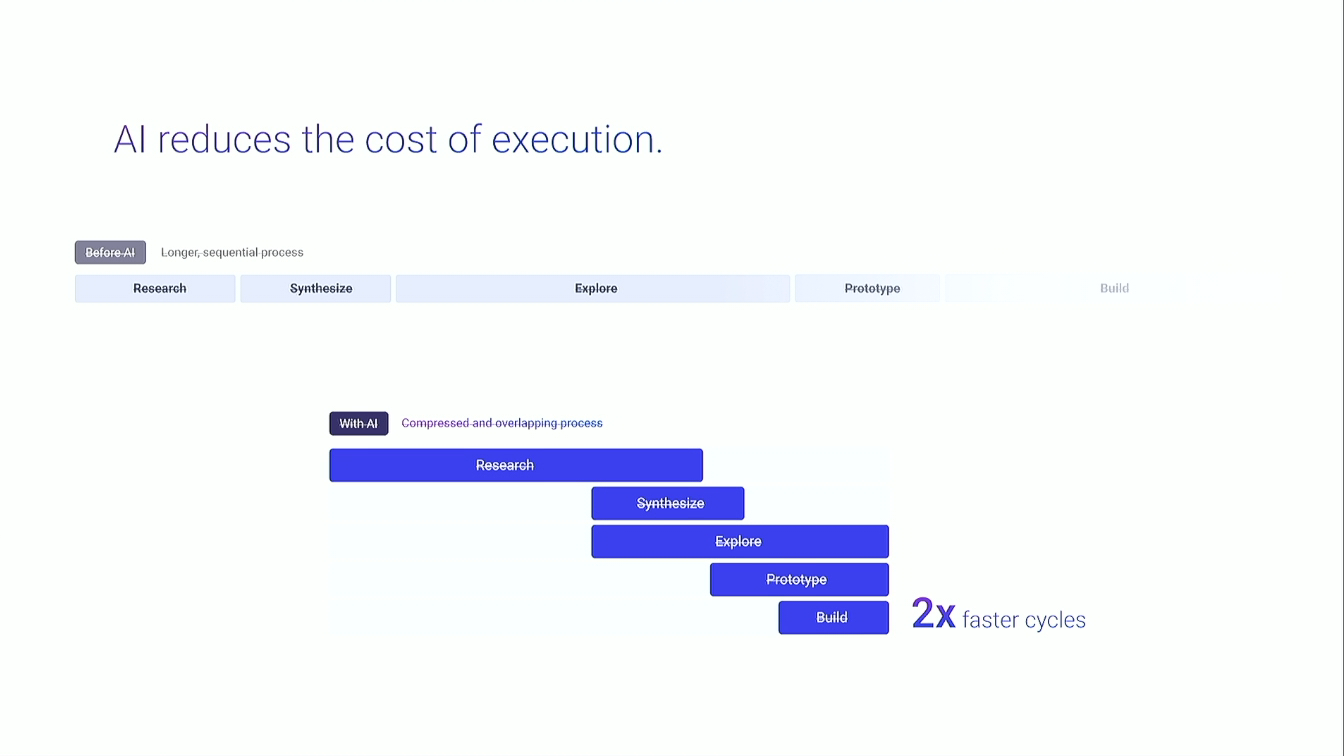
Thanks, Kev. So we'll move into the labyrinth. So this is where we talk about AI's disruptive impacts, if this thing works. It will do. You're gonna do a click. Oh, yeah. Cool. So AI can accelerate the start of the work. It can generate wireframes in minutes, and that's the opportunity.
Use the speed to explore more broadly, not not the thinking not skip the thinking. Sorry. And that's where your edge comes in. Your intent and your judgment and those quick outputs into design that actually makes sense to the user. And that's the point. AI reflects your strategy. It doesn't create it.
Okay. Apparently, I can't use technology. Where security does normally. Okay. Prompt fatigue. Does this sound familiar? There's this shiny idea that AI always saves time. But when the prompt isn't clear, you get volume, not value. We've all been there. The tool keeps you the the tool keeps on giving you variations that you don't need, and you start iterating endlessly without getting any closer to your intent.
And that's where prompt fatigue looks like. So quick show of hands. Most of us have been there. Who has spent more time refining an AI output instead of just sketching? Oh, really? Oh, I'm shocked. Okay. You give the tool a vague prompt. It spits out five or so versions, and you suddenly burn about forty five minutes trying to fix something you could have just sketched out quite easily. AI generated sorry.
AI generated wireframes are useful early on when when the point is to explore and broaden that thinking. They're great for conversation starters. Prompting about clarity adds rework. It wastes time. It doesn't save it. And speed isn't a strategy. It won't fix unclear thinking. It only amplifies it.
And that's good news because this proves you're doing exactly what AI can't, making those creative decisions. So is anyone familiar with these tools? UX pilot, visually, Motif. Anyone use any of those? No? Okay. So tools like the the ones I've just mentioned, they can generate screens in a matter of minutes.
They're quick. They're rapid. They can speed up the early stages of your work, but they don't understand your product, the constraints, the journey nuances, the brand voice, the business logic. AI can move quickly, but it can't tell you what fits your brand and what is right for your users. We set the course. AI just helps us move faster in the once we know what where we're going. So this is the shift.
Your role is evolving. So you're moving from creator to create strategists. You don't just accept AI output. You wanna interrogate it. You wanna refine it, and you want to direct it. AI can handle all the build all the building blocks. That's where AI is good at.
So from rapid wireframing to generic flows to pattern detection to template based solutions at speed, that's where it's good at. However, you're the one who brings the human touch to the whole experience, and this is where design leads. So you lead in how the journeys are shaped, trust queues, edge cases, and context that actually matters to your users.
So AI will give you speed, but you will give AI purpose. So this is the heart of it. AI can generate 50 versions of any screen, but it can't tell you where it'll help if a user for users to succeed or reduce anxiety at a high stakes moment. This is the part AI can't touch.
Synthesis, judgment, empathy, and understanding. These are the skills that turn data into insights and turns ideas into experiences. I AI can produce options, but you're the one who knows that what matters, what resonates, and what actually works hard and for real people. That's your skill, and that's irreplaceable.
So even big companies are jumping on board as well, but they're actively experimenting. Large firms large firms face serious constraints around data privacy, security, and team readiness. They're not rushing in blindly, though. They're tapping into private secure environments, and they're building that trust layer.
Firms such as PwC, CBA, Salesforce, they're all building private AI environments. What this means to you is companies want AI savvy designers who can navigate both the innovation as well as the constraints. On to Kevin.
Thanks, Thomas. Can I see a hand up in the room who was at Next last year? Yay. There you are. You all remember Josh? Josh Clark from Big Media? No? Okay. This section's a little bit of a homage to Josh and the work that him and his daughter's been doing. So I wanted to talk about this theme that Josh introduced last year called Sentient Design and basically talked about the fact that it represents the evolution towards an intelligent context aware interfaces that seemingly adapt to users' needs. It's delivering deeply personalized and proactive experiences, and this innovative approach creates systems that feel naturally responsive and almost intuitive in their understanding of the users' needs.
It's using and harnessing the power of AI. The sentient design makes technology feel more human and helpful. It's about anticipating what the users need and intuitively providing assistance before the designer, you know, realizes that they need it. So how does sentient design it how does it sort of it's sentient design isn't about machines becoming self aware.
It's about systems that observe, learn, and adapt in context. It marks a shift from predictable rule based design to responsive ecosystems where AI actively contributes to the decision making. Sentient design refers to the creation of intelligent user interfaces that are aware of context and user intent.
It's about allowing them to adapt and respond in real time to individuals' needs. And AI moves from being passive tool to a design collaborator reacting to real behavior in real time.
I guess it's a color picker. Right? Click copy to copy this hex code. You have a a slider between orange and pink. You click on the make real button, and because our canvas, which is very unusual and very much unlike something like Miro or or Figma or anything, our canvas is a normal website, we can put that iframe back onto the canvas, you know, and you can, you know, rotate it and resize it and move it around and draw on top of it.
It's just like a normal thing on the canvas, but it is a working interactive website. So
how does sentient design relate to traditional design thinking? So traditional system thinking focuses on efficiency, repeatability, and structure. It's great for scale and governance. Sentient Design introduces adaptivity, context sensitivity, and nonlinearity.
It's great for personalization and fluid experiences. Sentient design extends system thinking by adding a layer of responsiveness and intelligence on top of foundational patterns. So an analogy would be system thinking is the building's blueprint. Sentient is the smart tech inside that adjusts the lighting, temperature, and flow based on who walks in.
So let's look at how decision making has changed. So we're pretty much in a human driven situation at the moment where we're looking from, you know, the brief design test deploy mode, moving towards a more hybrid loop where you've got the brief, AI generates, you've got human validation, and then you've got system auto adjusts.
AI learns from that and then repeats to a more proactive design phase where decision making is continuous, not periodic, design becomes proactive, not reactive, and AI predicts and proposes before humans ask. So let's look at the core principles of sentient design.
So the first one is really like about radical adaptivity. So interface is now dynamically reconfiguring content, interaction modes, and even goals based on real time user intent and content. So for example, a navigation app might switch from driving directions to walking routes if it detects that a user has parked their car and is now mobile.
And then there's a thing called contextual awareness. Systems interpret environmental cues like location, time, device, user behavior patterns, and implicit intent to deliver relevant interactions. This goes beyond simple personalization to anticipate needs. And then we're talking about human application.
The design philosophy prioritizes enhancing human judgment and agency rather than replacing them. Systems act as a collaborative partner, offering suggestions or automate automating mundane tasks while leaving final decisions to the users. And then we're finally looking at modality fluidity. So experience transcend traditional screens, interacting speech, gesture, ambient signals, and cross device interactions. A sentient design system might shift seamlessly from a smartphone interface to a voice assistant in a car.
So how can sentient design work with design systems? So there's probably a number of ways of doing that. The first thing it does is we're looking at enhancing existing components. So for instance, the design system can incorporate AI to dynamically adjust content within components based on their user behavior and context.
For example, a product card could display different information or imagery depending on whether the user is browsing for GIFs or for themselves. And we're looking at adaptive layouts. AI can rearrange or resize components on a page to optimize the different screen sizes, user preferences, or even the user's current task.
And then we're looking also at personalized interactions. Design systems can use AI to personalize the way users interact with components. So for example, a button could change color or size based on how frequently a user clicks it. And then we're kind of also talking about, you know, creating new components. So AI tools.
The idea is that the design system can integrate AI tools that help designers create new components more efficiently. For example, an AI powered sketch to code tool, which you saw earlier, could transform hand drawn sketches into functional web elements. And we're also looking at things like emerging interfaces.
Design systems can incorporate AI to generate new interfaces or interactions on the fly based on the user's needs and context. This could involve creating a dashboard tailored to a a specific user's tasks. And then how can Sentient Design work with design systems? So, basically, I've got sort of two principles here.
Firstly, I'm just looking at a design system with memory. So we're large scale platforms. How? So design systems evolve based on what users respond to, automatically flagging low performing patterns and recommending alternatives. So an example could be Figma uses tokens.
So it's a token based system that suggests phasing out underused tokens or underused variants or underused components. Or we can go more in a conversational process. So the idea is that chat box, for example, or voice assistance.
And so AI adapts to tone, structure, and pacing based on real time emotional or behavioral signals. Example, an onboarding assistant that simplifies language for new users but increases complexity for returning ones. Okay. So just in basically summary, the idea is that the designers' role is evolving. It's moving from specific paths to on demand interfaces.
There's no more happy path. Our focus should be valuable experiences over efficiency, experience patterns, and intelligent canvases that interface, sorry, interfaces that adapt to the user's needs. And the practical implications are that AI as a creative material, it builds entirely new experiences, not just efficiency tools tools.
And we're moving from search to discovery, more curated discovery based experiences, design systems that matter. They enable consistent yet adaptive experiences. And therefore, the challenge for the designer is that they must embrace unpredicted I can't say that word. Unpredictability. Work with with the grain of AI.
They understand its strengths and weaknesses while creating systems that remain cohesive even with a open ended possibility. And just to finish up really quickly, here's two examples of that. That was Salesforce, and then this is from Josh.
Thank you.
Thanks, Kevin. Okay. Moving on to AI ethics. So AI optimizes for patterns, not for people. This is the uncomfortable truth. AI is brilliant at spotting patterns in data, but it doesn't care who gets left out. It defaults to the average, and the average user is often the most privileged. Biased data produces biased output, and AI amplifies that bias faster than any human ever could.
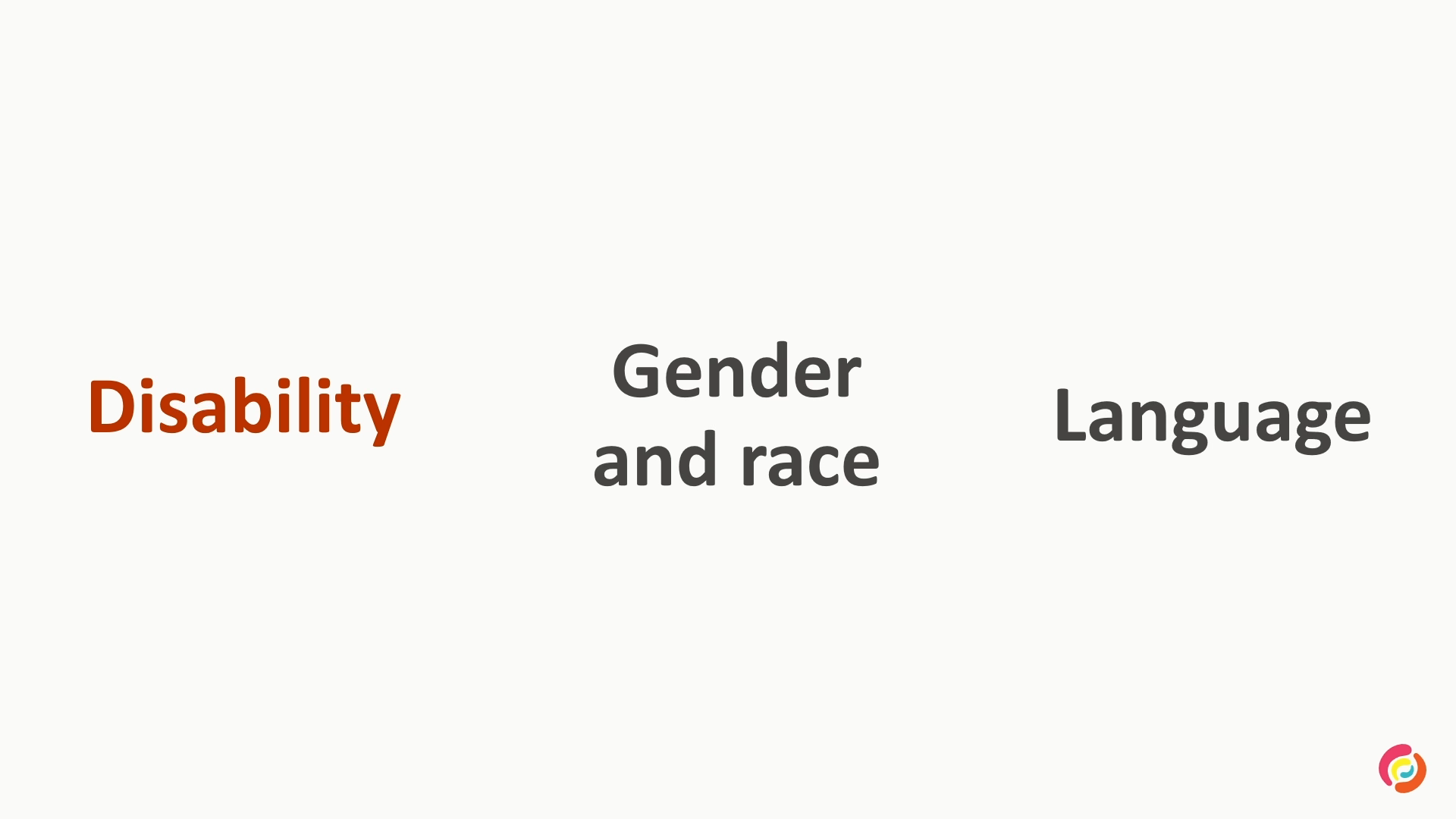
We're we're already we're already seeing the impact. Voice systems that struggle with certain accents, mine included. Facial recognition that is unreliable in darker skin. Design defaults to Western aesthetics, and hiring algorithms that screen out ethnic names. These aren't edge cases. These are natural consequences of AI optimizing for patterns instead of people.
This is where your responsibility comes in though. AI will always optimize for efficiency, for scale, for speed, never fairness. It won't push out sorry, it won't push back on harmful consequences or patterns. That's our job, to act as the human firewall between AI efficiency and user harm. AI inherits the biases on its training data.
So the bias you don't see, your users actually will feel. If stock photos skew towards white male, if language doesn't so if language detects historical prejudices, if design patterns come from one culture, AI repeats that, and this will get amplified at scale. You might not see it in the interface, but your users will feel it. When I when AI gets it wrong, it's not just a bug. It becomes someone's experience.
We've seen it happen before. Accessibility features that don't work. Financial tools that disadvantage certain postcodes, health apps that ignore cultural needs, and social platforms that amplify harmful content. AI speeds up delivery, which means issues can scale up very quickly. If they're not caught, one one clear prompt or unchecked decision can impact thousands of people.
So we do have an ethical responsibility, and here's a checklist for that. So before you ship any AI generated design, pause and ask. Who gets excluded? Who could cause this harm at scale? What assumptions are being baked into the devices, to the language, connectivity, to the culture? And would I stake my reputation on this publicly if it actually failed?
Now if you can't answer those questions confidently, that's your signal to slow down. Shipping is not the finishing line if harm is built into it. So there are red flags, and this is when you have to question your, question the AI output. Anytime an output ignores emotional context, oversimplifies critical decisions, excludes people with different abilities, or optimizes efficiency over trust, this is where you need to step in. If design will cause real harm when misunderstood, I AI doesn't know that, but you do, and that's the that's where the moment is to intervene.
So AI, as we know, doesn't have a consonance. It's an object it's it's an objective function. The opportunity for us is to build ethical framework that others follow, to be the people in the room who say, this is powerful. However, this is where it may cross the line. The risk is simple. Designers who ignore ethics get replaced by those who don't.
Every design decision is an ethical decision. So as we as before, AI will amplify whatever designer that you choose. If you focus on how does this work, is this efficient, will users understand this, then I AI will help you optimize for that. But if you add an extra layer, does this work for everyone? Who who needs it?
Is this humane? Do people feel welcome here? Then AI will amplify that intent instead. And AI will accelerate evil approach, but you need to choose wisely. And it in the iconic words of uncle Ben, with great power comes great responsibility. Ethics isn't a nice to have. It's a career advantage.
Companies are looking for people who can use AI without losing the human side, who can push for innovation as well as protecting them. The the edge your edge is the person who can have both conversations. The exciting one about, oh, what AI can do, but also the honest and brutal one where it must be constrained. Companies want designers who can use AI responsibly.
People who can hold both conversations, innovation and restraint, that's your career advantage. The future of ethical AI isn't just individual responsibility, though. It's about leading the demo, I can never say that word. Democratization of design tools responsibly. Oh, you're gonna see what that too much to smash this.
Thank you so much, Thomas. We're in the the final straights. So basically, I wanted to talk really quickly about the democratization process. So AI tools are lowering the barrier to entry. This creates space for more voices. The idea is that developers, researchers, PMs get to participate earlier in design. It's about the democratization of a wider collaboration.
It's not less craft. The goal is to include, not dilute. And everyone can prompt design as intent. So non designers can generate UI with AI. Design conversations start earlier across teams and our role in design is to guide intent and not guard access.
You're not losing control. You're expanding influence. So your role shifts from gatekeeper to guide. You help others to make solid design calls. You share design thinking openly and you shape values and process, not just outputs. Designers who guide AI become the go to people. AI is changing the way we collaborate.
It's moving from less rights and devs and PMs create flows and mocks to the opportunity of orchestrating content to align with design intent. Design inputs arrive earlier from more voices. It gives you the opportunity to set creative direction before others start prompting. And AI appears in workflows before designers see it.
So you ensure user centricity doesn't get lost in the speed. It's not about who starts first. It's about how you guide the process. It's the democratization that needs direction. So AI floods systems with variations. It's easy to lose consistency. So you need to set clear guardrails so exploration stays usable and on brand. And your role is to keep creativity productive, not scattered.
AI practical steps are, you know, in terms of preparation tactics, it's define the roles, not replace them. So why it matters? Because you define human versus AI responsibilities. You create strategic prompts which then align AI outputs with user goals and you protect thinking time. So you preserve time for research and strategy and then you encourage feedback on AI output.
Therefore, you make AI the rejection and iteration judgment free zone. Finally, Thomas.
Thank you. I'm taking Dan home straight. I'm looking at John. He's putting a clip. Are we good? Okay. Cool. Still taking Dan home straight though. Thanks, Kev. Let's talk about how to prompt in a design led way. So as we know, AI can do a lot. But what you ask and how you check it matters.
You can't expect quality just by throwing a bunch of words into a prompt. If it's unclear about your user goals, about the flow logic, you'll just get generated a generic output, but a lot faster. If you're gonna use AI, you should be treat prompting as part of the design process. Treat it at the same the same level and thought and disciplines you'd give to any design brief.
What use what user problem are solving? What emotions should be should it create or remove? How does it work for diverse abilities or cultures? What happens if it fails? Design thinking first, AI execution second. AI will only execute the vision you give it. It doesn't create one.
Clear prompts come from clarity about the user, the task, and the context. Without that, the tool will just fill space or make shit up. Vague prompts can drift if you're not intentional from the from the start. You just burn time instead of saving it. As we all know, garbage in, garbage garbage out, but at speed.
So, your human human edge in an AI world. So, this is looking at different types of prompts. So, here's two examples that show the gap between a vague prompt and a more meaningful one meaningful one. For this first example of of use UX pilot, the tool can generate both desktop and mobile, screens.
With a loose prompt, AI produces something generic. It looks like something like a real screen, something you could use, but isn't grounded in user intent. Add context, constraint, clear goals, and the output becomes more relevant. But even then, the they aren't final designs. They're conversation starters and should always be treated as such.
This is a way to explore, not to decide. And the point is simple. AI speeds up the doing. You're still doing the thinking. And the prompt for this was to create a user flow for checkout flow. And then the second part was to build in some more detail around it. So an anxious first time buyer who needs resources at every step with clear exit paths.
So from the two examples, the second one has a bit more detail around it, but again, it's a starting point for a conversation. This is another platform. It's used visually. So with this platform, it's mobile screen only. As you can see, the added context makes the output a bit more relevant, but it's still the starting point, not the decision.
So here we go. The tools are in everyone's hands. However, the vision is still in yours. So your next move. This is where it becomes a bit more real. You don't need a huge AI department or program. You just need one intentional step. So try for one week not to automate everything.
Use a choose a u a choose a a an AI tool. God, I've been saying this so many times. Choose an AI tool, but not to generate everything, automate everything, but to use it where it generally helps. So reframe your next prompt. Lead with user intent, not tasks. That shift changes everything. Talk to your team about where AI fits into your process and where it helps keep work focused.
Automate one repetitive task to free up your headspace so you can still do the thinking. Start small, think strategic, and keep design at the center. So your edge isn't going anywhere. In fact, it's becoming more valuable. And again, we're ending on David Bowie. So this was the last picture taken of David Bowie before he passed, but I love what he said.
I don't know where I'm gonna go from here, but I can promise you, it won't be boring. Thank you.
Concepts & Methods
- atomic design
- design systems
- sentient design
- radical adaptivity
- contextual awareness
- human amplification
- multimodal fluidity
- algorithmic bias
- design-led prompting
Organisations & Products
- Figma Make
- Framer
- UX Pilot