From Product Vision to Production Code: How AI Tools Enable Non-Engineers to Build Real Software
An Integrated AI Editing Workspace
William Kirkwood introduces Luck, a workspace that connects files and applications so AI can edit with native context. The product emphasises visible changes, model choice and an integrated experience.
Prompting from First Principles
Instead of merely telling an LLM what to do, Kirkwood asks what additional information maximises the probability of the desired result. He recommends spending most effort on context, requirements, architecture and edge cases.
Operating Principles for AI-Assisted Building
Voice input, separate implementation and review models, MCP servers, open-source search and repeated simplification make the workflow faster and more reliable. Multiple branches can run in parallel when their scope is clear.
Architecture Before Production
Kirkwood argues that architecture matters more than early code quality. Non-engineers should prototype end to end, validate the interface, then rebuild inside a clean production codebase rather than polishing the first attempt.
Lessons for Non-Engineer Founders
The closing advice is to solve a problem people will pay for, accept that code will be rewritten and become technically credible enough to collaborate with engineers and investors. The takeaways consolidate planning, voice, tools and rebuilding.
Hello, everyone. I'm William. Is anyone here actually starting a start up or planning to? Okay. Okay. Good. So I'm the founder of Luck AI and I'm I'll kinda start with the context at the start of what we're doing and who I am. I'm building Cursor for knowledge work. For anyone who spent time inside a Cursor terminal it will look fairly familiar and I'll kind of go and get to that later.
But first of all to kick off with my intro, who am I? I'm a product manager and for the last five years I've kind of worked across every stage of startup from like very tiny pre seed startups, seed startups to series a, series c mega corps. And I'm fairly seasoned.
Like I've raised money before and so that's kind of the background context. Now I've done a few computer science classes during my university studies and I wasn't very good And if you get me to look at a page of code now I can kind of tell what's going on. But when I started going on this journey about a year ago, I wouldn't have been able to like tell you what any of the syntax meant.
Basically, I have no idea about engineering in any way. Fast forward to today, in March, I went full time, quit my job at News Corp and started building luck by myself and I've been backed by Startmate. I went through Startmate as part of the last cohort. For anyone that doesn't know, Startmate is the best startup accelerator in Australia. There's like a thousand companies apply and about 10 get in.
And so I've just gone through StartMate and had a three month sprint of basically spending fifteen hours a day looking at cursor and coding. And so now I'll kind of go through some of the learnings, some of the things that I've discovered on this journey. So this is what I'm actually building to give you the context so that everything I say will make sense.
It's a b to b SaaS AI workspace and it basically integrates with all of your tools, pulls it into an editor where you can then work with an agent that understands all of your work and shows you accept and reject highlights. And so the value proposition really is bringing the intelligence that engineers are using in their work to generalist knowledge workers.
And so you can imagine actually like building this out starting from scratch with pretty much no engineering experience has been quite a challenge and so there's kind of a lot of kind of core principles for me to go through. I've kind of just gone through and touched on the value proposition but this is kind of what it's all about.
And so my stack going through this whole process has really just been based on two things. Figma as well. Figma is really great and Figma Make is amazing, but really I've focused on Cursor and Whisperflow and the reason for that is because I haven't had the experience to be able to kind of read every line of code, perfectly understand exactly how it works together, Cursor actually gives you far more control and with the more agentic tools like Claude Code, you actually it's more important that you understand what it's doing because it can go off and just do crazy things and with Cursor I can really granularly manage the process which I'll kind of step through.
But on WhisperFlow, for anyone that doesn't know, WhisperFlow is an app that basically does speech to text. So every time on my keyboard I hit the f n key, there's a little thing that pops up at the bottom of my screen and I just talk to it and then it transcribes pretty much perfectly everything that I've said.
And so I don't type at all anymore. I just speak and I've basically found that this maximizes your productivity so much because you can get ideas out of your head so quickly and all of the LLMs are so good at understanding what you're talking about so that if you just brain dump a stream of consciousness for like ten minutes, it will understand like really well exactly what you want it to do and this saves you so much cognitive load especially when you're sitting there all day.
And when I have when I'm forced to type, like when, you know, there's something going on around me and I can't speak, it really actually makes the work much more difficult. So WhisperFlow is like a key part of my kind of whole process. And then before I kind of go through my workflow, something I wanna just highlight is that if you understand, like, at a even at a fairly light level, what is actually going on inside an LLM, that is what positions you to have the most effective workflow and to be able to use them most effectively.
And I would very strongly suggest these two articles. It takes about like, I don't know, maybe two to five hours to read through them properly. If you kind of go through slowly and you really understand it as you go, you're not gonna understand all of it. Like, we're not researchers. We don't really need to know that. But reading these two allows you to understand what's actually going on inside the LLM. And every time you write in a prompt, this fundamentally changes the way that you're thinking about the response that it's gonna give you and it fundamentally changes the way that you actually build your workflow and then interact with with LLMs.
And so I very strongly recommend these two. If you're gonna just do one of them, the what is ChatGPT doing and why does it work is very good. And it goes into a lot of the maths. You don't need to really understand that. But the kind of key takeaway from all of this is that LLMs are probabilistic. And so they don't actually understand anything.
They are simply just creating a prediction of which tokens should be following the tokens that you've given it. And maybe that's a little abstract before you read the articles, but kind of the key point is that the LLMs are probabilistic. And so in order to get the right response, and the reason that I recommend reading these and really understanding at a fundamental level what is going on inside the LLM, is that it really changes your mindset from an approach of I need to, you know, tell it what I want it to do and I'm gonna tell it to do this for me and then I'm gonna send it off to do that. And then it it really changes your mindset where you start thinking, given the context it has, what do I need to give it in order to maximize the probability of generating the outcome that I want?
And that really, like, gets you to think about it in a different way, which makes you far more effective. And so I think where I've like seen people get stuck, other engineers or people I've worked with is they don't really understand how it works and so they'll ask it to do something not understanding like how the context windows work or, you know, how you can basically set it up correctly.
And on this point, I think that prompting is like actually not that important. The context engineering is is actually what's most important, especially when you're coding. Feeding it the right files is very important. And so I'll kind of go through my workflow and kind of go through kind of how I've how I've like ended up here.
So I mean, basically, I've spent I don't even know. Like, hours a day, like, seven days a week for, six months working on this. And so over that time, I've kind of just intuitively built this workflow. And basically, where I start is that whenever I'm writing any code, pretty much 98% of the time is just planning.
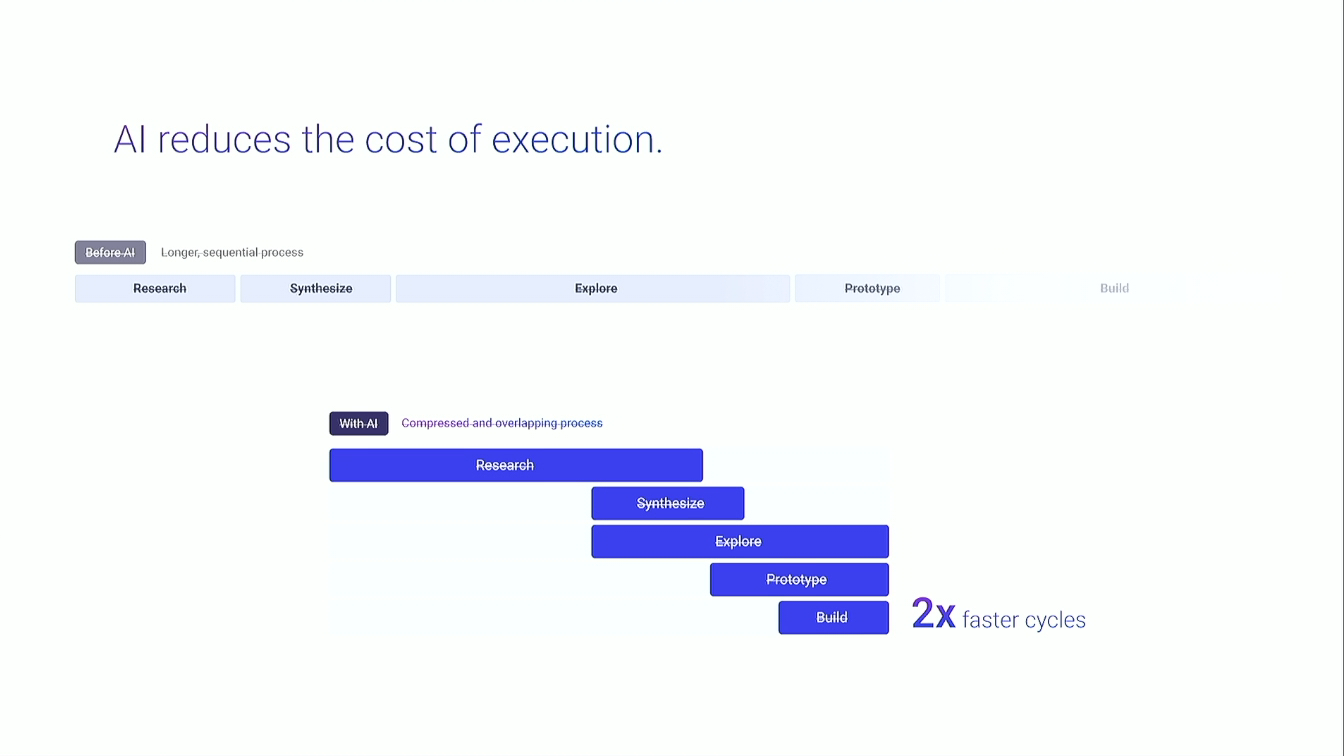
And so in in a world where the code generation is basically free and instant, if you spend all of your time planning and you give the LLM the perfect context, it will then execute exactly what you want perfectly the first time. And what I found is that when you're coding, if you're focusing on like trying to do any kind of big piece of work, you're giving it prompts and then it's getting stuck and then you have to debug and you end up going down these rabbit holes.
And so instead what I will do is I will spend so much time getting the LLM to understand the current state of the code base so that it understands like exactly what like the, you know, the current situation is. I will have an extremely detailed spec of precisely what changes it needs to make and then I will give it very precise instructions about how to implement that spec and then I basically have a review system where I then have another LLM that reviews all of the implementation work to make sure that it's adhering to our like coding guidelines. So I'll kind of step through what this looks like in practice. And so this this takes quite a lot of time and I actually find though that you end up using a lot less tokens or usage of whatever you're using when you do this because you're able to basically make sure that you don't really need to go on these like debugging rabbit holes.
But essentially what I'll do is I'll say, read through, you know, our code base and I want you to understand precisely how this thing works. And so whatever the change I'm making, I wanna go and understand exactly how the current code base works. And then I wanna ask the LLM to to actually create some, like MD files that show me like exactly how it works.
And so I'm then able to and what I'll do, I'll create a new tab in cursor, fresh context window, and I'll paste in the response. And so then I'll say to the other LLM, like, another LLM said this, is it true? And if you kind of do that, it it it basically like wipes out the blind spots and then you end up with an MD file that is basically a perfect reconciliation of the current truth in your code base.
And you can then say to a fresh LLM, again, read this file and confirm this is correct and this is exactly how it works. And so when you do this, when you think probabilistically, you're increasing the probability that the LLM is going to perfectly understand exactly how the code base works right now. And once you have that, you're then able to go and talk it through and do a full spec.
And so I now have an MD file that perfectly documents exactly how this feature works and all of the other relevant information in the code base regarding this feature. I can just talk to Whisper Flow and I literally will sit there and have a twenty minute monologue about the feature that I wanna build, describe in perfect detail multiple times exactly what I want it to do. And then I can basically just work back and forward with the agent, just giving it these long monologues.
And it usually comes back with questions because I'll say, you know, if there's anything that's unclear, you need to ask me questions. What information do you need from me for us to do this perfectly? And after you just kinda go through that process, maybe this will take half an hour or an hour for like any kind of like significant work.
And once you kind of go through that process, I then ask it to create a markdown file with the full spec, exactly what we're gonna do. And I'll go and then with that markdown file, now that everything is specked out, I'll review it. And so I'll go to a new LLM, give it that markdown file, and then get it to analyze, will this actually work?
So these are the things I will kind of typically say and I don't have any kind of preset prompts that I copy and paste because it's quicker to just speak to it every time. But I'll basically just say please carefully and critically analyze this. Will this work? Does it conform to our engineering guidelines? And is this prod quality basically?
And then once that LLM has done a review, it will identify a couple of things that are wrong in the spec. You can fix them and then you can basically just like restart this process. And so when you think about like what we're actually doing, the LLM is probabilistic. It doesn't understand anything. If you give it the correct context and the correct prompt, it will then go away and probabilistically after running this process a few times, you iron out any of the issues with its approach and you basically iron out anything that will potentially like fail.
And so at this point, after doing that a few times, none of and I use different models for all of this as well because all of them have slightly different personalities and they pick up on different things. And so once I've done all of this, I now have my spec that tells me exactly how the code base works. Then I have a spec of the precise changes we're gonna make, and then I'm able to actually just implement them.
And so this is what I'll do. I'll say, read this and implement it flawlessly and perfectly. Don't stray from the spec. And then I'll have a review LLM that basically I just paste the output and I tell it go and read these files that we've edited, read the spec, read the code base and then tell me was this implemented perfectly.
And so then at pretty much every chain of like the process of making changes in the code base, you're working with the LLM and like making sure that everything you're doing is probabilistic and you're reducing the risk that anything has gone wrong in this process. And I'm still reading through the spec and understanding what we're gonna do and understanding the approach we're taking and that we're not doing any crazy abstractions or anything like that.
But I have no idea about any of the syntax. I understand everything in a kind of high level. I have no idea what the exact code needs to be, but I understand the approach we're taking, the logic that we have, and the way we're approaching any particular problem. And so that's kind of my workflow end to end.
And I think like a really useful, like, kind of place to take this now is just going through some of the operating principles, which everything I'm saying is kind of backed by the the understanding of exactly like how the LLM works. And so whenever I'm specking anything or basically whenever I'm doing any work at all and I'm asking the LLM to help me, I will just be saying what would an engineer at Cursor or Linear do? And when you give it that prompt, it's basically unlocking the latent space inside that model of like what top tier engineers will do and how they will approach these problems.
And I found this is like extremely effective. You can pick, you know, x company, whatever company is like really relevant to you. And so all of the time, like, I'm thinking what would a top engineer at these companies do? And this is like a very effective way of thinking.
This is not even so much a prompt, it's just kind of like a background thing that's like constantly running in Cursor. The other thing is I use MCP servers and I don't think that you'd really need to use that many but these two are particularly effective. So the Context seven MCP server gives you updated documentation from like anywhere. And so whenever I'm doing anything that relies on an external service, I'll be saying read the Context seven MCP server and tell me exactly what the most up to date documentation is.
And this saves you so much time from like going and trying to find documentation yourself and then copy paste it in or telling it to search the web and then who knows what it's gonna find. Context seven just gives it the most up to date documentation for anything that it's doing and this is a huge time saver.
The other thing is Superbase. So that's the database that I'm using and basically the Superbase MCP server allows your LLM to just read your schema and that saves so much time because if you do it in any other way it gets messy, you're constantly having to copy and paste in the schema. When it can read and understand your database it's able to debug more effectively and it's able to basically understand like the exact structure of how it needs to scope features as well.
One of the other things I found is that I wasted so much time building things when there was some open source code that I could have used. And so whenever I'm scoping or specking anything, I'm always asking, is there existing open source code that we can use to make this easier? This applies to so many different things, but this is pretty much like a question I will ask every single time because usually there's a way easier way of doing it that doesn't require you to spend a few hours generating code and you have a massive head start doing this and the models won't automatically they won't automatically tell you. Sometimes like I've spent like a week trying to do something that was really complicated and then figured out that actually I could have used open source packages and it would have been far more simple. And so unless you really explicitly give it that guideline, it's not really gonna help you think through that.
One of the other things is that pretty much all always I'm just asking what is the cleanest simplest way of doing this? And the LLMs are great at like creating crazy abstractions and making things really complicated and I always just ground it in, can we do this in the simplest easiest way with the cleanest code?
And I think if anything's really difficult, I've found that that's when you should be skeptical that you're taking the right approach because usually there's an open source package or usually your like your architecture or your approach is not correct for what you're doing and pretty much I've found that every single thing can be broken down into just like a very simple a very simple approach.
And so I would basically strongly recommend that if you're doing coding, you're using LLMs, you're just constantly thinking in the back of your mind how can I make sure this is gonna be really simple and like really clean? The other thing I'll do is I'll have parallel workflows and I think that this is extremely effective if you can handle the context switching. And so basically what I'll do is I'll have three cursor like terminals open at once and I'll just bounce between them.
So whenever you're kind of doing anything substantial in the code base, It takes a long time for the agents to like fully work through the response sometimes and so what I found was very effective is basically having three separate branches on GitHub and then just working in each branch on separate features and then basically every time one of them is loading I'll go and input into the other one and basically just bounce between the three and so this obviously is kind of ADHD maxing and it's probably not sustainable.
I think if you're if you're an actual engineer and you really wanna read the code, it would probably drive you insane, but at the layer of abstraction that I'm working at most of the time, it's okay. And so I think you can probably do this for the first like three hours of the day pretty effectively. After that, I usually drop to two, but I found that this is a way of just like supercharging your velocity because especially if you're really locked in and you're in the flow, what takes you out of the flow when you're like in one window is it starts loading and then it takes two minutes and then it's like, oh, I'm gonna just go and have a look on Twitter.
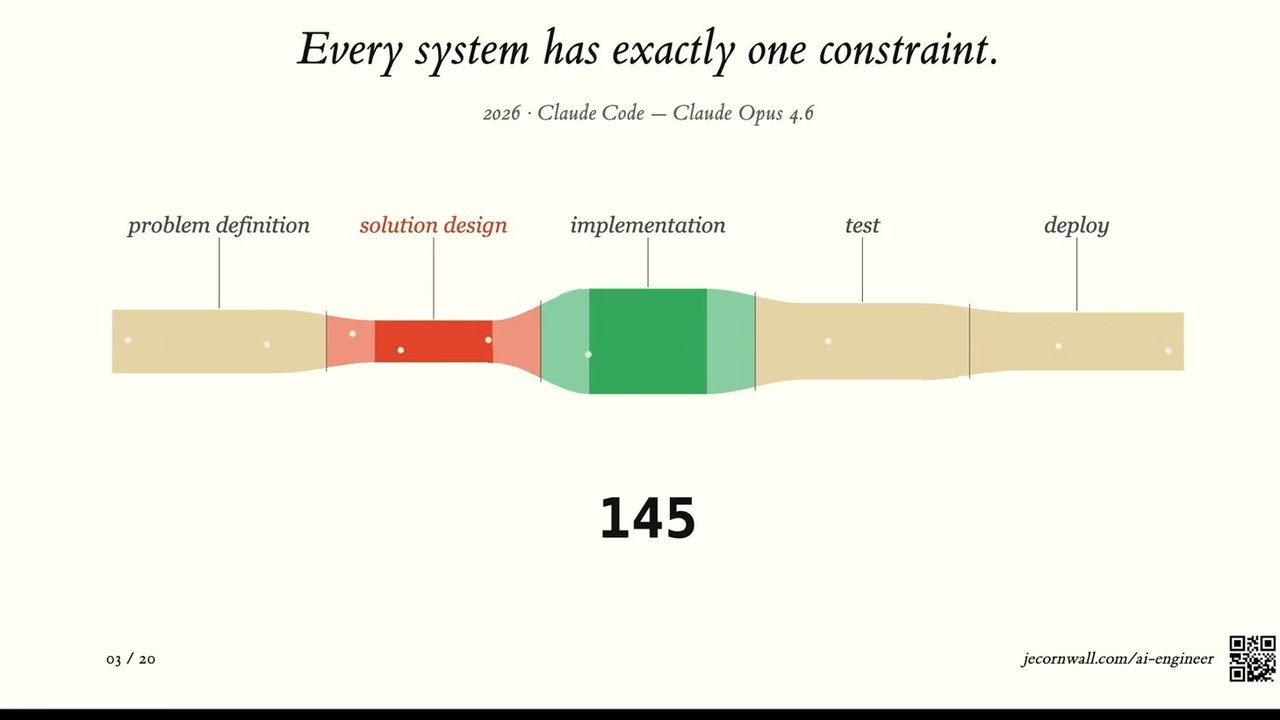
And then suddenly there's like, you know, fifteen minutes have gone and you've just been on Twitter the whole time and then you're like, oh, I need to go back to this. And so it's actually like counter intuitively doing more actually is easier. So some of the hard fought lessons that I've had are that the architecture is really the only thing that matters.
And I had a kind of painful experience that I'll kind of go into of running into architecture issues because I hadn't thought it through at the start. And basically my state management layer was totally messed up and it caused a bunch of like infinite loops and then I ended up having to just scrap the code base and just start a new code base and start porting code across.
And so in a world where the code generation is now free and in a world where the models are getting better and better, so like NVIDIA has trained NVIDIA has released all of their Blackwell GPUs. All of the LLMs that have been trained on these are gonna go live probably halfway through next year.
And at that point, like based on all of the math, it it looks like the the new models are gonna be two times better than the current ones, right, on whatever metrics they use. And so over time, the code generation and the quality of the code generation is basically free now. And that means that really carefully thinking through exactly how you're gonna do things and architecting it properly is now the most important thing.
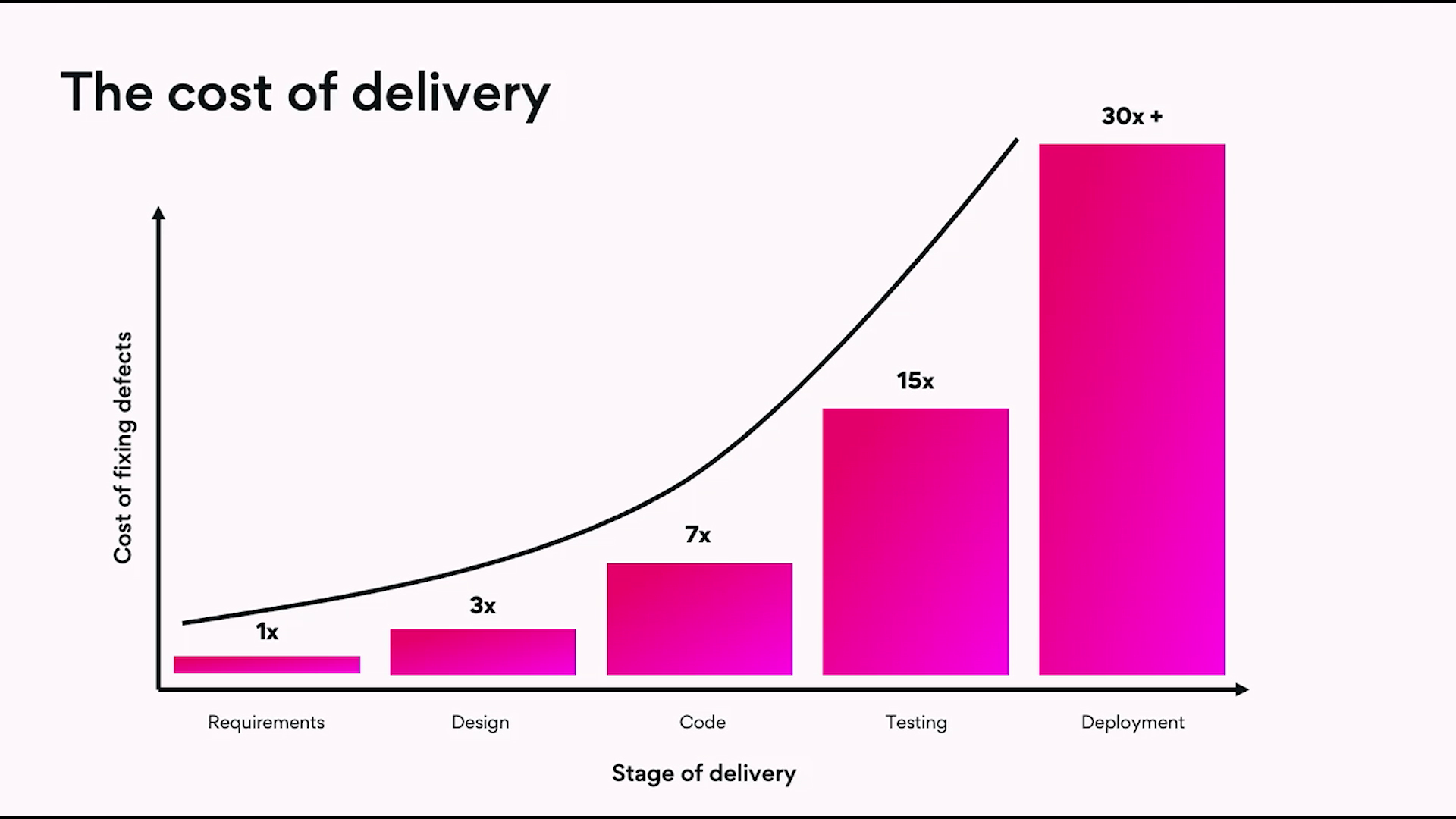
And it's very easy to just scrap code and start again, but it gets very difficult to do that once you're locked into the architecture and so the architecture is really a one way door. Any code you write outside of that is a two way door and if I had spent more time at the start architecting exactly how I was gonna do everything, I would have ended up saving myself like weeks of development time.
And so then the the major, like, mistake that I made was building the front end first and getting it perfect. So I had all of the state management, all the interactions, every tiny little thing like custom scroll bars, you know, all of the little tool tip logic, the CSS positioning logic, I really optimize for having a perfect front end and building it on a mock API with the assumption that, well, it's all on a mock API, so this makes it much easier for me to build my back end and I can get the schema from the front end when I build the back end.
This made sense to me at the time. Knowing what I know now, this was a massive mistake. I think having a really great front end is necessary and that's what got me into Startmate because I didn't have a real product. I had an amazing demo and I think that's very useful for getting the buy in from investors or employees or any other person when they can actually see it, it's real.
Whether it is actually real in the back end or not is like another question. But as far as they're concerned, like, it's real. And so what I would do if I could kind of start from scratch, and this is what I would recommend is build something end to end that fully works and just have the shittest code base that is like totally broken, no proper design system, like just hard coded things everywhere, a back end that like makes no sense, everything the security sucks. But just get it working so that you can like log in and go through your golden path user flow all in one go. And even if it's so broken and the security is messed up and like none of it is like prod quality, it doesn't matter because you've then gone through like the full cycle and you will have learnt so much And my mistake was building the front end and then thinking, now I can build the back end.
And it's so much more complicated than I had anticipated. And I ended up shipping like far later than I thought I was going to when I had like hard deadlines from StartMate. And so I think taking the the approach that like the code generation's free, I can basically just churn through code bases. I'm gonna build something really shitty and just get it all working.
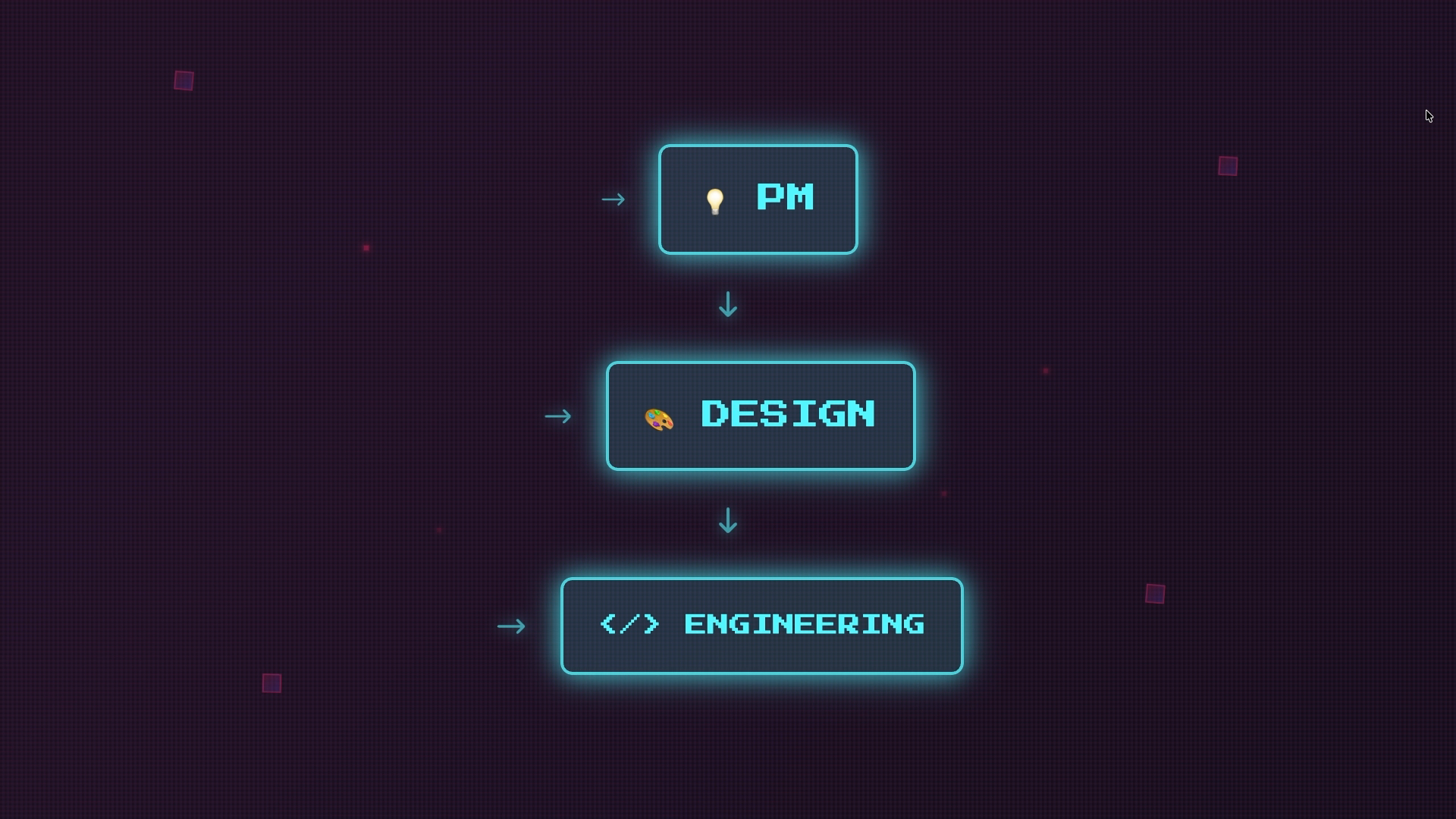
And then at the same time in parallel to that, I would actually use Figma make and get a perfect front end. And basically Figma make is incredible. I'm not sure that many people have figured this out. If you go on to Figma Make, you can actually copy the components into a Figma file. And so Figma have basically perfected the, like, you know, static design to code generation and then the code back to static design.
Like they map it almost perfectly every time. And so you can basically build out an amazing design system in Figma and then use FigmaMake or you can build everything in FigmaMake and then use that to create a design system. But I would create what I did. I would create an amazing demo using like mock APIs and state management that's all messed up and like that doesn't really matter, but if you create an amazing UI in Figma Make, and I'm not a designer, so all of everything I did was designed in code.
If you design with Figma Make and then you export it to static Figma components, then you can have your beautiful demo that's all messed up. You can have all the experiences you have from building end to end and it's all messed up. You can scrap all of it and just rebuild in a clean code base and do it properly.
And so I would kind of think of working in sprints and like kind of doing it like that rather than doing some kind of long waterfall where you're like getting a perfect front end and then a perfect back end. I think it would have been way more effective if I if I did it like this. And then like these are some of the things I've kind of found as I've gone on this this journey that unless you're an engineer, like it it doesn't really matter and particularly when you're a product person, like the code is gonna be rewritten anyway and the founder code gets scrapped pretty much straight away in every startup even when there are good engineers working on it.
And really it's about learning how to understand what's going on in the code base because if you're a nontechnical person and you're founding a company, in order to have the credibility with engineers, you need to be able to understand all of concepts and actually understand what's going on. And you need to just be technical enough so that the VCs and the engineers will kind of buy in.
They can see the vision and they take a bet on you. And solving a problem that people will pay for is like by far and away like the most important thing to optimize for which is try product management stuff. Anyway, the key takeaways are you should be using voice for basically every single thing and not typing anything.
I would very strongly encourage you to read those articles and understand in a granular way what is going on every time I type into a chatbot and hit enter, like what is actually happening in the background. There's a Pareto distribution between planning and implementation and you should basically plan a lot more and then try and just one shot complex features which you can do.
MCP servers help a lot. And then just generally thinking through what would an engineer at cursor or linear do? Can we make this simpler? And then building end to end and just throwing it away a few times is gonna give you a way better result than optimizing for like a perfect front end and then trying to go from there. You should really just think code generation is free, so basically take advantage of that and just build like five, six code bases and just scrap them and start a fresh clean one every time.
And the architecture is really the only thing that matters. Thank you. If you wanna learn more you can go to getluck.ai.
Standards & Specs
- MCP servers
Concepts & Methods
- first-principles prompting
- dual LLM review
- parallel workflows
- software architecture
Organisations & Products
- Luck
- Cursor
- Wispr Flow
- Context7
- Supabase
- Figma