How Engineers Can Enable Designers To Ship Production Code Safely
From Defined Designer to Shape-Shifter
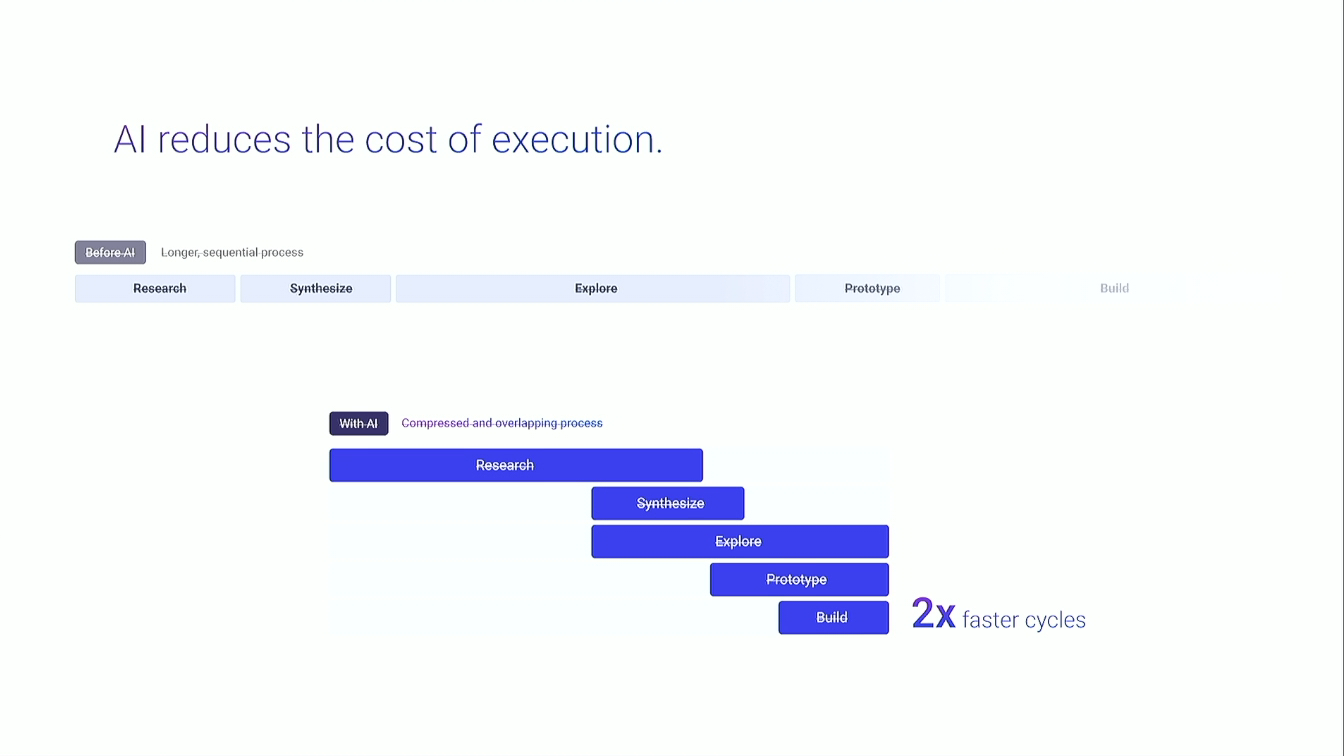
Freya Stockman contrasts a fixed bank-design role with fluid work at Relevance AI. AI and a supportive team expand the Double Diamond into scoping and code, allowing designers to fill gaps across product and engineering.
A New Coding Frontier
Early success with Cursor and merged pull requests gives a non-engineer confidence to contribute production code. The experiment then becomes a higher-stakes vibe-coding squad led with engineering support.
Seven Days, Two Codebases
A San Francisco billboard creates a one-week deadline for a responsive onboarding flow spanning Vue and React applications. Query parameters fail during OAuth, and the team fixes the journey by preserving campaign context through the callback.
Two Onboarding Iterations
Recorded demonstrations show a billboard-specific prefilled chat experience and a general signup carousel. The implementation is tested across desktop and mobile while feedback is captured directly from colleagues.
Team Work Showcase
Other Relevance AI designers demonstrate shipped work including a 404 page, pricing, and agent escalation changes. GitHub reviews and feedback show designers contributing code within an engineering safety net.
A Coding Playbook for Designers
The playbook covers Git essentials, documenting current systems, making phased implementation plans, pairing with engineers and testing feasibility before coding. The recommended effort split is seventy percent planning, twenty percent execution and ten percent pairing.
Draft and Small Pull Requests
Draft pull requests surface questions early, while small changes reduce reviewer effort and prevent large cleanups. Review-cycle counts provide a practical signal for whether designers are learning or engineers are rewriting the work.
Hi, guys. My name is Freya, and I'm a product designer at Relevance AI. And
my talk is all about not being an engineer, but being able to ship production quality code. And so I wanna show the designers and maybe engineers in the room or maybe founders or managers how engineers can enable vibe coders in your company to ship code safely because that's what we're doing at Relevance AI. So eight months ago, I was just a standard product designer at a bank.
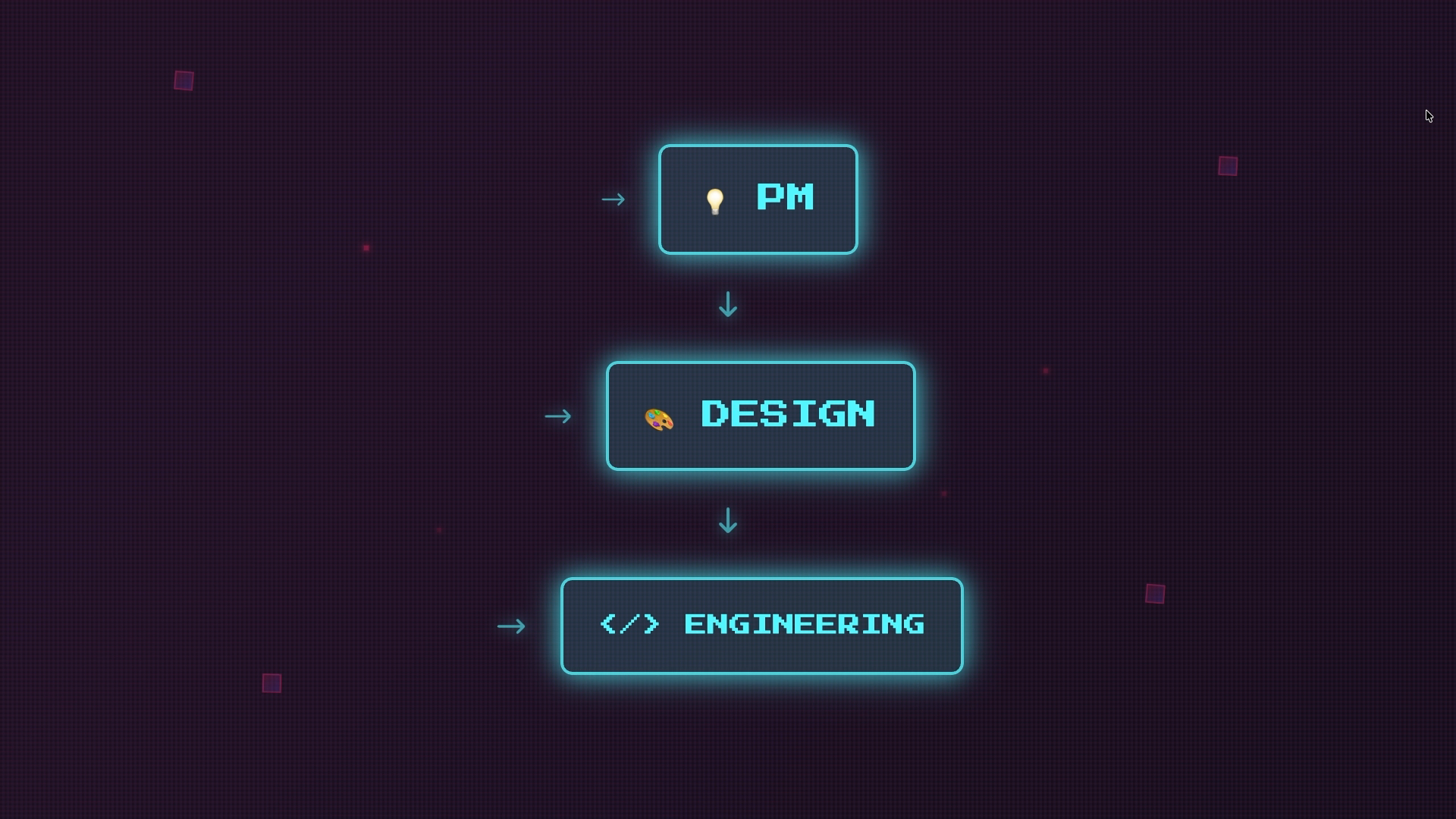
So I had a very defined role. And I say standard with tongue in cheek because, obviously, a product designer is wears so many hats already. But yeah. My role was very defined. I was a designer, and it was a classic waterfall situation. A PM would throw the requirements over the wall.
I would then design, and then I would throw the designs over the wall to the engineering team. So I was working within a very classic double diamond framework, taking a problem that the PM took gave me and going through discovery and then defining what the solution should look like.
But then I started working at Relevance AI seven months ago, and everything has completely changed. So now I see myself more as a fluid shape shifting collaborator. There's been multiple projects now where I'm a little bit of a PM or I'm a little bit more of an engineer. Right now, I'm working on a project where I'm just doing design and working in a classic triad because that's what's actually enabling us to work really fast.
But, yeah, the the guys at Eucalyptus really highlighted this well with their talk showing that being able to be more flexible allows you to fill in the gaps when needed, so you can better collaborate with everyone. So in my first three months at Relevance AI, they threw me in the deep end.
I was leading my own team as a product manager with zero product management experience as well as delivering designs for three engineers. And I did this all with the help of AI. But the focus of my talk will be on what the last three to four months has been like for me. So over the last few months, I've been designing and owning the implementation using Cursor. And for me, my experience, while definitely, being a bit stressful at times, it's definitely expanded what I can do.
And I feel like the double diamond is expanding. Now I can dabble more in scoping and also code, not just the classic double diamond. So how did I get here? Let's go back in time. Chapter one, a new frontier. I had a of lot fun with these slides, if you can tell. So this photo was taken over the over my shoulder by one of the founders, Dan Palmer.
And it was thirty minutes after a few of the a few of the managers had set us up on cursor, Vercel, and GitHub. Us designers, we were pretty excited and trigger happy, so we got stuck into vibe coding. And I was so blown away with what I was able to achieve using the existing code base.
It it really, like, showed me that the future is here. So these are exam like, some photos from GitHub of PRs that I've delivered. Some of them were canceled. A lot of them merged. So they actually hit the code base. They're they actually are in the hands of our customers. So my initial success boosted my confidence and was a fun experience, but that then led me to chapter two, sink or swim.
So my engineering manager, Inga, she had a brilliant idea to create a vibe coding squad made up of me and another girl or a girl, Caitlin, at work to essentially try and activate users in our chat app that we just launched. So our focus was growth, activation, retention.
And we wanted to work on initiatives that would drive all of these metrics. So straight away, I was thrown in the deep end once again. The stakes, a billboard going live in San Francisco and I have seven days to launch including the weekend. The task, design and vibe code a mobile and desktop optimized onboarding flow. And then there's me, a product designer with zero engineering background.
This is probably my favorite meme because it perfectly encapsulates what it's been like to be a designer. I rather than say hi. So I actually got pretty far with my designs and but I ran into a problem which was I was designing and and vibe coding across two code bases.
So our original platform is built on Vue and our chat app is built on React so that it's mobile friendly. So I had to factor this in with my work and make the two code bases connect and pass data between the two. I had to take a campaign URL parameter from the landing page that people landed on after they saw the billboard and make that survive multiple environments. I had take it through an authentication flow in our Vue app. I then had to they had to go through onboarding still within our Vue app.
And then they had to get into our React app and and then that URL parameter would enable us to pre fill a message in our chat app to help them get started with using slides builder, a new feature that we were trying to promote. I also had to design a modal with custom animations and graphics to promote this feature.
And I also had to put in the right analytics and make sure that it was feature flagged. So I really owned everything that an engineer would own. But the problem was that the query parameters, so the URL parameter that I needed to survive through that long journey, kept failing and falling off and we couldn't trigger that end outcome which was that prefilled message.
So we did find a solution. With enough testing, we were able to debug and make it work. We did this by letting the auth callback carry params back, which is quite a technical thing. But essentially, we got it working. So it was a very happy ending.
And I was able to deliver this work actually within three days and have two days for testing and debugging, which is when we ran into this particular issue. Okay. I'm now going to move to my second slides because I have three different slides for this presentation. So this is the first iteration that I shipped within the five days before the billboard went live.
I've skipped the sign up and the onboarding just to show you the end result. So what you just saw there is let me take it back to the start. So this is the custom graphic, with text and a modal and then a button, and then we have prefilled this message, create a stunning presentation with AI, and the user can get started straight away to see how it all works.
Now this is my second iteration which I also designed and vibe coded. So this, is seen by all other sign ups. So if you didn't see the billboard and you come through our sign up journey, this is what you would see. You would see two oh, oh, started there. You would see two options. Chat with agents is you'd click on chat with agents.
You would see this carousel with custom animations and content that you can click through to see what all the different features in our chat app can do. And I had to make it mobile friendly. So this is me showing you what that looks like. Imagine you're holding in your hand. And now I wanna show you what the rest of my team has designed and vibe coded because it's not just me at Relevance AI that is vibe coding production quality code.
My teammates are. So Steven, who's actually in the audience today, he has made this and coded up this really cool three d, I guess, like, animation. And he's still exploring how to use in the platform, but the intention will be that it will be part of an like an unboxing of new features or new agents in our marketplace.
The next thing that he has designed and vibe coded is this cool, really playful four zero four broken page game. So, yeah, you can essentially try and like get your frustration out on this on this little guy running and jumping over hurdles. James, who's a senior product designer at Relevance AI, he created this really cool JavaScript animation that you can interact with on a modal for our pricing.
And Faria, who's also a senior product designer, she this is showing a bit of our GitHub, but she vibe coded a notification alert feature in our platform. So if agents run into issues when they're running, you'll be notified. You can customize what sort of notifications you'd like to receive.
And just as a heads up because I didn't really intro Relevance AI, our platform is you can build custom AI agents and build your own AI workforce. So that's why we have alerts and notifications you can build in to get alerts from your agents. So before I go on to the second part of my talk, if you want my coding playbook, I've put together a really doc detailed document in Notion that outlines how you and your team can get started with vibe coding.
And not just vibe coding, like really high production, well thought out, low risk implementation strategies. I've been building it up for four months. I think it's pretty unique. So it literally just takes you to my LinkedIn page, but you can send me a message. I'll shoot you a DM and you can have it. So I was meant to do this presentation today with one of my colleagues, Nathan, and he couldn't be here today.
And so Zach was meant to step in, but Zach got sick. And so me and Inger have collaborated on this, but I'm gonna present on behalf of Inger, who's my manager. What is the vibe coding best practices? And these are some of the things that are in my playbook document. So, first of all, you wanna get really comfortable with the essentials of GitHub and how to create branches, how to commit, which is saving your work, how to push to GitHub so that other engineers can review it, how to pull from GitHub.
These are the basic concepts that your team can teach you before you get started with Cursor. You wanna learn how to revert mistakes. And it's really important never to commit big batches of changes. Every time you're happy with a change you've made, you wanna commit that and push it so that you can essentially look at a chain of events. And if anything goes wrong, you can quickly contain the problem, revert the mistake, and continue on.
So it it helps to reduce risk rather than just being sort of, yeah, in the wild west of vibe coding and vibe coding a giant feature and saving it once. It's very hard to untangle your mistakes once you get into that place. And you wanna see Cursor as a collaborator done with you, not for you. So while you may not be deep in the code base, you still want to be talking and communicating with AI as if it's your teammate.
And I've learned so much about how to like, technical language. I've learned so much about how APIs work just from talking with Cursor and getting it to explain to me how is our code base built. And this includes, you know, how is our current components built on a screen, What is the current data analytics that we're tracking on this screen?
Any current API infrastructure that is helping to connect or integrate different tools or software. And it's really important to document these things, document what you plan to change, and run tests to make sure that what you plan to do is actually feasible before you even touch code. And then you'll go on to implementing phase one of your plan and revise, debug, rinse, and repeat.
So this is sort of an overview of what it's like to collaborate with Cursor on a daily basis. So to break that down, you wanna document all of the states. So the way that you store files in your documents folder on your MacBook or or your computer, You want to have a folder for each project or PR that you wanna ship and document the current authentication, all of the current flows, the current components, APIs, any risks associated with you changing certain things.
Are there any critical points that if you were to change it, it could break, other parts of the platform? So documentation is key. You wanna create a phase by phase implementation plan. Some of my plans have been 10 steps long. And the first phase may be really simple.
It might just be setting up some basic foundation elements or or infrastructure. And then, you know, it takes you till phase four before you do anything front end or UI related. So breaking these things down again reduces the risk of cursor going off track and doing too much too soon and making mistakes that are hard to reverse.
And really important to pair with an engineer, when you're a vibe coder in a company, you wanna treat yourself like you're a junior engineer. So you need supervision. You need feedback. And the same goes with what Cursor's doing. You can't just trust what Cursor tells you is the right path. You really wanna double check your plan before you touch code.
And testing feasibility, this might be a bit of too of a high level concept for you guys. So I'll try and like, give a real world example. So for example, when I built that onboarding flow for the billboard, one of the one of the constraints I had to make sure could actually work is can a URL parameter survive an authentication flow in a separate code base to pre fill a message in a second code base. Without that constraint being possible, feasible, then everything falls down. So before you start building something, make sure it works and that kinda ties into what William was talking about.
You know, he built the front end, but then the back end kind of blocked him and he had to kinda start again. So the same goes with small projects that you're vibe coding in your workplace. You wanna make sure that you don't put all these hours into building something and you've missed a really critical factor that stops you in your tracks.
So this is a screenshot of what my documentation looks like and Cursor can read all these documents. So you can store these locally on your computer and you can tag it in the chat with Cursor. Hey. Read this document. Implement this document. Follow the instructions. So I've got current implementation, which is like how is everything currently built in the chat app.
And then I've got my implementation plan. I've got any critical things like the agent ID correction. I can't remember what that was about, but, yeah, it was important, obviously. And then I I even documented what is, like, the UX journey with words? Like, how would I like break it down into sections and dot points and like what are the the key CTAs or things that I wanna implement?
And then, you can see that I've got five tests there. So each of those tests were testing different constraints like the URL parameter surviving authentication. There was a few others that I needed to test and all of those passed. So I was able to proceed with my build. So yeah. William said 98% planning.
I would agree with that. But I've sort of given it a bit more of a like, yeah. 70% planning, 20% execution, and 10% pairing. So you definitely wanna index more on planning over just going ham with cursor, trying to vibe code something, which some people have done and still kinda do at our work.
And they typically have the most problems with their PRs. So, yeah, definitely plan ahead. Get someone to check your work and you may only have two rounds of PR feedback, which is really impressive for vibe coding like to be able to achieve that. So some tips. When you start doing PRs, you wanna put them in draft mode. Don't publish them, and ask questions early.
Get an engineer to review your work because they might redirect you before you then spend hours, building the thing. A good example of this is I was feeling the pressure to create those animations in that modal and I had to make it mobile friendly and desktop friendly.
So that was my my blinkers were on, and I wasn't thinking about tablets. And when we got to implementing all of my animations into the modal, they didn't look right on desktop size screens. It looks really funky. So I then had to instead of using videos that I generated, I had to rebuild it with the engineer to put a background code gradient. So it's just HTML code.
And then put a GIF or like an animation with a transparent background to sit on top so that it would scale properly across tablet. And that's actually something that I've done before with an engineer, but I think sometimes you you're like, oh, I can do this. I don't wanna bother anyone. Let me just, you know, push to the very end.
And then you have to spend like three hours reversing what you've done. So yeah. Definitely check-in with engineers about all of the edge cases. You wanna do small PRs to start. Myself, Steven, Faria, and James, we're all pretty confident with vibe coding now and we're trusted trusted because we have really good practice now with how to reduce the risk in our code or like the we increase the quality of the the the work that we're doing.
But when you're starting out, just start with simple things like, you know, moving moving buttons or changing text, doing things that build your confidence with how does GitHub work, how do I work with Cursor to push PRs, commit changes, do documentation and planning.
All of those things are the building blocks to make you successful as a vibe coder. And then you can graduate to larger flows. So the work that I showed you, I would say that's quite medium, large work for a vibe coder to be owning who doesn't actually understand the code. But it took us time to get there.
It's been about a four month journey, which is really fast, to be honest. Like, I mean, that's just the age we're living in with AI. But definitely start small. And then when you build trust with your engineers that you're not gonna break the code base or make their life difficult, they're gonna be more willing to collaborate with you and support you.
And what does a pairing structure look like? So when you work with engineers, you wanna have short scheduled pairing blocks to check-in, maybe a twenty minute or fifteen minute meeting for them to review the work that you've done on a daily basis. And I would recommend once or twice a day meeting with an engineer just for fifteen minutes to because those small pairing blocks will definitely reduce the amount of time they have to spend at the end reviewing your PR and potentially reversing things.
And at the end of day, engineers should support VibeCoders like the leadership team at Relevance AI are really fit feel very positive about everyone working together and helping each other grow and expand with AI. So we should be helping each other, but you don't wanna make people's lives harder. So if you should be spending less time, not ten hours to help designers with vibe coding.
So based on that, if it takes just one to two or three reviews, that's reasonable. Designers are learning. If it takes six to seven reviews, this means engineers are pretty much rewriting everything. So you can write a script to analyze how many comments designers are getting as like a ratio to the lines of code that they've written. And if the PR stays small, engineers, this means that engineers aren't cleaning up big messes.
That's it. Thank you, guys.
Technologies & Tools
- Vue
- React
- feature flags
Standards & Specs
- OAuth
Concepts & Methods
- Double Diamond
- vibe coding
- pull request
- responsive design
- code review
Organisations & Products
- Relevance AI
- Cursor
- GitHub