The Rise of On-Device AI: What’s Next for LLMs in the Browser?
On-Device AI Narration: Live David Attenborough Demo
The speaker opens with a live demonstration of an on-device AI application that narrates a photo of the audience in the style of David Attenborough. The pipeline chains image captioning, text generation, and text-to-speech—all running locally in the browser without any cloud API calls. The speaker notes that an identical demo built twelve months earlier required three separate cloud APIs, illustrating how rapidly on-device AI capability has advanced.
Why On-Device AI Matters: Cloud Limitations and Edge Advantages
The speaker outlines four key limitations of cloud-based language models: latency from combined network and inference delays, cost that inflates quickly at scale especially with chain-of-thought models, privacy constraints around PII and compliance regimes like GDPR, and the inability to operate offline. The speaker then presents the corresponding on-device advantages—no network costs, potentially faster real-time inference, free licensing on many models, full data privacy, and offline availability once a model is cached.
The Browser AI Technology Stack: From Web APIs to SDKs
The speaker walks through the layered technology stack enabling browser-based AI, starting with low-level web APIs: WebAssembly for CPU inference, WebGL and WebGPU for massively parallel GPU computation, and the emerging Web Neural Network API for accessing dedicated AI chips. At the SDK layer, the speaker introduces Transformers.js (Hugging Face), TensorFlow.js (Google), WebLLM, and Chrome's experimental built-in AI, noting the talk will focus on Transformers.js and built-in AI. Google's MediaPipe is flagged as an additional tool worth watching for tasks like pose and face detection.
Transformers.js in Practice: Sentiment Analysis and the Pipeline API
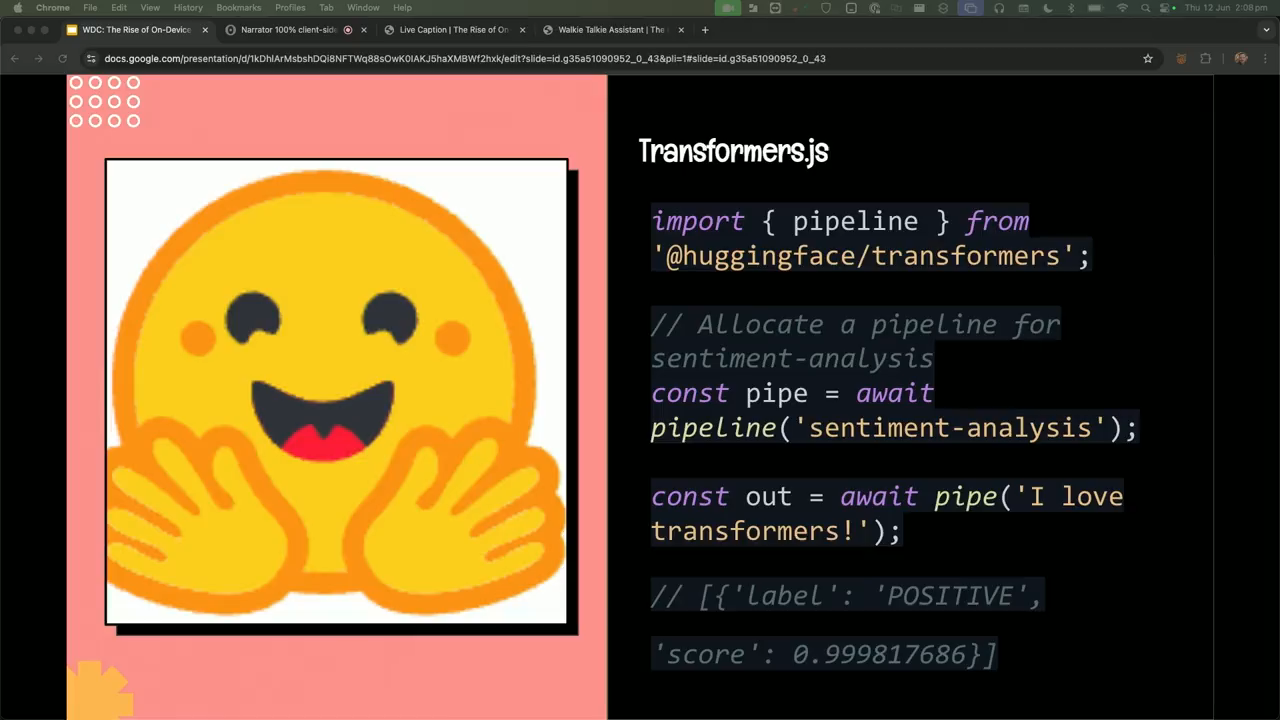
The speaker dives into Transformers.js, covering its key features: automatic model loading and service-worker-based caching, multimodal data conversion for images and audio, ONNX format support for standardized model files, and automatic execution optimization across WASM and WebGPU. A concise code example shows how a sentiment analysis pipeline can be created and run in just a few lines, with the library handling all complex glue code transparently.
Vision AI on Device: Live Captioning, OCR, and Object Detection with Florence 2
The speaker demonstrates the Florence 2 vision model running entirely on-device via webcam, progressively showing live image captioning with increasing detail, optical character recognition reading text from physical objects, and object detection that draws bounding boxes around faces, hands, and clothing. At roughly 700 megabytes, the speaker describes the model as impressively capable and suggests practical use cases including factory inventory management, field plant recognition, and a real-world Pokédex.
Chrome's Built-in Gemini Nano and a Natural Language Video Editor Demo
The speaker explains Chrome's experimental built-in AI program, which exposes Gemini Nano via JavaScript APIs with cross-origin model sharing and standardised task-specific APIs for summarisation, translation, and transcription—making consistent results achievable across browsers without per-site downloads. The speaker then demos a competition project: a chat-driven video editor that translates natural language commands into FFmpeg instructions running in the browser via WebAssembly, handling GIF conversion, video filters, format conversion of unsupported files, and audio extraction even when input contains spelling errors.
Real-World Trade-offs: Model Size, Device Hardware, and Development Challenges
The speaker covers the practical considerations of deploying on-device AI, including model size variability from tens of megabytes to several gigabytes, hardware requirements around RAM and VRAM, and the need to use web workers and async patterns to avoid blocking the main thread. Development challenges discussed include service-worker caching strategies, UX for large downloads, sharing models across tabs using shared workers, and evaluating whether a use case justifies the download cost. Security considerations are also addressed: system prompt exposure on the client, prompt injection risks, sandboxing generated code using Content Security Policy headers, and verifying model integrity via hash comparison.
Practical Use Cases, Voice Assistant Demo, and Conclusion
The speaker outlines a range of browser-based AI applications including grammar checking, article summarisation, real-time narration, on-page chatbots, and accessibility image captioning. A live voice assistant demo closes the talk, combining three on-device models—Whisper for transcription, Llama 3.2 for text generation, and Kokoro for text-to-speech—achieving near-real-time responses entirely on device. The speaker concludes that client-side AI is powerful and growing fast, encourages the audience to explore the space, and acknowledges the trade-offs between cloud, on-device, and edge deployment strategies.
Thank you. Yeah. It's great to be here. So I'll be talking about on device AI and specifically within the browser. So, with that with that lens in mind, this space is moving really, really fast. I've had update these slides quite a few times in the last couple of weeks because of so much has been happening, between all the announcements. So we'll get right into it.
So today, we're gonna cover, like, why AI in the browser is so important, the enabling technologies that make it happen, the trade offs that you have to think about when you wanna use a non device AI model. And then throughout the presentation, I'm gonna sprinkle use cases. And instead of telling you about it, I'm gonna start with a demo and show you something that I built that's all on device. So we'll jump over, and we'll explain what's going on here.
So this, this basically narrates a screenshot of you in the style of David Attenborough, so it makes it a bit snarky. And so it it takes a screenshot and then does a caption and then feeds it into a text generation model and writes a script, and then it does text to speech. This is all happening on device, so I'll take a photo.
There we go. Snapshot. You can see there's a caption now, a script, and hopefully, audio is
Are the human, a curious creature caught in the act of, well, not exactly hunting the prey, but more like collecting a shiny trinket? Observe as he proudly displays his trophy, a symbol of his species' greatest achievement, the ability to produce and consume food. Fascinating. Note the telltale signs of entertainment, the man's enthusiastic facial expressions, the raised eyebrows, and the faint scent of excitement wafting from his direction towards the object.
This is
And so I cut it short because I didn't keep going with the generation. But you can see, like, that's all happening on device, and that's, like, super impressive. Like like, even twelve months ago, that wasn't possible. And I made the same demo, like, about twelve months ago, but I was relying on three AI models that needed API access.
And now you can do it all in the client within within twelve months, so it's moving incredibly fast. And it's kind of like a really fun thing to to play with. And the size of those models all up are about a gigabyte. I've obviously cached them already, so that's why it loaded really quickly. You can see, like, that's kind of one of the trade offs you have to think about is the size of these things.
So you can kind of think about the shift from cloud to edge, and edge could mean the browser right on your device, or edge could mean, like, a a CDN or like a worker kind of function. And it's driven by, you know, kind of very compelling reasons. We think about large language models, running purely in the cloud, but there are four kind of main limitations when you think about cloud based language models.
And I kind of categorized them into here. Maybe sustainability could be another one too. We've got latency. You know, LLMs are are slow to infer. There's obviously optimizations you can do to increase that, but then you've got network lag on top of that. So you've got network latency as well as the large language model latency too. And you have you have to kind of work around that in the UI space of, like, how do you stream that in? How do you work with, like, long waiting tasks, and how do you present that to the user?
There's cost. You know, they're not free. Complex tasks, especially if you go into, like, the chain of thought models where they can think for anywhere from ten to several minutes. Yeah. You can quickly inflate expenses if you're using it in production, and you have, like, lots of users, especially in the enterprise setting. Privacy is another big one.
If you've got, PII, which is privately identifiable information, you might have to comply with, some legislation around privacy like GDPR in certain regions, and you've got compliance like SOC two, and you've also got sensitive proprietary data that maybe contractually you're not allowed to use. So there's lots lots of data that's off limits for using in these kind of language models.
And then the other one is offline. Can't use these offline. You need a solid Internet connection, and they can't operate offline. So if we go on the other end, we look at the promise of on device AI. We have no network cost because it's on device. Can have faster inference in the stars there because you've got the trade off between, the device running it.
And you can get truly real time experiences on the client because you don't have those round trip latency costs you have to pay. Costs, all these models are usually free to use depending on the license. A lot of them are MIT licensed, so you can use them in a commercial setting as well. And so there's no monetary cost to actually have them or or use them within your products.
And then privacy is another big one. You can use any and all data because it's all on device, and you don't have to worry about compliance or PII or any kind of, kind of privacy legislation or or what region you're running in. And then offline, we can have it cached. Once it's downloaded, it can be cached, and then you can use it, when you're in remote areas or you have an inter intermediate connection.
So if we think about the enabling technologies that make this happen, there's kind of like the lower layer, web APIs that we we have available to us that a lot of these models tap into to make, sure the performance is fast. You got WASM for CPU based inference, and so that's the WebAssembly, stuff. Usually, it's for cross compiling C plus plus or Rust or other languages into a format that the browser can run, but these models take advantage of that too.
And better yet, if it's available, they tap into WebGL and WebGPU, which is, which is, like, the latest evolution of working with graphics cards, so you can get that massively parallel computation on the client. And then the the fourth one there is the web neural network API, which is still an emerging standard, kind of being, put out there by Microsoft around how can we have a specialized, API for working with these models directly.
So with with WebGPU, it's kind of got, two kind of tasks of graphics and AI, whereas WebNewer Network can also tap into more specialized hardware. So if you've a phone with, like, a specialized AI chip or, like, Google's Tensor Processing Units, you can tap into those as well so you can get better performance on lower end devices.
And these are kind of foundational technologies make it possible. And we'll dig into the top, the other two layers as we go. So if we go directly to the top layer, this is where you as a developer will kind of be working at the SDK level, spending most of your time. And there's kind of like probably three main libraries players in the space. There's transformers JS, which is from Hugging Face.
And if you haven't heard of that, that's kind of like GitHub for AI models. So if you've ever experimented with any AI models, whether it be on the server or on the client, they're all kind of hosted on Hugging Face. That's where you'll find them. And that's this is their browser node port of their popular Python library by the same name.
There's Google's TensorFlow JS SDK. You can do a lot of that, including training your own models, and you can also do inference and the same stuff that transformers offers as well. There's WebLLM, they have a really great website, with a bunch of custom on device models that you can experiment with. So I suggest looking at them to play around with them.
I'll just be mindful of, downloading them here on the Wi Fi here. And then there's also the other end of built in AI, which, Google Chrome is experimenting with building in a model into Chrome browser, and exposes it via JavaScript APIs so you can use it directly, in there. And we'll talk about that in a sec.
And so for this talk, I'm gonna focus on Transformers JS and the built in AI side of this, because that's the most experience I've had with with this stuff. Another one I haven't mentioned is to keep an eye on Google's MediaPipe, which offers a lot more, kind of AI based stuff around, like, pose detection, face mesh, eye detection, as well as, like, language model stuff. So if we do dig into transformers, it's a popular one from Hugging Face.
And this is like a really simple code example, but they handle stuff like loading, caching, inference, so running the model. They automatically use service workers to cache the model. So once it's downloaded, they'd handle that for you. So don't have to handle that kind of caching offline. So once it's downloaded, it's there until you purge your service worker cache. They handle, like, data conversion between, putting in, like, audio and images, in a multimodal, model.
So if you wanna feed in, an image or something else, they can handle the the, the conversion in and out from that. They have ONNX support, which is a Microsoft led standardization around a single file format for AI models. And and so, like, they host a lot of those, and they kinda handle that transparently for you.
So they'll convert a lot of these models you might see into the ONIX format and allow them to run to the browser. And then they have execution optimization where they would do WASM if nothing else is available, but they also use web GPU and allow you to fine grain control over, like, different models. So if we look at just a few lines here, you've got importing the library. You set up a pipeline, is how they call it, and then this is basically a generic name for a sentiment analysis. You can also pass a second argument to specify the exact model you wanna do as well, which you probably would do in production. You And can see here then you pass you run that pipeline function returns, and then you can do sentiment analysis on that string. And it'll send you back structured JSON with the probability of what label it thinks it falls under for that sentiment.
And it truly smooths over a lot of complex glue code, so it's a really handy tool to use. So I've got another demo here. So I'll get straight into it. This is like a live captioning. So this is using a different model called Florence two. If I start the video, so you can see, I'll slow down the captioning. So every two seconds, it'll do a caption.
So you can see now it's describing me. I've got a shirt and a beard. I can also get more detailed captions. So better to say I'm wearing a watch. You might even know I'm wearing a ring. And it knows, like, doing symbols, and it gets really descriptive. And this is all running on device. You can also do OCR, so optical character recognition.
So I have to grab my lanyard there. Oh, there you go. Takes a bit to stabilize. Oh, no. I'm disappearing. And you can see it can even read like like at home when I was practicing, had text on my shirt that it could read as well. That's and then the last one it does is object detection.
So it can yeah. It gives you bounding boxes and it puts it around face and shirt, and it can even have and got the hands. I think you can do a watch as well. Maybe. Maybe a watch. Yeah. So that's you can imagine, like, that's only 700 megabytes, only 700 megabytes, which is small in the AI model world, and it's, quote, really quite capable.
So you can imagine you could finally have your dream of having a real Pokedex, for instance, or or something more serious like on the fly inventory management in a factory where internet connection may not be super stable or, like, out in the field, you might wanna have, plant recognition or or some sort of, like, real use case.
And then so on the other end, have the built in AI. So this is, Google, in their Chrome dev browser have running an early access program at the moment, which you can which you can get access to. And so Google Chrome, for example, they're experimenting with their model called Gemini Nano, and this is the same model that runs on Android. So it does a lot of the on device stuff on there, and they expose it via, some JavaScript APIs.
And so the big advantage of this is you don't have to worry about cross origin use. So with transformers, if you download a model, that that's cached per origin. But with this one, you can use it across many websites. So once you've downloaded it once, that's it. Anyone can take advantage of that. And it has no SDK, so you've got, like, the JavaScript API there, and you can get direct access.
It can also make it easier to work with DOM nodes. You can just pass DOM nodes into it, and it'll know how to pull out text or images or audio or images. And the the goal of this is to standardize task specific APIs, not not the prompt API. That's more for experimentation to figure out what task specific and when I say task specific, I mean, like summarization, translation, like captioning, you know, like transcribing, stuff like that.
And that that way, they can standardize those fine tune use cases, and then it doesn't matter what browser is using what model locally. They can all have pretty consistent results, like the summarizer will always summarize, etcetera. Whereas with a prompt, it would be really hard to have that work across browser and have consistent results. You'd be battling with trying to make, you know, four models act the same, which should be tricky.
And then I guess regarding the long term cost of these free models, like, at the moment, Google's offering for free, but who knows how long that might be, whether that be indefinitely or this might never go anywhere. And, also, you have to be aware of the licenses on the Hugging Face model side as well to make sure you can use them in a commercial sense.
But if you're just playing with it, you can go you can go and play with whatever you want. So I got another demo here of a thing I built. So there's a Google AI competition where I built this for using the Google AI stuff, and I want to go beyond the normal kind of generic use case of summarization or chatting to a document.
So I thought about what if I could make, like, a a video editing tool that you can just chat to and get it to do video editing. So I've got a demo here. So I upload that video, and I just say convert to GIF. It'll take that natural language and then convert it to an FFmpeg command, which is like a normally a command line tool for converting videos, audio, images, all that.
And this is running into browser using the WASM build, and that's actually converted to a GIF. I can also be pretty vague and say BMW, and that does a filter, a pretty complex filter. If you've ever worked with FFmpeg, it's, like, incredibly complex, a bunch of arguments to work with, and this kind of smooths over a lot of it. One of my favorite things of this is you can take unsupported video formats like the OG format, which is no longer supported in most browsers, and I can say convert to m p four.
And so now I've actually rendered the unsupported format into a format that works. You can see it's got audio. I can also say, actually, I want that audio, and I'll do the misspelling. And that works too. So even with misspellings, it can work. So I subtracted the audio. This is a lot of fun to build. I spent a lot of time on this, like, last year.
I was working on it, and I'm still kind of working on it now today. Alright. So now we've had all the fun demos. Let's now talk about the the kind of realities and the trade off and performance you have to think about, when working with this stuff. Yeah. Even small models can vary greatly in size from tens of megabytes to several gigabytes depending on what you wanna do, And so it can be a significant challenge in how you handle the UX of this and how if it's even worth the download for the the use case you've got.
They're often lossy versions of their bigger siblings, and they're created through, like, what's called distillation, which is basically like the teacher student where the the state of the art model is training the smaller model, and it kinda learns from that. So it kinda gets adapted skills that can be quite good. Yeah. But, however, I wouldn't discount these because Google's open source version of their Nano model called Gemma, which is about 600 megabytes, is probably one of the best on device models you can use, and it's incredibly capable. So if you've got the right use case, they're actually really, really great.
You know, beyond the download size, you have to think about device hardware as well as a bottleneck. You know, I've got a m four Pro Mac here with 42 gigabytes of RAM, which is, like, not the average one. The average RAM is between four and eight gigabytes, and they rely on also on at least having four v RAM four gigabytes of v RAM to make the performance of these models, depending on the size, run well. So anywhere between two and four.
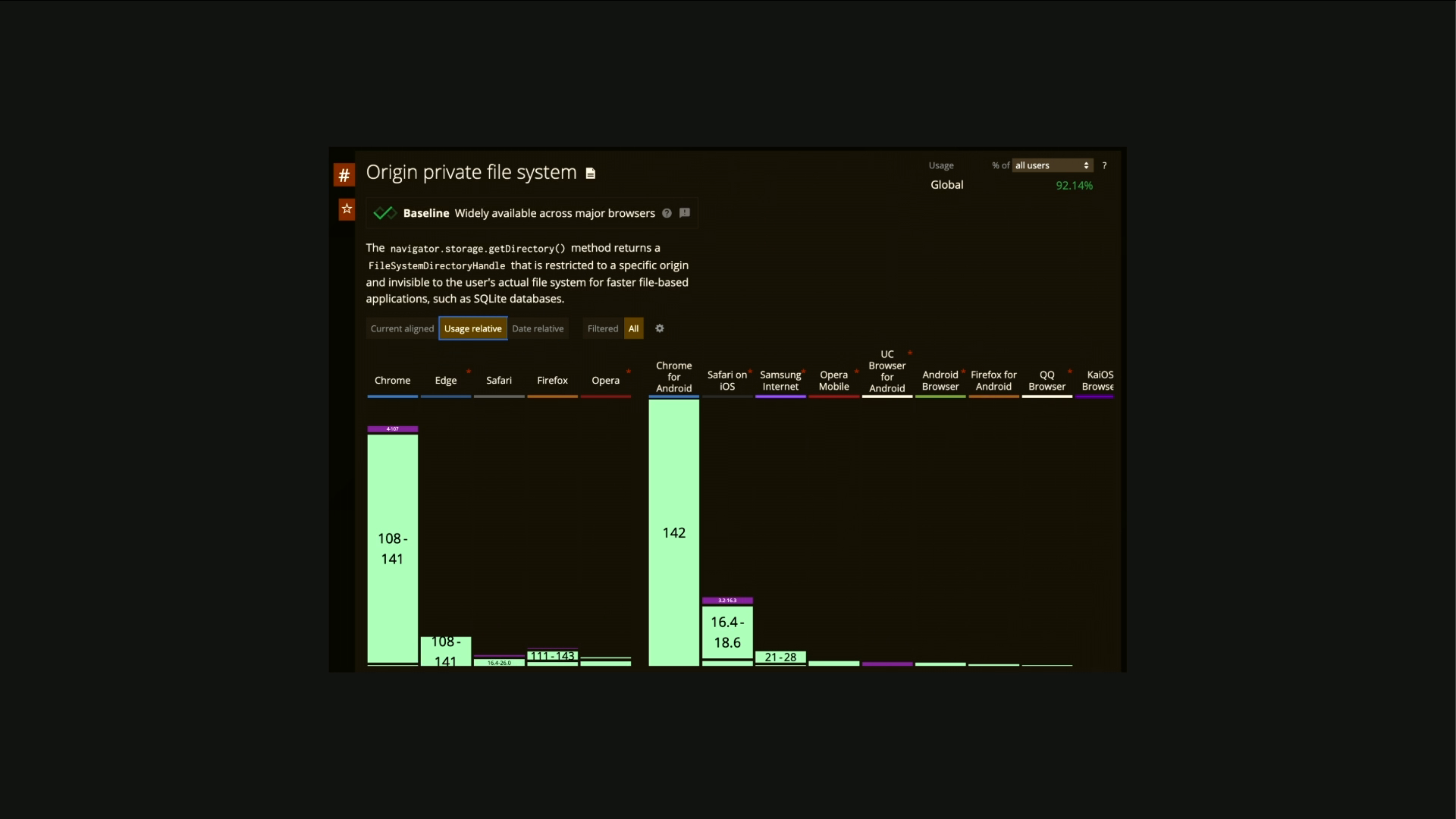
You know, these are hefty operations that run, and they can block the main thread. So you have to use workers and async patterns to make sure you're not blocking the main thread when it happens. And models run best on the new web GPU API, which as of, like, yesterday, I think Safari finally announced they're bringing it to version 26 of Safari for iOS and desktop.
And so that'll probably bring up to 90% by September or whenever they release it. So the support's getting there. And then there's the web neural network. It's also a really promising one where it can tap into, like, I know a lot of mobile phones have dedicated dedicated AI chips where they could tap into that operating system level kind of computation and get even better performance again once that's around.
And latency is, like, dramatically improved too from device. You know, it could could be potentially seconds with a cloud based LLM to hundreds or even tens of milliseconds on the device depending on, like, kind of the the device capabilities. And so, like, the key challenge is kind of device variability. So, like, while there's no direct AI capacity API, there is several APIs being exposed around being able to get an idea of what how much video RAM a device might have and where they give you, like, an indication as well as kinda like any other metrics you might, wanna infer.
So you could probably track that in telemetry using Honeycomb or Datadog or even analytics to say like what your users actually have capable and if it's worth doing it or not. And then there's kind of development challenges on the other end of working with this new stuff. You know, it's it's a learning curve, not just learning all the kind of language used for all the different terms, but also working with, like, new APIs like WebGPU.
There's model caching. You know, if you're not work using SDK, you have to properly cache models, so you have to then dig into service workers and, know, to avoid repeated downloads and make it offline capable. You have to think about, like, how you would handle these potentially long downloads and how you communicate that to the users. There's a lot of UX and kind of and and kind of, like, optimistic UI handling that you have to think about on that side. And then you have to go to dig into workers, so service and shared. So you wanna use shared.
If you have, like, a user that opens multiple tabs, for instance, you don't wanna spin up four copies of that same model. You wanna share that model between those four tabs using shared workers. And then the final one is evaluating the cost versus benefit. Like, is it actually worth downloading this model for your use case and whether or not you can accomplish that?
And that's kind of the big trade off you have to think about. And the good news is SDKs like Transformers JS really handle a lot of this caching and all this kind of challenges as well, so they kind of wrap it up into a nice API to work with. Security is an emerging one as well. You have to be aware that system prompts are exposed on your client side if you're using on device model if that's important to you where you might have sensitive data in there.
Prompt injection is always a risk no matter the size of the model. And there's also, like, code generation models you can do on the client too. So if you're trying to run code or generate code and run it, you probably sandbox that. And that's where you can leverage existing technologies in the browser, like the content security policy headers, which are laid to kind of mitigate a lot of cross site scripting attacks.
So that's good if you, like, got a lot of user input and you wanna make sure you nothing in virus is happening. And the other one is kind of model integrity. So you wanna make sure the model that's downloaded is the actual model you expect. So you'll notice in a lot of download sites, you might have an m d five hash.
And with JavaScript, we can kinda do that with the subresource integrity attribute, which allows you to supply a hash to a JavaScript file, and then it does comparison. The browser does it for you. And if it doesn't match, it blocks it So it kinda stops the kind of, you know, person in the middle attacks. But, you know, if you're serious about this, you probably host your own to kinda mitigate that.
So what else could we build? It's kind of like the, you know, the powerful, kind of core strength stuff that people tend to think about when they think about I AI. You could do, like, local grammarly style grammar checking or spelling checking. You You could do summarizations of articles, instantly in the browser. If you do text to speech, you can do, real time narration of an article. You could have, like, the usual kind of chatbot thing where you can chat to the contents on the website.
And you can also do accessibility stuff around image captioning. So if someone uploads an image, you can also auto generate a caption for them based on what it sees. And these are kind of just starting points. I've got one more demo. So this one does transcription and then responds to me in text to speech, and it does it pretty quickly.
So let's hope this works. Hello. I'm live on stage. Can you say hello to the audience for me? Hello. I'm here to help, Livan. My name's Livan. What's 10 plus 10? 10 plus 10 equals 20.
Thank you. Thanks for asking, Livon. So you can see that that's that's like really fast response, almost real time, and it's all happening on device. And that's kind of built up with three different models. There's a Whisper, which is like the real time model for doing a live transcription. There's Lama 3.2, which is like a really small version of kind of the meta text generation models, and then there's Kokoro, which is the text to speech model, and they kind of all I've combined them all together.
You can actually get a version of Lama that can take audio input directly, but I use Whisper so you can see the text come up and kinda see that it's not always perfect. And, you know, it's it's kind of really impressive. Like, you know, twelve months ago, this wasn't possible, and now it is. And you imagine what's going happen in the next twelve months.
You know, so in conclusion, the client side AI is here. It's powerful, and it's growing fast. You know, standards like the Open Neural Network Exchange, the ONIX, acronym up there, and tools like Hugging Face are making it easier to leverage these models, you know, opening pretty exciting possibilities. And, yes, there are trade offs. You have to really think about that, whether, like, you wanna run it in the cloud or you wanna run on device or maybe you wanna take that on device model and put it in your own infrastructure and run it on the edge as like a a stepping stone or like a layered approach.
And, you know, I've only scratched the surface of what's possible today. There's way more stuff I could have covered, but there's, like, only so much time. And, you know, I really it's a really exciting space to dig into, and I I recommend you have you take a look. So thank you.
Technologies & Tools
- Datadog
- FFmpeg
- Florence 2
- Gemini Nano
- Gemma
- Honeycomb
- Kokoro
- Llama 3.2
- MediaPipe
- Safari
- Service Workers
- Shared Workers
- Tensor Processing Units
- TensorFlow.js
- Transformers.js
- WebAssembly
- WebGL
- WebGPU
- WebLLM
- Whisper
Standards & Specs
- Content Security Policy
- GDPR
- ONNX
- SOC 2
- Subresource Integrity
- Web Neural Network API
Concepts & Methods
- Model Distillation
- Prompt Injection
Organisations & Products
- Hugging Face
- Microsoft