Not Everything Needs an LLM

The Support Ticket Routing Problem

Speaker B (Dave) opens by describing his frustration with mis-routed support tickets and the sarcastic replies agents often give. He explains that support agents scan tickets for keywords rather than reading them fully, leading to frequent misrouting, illustrated with an interactive audience example about a 'sales reporting dashboard' ticket.

Benchmarking Misrouting Rates Across Organizations

Dave shares research findings that ticket misrouting rates of 28% are actually better than the industry norm of 40%, with 20% being average and 10% considered high-performing. He argues that simple fixes like more training or documentation don't address the root cause, which is agents dealing with complexity by scanning for keywords.

Early Attempts: Prompting LLMs for Ticket Routing

Dave recounts the 2024 mindset of reflexively reaching for ChatGPT to solve problems, showing how a simple prompt can route tickets among a few buckets but breaks down as organizations scale to dozens of overlapping support teams and messy boundaries. He demonstrates how larger, more complex prompts cause LLMs to become confused, making the original 28% misrouting rate look less alarming by comparison.

Introducing Yara: A BERT-Based Routing Solution

Dave introduces his ticket routing system named Yara (Greek for 'cat', standing for 'your automated ticket allocator'), built on Google's BERT model rather than an LLM. He explains BERT's advantages for text classification: it's fast, lightweight, quick to fine-tune (around an hour on GPU for tens of thousands of tickets), and can run inference on CPU.

Building the Training Dataset from Closed Tickets

Dave details how Yara uses labeled datasets derived from closed support tickets, using the closing team as the ground-truth label and ticket subject/body as input text. He shows a JSON example from Zendesk documentation and explains the data prep logic needed to trace escalation chains back to the correct originating team.

Maintaining BERT Models vs. Debugging Giant LLM Prompts

Dave contrasts the 'whack-a-mole' debugging experience of large LLM prompts with the simpler maintenance of BERT models, which just require ensuring the closing group label is correct. He mentions training with three months of rolling data and splitting very small groups into a secondary BERT model for better accuracy.

Cost Comparison: BERT vs. LLMs for Ticket Allocation

Dave breaks down the cost of running ticket allocation inference via AWS SageMaker serverless with BERT (about 6¢ per thousand tickets) versus using state-of-the-art LLMs like Opus (about $50 per thousand tickets) or Sonnet ($30 per thousand), emphasizing the dramatic cost savings of the classical ML approach at scale.

The Hidden Cost and Complexity of Evals

Dave addresses the common suggestion to use evals to catch prompt bugs, explaining the practical challenges: building representative test datasets, the expense of running evals at scale, and the recursive problem of needing evals to judge your evals. He argues this makes the LLM approach even more costly and complex compared to BERT-based classification.

Beyond Routing: Prioritization Challenges and Solutions

Dave expands the problem beyond routing to ticket prioritization, describing how priority levels shift unpredictably (e.g., a low-priority ticket becoming urgent after a scrum standup) and how executive tickets are always marked high priority regardless of actual urgency. He shows how using a cheap, constrained model (Amazon Nova Micro) for prioritization costs only 42¢ per thousand tickets, compared to over $60 with Opus.

Summarization Costs and Total System Economics

Dave covers ticket summarization, which helps agents quickly compare similar past tickets, costing about 64¢ per thousand tickets with a cheap model versus $210 with Opus. He totals the annual cost comparison: roughly $30,000/year running everything through Opus versus just $212/year using BERT and cheaper specialized models.

Choosing the Right Tool: A Ladder from If-Statements to LLMs

Dave presents his core philosophy: LLMs are just complex neural networks, and neural networks are essentially decision trees, which are just collections of if-statements. He recommends starting with the simplest solution (if-statements), then classical ML, then text classifiers, and only reaching for LLMs as a last resort based on the nature of the problem's inputs, outputs, and data labels.

Closing Remarks and Q&A: Rediscovering Classical ML

Dave wraps up his talk and thanks the audience before Speaker A joins for a Q&A discussion. They explore how many engineering teams skipped decades of classical ML and NLP development, jumping straight from traditional software engineering to LLMs, and discuss the need to reeducate teams about simpler tools like BERT and regex, cautioning against 'AI for the sake of it' and advocating for choosing the cheapest, fastest solution that solves the actual problem.

Thanks, AJ. Yeah. If you're here for the token AI Skeptic Talk, you're in the wrong session. So first, I want to go back in time a bit. Back when we used to ride dinosaurs. When we're talking about Gen AI, that's about 2024. This is the OpenAI crew commuting to the office back then.

So back then, I had a real problem. I would open support tickets. They would get emailed off. Sometimes I wouldn't hear anything for a few days. And then sometimes I would get a question back which was already answered in the information I'd submitted in the original ticket.

I can see some people nodding. You've been here before. But my favorite reply used to be a version of this because someone had misrouted the ticket. Now that's paraphrased. So I'll paraphrase my reply. Well, actually it was usually more like that. Now why does this happen?

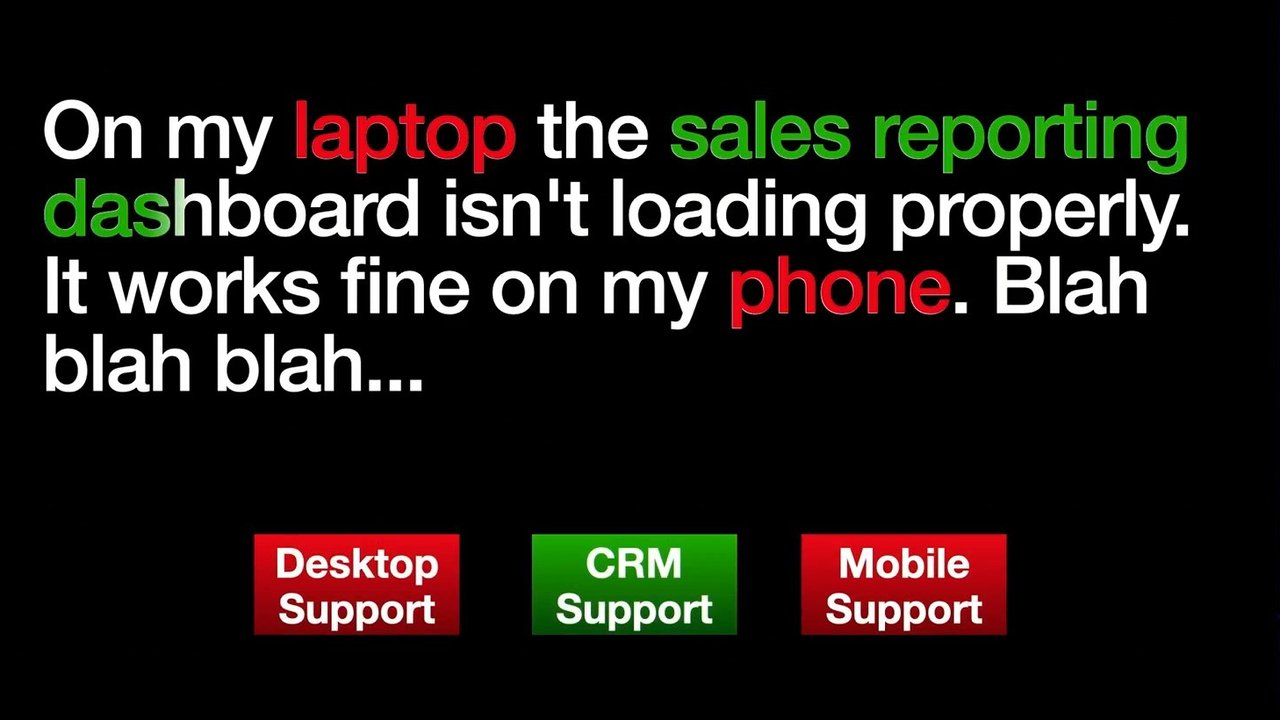
Well, it turns out that routing tickets isn't as easy as it sounds. So support agents, they are generally having a quick look at the ticket. They're not reading past the second sentence of the ticket. They're just scanning for keywords. So I know it's after lunch, everyone's like feeling a bit sleepy, but I'm going to make you all our one support agent for a minute. So here we have On my laptop, the sales reporting dashboard isn't loading properly.

It works on my phone blah blah blah. Paragraphs of stuff that the triage agent's never going to read. Now who thinks this is a desktop support issue? Alright. One hand up. Who thinks it's a mobile support issue? Okay. Good. You can all get a job as an L1 agent because you didn't put your hand up for that.

Actually, sorry. And the actual answer is the sales reporting dashboard is in the CRM supports team responsibility. But the agent is just scanning for the keywords. So they may have spotted laptop or phone as the first thing and your tickets getting misrouted. Now this happens all the time.

When I first started digging into this issue, the organization I was working with, 28% of tickets went to the wrong team the first time. Now 28% you're going, Oh my god. That is so bad. But when I was working on this project, I started off thinking I have to get at least 95% accuracy for this to be good. When I found out it was 28%, I'm like, are we just a really bad organisation?

And I started doing some research and I found out that the bottom end of what's considered normal is 40% of tickets being misrouted. And so if you've got 60% of tickets landing with the correct team the first time, you're not running a support organisation, you're running a casino. Now I found out that the the midpoint is around 20% of tickets being misrouted.

So the organization was underperforming a little bit. But 10% of misrouted tickets is considered like a high performing team standard which I was really surprised about. And these misroutings, they cost us time, they cost us money. Now some people are going to go, Just document things properly.

Do more training. We'd already ticked the training checkbox. We had documentation. It's the person is dealing with complexity. They are scanning for keywords. Training isn't going to solve the problem. The issue is the complexity in what they're dealing with. So I started to think about how can we solve this.

And this was back in 2024, remember. So what was happening back in 2024, people would be sitting around and they'd be thinking about how to solve problems. Now the woman on the left, she's the smartest person in the room. She's thinking, oh my god, why can't we go to IKEA and buy some furniture for this stock photo?

And the the guy on the the right, he just can't help himself. He's got to grab the laptop and go, Look, let me show you. We can solve this with ChatGPT. Now, not it might work but we'll we'll talk about some other options as well. Now in a the example I had before, we've got a ticket. We've got to land it in one of three buckets. Now this type of scenario, we can probably write a prompt to route the ticket.

Prompt would look like this. Well actually it's more like that. But as you get the idea, you can write a prompt. The contents of the prompt isn't so important. It is but not for the talk. Now you can We can do that when we've got three buckets.

Larger organisations, things are messy. You'll have one team responsible for a bunch of mobile apps, another team responsible for a different bunch of mobile apps. You'll have the the.com or.com.au website that one team handles. You'll have another support team handling stuff for EMEA, another for North America, probably another one for APAC, and then you'll have some sector websites that target certain customers or verticals or whatever.

Each of those have separate support contracts. Each of them have separate teams dealing with them. And the boundaries between them are really messy. And this is where humans struggle because again they're scanning for keywords. Now larger organisations, you end up with dozens of buckets. I could have filled a slide with buckets and it'd probably be accurate for some organisations.

So our nice little prompt from before ends up being something like that. Now it's not like this prompt, don't copy and paste it, it probably won't work. But what ends up happening is that our model Hang on, we're talking about bots here.

There we go. Our models end up getting confused. And so the prompt, it's big, it's complex, the model is struggling with some of the nuance in it and we're back to 28% is not looking like such a bad number. So that got me thinking and no, that's not a photo of me. He's got too much hair and he's also got a Windows laptop. But I was thinking about how do I solve this problem.

Now, I came up with a solution. But before I take you through it, are there any Greek speakers in the room? Good. I can't get away with butchering the name. So I developed Yara which is based on It's a Greek name. Yara is written with a g in Latin script.

It is pronounced Yada and the name came from your automated ticket allocator. And Yada is the Greek word for cat. And this was the inspiration for the ticket routing system. So I I really love this GIF and I was like, this is going to be the name for the product.

But I thought CatRouter didn't sound so good so I was working with someone in Greece and we came up with Yara. Now the heart of Yara is not an LLM. We went with BERT. And so BERT is a model from Google which is great for natural language processing. Oh, hang on.

Let me fix the acronym. So we have BERT which stands for bidirectional encoder representations from transformers. And it's a great model for doing text processing and stuff like that. And the reason I love BERT is the the text classification is really fast. It's lightweight, the model.

I forgot to check the size, but it's really small, easy download. Fine tuning it's really fast. I can throw thirty, forty thousand tickets at it and it's going to train on GPU or fine tune in about an hour on a GPU. So nice and fast. And the other thing is that we can run inference on CPU which we'll see in a little bit gives us a lot more options. The downside of BERT is he's not as funny as Ernie.

Like no one can beat Ernie. Now our ticket is a labeled dataset which is perfect for working with Bert. So we have the label up here which is the group that ended up dealing with the ticket. We know that the team that performed the work on the ticket is most likely to be the team that closed the ticket.

So that gives us a high quality closed dataset now. There are escalation chains and stuff like that. I've got logic in the data prep step to kind of get it back to the the first team that should deal with it. That's all implementation data. The main thing is we've got a labeled dataset. And the text, that's all we need for the the subject and the body of the ticket is enough.

And then we apply a filter based on closed ticket. So we wait until the ticket is closed before including it in the training dataset. So that gives us the the confirmed information we need. And this is what it looks like in JSON or the stuff that we really care about looks like this.

Now this is straight out of the Zendesk documentation. When you have private equity owning a company, they're not so good at fixing their docs and they didn't replace the token about the printer being on fire. So I don't know the full details of what happened to the printer, but this we can use as our training data. So again we've got the group IDs, the label, we've got the subject and we've got the filter based on the ticket being closed.

Now if we wanted to use an LLM, we're back to our big prompt. And one of the problems here is it's a big prompt and we might find that there's one section of the prompt that is being unreliable or buggy. And so we're like, okay, cool. We'll fix that. And then we start running that in production and we discover ah, there it is.

Yeah. We discovered that there's a bug somewhere else in the prompt. So we're we're kind of playing an engineer's favorite game, whack a mole, as we're trying to to fix the the prompt. And so if we have a problem when we're using BERT, we just need to make sure that the closing group is correct.

I tend to train with three months worth of data, which allows for changes over time but still gives us a large dataset. Where there's a lot of smaller groups, can actually run two berths where one pass the smaller groups off to second model.

Pretty straightforward. Well, it took a bit of work to get there, but now it's pretty straightforward and that works well. And yeah, all we have to do is make sure that the the group is correct. Now you're leaders, you care about money, you care about budgets. You'll notice I'm using coins, not stacks of $100 notes.

So you'll see where the where the solution can save some money. So I run all of the inference for the ticket allocation on AWS SageMaker serverless. And that runs at 0.002¢ per second.

It generally takes one to two seconds to figure out the allocation. But I was being really conservative and worked out as three seconds. Now this number it's annoying to read out. So let's just call it 0.6¢ sorry, 6¢ US per thousand tickets.

Now that does exclude the dollar a week that it costs to fine tune the model and there's some workflow stuff and other bits around it. But that's the the general cost of it. Now if we were to throw it in LLM, let's go state of the art. Let's go with Opus 4.8.

Now it we're we're paying for tokens. It's going to cost us, about 8,000, tokens for our prompt, another 2,000 on average for the ticket contents. Well, that works out as 10,000. Nice round number for doing the maths or 5¢ per ticket. Now you're probably thinking 5¢ per ticket, that's not much.

But that's $50 per thousand tickets. When you're running a 100,000 tickets, this all starts to add up. And so, it does get, more expensive now. If we wanted to be a bit cheaper and go with Sonic, we're still looking at 3¢ a ticket or $30 per thousand.

So this is all starting to add up. Now I was talking about bugs in our prompts. Now there's probably a bunch of you going, Yeah Dave, haven't you heard of evals? I have heard of evals and yes, we can have evals. The issue with evals is it's a yes but Because with our Evals, you need a representative set of tickets to do the the testing with.

Now trying to find those tickets, sure, you can throw like a whole bunch of your ticket data at an LLM and go pick out the representative ones. Maybe it'll do a good job. Maybe it won't give you such a good dataset. So you're sitting there having someone manually go through it. The other thing is that evals, especially if you've got a lot of data to work through, it can be expensive.

And I was reading the other day, someone was suggesting that you actually need eval for your judge that's doing the the eval. So it kind of ends up being turtles all the way down which is probably not what we're looking for especially if we're mindful of budgets. And so it ends up getting really expensive.

Now you're probably sitting there thinking, Dave, ticket triage it's not just assigning it to the right group. And you're very smart if you were thinking that. There is more to it. And one of the things that we need to deal with is prioritisation. Now who here has done on call before?

Yeah. Lots of hands going up. I'll try not to give you any PTSD today. But the the whole thing with prioritization is it's really messy. I open a ticket today. I say, hey, this ticket, it's not important. I just need it next week. So it's a low priority ticket.

I'm at stand up on Wednesday next week. The the scrum master is like, oh, I'm I'd say, oh, this is a problem. The scrum master says, oh, let me deal with that. They send an email to the support team going, we need this ticket done today because it's blocking work. That's just become a high priority ticket. Also, when you have senior executives opening tickets, they're always high or critical. It doesn't matter how routine the task is.

Now I don't wanna be waking up engineers at 04:00 in the morning because some ticket came in that looks a bit similar to one from an exec a month ago. So instead, we use a nice constrained prompt and get it to just output one word. And I'm using Amazon's Nova Nova Micro for this which is super cheap. We've got 400 tokens going in plus the the ticket contents.

This is the cost. I'm not going to read those numbers out. I'm just going to tell you that's 42¢ per thousand to do prioritization. Now that's more than what it costs to do the group allocation but for 42¢, I'm pretty happy I'm not going to be waking people up. Also, Nova Micro, it's a bit of a rubbish model sometimes. So if it comes back with something that's not one of those words, I just throw it at the thing again and it works. And when I'm paying 42¢ per thousand, it doesn't really matter. Now if I was using Opus for this, it's probably going to not mess up and give me a random word as a prioritization. But it's going to cost me over $60 per thousand tickets.

Now summarization, another thing that's really handy. Often when support tickets come in, the agents want to just run through similar tickets and see if they're relevant so they can copy the the solution from that ticket rather than trying to run through stuff themselves. So they're reading through a lot of tickets.

What I do is summarize the the ticket at the bottom as the the last comment. That's the prompt, about 300 tokens. Again, we're talking about really small numbers. This one it's working out at about 64¢ per thousand tickets, which again pretty cheap. Let's do the summarization with Opus just because I like making up crazy numbers.

And we're looking at around $210 dollars. Just to summarize tickets. Now some of you have probably been sitting there doing the math but I'm going to make it easy for you. If I was running this system with everything running through Opus, dollars 30,000 US per year. And that doesn't include the infrastructure, the evaluations and the workflows all wrapped around it. Using BERT, 212.

So you're getting change of a thousand dollars running this system with the correct models and using other techniques. So the and again that excludes the stuff but still it's coming in at less than a thousand bucks once you factor all that in. So to LLM or to not LLM?

That is the question. And it's not black or white, it's shades of grey. So the way I like to think of things is LLMs, they're just really complicated neural networks. And so IBM's marketing team says this is what a neural network looks like. To me, it just looks like a decision tree with a load of math.

And a decision tree is really just a whole bunch of if statements. So the simplest model we can ever build is an if statement. So when you're trying to decide what you need to build, I recommend start on the bottom rung of the ladder. Start with an if statement or 10.

If you can't solve the problem there, have a look at ClassicalML. You might find a solution there for your problem. If that doesn't work and it's a text issue, go with TextClassifier and then reach for an LLM as your last resort. Your budget will thank you. And so this looks like a ladder.

Climb up as high as you need to go. Or another way of looking at this is known inputs and outputs go with NIF statement. If you've got labeled data and known outputs go with Classic ML. Yes, I know you can do stuff without labels as well.

Unsupervised learning is great. I do it all the time myself. YouTube. Great. And then we have the text Classifier. So if you've got labeled text and known outputs, again it's great. And for the really messy stuff, go with an LLM.

Hang on. I need to press one more button. There we go. The simplest model you can build and here's a model for choosing if you need to use an LLM or not. So thank you everyone. And if you're interested in continuing the conversation, I'll be around for the rest of the day or you can visit my website.

Thank you.

That was brilliant, Dave. Thank you very much. I might just, grab you to ask you a couple of questions while we're, just waiting for the next session. I think something that I've noticed in talking with certain teams, and I'm curious to see how you've kind of seen this with the teams that you've been working with, is it's almost like from an engineering standpoint. A lot of teams have gone from classic engineering straight to AI. Yep. And it's it's like they've missed out the entire middle twenty years of kind of, you know, development in things like ML and text classification and NLP and kinda all of these sorts of things. And I'm just curious to kind of see like, you know, is that an experience that you've had and kind of, you know, like, how have you sort of had to almost reeducate people on history a little bit?

Yeah. So it is something that I've seen. And I think it was like ten years ago, fifteen years ago, it was all big data and like we're just gonna collect all this data and then it's like, oh, cool. Now we can start doing AI and, you know, was all classic ML stuff. And but it was a different group of people went off and did that stuff.

And all the engineers who stayed doing your traditional software engineering, they've missed that bit, and they have jumped straight to let's throw an LLM at everything. And myself, I decided that I was going to spend more time on the the classic ML stuff and NLP and stuff like that. And that led to a better solution than, you know, the throw it all at an LLM approach.

And have you found that you've had to almost do a little bit of education back into those teams to kinda like, hey. By the way, there's this thing called BERT, and you can use it for text classification.

Yeah.

Yeah. Yeah.

So there there's been that, but also when people are, like, trying to to solve other issues, it's like, oh, we've we've got the the input. It's text. It goes to an LLM. And it's like, no. Sometimes just regex will actually get us what we need. And it's like people have forgotten, like, everything that we've learned so far about how to get stuff done.

Yeah. The the shiny syndrome is very serious with a lot of engineering teams, I think.

I also think a lot of organizations, they're like, we're all in on AI. And so everyone feels like, oh, I've gotta have an AI project to to show things off. And I think that AI for the sake of it is the wrong approach. It's like define the problem, evaluate solutions, and then go with the cheapest and fastest option rather than the shiniest one that, you know, you can say, where AI now?

Not Everything Needs an LLM
Dave Hall - 4 June 2026 - AI Engineer Melbourne

A pixel-art illustration of an orange fox-like character working on a laptop.
An illustration by James Gurney depicting a pastoral landscape where humans and dinosaurs coexist. People are riding various dinosaurs for transport and recreation: a large long-necked dinosaur carries a passenger carriage filled with people, individuals ride smaller bipedal dinosaurs, and a large horned dinosaur is also ridden. Other people are walking or playing in the grassy fields, with hills and a winding river in the background.

Source: James Gurney

An illustration depicting a prehistoric landscape where humans coexist with dinosaurs. A large long-necked dinosaur, adorned with a decorative blanket and carrying a canopy-covered carriage full of people on its back, walks through a grassy field. Several people ride smaller bipedal dinosaurs. In the background, a Triceratops and another large dinosaur are visible near a winding river and hills.

Trouble signing in

Screenshot of a support ticket interface, displaying a ticket about a password issue with details like assignee, tags, and priority.

This team doesn't handle these requests. Please open a new ticket with the [different] team.

Why?

On my laptop the sales reporting dashboard isn't loading properly. It works fine on my phone. Blah blah blah...

  • Desktop Support
  • CRM Support
  • Mobile Support

On my laptop the sales reporting dashboard isn't loading properly. It works fine on my phone. Blah blah blah...

  • Desktop Support
  • CRM Support
  • Mobile Support
A slide presenting a user's IT support complaint. In the complaint text, the words 'laptop' and 'phone' are highlighted in red, and 'sales reporting dashboard' is highlighted in green. Below the text, three rectangular buttons are displayed: a red button labeled 'Desktop Support', a green button labeled 'CRM Support', and a red button labeled 'Mobile Support'.

On my laptop the sales reporting dashboard isn't loading properly. It works fine on my phone. Blah blah blah...

  • Desktop Support
  • CRM Support
  • Mobile Support

AI Engineer
Melbourne

28%

Misrouted

Source: Client data

40%

Misrouted

Source: Random blog posts

10% Misrouted

Source: A different set of blogs

An overhead view of a dense collection of various alarm clocks. The clocks are of different shapes (square, round, heart-shaped), sizes, and colors, tightly packed together.
A close-up, overhead view of a spread of 100 Euro and 100 US Dollar banknotes.

The Solution

  • Desktop Support
  • CRM Support
  • Mobile Support
A diagram showing a document icon at the top. Below it are three bucket icons, each with a label: 'Desktop Support', 'CRM Support', and 'Mobile Support'. This represents routing a document to one of three support categories.

You are an expert IT help desk triage specialist with years of experience correctly routing tickets on the first try (a rare and celebrated skill). Your job is to read incoming support requests and assign them to the most appropriate team.

The available teams are:

  • Desktop Support: Handles laptops, desktops, operating systems, peripherals, VPN issues, and anything that makes a user say "my computer is acting weird."
  • CRM Support: Handles all issues related to the CRM system, including access problems, data errors, workflows, and cases where "the system ate my deal."
  • Mobile Support: Handles smartphones, tablets, mobile apps, device enrolment, and issues that occur when someone insists "it worked on Wi-Fi at home."

Instructions:

  1. Read the help desk ticket carefully.
  2. Determine the single best team to handle the issue.
  3. Output your decision in the following JSON format:

You are an expert IT help desk triage specialist with years of experience correctly routing tickets on the first try (a rare and celebrated skill). Your job is to read incoming support requests and assign them to the most appropriate team.

The available teams are:

  • Desktop Support: Handles laptops, desktops, operating systems, peripherals, VPN issues, and anything that makes a user say "my computer is acting weird."
  • CRM Support: Handles all issues related to the CRM system, including access problems, data errors, workflows, and cases where "the system ate my deal."
  • Mobile Support: Handles smartphones, tablets, mobile apps, device enrollment, and issues that occur when someone insists "it worked on Wi-Fi at home."

Instructions:

  1. Read the help desk ticket carefully.
  2. Determine the single best team to handle the issue.
  3. Output your decision in the following JSON format:
{
  "team": "<Desktop Support | Mobile Support | CRM Support>",
  "reason": "<brief explanation>"
}
  1. Keep the explanation concise but clear enough that a human won't argue with you (too much).
  2. If the ticket is ambiguous, choose the team most likely to resolve it without starting a turf war.

Additional Guidance:

  • If it involves hardware with a keyboard: probably Desktop Support.
  • If it involves a device that fits in a pocket: probably Mobile Support.
  • If it involves sales, pipelines, or mysterious disappearing customer data: definitely CRM Support.
  • If someone says "everything is broken," pick the most likely culprit and move on with confidence.

Example Input:

> I can't log into Salesforce on my iPhone, but it works on my laptop.

Example Output:

{
  "team": "Mobile Support",
  "reason": "Issue is specific to iPhone access, while desktop access works fine."
}

Remember: accuracy is good, but avoiding unnecessary escalations is legendary.

  • Desktop Support
  • CRM Support
  • Mobile Support

An illustration shows a document icon at the top. Below it, three bucket icons are arranged horizontally, labeled "Desktop Support", "CRM Support", and "Mobile Support" respectively.

  • Some Mobile Apps
  • Other Mobile Apps
  • Primary Website Support
  • EMEA Website Support
  • AMER Website Support
  • [Sector] Website Support
An icon representing a document or a prompt is displayed at the top. Below it, six white bucket icons are arranged in a horizontal row, each labeled to represent different categories of applications or support within a large organization.
An icon of a document is at the top center. Below it are two rows of ten white bucket icons, totaling twenty buckets.
An icon of a document is at the top. Below it, there are two rows of ten outline bucket icons each, totaling twenty buckets.

Example of a Complex or Confusing Prompt

A dense block of small, unreadable placeholder text (Lorem Ipsum) covers most of the slide, visually representing a very long and complex prompt that could confuse a model.

Lorem ipsum dolor sit amet, consectetur adipiscing elit. Integer nec odio. Praesent libero. Sed cursus ante dapibus diam. Sed nisi. Nulla quis sem at nibh elementum imperdiet. Duis sagittis ipsum. Praesent mauris. Fusce nec tellus sed augue semper porta. Mauris massa. Vestibulum lacinia arcu eget nulla. Class aptent taciti sociosqu ad litora torquent per conubia nostra, per inceptos himenaeos. Curabitur sodales ligula in libero. Sed dignissim lacinia nunc. Curabitur cursus sapien sed magna. Quisque id mi. Ut in enim sed nisl dignissim consequat. Praesent commodo cursus magna. Sed eu elit. Nulla facilisi. Nulla facilisi. Praesent

Lorem ipsum dolor sit amet, consectetur adipiscing elit, sed do eiusmod tempor incididunt ut labore et dolore magna aliqua. Ut enim ad minim veniam, quis nostrud exercitation ullamco laboris nisi ut aliquip ex ea commodo consequat. Duis aute irure dolor in reprehenderit in voluptate velit esse cillum dolore eu fugiat nulla pariatur. Excepteur sint occaecat cupidatat non proident, sunt in culpa qui officia deserunt mollit anim id est laborum.

Sed ut perspiciatis unde omnis iste natus error sit voluptatem accusantium doloremque laudantium, totam rem aperiam, eaque ipsa quae ab illo inventore veritatis et quasi architecto beatae vitae dicta sunt explicabo. Nemo enim ipsam voluptatem quia voluptas sit aspernatur aut odit aut fugit, sed

Lorem ipsum dolor sit amet, consectetur adipiscing elit. Nullam eget arcu vel nisl auctor facilisis. Sed efficitur lectus eget mi vestibulum, quis molestie ex vulputate. Proin eget risus vitae arcu pellentesque feugiat at ut lectus. Pellentesque semper, neque in tincidunt laoreet, nulla erat malesuada erat, eu feugiat ligula diam vitae magna. Nunc eu nisl sit amet lacus tincidunt ullamcorper non in mi. Etiam eget enim mi.

...

Detailed image of a robotic dog with black fur, metallic components, and glowing orange eyes.

Your Automated Ticket Allocator

A pixel art illustration of a red cat-like character sitting at a laptop.

Your Automated Ticket Allocator

ROUTE THIS

A split slide illustrating a challenge and its solution. On the left, a white cat sits on a table, looking stressed or confused, accompanied by the text "ROUTE THIS". On the right, a pixel art illustration depicts a red fox-like character sitting at a laptop, representing an automated system.

ROUTE THAT Your Automated Ticket Allocator

On the left, a white fluffy cat sits on a wooden surface. On the right, a pixel art illustration shows a red cat character working on a laptop.

Your Automated Ticket Allocator

An image of a fluffy white cat sitting on a desk, looking intently at something near a computer screen. Overlaid on the image are the words "ROUTE THIS THING IN PARTICULAR". Below the text "Your Automated Ticket Allocator" is a pixel art illustration of a red fox-like character working on a laptop.

Your Automated Ticket Allocator

ROUTE ALL THESE

An image of a white cat sitting on a table looking down. A pixel art illustration of a red cat-like character with pointed ears, wearing a blue hoodie and looking at a laptop.

Your Automated Ticket Allocator

ROUTE THAT

An image of a white fluffy cat sitting on a table with its paw raised, looking down. A pixel art illustration of a red fox-like creature sitting and looking at a laptop.
An illustration of Bert from Sesame Street, looking directly at the viewer with a surprised expression. A tiny Big Bird character is partially visible in the upper right.
A large illustration of Bert from Sesame Street is on the left. On the right, stacked vertically, are smaller illustrations of Big Bird, Ernie, and Cookie Monster.

B

  • BERT (Bidirectional Encoder Representations from Transformers)
Illustration of Bert from Sesame Street. To the right are smaller illustrations of Ernie, Cookie Monster, and a red monster puppet, also from Sesame Street.

B

E

R

An illustration of Bert from Sesame Street is prominently displayed on the left. On the right, the stylized letters "B", "E", and "R" are stacked vertically. Below the letter "R", a small illustration of Elmo from Sesame Street is shown lying down.

BERT

  • Bidirectional Encoder Representations from Transformers
An illustration of the Sesame Street character Bert.

Bidirectional

  • E
  • R
  • T
An illustration of Bert from Sesame Street, a yellow muppet character with an orange nose and spiky black hair, smiling.

BERT

  • Bidirectional
  • Encoder
  • Representations
  • from
  • Transformers
An illustration of the character Bert from Sesame Street.

Why BERT?

An illustration of the puppet Bert from Sesame Street, with a yellow head, orange nose, and black hair.

Why BERT?

Illustration of Bert from Sesame Street.
An image of Ernie, the orange Muppet from Sesame Street, holding his rubber duck. Ernie is looking forward with his right hand near his mouth as if in thought.

Sample ticket: Meet the ticket

Screenshot of a customer support ticketing system interface showing a sample ticket.

Sample ticket: Meet the ticket

Screenshot of a customer support ticketing interface, showing ticket details, conversation history, and an arrow pointing to the 'Assignee' field which shows '1st Level Support / Leafworks Team'.

Sample ticket: Meet the ticket

Screenshot of a customer support ticketing interface. Orange arrows point to the "Assignee" field (labeled 'Label'), the ticket subject "Sample ticket: Meet the ticket" (labeled 'Feature'), and the customer's message (labeled 'Feature').

Sample ticket: Meet the ticket

Screenshot of a customer support ticketing system interface, displaying an open ticket with fields for assignee, tags, type, priority, and a conversation log. Arrows highlight a 'Label' section for assignment, 'Feature' areas for the ticket title and conversation content, and a 'Filter' option on a 'Submit as Open' button.

Sample ticket: Meet the ticket

Screenshot of a customer support ticketing system interface, displaying a sample ticket with fields for assignee, tags, type, priority, and a conversation history. Orange arrows are overlaid on the screenshot, pointing to specific areas and labeled 'Label', 'Feature', and 'Filter'.
{
  "ticket": {
    "ticket_id": 210123,
    "generated_id": 1334,
    ...
  },
  "group_id": 00728,
  "custom_fields": [
    {
      "id": 27543,
      "value": "false"
    }
  ],
  "created_at": "2008-07-
{
	"ticket": {
		...
		"group_id": 98738,
		...
		"raw_subject": "{{dc.printer_on_fire}}",
		...
		"status": "closed",
		...
	}
}
{
  "ticket": {
    ...,
    "group_id": 98738,
    ...,
    "raw_subject": "{{dc.printer_on_fire}}",
    ...,
    "status": "closed",
    ...
  }
}
{
  "ticket": {
    ...
    "group_id": 98738,
    ...
    "raw_subject": "{{dc.printer_on_fire}}",
    ...
    "status": "closed",
    ...
  }
}
{
  "ticket": {
    ...,
    "group_id": 98738,
    ...,
    "raw_subject": "{{dc.printer_on_fire}}",
    ...,
    "status": "closed",
    ...
  }
}
{
  "ticket": {
    ...
    "group_id": 98738,
    ...,
    "raw_subject": "{{dc.printer_on_fire}}",
    ...,
    "status": "closed"
    ...
  }
}
{
  "ticket": {
    ...,
    "group_id": 98738,
    ...,
    "raw_subject": "{{dc.printer_on_fire}}",
    ...,
    "status": "closed",
    ...
  }
}
An orange arrow labeled "Label" points to the value "98738" next to the "group_id" key in the JSON snippet.
{
  "ticket": {
    "...",
    "group_id": 98738,
    "...",
    "raw_subject": "{{dc.printer_on_fire}}",
    "...",
    "status": "closed",
    "...",
  }
}
A JSON-like code snippet is displayed. An orange arrow labeled 'Label' points to the value `98738` within the `group_id` field. Another orange arrow labeled 'Feature' points to the value `{{dc.printer_on_fire}}` within the `raw_subject` field.
{
  "ticket": {
    ...
    "group_id": 98738,
    ...
    "raw_subject": "{{dc.printer_on_fire}}",
    ...
    "status": "closed"
    ...
  }
}

The value 98738 for "group_id" is identified as the "Label".

The value "{{dc.printer_on_fire}}" for "raw_subject" is identified as the "Feature".

The value "closed" for "status" is identified as the "Filter".

A code snippet, structured like JSON, is displayed. Orange arrows point from specific values within the code to labels: '98738' is labeled "Label", '{{dc.printer_on_fire}}' is labeled "Feature", and 'closed' is labeled "Filter".

This slide visually represents training data, which includes group IDs, a label, a subject, and a filter based on the ticket being closed.

A large block of dense, small placeholder text fills the left side of the slide, serving as an example of training data.
A large, dense block of placeholder text, visually representing a "big prompt" or "training data," fills the left side of the slide.
Lorem ipsum dolor sit amet, consectetur adipiscing elit. Nullam non tellus nunc. Nam porta quis felis nec volutpat. Suspendisse eu sem vel dolor sit amet interdum sem. Cras a purus at ante efficitur tristique nec quis massa. Vestibulum vel ligula laoreet, lobortis metus vitae, dignissim mi. Proin aliquet quis nisl non venenatis. Mauris pretium ligula quis erat auctor, vel tempor tortor pulvinar. Nunc at laoreet nisi, vel aliquet mi. Proin sed quam nec leo cursus mollis. Mauris sit amet tincidunt sapien. Duis vel ligula ut neque tincidunt posuere non eu ipsum. Pellentesque dapibus eros id ex pretium, at egestas orci porta. Ut et erat vel enim sollicitudin cursus.
A slide displaying a dense block of placeholder text (Lorem Ipsum) filling most of the left side, representing a large prompt. A small red bug icon is embedded within the text block, visually highlighting a problematic section of the prompt.

Complex Prompt Illustration

A slide displaying a large, dense block of "Lorem Ipsum" placeholder text, visually representing a complex prompt or code. A small, shiny red and gold spherical object is embedded within the text, hinting at the speaker's "whack-a-mole" analogy for debugging complex systems.
Lorem ipsum dolor sit amet, consectetur adipiscing elit. Maecenas aliquet ex sit amet diam vulputate, ac dictum dolor mollis. Nunc et elit quis mi convallis interdum. Suspendisse ac libero nec massa vehicula tristique et non urna. Suspendisse potenti. Nam convallis, libero non cursus egestas, mauris mi interdum felis, ut tincidunt nisi sem sit amet ligula. Integer pretium magna ut neque scelerisque, et facilisis metus finibus. Cras imperdiet quam vel lectus semper, id consectetur mi consectetur. Fusce mollis nunc enim, eget efficitur tortor auctor nec. Aliquam nec enim quam. Nulla non dolor at sapien finibus suscipit eu sed ex. Donec congue nec magna quis ultricies

WHACK-A-MOLE

A screenshot of a Whack-A-Mole game interface with an orange dirt-like background. Three moles are visible, two of which have popped out of the ground, and a bomb with a lit fuse is also visible. A yellow "Start" button is at the bottom center. A gear icon for settings is in the top right corner.
{
  "ticket": {
    ...,
    "group_id": 98738,
    ...,
    "raw_subject": "{{dc.printer_on_fire}}",
    ...,
    "status": "closed",
    ...
  }
}
{
    "ticket": {
        ...
        "group_id": 98738,
        ...
        "raw_subject": "{{dc.printer_on_fire}}",
        ...
        "status": "closed",
        ...
    }
}
{
  "ticket": {
    ...,
    "group_id": 98738,
    ...,
    "raw_subject": "{{dc.printer_on_fire}}",
    ...,
    "status": "closed",
    ...
  }
}
{
  "ticket": {
    "...",
    "group_id": 98738,
    "...",
    "raw_subject": "{{dc.printer_on_fire}}",
    "...",
    "status": "closed",
    "..."
  }
}
{
  "ticket": {
    ...,
    "group_id": 98738,
    ...,
    "raw_subject": "{{dc.printer_on_fire}}",
    ...,
    "status": "closed",
    ...
  }
}
{
  "ticket": {
    ...,
    "group_id": 98738,
    ...,
    "raw_subject": "{{dc.printer_on_fire}}",
    ...,
    "status": "closed"
  }
}
{
  "ticket": {
    ...
    "group_id": 98738,
    ...
    "raw_subject": "{{dc.printer_on_fire}}",
    ...
    "status": "closed",
    ...
  }
}
{
  "ticket": {
    ...
    "group_id": 98738,
    ...
    "raw_subject": "{{dc.printer_on_fire}}",
    ...
    "status": "closed"
  }
}
{
  "ticket": {
    ...,
    "group_id": 98738,
    ...,
    "raw_subject": "{{dc.printer_on_fire}}",
    ...,
    "status": "closed",
    ...
  }
}

An arrow points from the text "Label" to the value 98738.

An orange arrow points from a label to the 'group_id' value of 98738 in a JSON code snippet.

0.00002 per second
= ~ $0.00006

Cost Calculation Summary

0.000006 USD per second

≈ 0.06 USD per 1000 tickets*

* Excludes ≈1 USD per training run + 0.30 USD p/1K workflow costs

8000 + 2000 = ~$0.05

Source: Anthropic

3000 / 2000 = ~$0.05

~50 USD

1000 tickets

Source: Anthropic

Cost Calculation Example

  • ~50 USD
  • 1000 tickets
  • = ~0.05 USD
  • 30() + 2000

Source: Anthropic

~50 USD

= ~$0.05

1000 tickets

Source: Anthropic

Cost Analysis

  • Approx. 30 USD for 1000 tickets
  • Equivalent to approx. $0.03 per ticket
  • Reference Calculation: 8(0). + 2000

Source: Anthropic

Evals

Yes

Yes, but...

A cartoon illustration of a turtle emoji.

Yes, but...

An illustration of three green turtles, stacked one on top of the other, implying the phrase "turtles all the way down".

Yes, but...

An illustration of four green turtles stacked vertically.

Yes, but...

A vertical stack of cartoon turtles, one on top of the other, symbolizing the concept of "turtles all the way down."

Prioritisation

This is a new support ticket submitted by a customer. Please review it.

I need to prioritise the ticket. The available priorities are:

  • LOW
  • NORMAL
  • HIGH
  • URGENT

Below are the descriptions for each of the priorities. IMPORTANT: YOU MUST ONLY REPLY WITH A SINGLE WORD, ONE OF LOW, NORMAL, HIGH OR URGENT.

LOW

Description: Minor issues that have little to no impact on daily operations, such as typos, feature requests, or problems affecting a single user with a simple workaround.

Impact: Negligible or cosmetic.

Resolution: Handled within standard support times, often scheduled for a later time.

NORMAL

Description: Standard issues that have a moderate impact on a limited number of users or specific functionalities. Workarounds may be available.

Impact: Moderate, but not business-critical.

Resolution: Handled within normal service level agreement (SLA) timelines.

HIGH

Description: Significant issues that have a major impact, such as a core service being degraded or a significant number of users being unable to work, but the business can still operate.

Impact: High, affecting multiple users or a key service.

Resolution: Requires a prompt and rapid response, often with resources pulled from other tasks to address it.

URGENT

Description: Critical failures that cause a major outage or represent a severe threat to business continuity. These issues affect all users and halt all or most business operations. Only use this priority if it is clear that this is a production outage for a key system.

Impact: Critical, business-disrupting.

Resolution: Requires immediate, often immediate, attention and action, typically outside of standard business processes.

Please provide a priority for the ticket. IMPORTANT: YOU MUST ONLY REPLY WITH A SINGLE WORD, ONE OF "LOW", "NORMAL", "HIGH" OR "URGENT".

This is a new support ticket submitted by a customer. Please review it.

I need to prioritise the ticket. The available priorities are:

  • LOW
  • NORMAL
  • HIGH
  • URGENT

Below are the descriptions for each of the priorities. IMPORTANT: YOU MUST ONLY REPLY WITH A SINGLE WORD, ONE OF LOW, NORMAL, HIGH OR URGENT.

LOW

  • Description: Minor issues that have little to no impact on daily operations, such as typos, feature requests, or problems affecting a single user with a simple workaround.
  • Impact: Negligible or cosmetic.
  • Resolution: Handled within standard support times, often scheduled for a later time.

NORMAL

  • Description: Standard issues with a moderate impact on a limited number of users or specific functionalities. Workarounds may be available.
  • Impact: Moderate, but not business-critical.
  • Resolution: Handled within normal service level agreement (SLA) timelines.

HIGH

  • Description: Significant issues that have a major impact, such as a core service being degraded or a significant number of users being unable to work, but the business can still operate.
  • Impact: High, affecting multiple users or a key service.
  • Resolution: Requires a prompt and rapid response, often with resources pulled from other tasks to address it.

URGENT

  • Description: Critical failures that cause a major outage or represent a severe threat to business continuity. These issues affect all users and halt all or most business operations. Only use this priority if it is clear that this is a production outage for a key system.
  • Impact: Critical, business-disrupting.
  • Resolution: Requires immediate, often immediate, attention and action, typically outside of standard business processes.

Please provide a priority for the ticket. IMPORTANT: YOU MUST ONLY REPLY WITH A SINGLE WORD, ONE OF "LOW", "NORMAL", "HIGH" OR "URGENT".

This is a new support ticket submitted by a customer. Please review it.

I need to prioritise the ticket. The available priorities are:

  • LOW
  • NORMAL
  • HIGH
  • URGENT

Below are the descriptions for each of the priorities. IMPORTANT: YOU MUST ONLY REPLY WITH A SINGLE WORD, ONE OF "LOW", "NORMAL", "HIGH" OR "URGENT".

LOW

  • Description: Minor issues that have little to no impact on a daily basis or typos, feature requests, or problems affecting a single user with a simple workaround.

400 + (1000 to 2500)
= ~$0.000125 + ~$0.0003

Source: AWS

Prioritization Cost Calculation

400 + (1000 to 250)

= ~$0.000125 + ~$0.0003

~0.42 USD

for 1000 tickets

Source: AWS

400 + (1000 to 2500)

= ~$0.01 + ~$0.0537

Source: Anthropic

Approximately 63 USD per 1000 tickets

400 + (1000 to 2500)

= ~$0.01 + $0.0537

Source: Anthropic

Cost Scenarios

For 1000 tickets:

  • Approximately 63 USD
  • Alternative calculation: 400 + (100 to 250) = $0.01 + $0.0537

Source: Anthropic

Summarisation

Each of the messages are comments from a support ticket. Each message is structured like so:

:

There are multiple users with different roles. They are as follows:

  • REQUESTOR is the person who raised the ticket
  • AGENT is the support agent working on the ticket
  • USER is another person interacting with the ticket. They are neither the REQUESTOR nor the AGENT

Where a role is followed by (PRIVATE), this indicates that this was a private message. This message was not seen by the user.

When describing the roles in the summary, do not use all caps. Capitalise the information as appropriate.

Summarise all activity on the ticket in a single comment. Format the output as markdown. Any top level headings must be H2s. Sub headings must be H3s.

The output must include the following sections:

  • "Summary", that summarises the problem
  • "Actions", which lists any relevant actions taken by the agent or the customer

Include any other relevant information that will assist the reader in understanding the history of the ticket. Add additional headings as needed to improve readability.

It should take less than 2 minutes to read the summary. Only the critical information should be included in the summary. It should not be a blow by blow account of action. Do not repeat information.

**IMPORTANT ALWAYS USE AUSTRALIAN ENGLISH SPELLING!**

Each of the messages are comments from a support ticket. Each message is structured like so:

<ROLE>: <MESSAGE>

There are multiple users with different roles. They are as follows:

  • REQUESTOR is the person who raised the ticket
  • AGENT is the support agent working on the ticket
  • USER is another person interacting with the ticket. They are neither the REQUESTOR nor the AGENT

Where a role is followed by (PRIVATE), this indicates that this was a private message. This message was not seen by the user.

When describing the roles in the summary, do not use all caps. Capitalise the information as appropriate.

Summarise all activity on the ticket in a single comment. Format the output as markdown. Any top level headings must be H2s. Sub headings must be H3s.

The output must include the following sections:

  • "Summary", that summarises the problem
  • "Actions", which lists any relevant actions taken by the agent or the customer

Include any other relevant information that will assist the reader in understanding the history of the ticket. Add additional headings as needed to improve readability.

It should take less than 2 minutes to read the summary. Only the critical information should be included in the summary. It should not be a blow by blow account of action. Do not repeat information.

IMPORTANT ALWAYS USE AUSTRALIAN ENGLISH SPELLING!

300 + (3000 to 10000)

= ~$0.0004 + ~$0.0016

Source: AWS

300 + (3000 to 10000)

= ~$0.0004 + ~$0.0016

Cost Calculation:

Input tokens: 300

Output tokens range: 300 to 1000

Intermediate cost calculation: ~$0.0004 + $0.0016

Result: 64 USD per 1000 tickets

300 + (3000 to 10000)
= ~$0.039 + ~$0.17

Source: Anthropic

300 + (300 to 1000)

= ~$0.039 + ~$0.17

~200 USD

1000 tickets

Source: Anthropic

AI Engineer
MELBOURNE

209 USD for 1000 tickets

Calculation details:

  • 300 + (300 to 1000)
  • Approximate unit costs: ~$0.039 + ~$0.17

Source: Anthropic

300 + (600 to 1000)

≈ $0.039 + ~$0.17

~200 USD for 1000 tickets

Source: Anthropic

~212USD

BERT + Task Appropriate LLMs

~212USD

BERT + Task Appropriate LLMs

100K tickets p/year. Excludes training, evals, workflow & infra

To LLM or to not LLM?

A diagram illustrating a neural network with multiple layers of interconnected nodes. The diagram shows five layers: an input layer with five nodes, three hidden layers with five nodes each, and an output layer with three nodes. Lines connect all nodes from one layer to all nodes in the subsequent layer.
A diagram illustrating a complex neural network or decision tree, composed of interconnected circular nodes, some filled blue and others outlined, with white lines representing connections and blurred rectangular shapes suggesting activity.
A diagram illustrating a tree-like structure, similar to a neural network or decision tree, with multiple layers of nodes connected by lines. A specific path from the root node to a leaf node is highlighted in blue, while the remaining nodes are shown as white outlines.
if True:

Classic ML

if

A diagram showing two rectangular blocks stacked vertically. The upper block is labeled "Classic ML", and the lower block is labeled "if".
  • LLM
  • Text Classifier
  • Classic ML
  • if
A diagram showing a vertical stack of four rectangular blocks, each representing a computational approach, arranged in a hierarchy. From top to bottom, the blocks are labeled "LLM", "Text Classifier", "Classic ML", and "if".

Solution Hierarchy

  • If/else
  • Classic ML
  • Text Classifier
  • LLM
A diagram showing four stacked rectangular boxes, each representing a different type of machine learning or programming solution. From bottom to top, the boxes are labeled "If/else", "Classic ML", "Text Classifier", and "LLM".
  • if
  • Classic ML
  • Text Classifier
  • LLM

A vertical flow diagram showing four sequential steps or categories: "if", "Classic ML", "Text Classifier", and "LLM".

  • Known Inputs and Outputs
  • If
  • Classic ML
  • Text Classifier
  • LLM
A flowchart diagram showing a decision progression. A diamond shape contains "Known Inputs and Outputs". To its right, a vertical stack of rectangular blocks are labeled: "If", "Classic ML", "Text Classifier", and "LLM".
  • When you have Known Inputs and Outputs, use an "If" statement (rule-based logic).
  • When you have Labelled Data & Known Outputs, consider Classic ML.
  • For text-related tasks, a Text Classifier is a suitable option.
  • For more complex problems, an LLM can be employed.
A flowchart diagram showing a progression of machine learning approaches. On the left, there are three diamond shapes representing input conditions: "Known Inputs and Outputs", "Labelled Data & Known Outputs", and a third, unreadable label. On the right, there are four rectangular shapes representing corresponding methods: "If", "Classic ML", "Text Classifier", and "LLM". Arrows connect the diamonds on the left to the rectangles on the right, indicating a path from specific data types to appropriate solutions.
  • When dealing with Known Inputs and Outputs, a simple "if" rule can be applied.
  • For Labelled Data & Known Outputs, consider Classic ML.
  • When you have Labelled Text & Constrained Outputs, use a Text Classifier.
  • For more complex or open-ended tasks, consider an LLM.
A conceptual flowchart diagram illustrating different approaches to problem-solving based on the nature of input data and desired outputs. The diagram progresses from simple rule-based systems to more complex machine learning models.

Decision Flow for Choosing an ML Model

  • If you have Known Inputs and Outputs: Use `if` statements.
  • Else if you have Labelled Data & Known Outputs: Use Classic ML.
  • Else if you have Labelled Text & Constrained Outputs: Use a Text Classifier.
  • Else if you have Messy Input and/or Many Outputs: Use an LLM.
A flowchart diagramming a decision-making process for selecting the appropriate machine learning model (if statement, Classic ML, Text Classifier, or LLM) based on the type and structure of the available input and output data.

Thank You!

davehall.consulting/

AI Engineering Melbourne

A small, vintage, beige CRT television displaying a pixelated grey chevron pointing right on its white screen. The television has tuning controls on its right side and a speaker grill at the bottom front.

Technologies & Tools

  • AWS SageMaker
  • BERT

Standards & Specs

  • JSON

Concepts & Methods

  • Classical ML
  • Decision Tree
  • Evals
  • Fine-tuning
  • LLM
  • Natural Language Processing
  • Neural Network
  • Regex
  • Text Classification
  • Ticket Routing
  • Unsupervised Learning

Organisations & Products

  • ChatGPT
  • Google
  • IBM
  • Nova Micro
  • Opus 4.8
  • Sonic
  • Yara
  • Zendesk