Offline AI Web Apps
Why the Web Must Survive the Network
Zach Jensz opens with a camping scenario that exposes how poorly ordinary websites handle lost or unreliable connections. He shows how HTTP caching can preserve previously loaded pages, then explains why browser eviction, hard reloads, private browsing, and cold navigation make the default cache too unreliable for a complete offline experience.
Taking Control with Service Workers
Jensz introduces pre-caching as a way to keep saved recipes and recommendations available before the network disappears. He explains the service worker lifecycle, request interception, Cache API access, cache versioning, client control, and the secure-connection requirement.
From Website to Installable Offline App
A web app manifest gives the recipe site a home-screen icon, standalone presentation, launch URL, icons, and theme settings, allowing it to behave more like a native app. Jensz then contrasts online-first loading with real-world connectivity, where a device may report itself online while the wider internet remains unreachable—a condition Jake Archibald calls “Li-Fi.”
Offline-First Loading and Storage Limits
Jensz argues that cached assets improve performance even for business users on fast connections by avoiding latency and TCP slow start. He demonstrates a cache-first strategy, recommends Workbox for production implementations, reviews browser support and storage quotas, and weighs the cost, sustainability, privacy, and fairness of aggressive pre-caching.
Local Databases and Background Synchronization
The recipe example expands into structured offline data, including comments, sorting, and server synchronization. Jensz surveys IndexedDB, the IDB wrapper, the Origin Private File System, SQLite compiled to WebAssembly, and Background Sync for deferred uploads and downloads, while emphasizing visible notifications and user control.
PWAs, Browser Competition, and Progressive Enhancement
Jensz compares uneven browser support for notifications and background capabilities, framing the disagreement as both a standards question and a competition problem. He argues that PWAs can provide one installable codebase across devices, immediate cached loading, direct updates, and progressively enhanced features without requiring every browser to implement them at once.
Running AI Locally in the Browser
Jensz turns to offline AI as a way to avoid API keys, server inference costs, and data leakage by keeping computation on the user’s device. He compares Chrome’s built-in Gemini Nano with portable WebLLM deployments, then surveys WebGPU and the emerging Web Neural Network API as routes to GPUs and dedicated neural processors.
A Fully Offline AI Web App in Action
The completed architecture transforms the browser’s disconnected dinosaur page into a pre-cached recipe application that keeps working without the user noticing the outage. Jensz demonstrates Chrome’s service-worker and cache-storage tooling, runs a small WebLLM model offline, and applies a Starry Night-style image transformation entirely in the browser.
The Policy Barrier to an Open App Platform
Jensz closes by arguing that platform gatekeepers and their app-store economics—not merely technical limitations—are holding PWAs back. He points to Open Web Advocacy and legislation as ways to promote browser competition, improve implementation quality, and address privacy, security, performance, and user expectations across the open web.
Who's been offline or on spotty connection in the past month? Decent amount of people, less than I think. So I went camping a while back and I was sometimes offline, sometimes without any connection. And you don't normally expect the web to work. And let's say I wanted to cook some pancakes, and just imagine there's no recipe on the back of the tin, and I want to look up a recipe.
Well, you'd probably download a PDF for this. We don't expect the web to work offline, so we expect a PDF to work online. We just download a file or download a program. This is the web's answer when we're offline. We just get a dino game. This is terrible. What if I want to view a recipe website when I've lost connection or when I'm on a spotty connection?
So we want to be able to view our recipe offline. So one method we can get things to work offline is with just a cache control header. So we'll just set a cache control header on our pages. And that tells the browser, hey, you can keep using this resource even when you go offline. And we can store all our assets that we'll need.
And you can set a max age, how long it'll last, and that's in seconds, so that'll be one day. So this is what things will look like online. Obviously, you'll just get your recipe site. If you lost internet momentarily, of course, the page is stored in RAM, so it'll still show. But most browsers, Chromium, sort of give you this no internet connection banner. So you don't need to display anything yourself to tell the user they're offline, because the browser already does that for you.
You can actually go back into the browser, even if you've closed it out of RAM and just opening at cold start, and generally it'll reopen pages that you've already loaded. It'll have a cache stored to disk. So if you come back to a tab that you had open, but you closed the browser, on Chromium, on Android at least, you'll get this little icon that tells you, hey, you're loading a cached resource. And it'll give you some details of when it's acquired.
So this is all just through that caching header. But if you're completely offline and you've closed the tab, and then somehow you remember the URL and come back, you're going to get a dinosaur, even with that caching header. And also, the cache is fairly unreliable.
If you're full on storage, obviously, browser cache is going to be the first thing to go. If you hard reload the page, it'll wipe the cache, no way to get it back. The browser might evict it for various reasons. So maybe other apps want to use storage or the browser might decide, hey, this is super old.
Safari, after seven days, will just wipe everything. And in Incognito, obviously, even with these features we'll talk about, there's no caching. As soon as you close it, you lose everything. So, yeah, we're on spotty connections all the time. I was without Wi-Fi on the flight here. You might be on a cruise ship, camping. So we have to design around this.
The web can't fail as soon as the network fails. And we might also want to store things ahead of time. So let's say we want to add saved recipes and recommendations ahead of time. So a user loads our website and we can just preload things so that when they go offline, they can keep using the site without even noticing that they've lost internet.
And we can do this with the service worker. So the service worker is like a tiny bit of your server that you can actually put in the front end. It's kind of sitting within Chrome. So that handles things like routing, you can intercept any fetch request going through the network, you can interface with the cache, so there's another case we're going to talk about that isn't just a built-in default browser cache, and you can update and version control it just like a native app.
The lifecycle is pretty complex, so you'll register your service worker just from your page or check for updates if you've already got one. Then you'll install it, load any assets that it might need, then it'll be installed, and then you actually have to wait for all the tabs of your site to be closed and for the user to come back to your site in order to activate a new Service Worker, and then it will be activated and controlling web pages.
So all we need is this one line in our script on our page, and we can register any Service Worker file. Where that file lives is what scope the Service Worker has control over. And it's got a few events. So on install, we want to catch all the assets that we need offline. We activate and we can clear off old caches by name, and then we can intercept any fetch request.
So we can say, hey, don't bother going to the network, I actually have this offline. So you can control many clients with one service worker. Any that are open currently, you have to claim clients if you want to take control when there's a new version with clients.claim. And we interface with the cache API in order to serve assets offline. So you can cache all the assets that you might cache with the default browser cache, and you can also cache AI.
So on on our install event, we'll call the event.waitUntil. So this will execute everything inside before exiting, otherwise it might quit, the browser is pretty fussy, even with waitUntil. If it runs too long, the browser is gonna kill it. But we'll open our cache, we'll give it a name, version one, you'll tie this into your build systems, you can have all this versioning, and then we'll add all the resources.
So this will just be adding the the index.html. And then we can intercept fetch requests. So this will be an offline only solution where we're getting the cached asset from the cache. Now, we don't actually reference the cache name there because you can just do caches.match and it will just find anything in any cache.
It's more performant, but you can go by the cache name and then we'll just respond with that resource. You will need a secure connection for this, because these are some pretty powerful features. If hackers got access to your website for all of eternity after the first visit, that wouldn't be good. So you do need a secure connection to do all this.
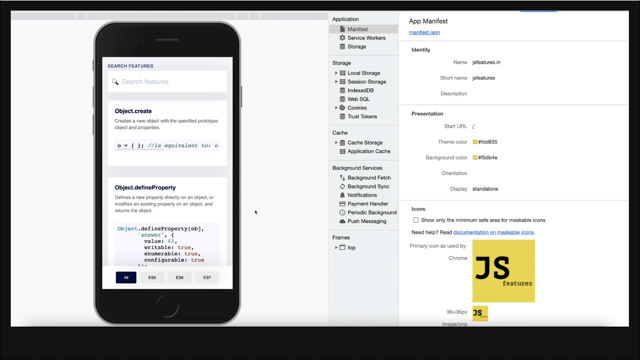
Now, you're probably thinking, if we're getting everything working offline and we're out camping, we want to look for a recipe. We're not going to open the browser and then type out a URL to get to a recipe website. We want a home icon. We want to compete with native. All you need for that is just a manifest.json file.
And you can define a short name, a full name, a bunch of icons, the start URL where you start when you open the app. Display standalone will mean that instead of opening a browser tab, it'll just open in its own essentially app, its own web frame. And so you can do the usual Android swipe between apps and all sorts of nice features.
You could get it to display just in a tab, up to you. And then you've got a bunch of theme colors and everything. My email app actually does this. So I use this every day. And it's just a web app on my phone, and it feels just like native. Web apps can load faster than native because you often have your browser in RAM. So the entire browser is already sort of stored there, ready to go.
So opening a web app is just that thin web app on top of the browser. But what if we want to update information? We don't just want an offline-only strategy. So one way of doing this is to check if there's internet. And just load from internet if we have a connection. So we can check is navigator.online.
So this is an online first strategy where we check if we have internet. If we do, fetch the resource, just go to the web, go to the internet. If not, then find our resource in the cache, otherwise return 404. So that's a online first strategy. Issue with that is navigator.online is false if we have no connection because obviously we're not connected to anything, we know we're offline.
But if it's true, we have not no connection. So does that mean we have internet? Well, I'm not sure. Okay, we're going through all the routers and systems and maybe connecting to a cell tower.
Do we have internet? Waiting. Oh, we don't have internet. Oh, loved waiting to find out. So, Jake Archibald calls this Li-Fi, which I just love. And he demonstrated by plugging a router into just some soil and, oh, you're technically connected.
And I think this is getting worse, not better. So we're building more and more cell towers, but they're 5G, and these new standards, sure, you get a lot of bandwidth. You're throwing a bucket full of bandwidth, but there's a leaf over there, and your signal won't get through the leaf. So I think it's getting worse with 5G than we had on 4G. So we've got a design around this.
And you might be wondering, okay, I'm only building a business app that's only used by a few important business people, and they're on fiber fast connections. Why do I care about offline first in that case? This is a great article I read recently where it discusses the first TCP packets to your website.
And how important they are. So TCP has this thing called slow start where you only send, I think it's 10 or so packets, or you get 10 packets at the start of a connection, and then each time a packet gets sent successfully, it'll double. And so you get this exponential increase in speed, which is interesting because with internet, sure you've got the download speed, but there's also the latency aspect as well, and latency has a huge impact on the web. But what if we could just avoid this entire issue and just have cached assets?
This is the beauty of offline-first. So this code here will get the cached response from our cache, and then if we have that, just return that, and then we'll try going to the network. So we'll get our network response from our fetch, and then if that's okay, we'll put it in the cache.
So this is if we don't have it in the cache already, we'll go down past there and add it to the cache. We'll have to clone things, because we're going to return one clone of the response, and we're going to put the other in the cache. And then we'll return that network response, and then if there's an error, will create an error.
So that's offline first. If we've got the cached resource, just give people that. Of course, you'll need to add some complexity if you want to update things and version manage assets. There's a lot of complexity that you can go into, but this is how simple it could be. Workbox does a lot of these strategies for you, adds lots of build complexity, lots of things, but Really good tool to add it to your real-life application.
Now, you're probably wondering about browser support. They seem like pretty powerful features. So, should I be bothered? Will people have this feature in their browser? Yes. So, I'm not sure this used to be 97%, but it's gone back down to 94. I think maybe can I use updated some stats?
But pretty much every user has this unless they're on an old iPhone or Internet Explorer, which, you know, that's their fault. It's about as old as Fetch. So if you're using Fetch, you can use Service Workers. Then you're probably wondering, okay, browser support's pretty good. What about how much can I actually store in the browser?
And will it last? Because the Web is Famously, quite ephemeral. Like, if I install an app to the home screen, Safari was killing things after seven days. What happens there? Well, the seven days only applies to non-installed web apps. But what if they run out of storage? How do I manage? How do I know how much I can store even?
A very quick summary is that Chrome basically is like a giant container ship. Store whatever you want. Don't really worry about it. I checked on my PC, which has like two terabyte SSD or whatever, and I had over a terabyte that I could use on one single website. I didn't check whether it warns you before it keeps using that whole storage.
Hopefully it warns you. But I like to think of Firefox and Safari more as like a truck. So you can load tons of stuff, but not a huge amount. And sensible enough to do a lot of pre-caching. But you'd want to use the storage manager API, which gives you estimates on how much is actually available and when you're hitting the limits there and all sorts of other things and pretty decent browser support.
You're probably wondering, how do I decide how much to cache? It's a bit of an ethical question, really. People might be on mobile data, which costs money, and in some countries can cost a lot of money. There's the environment and server costs, so you're paying. With a CDN, it's not as bad, but you're paying for this data egress, and the environment pays as well.
Someone might be on a slow connection, though, so maybe it's better to load things sooner and pre-cachE so that it feels less slow. But maybe then someone else is using their Wi-Fi and that slows down them. Maybe you download all these things and it's unused. And if you check what speed they're on and whether they have prefers reduced data, that's fingerprinting and so that's a privacy consideration.
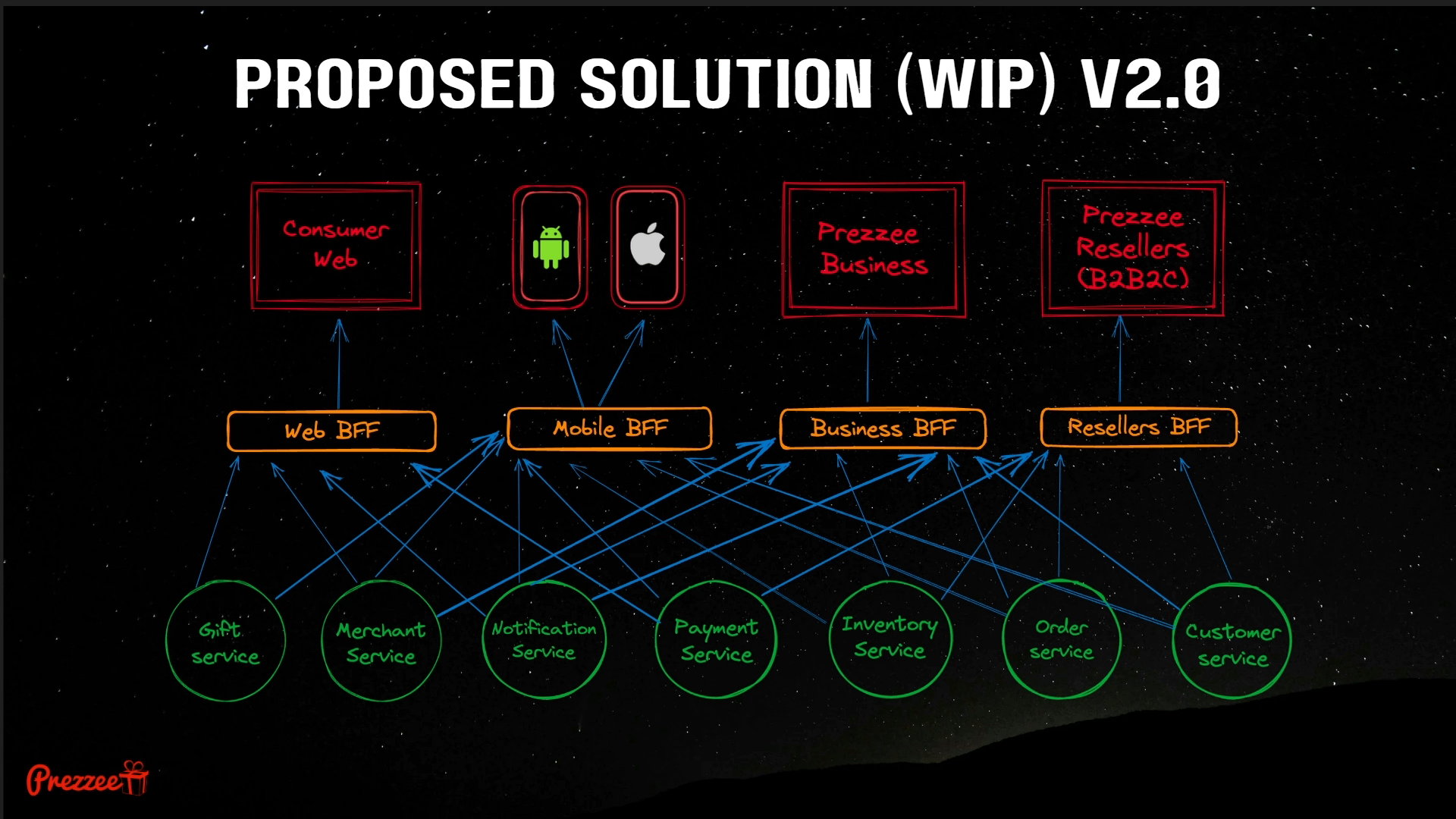
So there's a lot of tough ethics there and some interesting discussions hopefully at the end of the event, we'll have some good discussions on that. You can also do an offline database. So what if going back to this recipe analogy, I want to have a recipe comment section and I have maybe a BFF that handles all the comments and I want to interface with that.
And I want to index maybe based on most recent, or most upvoted, I can have an offline database. I could essentially clone the BFF and whatever microservices into the web browser. And we can do that with IndexDB, which has really good browser support. IndexDB is kind of known for being horrible to work with, but here's IDB, a small library, that's the entire thing right there that sort of covers up some of the terrible stuff.
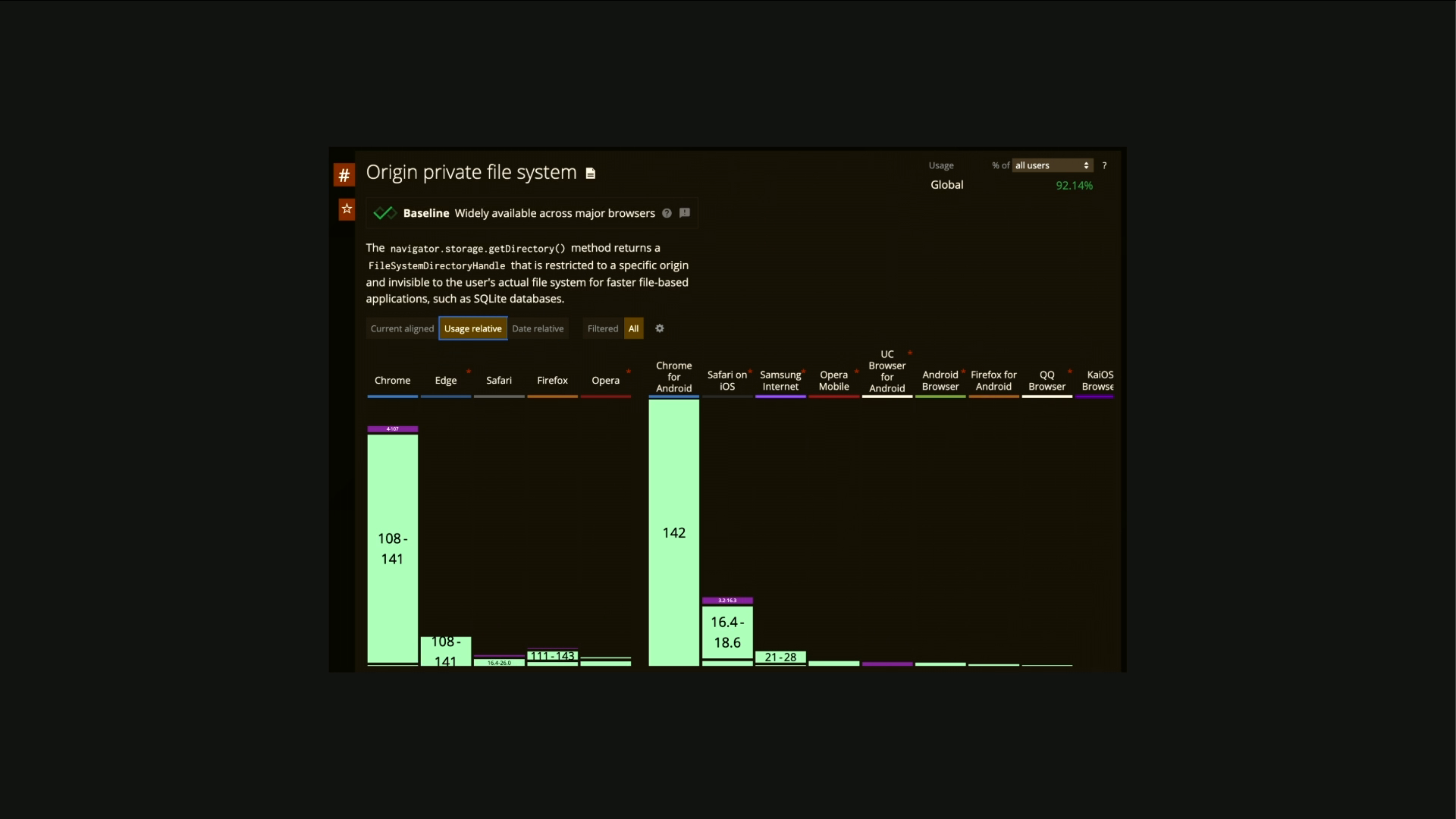
You could also use the Origin Private File System. So if you don't want to deal with IDB, you could just get direct access to a hidden file on someone's computer, and then you can use a Read/Write API, which has worse support, to directly access that file. And you could run Wasm SQLite on that.
So you can have an entire SQLite database in the browser, and it's only a few hundred meg, I think. But we've got all this data on the front end. We've got, you know, maybe gigabytes of data. How do we actually sync it with what's happening on a server? How do we update it? And does the app have to be open?
Like, we're trying to compete with native here, how can we actually sync data in the background? What if we want to write out a comment and then click send and then close the app? We don't want to watch it through. Or what if we want to download recipes every morning? If a user's using our site frequently, we might want to just download recipes even when they're not in the app so that when they're on the train on their spotty connection, they can just go through and view them.
Background Sync allows us to do this. Note that you will have to show a notification when you're downloading something, just to show the user that something's happening in the background. So I would argue this is better than Native, because on Native we install an app and we just have to trust that app not to do bad things and not to access all these features without us knowing. Whereas on the web we trust it a little bit less and so it's more private, more secure.
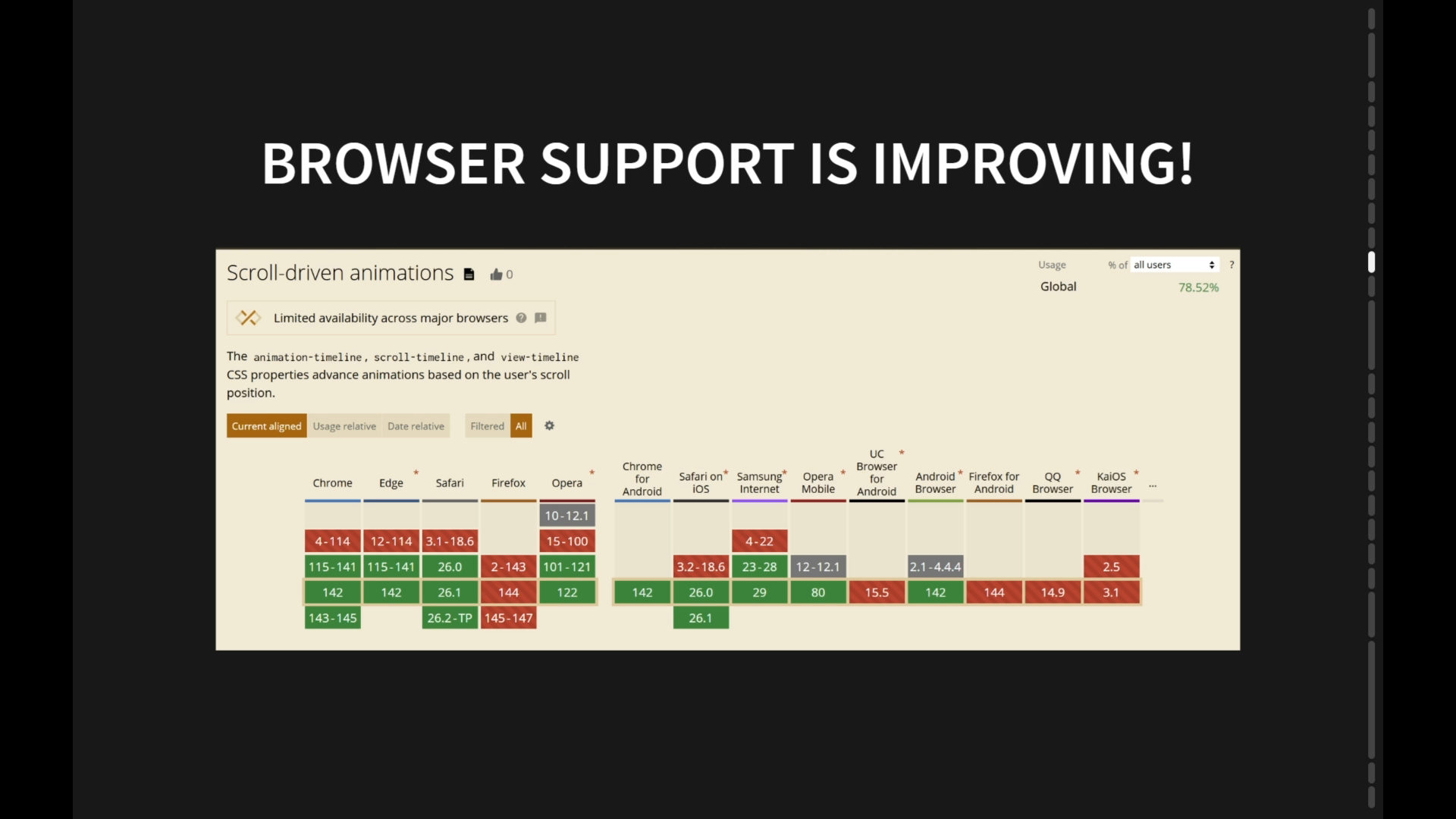
We know what's happening in the background because we've got that notification there. You'll notice somebody is sort of lagging behind. We'll get to that. So notifications as well. You'll probably want to compete with native using notifications. Safari has recently got their own version of them.
Some people, on one side of the fence, people like, we want all these PWA progressive web app features on browsers, and they'll say, Apple's lagging behind massively with iOS. Other side of the fence, people say, Chrome's rushing things. They're adding them before they're fully fleshed out in the spec.
You'll see the previous one, Firefox, didn't have support for background sync either. But I think we should be advocating for the web. I think that we should try and compete with native and have fair browser competition and more PWA features at our disposal. But I do think that we should also discuss features more before we add them to browsers, because we have to support them forever.
Lots of considerations there. But the beauty of the web is that we have one app that works everywhere. We don't have to build multiple code bases. We can just install a PWA on desktop, any mobile, and any device that supports the web, maybe on your smart fridge, recipe app, smart fridge. And we don't have to get gatekeepers permission to publish an update. We can just push a new service worker.
We don't need to be in the app stores, although people do expect apps to sort of be in the app stores. So on Android, I think you can put PWAs in the app store, but on iOS, you can't. So there's some issues there. But we have zero load time. So we're definitely competing with native, even if we don't have support for a lot of these features in one browser.
We do in the other. So it can be a progressive enhancement. I can use my Android PWA, for example, and get instant loading pages, and then maybe I'll use some ancient browser like Internet Explorer. Maybe you support it, and it will just be slower. So you can use these things and not use them at the same time. But AI, wasn't AI in the title?
We've got to add AI to everything. So why might we want to do AI offline? We don't need any API keys. They're expensive. We want to just get the user's device to do all the work. And we don't want to deal with data leaks. We just want everything local first on the user's device. We just want a static CDN that serves them everything, and they can run it.
So one solution for AI in the browser is Google's Gemini Nano, which is built into Chrome. Surprisingly, it doesn't support Android or Chrome OS, but it supports desktop. It even has Linux support. So you're going to need 22 gigs of space, an unmeted connection, four gigs of RAM, and it's pretty simple.
You just do languagemodel.create. I haven't played around with it too much, but it's quite good because it ships Gemini with the browser, and then it shares it among origins. So if one website loads it, you have access to it, which we kind of had a fingerprinting issue with fonts in that regard, but with AI, it's so much heavier, and maybe we'll change this in the future, but there is that privacy consideration.
Interesting trade-offs there. But it's really good for just if you want to add a sprinkle of AI for Chrome users. You'll get a loading hook that you can tie into to display to the user if you're loading Gemini for the first time. So if a previous site's already loaded it, you won't need to load it. And you can also set the temperature among all sorts of other things. But not everyone uses Chrome.
We want to look into something that everyone can use. Web LLM is one of many libraries that can run on top of CPU, GPU, or WebNN potentially. Web GPU is pretty good in terms of browser support. It's actually landed in Safari, it's in Firefox.
Once people update their browsers, this is coming really soon, it replaces WebGL a little bit. But it lets us run AI really efficiently. But what about NPUs? Everyone's getting an AI chip in their phone. If we want to compete with native, we have to tie into this on the web. So there's this new web neural network API, and there's a lot of work happening here, rapidly moving.
And this essentially gives you low-level access. It's like a primitive on the web for AI. It's really good bedtime reading. I'm not going to summarize too much on that. I want you to go and dig in and make comments and have your own opinion on what they're discussing. There's a Discord as well. So the browser support, it's behind a flag in Chrome, so you can play around with it, but definitely not ready for production.
So we want to play around with WebGPU a bit more. But you can turn it on through flags. And it's just those two there, and that'll let you play around with it in Chrome. It can do some cool things, like it can make an image starry night-ified, if that makes any sense.
But essentially, I didn't get a chance to finish a demo, but if we started off with just a dinosaur, no internet page on the web, We've now ended up with a full-fledged recipe website. We can load everything offline. We've pre-cached favorited pages or saved pages and anything that we might think the user wants to visit.
So we've gone from dyno to full-fledged website and the user doesn't even know that they're offline. So service workers, there's a lot of nice dev tools. I might zoom in a bit more. So you can just go to this application tab in Chrome. I've got a service worker.
This is a meetup that I go to quite a bit in Melbourne. So I made this a while back. If I turn off internet, this is a bit risky. And I reload. Please work. Yeah, it doesn't even show it reloading. So it's actually is reloading. And in here, you can see the size is empty because we're just loading from a service worker.
If I can expand that at all. You can see here, service worker. So we're loading all of this offline. So you can go into service workers, you can view the entire source code for your worker, you can go into the cache storage. So this is different from the built-in browser cache. This is the cache that we're controlling.
Programmatically, and we get much more control over everything here. We can catch any asset we need, including AI. So if I go here, this is an AI built with web LLM, which runs on top of web GPU. So it's not very intelligent, this one, but let's ask it a question. We might get a cursed answer here.
Let's find out. Oh, this is terrible. So you might want to load in a smarter one. This one's very tiny. But yeah, you can run AI in the web. It's not really selling it, is it? Let's do something cooler. Let's starry nightify something. So we'll set the GPU backing.
Of course, in the future, this can go straight onto your AI chips. We'll pick an image, go through all my private GIFs. Mr. Bean. There's Mr. Bean's Starry Nightified. So that's running all in the browser. You can see I've got no internet connection at all. So why aren't we building PWAs?
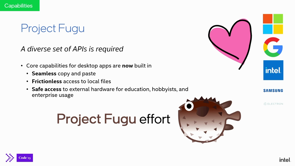
Why are there no web apps like this out? I think there's one culprit. One main culprit, of course, both duopolies don't want a free and open platform to succeed. One of them might push the web more than the other, but neither of them want to give up their 30% cut.
There's open web advocacy, which John has had a speaker on before, talking about how to teach legislators web technologies and push them to advocate on our behalf for opening the web up and supporting fair browser competition. Legislation is the main issue stopping all these technologies from proliferating, but that ties into if we're not forcing certain companies to play fair, we're getting bugs, user expectations are low, privacy is used as a scapegoat for a lot of things, There are some privacy considerations. Security, it might be less secure because there's so many more features on the web, but if we use the web more, we'll have more resources to fix those.
Performance is another issue, but all of these tie into legislation. So if we support more fair competition, then we'll get a much better web for everyone. Thanks for listening. That's my newsletter. I'll publish updates on all this stuff and you can find my LinkedIn. All opinions in this talk are my own and I'm also doing Movember, so if you want to support the cause, come and speak to me after.
But yeah, I think that's everything. Thank you.
People
- Jake Archibald
Technologies & Tools
- Chromium
- Service Worker
- Cache API
- Workbox
- IDB
- SQLite
- WebLLM
Standards & Specs
- Cache-Control
- clients.claim
- event.waitUntil
- Web App Manifest
- navigator.onLine
- 5G
- StorageManager API
- IndexedDB
- Origin Private File System
- WebAssembly
- Background Sync
- Language Model API
- WebNN
- WebGPU
- WebGL
Concepts & Methods
- Progressive Web App
- Online-first
- Li-Fi
- TCP slow start
- Offline-first
- Progressive enhancement
- Local-first
Organisations & Products
- Gemini Nano
- Open Web Advocacy