Local First: Collaboration Beyond Cloud
Local First: Solving Collaborative App Offline Challenges
The speaker opens by contrasting consumption-based apps with collaborative ones like Figma, Miro, and Canva, explaining how centralized servers power these experiences but create problems when connectivity degrades. The talk introduces the core problem: offline drift — the growing difference between an offline and online version of a shared document — and frames local first as a paradigm that lets multiplayer experiences thrive offline, sync smoothly when online, and give users ownership of their data.
Demonstrating Cloud-First Limitations with Trello
The speaker uses Trello as a live demonstration of a cloud-first app's offline fragility, showing how slow connectivity causes lag and how going fully offline prevents any changes from being saved. The speaker then addresses why simply making an app a PWA is insufficient, introducing the concept of drift — where two users working on the same document diverge — and drawing a parallel to Git merge conflicts.
Rethinking the Central Server Model with Local First
The speaker explains how decades of development have relied on a central server as the single source of truth, with clients acting as mere windows into that truth. The local first paradigm is introduced as a shift in which users own their data on-device, conflict resolution and intelligent sync handle drift in the background, and applications become instantly responsive by eliminating dependency on network round trips.
Live Demo: Real-Time Sync with a Local First To-Do App
The speaker demonstrates a local first to-do list running simultaneously in two browser windows representing two collaborators, Koala and Panda. Items added by one client appear instantly on the other without any manual refresh or sync action, illustrating the seamless real-time collaboration that local first enables as a baseline experience.
YJS and Shared Data Types: The Core of Local First
The speaker introduces YJS as the foundational package powering local first apps, centred on the concept of a YDoc — a shared real-time data structure that lives on each client's device. YJS shared types (Y.Map, Y.Array, Y.Text) mirror standard JavaScript data types, making the API familiar to developers while enabling collaborative state across clients.
Migrating a React Component from Local State to YJS
The speaker walks through a side-by-side code comparison, showing a standard React to-do list using local state versus the YJS equivalent. The key change involves replacing the local array with a Y.Array shared type, observing it in a useEffect hook, and directing all CRUD operations to the shared type instead. The speaker emphasises that most component logic remains unchanged, highlighting YJS's minimal migration footprint while unlocking collaborative and offline-ready state.
Connecting YJS to WebSocket and IndexedDB Providers
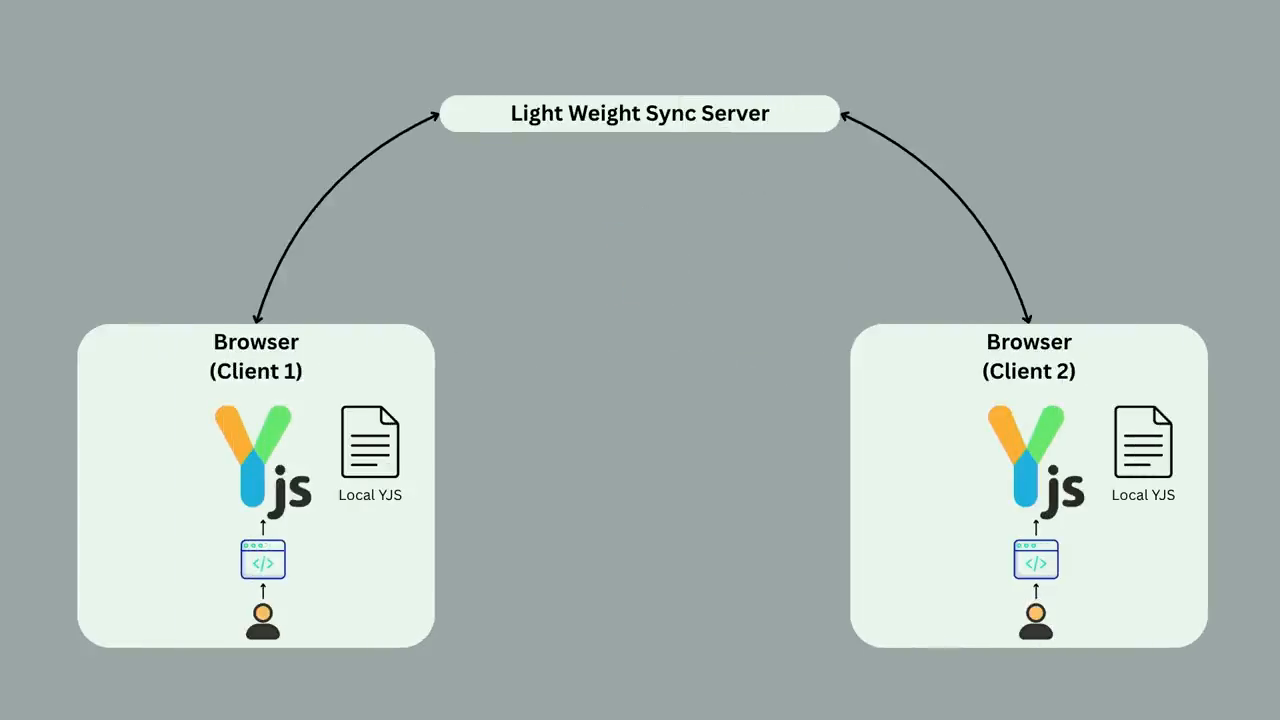
The speaker explains how YJS providers are modular add-ons that connect a YDoc to real-time networking or local persistence. The WebSocket provider is shown relaying incremental updates between clients through a lightweight server, requiring just one line of code on the client side. The IndexedDB provider (y-indexeddb) is introduced as a superior alternative to localStorage for persisting the YDoc locally, and the combined architecture — each client holding its own YDoc with both providers — is visualised in a diagram.
Offline Sync Demo: Conflict Resolution with CRDTs
The speaker runs a live demo where Koala goes offline, both Koala and Panda add items independently, and then Koala reconnects. The audience is asked to predict whose item will appear first — Panda wins. The speaker explains that YJS uses logical Lamport clock timestamps and CRDTs (Conflict-free Replicated Data Types) to deterministically resolve concurrent insertions, ensuring all clients converge on the same ordered state without any custom conflict resolution code.
Last Write Wins and Delete Semantics in CRDTs
The speaker escalates the demo to concurrent edits and then concurrent edit-vs-delete on the same item. In the edit conflict, Koala wins via the Last Write Wins Register — the last recorded operation by logical timestamp prevails. In the edit-vs-delete conflict, the delete wins, demonstrating that CRDTs in YJS treat removals as definitive over concurrent edits. Throughout, the speaker highlights that no custom conflict logic was written — YJS and CRDTs handled everything automatically.
CRDT Algorithms, Trade-Offs, and Real-World Adoption
The speaker gives a broader overview of CRDT algorithm variants including Grow-Only Sets and add/remove sets, noting there is no universal solution. The local first approach's challenges are acknowledged — increased client complexity, larger bundle sizes, higher device energy demands, schema migration difficulties, and residual server requirements. The talk closes by citing major real-world adopters of local first and CRDT technology including Figma, Google Docs, Shopify, JupyterLab, Evernote, and ClickUp.
Good morning. Yeah. That was great presentation coming from Afarlander. Thank you so much. And now we're here for local first and it's a bit of a switch up on what we've been talking about and maybe the way that we've been building so far. And so if you're someone who's building apps that are collaborative in nature, which means they used to work rather than just consume, then you it's gonna be a fun ride.
So so far, many of the apps that we use daily are more consumption based. Think of a news site or a streaming service like Netflix. But then there's others where people are actively coming together, working on a shared canvas or a piece of information, and they get the benefit of updated information as in when other clients are also updating it. A great example is Figma where designers and developers are coming together and building or collaborating over over shared canvas and some others are Miro and Canva as well.
Now when we think of these features, these collaborative features, these apps, our default is to lean onto heavy, big centralized servers to power them. And there's good reason for that. They offer us a lot of power and a lot of scale and it seems like a no brainer. That's really how we've been doing and also AWS pushes it quite a lot, so thanks for that.
But what happens when we lose Internet? These experiences are or actually losing Internet is rather dramatic, but if even if it slows down, these experiences slow down obviously because that round trip to the server is needs to be made and then eventually we do end up meeting our dear friend Dino here when there's no Internet. This the purpose of this talk is really to create an extension to these collaborative features such that they can deliver those amazing experiences that we've been used to and without actually being held back by connectivity and then having to face the problems that come when we're offline, that is sync problems when someone else has been working on that same device, same app.
And so I'm here to introduce a paradigm that will help us build multiplayer experiences that can thrive offline, sync smoothly when online, and finally harness the value of localized state so that users own their own data. I'm here to introduce Local First. Now before we get into solution mode, this is my backup video.
So I've got a little bit of a demo here of a cloud first app. This is Trello. I love Trello. I use Trello. No shade on them. But right now, I'm online. I've been using this board to prepare for this talk and because I have perfect connectivity, I can move my cards around really easily. But while I was on my way back, I was still working on this card and I was in a bit of a tunnel and ended up hitting refresh.
Live demos. It only took a quick couple of seconds. It's still taking a few seconds, but eventually it will come up is the hope. I'm just gonna give it So you see, it kinda struggles. Right? I was stopped for a bit, but eventually I'm just in a town. Right? I'm gonna come out.
But then what if I went bush walking and now I am completely offline? Trello pretty much of in in our faces tells us, your changes are not gonna be made saved. I can try moving them around but nothing's gonna happen. Even the cards can't be found. And if I refresh, this is gonna go away. So it's it my work was definitely hindered by not being able to be connected to the Internet.
Right? But nothing in offline mode can't fix. Right? We can just make this a PWA and sort it. That's it. We can now work offline. But then what about Drift? So Drift is in simpler terms, it can be defined by the growing difference between an offline version of the same document to the online version. In real terms, if a colleague was held the colleague who's helping me with the board with the presentation would have made some changes on the board and now we would see two different versions. A more realistic examples for people in this room are Git, where we inherently keep a local copy and then eventually have to manually sort out those merge conflicts which all of us love of course. So simply put, it's not it's not quite that straightforward.
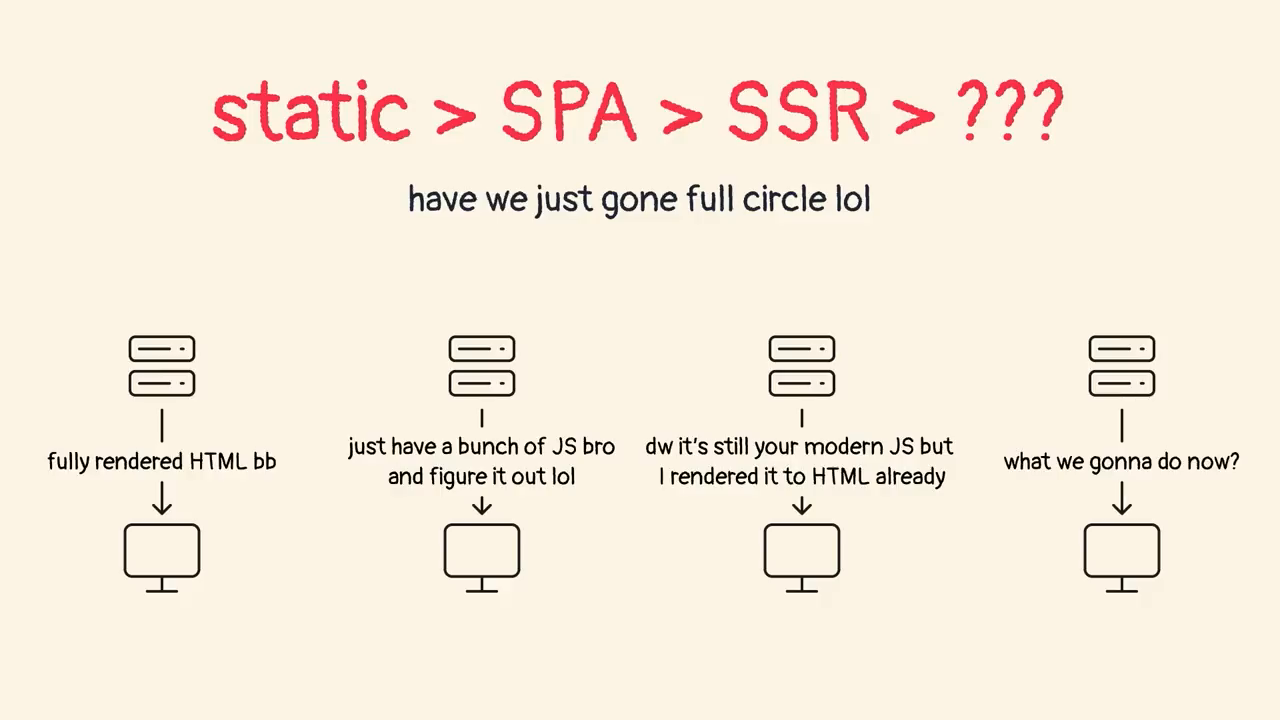
Right? We can't just make it a PWA and be on our way. Now primarily, that is because we have relied for the last couple of decades at least, we've derived quite heavily on the simple yet powerful premise that there's a central server somewhere that holds the truth. And our clients be it web, desktop or mobile are really just windows into that truth and they usually have to go back and forth to this source of truth to be able to actually be useful. And that's fine.
Right? That's good. This approach has given us a sense of control. It ensures consistency. There's a single source of truth. And also, it provides that much desired single source of truth that we all need until until we start building right heavy collaborative features into our apps, and then the central source of truth under heavy load can be slow to respond, and then, I'm trying to be dramatic here now, our data is held for a ransom, hidden away in a server, never to be seen again.
But, well, the more realistic thing is that maybe there's a better way here, and that is this local first paradigm, which is a powerful extension to the capabilities of our apps and how that shifts is basically starting with server controlling everything. Now the user owns their data, which means instead of the cloud, your data now resides on your device.
Right? Giving you immediate access and ownership. Regarding consistency across users, this is where the actual reimagination of experiences is happening. Through intelligence sync and conflict resolution for the drift part of the story often operating in the background, local first apps ensure that while you get immediate access to your data because it's offline and available, your changes are eventually and reliably propagated and as and when you do get Internet.
And then finally, what I like the part that helps us most, is responsiveness and performance, is by thriving offline, which is just being available offline. And how that does is basically our data is local, means applications are instantly responsive. You're no longer waiting for network round trips or server processing. You can be on patchy Internet and it's still gonna be available.
Now, I can talk all about it, but I have a little demo to show you. So this is one app that I have open on two different browsers just so we can eliminate the chances of crosstab comes. And what it does this this is a simple to do list and it's local first. So if I say koala, which is one of my clients on the left, adds an item, they're both online indicated by this beacon over here and say, an item.
Let's see. Moment of truth. As I hit that in, you saw that it just shows up on the other client. And then similarly, if I go panda ads, There you have it. No refreshes, no syncs, it just shows up on the other ones, the two collaborators. I don't know why they're talking to each other, pandas and crawlers by the way.
So, yeah. That's and that's it at initial glance. This is just the start start of it all. But at initial glance, that's quite a powerful experience to have. Right? Just not having to refresh and people just being able to work together. Like that. Now at the core of it all oh, that's my backup video. So at the core of it all and a lot of other local first apps is a package called YJS.
This package provides us with a wide doc. A wide doc is basically the equivalent of the canvas that we've been working that two or multiple users work together on. And essentially, this is the real time data structure that then lives on each client's device. The beauty of YJS is that the way we interact with it is through these shared types and which are y maps for objects, y arrays for lists, and then y text for collaborative text editing.
The cool thing is that they are really not much different from their JavaScript counterpart, which is maps, text, arrays, text. So you can still set to a map, push in an array, and then assign values to text. And that's that's how it's doing it at the center of it all. Right? Now, enough theory, let's have a look at code.
So this is how I would create I would have created a to do list component, which is on the left as you see. If I were using no local first principles and really just doing it the basic way. I have a to do list I have to dos as an array of to do items in my local state and the challenge with this is this state is either only limited to the component or this client itself if I bubble it up to the top level. But for it to be accessible on any other client or any other user using it, I would need to make some sort of an API call that would then save it in a database which and then other clients will pull from it, which is not bad. But let's see how YJS changes it.
So YJS starts just a level up from there. It starts by importing YJS the main package and then all we do as you can see there is instead make a new instance of YDoc and create a y to dos array. Like I said, because the arrays or the data types shared from y doc are identical to or similar to JavaScript data types.
All we're gonna now, going forward, do is leverage this y deduce array instead of the local state one that we've been using. How this changes is that traditionally our data was living up there in a server and then we were fetching to get that data into our devices, thus the Windows analogy. And now with YJS, it flips it.
And now every client has its own complete and authoritative copy of the document, which is the YDoc and those arrays. And then within those special data structures. And you might notice that the server is still in the picture because we need comms across the network, but then its role has been fundamentally reduced. It now acts as a lightweight server that simply is relaying updates between clients rather than actually doing any processing.
A more realistic example of this is to actually have a server which keeps a snapshot and maybe does some processing. But the key part, the crucial thing is that now our clients have their own copy and are not reliant on the server. So we've kind of moved that out of the picture. In terms of the code for the actual component, the bit that we're gonna change the rest of the component stays out as as it is. We continue to have our to dos local state within it as well. But I will grab your attention and bring it to the use effect hook there and specifically on the line that's highlighted. All we're doing here is setting up a observer or a listener on y to dos which is the shared array that we just created back there as this component mounts.
Next up, within it calls update to dos. Within update to dos, we take the y to dos array, convert it to a normal JavaScript array, and set it to the to dos the local to dos. Now my component by itself is still looping through my local state. The only thing that actually changes is that now my local state is not getting directly set but instead from the shared state.
We call it once for initial sync in case a client joins after some work has already been done. And then finally, we unobserve just so there's no memory leaks and when the component unmounts eventually. With this setup, any CRUD operations, be it add, edit, toggle, or delete, are directly modified to that y to do shared type instead of the local one that we've been using so far.
And did you notice that we actually did not change much of the component logic? We can still continue working with our standard React ways of doing things, except the key adjustment is now we're saving our list to a different array. And that's the the simplicity of this is where the beauty is. These operations still feel very familiar because we're still pushing to wire.
And deletions is also quite similar. But now we have unlocked the power of YGS YGS's collaboration, which means now at this stage it's not too not too fancy because we haven't really plugged anything in, but it's now ready for real time collaboration and local persistence.
Cool. And how do we do that? We do that by connecting our wire dock, which is the instance that we have created with something called providers. These providers are really just modular p pieces that we can stack on top of that document and make it connect to a web socket provider or maybe a local persistence provider to then enable it to do to do real time comms or local persistence.
How does that look? From a WebSocket provider perspective in a multi client setup, all we're doing is really getting our YJS component to get connected to the web socket. And now what this is doing is it now is acting as a simple messenger between those two between those two clients.
When it does get the does get Internet, it updates. It pushes small incremental updates to that client to the sync server which can then pick up and publish it to all the other clients that are in the picture. For the actual code, it's literally that one line that we see over there. We will need a server running by the way in the background, although very lightweight.
There's no logic there if we can just run that much, it's done. In terms of the client code itself, what we're doing is as you can see, we're importing WebSocket provider from YWebSocket, which is again one of the packages in the ecosystem. And then we're creating a new instance similar to that YDoc. And server URL is just coming from that server below.
Room name is a unique key identifier that all the other clients will connect to. And finally, all we did to actually plug the provider in is to pass that YDoc instance over there, which is pretty neat. Right? No. Not not too much code written there as well. Now for us to truly be able to thrive offline, we need a way for data to persist directly to our local user.
Now we can use local storage, but there's surely better ways to do it and that's where IndexedDB comes in, which is a low level, no SQL database which is available into our in our web servers sorry, in in our modern web browsers anyways. And y index tp which is that package over there gives a way for our wide doc to be connected to it.
What this is gonna do is really keep incremental snapshots of our wide doc within the app as well. Everything put together, this is what that diagram looks like. Each client as you can see get their own little Y doc and they get their own providers keeping a local copy of their data and all of the data that is updated from others comes through this WebSocket provider.
And now to have some fun. Cool. So I'm going to risk it and try doing it live as well. So for starters, we've already seen sync syncs happen. Right? So let's see. Our Koala is not too happy that a partner is using this. So they delete one of their apps one of their to do items and similarly panda returns in kind.
Now, what happens is our koala has chosen to go offline because he's in the bushes of course. And then as you can see, they're offline right here. Panda still online adds an item because Koala is not in any network connectivity, they don't see anything.
And then Koala adds an item as well. Again, no Internet, no syncs happening. And then obviously, you know, there's the patchy Internet coming up. Now before I turn that on, what's right now, what we see is Koala, because they're offline, they're seeing their item as the first one in the list.
And similarly for Panda, they're seeing theirs as well. When they rejoin, what do you think is gonna happen? Whose item is gonna be the first one versus the second in this case? Panda? Okay. Fair. Let's see. Cool. Panda is first.
Good on you. So why was Panda first, though? Panda is first and this app that we saw just there, I had I did not write any other code than the one that I showed than the ones that I showed you. So all we did is use that wire doc, use wire to dos, plug in the socket and the index db and that's it.
What YJS is doing internally is actually it's timestamping each operation that comes in and with a unique identifier at which is not necessarily wall clock timestamp. It's something called a it's a logical timestamp which uses Lamport clock, which is beyond the scope of this presentation in terms of yeah. Just going in.
So yeah. You can ask me questions, but I will embarrass myself. But what's happening is it's using something called CRDTs or conflict free replicated data types at the core of it in YGS, which are algorithms for lists such as arrays that essentially help us in finding a deterministic way of resolving concurrent insertions and deletions in maintaining a consistent state across replicas.
Right? So because everyone has those same same copies of data, it's important that irrespective of network latency or precise wall clock time, every client sees the same order of order of items in their lists. Because otherwise, Drift a Drift situation would have been simple. Koala continues to see theirs first and then ponder comes up second in their client. But that did not happen.
Now with this exact algorithm, yeah, we we've already time stamped things, so they kind of manage it for us. Which means no code written but this was handled very gracefully. Now let's kick it up a notch. Again, risk danger zone. So they can see and they're happy that we're still able to collaborate and work with each other and it's pretty good.
Now what happens is, Panda, because again, he's been in patchy Internet, stays offline, edits panda while online, edits an item, edits the first item. Changes don't don't come through, but they have edited.
So far in the last example, what we did is really add two new items and all YJs had to do is figure out where they land. Right? But now, we're coming up with the age old git problem if everyone wants to update the same line, which in this case is everyone wants to update the same to do item as Quala updates the same item.
Who do you think is gonna win now? Voila. Voila? Cool. Let's see. So there you go. Does win. It was so smooth that you couldn't catch it. But anyways, it's it's a Quala wins this one as well.
Again, similarly, what's happening here is Quala is winning because YJS has timestamps on individual map properties as well. Right? So the two things that actually changed is the item that was added by and the text itself. So every time we are all we're doing is setting text to it, there's also other metadata that's getting captured by YJS without us actually needing to set any of that.
And this is where CRDT is coming into picture. The algorithm, the actual algorithm that comes into play is something called last write wins register, which means it's designed to ensure that the last recorded operation for a given piece of data I say last recorded operation and being mindful that Quala was offline when that operation was recorded in their YGS document.
And so the last recorded operation for a given piece of data based on their unique timestamp is the one that prevails. It's very common strategy in collaborative context as well. Now I'm going to take it one level up. Panda is actually quite angry that he keeps losing. So what's happening is and Quala is just, he's away in a bush. He doesn't know what's happening.
Yeah. So koala in a spurt of anger deletes the same item while koala is chewing on well, can't spell. Thank you. On leaves. Chains are not coming through.
Now. This is the last and final time. I know this is gonna get boring eventually. Who's winning this one? Koala? Okay. Cool. Let's see. Paula does not win this one. So this is this is one of the fundamental things that is being being handled by YGS as well internally.
Right? Deletes are first class citizens. Right? So if I've got I've got a bit of text here that I need to get through. While the last register wins maintains last edits as the as the winner in most operations, Most CRDTs including YJS favors removals when an item was concurrently edited and deleted.
And deliberate deletes are usually, you know, considered definitive and edits do get overrun by them. Now the thing to note is we wrote very little code for all of that to happen. There was a really dumb lightweight server running in the background. All we did was really use our those types and it kind of did all of the work for us.
Right? But under the hood, what's actually powering it all is something, as I mentioned, conflict free replicated data types. And what it they're special data types that are designed to merge automatically and correctly without requiring conflict complex conflict resolution logic. So we don't have to have these debates of if Quala is gonna win or Panda is gonna win.
CRDT kinda handles that for us. These operations are structured in a way that no matter the order they arrive in, right, because when someone when a client is online, they their change is obviously gonna arise arrive first. It does not matter. It is when it happened that it matters. And finally, there's a few other the ones that we the one that we've discussed is oops.
I'm just gonna go back. The ones that we have discussed are last right wins, but then there's also some other algorithms as well such as Grow Only Set, which means if you've gone on Facebook and tried liking a post, there's a counter on there that keeps updating. Now, obviously, thousands of people are updating that at the same time.
So being able to synchronize that, but the grownly sets problem is that it can only add not delete. There's a there's another one where it maintains an ad and a removal set and the no edits are basically treated as ads. So if you edit something, it's just gonna pop out of the list and then just enter in another set.
There's no silver bullet unfortunately. So while this is while the local first approach is great, why YJS makes it really easy, there's still challenges. It does increase client side complexity obviously because we are pushing quite a lot onto the client. It increases the bundle size just a fair bit and obviously the energy demands on the client also grow quite significantly.
Debugging can become a challenge because now a lot of the data's moved on into the user. And sometimes how those problems arise because of that data interaction can be challenging. If we choose to change schemas, so come up with a v two, that can be also a bit of a problem because, you know, we have a local copy of our data and that's yeah. We can't just flick a switch and make it updated.
We'd have to have proper considerations. And there's also server requirements. I took the example of WebSockets, but there's also RTC and other options. But we still it's still not completely serverless unless Cisco decides to solve peer to peer. But yeah, until then there's going to be still server requirements in the picture. Some of the bigger organizations using this technology not in the simple form that we saw are Figma with their Figma is actually using this and they came out in 2019 with an article about how they power these multiplayer experiences.
Some of the other ones are Shopify for their shopping cart and, yeah, a few others as well around the around that area. And I feel so a more realistic way of probably oh, I have this later. So those are the companies. JupyterLab is the one that gives you a collaborative Python editing environment. So that's the one.
Evernote, the note taking. Google Docs is a big one, but obviously Google Docs owns their own technology and the math is quite complicated behind what they've been trying to do. ClickUp is a Trello like company that's also using it. I think I also mentioned Shopify. Thank you.
Technologies & Tools
- Git
- IndexedDB
- JupyterLab
- PWA
- React
- WebSocket
- y-indexeddb
- YDoc
- YJS
- YWebSocket
Concepts & Methods
- CRDTs
- Grow-Only Set
- Lamport clock
- Last Write Wins
- Local First
Organisations & Products
- AWS
- Canva
- ClickUp
- Evernote
- Figma
- Google Docs
- Miro
- Netflix
- Shopify
- Trello