From reactive systems to proactive intelligence
Why more dashboards leave users connecting the dots
Jessie Pahng introduces the challenge of making increasingly capable enterprise technology easier to use. An incident investigation illustrates how dashboards deliver signals quickly while users spend hours tracing ownership, impact, and relationships. She asks how systems could help users connect those dots.
AI connects context—but integration and trust lag behind
Pahng describes how AI can prioritize signals, explain anomalies, and support root cause analysis. She examines how rapidly added assistants and generalized answers leave users uncertain about what to trust. When users must independently confirm the output, promised time savings become harder to realize.
The gap between system logic and human questions
Pahng contrasts systems organized around assets, policies, events, and incidents with people asking what happened and what they should do. She explains how research and usability testing help bridge these different mental models. AI accelerates exploration and delivery, increasing the importance of preserving that understanding.
Polished doesn't mean right: validate consequential decisions
Pahng recounts giving two AI tools the same prompt to combine observability and lineage, then questions whether their polished results actually improve usability. She argues that teams should explore reversible choices quickly and validate decisions with wider consequences. As enterprise platforms add products and agents, designers must prevent competing assumptions and workflows from fragmenting the experience.
Make context, constraints, and uncertainty explicit
Pahng outlines an approach that grounds AI exploration in an established understanding of users and their problems. She recommends supplying constraints, asking AI to challenge assumptions, and identifying what still needs validation. Focused task context and collaboration with engineering can improve exploration speed and reduce unnecessary token use.
Lead for speed and scale the human experience
Pahng asks leaders to establish clear frameworks, give designers ownership, and concentrate their involvement on conflicts, major decisions, and critical end-to-end experiences. She returns to the gap between technical structures and human understanding, emphasizing that designers must define and evaluate what makes an experience better. She closes by urging teams to scale cohesive, intuitive experiences while keeping them human.
I wanna say hi first. I traveled a little bit of distance to come here, and I've been really expecting I didn't know what to expect, but I've been enjoying very much and you guys are so nice. Alright. So a few things I wanna talk about and share with you today and actually listening to what Peter had to say, it seems my talk is has a little bit of connection to that as well. My talk would totally support what Peter shared with us.
I spent my career solving one problem. Making complex technology easier for people to use. So in recent years, I've been working on enterprise platform across cloud and data infrastructure, security, compliance, data intelligence, and AI powered observability.
And over the years, across all these platforms, and I'm sure you we've all noticed, is technology has become more capable and sophisticated, vastly, but the user experience hasn't necessarily become simpler.
So let me show you what the complexity can feel like. An alert comes in, something changes and performance drops all of a sudden 40%. And the dashboard lights up like a Christmas tree and then we start looking through all the signals.
And years ago, what company had done is that, oh, there's a lot of signals. We gotta help the users. And what do we do? Design more dashboards. And we trace the problem across the systems to figure out really what happened and why. So we eventually find the answer.
But we might have taken hours getting there. So let me show you what the com what the complexity can look like for the user. Right? Users are trying to really figure out, mapping, their project and really just going into the timeline and then look at all different logs, metrics, and try to correlate and really figure out, okay, so who owns this one?
How important is it for me? Does it affect my data? Do I need to connect and collaborate with other cross teams? Right? So, that's what really takes a long time for the user to figure out. And the technologies have been there and it takes just a millisecond to bring all this data but it takes a long time for people to really understand what is going on because we still have to connect the dots ourselves.
So what if the system could help us connect those dots? So the evolution that's been going on very recently and it's rapidly increasing and expediting is now AI can help prioritize what matters, bring together all the context, and explain what might have happened and guide us on what to investigate next so we can solve the problem faster. Right? And that's incredibly powerful and this is actually happening now.
So as you can see and it actually this is really not a critique as as to whether it's a good interface or not. But you can this is also mocked, you know, using cloud, just to make it clear. But there's this old, like, a trend over time and there's all the data on the table underneath of it.
And as you can see, you try to trace the problem over time, anything that you hover over, the rows on the, in the table with highlight as well, you click and you can drill down into learning you know, more about who owns it and what happened and why and etcetera. Right? So, there's been evolution, there's been new companies like popping up, probably about maybe 19 ago in The United States really focusing on mapping the data because data quality is a big problem for larger corporations.
So the metrics that are coming out right now is actually AI is making the context altogether and it's helping people and company understand the root cause and do the analysis of that and identify all the anomalies. So that is very helpful.
Right? You know, if there's some information is missing and there's conflicts, AI can bubble that up. But now that's creating even more problem because enterprise companies are doing this really fast right now. So the technologies are not fully integrated. So think about having wrapper. Right? Wrapping on one side.
Wrapper on one side. Let's say, like, that kind of like a chatbot lookalike, right panel, like sliding out, you you can also enter information. So is that really integrated? Probably not because this is rapidly happening. What it means is that users are not trusting what they're looking at. And users not trusting because when there is a very unique incident that's complex, then what they're doing is they are copying what they're seeing and they can confirm.
So there's a huge trust issue. And also AI can automate but then the information that's coming out is pretty generalized. So users aren't really trusting what AI is giving them either. So does it really save time? Yes and no. Not really. Does it solve problem one side?
But that may be creating problem on the other side. So, not by having this evolution through the older industry in enterprise platform arena, how does a system really know what matters to the user? Systems have their own logic.
There are assets, rules, policies, events, incidents, and relationships between them. So think about use cases such as, you connect the pipe and migrate all the data, all those assets, you apply the rules. But if those assets violate policies, they will trigger events and altogether it will create incidents and all those thoughts and relationship will show in the lineage. So that deductive structure and if then reasoning is what how the systems are built in the back end.
Right? But that's not how people think. So if something happens that we are thinking, what just happened? What's affected? Is it important? Do I need to coordinate with other teams? Who owns this? Do I need to fix it?
What should I do? Did I fix it? So the mental model between systems and human are vastly different. Systems are built that way because, and again, it's for the hardware and it's a limitation about the hardware and what software can do and also debugging also needs a specific, very linear structure.
Right? But still there is a gap between what systems are made to do and how human think. And that gap creates complexity for the user. So that's why we've been doing user research, usability testing to understand how people think so we can make the experience more intuitive even when the technology underneath is complex.
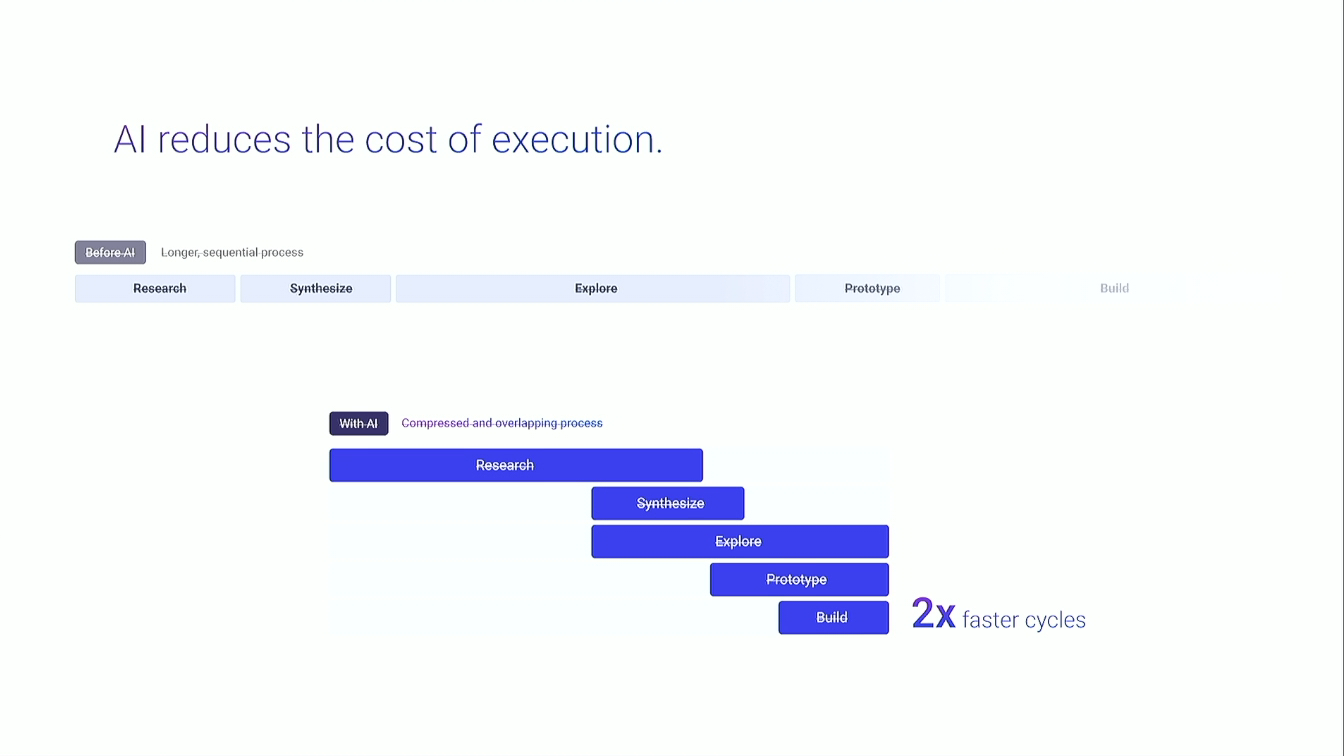
And that used to take time, but very valuable. But now AI is dramatically compressing their cycle. Designers can explore faster. Engineers can build faster.
Teams can ship faster. And I really love that. So probably everybody also experienced this. Right? We wanted to see something really quick that we use AI to, you know, show us super fast. And I go, I like that.
Mhmm. Yeah. That looks pretty nice. And I keep exploring. But there's another side to the speed. So I gave two AI tools the same prompt. Combine observability and lineage to make the experience more intuitive.
I thought, this look good? Very fast, but looks so polished, and I was very impressed. But was my assumption right? Does putting everything together make the experience more intuitive or more complex?
AI can make an idea look really polished and convincing very quickly. And it doesn't always challenge the direction we give it either. Right? So, if our assumption is wrong, we can go in the wrong direction, very far, very quickly.
Polished doesn't mean right. So I think about it this way. AI can analyze large quantity of data, identify patterns and synthesize information. It also helps us move really fast and explore tons of ideas.
But we still have to decide actually what makes sense to the user. So the question is, what if if we are wrong, then what happens? In a large enterprise platform, one workflow, one simple workflow can affect navigation, permission, terminology, other products in thousands of users.
Something can work really well in one place but create problems somewhere else. So if something is easy to undo, explore quickly. But if consequences are high, slow down and validate.
Why? Because enterprise companies are constantly adding new capabilities and scaling their systems. We are integrating platforms, adding products and introducing new AI capabilities and agents all very, very quickly.
And each one brings its own logic, workflows, assumptions, and altogether they can create a fragmented experience. That's why understanding how people think becomes even more important.
Because we need to bring all these pieces together into an experience, they make sense to the user. The technology can and will become more complex underneath, but user experience shouldn't. So the question is, how do we use AI to move faster without losing what matters?
I think about it in three parts. First, the foundation. So this is our understanding about the user and the problem. And this shouldn't change every time we use AI. Then we give AI constraints and requirements to work within, then AI can explore very quickly.
Ask AI to challenge the thinking. What assumptions do we make? And ask AI to tell you what it does know, and most importantly, what still needs to be validated.
And we can actually put this whole framework directly into the prompt. So designers, if you want one thing, you can take that to your team tomorrow. Take this. Good prompt isn't about writing more.
It's about making the right thing explicit. Give the AI specific context that it needs for the task. That helps the AI to stay focused, move faster, and actually use fewer tokens. Yeah. I know token anxiety is real.
And try, you know, work with engineering or design technologies or design engineers so that you guys can connect the systems all together. You know, that way you can only reference to that specific context. Right? To make the AI faster.
So it doesn't read everything, it doesn't get confused, it helps you to move faster. But this is still doesn't guarantee a correct design. But it gives us much better starting point for exploration.
AI makes designers faster. And leaders should be able to move fast with them. Set a clear framework, stay close to what's going on, give designers more ownership, help them make good decisions, and get involved where you matter most.
Resolving conflicts, influencing partners, making major decisions, and reviewing critical end to end experiences. That allows your team to move faster without lowering the quality bar.
And that's how design quality scales with execution speed. We started with a simple gap. Systems are built around how technology works. People experience them through how they think.
Complexity comes from that gap. And AI is not gonna make that gap disappear, but it can help us bridge it faster. It can analyze huge quantities of data, identify patterns, synthesize information.
That's all very helpful. But we still have to understand the user, define what good looks like, and evaluate whether what we are creating actually makes the experience better.
AI gives us leverage. Design give it direction. As our platforms grow, we have an opportunity to make the experience more cohesive, more intuitive, and easier to use rather than simply adding more complexity.
Scale the experience, not the complexity. And keep the experience human. Thank you.
Technologies & Tools
- Artificial intelligence
- Chatbots
- AI agents
Concepts & Methods
- Observability
- Data quality
- Root cause analysis
- Anomaly detection
- Data lineage
- Deductive reasoning
- Mental models
- User research
- Usability testing
- Design validation
- Prompt engineering
- Design leadership