Designing for Spatial Computing & the Apple Vision Pro
From Early Computing to Spatial Interaction
Oliver Weidlich opens by framing spatial computing as an emerging opportunity for UX practitioners. He traces his interest to an encounter with the first Microsoft HoloLens, whose overlays, gestures, voice controls, and head gaze introduced a fundamentally different way to interact with computers.
How Computers Learn About Physical Space
Weidlich defines spatial computing through Simon Greenwold’s work and explains how machines retain references to real objects and environments. He surveys world mapping, digital twins, computer vision, conversational interfaces, connected devices, and the growing range of headsets used to explore these possibilities.
Prototyping for the Vision Pro Era
Weidlich describes how Contextual created video and headset prototypes to investigate spatial experiences before products and conventions had settled. The Apple Vision Pro’s announcement accelerated that work, and importing an early US device gave his team a valuable view of onboarding and first-time reactions.
Research, Community, and Commercial Momentum
Weidlich connects industry experimentation with academic research, including collaborative work presented at CHI. Drawing on his earlier experience building mobile communities, he describes convening VisionOS designers, researchers, product professionals, developers, and local companies while pursuing commercial projects across spatial platforms.
Evidence Beyond the Early-Adopter Hype
Weidlich acknowledges the Vision Pro’s cost, bulk, limited adoption, and early application ecosystem, but argues that it should be treated as one point on a longer spatial-computing roadmap. He combines his own workspace, a survey of VisionOS professionals, and JigSpace’s enterprise work to show how collaboration, sales, and product demonstrations can already benefit.
Glasses, Context, and the Next Computing Platform
Weidlich looks beyond current headsets to investments by Apple, Meta, Google, and Snap in context-aware glasses and XR devices. He warns that devices able to see and hear what users do raise consequential data and design questions, making early participation by UX researchers and designers especially important.
Designing Day Ahead as a Spatial Utility
Weidlich presents Day Ahead, a compact volumetric calendar created to fill the Vision Pro’s lack of a native spatial calendar. He follows its development from desk-accessory inspiration and sketches through Figma, 3D modelling, Xcode, and launch, then shows how its genuinely volumetric form improves visibility over flat interfaces.
A Practical Entry Point Through Spatial Widgets
Weidlich distinguishes ordinary 2D windows, immersive spaces, and the volumetric middle ground, then recommends VisionOS widgets as an accessible first spatial project. He demonstrates environmental styling and proximity-based disclosure before closing with a glasses prototype that reveals contextual information gradually instead of covering the world with data.
Good afternoon, everybody, and thank you for coming along to the session. I'd like to start by acknowledging, in the spirit of reconciliation, acknowledging the traditional custodians of the land here at the Wurundjeri people of the Kulin nation, and pay my respects to their elders past, present, and any other elders that are here today from indigenous Aboriginal Torres Strait Islander peoples. I think it's wonderful that we've got UX Australia back. Obviously, last year, we missed getting together, but there's something really special about coming together, seeing each other face to face, old friends, making new friends, and I think sharing the learnings of the things that we've been covering over the last couple of years.
Today, I wanna focus on the things that we've been learning around spatial computing and to talk to you give you a bit of an explanation of what spatial computing is and our experience in understanding it, designing for it, and taking products to market around that, and the type of industry that is actually growing up around this area.
So I firmly believe that those of you who are UX researchers and UX designers in the room might see an opportunity here. And that opportunity might not be tomorrow, but it's coming. And I'll talk a bit more about that as we progress. So the first thing to note is I'm old.
Okay? I've now been in the industry half my life, which is a scary thought in and of itself. I used computers before they had mice. Right? So this is a long time, but the opportunity that that has given me is to see the evolution of these eras of computing and specifically how humans have interacted with computing over that time.
What has really been interesting is over the last eight years, we have been exploring spatial computing. And it happened many years ago. A friend of mine, Mark Pesci, invited me over to use a device that he had just been given from Microsoft, and that device was the Microsoft HoloLens, the first one.
And what was really interesting to me about this device was when I put it on, I saw digital content overlaid in the physical world for the first time without having to hold up a phone or a tablet or anything like that. And not only that, but I could also interact with it in ways that I'd never really interacted with a computer before.
I could use gestures, I could use my hands for gestures, I could use voice and talk to it. And in the first edition of the HoloLens, I could use my head gaze to sort of orientate information and things like that. So before we go too far down this path, let's talk about what is spatial computing.
And in the early thousands, Simon Greenwald wrote a paper at MIT, which sort of set the scene or certainly brought the term spatial computing to prominence. And he says, spatial computing is human interaction with a machine in which the machine retains and manipulates reference to real objects and spaces. It is an essential component for making our machines fuller partners in our work and play.
And what does that mean? Well, what it means is that the computer now knows more about where we are and what we might be doing. The computer can look out into the world and see that there's a floor there, see what it that there's a chair there, see that there's a roof there. And because of this information, we can potentially design these experiences that make that computer more of a participant or more knowledgeable about the context in which we are conducting our work or play.
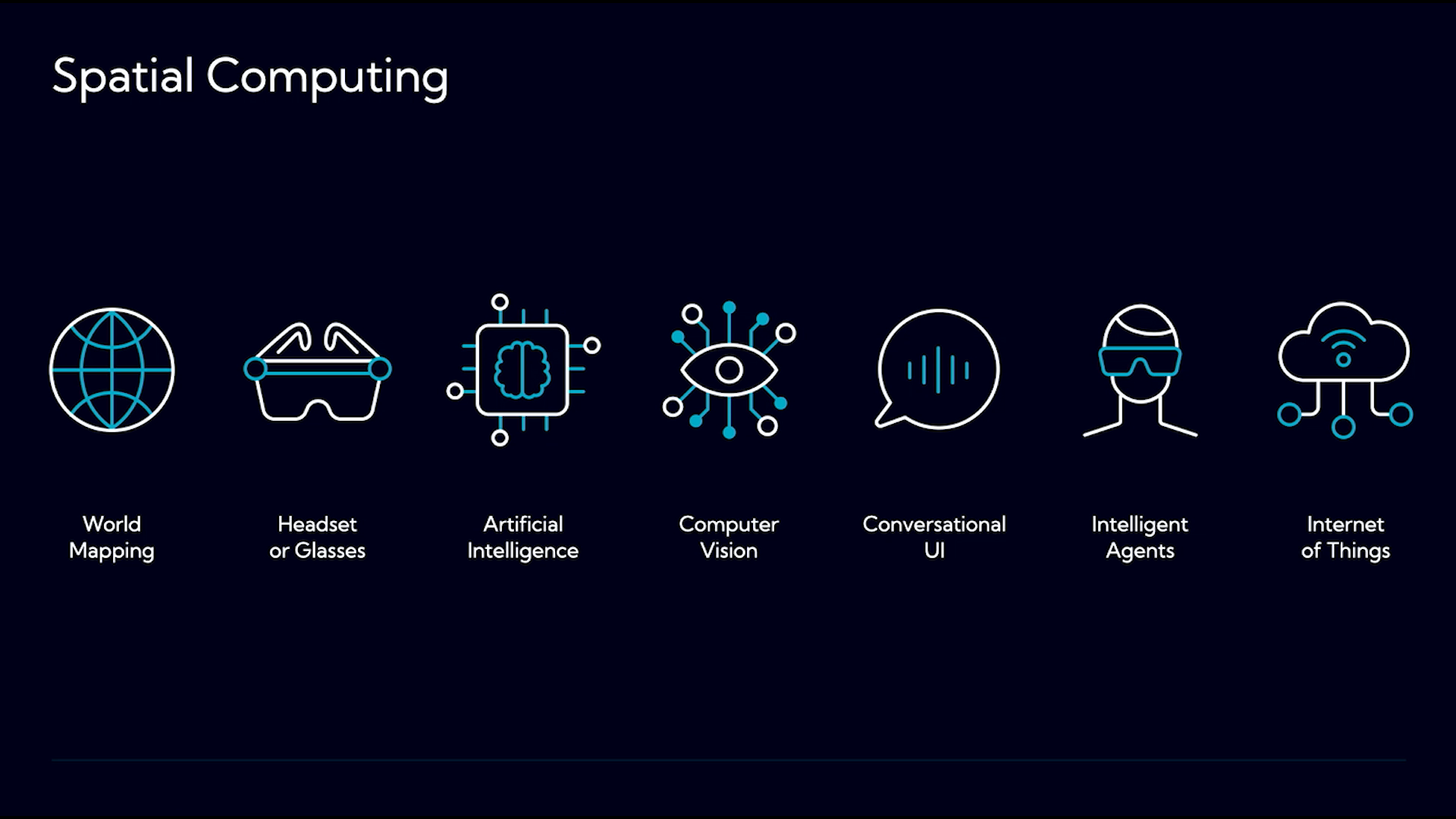
And I really like that he involved the word play there. So spatial computing can be made up by a number of a number of aspects, and not all spatial computing necessarily includes all of these elements, but I wanted to touch on all of them briefly just as quick background. So the first one there is the world mapping.
So understanding the physical world around you is critical, as we've just heard, for the computer to understand you and what you might be doing in that world. Now, that might come from things like digital twins of buildings. It might come from a service like Niantic's Lightship SDK where it has a bunch of maps of the real world because everybody's been pointing their phone, getting their Pokemons.
They've now rebuilt a lot of the physical world digitally and have a map of that. Or it might be the device itself, whether that's an Apple Vision Pro using LiDAR or camera sensors on the Snap Spectacles. But it understands, it can look out into the world and map that out. Of course, then you've got the headset or the goggles or the glasses, sorry, I should say, and we'll touch on smart glasses. And these are often powered by artificial intelligence, certainly in terms of their understanding, that computer vision of what is a chair or what is a wall and how that might feature into that experience.
And then also through intelligent agents and interacting with those intelligent agents through conversational UI. And then there's also the potential for this digital interface that we're overlaying on the physical world to loop back into the physical world itself and have change or effect on that physical world through the Internet of Things.
So we got the opportunity, know, as soon as I'd use that headset, I thought, what clients are we working on now? And we were working with a particular AgTech client at the time. We were redesigning their mobile application. And I was like, cool. Okay. Where are the gaps in the customer experience where a mobile app isn't suitable for this type of thing?
And we were blue skying. We were looking and thinking, okay, what if in ten, fifteen, twenty, thirty years, what might this look like for this farmer or this board member or whoever it might be to look out and better understand their physical world around them, enhanced with digital information. So we played around with that.
And that was one of the things that we see as really being key. And so we've had the opportunity to purchase a number of these headsets. We've got Spectacles, Oculus Quest, we've got the Oculus Pro, HoloLens, we've got Magic Leap one, Magic Leap two, and we're getting a bit ahead of ourselves, but there's the Apple Vision Pro.
So four years ago, I got the opportunity to speak to UX Australia. And at the time, we were called Mobile Experience. A couple of years ago, we changed our name to contextual to sort of emphasize this new opportunity of understanding that world around us. And we talked about designing for the augmented human, okay, and trying to bring to light some of the things that we'd found.
And since then, we've done a lot of prototyping and a lot of playing around with devices. There we go. So if you go to a website, here's a bunch of prototypes that we've created, both video prototypes and in headset prototypes, coding those up to explore little elements of what life might be like in the future.
And I'll show you an example of those later on. And then two years ago, we had the announcement of the Apple Vision Pro in June 2023. And from that announcement, we were fascinated by the device. We started thinking about what we could do around that device, what sort of experiences we could create around that.
And it's a fascinating device in many ways, and I'll I'll touch on on some of those later on. But what it's opened up for us is this new opportunity of thinking spatially to a high degree, high definition, high resolution screens, and a really good understanding much better than we've seen before of the world around us. So we looked at that and of course, it being a new device, we wanted to ensure that we could understand how people were using it.
And I happened to go, it launched in The US in February of last year. It wasn't on sale in Australia until July. I'm lucky enough to have a brother-in-law in The US, so I got him to buy it and sent to his place and he was going to ship it to me. Turns out that box is huge, and the weight and the size of that box meant that it was gonna cost more for me to ship it than for me to go to LA.
Well, that's what I told my wife. So I went over, got to do the whole onboarding experience and so on at the Apple Store, and and that was informative in and of itself. But then we bought it back. So what it meant was we had one of the first of these devices in Australia. So immediately, I started inviting all my friends in.
Think you get first one to find John in that. I think I know he is. To understand or to showcase or to explain what this experience is like. I know all the demo slots are booked for tomorrow, but if you haven't had the opportunity to use this device, no matter what your thoughts on it, I strongly suggest to try it at the local Apple store.
If you are in Sydney, please reach out. I'll come and do a demo separately. But in Melbourne, unfortunately, I'll only be here tomorrow. So this was really informative for me of how did people first experience this device, how did it work in terms of getting them to use it straight out of the box for want of a better term, and to engage with those elements of it, and to see their reactions and to see their response to this type of device. Since then, and because we're early adopters, we've now had the opportunity to do a bunch of things that have been associated with spatial computing. So I get to speak on podcasts all the time.
I get to do research. So this is a this is a a key passion of mine. For those of you who know me, I've always tried to straddle both industry and academia. So I have an adjunct position at Sydney University, and this means that we get to do, excuse me, collaboration on academic research. So one of my career highlights happened this year where I had a paper that I co authored with doctor Tram Tran and the rest of our team at CHI in Yokohama this year.
So that was a a key highlight. But what we want to provide is an industry perspective on what is happening in spatial computing and pair that with the academic rigor of research that pure research and academic research can offer. So we get to do various research projects. This is one of them. And I get to travel the world to to China, to Perth, as far as why is Perth and Singapore, and to talk to people, and again, try and introduce them to this this new era of spatial computing. In the early thousands, I was enthralled by mobile UX and got involved very much pre iPhone and saw that evolution of how mobile UX evolved from the early thousands to the iPhone in 2007 and then post and how that rapidly changed.
But the key thing was bringing the community together. So in Sydney, I ran Mobile Monday Sydney. I was the co chair of the mobile industry group under Aimia, an industry body. And now with spatial computing, I'm I'm doing a similar thing. So last year in October, we had our first event at the Telstra Customer Insights Center here in Melbourne in October, and we had about a 100 people turn up.
Now Apple is good at talking to developers and giving them developer assets and things like that, but what I wanted to do was bring product and UX and UI people together around this new area to see what people are doing. And we try to combine both speakers who come around to all of these. So Apple presents on accessibility in the Apple Vision Pro, but also with local speakers.
So here we had Jigspace. We had Foria, Sarah's here from Foria, present, and and so on. So we're trying to blend what's the best happening around Australia, plus what's happening locally. So as a community, they can come together, meet other people who are doing stuff with with Vision OS. So now, last month started this month, sorry.
I was running workshops in Amsterdam. I presented at Apple in London. I've been to Shanghai, Beijing, do a number of talks in Singapore. This is really exciting for us to see and to connect with the spatial computing community around the world. And it's this interesting time where things haven't solidified yet.
So if you are a UX researcher, UX designer, a product person, if this stuff floats your boat, now's the fun time to be in it because not everything's bedded down. And we are lucky enough to be currently doing commercial projects across all of these platforms. Right? We've got really interesting cognitive testing happening on one.
We're doing some big global stuff on another platform, and so on. So there are commercial opportunities out there. So the key question a lot of people ask is, hang on. Apple launched this device, and didn't nobody buy it? Or aren't there no apps in the App Store? Or I used it once.
I didn't really see it. It's too big. It's too bulky. It's uncomfortable. And I get that. Right? And some of those things have an element of truth to them. But I think what the idea is that we look beyond this device. Alright? This isn't about a particular device or a particular platform, but more broadly spatial computing.
But let's start with VisionOS. So Tim Cook said, right now, it's an early adopter product. People who want to have tomorrow's technology today, that's who it's for. Fortunately, there's enough people who are in the camp that it's exciting. Okay? So there's a whole range, and we can discuss it separately if you want, about the constraints on manufacturing of this type of device. But essentially, it's like a future facing device that we can play with today. If you compare it with the Snap Spectacles, they released theirs as a hardware dev kit, so developers and designers could play with it, not for the general public, but Apple decided to make it public. So that's one data point, and Apple talk about that this is a very early stage in their long roadmap for VisionOS. One data point.
Another data point is, of course, my personal experience. So this is a video of me in my office sitting in a lounge chair up the front. I've got Slack in front of me. I've got Notion in front of me. Just two d screen stuff. I'm going through, clicking on an article that maybe one of my team members sent me in Slack, having a read.
But it's a more relaxed way of engaging with content. I'm sitting back and so on. But then we might have a collaborative session. So maybe I've anchored a whole bunch of our screenshots or assets that we work on on the wall because I can put things around the physical space. I might grab that asset off and drag it into a collaborative session that we're having or that the team's about to start.
So I might put it on, you know, this in this case, it's free form. And, I get it didn't stick, but it does. Trust me. It could be a Miro, you know, future Miro product, whatever it might be. And my other team members might be, a, in their own VisionPros now next to me having the same collaborative experience.
They could be remotely having this collaborative experience. They could be on their Mac. They could be on their iPad. And maybe I refer to other content. So maybe I've got resources all around me that I can quickly refer to and go, oh, let's grab a video of that prototype we did. Or maybe I wanna turn the light on.
Of course, that's exactly what you wanna do there. And so you can see that loop back to the physical world. And then maybe I go back and sit at my desk, and this was actually filmed well before we could bring up our Mac virtual display so I can have my Mac display in my Vision Pro and check on some things that we'll talk about in a sec. So that's how I use it, and that's simply another data point. In September last year, a friend of mine, Tom Krikorian, ran a survey, excuse me, about how people were using their VisionPROs in the early days. So that was September after really a a July sort of global launch.
And he got some really interesting insights, and we got to hang out in in Shanghai together earlier this year at a conference. And we went, let's do another one, but we did it for VisionOS professionals. So this was 170 people, obviously a biased sample. There are people in our network, people who are engaged with VisionOS and Apple Vision Pro.
And, you know, kind of as you expect, if people are in this, how do they currently rate Vision OS, as in the operating system, and how do they currently rate the device? So you'll notice there's a bit more positivity around the the Vision OS side of things, but also around the Vision Pro, the device itself. Interestingly, we asked also about the future, how they see the future of Vision OS and of that device.
Again, a lot of positivity. Again, I get it. It's it's people who have a vested interest. But I think the next one is the most telling. In the next twelve months, how likely are you to increase the time and effort and money that you put in to Vision OS? And you see, I think it's over 60%, either yes slightly or yes significantly. So the people who are in it get it, and we might view they get it, and they are doubling down on that. They're moving forward with that.
And then another data point is is clients who are out there doing things. This is an amazing Australian company, JigSpace, who've partnered with their client. They put this case study up a week or two ago, and this is exploring what are the commercial realities of rolling this out in enterprise. The money that they are saving, the the future facing opportunities they have because they're creating these assets in this type of experience, the way they're rethinking, how they have a sales process.
You know? These big devices are not easy to move to a trade show floor. They're not easy to pull apart and demonstrate. That costs a lot of money to shift them, etcetera. If you can create a model and have a remote sales process with somebody, that might give them a lot more insight and really blow that model apart and play around with it.
You can animate it and things like that to design. So another data point. And these sometimes I think we have to reflect that it's only been since February last year at the most in Australia, it's only been just over a year that this device has been in market. Okay. So the other thing to think about is the future.
Right? I've just talked about the Apple Vision Pro. That's a device that's here now. Okay? We are rapidly on a path to these devices changing. Now that's not to say that it will evolve very quickly, but we're getting there. Because if you look at all of the large tech companies, so Google, Meta, Snap, Apple, all are investing billions and billions of dollars in this next era of spatial computing.
Okay? Recently, Mark Zuckerberg wrote this on his blog. Personal super intelligence that knows us deeply, understands our goals, and can help us achieve them will be by far the most useful. Personal devices like glasses that understand our context because they see what we see, hear what we hear, and interact with us throughout the day will become our primary computing devices.
Now that might scare some of you, and that's kind of okay because this is exactly like what we saw with mobile in the early thousands. Right? Now I'm not saying it's going to be the same, but now is the time for us as UX researchers and UX designers to get involved to make sure that the right decisions are happening around this technology, how that data is being processed.
Like, there's a lot of potentially very scary things that are in that statement. Okay? But how do we progress to a future where those are designed in the way that we would hope that would be designed? And you can look around. So Meta have an event next month, September, where they're likely to launch their new AR glasses, so a digital overlay in the glasses.
We're likely to see new devices from Apple. Google are bringing out their new their first Android XR headset and so on. This next six to twelve months is going to be phenomenal in the number of different devices that start to come out. So I thought today what we'd do is we'll talk about our first spatial experience and how we created it, and then I'll flip it and we'll go, what are the opportunities for you?
We've created an app called Day Ahead. We wanted to do this specifically for the launch of Apple Vision Pro. So the announcement was in July. The launch date, we didn't really have one, but we had the SDK and we played around with it. And so we wanted to put something out there. And remember, we're a UX consultancy.
We don't have dev capability beyond prototyping dev capability. We wanted to make something small and useful that people could put in their spatial computing workspace. We wanted to make it volumetric. We wanted it to be beautiful. Right? Like, that's an important thing. If we're overlaying digital on the physical world, there's no reason why it can't be something that we find aesthetically pleasing.
And of course, we didn't want to hold data, anyone's data. We were just doing this to explore that opportunity. The problem that we saw was that in the Apple Vision Pro, there is no native calendar application yet. So you get an iPad app. Right? And that takes up a lot of your visual field.
And that's not how we think people want to see their calendar or refer to this information. And we thought back to the early days of the Macintosh, and for those of you who might remember, they had these little applications called desk accessories that ran in between the code of the large because you could only run one app at a time, so MacRite or whatever it might have been.
These little DAs, like calculators and the puzzle and time and things like that. And we thought, what's the modern equivalent of that? What's a desk accessory that you might have in your spatial computing experience? So we started sketching, of course, and thinking about how might we create this glanceable information visualization that can live on my desk or wherever I want it, and I can just refer to it and see what meetings I've got coming up or what it might be. And of course, we started to grab the images off Apple's website and put them up and and sketch over the top of them and go, oh, it could fit here and how big would it be because the physical world is very different.
We've got this unlimited screen real estate we can play with. And of course, we dived into Figma to create those two d screens. Now where it started to become really different is when you start playing around with the three d models. And this is very much a very interesting place to start to go and play and to understand how these representations of three d volumetric assets can be positioned and moved and relate to us in our physical environment. And Shane did a great job here.
One of my UX consultants played around with it and got it together, got it into Xcode and simulator. Now I'm blurring over this because this is actually there's some technology there. But when I talk about why you might start, I'll look at a different path. And so we launched day ahead. On the launch day of the Apple Vision Pro in February last year, we got a lovely comment around it.
And I was sitting at home on the couch one night and watching a YouTuber, Chris Lawley, and this popped up.
Tastical isn't the only calendar app I use on Vision Pro. There's an app called Day Ahead that I've been using, and Day Ahead is a really interesting app. Instead of having like a window like you would traditionally do for an app, this just has a three d tube, and inside it are your calendar events. So you can see your events and when they will be happening.
You can see where you currently are and how far along your events are. You can then look and select an event, and it'll show you all the details for it. This is a really clever app. I absolutely love playing with this. For a digital three d environment, I think this is a really clever way of showing calendar events.
It's a simple looking app, but I'll totally admit to that. But I think a lot of really good native Vision OS apps aren't trying to be these big complex UIs that you would see on something like the Mac. They're just simple utilities that you can just interact with, They do a particular thing, and then you can move on.
And so that sounded great to us. Right? That was exactly what we were trying to achieve. How can we incorporate information in a way that is engaging, visually pleasing, and useful in somebody's day to day spatial computing experience. And this was a nice comment that we got as well. And we've just we're just about to ship an update where we can actually overlay meetings at the same time, which see sounds simple, but we'll get back to that.
Then we took those assets because I was, like, frustrated with the silly battery monitors. There's no native battery monitor in in the Vision OS for some reason. Maybe they they don't wanna really tell you. But we decided to reuse those assets and create our own little battery monitor as a glass cube instead of an ugly lava lamp.
Or what we thought was really interesting was people who might not have thought through the whole aspect of spatial computing. And what you find is that when you're in an environment, so I've got a another battery monitor there, and then we've got ours. And then as you move around the side, because we've created ours volumetric in three d, I can always see where the battery monitor is. But you can see the other one is just a two d plane. So if I move to that part of the room, I can no longer see my battery monitor.
So these are some of the elements you need to rethink when looking at three d design. Now in the closing minutes, let's think or let's look at how you can create your first spatial computing experience. Now to establish this, we've got two d windows. You saw those at the start in the video of my office, Notion, and so on.
These are just iPad apps that are brought into the space. Two d apps are fine, not very exciting. Spaces are fully immersive, videos, things like that. More on the entertainment end can be others, but let's leave that there. Where I'm interested in is the volumetric space as you saw with Day Ahead. I was lucky enough to be at the Worldwide Developer Conference at Apple in Cupertino, and one of the things stood out to me this year in June.
And that was this little bit here, widgets. Now widgets are on your iPhone. They're on your iPad. They're on your Mac. They're going to be in CarPlay shortly in your car if you want them, and they're on your watch. And now they're coming to spatial computing. And what that means is, if you have an app that's already in the App Store for iPad or for iPhone, you can have a piece of content that now lives within somebody's spatial computing experience.
So the first super simple step is, can we rethink the content that people might want to see when they're in there and simply add it as a widget option on your current app? With VisionOS, you also get bonus sizes, so extra large portrait and extra large landscape. And these you VisionOS exclusive, but they also have the opportunity to create sort of more interesting experiences.
So this is my work setup. I've got weather. I've got time. I've got our thing there. I've got battery monitor, etcetera, etcetera. And then you can actually personalize these so you can make them all fit into your environment because these are things that should feel like they live in your environment. So you can change the color of the frame.
You can change it whether it's light or dark. You can inset some. You can put them in frame for others and change that frame size. And there's also an aspect which I think is really interesting about proximity. And what that means is when you're far away, you get a piece of information. When you get closer, that information can change and become more richer.
Okay? Now the potential of that is is fascinating, and we'll come back to that on the very last slide. Here's another example. I'm getting the game score. As I move closer, I get more detail about that game. And you can tap on this widget, and it will take you directly to the application. So it's kind of a shortcut as well, which is really useful instead of having to navigate through all your apps or use your voice. There's a lot of the detailed design around these elements, but this is how I had it set up, for example, in my hotel room last night.
So music playing, I can control that, looking at some key pieces of information, the weather, and so on. But these are really easy to to pop up quickly. And there's a great video on it. I've got a QR code at the end of my deck, so you can scan that and you'll get links to all of these videos and resources. But what I wanted to end on was a bit of pro well, a prototype that we created, which is looking to the future. Right?
We don't expect people are going to be walking around with the Apple Vision Pro on through their house all day, every day, etcetera. But we are moving to this place where glasses might take some of that role as another potential device. So we went, how do we scaffold information? Because we don't want to plaster digital data everywhere.
So as I'm leaving the house, maybe I've got a set of icons, but as I get closer, it gives me more detail about the contextual aspects that I want to know about. So I take my phone charger, I take my umbrella because I know it's going to rain and I can head out into the world. Thank you for your time today.
As I oh, as I mentioned, all of those have booked out, so I had it there, but I should have taken it out. But again, if you are really interested in in trialing it, I've probably got one of the only few pairs of the Snap Spectacles in Australia, but but reach out in some way. I'll get a get you to have a demo.
And as I mentioned, that QR code, it's got all the resources that I talked to, some design the other resources around designing for spatial computing as well.
People
- Mark Pesce
- Simon Greenwold
- Tim Cook
- Tom Krikorian
- Mark Zuckerberg
- Chris Lawley
Technologies & Tools
- Lightship SDK
- LiDAR
- Artificial intelligence
- Computer vision
- Internet of Things
- VisionOS
- Mac Virtual Display
- Android XR
- Figma
- Xcode
Concepts & Methods
- Head gaze
- Spatial computing
- World mapping
- Digital twins
- Conversational UI
- Desk accessories
- Volumetric design
- Widgets
- Progressive disclosure
Organisations & Products
- Microsoft HoloLens
- MIT
- Apple Vision Pro
- Snap Spectacles
- Oculus Quest
- Oculus Pro
- Magic Leap
- Contextual
- Freeform
- Miro
- JigSpace
- Day Ahead
- CarPlay
Works
- WWDC