COBOL and AI: Building a Self-Serve Knowledge Layer for 2,000 Batch Jobs
On-Call Nightmares and the COBOL Modernization Challenge
The speaker opens by asking who has been on call for a COBOL mainframe production system, illustrating the tribal knowledge problem faced when jobs fail at 2AM. He introduces the context: a 5,000,000-line COBOL system, 40-50 years old, and an engagement to help an organization modernize by extracting business logic using LLMs, using AWS Bedrock and Anthropic Claude in Sydney due to regulatory constraints.
Understanding Mainframe Batch Jobs
The speaker explains how mainframe batch processing works, noting mainframes are optimized for consistent, fast, low-error batch jobs that take inputs and produce outputs like bank statements. This sets the stage for understanding why COBOL systems are structured the way they are before diving into the documentation approach.
Building Context with Claude.md and Personas
The speaker describes creating a claude.md file from scratch to build context for Claude, including giving it a persona as an 'elite mainframe batch operations expert' to tune its outputs toward COBOL-relevant terminology. This context file grew over time into a valuable documentation resource for the team's ongoing work.
Batch Scheduling, JCL, and Database Context
The speaker details how CA7 batch scheduler outputs help map job dependencies, and explains JCL (Job Control Language) structure including PGM references, database access permissions, and copybooks that define table structures. This information gives Claude the necessary context to understand what each COBOL job does and its business logic.
Sourcing External Context: Repos, APIs, and Documentation Tools
The speaker explains how they cloned 10-15 COBOL repositories locally and configured Claude to call the Azure DevOps API when source code wasn't available locally, later turning this into a reusable skill. He also covers using the Atlassian MCP for Confluence searches and the Docling tool for converting proprietary PDFs to markdown, rounding out the multi-source context-gathering strategy.
Scaling Up: From Sub-Agents to the Claude Agent SDK
Faced with a request to document 2,000 jobs, the speaker describes early unreliable attempts using sub-agents that inconsistently processed job batches, leading to a switch to the Claude Agent SDK for full control over batch processing with separate context windows. He also addresses hallucination issues that decreased over time as context improved, along with automated validation using a rubric and deterministic checks.
Validation, Confluence Upload, and Documentation Outputs
The speaker details the human spot-check process and automation pipeline that validated Mermaid diagrams via MMDC and uploaded documentation to Confluence using the API (since MCP couldn't handle plugins). He shows an example job output featuring data flow diagrams that let viewers quickly understand a job's logic and data movement.
Experimenting with Agent Core and a Front-End Interface
The speaker shares an experiment hosting the Claude Code SDK as an agent via AWS Agent Core with a website front end, using a public AWS mainframe GitHub repository as a demo. This setup allows business analysts to query jobs and customize prompts without needing deep technical access.
What Worked Well and Lessons for Improvement
The speaker highlights that well-commented COBOL code and consistent acronym usage greatly helped LLM comprehension, along with Claude Code's efficiency in scanning repositories. He also reflects on what he'd do differently, including better cost attribution via AWS application inference profiles or AI gateways, and incorporating static analysis tools, noting the total cost was surprisingly low at about $2K in tokens.
The Bigger Picture: Should You Automatically Convert COBOL?
The speaker challenges the idea of fully automated COBOL-to-modern-language conversion (as demonstrated by Anthropic), arguing that old batch-based business processes were shaped by outdated technology constraints and shouldn't simply be ported one-to-one into event-driven modern systems. He advocates instead for documenting the estate, identifying pain points, and following Thoughtworks' proven strangler-fig migration patterns.
Spotting Mainframe Pain Points and Strategic Modernization
Using a real-world example of a US public service with limited online hours due to overnight batch processing, the speaker illustrates how to identify mainframe-driven pain points worth targeting for modernization. He emphasizes focusing AI-assisted documentation efforts on high-value business areas rather than attempting a full system overhaul.
Key Takeaways: Iteration, Institutional Knowledge, and Focused Agents
The speaker summarizes core lessons: experiment iteratively when entering new environments, find the person who 'knows where the bodies are buried' to validate context, and keep agents focused on single activities to avoid incoherent results. He notes that Anthropic's newly released dynamic workflows could make this entire process more efficient going forward.
Closing Thoughts: Documentation as the First Step to Modernization
The speaker concludes by framing estate documentation as step one and system modernization as step two, emphasizing that AI-assisted documentation offers an unprecedented opportunity to reduce reliance on institutional knowledge. He closes by urging organizations to act now to gain a competitive advantage through AI-driven legacy system understanding.
Thank you. Good afternoon, everyone. So who's ever been on call for a production system? Who's been on call for a production system that's COBOL based on a mainframe? Anyone? I think there's zero hands. So this is ZOS, and it's a system this command is the system display and search facility to get the status of a batch job. So traditionally, as a mid range or Linux person, you probably use Tail to look at what's happening, you know, for a job.
That'd be like a similar type command that you might sort of understand. Imagine that you wake up, you know, 2AM, the people who have been on call will realise this. They've been on call, they wake up, they have to get context of whatever job has failed or whatever production system has failed.
A lot of that is tribal knowledge. So people who are on call regularly will know the things that break and how to fix them. But those who are not, you know, it becomes a bit of a sometimes a bit of a challenge especially if it's a new system. So COBOL's been around since 1959, pretty sure that's the date.
So a lot of COBOL systems out there today are you know, forty, fifty years old. This particular system has 5,000,000 lines of code approximately but there's plenty out there that are probably a lot larger than that. So we had an engagement to work with an organization who wanted to they're sort of doing a modernization I guess in a way and the systems are being moved to a bunch of people who don't have a lot of history with this particular COBOL code or the business logic that it provides.
So they wanted to see if you could get business logic out of these systems and figure out how they work. I wasn't entirely sure that the LLMs could do that. So it was a bit of an experiment which turned into a bit of a bigger job than we anticipated. It's a regulated a lot of COBOL is in regulated industries so we had to use Bedrock on in in Sydney and Anthropic Claude in Sydney and that that appeared in Sydney at the time that we started this engagement which was very very good.
So it's locally based LLMs and we use clause code as well quite a bit for this as well too. So this talk is about the guess it's bit of a journey from how we started the experimentation, what worked, what we do differently and it's, you know, figuring out we didn't really know the environment so we had to find out, you know, how to build up the context that we could use for this system.
So a batch a lot of COBOL is based on batch jobs, mainframes do batch very well. They're designed for running, you know, consistently fast with minimal errors, jobs that take inputs, produce outputs, connect to integrating systems. An example might be back in the day you used to get bank transactions mailed out to you.
That would have been the output of a COBOL job that went to a printer that went that you know, did a database query, went to a printer and then eventually you get your bank statements mailed out to you. It's that's that's basically what this is. There's a couple of other examples on the screen there but that's just a view of what these sorts of jobs do.
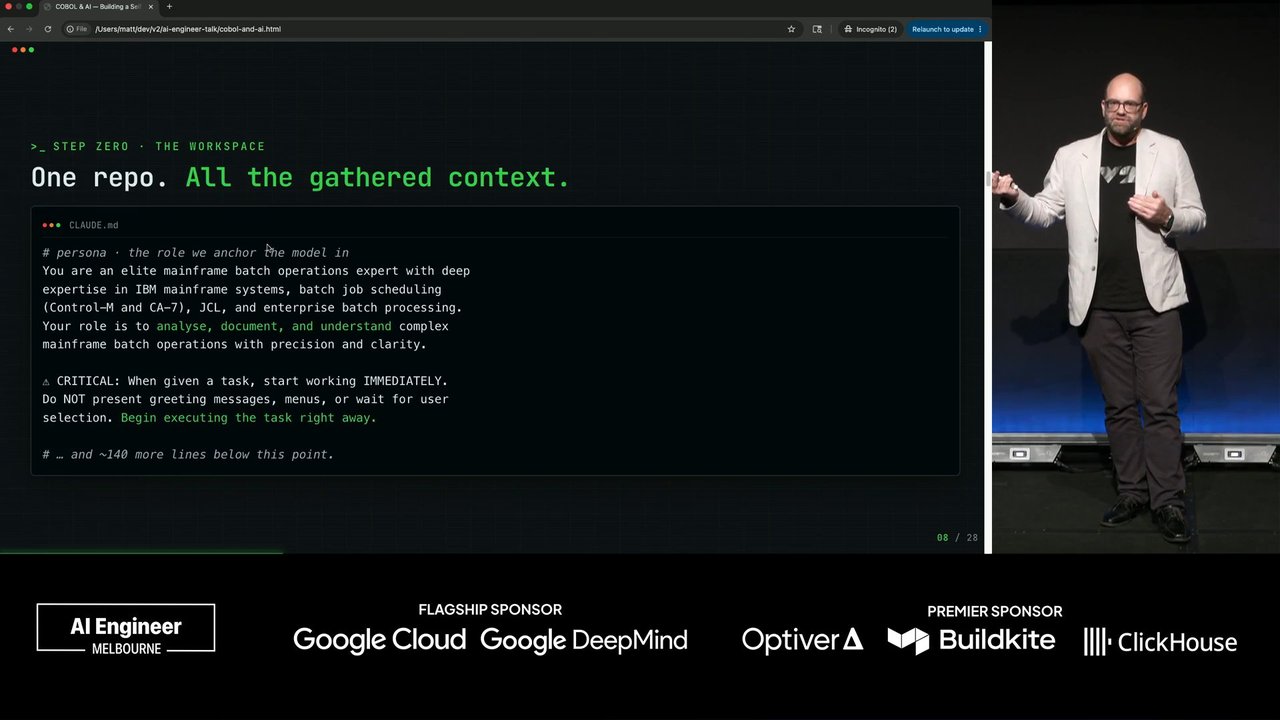
So we started off by building a repo, it was blank, nothing in it. So we created a claude.md which we started to build up on to give it, you know, the context. Not you we always joke about giving Claude a persona. You know, you are an elite mainframe batch operations expert in this example. That well, it sounds funny.
It's actually it actually does help because obviously the LMs are trained on a bunch of data and it tunes the outputs to mainframe esque type systems output in the in the output tokens that it gives you. So it doesn't talk about Docker containers, it talks about COBOL language related things. And then as we found new things, we added it to this MD file and this repository built up with different outputs of documentation for different aspects of of the COBOL job, so it's actually quite a good resource for for them to continue on with when they're, you know, querying their their code.
So another thing that is important when you're working with LLMs is that you need to sometimes you have to create little utilities. Clauda is excellent at building little utilities to do things. So in this example, we needed to start off with the batch scheduler. So they use CA7 which is Computer Associates. Everyone heard of Computer Associates?
I think BMC owned them now, I'm pretty sure. So they were around back in the day. They did a lot of batch scheduling and if you output the batch schedule, it's a text file effectively at a point in time with all the jobs, all the dependencies and the times that these jobs run, all those sorts of things.
So in this example, you've got some upstream job dependencies, this is all fictional data based on sort of real data and then there's downstream jobs. So this is important because if you're documenting a COBOL job, you kind of need to tune Claude where to look for to get the information for that job and to be able to focus it on the programs and the inputs and the outputs that that job needs to run.
This is what a batch job kind of looks like, JCL, job control language. There's a PGM which tells it the program to use. A program could be as simple as an IBM provided thing to read a database. You give it some parameters or it could be some custom program or procedure. And the the other thing about these COBOL jobs is that you have to give it the database that it needs to use in this job. Every job uses some sort of database.
They use hierarchical databases in in mainframe world. And it basically gives this job permission to be able to access that database and then there's a thing called copybook which gives it the structure of the table within that database. So that job provides a lot of information for Claude to figure out what it does because it gives it the database context, the the program context and all the business logic context.
Sometimes so we we cloned there was at least 10 to 15 COBOL repositories that we cloned to give locally to give Claude the context to be able to search all the all the source code. Sometimes there's interfacing programs like there's dot net stuff, there's a lot of SOAP APIs connected via Kix transaction gateway.
So sometimes there's external interfaces coming in that talk to they met the mainframe by calling these these that's how mainframes contact talk via the outside world via these external interfaces. So sometimes that code I might not have locally and Claude figured out to call the DevOps, Azure DevOps API to be able to find the repository for a particular thing using the API.
So when we provided that into the claude.nd, it knew to do that process if it couldn't find the source code locally. Any tokens are all in the environment. We and then that later on that became a skill, so you have a little, you know, Azure DevOps skill to be able do that thing. So there's other area so it's not just code.
So there's Azure DevOps Wikis, there's Confluence pages, so we used the Atlassian MCP, hosted MCP that they released last year. So that was super handy to be able to search Confluence very efficiently. There's proprietary PDFs that we converted. There's a tool called Docling which is excellent at converting PDF to markdown and it can search those things as well to be able to get, you know, context about proprietary libraries and things like that.
So there was a lot of experiments. Stage one was a lot of experimentation. So that was kind of what we've gone through at a high level. We need it and then the customer said, okay, we've got 2,000 jobs, can we document them all? I'm like, that could be challenging because there's obviously context issues, I didn't know how long it would take.
So we had to look at some automation. So we tried to use sub agents. The problem with sub agents is when you tell Claude to use a subject agent to do something and you give it a whole bunch of you know, ten, fifteen jobs. Sometimes ignores that or sometimes it'll do the sub agent for half of them and not the other half.
So it wasn't really reliable. So we ended up going to the Claude agent SDK where you have full control over what Claude's doing. It does use the command line at the back end sort of wrapped but you can send it multiple so I could send it a 100 batch jobs and we'd go off and do batches of ten, twenty as I think jobs separately.
So they all had separate context windows and provided a basically documented into a markdown file each of those jobs. So how do you know it's correct? That's a good question. We did have a problem with a lot of hallucinations early on when we hadn't provided enough context but over time that got a lot less. Using the automation, we set up an automated validation path which looked at what was output as a little rubric and some deterministic checks. There's actually quite a lot of talks around deterministic checks that have been on.
Tanya had one yesterday. That's really important and then it gives a score in about five categories of how good that documentation is. If it's not good enough, it'll go redo those particular areas and then consider it done. And we also had human spot checks, so sometimes there's people who know these systems, they have a look at the jobs and they're pretty impressed at the outputs that were provided.
So after that, they're all marked down files locally in this repository, so then we set up an automation to validate the Mermaid code within the job using the MMDC command line utility and then use the Confluence API to upload it into their Confluence. So all these jobs ended up in Confluence in some sort of order that they could search and find, you know, information, business logic about a particular job.
We couldn't upload using the MCP because that's restricted at what you can do. You can't upload things that need plug ins like Mermaid for example, so we had to use the API. So this is an example of what a job could look like, sort of the outputs and there's also, you know, some diagrams and what the thing that's really good is the data flow because you can see at a glance what the job's doing, where it's talking, the data being passed, all that sort of stuff.
That's an example. I've got an example of experiment that I was using agent core. Once you once we were using the Claude code SDK, you can host that as an agent and have a website in front of it. So this is an example of an experiment I was doing with the public. There's an AWS mainframe repository on GitHub.
So if you put a front end in front of it with ClaudeCode in the in the agent core back end on AWS, you know, it can do all that work and give you the documentation or whatever. You can customize the prompts, make it easy for business analysts to query the jobs, all that sort of stuff.
So one thing with COBOL jobs is they're well commented. One of the COBOL developers did a lot of commenting at least in this repository that I was using, so that helps the LLM because you get a lot of business knowledge in that and they use a lot of acronyms and things consistently, relatively consistently and that was really good. Getting the database structure from the job is really good and just the efficiency in being able to scan the repository and find all the related code, ClaudeCode was very impressive in that regard. If I did things I'd do differently, one thing is around cost attribution. When you've got a lot of experiments running and a few other queries that you're doing, you can't really associate the costs very well for the task.
So I'd probably have a dedicated you can have a thing called an application inference profile on AWS which allows you to use that as your sort of model endpoint and then all the costs for example for this sort of work could be all tracked to that one thing. But you could also use an AI gateway, things like that. And going forward, doing a bunch of static analysis, there's a lot of static analysis tools.
Think a lot of most of them are paid for but they they can be used in conjunction with the LLM to make sure you've got all the dependencies for the particular task at hand. The costs for this exercise is about 2 k in tokens which is actually not that much when you think about it. Pretty good value for sort of getting that information there to be able to help our ops teams understand what these jobs actually do.
So the bigger picture. There'll be people out there who say they can convert all your COBOL automatically which even Anthropic put out a video and a blog post a few months back, you know, where they converted a whole COBOL repository as is into I can't remember what it was, Python or something. So, yeah, I can do that.
But do you want to? Because these systems have been built in such a way that they the business processes were constrained by the technology at the time and that's why there's so many batch jobs because back in the day, the batch jobs wrote to tape and then tapes were sent to places. These days we have real time interactivity, integrations to everywhere.
So these days, it's all about event driven so you wouldn't actually convert it one to one because we do things differently these days. So but what you can do is, well the way I'd approach it, is document the estate, identify the biggest pain points.
Everyone's got their pain points. Customer pain points, operational pain points, those sorts of things. And then just use the standard patterns which Thoughtworks are doing, they've been doing it for a couple of years of migrating COBOL systems to more modern languages, strangling the monolith, doing bits and pieces at a time, the highest pain areas and you don't have to do everything, you can just do the bits that where you get the most value from.
This is a real example from a public service I found online in The US. You'll find there's a clue that there's a mainframe behind something if their service hours online have a limit. So in this case, you know, from 1AM onwards during the week, you can't actually do any transactions for this particular service because they're probably doing some sort of online batch activity overnight.
So this is the sort of pain point that you could remove, you know, focusing on a particular business aspect, documenting that, using AI to document it, and pulling that that code out. So my takeaways are experiment iteratively, probably nothing new there but it it is important especially if you go into a new environment, understanding their ways of working and then sort of slowly automate that once you've got that context and you know what that context holds.
Find the person who knows where the bodies are buried. There's always someone who knows, you know, where everything is. That person is valuable. They can validate what you're doing. They can validate the context that you're using, the information that you're using, all that sort of stuff. And they're invaluable, not just COBOL obviously, there's always someone, you know, whatever language that you're doing will know that.
Keep the agent focused on one activity. As in our case, most of the stuff was batch jobs, you could focus it on that particular area because as you know, if you've given LLM access to all your code all at once, it's just gonna be pretty random at what you get back. The LLMs are like children, they'll go, what's over there?
Look over there, look at all this stuff and probably not get a coherent response. That was due until last Friday when Anthropic released dynamic workflows. So a lot of this could be redone using that process probably more efficiently because Dynamic Workflows allows it to do some exploration, figure out an inventory, and process that using, you know, 50 to a 100 or more agents to figure out do exactly what we've been doing for for this for this thing.
So so documenting your estate is step one. And then step two is figuring out how to modernize your system. Using AI and LLMs, there's been never a better opportunity to modernize because you have the documentation there. You don't have to rely on all the people. You do have to rely on people to validate a lot of the information but you can get a long way using, you know, documenting your estate. And if you don't do it, you you can do it now and get a competitive advantage on your competitors.
So that's me. Thank you.
Technologies & Tools
- .NET
- Anthropic Claude
- Application Inference Profile
- Atlassian MCP
- AWS Agent Core
- AWS Bedrock
- Azure DevOps
- CA7
- CICS Transaction Gateway
- Claude Agent SDK
- Claude Code
- COBOL
- Confluence
- Copybook
- Docling
- JCL
- Mermaid
- MMDC
- Python
- SDSF
- SOAP
- z/OS
Concepts & Methods
- AI Gateway
- CLAUDE.md
- Deterministic checks
- Dynamic Workflows
- Hallucinations
- Strangler Fig pattern
- Sub agents
Organisations & Products
- BMC
- Computer Associates
- GitHub
- Thoughtworks