Code Trust and Verification for the AI Era
Speaker Background and the AI Tooling Explosion

The speaker introduces himself with a multicultural background spanning Ukraine, China, and Korea, then frames the talk around the dramatic acceleration of AI tooling in the software industry. He describes the challenge of keeping pace with daily announcements, while arguing that despite all the new tooling, the fundamentals of software development—focused on developers—remain unchanged.

Three Types of Developers in the Age of AI

The speaker categorises developers into three archetypes: the sceptical expert who uses AI only for information retrieval, the augmented engineer who uses AI to scaffold code but reviews every line, and the 'vibe coder' who delegates entirely to AI agents. He draws on his own experience at GitHub Copilot to illustrate the middle archetype, and notes that all three groups ultimately rely on the same underlying tooling infrastructure.

AI-Generated Code and the Path Traversal Vulnerability Demo

The speaker walks through a realistic AI coding scenario—implementing a PDF upload feature—and shows how at least half of LLMs produce code with a path traversal vulnerability, where an unsanitised filename can be exploited to access unauthorised directories. He explains that while AI can fix the issue if told about it explicitly, the root problem is that LLMs are trained on publicly available GitHub code of varying quality, which Sonar quantifies through its publicly available LLM leaderboard.

What 'Good Code' Means Depends on Context and Time

The speaker argues that code quality standards are not universal: an early-stage startup optimising for investor demos has very different priorities than a company preparing for an IPO under auditor scrutiny. He also highlights how standards shift over time, citing OWASP Top 10 rankings where supply chain attacks moved from sixth to third place, and explains that Sonar maintains a research centre to track these evolving industry standards.

Sonar MCP Server: Connecting AI Agents to Your Quality Rules

The speaker introduces Sonar's MCP server, which integrates with an existing SonarQube instance so that an AI coding assistant can query it in natural language. When the assistant detects a Sonar-related request, it routes it via MCP to scan code, retrieve issues, and return results in plain English. He also explains that pairing the MCP server with the Sonar IDE extension allows some scans to run locally, improving speed, and describes the alternative SonarQube CLI for developers who prefer command-line control.

Context Segmentation and the Agentic Analysis Feedback Loop

The speaker describes two additional capabilities built on top of the MCP connector. Context segmentation injects project architecture, quality profiles, and policy definitions from SonarQube directly into the LLM prompt before code generation begins, producing significantly better output. Agentic analysis then scans the generated code for vulnerabilities and, if issues are found, sends it back to the model for revision—a loop the speaker has seen run three iterations before returning clean code.

Remediation Agent: Automated Pull Requests and Scheduled Backlog Reduction

The speaker introduces the remediation agent, which automatically generates pull requests to fix issues found in code reviews and long-standing backlogs. He presents two modes: manual selection of specific issues for the agent to fix, and a scheduled approach—likened to a daily gym routine—where the agent picks a set number of issues at a configured time each day and raises PRs for them. A live experiment on a popular open-source library demonstrated that continuous automated remediation eliminated nearly half the backlog within two days.

Hunter Agent: AI-Powered Detection of Authorization Vulnerabilities

The speaker introduces the Hunter Agent, designed to detect business-logic vulnerabilities such as Insecure Direct Object Reference (IDOR), where a logged-in user can access another user's records simply by incrementing an ID in the URL. He explains why AI is particularly well-suited to finding these authorisation flaws, and notes that when the agent was run against a popular open-source project it surfaced more than 200 issues, which were reported to the maintainers. Results surface in the standard SonarQube UI alongside all other issues.

I didn't expect that, so I put my pretty picture on the on the screen just to give you an intro into myself. I'm born in Ukraine, studied in China, worked in Korea. My family is always we speak four languages at home. We need at least one translation at dinner discussion. On weekend of flight, gliders send count money and watch all the podcast, and trust me, no, I'm not a spy because even though a lot of people suggest that's the case.

So what I wanted to talk by the way, has anybody used Sonar here? Has anybody heard of Sonar? SonarQube before? Okay. At least some I'm not sure if we still use it. That's not a good that's not a good sign. Yeah. Okay. So what happened in past six months is probably there is more turbulence in the industries than in previous ten years.

I I don't know how you about you, but I feel that every day I you think a year ago, I learned what I started Sonar. I learned what SonarQube is. Every week, maybe two weeks, there is maybe some new news. This time, I struggle to keep up. I wake up every morning just to check the news and make sure that I I'm up to date so our salespeople don't kill me at 9AM asking all these questions about this new thing announced every day. So that all the ACI tooling came up, but the fundamentals didn't change. It's all about developers, really.

That's all about that's the people that we are talking about when we build these tools, including ours. And from what we I see in the industry, all the developers who start using AI tools, they sort of fall into these three types, three buckets. One is your hardcore developer. If you watch Matrix, that new who watches the Matrix and sees clearly exactly what it is, They write co code in Notepad.

Those are the people in the first bucket. They don't trust AI. They write the best code, but they do use AI. They use AI as a search tool, as a tool to find information, to understand information. So they use AI as a replacement for your knowledge base, confluence, whatever there is. Right?

Then there is a second type who are they're somewhere augmented engineer. They want to build some functionality. They use AI to build the skeleton, but they go through every line of code and to make make they review it and make sure that whatever AI created is actually valid, makes sense, and according to everything they wanted to do.

So they use AI just to create something which they thoroughly review. And when I started working with by the way, before so, I was with GitHub, selling GitHub Copilot, and that's where I started using the tooling, and that was me at that time. And then there is a third type. And this one, who heard of white coding before?

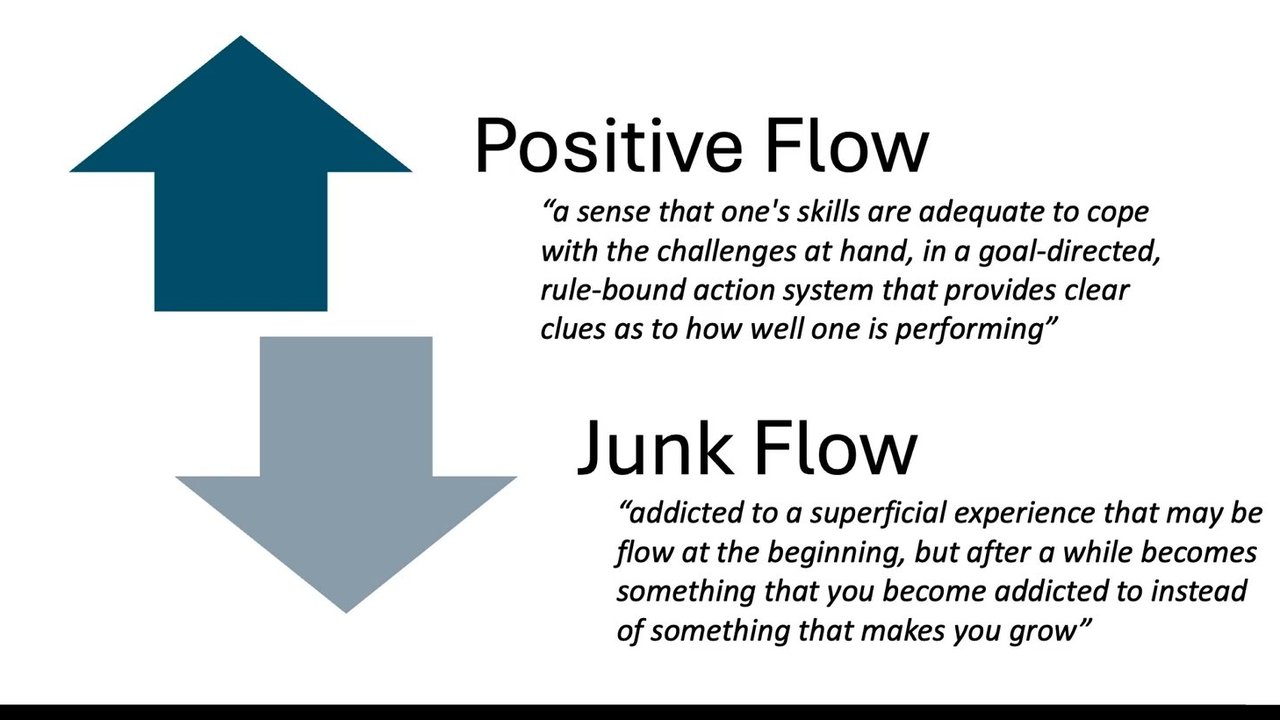
Those are the guys. They pick up Jira tickets. They send it to agent and just sit back, relax. When it's done, they push it to production. Right? Well, maybe hopefully not. Hopefully not. Hopefully, there is a little bit more than that, but social media portrays them like that. But those people are heavily working with AI and let agents generate all the code. But the tooling under the hood, it's all the same for all the type of these people.

And that's the type of tooling that we've, as Sonar, built originally. That's what we are known for. Well, we start within IDE. We look at problems which you can we can find with an IDE. The good thing is with within IDE is blazingly fast. It gives you feedback immediately. It doesn't find everything because it gives you it's a trade between speed and depth. But you will find 85% of problems within IDE and we'll be able to fix it immediately.

Then you push it to your CI, we will find more hard, more complex issues there. And from there, we will report in Sonocube and whatever you do after that. But so what's current workflow work look like if you want to build something with AI?

Your team comes and say, we need to implement a upload feature of a PDF file. You throw it into an agent. Agent writes a code. By the way, this code will be this or similar code will be generated by half, at least half of LLMs. Anybody developer here? Can you see the problem?

So it's a common, pass reversal, vulnerability where you accept a past name, plus file name of a file, and immediately append it to something else. I could construct a file name in some way which will let me go into some folder above your folder and access information which I was not supposed to access.

You want to sanitize it before you do it. But AI generated that code. So AI does produce insecure code. Funny part, if you go back and tell, actually, there is a past reversal, can you look into that? AI will actually come back and say, oh, yeah. Completely agree. There is a pasta girl, so let me go and fix it. So AI can understand if you tell it that what exactly you want to do, how what good looks like, AI can do the job. But quite often, it doesn't understand what good looks like. So here's the usual flow of how the request goes.

You go to an agent. You say, I want blah. The agent will send it to large language model. The training data comes from GitHub and whatever. By the way, there is a little bit of a problem there. All language models are trained on publicly available code on GitHub. And as we know, they all publicly available code to all repositories on GitHub are very secure and written in of high quality by experts. Right? Yeah. Right.

So you get this not very well written code as a source for your training. As a result, you will not get very well written suggestion as output all the time. By the way, sidestep, with Assonar, we actually analyze majority of models for what sort of codes they can produce and how much insecure or bad codes they can produce.

If you Google Sonar LLM leaderboard, it's publicly available. You will be able to see how we benchmark them. And you will find numbers, very interesting numbers. So coming back to this one, if we somehow provided information to the agent what good looks like, probably it could produce a better code. But what good looks like may mean different things.

An example I usually give is if you are a hottest startup in town, you are not chasing the best code. You're chasing funding, which means you're minimum viable product. You want to ship something to show it to investors so you can get funding. Bad code fixing bad code will come later.

So your priorities are different compared if you are two years later or five years later preparing for IPO. Oh, you want security to be top notch because your every auditor will be going through every line of code in your application, making sure that everything is top notch. Right? So you have different priorities.

But it's also not just different companies. It's also time. Who's looking at OWASP reports? Who familiar with OWASP top 10? Prior to November, supply attack, number six. In November, it's number three. SQL injection was number one, I believe, and before now it went down. Right? I don't even remember it's top three now because times change. So it's not just type of companies, it's also time.

So we at Sono, we have a research center with the research people who constantly follow these and update our products according to what we see in the industry. So coming back here, if only we had something that would tell the agent, this is what good looks like in my company.

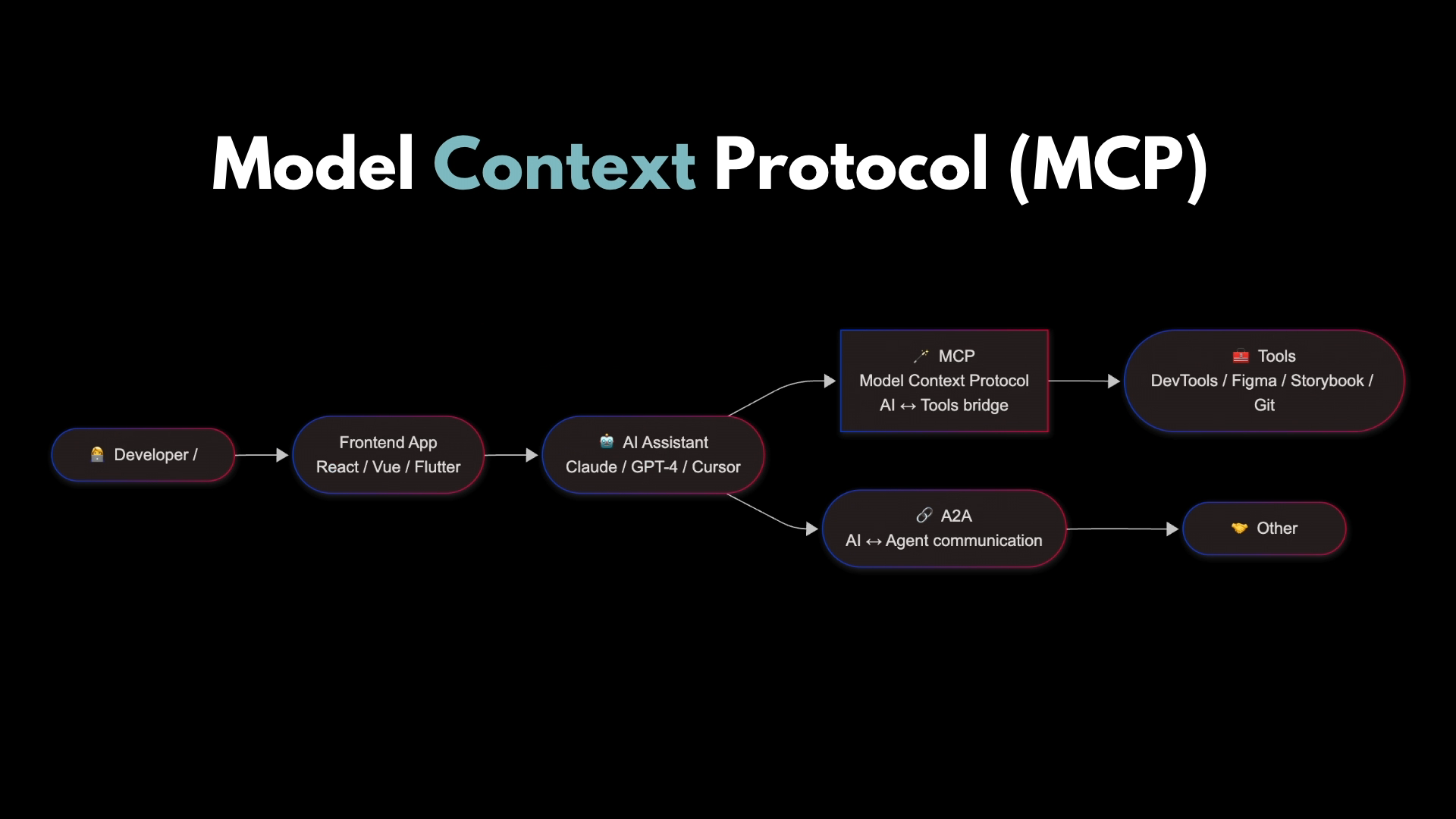
And that's what we built recently. Our MCP server integrates with existing Sorenkube instance, which your AI coding assistant can talk to. So you're asking AI coding assistant something in English, can talk to your coding assistant in English in conversational style.

It will detect if there is something that is related to Sonar. It will through MCP, will pass this request to Sonar, and Sonar will do all the job and come back. So the way it usually works is you can say, look, can you you highlight a piece of code and say, can you scan it with using Sonar engine?

Agent will understand that it's about MCP and Sonar. It will send it, run a tool available within our MCP. I think the tool is search Sonar issues and project. It will find all issues, return it, and in English, the agent will present it to you. But we can take it a step farther.

Those who use Sono have used IDE extension with our IDE extension. If you use that one, integration with MCP is even better because some requests we don't even send to the server. If you have an IDE extension and use MCP, we will use the capability of that extension to scan the code, which means it will be faster straight away rather than us sending it to somewhere remotely.

But then we come back, we have developers coming back and say, well, MCP is using too many tokens, and I don't like it. They're like, okay. For those hardcore developers, fine. We built Sonocube CLI, which is much more configurable, much more flexible, and it's command prompt.

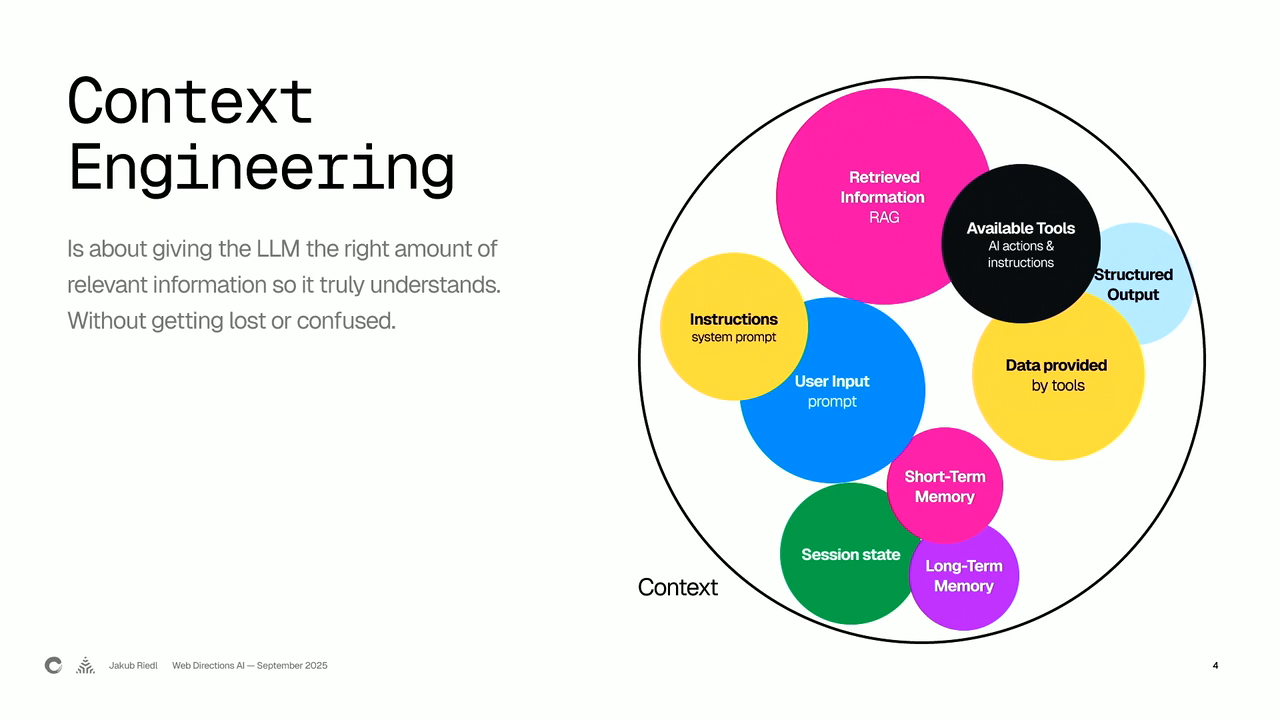
Developers love it. So what else could we do with this tooling? Like, MCP is just a connector. Right? So what else can we do? We've built a tool called context segmentation. As a company who scans your code and scan your project, we have a lot information available about your code.

And if you worked with LLMs, you know that the context you provide to in your request is is a king. It's pretty much defines whether you will burn five tokens or 5,000. So what we are able to do? We actually able to inter inject ourselves in at the moment where you start talking to agent before they start generating code.

And we can tell agent, go to our Sonar instance, collect all the information about this project, get the architecture that you designed within the project, get all the quality profiles, all the policies about what sort of what good looks like for this project that you defined within our product, within that project, come back and feed it into LLM as part of the original request.

So as a result, you send something to LLM with much more data, it will come back with much better results. But remember I said it's still not trained, it's still trained on a publicly available code, it still can come back insecure. So what can we do about that? That's fine. We have agentic analysis where you can same story.

Before even code is presented to you, you send it to our sonar engine. We will scan it for any possible vulnerabilities or code quality issues. And if we find something, we'll send it back to your cloud and say, cloud, go back and fix it. And it will come back and sometimes there are still problem, we will send it back.

I had cases when it happened three times before it actually came back clean. So that's what we can do. So now what you have is this beautiful diagram where we can provide feedback to agents saying this is what good looks like and give me the good code. So usually the request looks like something like you ask agents, it will go, ingest, go get architecture, go get extra information, comes back, send it to code, Agent generate will come back.

We will look at find problems, send it back if needed, and as a result, you will get all green. But that's all within your when you work with agents. What we've done is we actually done it even more on at a later stage. What we've built is two agent. One is called remediation agent. That's the one which will look at what issues we find later in the pull request and fix the problem there.

So for example, here's a pull request in your repository where agent would kick in, find suggested solution produce suggested solution for that. By the way, behind the scene, we use the same agentic analysis. We still scan that code, making sure that there is less possibility of bad code coming back. And all you have to do is it will create a new pull request, which you will have to just accept if you like it or modify if needed.

But we make it a bit even better. Rather than not only we will kick it off at pull request, you can now go back into the long backlogs that you have. Usually what I find, customers start implementing our toolings. They will get 10,000 issues in backlog. Nobody wants to go there and touch that. But it needs to be fixed.

So what we can do now is we can actually go into the list of all the issues. We can pick particular issues, assign it to an agent. Agent will create a pull request. And as a result, you will get that pull request fix. But we've done it even better. Now the previous feature would require you to go and manually select issues and assign them.

And just like going to gym, it there is no point if you're going today, do a thousand push ups, and then be sick for five days and do a 100 push up five days later and come back rest, go on holiday for five days and do another 10 later. The goal is to do 10 every day. 10 every day is better than all this stuff.

Right? And that's what we're fixing with this feature, where we take the same remediation agent, and we let you schedule how many issues or look at every day, every week, or whatever. You set up the schedule. And what remediation agent do is every day at 1PM or whatever the time you set up, it will pick three or whatever you choose issues from the list and go create a pull request for all those three or five issues that you selected.

So it's one of those work out every day to knock out knock down your backlog. What we've done is we took that tool. We grabbed one of popular libraries on the Internet, one of the popular popular open source libraries, and we unleashed that nonstop.

And we put automated auto merge in the I don't don't do it in production. But for just for sake of testing, we put auto merge in GitHub. So when it creates a pull request, it automatically scans it. If there are no problems, it will auto merge it. So within four hours, we removed 5% of backlog from that project.

We didn't stop there. We waited for two days. So it within two days, half almost half of backlog was gone. So obviously, this is a not realistic example. You probably don't want to do it in production, but it can show you the power of what you can do, how easier it is now to look after your backlog.

So that's backlog. The last engine which I wanted to talk to you about is called Hunter Agent. Who here heard of IDOR or insecure direct object reference? No? So this is type of a problem where let's say I have a booking system with my GP, and I log in with my username and password.

I go to schedule. I book a session. So I can see my previous sessions. I can see previous notes from the doctor. So I it's my portal. I can go there. But after logging in, what I can do is I can go to the top there and change from 4 to 4520 to 4521 and see somebody else's details.

So my authentication worked. It accepted my username and password. It's all good. But the authorization wasn't there configured correctly. So I was not authorized to access other records, but it let me. So what we are building now of built is this thing called Hunter Agents. It's all AI based.

In fact, AI is actually, in a way, better to find this type of problems, business logic related problems. AI is actually better at that. So what we've built is this AI remediation agent where we will be able to send it on your application. It will go find all these problems and present it in the same UI within SonarQube where you look for all the other issues as well. So we sent it, we compared it with other ones.

So there are some findings. And also we picked very popular open source project out there and ran it and found more than 200 problems in it. We, of course, reported it to the maintainers. So finally, there are a lot of products that we shipped in past two months. In past two months, we shipped probably more in than in the previous year.

Some of them are still in beta. Some of them are still under the under the table. Some of them already shipped. If you are interested

Andre Kolodochka

Solutions Engineer

  • Previously in Dev, IT, Support, Operations, Consulting, Presales
  • Born in Ukraine
  • Studied in China
  • Worked in Korea
  • Live in Australia
  • International family (four languages)
  • Flying, money/finance
A headshot of a bald man smiling, against a background showing abstract UI elements and a logo.

Software engineering has changed for good

"It's hard to communicate how much programming has changed due to AI in the last 2 months... You're not typing computer code into an editor... that era is qver. You're spinning up AI agents, giving them tasks in English and managing and reviewing their work in parallel."

Andrej Karpathy,
Co-founder of OpenAI, Founder of Eureka Labs
February 25, 2026, post on X

Illustration of a robot head with two eyes and a dash mouth, connected by lines to a vertical list of items, each with a checkmark.

AI brings new types of DevX

Behaviour

Legacy DevX:
  • 80% human
  • 20% AI

Skeptical developers who believe in coding as a craft. Use AI as a replacement for search.

Augmented DevX:
  • 50% human
  • 50% AI

Developers who use AI for isolated development or troubleshooting to be more efficient and move faster.

Autonomous DevX:
  • 20% human
  • 80% AI

Skilled prompt

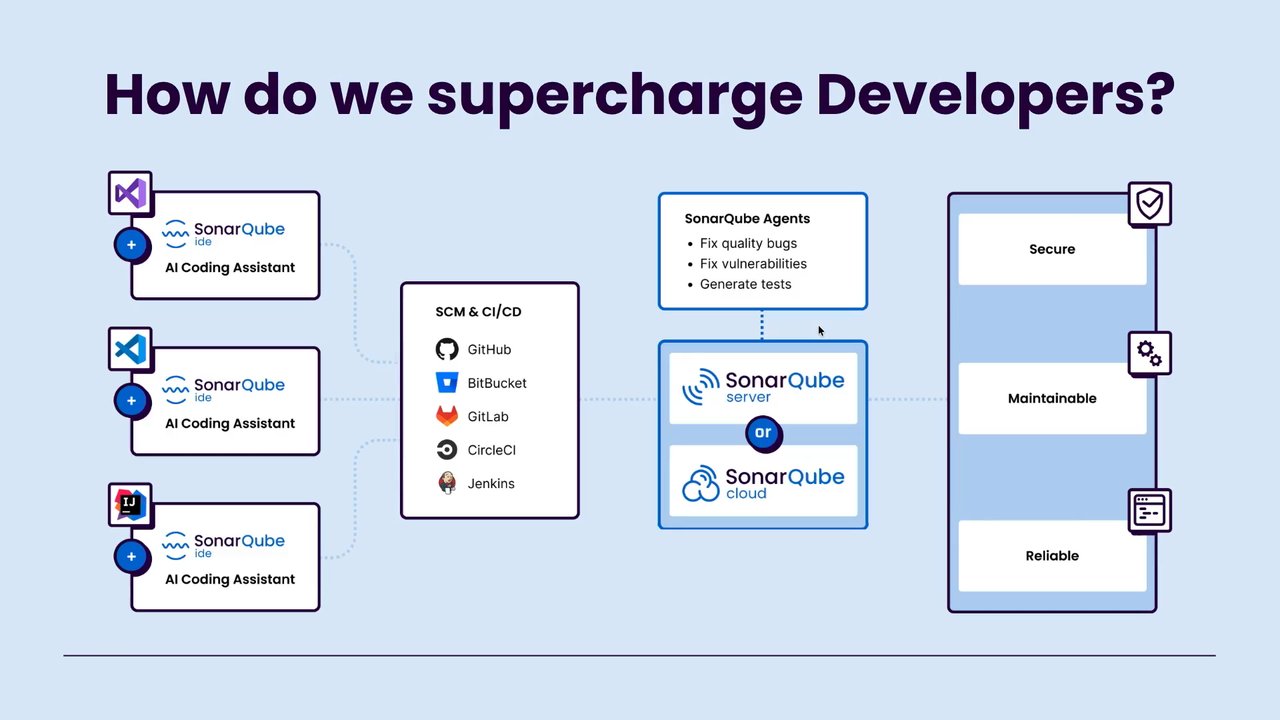
How do we supercharge Developers?

Developers use various IDEs integrated with SonarQube AI Coding Assistant:

  • Visual Studio Code
  • Visual Studio
  • IntelliJ IDEA

These systems integrate with SCM & CI/CD platforms:

  • GitHub
  • BitBucket
  • GitLab
  • CircleCI
  • Jenkins

The process leverages SonarQube Agents, which:

  • Fix quality bugs
  • Fix vulnerabilities
  • Generate tests

And utilizes either a SonarQube server or SonarQube cloud instance.

This entire workflow aims to produce code that is:

  • Secure
  • Maintainable
  • Reliable
A diagram illustrating a development workflow. On the left, three boxes show IDEs (Visual Studio Code, Visual Studio, IntelliJ IDEA) each integrated with "SonarQube ide" and "AI Coding Assistant". Dotted lines connect these to a central box labeled "SCM & CI/CD" which lists GitHub, BitBucket, GitLab, CircleCI, and Jenkins. From "SCM & CI/CD", dotted lines extend to two components: "SonarQube Agents" (listing 'Fix quality bugs', 'Fix vulnerabilities', 'Generate tests') and a section showing "SonarQube server" or "SonarQube cloud". Another dotted line connects "SonarQube Agents" to the "SonarQube server/cloud" section. Finally, dotted lines extend from the "SonarQube server/cloud" to a vertical stack on the far right, which highlights three desired code qualities: "Secure" (with a shield icon), "Maintainable" (with gears icon), and "Reliable" (with a dashboard icon).

How do we supercharge Developers?

  • Visual Studio IDE
    SonarQubeide
    AI Coding Assistant
  • Visual Studio Code IDE
    SonarQubeide
    AI Coding Assistant
  • IntelliJ IDEA IDE
    SonarQubeide
    AI Coding Assistant

SCM & CI/CD

  • GitHub
  • BitBucket
  • GitLab
  • CircleCI
  • Jenkins

SonarQube Agents

  • Fix quality bugs
  • Fix vulnerabilities
  • Generate tests

SonarQube server

or

SonarQube cloud

  • Secure
  • Maintainable
  • Reliable
A diagram illustrating how developers can be supercharged. On the left, three boxes represent different IDEs (Visual Studio, Visual Studio Code, IntelliJ IDEA), each integrated with 'SonarQube IDE' and an 'AI Coding Assistant'. Dotted lines connect these to a central box titled 'SCM & CI/CD', which lists logos for GitHub, BitBucket, GitLab, CircleCI, and Jenkins. From SCM & CI/CD, a dotted line leads to a block containing 'SonarQube server' or 'SonarQube cloud'. Above this, another block is labeled 'SonarQube Agents' with bullet points: Fix quality bugs, Fix vulnerabilities, Generate tests, connected to the SonarQube server/cloud block by a dotted line. On the far right, three vertical blocks are labeled 'Secure' (with a shield icon), 'Maintainable' (with a gears icon), and 'Reliable' (with a monitor icon), connected to the SonarQube server/cloud block by a dotted line.

Scenario:

we are a typical SaaS business, our amazing product team comes on friday and asks to add file uploads to our customer support screen.

Who are we to say no? We now have AI to fulfill all the wishes and pretend we are working. We open our AI and ask:

💻 Prompt:

“Generate me an endpoint to upload PDF files and depending on the parameter it should be in different folder order or invoice.”

Scenario:

we are a typical SaaS business, our amazing product team comes on friday and asks to add file uploads to our customer support screen.

Who are we to say no? We now have AI to fulfill all the wishes and pretend we are working. We open our AI and ask:

Prompt:

"Generate me an endpoint to upload PDF files and depending on the parameter it should be in different folder order or invoice."

⅔ LLMs generated this/similar code:

// Configure dynamic storage
const storage = multer.diskStorage({
    destination: (req, file, cb) => {
        // Decide folder based on route
        let folder;
        if (req.baseUrl.includes("invoice")) {
            folder = path.join(__dirname, "uploads/invoices");
        } else if (req.baseUrl.includes("order")) {
            folder = path.join(__dirname, "uploads/orders");
        } else {
            folder = path.join(__dirname, "uploads");
        }
        cb(null, folder);
    },
    filename: (req, file, cb) => {
        cb(null, Date.now() + "-" + file.originalname);
    }
});
Screenshot of a code editor displaying JavaScript code for configuring dynamic file storage using Multer, with logic to determine upload folders based on URL parameters and timestamped filenames.

Scenario:

we are a typical SaaS business, our amazing product team comes on friday and asks to add file uploads to our customer support screen.

Who are we to say no? We now have AI to fulfill all the wishes and pretend we are working. We open our AI and ask:

💻 Prompt:

“Generate me an endpoint to upload PDF files and depending on the parameter it should be in different folder order or invoice.”

⅔ LLMs generated this/similar code:

// Configure dynamic storage
const storage = multer.diskStorage({
	destination: (req, file, cb) => {
		// Decide folder based on route
		let folder;
		if (req.baseUrl.includes("invoice")) {
			folder = path.join(__dirname, "uploads/invoices");
		} else if (req.baseUrl.includes("order")) {
			folder = path.join(__dirname, "uploads/orders");
		} else {
			folder = path.join(__dirname, "uploads");
		}
		cb(null, folder);
	},
	filename: (req, file, cb) => {
		cb(null, Date.now() + "-" + file.originalname);
	},
});

You're absolutely right! The current implementation has a serious path traversal vulnerability. Let me analyze the code and fix this security issue.

A code editor window displays a JavaScript code snippet for configuring Multer storage. Within the code, the `file.originalname` part is highlighted, indicating a potential vulnerability. An accompanying annotation suggests `path.extname(file.originalname)` as a safer alternative. Below the code, a chat interface shows an AI's response acknowledging a serious path traversal vulnerability in the implementation.

AI Agents

This diagram illustrates the operational flow of an AI Agent system:

  1. The User provides a task or question to the Agent.
  2. The Agent sends the task or question to the Large Language Model (LLM).
  3. The LLM processes the request and returns a response to the Agent.
  4. The Agent surfaces the answer back to the User.

Agent: Receives the task, coordinates with the LLM, and returns the answer.

LLM (Large Language Model): Understands the task and generates a response. The LLM is built on data from historical data.

Historical Data: Comprises previous documents, records, conversations, and knowledge used to train and build the LLM.

A flow diagram illustrating how AI Agents work. It shows a User, an Agent (represented by a robot icon), a Large Language Model (LLM, represented by a brain icon), and Historical Data (represented by a database icon). The process flows from User to Agent (step 1), Agent to LLM (step 2), LLM back to Agent (step 3), and Agent back to User (step 4). An additional dashed arrow shows that the LLM is built on Historical Data.

Sonar LLM Leaderboard

Evaluating AI beyond functional benchmarks

  • Beyond "Does it work?": Functional benchmarks (passing test cases) are no longer enough; engineering leaders must now prioritize structural quality, security, and maintainability for production-ready code.
  • Sonar's deep analysis: Leveraging a massive scale of 750 billion lines of code analyzed daily, Sonar evaluated leading LLMs across 4,000+ Java programming assignments using the SonarQube engine.
  • New LLM Leaderboard: Launching a comprehensive leaderboard to track code health, featuring latest evaluations for GPT-5.2, Gemini 3.0 Pro, and Claude Sonnet 4.5.

Source: https://www.sonarsource.com/the-coding-personalities-of-leading-llms/leaderboard/

A screenshot of the Sonar LLM Leaderboard web interface. The interface shows a table ranking different LLM models based on various code quality metrics. The analysis is based on 4,444 distinct Java programming assignments. Columns include Org, Model, Release date, Pass rate, Issue density, Lines of code, Cyclomatic complexity, and Cognitive complexity. The top ranked models shown are Opus 4.5 Thinking, Gemini 3 Pro, GPT-5.2 High, Claude Sonnet 4.5 Thinking, and GPT-5.1 High.

AI Agents

This diagram illustrates the workflow of an AI Agent system, detailing the interactions between a user, an agent, a Large Language Model (LLM), and historical data.

Components:

  • User: Provides tasks or questions.
  • Agent: Receives tasks, coordinates with the LLM, and returns answers.
  • LLM (Large Language Model): Understands tasks and generates responses.
  • Historical Data: Contains previous documents, records, conversations, and knowledge used to train and build the LLM.

Workflow Steps:

  1. The User provides a task or question to the Agent.
  2. The Agent sends the task or question to the LLM.
  3. The LLM processes the request and returns a response to the Agent.
  4. The Agent surfaces the answer to the User.

The LLM's capabilities are built upon and informed by Historical Data.

Diagram illustrating the workflow of an AI Agent system, showing interactions and data flow between a User, an Agent, a Large Language Model (LLM), and Historical Data.

AI Agents

  • User:
    1. User provides a task / question
  • Agent: Receives the task, coordinates with the LLM, and returns the answer.
    1. Agent sends the task / question to the LLM
    1. Agent surfaces the answer
  • LLM (Large Language Model): Large Language Model that understands the task and generates a response.
    1. LLM processes the request and returns the response
  • Historical Data: Previous documents, records, conversations, and knowledge used to train/build the LLM. LLM is built on data from historical data.
A flow diagram illustrating the interaction between a User, an AI Agent, a Large Language Model (LLM), and Historical Data. The User initiates a task/question to the Agent. The Agent sends the task to the LLM. The LLM processes the request, referencing historical data it was built upon, and returns a response to the Agent. The Agent then surfaces the answer back to the User.

What "good" looks like

Organization - A

Focus: Deliver high-quality software quickly and safely to thousands of customers.
Quality Gate Criteria:
  • Reliability Rating on New Code: Bugs, vulnerabilities, reliability issues. Priority: HIGH, Typical Threshold: A.
  • Security Rating on New Code: Vulnerabilities & security hotspots. Priority: HIGH, Typical Threshold: A.
  • Maintainability Rating on New Code: Code smells, duplications, complexity. Priority: MEDIUM, Typical Threshold: B or Better.
  • Coverage on New Code: Unit test coverage. Priority: MEDIUM, Typical Threshold: ≥ 80%.
  • Duplicated Lines on New Code: Maintain clean, DRY code. Priority: LOW, Typical Threshold: ≤ 3%.
  • Security Hotspots Reviewed: Proactively review risks. Priority: LOW, Typical Threshold: ≥ 90%.
What Good Looks Like: Fast delivery with high reliability and security, enabling continuous innovation and customer trust at scale.

Organization - B

Focus: Ensure secure, compliant, and maintainable systems that protect citizens and taxpayer data.
Quality Gate Criteria:
  • Security Rating on New Code: Vulnerabilities & security hotspots. Priority: HIGH, Typical Threshold: A.
  • Reliability Rating on New Code: Bugs, vulnerabilities, reliability issues. Priority: HIGH, Typical Threshold: A.
  • Compliance / Standards: Coding standards, policy compliance. Priority: HIGH, Typical Threshold: 100%.
  • Maintainability Rating on New Code: Code smells, duplications, complexity. Priority: MEDIUM, Typical Threshold: A or Better.
  • Coverage on New Code: Unit test coverage. Priority: MEDIUM, Typical Threshold: ≥ 70%.
  • Duplicated Lines on New Code: Maintain clean, DRY code. Priority: LOW, Typical Threshold: ≤ 5%.
What Good Looks Like: Secure, compliant, and dependable systems that stand the test of time and meet the highest standards of public trust.
The slide presents two side-by-side panels comparing how "Organization - A" and "Organization - B" define "good" in terms of software quality. Each panel outlines a focus, a list of quality gate criteria with priority and typical thresholds, and a summary of what "good looks like". The Organization A panel features icons for each criterion: a bullseye for focus, a shield for reliability, a padlock for security, angle brackets for maintainability, a beaker for coverage, concentric circles for duplicated lines, a wavy line graph for security hotspots, and a trophy for the overall summary. The Organization B panel features icons for its criteria: a shield with a checkmark for focus, a padlock for security, a shield for reliability, scales of justice for compliance, angle brackets for maintainability, a beaker for coverage, concentric circles for duplicated lines, and a trophy for the overall summary.

What "good" looks like

2020: WHAT MATTERED MOST

Foundational hygiene and manual coding pitfalls

  • Example Rule: Dead Code
    • Description: Remove unreachable code blocks
    • Why it mattered in 2020: Easy to accumulate and ship
    • Status in 2026: Better tooling and AI refactoring keep codebases lean.
  • Example Rule: Unused Variables / Imports
    • Description: Flag unused symbols
    • Why it mattered in 2020: Common noise, hurt readability
    • Status in 2026: Auto-fix and LLM codegen rarely introduce these.
  • Example Rule: Magic Numbers
    • Description: Avoid unexplained numeric literals
    • Why it mattered in 2020: Hard to maintain, error-prone
    • Status in 2026: Constants suggested automatically by tools and AI.

2026: WHAT MATTERS MOST

Modern risks from AI, supply chains and complex systems

  • Example Rule: Prompt Injection Defense
    • Description: Prevent untrusted data in prompts and tools
    • Why it matters in 2026: LLM apps can be manipulated via crafted inputs
    • Didn't matter in 2020: NEW IN 2026. LLMs and prompt engineering didn't exist.
  • Example Rule: Dependency Risk & Provenance
    • Description: Block high-risk or unverified dependencies
    • Why it matters in 2026: Supply chain attacks and typosquatting are top risk
    • Didn't matter in 2020: NEW IN 2026. Fewer third-party deps and registries.
  • Example Rule: Secrets in Code & Config
    • Description: Prevent secrets, keys, and tokens in source
    • Why it matters in 2026: Cloud and dev tooling sprawl increases exposure
    • Didn't matter in 2020: NEW IN 2026. Secret scanning wasn't pervasive.
The slide presents two tables side-by-side. The left table, titled "2020: WHAT MATTERED MOST", has rules about foundational coding hygiene. Each rule has an icon: Dead Code is represented by a document with an arrow, Unused Variables/Imports by a warning triangle, and Magic Numbers by a magnifying glass. The right table, titled "2026: WHAT MATTERS MOST", discusses modern risks. Each rule has an icon: Prompt Injection Defense by a padlock, Dependency Risk & Provenance by stacked cubes, and Secrets in Code & Config by a key.

AI Agents

  • User:
    1. User provides a task / question
  • Agent: Receives the task, coordinates with the LLM, and returns the answer.
    1. Agent sends the task / question to the LLM
    1. Agent surfaces the answer
  • LLM (Large Language Model): Large Language Model that understands the task and generates a response.
    1. LLM processes the request and returns the response
  • Historical Data: Previous documents, records, conversations, and knowledge used to train/build the LLM. LLM is built on data from historical data.
A flow diagram illustrating the interaction between a User, an AI Agent, a Large Language Model (LLM), and Historical Data. The User initiates a task/question to the Agent. The Agent sends the task to the LLM. The LLM processes the request, referencing historical data it was built upon, and returns a response to the Agent. The Agent then surfaces the answer back to the User.

Introducing SonarQube MCP Server

  • SonarQube MCP Server is the official implementation of the Model Context Protocol
  • Designed to bridge AI agents with SonarQube's trusted code analysis capabilities

FREE & SOURCE AVAILABLE

Conversational integration

Query SonarQube using NLP directly in your AI assistant

No context switching

Real-time quality feedback

Integrate code quality & security checks into your workflow

Proactive verification

Standardized bridge

Single integration point for connecting Agents to SonarQube

Scalable solution

Easy docker deployment

Works with server & cloud

Lightweight & local

An icon of a speech bubble representing conversation. An icon of a shield representing security or quality. An icon of two connected squares, symbolizing integration or a bridge.

How does SonarQube MCP Server work?

  1. Agent query

    Developer submits a natural language question in the

    Example: "Are there any new vulnerabilities in this file?"

  2. Translation & query

    MCP Server translates the request into a query for SonarQube (Cloud or Server). It acts as a universal translator

    Example tool: search_sonar_issues_in_projects

  3. Contextual response

    Agent receives the data from SonarQube and presents an answer directly within the developer's editor

A block diagram illustrating the SonarQube MCP Server workflow. An MCP Client, which includes applications like Claude Code, Cursor, Devin, Windsurf, and VS Code, communicates with the SonarQube MCP Server. The SonarQube MCP Server then interacts via an API, which connects to both SonarQube Cloud and SonarQube Server.

Seamless integration with developer IDE agents

SonarQube for IDE now offers a simple 1-click process to

  • Configure the SonarQube MCP Server in Cursor directly from the extension
  • Install a rule file to instruct Cursor's agent how to use the SonarQube MCP server

When installed from SQ-IDE, the SonarQube MCP Server will be configured to delegate the code analysis to the SonarQube for IDE extension (which offers better analysis capabilities than the MCP Server on its own).

This process is transparent to the user, thank to the instructions file and SQ-IDE ↔ MCP bridge.

Cursor IDE Settings Overview

AI Agents Configuration
  • Configure SonarQube MCP Server
  • Create instructions for AI agents
Installed MCP Servers
  • sonarqube (17 tools enabled)
SonarQube MCP Instructions File: sonarqube_mcp_instructions.mdc
5
6
7
—
These are some guidelines when using the SonarQube MCP
server.
8
# Important Tool Guidelines
9
10
## Basic usage
11
- When starting a new task, disable automatic analysis with
12
  the `toggle_automatic_analysis` tool if it exists.
13
- When you are done generating code at the very end of the
14
  task, re-enable automatic analysis with the
15
  `toggle_automatic_analysis` tool if it exists.
16
Then call the `analyze_file_list` tool if it exists.

SQ-IDE ↔ MCP bridge (allows the MCP tools to interact with SQ-IDE's UI and analysis)

Screenshot of the Cursor IDE showing its settings panel, an open file named `sonarqube_mcp_instructions.mdc` containing guidelines for using the SonarQube MCP server, and a panel for StackOverflow service. Arrows connect explanatory text blocks on the left and right to relevant sections within the IDE screenshot. Below the screenshot, there are two icons: a wavy symbol labeled "SQ-IDE (extension)" and a stylized swirl labeled "SQ MCP Server", connected by an arrow representing the SQ-IDE to MCP bridge.

SonarQube CLI

Unified interface that brings the core SonarQube capabilities into a single binary with a single install and a single authentication flow

  • Secrets detection with pre-capture hook for Claude Code
  • Code quality and security analysis
  • Direct API access
  • And many more capabilities..

Learn more at cli.sonarqube.com

SonarQube CLI (BETA)

Code verification in your terminal

Install: Linux / macOS Windows View installation instructions

curl -o- https://raw.githubusercontent.com/SonarSource/sonarqube-cli/refs/heads/

I want to list my project's open issues

Agent: fetching open issues for my-org_app

$ sonar list issues --project my-org_app --format table
SEVERITY | RULE | MESSAGE | FILE
BLOCKER | secrets:S6290 | Hardcoded password detected | src/config.ts:12
CRITICAL | typescript:S3649 | SQL injection vulnerability | src/db.ts:34
MAJOR | typescript:S1764 | Identical sub-expressions on both sides | src/auth.ts:78
MINOR | typescript:S1135 | Complete the task associated

Context Augmentation

Supercharge coding agents like Cursor, Claude Code, and Copilot with deep, repo-aware intelligence:

  • Code smarter: Instantly improve code quality, security, and architectural alignment while resolving complex dependencies.
  • Stay fast: Maintain the agent's core speed and accuracy without the bloat.
  • Cut costs: Optimize context windows to significantly reduce token spend.
A diagram illustrates "Context Augmentation" with several interconnected nodes. The nodes include a human head with a circuit board, a shield, a grid, a cogwheel with a checkmark, and a stack of cubes, all connected by lines on a grid background.

How does Context Augmentation work?

  • Historical context

  • Code based context

    • Code file / diff
    • Project config. / envr.
    • Dependencies
    • ...
  • Text based context

    • Project/code/dependency doc.
    • Commit/PR messages
    • JIRA tickets
    • KNLG. bases (e.g. Sonar rule specs)
    • ...
  • Structured context

    • Repo file/class architecture
    • Abstract syntax tree, call graphs
    • Data flow / control flow graphs
    • ...
  • Static analysis context

    • Sonar analyzers results
    • Paths from symbolic execution
    • ...
  • Dynamic context

    • IDE telemetry
    • Compiler / interpreter state
    • ...

Consolidate

  • Sonar .md
  • Context Manager
  • MCP

Empower

External products

  • Cursor
  • Claude code
  • ...
A diagram illustrating the workflow of Context Augmentation. On the left, various types of context are listed: Historical context (represented by interconnected boxes), Code based context (represented by a code editor icon), Text based context (represented by a document icon), Structured context (represented by a tree-like data structure icon), Static analysis context (represented by a magnifying glass over code), and Dynamic context (represented by a gear with a code tag). These contexts feed into a "consolidate" step, indicated by a large arrow. The consolidated output includes "Sonar .md" (a markdown file icon), a "Context Manager" (an API icon), and "MCP" (a stylized 'M' icon). These then proceed through an "empower" step, also indicated by a large arrow, leading to "External products" such as Cursor (a dark faceted cube icon), Claude code (an orange asterisk-like icon), and another unnamed product (a black wavy 'W' or squiggle icon).

Agentic Analysis

Generate, validate, fix—in seconds, not hours.

The gap

Without instant, accurate feedback loops, coding agents stall. Delays lead to broken code hitting the repo, bloated rework cycles, and friction.

The outcome

  • Maximize AI productivity without sacrificing quality.
  • Guarantee every line of code meets your standards.
  • Eliminate back-and-forth with fast code reviews.
  • Catch and fix issues before code is ever submitted.

What you get - AI productivity without the tradeoff

Diagram illustrating a process flow. At the top, a folder labeled "Cached Analysis" feeds into a central blue icon depicting a brain or chip labeled "SonarQube MCP Server". The server also receives "FINDINGS" as input. From the "SonarQube MCP Server", "CODE CHANGES" are outputted. Below the server, there are six boxes representing different AI coding assistants or models: Cursor, Gemini, Copilot, Windsurf, Claude, and Codex.

AI Agents

This diagram illustrates the workflow of an AI Agent system, detailing the interactions between a user, an agent, a Large Language Model (LLM), and historical data.

Components:

  • User: Provides tasks or questions.
  • Agent: Receives tasks, coordinates with the LLM, and returns answers.
  • LLM (Large Language Model): Understands tasks and generates responses.
  • Historical Data: Contains previous documents, records, conversations, and knowledge used to train and build the LLM.

Workflow Steps:

  1. The User provides a task or question to the Agent.
  2. The Agent sends the task or question to the LLM.
  3. The LLM processes the request and returns a response to the Agent.
  4. The Agent surfaces the answer to the User.

The LLM's capabilities are built upon and informed by Historical Data.

Diagram illustrating the workflow of an AI Agent system, showing interactions and data flow between a User, an Agent, a Large Language Model (LLM), and Historical Data.

Agent Inner Loop

  • A User initiates the process by requesting code generation from an AI Agent.
  • The AI Agent requests guidelines and architecture from "Context Augmentation (Guide)".
  • "Context Augmentation (Guide)" then injects coding standards and structure to the AI Agent.
  • The AI Agent generates code.
  • The generated code is sent by the AI Agent to "Agentic Analysis (Verify)" for analysis.
  • "Agentic Analysis (Verify)" returns the analysis results to the AI Agent.
  • If issues are found during analysis:
    • The AI Agent refines the code based on the identified issues.
    • The refined code is sent back to "Agentic Analysis (Verify)" for re-analysis.
    • "Agentic Analysis (Verify)" returns the re-analysis results to the AI Agent.
  • Finally, the AI Agent returns the verified code to the User.
A sequence diagram illustrating the 'Agent Inner Loop' process for code generation and verification. The diagram shows interactions between a User, an AI Agent, a 'Context Augmentation (Guide)' component, and an 'Agentic Analysis (Verify)' component, including a loop for code refinement if issues are found.

Introducing Sonar Agents

SonarQube Platform

An illustration of five white, minimalist robots with blue screen faces, standing in a line on a circular, glowing blue platform. Each robot is surrounded by a pulsating blue circular light. The background features glowing blue wave patterns, suggesting a digital environment.

SonarQube Remediation Agent

One agent to heal your code

  • GitHub
  • GitLab
  • Bitbucket
  • Azure DevOps
  • Quality Gate Passes
    Release with confidence
  • CI Pipeline Passes
    Ship faster
  • Backlog Reduced
    Cleaner codebase, healthier project
  • Technical Debt Down
    Continuous improvement, long-term impact

SonarQube Platform

  • Analysis
    Deep code insights
  • Context
    Understand your codebase
  • Expertise
    Built-in best practices
  • Standards
    Industry and security compliance
A diagram illustrates the SonarQube Remediation Agent as a central white robot figure. On the left, it connects to boxes representing source code platforms: GitHub, GitLab, Bitbucket, and Azure DevOps, each with its respective logo. On the right, it connects to boxes listing benefits: Quality Gate Passes (with a checkmark icon), CI Pipeline Passes (with code tags icon), Backlog Reduced (with a bug icon), and Technical Debt Down (with a bar chart icon). Below the robot, a section titled "SonarQube Platform" displays four capabilities: Analysis (magnifying glass icon), Context (chat bubble icon), Expertise (star badge icon), and Standards (shield with checkmark icon).

Remediation Agent Unblock to ship fast

  • Step 1 Activate the expert
  • Step 2 Get the resolution plan
  • Step 3 Merge with confidence

Launch the Remediation Agent directly within your workflow to analyze the Quality Gate failure.

SonarQube reviewer guide

Try our new unified code review experience New

Review this PR in SonarQube

Quality Gate failed

Failed conditions

  • 2 New issues
  • B Maintainability Rating on New Code (required ≥ A)

Remediation Agent ready

Screenshot of a pull request review interface, likely GitHub, displaying a SonarQube reviewer guide. The guide shows that a Quality Gate failed due to new issues and a low maintainability rating. It then highlights that a Remediation Agent is ready to fix issues automatically and provides links for further analysis and IDE integration.

SonarQube Remediation Agent

Intelligent cleanup, effortless at scale

1 BACKLOG OF OLD ISSUES

Technical debt piles up over time and slows down your teams.

SonarQube Issues (Backlog)
  • Refactor this method to improve readability (Cognitive Complexity more than 30). (High)
  • Make the class immutable. (Medium)
  • Remove this unused parameter. (Low)
  • Replace this type of code with safe operation. (Low)

2 MANUAL ASSIGNMENT

You pick the top issues and assign to the right.

  • Pull Request #1029 Fix: Refactor for readability (+20, -15)
  • Pull Request #1030 Fix: Remove unused params (+10, -6)
  • Pull Request #1031 Fix: Refactor unsafe usage (+20, -9)
  • Pull Request #1032 Fix: Code quality & issues (+15, -3)

3 AUTOMATE AT SCALE

The agent writes & regularly checks new code with optimal decisions.

78% issues resolved

Run on cadence: Daily / Weekly / Custom

A diagram illustrating the SonarQube Remediation Agent workflow. On the left, a dark box labeled "1 Backlog of Old Issues" displays a list of technical debt items from SonarQube, with some items marked as completed and their priority levels (High, Medium, Low). In the center, a white robotic agent with a friendly face is depicted. On the right, two light-colored boxes show the next steps in the workflow: "2 Manual Assignment" lists four pull requests, each with a fix description and two numerical metrics (e.g., +20, -15). Below it, "3 Automate at Scale" describes the agent's function, shows a "78% issues resolved" progress bar, and lists scheduling options (Daily, Weekly, Custom). Arrows connect the backlog to the robot, and the robot to both manual assignment and automated resolution, indicating a process flow.

Remediation Agent Backlog cleaner

  • Step 1: Target technical debt

  • Step 2: Delegate to expert

  • Step 3: Ship cleaner code

Filter and select accumulated issues from your backlog to remediate at scale.

A screenshot of the SonarQube Cloud interface is shown, focusing on the "Issues" page for a project. The interface displays various filters for software quality, severity, and code attributes on the left, and a list of code issues on the right. A yellow rectangular overlay box highlights the list of issues, indicating the process of filtering and selecting issues for bulk actions.

Remediation Agent Backlog cleaner

Remediation Agent Backlog cleaner

A black video player with a red play button in the center.

Remediation Agent Backlog cleaner

Screenshot of the SonarQube Cloud application interface displaying project details, filters, and quality gate metrics for an "AutoCodeRover" project.

Remediation Agent Backlog cleaner

A screenshot of a web browser window showing an empty tab with 'about:blank' in the address bar.

Remediation Agent Backlog cleaner

Screenshot of a GitHub pull request page showing a remediation agent's proposed code changes.

Remediation Agent Backlog cleaner

A video player with a black screen and a red play button in the center.

Remediation Agent Backlog cleaner

  • 500 issues.
  • Verified and Solved.
  • In 4 hours.

Issue Stats at Time T

  • Overall Issues: 9,954 (-0.8% vs last 30 days)
  • Open Issues by Severity: Blocker, High, Medium, Low, Info
  • Issues by Status: Open, Fixed

Issue Stats at Time T+4

  • Overall Issues: 9,435 (-6.6% vs last 30 days)
  • Open Issues by Severity: Blocker, High, Medium, Low, Info
  • Issues by Status: Open, Fixed
The slide displays two dashboard panels, labeled 'T' (initial time) and 'T+4' (four hours later), showing 'Issue Stats'. Each panel includes three metrics: a summary box for 'Issues Overall code' with a total number and percentage change, a donut chart for 'Open Issues by Severity' (Blocker, High, Medium, Low, Info), and a pie chart for 'Issues by Status' (Open, Fixed). The 'Issues by Status' chart at time T is almost entirely red (Open), while at T+4, the green 'Fixed' segment has noticeably increased, indicating progress in resolving issues.

Timelapse

Start

  • Issues: 9,954 (-0.8% vs last 30 days)
  • Open Issues by Severity: Blocker, High, Medium, Low, Info
  • Issues by Status: Open, Fixed

4 Hours

  • Issues: 9,435 (-6.6% vs last 30 days)
  • Open Issues by Severity: Blocker, High, Medium, Low, Info
  • Issues by Status: Open, Fixed

24 Hours

  • Issues: 8,024 (-20.6% vs last 30 days)
  • Open Issues by Severity: Blocker, High, Medium, Low, Info
  • Issues by Status: Open, Fixed

48 Hours

  • Issues: 5,686 (-43.7% vs last 30 days)
  • Open Issues by Severity: Blocker, High, Medium, Low, Info
  • Issues by Status: Open, Fixed
A series of four dashboard snapshots, labeled 'Start', '4 Hours', '24 Hours', and '48 Hours', illustrating the reduction of issues over time. Each snapshot contains three panels: 1. A numerical counter for 'Issues' displaying the total number and a percentage change from the last 30 days. 2. A donut chart titled 'Open Issues by Severity', categorizing issues into 'Blocker', 'High', 'Medium', 'Low', and 'Info'. 3. A pie chart titled 'Issues by Status', showing the proportion of 'Open' and 'Fixed' issues. The total number of issues decreases significantly over the 48-hour period, from 9,954 to 5,686. Concurrently, the 'Open Issues by Severity' charts show a reduction in 'Blocker' and 'High' severity issues, while the 'Issues by Status' charts show a progressive increase in 'Fixed' issues, moving from a small segment at 'Start' to a substantial portion at '48 Hours'.

SonarQube Hunter Agent

One agent to find deep complex issues

  • GitHub
  • GitLab
  • Azure DevOps
  • Authentication Logic: Analyze issues in authentication mechanisms and credential handling.
  • Improper Access Control: Detect issues related to authorization, permissions, and access control.
  • Business Logic: Identify flaws in business workflows and logic implementation.
SonarQube Platform
  • Analysis: Deep code insights
  • Context: Understand your codebase
  • Expertise: Built-in best practices
  • Standards: Industry and security compliance
A diagram illustrates the SonarQube Hunter Agent workflow. On the left, icons for GitHub, GitLab, and Azure DevOps represent source code platforms. Lines connect these to a central white robot figure, labeled "Hunter Agent." From the robot, lines extend to three issue categories on the right: Authentication Logic (represented by a green shield with a dollar sign), Improper Access Control (a purple icon of a person with a padlock), and Business Logic (an orange icon with angle brackets). Below, four sections highlight features of the "SonarQube Platform," each with an icon: Analysis (magnifying glass over a bar chart), Context (chat bubble with lines), Expertise (blue ribbon with a star), and Standards (blue shield with a checkmark).

Closing the "business logic" gap in software security

The problem framing

  • Modern scanners (SAST, SCA) catch mechanical errors like SQLi or XSS.
  • Damaging breaches stem from logic and access-control errors violating business rules.
  • Traditional tools lack the human-like context needed for roles and workflows.

What Hunter Agent is

  • High-fidelity AI security agent for critical logic flaws missed by traditional tools.
  • Native to SonarQube, scanning full codebases across modules and languages.
  • LLM-agnostic: No vendor lock-in; use preferred commercial or self-hosted models.

Concrete example: Insecure Direct Object Reference / broken access control

Hunter uses structured playbooks to probe endpoints and verify if unauthorized users can access protected records. This checks “who should be allowed to do what” against real system behavior.

Protecting critical services

Securing “crown jewel” systems where access bugs have broad impact.

Regulatory alignment

Addresses OWASP top issues and provides compliance evidence.

Future-proofing AI dev

A measured, guardrailed way to use AI for defense, not just speed.

A diagram illustrates "Good Access Control" versus "Bad Access Control". On the left, "Good Access Control" shows three users connected to records via an access control system, with clear lines indicating allowed access (User 1 to Record 1, User 2 to Record 2) and denied access (User 3 cannot access Record 3). On the right, "Bad Access Control" shows an "at-risk user" and a "malicious user" where the malicious user is able to bypass the access control system to access records (Record 1, Record 2, Record 3), demonstrating a security vulnerability.

Hunter Agent Detect critical issues

Screenshot of a web browser displaying the Meridian Health Patient Portal login page with an email and password field.

Hunter Agent Detect critical issues

A screenshot of a web browser displaying the login page for Meridian Health Patient Portal. The login form has fields for email and password, and a 'Sign in' button.

Hunter Agent Detect critical issues

Hunter Agent Detect critical issues

A video playing a screen recording of a web browser displaying the Meridian Health Patient Portal login page.

Hunter Agent Detect critical issues

A screenshot of a web browser displaying the login page for the Meridian Health Patient Portal.

Hunter Agent Detect critical issues

Screenshot of a web browser displaying the login page for the Meridian Health Patient Portal.

Insecure Direct Object Reference (IDOR)

Request A (Valid)

  • GET /appointments/4520
  • User: Alice Chen
  • Status: 200 OK (Authorized)

Request B (Vulnerable)

  • GET /appointments/4521
  • User: Alice Chen (sees Marcus Reed)
  • Status: 200 OK (IDOR)

Authentication worked. Authorization failed.

A diagram illustrating an Insecure Direct Object Reference (IDOR) vulnerability. It shows two request boxes: Request A (Valid) where user Alice Chen accesses her own appointment 4520, and Request B (Vulnerable) where Alice Chen accesses appointment 4521, belonging to Marcus Reed. A dotted arrow connects the two requests. The Sonar logo is in the top left.

Hunter Agent Detect critical issues

Screenshot of a web browser displaying the "Agent activity" page in SonarQube Cloud for the healthcare-system-demo-app project, showing a completed Hunter Agent task.

Hunter Agent Detect critical issues

A video player with a red play button.

SonarQube Hunter Agent

Results with real-world projects

SQHA
(Sonnet/Opus)
Claude Code
(Opus)
Cursor
(Opus)
Run #111 findings47 findings6 findings
Run #213 findings29 findings30 findings
Run #312 findings14 findings25 findings

200+

0-days found in real world open-source and enterprise projects

  • Critical: 4.7%
  • High: 26.5%
  • Medium: 45.9%
  • Low: 22.6%
A comparison table shows the number of findings from SQHA (Sonnet/Opus), Claude Code (Opus), and Cursor (Opus) across three different runs. A large number "200+" is displayed. A stacked bar chart illustrates the distribution of issue severity categories: Critical, High, Medium, and Low, with their respective percentages.

Sonar provides a closed loop solution for safe, reliable, and auditable agentic development

GUIDE

  • Sonar Context Augmentation BETA
  • SonarSweep PRIVATE BETA

VERIFY

SonarQube

  • Server • Cloud • MCP Server • IDE • CLI
  • SonarQube Advanced Security • SonarQube Architecture
  • SonarQube Agentic Analysis BETA
  • SonarQube Hunter Agent COMING SOON
  • SonarQube AI code review COMING SOON

SOLVE

  • SonarQube AI CodeFix
  • SonarQube Remediation Agent BETA

40+ Languages and Frameworks

  • Java
  • JavaScript
  • PHP
  • Python
  • Spring
  • React
  • Cobol
  • Kotlin
  • Swift
  • Terraform
  • TypeScript
  • Flex

DevOps

  • Azure
  • BitBucket
  • GitHub
  • GitLab
  • Harness
  • Circle CI
  • CodeCatalyst
  • Jenkins

IDEs

  • Cursor
  • Windsurf
  • VS Code
  • JetBrains

Partners

  • Anthropic
  • OpenAI
  • Google
  • GitHub
  • GitLab
  • JFrog
  • Wiz
  • Cognition

Marketplaces

  • AWS
  • Microsoft
  • Google Cloud

Confidential - ©2026, SonarSource Sàrl

The slide illustrates Sonar's closed-loop solution for agentic development, structured into three main phases: Guide, Verify, and Solve. Below this, various logos are categorized into sections for "40+ Languages and Frameworks", "DevOps", "IDEs", "Partners", and "Marketplaces", showcasing Sonar's extensive integration and support ecosystem.

Technologies & Tools

  • Confluence
  • Context segmentation
  • GitHub Copilot
  • Hunter Agent
  • Jira
  • MCP
  • Remediation Agent
  • SonarQube
  • SonarQube CLI

Standards & Specs

  • OWASP Top 10

Concepts & Methods

  • Agentic analysis
  • IDOR
  • Path traversal
  • SQL injection
  • Supply chain attack
  • Vibe coding

Organisations & Products

  • GitHub
  • Sonar LLM Leaderboard