Teaching Your Frontend Tools to Talk to AI
When Missing Context Turns Into Bias
Anna McPhee opens with an AI-generated headshot that replaces her partner with a stranger, illustrating how models invent plausible details when context is absent. She connects this behavior to demographic bias and warns that coding assistants make similarly unreliable assumptions about unfamiliar codebases.
MCP as the Bridge Between AI and Frontend Tools
McPhee introduces Model Context Protocol as a common language that gives AI agents access to context held by external tools. She distinguishes tool-oriented MCP connections from agent-to-agent communication, then creates an attractive portfolio with Lovable to show why a quick prototype still requires serious inspection.
Auditing a Prototype with Chrome DevTools
McPhee uses Chrome DevTools MCP and Claude Code to audit the portfolio for performance, accessibility, responsiveness, and color-contrast problems. The agent grounds its findings in the running browser and can repeatedly fix and verify defects instead of guessing from training data.
Grounding Code Reviews in Current Documentation
McPhee demonstrates Context7 MCP, which retrieves current documentation for code-quality analysis rather than relying on potentially outdated model knowledge. It reviews React and TypeScript practices, prioritizes issues, identifies maintainability problems, and cites the relevant modern guidance.
Testing Real User Journeys with Playwright
McPhee asks Playwright MCP to exercise buttons, form submission, scrolling, console behavior, and an animation in a live browser. The automated run exposes broken interactions, records passing behavior, and creates a feedback loop in which the agent can repair failures and rerun the tests.
From Vibe-Coded Prototype to Production Candidate
McPhee compares the fragile initial prototype with the more accessible, responsive, tested, and maintainable result produced through contextual tooling. She stresses that MCP accelerates the journey toward production but does not remove the engineer’s responsibility to understand and secure the code.
Security, Quality, and Choosing the Right Interface
McPhee surveys MCP’s practical hazards, including broad filesystem permissions, inconsistent server quality, absent centralized audits, and unsafe API-key handling. She advises developers to prefer a direct API or CLI when it is simpler and more efficient, and to integrate useful servers before building yet another one.
The Emerging MCP Ecosystem
McPhee looks ahead to operating-system integration, remote servers, asynchronous background work, and multi-agent collaboration. She closes with signs of rapid ecosystem growth and returns to the headshot story to reinforce the value of supplying AI with meaningful context.
All right, so this is me, if you hadn't figured that out already. And this guy, I have absolutely no idea who he is. He's a stranger. I don't even think he's real, but definitely that's not my boyfriend. But I will circle back to the story in just a moment. So back to me.
I have been building for the web since the 90s. I started as a little kid and I have been watching things develop over the last 25, 30 years. I've been at automatic for eight years now and I am a systems thinker who loves connections, metaphors, so MCP is totally my thing. I love seeing how different tools can engage with each other and how different ideas can connect.
So, AI replaced my boyfriend. This is my actual partner. This is Aldo. Here we are in Mexico City. We used to live in Mexico. And look how happy we are. This is before we had kids. We're super awake and alert, and I needed a professional headshot, but I didn't have anything. I didn't. I had something from when I was about 19, and it was starting to get very out of date.
And so I wanted to try out some new AI tools to to develop a headshot of me. And I thought, this is a nice photo. How about I give it to a tool and ask it to replace my boyfriend with nothing, give me a professional background and turn it into a headshot? So here's what I got.
Whoops, pushing the button. Here we go. I gave it a prompt to make a headshot Remove the other person. And give me professional neutral background and remove the picture. Gave me this guy.
Interestingly, it was very aware of the racial undertones here because it's picked another Hispanic guy. He still looks Mexican, but I have no idea who he is. This is definitely a stranger to me. The problem here is that the AI didn't have any context. It didn't really know anything about me when it created this.
It also gave me another option, which was very professional. I'm in a jungle and I've got a cocktail. These were the two interpretations that it had of me wanting a professional headshot. But this isn't AI's fault. This is just it doing what it's supposed to do. It's based on training data. It saw that I had my arm kind of like this, so it filled the gaps with a person, it filled my hand with a mojito. It had no context, and this is where AI can really fall short. It doesn't know you, it doesn't know anything about your tools, about your code.
So when there's no context, bias wins. The system falls back into bias. So there was another thing going around recently on LinkedIn where it suggested, ask your particular LLM, what do you think I look like? Create an image of me based on what you know from our discussions. Okay, so I did this and it made me a white man. Because I guess most developers are and it knows I'm a developer and it just assumed that I was a white man.
And I did this to a lot of women in engineering. It was all over LinkedIn. I tried it a little bit later. They did a lot of course correcting to try and fix this bias. So I did it again a bit later, and now I became a black woman. It was very awkwardly trying to fix what it had broken, but it is now still problematic, just in a different direction.
And this is because there was no context again. So you can imagine that this is what AI is doing to your code when you're developing. It is using statistical bias. It is assuming what it thinks you want to know and what you want to do, but it doesn't actually have that information. So this is where MCP comes in, and the key word here is the C for context.
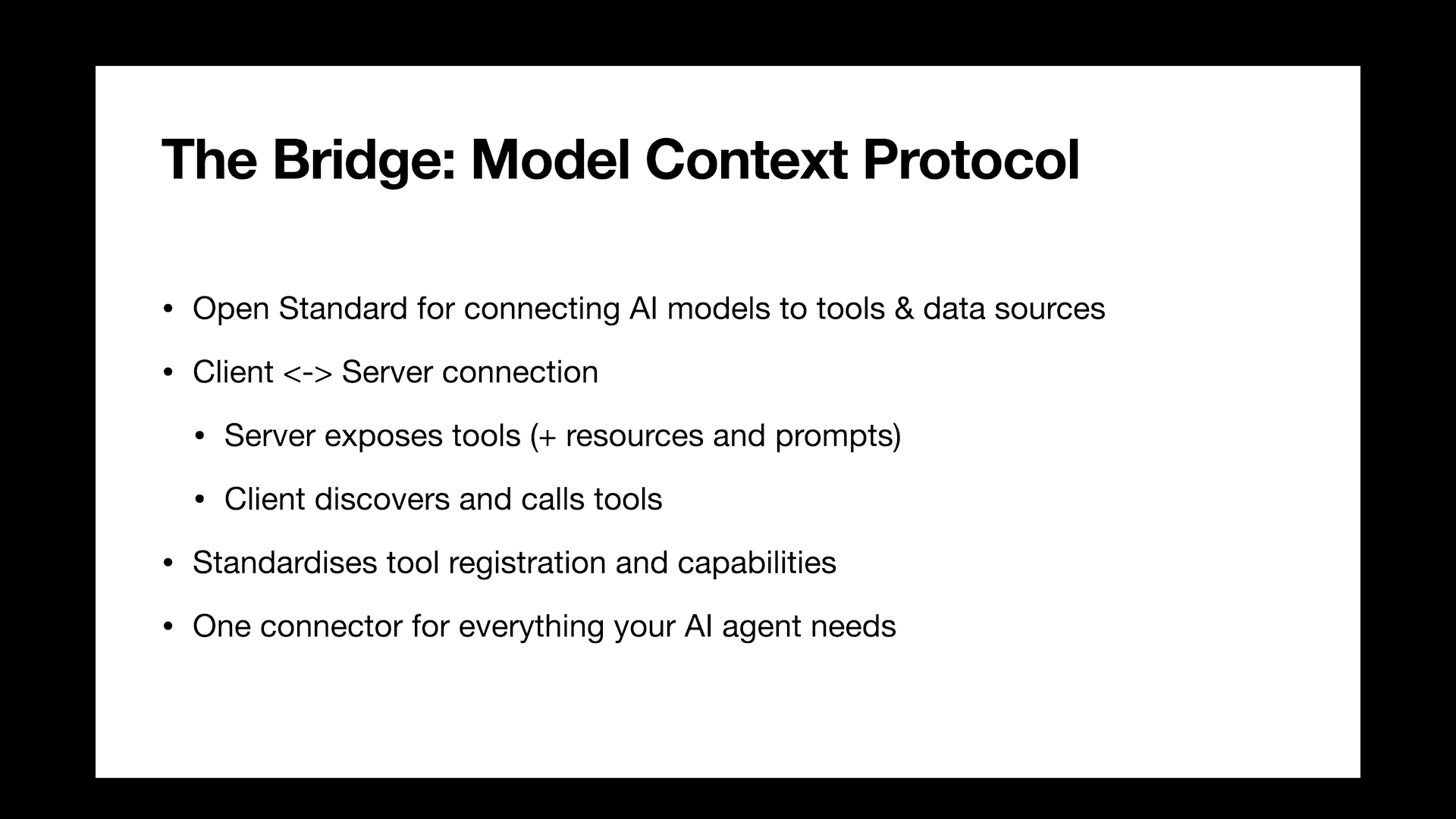
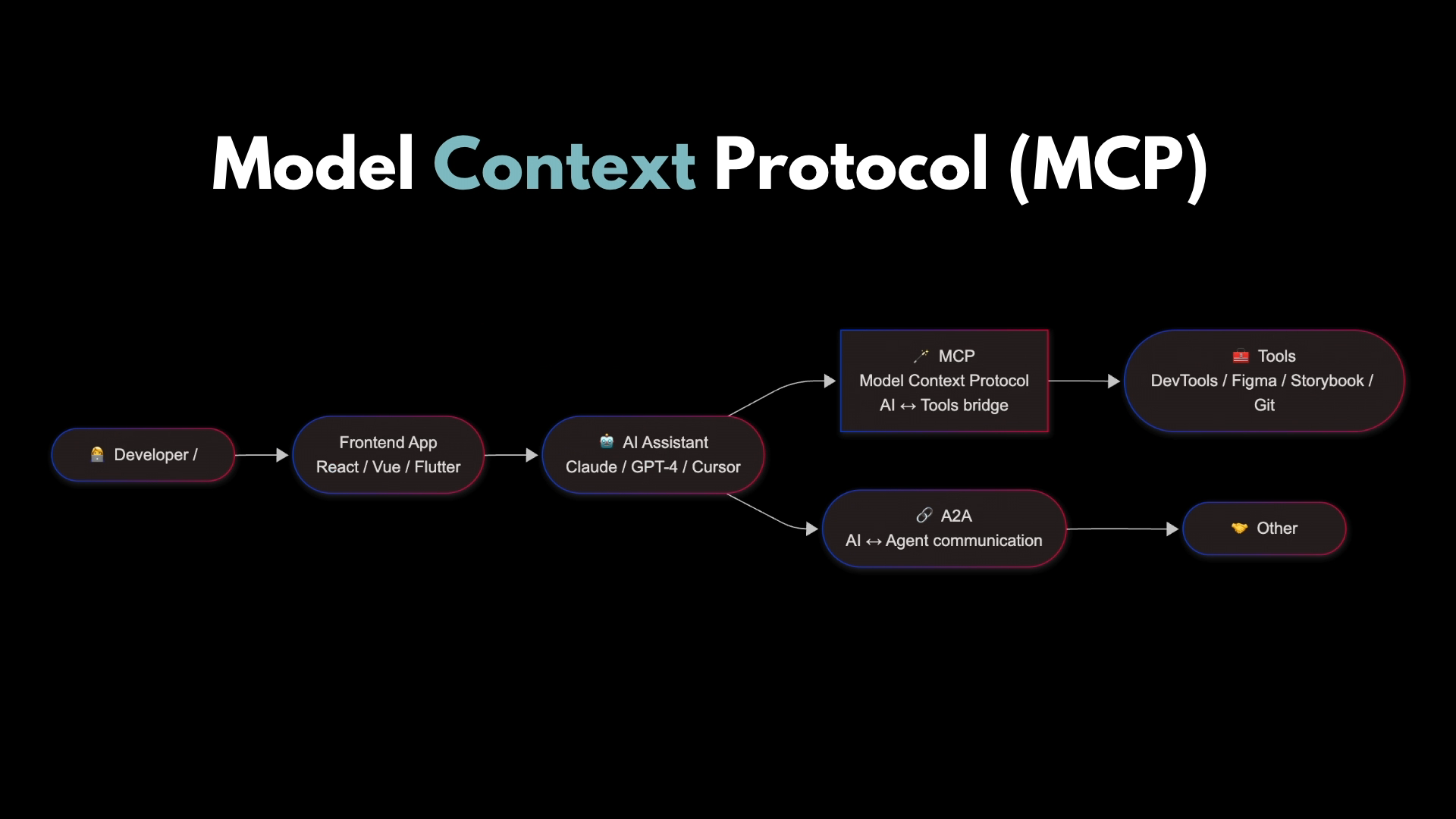
It's so important to have context, not just in development, not just in AI, in life, in humans, in everything. An MCP or Model Context Protocol is a protocol developed by Anthropic, and it's a common language between your AI and your other tools. It's like a universal adapter or a bridge that allows whatever you're working in to speak with your agent.
This falls back a little bit to the last talk. This is the next step in connecting your agent to have more information about you. The context itself it lives in your tools, and then the MCP gives your AI agent a map to your tools. This is a very simplified version of what goes on.
You're the developer, you're using your front-end tools or language, and you're usually using an AI assistant, so it might be Claude or ChatGPT, it could be a tool like Cursa. There's some kind of AI layer going on there. Then there's a few different protocols that are really popular at the moment. A2A is gaining a lot of traction, and that's when your agent can speak with another agent.
But what we're focusing on today is MCP, which is where your AI can speak with your tools. Some examples are DevTools, Figma, Storybook, GitHub. There are so many. You can pretty much connect it to anything right now. I decided I was going to Vibe Code something. This is not something I have really done much of.
I don't really deal with no code, but I thought I'd get it to make me a bit of a fun portfolio. So I picked Lovable. No particular reason. It's super popular right now. It's just about to have its one year anniversary. So I thought I'd give it a shot. And I asked it. It created. It takes a while.
We won't watch the whole thing. It took a while, but it did create what I wanted. It created a really beautiful portfolio website for me. Here we go. Okay, is it good though? It does look fun. They did a really cute job. I really, really like it. It does have personality. But could you ship it to production?
Technically, you could, but you shouldn't. It is not good. You should not ship this. So I think we should take a look underneath. At what's going on here. First of all, we're going to look at the Chrome DevTools MCP tool. So this is a recent release from Chrome and it allows your agent to talk to the Chrome Developer Tools.
So this is the prompt that I gave it. I need you to audit my portfolio site on localhost for performance and accessibility issues. You can use the Chrome DevTools MCP to do these things. So I asked it to check the network performance, run an accessibility audit, check for mobile responsiveness issues, identify color contrast violations. I asked it to give me specific issues with file names, line numbers, and violations where applicable.
So you can see on the right here, what I'm just using is a Claude code instance, but you can connect MCP up with any agent. It can be regular Claude, it could be cursor, it can be in your IDE, it can be in your terminal. Wherever you're running it, you can connect up an MCP server. And use these tools.
So you can see it's thinking through things here. And it's come up with some issues. It's found heaps of violations and heaps of problems under the hood that need to be addressed. So we've got performance issues, discovery issues, responsiveness issues. It does a pretty good job.
It was pretty fast. This isn't real time. I sped it up a little bit, but it does only take maybe two or three minutes to connect to your Chrome DevTools and run a full audit on whatever you asked for, which is really handy, because you can do this yourself, but it takes so much longer. This is very, very fast.
Okay. And then iterating. Iterating is one of the things that makes this super powerful. Because what you can now do is ask your tooling to fix the problems and then continue referring back to the results from the MCP and iterate on it until it's got a fix and it can verify the fix. So it's not using random data, it's not looking at what might be wrong, it's really looking at what actually is wrong in your browser and your network, anywhere that you ask it to look.
So one of the big powerful things here is that you can iterate and keep going until you have it all fixed and you're getting a good result. Okay, so the next one I'd love to show you is the context 7 M C P. This is a really cool one because it has access to documentation for anything you're using.
It has up to date documentation as well, so you're not leaning on the training data of the model that you're using. So I gave context 7 MCP this prompt. I asked it to review the code base for code quality issues and outdated patterns. To use context 7 MCP to check against current documentation for the React best practices and modern patterns, TypeScript safety issues, performance anti-patterns and code maintainability issues like magic numbers, dry violations, et cetera. I also asked it which files I wanted it to focus on. Because I had a bit of an idea from the last MCP I ran where the problems might lie in this particular application.
I also asked it to give me specific line numbers and explain which modern best practices are recommended instead. This is Context 7. This is in the repo, this is the readme. It's a really, really cool tool. It's super powerful. And yeah, you can read all about it on GitHub.
But one really cool thing about this one, they recommend you can add a rule to auto invoke it so that it is always anytime that you use your coding agent, it is always going to refer to context 7. It's always going to have access to the most up-to-date documentation and it's going to work in your favor. So here is a demo of me using context 7 with the prompt that I showed you before.
It does give you a lot of these, but I recommend not just giving it free rein on everything. You can see it's thinking through what I asked of it.
It takes some time because it's thinking through Lots of documentation. There's also a website for Context 7 where you can go and directly look up what docs it has. But it came and gave me this really cool summary. It prioritized what I need to fix. It decided the component organization is absolutely fine, but that there are some issues and it ordered them by critical, medium, and some nice to haves as well.
It also told me the most impactful fixes. It also goes into more detail if you scroll up about the specifics and it gave me a full code quality analysis report. You can see some magic numbers, direct DOM manipulation, inline styles, and it references the best practice specifically underneath as well.
This is a super useful tool and if you can build it into whatever you're using when you're developing, it can automatically run this on any code quality analysis. Our third demo is the Playwright MCP. This is a Microsoft MCP tool and it's very similar to Puppeteer which was recently very popular.
It has the ability to open up a browser instance and run testing on your behalf. So here is the prompt I am using with Playwright MCP to improve my application. Use Playwright MCP to test the critical user interactions on my portfolio site. Test if the project buttons actually navigate anywhere.
Test if the contact form submission works. Test if the get and touch button scrolls to the contact section, check if there are any console errors, and verify the typewriter animation displays all the titles. Then write tests that will either pass or fail and tell me what's broken. Here we go.
You'll see that it actually opens up its own testing. Browser instance to run through and do all this. And it's nice you can see it thinking and what it's working on and you can see it on the left hand side working through the website.
It's finding some errors with the buttons and with the form submission. You can see here that it's filled out its own testing into the form fields. So test the form submission itself. Other than clicking accept, I'm doing nothing. It's doing everything else. And you could let it to be fully automated and just have free reign, but I've chosen the security reasons not to let it do that.
So it's just finished checking the scroll. Now it's checking the console errors. It's testing out the TypeRite animation and then it's going to give me a report of what it finds and what it recommends. Any minute now it's going to be done.
So it takes about three minutes to run through this process, but it does something that could take you all day to do manually. And here we go.
So we now have our results. So the buttons don't work, the form submission doesn't work. And we've got more information on how to fix it. We've got some passing tests on the things that I specifically asked for, what did work, what went well. What console errors were found?
The animation that we asked about was working. It's giving us this whole report here along with what's broken. Much like the other tools that we've used today, it's going to give us a summary and tell us what we need to fix. What's broken? All of our buttons are broken and our contact form is broken. But sometimes things like this, you don't find out until your customers find out for you.
It's really handy to have Playwright to just go in there and figure it all out and let you know before someone else does. Again, with this one, iterating is super powerful because you can now ask your agent to fix these issues and it knows where they are, it knows the lines of code, it knows what to do, and then it can run the tests again and check that they've been fixed. If they haven't, it can keep iterating until it gets fixed.
So essentially, MCP is a bridge that allows you to move from prototype to production Super fast. Without Vibe coding, no code app, it was fast to build and it did look good, but the accessibility was terrible. The contrasts were terrible, mobile breaks, it wasn't automated, there were no tests. It was pretty horrendous once you look at the code.
After using the MCP tools, it's way closer to being production ready. Accessibility has been addressed. It's fully responsive, it's tested, we've got modern CSS patterns. And the code is just so much better. There are a few gotchas when you're dealing with MCP though. So the S in MCP stands for security, is a really popular saying right now because there really isn't any security.
You should always know and understand your code. It's not an excuse to just let it do its own thing and then ship something that you don't understand. You still need to get in there and really make sure that everything's how you want it and that it's secure and yeah, it's not a full replacement for an engineer. Also, MCP isn't the only tool or protocol that we have.
So it's created by Anthropic and it's gained so much traction recently, but there are other options and you need to know which one to use and when to use it. Again, with the security, for example, there's a file system MCP. It's super helpful. It allows reading and writing anywhere on your file system, which can be incredibly helpful and it can be incredibly dangerous.
There are a lot of MCP tools like this that you need to use with caution. So always keep security at the front of your mind. Also, the quality varies wildly. Not all MCP tools are updated. We don't have a good standardized protocol yet. So some of them are production grade, some of them have no security, some of them are literally dangerous and shouldn't be used at all. We don't have any centralized security audits and it's still an emerging technology that's really new.
Also the API key dance, every single NTP tool, not every single one needs an API key, but a lot of them will. And so it's really important to know where these are being stored, how your configs are set up, and using environment variables as much as possible as well. So MCP is super popular at the moment and everyone is creating an MCP server. But if you could do this in one API call or a CLI command, you should do that because there's no point in burning through all your tokens just to say you used MCP to do something when the CLI might be faster and more efficient at doing it.
Don't architect an entire MCP server just to serve one purpose. There is now a GitHub MCP registry where you can see 50 at the moment MCP servers. That's a very small number of how many they actually exist, but it is the beginnings of a place where you can see and activate different MCP servers.
MCP is probably the only piece of tech that has more builders than users because everyone's getting on the train, but not enough people are learning how to use it or really integrating it into their workflows. So I think we should change that and get more use out of it before we start building an MCP for everything. So where is this technology heading?
Microsoft, bringing an operating system integration in Windows 11. We're heading in the direction of remote and cloud MCP servers and async and long-running operations that can have background processing, which is really cool. So we can allow our tools to do things without us, which could be a good thing or a terrible thing.
Multi-agent collaboration, AI to AI collaboration through MCP is a really cool thing that is coming up in the short term. And there's a current projection saying 90% of enterprises are expected to be using MCP by the end of this year. There was an MCP Dev Summit in May, and they reported over 10,000 community MCP servers.
So the 50 on GitHub are just a very small amount of what's out there. So it's a big technology, and it's a really exciting one. So I got my headshot and I would have gotten it much faster if I had had the context to just have this created. But I got there in the end and I used it for this talk. So this is me.
This is where you can find me. I love talking about AI, MCP, analytics, data, anything. So connect with me on LinkedIn or yeah. Thank you.
Technologies & Tools
- Chrome DevTools
- Storybook
- Chrome DevTools MCP
- Claude Code
- Context7 MCP
- React
- TypeScript
- Playwright MCP
- Puppeteer
- filesystem MCP
- API keys
- environment variables
- CLI
Standards & Specs
- Model Context Protocol
- A2A
- DOM
Concepts & Methods
- systems thinking
- statistical bias
- vibe coding
- DRY
- multi-agent collaboration
Organisations & Products
- Automattic
- Anthropic
- Claude
- ChatGPT
- Figma
- GitHub
- Lovable
- Microsoft
- GitHub MCP Registry
- Windows 11