Shipping Sandboxed Workers for Notion Agents
Customer Problems That Motivated Workers
The speaker introduces Notion's workers product by outlining four recurring gaps in agentic workflows: fragmented organizational context, constantly changing data, the need to sync agent-produced changes back to source systems, and the need for deterministic execution in business-critical tasks. He explains that workers, released as an alpha in February and reaching general availability last month, are Notion's answer to these gaps, contrasting them with MCP servers and pre-built connectors.
A Personal Motivation: Automating a Tax Practice
The speaker shares a personal anecdote about helping a friend, a tax accountant, build an automated practice management system in Notion, revealing where the public API fell short—syncing Xero data, triggering updates, and generating invoices reliably. He explains that this gap in integration and deterministic action was exactly what workers were built to solve, setting up the rest of the talk's exploration of product decisions.
Designing for Fast Results and Removing Infrastructure Friction
The speaker discusses the philosophy behind workers' developer experience: letting developers focus on writing code while the platform manages packaging, deployment, secrets, scheduling, and other operational concerns. He emphasizes that this approach benefits both human developers and AI coding agents by providing explicit, repeatable, and inspectable interfaces.
The CLI as a Control Plane for Agents and Humans
The speaker details how the NTN command line tool became the central control plane for managing the worker lifecycle, enabling a tight local development loop essential for both human and agent-driven iteration. He highlights the importance of informative error messages, such as a 404 indicating a permissioning issue requiring human intervention, and describes how skills guide agents through efficient workflows.
Why the CLI Beats APIs for Machine Operability
The speaker explains that the CLI's self-documenting nature—complete with help messages and command structures—makes it more discoverable and reliable for agents than APIs or online documentation, reducing hallucination and misuse. He notes that the team built the CLI in Rust with no prior language experience, leveraging AI tooling, and stresses that platforms must be machine operable, not just human readable.
Ensuring Consistency Between Local and Cloud Builds
The speaker addresses the importance of deployable artifacts matching the environment they'll run in, explaining that cloud builds occur in the same class of environment as production to catch issues like native package incompatibilities early. This approach balances fast local development with reliable, truthful cloud builds.
Choosing Full TypeScript Over Restricted Languages
The speaker describes the team's decision to run ordinary TypeScript programs with full NPM package access and network capabilities, rejecting a more restricted expression language used in their prior startup experience. He explains that workers need to handle arbitrary customer systems and slower IO-bound tasks, unlike narrow high-speed streaming transforms, justifying the choice for developer power and flexibility.
Isolation Through Vercel Sandbox and Firecracker Micro VMs
The speaker explains how Notion partnered with Vercel to leverage their sandbox technology for strong isolation of untrusted customer code, using ephemeral Firecracker micro VMs that provide stronger security boundaries than standard containers. He praises Vercel's fast startup times and low cost per execution as key enablers for this architecture.
Execution Limits: Five Minutes, Statelessness, and Small Sandboxes
The speaker details the decision to limit worker executions to five minutes using minimal sandbox resources, designed for short, repetitive, predictable jobs rather than long-running processes. He explains the reasoning around avoiding billing and capacity issues, and how syncs are broken into chunked, resumable tasks rather than single large executions.
Scalable Worker Orchestration and Notion's Existing Infrastructure
The speaker walks through the orchestration lifecycle of workers—deploy, trigger, and run stages—and explains how Notion reused existing infrastructure like queues and job processing rather than building a new distributed system. He also discusses the deliberate design choice of cadence-based scheduling over strict wall-clock precision to avoid traffic spikes.
A DynamoDB Scaling Lesson from the Early Access Phase
The speaker recounts a real-world scaling problem where an overloaded DynamoDB table caused performance issues in debug and diagnostic operations as workspace data grew. He describes the team's solution of repartitioning metadata by worker ID and moving logs to S3, framing this as a valuable lesson in anticipating data access patterns.
A Drama-Free GA Launch and Validating Constraints
The speaker celebrates the uneventful general availability launch, attributing the lack of critical incidents to a long alpha period that surfaced failures early. He shares data showing most syncs and tools complete within seconds to minutes, validating the five-minute execution limit, and explains why longer-running workflows aren't the current priority despite being a possible future feature.
Observability and Closing Reflections
The speaker emphasizes the dual importance of observability—internal telemetry to protect and validate the platform, and customer-facing visibility into failures across code, credentials, and third-party APIs. He closes by summarizing that workers are fundamentally about reducing the distance between an idea and a reliable production workflow, recapping the key product decisions covered throughout the talk.
Thank you. So welcome to my talk about how we shift sandbox workers for Notion agents. I want to start with some of the customer problems that were the motivations for workers. We built them to address four recurring gaps that we saw in Agentic workflows. First is that agents need context, but organizational context is spread across many systems.
So MCP can help when a server exists and has all the capabilities that you need, but that's not always true. And you can also set up pre connectors and pre field connectors are great if you have them, but every customer has some system that's too niche or too internal for Notion to be able to build and maintain a first party connector for it.
So and that long tail is where a lot of the most valuable business context actually lives for your agents. Secondly, that context changes constantly. If an agent is working from stale knowledge, it can actually become actively harmful to what you're trying to do. Thirdly, agents produce changes that often need to be synchronized back into the system that they came from.
And finally, not every action should be left to open ended tool use. For business critical workflows like account creation or invoicing, customers need deterministic execution, not best effort reasoning from an agent. So workers, as part of our developer platform, are how we address these problems. We released them in February this year as an early alpha and ramped up towards general availability just last month.
You can see them in the bottom half of this diagram up here. And so workers are small TypeScript programs that change the integration model. Rather than Notion needing to build every connector for you, we instead provide the platform and customers and partners build the integrations that understand their systems, their APIs, and their internal workflows. Syncs bring external context in bring external context into Notion.
Webhooks let external systems push changes in, and tools let agents call deterministic actions against systems. I do want to make one quick disclaimer though that I was not actually on the team that built workers. I'm here as the local engineering rep who spent time talking to the team and interviewing them, read through the implementation and have actually built with the product myself.
But I am personally invested because I hit those problems that I outlined earlier. A friend of mine is a tax accountant and earlier this year we planned out an automated practice management system for him using Notion. And so the public API that we have was great and was able to generate most of the Notion side components that we needed, but the real workflows needed more than that.
He needed to be able to sync customer details in from his Xero management system. He needed to be able to trigger updates when those records changed. He needed to be able to do things like generate invoices and or sorry. Generate invoices and check them reliably, and that's where we got stuck and just couldn't continue. And it wasn't because the idea was hard.
We knew exactly what we wanted to do. It was just that the integration and the deterministic action layer were missing. And so workers, as I said, introduced last month in general general availability are the things that make this workflow possible for us now, and we're gonna revisit this later in the year after it gets through tax season.
So for the remainder of this presentation, I will walk through the product decisions that we made to provide the best possible developer experience and worker capabilities without sacrificing security or scalability. I hope that by sharing these decisions, their backgrounds and their outcomes, I can help you in making your own agentic systems. So as engineers, we have a head start when we're trying to build a great developer experience because we're building for ourselves.
We know what we like and we know what slows us down when we're trying to go through our processes. So one of the clearest product directions for workers was that we needed to enable fast results by removing infrastructure concerns from the critical path. Writing the code is the easy and fun part for us, and with modern AI tooling, it's even more fun and more easy.
The hardest part is really everything else around it. So packaging, deployment, secrets, authentication, scheduling, logging, retries, etcetera, like that that stuff is what takes up a lot of time. So Workers were designed to let developers develop and have the platform handle the rest. We wanted to help our customers get quick wins, see the potential, and then go on to expand the capabilities of their Notion workspace. It makes them love Notion, makes them want to be long term customers, better for everybody.
And nowadays, what we do for humans also needs to integrate with AI. For coding agents that are building upon workers, the interface should be explicit, repeatable and inspectable. Otherwise, development can just waste time and tokens. The same thing that helps humans also help agents produce working code but benefit from being even more explicit. And so our answer to this was a strong focus on the command line interface. Early prototyping made it really clear that the CLI was not just a convenience wrapper, it actually was a core part of our product.
More specifically, this NTN command line tool became the control plane for our workers. It provides clean pathways to handle the entire worker life cycle. And that matters because the local development loop has to be tight when you're working with an agent. You want to be able to work matters, you know, generally. So you want to write code, inspect it, and run run it, inspect the logs, and try again quickly if there's any issues.
But if every iteration requires a full remote deploy or a manual inspection and dashboard, it's just gonna be too slow to be effective. And that matters even more for agents because they can do all those steps unattended if you let them, but without a clear feedback loop, they're mostly guessing in what they're trying to do. So a lot of care goes into making sure that our error messages, for example, are as informative as possible and even provide suggestions on how to recover from common pitfalls.
So as you can see in this screenshot, there was a four zero four, and at this stage, it usually indicates that there was a permissioning error in Notion that actually requires a human, to intervene. And so if we just let the agent sort of spin, it might try everything. It's never gonna succeed. You want to make it clear to it that no, no, you need to get a human involved to solve this.
And so while all the functionalities within the CLI, we also maintain skills to guide agents towards the most efficient path through the workflows, which commands to run, in what order, how to validate, and when to stop trying to continue. We can see here that we guide users to install them straight after installation. But skills are only guidance.
The CLI itself has to be discoverable to work in any situation and that's where it has a strong advantage over something like a set of APIs with, you know, even with online documentation because the CLI is fully self documenting. It has all the help messages, command structures, and varying levels of verbosity that you can access. And that means we avoid the situation where an agent is trying to use the wrong API or hallucinating about supported parameters, which I'm sure most of us have seen.
I've seen it myself in the last few weeks. It's all just there in the CLI. And so the lesson is if you want your AI to build on your platform, your development workflow has to be machine operable, not just human readable. And the CLI gives agents that control plane for a tight local development loop that leads to rapid progress.
Historically, building a robust CLI like this can actually be a bit of a chore for an engineer, but agents excel at this kind of work. And our team built NTN and Rust with actually no prior experience in the language themselves. So this click local, development loop doesn't mean anything if it produces different results to the deployed code.
So the deployable artifacts should not depend on the developer's machine. You don't want to have, you know, architecture issues or whatever. The Node. Js environment we use won't make much difference in most cases, but if you're using native packages, it might. So by building the cloud, the final artifact is produced in the same class of environment that it's going to run on.
That catches a whole category of problems before development and gives agents a more stable environment to reason about. So basically, we optimize for local development for speed, but cloud builds for truth. So when you're doing development, it's, you know, kind of not fun if you find that you you've got this idea and you're limited by some arbitrary system constraints.
So we wanted to make sure that we gave workers the most powerful environment we could while remaining safe. The team that built it actually had previous startup experience building for constrained cloud environments where they were doing fast transforms on streaming data using a restricted function language and that works well when the problem is narrow and well understood.
But workers are different. The job is to connect arbitrary customer systems, transform arbitrary data, and expose real business actions, which means that a restricted expression language is not going to be good enough. And we're not trying to optimize for a stream of thousands of high speed transformations per second like in that world. We're trying to produce tasks that will perform IO, possibly quite slow, quite blocking, and processing loops.
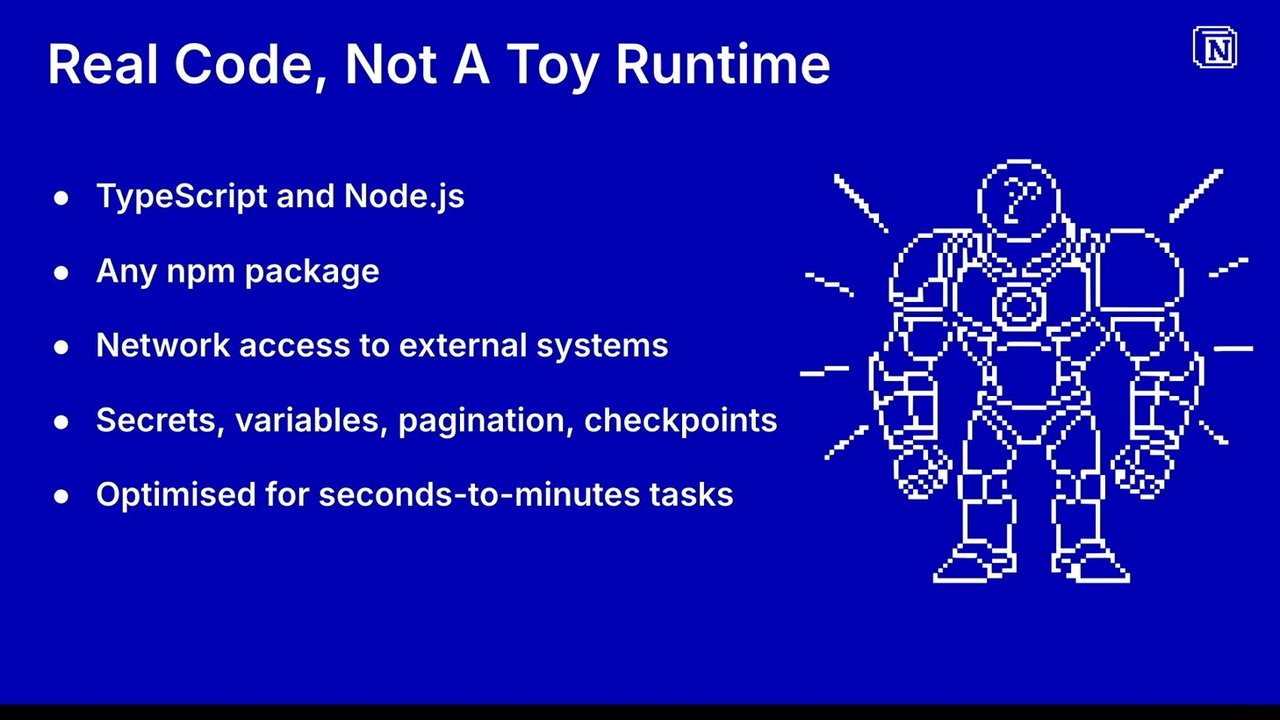
And so the whole task is is expected to take seconds to minutes. So we chose just to run ordinary typescript programs on node with NPM packages and full network access, which gives the developers the power they expect and avoids forcing customers to work around our constraints. But that immediately opens up the next problem. If you let customers run real code, you really need to have serious isolation around it.
It's customer code with customer dependencies talking to external systems. We have no idea what they're planning to do and that's kind of the point. So we partnered with Vercel to use their sandbox technology. This gave us the isolation model we needed without building our own execution platform. They're fast. They start up in under a second, usually much less than that, and they're cheap with fractions of a second fractions of a cent per execution. They have been a great technology partner, and we couldn't have done it without them.
And so each execution runs in a an ephemeral Firecracker micro VM. So regular containers like Docker, they isolate processes while sharing the host kernel, but Firecracker actually gives each execution a lightweight VM boundary with its own guest kernel, file system, and network stack, which is a stronger isolation model for running untrusted customer code like this in our infrastructure. The runtime that we give them is intentionally stateless.
So when a worker finishes, we persist only the state we explicitly planned to keep and, put into our APIs, and everything else that's on the disk gets discarded. But giving them real capabilities doesn't mean that we gave them unlimited power. We made a decision to limit executions to five minutes each using the smallest sandbox size that was available, which was one CPU and two gigs of RAM.
This came from the kind of work we wanted for workers to focus on, which was short repetitive jobs that run run often and finish predictably. So you'd expect things like syncs to bring the data in and webhooks to receive incoming data should be particularly fast, but even tools which are triggered by an agent should do their work and return quickly because you don't wanna have an agent sitting there just spinning while it goes off and runs a task for an hour and you've got no idea what's happening.
So we force customers to break, their jobs down into smaller, tasks, particularly sinks where we want them to do small chunks of work, where they fetch a page of data, they tell us there's more work to do, and then we'll schedule a fast follow worker, but the individual workers are fast and resilient to failures rather than a big black box.
The cell sandboxes could run for several hours if we actually wanted them to, but allowing that is more than a reliability problem. It actually becomes a billing and capacity problem. And killing jobs is not always as clean as you might expect. In a distributed system, cancellation has edge cases where if Sandbox keeps running longer than you're expecting, someone's still paying for that compute.
So setting a limit of five minutes meant that the workers will stop usually within that amount of time, and the vast majority will finish within ten minutes. That's not every single one, but most. So the current product was intentionally constrained in that regard. We run quickly, finish within minutes and build long workflows as a series of resumable steps rather than one giant execution.
Now, Notion has over a 100,000,000 customers, so anything we build needs to keep that scale in mind. Vercel handles the execution environment for us, so that part's under control, but we still need scalable worker orchestration. On deploy, we build the worker, we store the snapshot, we write the metadata and the secrets.
On trigger, work can arrive from several places. It can come from a schedule, it can come from a webhook, an API call, or an agent tool call. On run, the job passes the queue into a sandbox, executes, and writes back explicit state. And around all of that, we needed all the recovery mechanisms, so retries, back off, and life cycle enforcement.
And the good thing about it is because we're building on Notion, we're able to reuse a lot of our existing infrastructure here, especially around queues and job processing. The goal was not to invent a new distributed system for us. It was to fit workers into the infrastructure we already trust and to give them the most efficient, runtime that we could.
Now in that diagram, one thing that matters more than most people expect is scheduling. So if every customer says run hourly and we interpret that as exactly on the hour, we end up creating our own traffic spikes. We've seen this notion with several other scheduled task systems that we have. If you provide a Cron like syntax, it requires careful balancing of system capacity against customer expectations of when it's going to run.
So the model here is cadence, not wall clock precision. Customers say how often the work should run and the system queues it up to run roughly on that cadence while smoothing out the load across available capacity. When the job finishes successfully or not, it re queues itself. And so the the retries are deliberately battered though. So syncs can retry with exponential back off, but repeated failures usually mean either that's the code is bad or there was a third party dependency problem, and that's not something we should keep blindly retrying forever. All that said, some people do actually want more clock scheduling, so we're looking to add this in the future, but it we don't expect it will become the norm for operation.
So a real world problem that we hit during the early access phase was that AWS DynamoDB is a great scalable schema less storage solution. And so we started by putting all the metadata and run logs in there, in the same table partitioned by Workspace, which was a good decision at the time because it was really simple to develop against. But as the data grew and we added more queries against this overloaded table, we noticed that there was a drop in the performance of our internal debug and diagnostic operations.
Some workspaces had hundreds of workers, so table scans for all their logs was actually becoming quite an expensive operation. Rather than just adding new secondary indexes to the table, we decided to take a step back and rearrange these tables. The metadata was repartitioned by worker ID rather than space ID, logs moved into s three and the paths kept in a separate Dynamo table. And so this is one of these things that none of you would ever have known about if I wasn't sharing it here.
We didn't have any outages or customer facing degradations, but in hindsight, a bit more thought about the ways that the data was gonna be accessed would have saved us some stress, and the team internally was scrambling to fix all this in the lead lead up to launch. So I'll finish up today by talking about the GA launch and a bit about our future for this product.
The most surprising part of the launch was just that there was no drama. We saw usage jump on the day that it went live and it's continued to grow at a quite a nice pace. But there's been no critical outages and nobody got paged for any kind of incidents. The team actually apologized to me for not having a better disaster story, but that's the point.
The long alpha did its job. By the time we reached GA, all the scary failures had been shaken out. And really what remained at that point was just polish, checking edge cases, and continuing to build onto our new features. And so one feature you might expect from all this is that maybe we should have longer running workers.
As discussed earlier, the current workers model is strongest when work can be broken into short bounded executions. Executions. For syncs, the pagination model works well and gives us a practical way to support these larger jobs without requiring long compute tasks. And what we found actually is that the customer data from our decisions have been validated. Most syncs and tools complete in seconds, that's those green lines you can see up there, and nearly all of them complete within minutes.
The the syncs at the top are sort of a bit more consistent, tasks are a bit spikier. So the five limit limit limit was not hurting the common case, it was actually a constraint that matched how customers were using in the platform. But if we already have all this execution, scheduling, etcetera in there, why not support longer workflows?
Well, really just because it requires more work from us. The simple state persistence doesn't give us a general model for checkpointing, arbitrary business flows, providing ongoing progress updates, which is what you want for agents, resuming after failure, or protecting customers from what happens if their work gets rerun. And we'd love to spend time building that and likely will in the future, but it's not where the strongest customer demand is today.
The product's seeding succeeding today because it makes the common case simple, fast, and reliable. In other words, we're focused on making these short running workers excellent rather than prematurely expanding the platform. And so my final point, point today might seem obvious. Observability is important especially when launching a completely new system, allows us detect failures and so forth.
But we need internal telemetry to protect the platform for our set for ourselves. So we need latency, failure rates, retries, etcetera, is what made the Long Alpha useful. We're able to onboard early customs, see what happened, and adjust accordingly. Made us know that we were safe to go to GA. But customers also need observability because workers of their code running in our system. If a worker fails, they need to know where the problems in their code, our platform, credentials, third party APIs, etcetera.
So we need to capture all of that and convey it back to them as required. So workers are not about running code, they're about reducing the distance between an idea and a reliable production workflow. For us, that meant treating the CLI as a control plane, not a helper script. It meant providing simple and reliable builds. It meant optimizing the workload for what we wanted rather than offering general purpose compute. It meant giving developers real power with isolation and reasonable constraints. It meant focusing development on the core product while relying on our existing scalability where possible, and it meant treating failures, logs, and retries as part of the product surface.
And that's it. I'm Adam. I'm from Notion, and you've been listening to me talk about the workers component. So thank you for listening.
Technologies & Tools
- Amazon S3
- AWS DynamoDB
- Docker
- Firecracker
- Node.js
- Notion API
- NPM
- NTN CLI
- Rust
- TypeScript
Standards & Specs
- MCP
Concepts & Methods
- Command Line Interface
- Cron
- Exponential Backoff
- Micro VM
Organisations & Products
- Notion
- Vercel
- Workers
- Xero