Give it the boring jobs

Why Legacy Systems Need an AI Intern
Jason O'Neil introduces Culture Amp’s developer-experience mission and the sprawling monolith, slow feedback loops, and accumulated technology layers that frustrate its engineers. He explains that moving to microservices improves some workflows but creates coordination and maintenance problems across many repositories.
Refactoring AI Work Like Software
O'Neil connects agent effectiveness to the developer-experience pillars of flow state, feedback loops, and cognitive load. Inspired by reports of productive Claude Code use, he argues that previously unaffordable maintenance work may now be viable—but only when engineers decompose it into manageable tasks.
The Dependency-Update Backlog
Culture Amp uses Renovate and roll-up branches to automate safe dependency updates, yet breaking changes and failed builds still demand human investigation. O'Neil asks Claude Code and GitHub Copilot to assess multiple update branches, but the agents produce confidently incorrect pull-request comments.
Context Windows, Clash, and Subagents
O'Neil traces the dependency experiment’s failure to overloaded context windows and contradictory information from different pull requests. He restructures the workflow with Claude Code subagents, giving each investigation an isolated context and returning only concise results to the main agent; this substantially improves reliability.
Converting Flow to TypeScript
O'Neil tackles Culture Amp’s remaining Flow files, first with an overambitious modernization prompt and then with a repetitive, repository-wide conversion. After the agent loses focus and leaves many errors, he moves deterministic work into a custom script and limits AI to the transformation step.
Tools, Feedback, and the Cost of Agent Loops
By running Claude Code as a tool-using loop, O'Neil lets the agent consult TypeScript and iteratively repair its output, reducing the conversion to one remaining error. He weighs the financial and environmental cost of more than a thousand model turns and recommends treating AI calls like expensive operations that should stay off hot paths.
Throwaway Codemods for Tailwind Migration
O'Neil shows how Culture Amp scaled a difficult Tailwind CSS v4 migration by asking AI to generate disposable codemods rather than repeatedly transforming every repository itself. He closes by urging engineers to apply familiar software-engineering skills: improve agent conditions, revisit formerly expensive maintenance, and refactor large prompts into smaller reliable tasks.
So giving it the boring jobs. This is a talk celebrating this brief window of time where AI is smart enough to do some useful things, but dumb enough that we can still tell it what to do. And we can treat it like an unpaid intern and offer it no growth opportunities and ask it to make our coffee.
Of course, wouldn't do that. Pay your interns, help them grow and make your own coffee, one of the real joys in life. Anyway, I digress. I work in developer experience at Culture Amp and before I get into the meat of my talk, I wanna talk about developer experience a bit. Culture Amp's whole deal is about employee experience and trying to improve workplace culture because being good to your people is good for business.
And so of course, we wanna do that ourselves and in the developer experience team, we focus on improving the life of developers and some of the technical challenges that frustrate them and slow them down. And boy, do we have some. We've got monolith problems. Culture AMP started like, I don't know, twelve years ago or something and there's one big ugly code base with over a million lines of code. Like no one has a complete mental model of it.
I doubt anyone's read every file in there. And the feedback loops are slow, like it takes ten minutes to install the dependencies, it takes five minutes to start up the dev server, CICD takes half an hour, like it's just horrible to work in. But it's not just that it's big and that it's slow, There's also like, it's got layers and layers of different technology.
Like you think about the JavaScript part, like it started way back when with jQuery. But then they wanted richer UI, so they added React and then they wanted types, they oops, they added flow types, which is like TypeScript but older and crappier and from Facebook. And then they added like Elm, which was a fun experiment, but it didn't pan out, but it's still in the code base.
And then we switched to TypeScript like the rest of the industry, but instead of like changing and having just the newest thing and converting all the old things, we've just layered it on. And now if you work there, you have to have the cognitive load of thinking about all of these different layers. Similar story in CSS, similar story with like our databases and how we communicate. And so as a company, we took a bet on micro services, but turns out they're hard too.
In theory, you can keep it all in your head and you're just working in one little service and it is better. The feedback loops are better. The cognitive load is better. But how often do you hear stuff like this like, it doesn't work as planned, I need to run nine different services to test this properly or we have to update tailwind in 51 different repos.
I'm actually gonna talk about that example soon. So what's good for like, why am I why am I complaining about DX when this is a talk about AI? Two reasons, and these are kind of two of the things I want you to take home. One is what's good for DX is good for agents too. And what is good for DX?
Well, there's this nifty little triangle from Margaret Anstory, Nicole Forsgren and Mikaela Greylar did this awesome research and they kind of mapped out like well worth reading the paper, DevX, What Actually Drives Productivity. They mapped out these three parts which kind of make up what makes for good developer experience. Flow state, like being able to get in the zone, feedback loops, and cognitive load, like the amount of mental processing required to get a task done. So this is the stuff that's good for DX, but it's also good for the AI agents and how well they perform it. So as I go through the talk, I'm gonna point out parallels with each of the corners in this triangle.
So what's good for DX is also good for AI agents, that's one point. One of my next points, health tasks that were expensive might now be in reach. Like how often have you been like, oh, if only we had time to like go convert that old thing, get rid of that old tech we're using, but it's gonna take some weeks and we've got features to ship, how do you do that?
Like maybe maybe with the help of AI, some of this can actually be in reach. There's this great blog post by Arthur Thoreau, which was very inspiring and it fitted in great with this talk and talked about six weeks of Claude Code, he said, here's a list of things which I've completed solo since getting access to Claude Code, he just listed off like 20 things.
It And was like super inspiring, like switching to new tools with better feedback loops, converting code from old patterns to new patterns. And I was like, perfect. I'll copy some of this from my talk and like the examples I wanna work through today, dependency updates, like we use renovate button, we just have way too many dependencies come through, converting flow to TypeScript and updating tailwind v four.
But I'll admit, I haven't had as much luck. Like, I've had Clog code for more than six weeks and I still have these things like these examples, I've made progress and I think it's really promising, but it's actually hard to work. You can't just like give it a prompt and it just works. When the AI failed to help me straight away, I actually used my skills as a software engineer, things like breaking work down into smaller manageable pieces and refactoring, and I started getting better results.
And I grew more confident that my skills as a software engineer and our skills is like this industry are still gonna be relevant in a world with AI. And so this is my final point that I want you to take home before I get into my examples. You can refactor one big prompt into smaller tasks that the AI can handle more reliably.
Like, it's kind of fun. You actually like think about it and rather than just hand it off, you think about which parts can I put where, how can I break this work down? You're using AI less like an off the shelf product and more like a tool in your toolkit or a function call that you can call an expensive function call.
Yeah. So your skills are still useful here. So I wanna get into some examples. So the first one is about dependency updates. If any of you have worked in the j s j JavaScript ecosystem, like you install any of the common tools or frameworks and you get this unholy number of dependencies. And if you ignore them, your developer experience suffers.
Like you get more complexity and cognitive load because you're on old versions and what's in the docs isn't what you've you've got. What you're using at home isn't what you've got and so you get it wrong. Those kind of things. You get interruptions and less flow state because you've got security issues or bugs that were fixed in a newer version.
But keeping up to date is hard work, like we use renovate bot to open PRs for us, but how do you know if they're safe to merge? Like so pre AI at Culture Amp, we had this strategy called a roll up branch where like any of the updates that came through, if they weren't a breaking change and if they pass CI, we merge them in.
And so in this screenshot, it's probably too small to see it, but like we had 18 updates successfully getting the roll up branch. And these are pretty consistently green builds, they're pretty consistently safe, like it's a safe bet to we still review them, but it's safe to they're consistently good. But even though I've got 18 in there, there was still 18 more, like this was just one of our repos.
Like I said, we've got more repos than engineers. And so it's ridiculous. Like how are we going to get through these? Like someone has to look at investigate the breaking changes, someone has to look at why CI has broken and try and understand it. But it's kind of boring work, like maybe AI can help.
So with all of these examples, I start with like a naive attempt. Like there there is a more of a prompt here, but it's basically, hey Claude, go through these update branches and tell me if they're good to merge. I think I tried it with both Claude code and Copilot, similar results. And it started off well, like it used the GitHub CLI tool, it checked for all the open branches, it went through the first one and it checked the status checks and tried to do it. And it it looks like it was going somewhere useful.
But then it it ended up generating a whole bunch of, I don't know, just incorrect PR comments. It would be like this has no breaking changes when it clearly like in the release notes in the PR description, it had breaking changes. What went wrong? What happened, it's like LLMs have this context window.
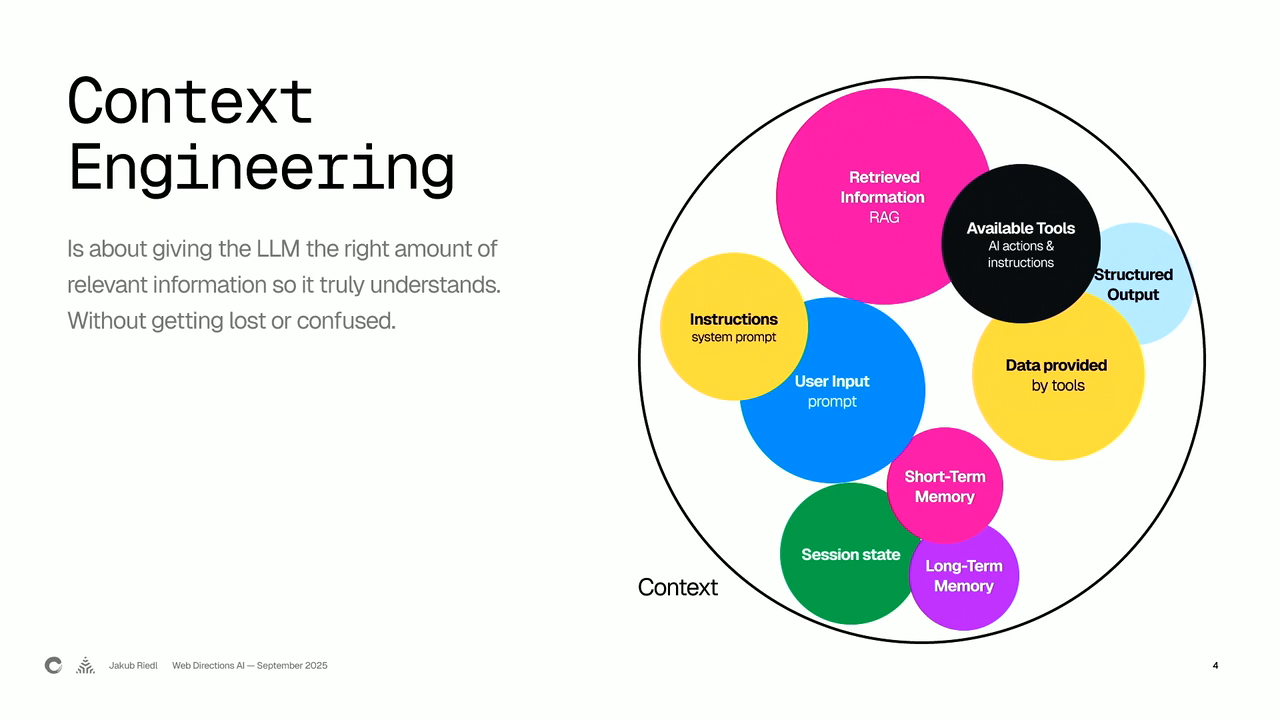
So the amount of context that's in the chat, kind of like chat GPT chat or Copilot where you've got the chat, that's the easiest way to think about a context window. The amount of stuff that's in there, it just started going haywire. Like each model has a maximum context window length and when they first came out, it was only like 8,000 tokens, like barely enough for a conversation and now they're much bigger, like 200,000 is common, Some up to one or 2,000,000, like is that enough for what we're trying to do here?
So let's actually have a think about it, like what goes in here. These might be a bit small to say, but you get the idea. Initial prompt, like what I I passed into it, it does its thinking, then it does a tool call to get the list of PRs, and then it processes PR one, two, three, and then it prints the summary at the end.
Like that doesn't look too complex, but the reality of what actually goes in when it processes the PRs is more like this. Like it starts PR one, it gets it does a tool call, gets some JSON, reads does another tool call to read the PR description. It thinks about what the change is. It starts grepping the code base to see if there's stuff there.
It starts doing API calls to see if the status checks are failing, it gets a thousand logs from the build, like all of these things and it just keeps going and more and more stuff goes in the context. And before you know it, you've got this huge context window full of like all these random things and you're asking the LLM to make a sensible summary of it at the end.
And remember, this is just for one PR. So like by the time you do a few PRs, it's getting it's getting absurd, the amount that you're putting in there. And we might still be within the 200,000 context window that Claude had when I was using this. But somehow it still failed. There's this amazing blog post, I will recommend it, like I recommend it to anyone who's coming to a conference like this.
It's by Drew Brunig, hope I'm saying his name right. How long context fail? And he lists these four things and does great examples. And in this case, I think it was context clash. Like we had contradictory information from different PRs. So we had information from the first one, which might have had like the breaking changes or rename of the symbol.
And then later on, it's doing the second one and it's grepping other code, but it's forgotten which breaking change it was looking at with which code snippets it was looking at and it starts generating wrong information. Like even though we've got these long context windows, they're not effective for this kind of work. So Drew gives this warning.
If a model starts to misbehave long before the context windows are filled, what's the point of a super large context windows? In a nutshell, summarization and factor retrieval. If you're not doing either of those, be wary of your chosen model's distraction ceiling. So this idea that even before you run out of tokens, it might be getting distracted by all the stuff you've put in there. Like ideally, we'd be able to break it down like if I could think about pseudo code for this, it would be like get all the branches and then do a for loop and just like in code where you've kind of got a separate scope for what's inside the for loop.
Can we have a separate context window for the stuff and so each branch gets its own context window? And so instead of having a giant stack like this, what if we could refactor it into like a whole bunch of different context windows? Now this is too small for you to see, but you kind of get the idea.
You've got this main loop on the left and then it's got like one on the right and then for each of these sub tasks, you're kind of creating a new context window, One to understand the change and analyze if it's relevant to you. One to check if the build failed and try and fix it, and one to leave the PR comment and the kind of summary at the end. Like you're putting all of those into separate context windows. I mean, that would be awesome if we could do that.
Luckily, Claude Code has this feature. It's called sub agents. I would be shocked if other agents don't copy it soon. Like I've I've played with Copilot, Cursor and Claude code. I know there's heaps of other open source ones. But Claude has this feature called sub agents and it sounds complex like, oh, I'm administering all these sub agents.
It's like a function call. It's a separate body with a separate prompt, a separate context window. Your code is like the prompt that you give it. Your input is like the main agent kind of passes in a bit of a summary of the task at once done. And the output is a summary that it returns back to the main agent. But all of the thinking is like a separate scope, just like your function has lots of local variables that your call site doesn't have to know about, a sub agent does all of the thinking over here and it doesn't distract and pollute the context back there. And so we end up with, you know, I won't spend ages here, but you have like a main thread, like a slash command that I used, which told it what to do and then a separate one for like a BuildKite CI one which gets thousands of lines of logs and finds the most relevant parts for the error. And then one that assesses the update, and this was like a fairly long prompt and it does a lot of grepping and tool calls. And it mostly worked, like it actually managed to stay on track and it worked its way through.
And because most of the context was happening over in these sub agents and just the important summaries were returning, I actually got some pretty useful results, which is cool. This is like the first kind of overlap in the triangle that I wanna talk to. Cognitive load kinda overlaps with context windows. Like if it's too much for a human to think, put in their head, it's probably too much for an agent as well.
And the kinds of techniques we use when we're trying to make our code simpler is the kind of techniques we can use to make agents or like the context windows for agents simpler as well. Alright, second example, flow to TypeScript. Who's actually heard of flow here? Like is anyone old enough? Yeah. Like back in 2017, it was becoming clear that like adding types to JavaScript in some way was gonna be a good idea for a lot of projects.
And both Microsoft and Facebook were giving it a go. Facebook with Flow, Microsoft with TypeScript. We picked Flow in 2017 before I joined. And by the time we realized it was the wrong choice and the whole industry was kind of going down TypeScript, we had like nine forty Flow files. And over time, we've converted most of them, but we haven't converted all of them. So you've still got the cognitive load of like, it's only 20 something left now, but they're still there and they're still like part of your build and there's still complexity you have to hold in your head.
Can we just get AI to finish the job and convert the rest? So someone on our team had this attempt at like full this full prompt that like takes an old legacy file and modernizes it all. So it's not just like flow to TypeScript. It's also like React class based components to function components, CSS modules to tail and like do everything.
And like you'd think this would fail and it kind of it can't do it autonomously, but it gets a good like it starts the work and then you can finish the work like it overcomes that initial block that you have when you start a big project like that. And yeah, Darren was able to merge some of these, which is great. I kind of think of this approach like vertical, like you've got all these kind of health tasks you wanna do and you're doing it in one place for all of them at once. Whereas I was wondering about doing it horizontal, like pick one task and do it across the whole code base.
So it's like a very repetitive change in a lot of different places, and it makes it easier to review and verify. So I was thinking about that. Again, I took a naive approach, just kind of said, find all the files, rename them and do the changes. And it got off to a good start, like I think it did four or five.
And then I can't like, I find this so funny. I tried to give it the boring job of converting them and it got bored. And it just said, let me continue. Maybe I can speed the process up using a script and it started trying to do bash one liners to convert. Completely failed. I told it to get back onto the task.
At some point, Copilot was like, are you sure you wanna keep using all of your requests for the month on this like pointless task? And then it started hitting the like summarizing conversation history, so we'd gone over our limit. And at the end of it, it had converted the 22 files and we only had 152 errors in 19 files to deal with.
So not very effective. The next thing I tried was writing a custom script. Like what if instead of just trying the one big prompt, we could break it down and actually script some of it. So a lot of these steps don't need AI, like use glob to find all the JavaScript files, do a for loop, do a git move, like do a commit at the end, but the AI bit we need is in the middle and I was using Vercel has an NPM library that can use like any of the different models or providers. And I was using that just one shot, have a go, convert it.
And this actually did better. I can't remember. I didn't write down how many it got correct. It did better, but there was still like a fair few errors. But it was a lot easier to follow the changes it made. It stayed on track and it was easier to iterate on. But it never calls TypeScript in this mode to actually go, did I do okay? Did I get it working?
And that's the next kind of overlap, like the kind of the same feedback loops that really help you as an engineer help the agents. So actually being able to do like tool calls and go, is this valid? Are my tests passing? Is my linter working? Like getting those working really well for your engineers is also gonna help your agent speed up.
And like I think this quote from Hannah Moran at Anthropic, agents are models using tool in a loop, like what a simple definition. So if you give them tools, they get their feedback and they do it. So same script as before, but instead of that one AI query, I'm using Claude code, which is not just a CLI thing, you can also use it as an NPM package with a function and I go, you've got 200 turns, you've got access to these tools, go for it.
Now I actually in my prompt, I said you have five turns at it and if you can't get it after five, like just use a TS expect error and move on. And at the end of that, I had it do way better, found just one error. Two of the files had some expect errors all through it, but overall, like it was actually, it did a reasonable job.
There is no story here where it got all the way on its own. Like at every point, I still needed to jump in and help with some of the tricky cases. So this is really promising, but like it was quite expensive, like it took eleven oh seven turns or like I assume that maps to API calls. It costs just under $7 in, you know, is that cheaper than my time?
Yes. If I just have it running on a loop meaninglessly, is it a good use of my money? No. There is like the final bit here though. It's like there's there's this overlap between flow state and token spend, like humans having enough time to be in the zone on something and then the AI having enough tokens to actually focus on the problem. Like Anthropic reckons agents use four times as much as a chat and these multi agent systems 15 times as much, great time to be working at Anthropic.
Like I just wanna call out like what's the environmental impact of this? Like Hannah Ritchie, who does sustainability by numbers has talked about some of this and she's like chat GPT as chat is not that bad, but if we're using it in a loop like this, we've got to be more thoughtful. And one way I wanna think about this is like performance optimization.
It's like when you're trying to make your server not crash all the time. You don't put expensive calls on the hot path and let's not put AI calls on the hot path. Anyway, I'm running out of time, so I'm just gonna screen through this last one. Tailwind v four update with Codemods. So Tailwinds was a really hard update for us.
Like it took Kevin Yank, who's one of our most senior engineers and who's speaking at the next Web Direction Summit. It took him like, I think three or four weeks to get it done in the first repo and like I said, we had 50 repos that needed it to happen. There was just a lot of complexity for different reasons.
It was harder than it should have been. He wrote an excellent guide, but it was very repetitive and we use code mods. And the key part here is like rather than spending months building a hard code mod, we did throw away once. So we just wanted it to build it once, use it, open the PR and then we don't have to worry about it again.
So we had a Codemod prompt we reused. We had a read me of our desired change, in this case like changing the import syntax because of like intricacies around like having both Tailwind and Next. And our internal packages. And then we just gave this to Copilot and it gave us a code model. And so instead of giving all of our code to an LLM and passing in all the source code in all of our repos, we got it to generate a code model once and then we can run that code mod on all of our things. And the key point here is like if Vibe coded it and at the top of my code mod, it has this comment and it's like, Vibe coding alert.
Like I didn't actually review this code at all. I just the only thing I care about is the diff, like is it making the correct change? And so me and Chris Chan on my team, we vibe coded a little tool to like let us run this across all the repos, preview the diff, iterate on the prompts and the code mods, and then it opens the PRs on GitHub and we merge them.
And in that case, it's like I was using AI, but we weren't just blindly dumping everything into it. We were actually thinking about can we use this to build a tool that will then programmatically make the changes. So they're my three examples. None of them were quite a wild success, but like there was a lot to be learned and I definitely feel like the skills we have as software engineers can apply and some context engineering is much the same. Like we can refactor the way we use AI.
So there we have it. They're my takeaways if you can remember them. What's good for DX is good for AI agents too. Health tasks that were expensive might now be in reach. And you can refactor one big prompt into smaller tasks that the AI can handle more reliably. Like, use it like an expensive function call, not not an off the shelf product. Cool.
Thank you.
People
- Margaret-Anne Storey
- Nicole Forsgren
- Michaela Greiler
- Drew Breunig
- Hannah Moran
- Hannah Ritchie
Technologies & Tools
- Renovate
- Flow
- TypeScript
- Tailwind CSS
- jQuery
- GitHub CLI
- React
- CSS Modules
- Vercel AI SDK
- codemod
- Next.js
Concepts & Methods
- microservices
- DevEx framework
- flow state
- feedback loops
- cognitive load
- roll-up branch
- context window
- context clash
- distraction ceiling
- subagents
- agent loop
- vibe coding
- context engineering
Organisations & Products
- Culture Amp
- Claude Code
- GitHub Copilot
- Cursor
- Buildkite
- Anthropic
- GitHub
Works
- DevEx
- How Long Contexts Fail
- Sustainability by Numbers