Flue: The Agent Harness Framework

From LLM APIs to Autonomous Agents

The speaker opens by tracing the evolution from simple LLM API calls and RAG apps to SDK-based scripted agents, and finally to autonomous agents like Claude Code. He explains that giving an agent a task, context, tools, workspace, autonomy, and boundaries allows a model to work until completion, setting up the concept of the agent harness.

Defining Harness Engineering

The speaker introduces the term 'harness engineering,' crediting Vivek Trivedi's framing of 'agent equals model plus harness.' He explains that everything surrounding the model—context, sessions, tools, skills, file systems, sandboxes, routing, observability, and safety—constitutes the harness that unlocks a model's full potential.

Fred, Astro, and the Origin of Flue

The speaker introduces Fred, creator of the Astro framework (now part of Cloudflare), and explains the problem Astro's large open-source community faced: thousands of GitHub issues that existing interactive harnesses like Claude Code and OpenCode weren't designed to handle in automated CI environments. This challenge motivated the creation of Flue.

Introducing Flue: A Headless, Programmable Agent Framework

The speaker demonstrates Flue's core API, showing how developers define agents in TypeScript with models, custom tools, MCP servers, and bundled skills. He highlights that Flue behaves like Claude Code but is fully headless and programmable, and explains how skills can be reused across both interactive coding agents and headless agent deployments.

Sandboxes, Deployment Targets, and the Flue CLI

The speaker covers Flue's flexibility around sandbox execution (local containers vs. sandbox providers) and clarifies that Flue, unlike Cloudflare's Agents SDK or Sandbox SDK, is platform-agnostic and deployable to Node, Daytona, E2B, Modal, Vercel, or Cloudflare. He then walks through the Flue CLI commands—init, connect, build, and deploy—for creating, testing, and shipping agent projects.

Real-World Example: Automated Issue Triage with Emdash

Using the open-source CMS project Emdash as a case study, the speaker shows how a Flue workflow agent called 'investigate' is triggered via GitHub Actions to automatically reproduce, diagnose, and comment on GitHub issues. He notes that companies like Amplitude have adopted similar patterns for automated PR review agents, replacing previously manual triage work.

Agents vs. Workflows in Flue's Architecture

The speaker distinguishes Flue's two harness types: long-running, stateful agents with persistent identity (e.g., a support assistant or Discord moderator) versus short-lived workflows that run and return a result (e.g., summarization or ticket classification). Both share an underlying session structure of operations, turns, and LLM calls, differing mainly at the harness and instance level.

Where Flue Fits in the Agent Framework Landscape

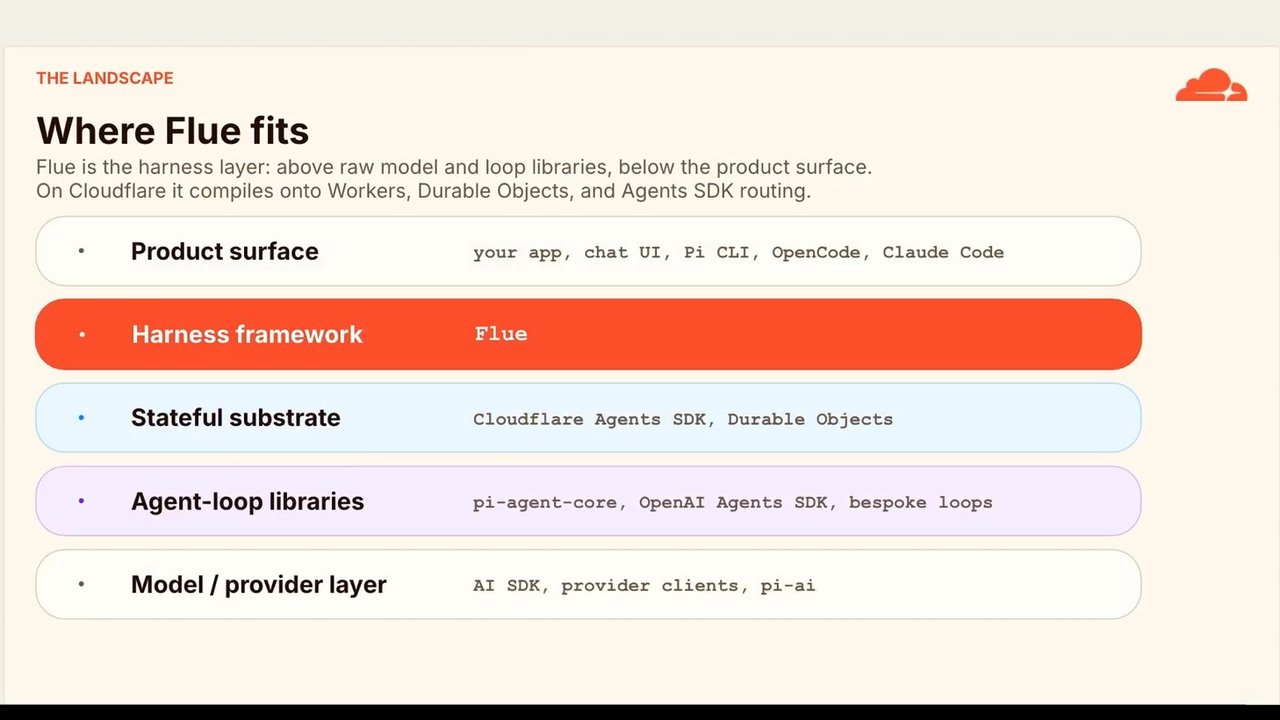
The speaker maps Flue against other tools in the ecosystem, explaining it's built on top of PyAgentCore (a coding-agent core library) and, when deployed to Cloudflare, leverages the Agents SDK and Durable Objects for stateful serverless execution. He positions Flue as a mid-layer framework that higher-level UIs or CLIs would build upon.

Flue in Production at Cloudflare

The speaker shares CTO Dane Knecht's vision of consolidating Cloudflare's many ad hoc AI harnesses—covering ticket triage, audits, security workflows, and more—onto Flue. He highlights 'Cloudflare OS,' an internal agent tool built on Flue that gives employees isolated workspaces, reusable skill libraries, and scheduled task capabilities.

Demo: Cloudflare OS in Action and Closing Remarks

The speaker demonstrates a real Cloudflare OS query used to find ownership and repo information for an internal project, showcasing MCP server integration, authenticated API proxying, and document generation. He wraps up with a lighthearted mention of OpenAI's same-day 'Sites' vibe-coding launch on Cloudflare Workers, and invites attendees to try Flue, noting it isn't yet at version 1.0 but is actively developing.

Hello. I'm here to talk to you about flu, last talk of the day, thankfully. Flu, the agent harness framework as well as, how it's being used in the wide world and at Cloudflare. Most of us kinda know the agent story by now. We know the transition LLM APIs were great.

We were creating rag apps, sort of simple input output. But they only got us so far. And then SDKs came along to to sort of wrangle them a little, but you still needed scripted steps and loops. It was only really until when Claude code and and the UI agents that are similar came along that we really kind of realized the power of of what an an agent in a harness can do. Claude code kind of showed us that if you if you give an agent a task, context, tools, a workspace, autonomy and boundaries, then the model will just keep working until it's done.

And so we kinda needed to create we we needed we needed these these sort of tools to show us what what boundaries you needed so that a model could kind of reach its full potential. And this sort of discipline has been termed harness engineering.

It's basically how we build systems around models to turn them into work engines. So harness harnesses are kind of how how we unlock the model's capabilities. This this quote here from Vivek Trivedi who who wrote one of the early pieces on harness engineering and actually coined this agent equals model plus harness.

What he means by if you're not the model, you're the harness. He kind of means, look, everything everything that you're putting into these systems like ClaudeCode except the model, that's the harness. So the context, the sessions, the tools, the skills, file systems, sandboxes, routing observability and safety, that's all harness and all that's left is the model and everything is supporting that.

So this leads me to Fred. Fred is the creator of Astro, a popular front end framework used on thousands of ecommerce sites and static sites around the world. And Cloudflare acquired Astro. And so Fred now works for us, which is great. Now Astro has many users, 60,000 GitHub stars, thousands of installs.

And like most open source projects these days receives hundreds if not thousands of GitHub issues. And you can use harnesses like OpenCode, ClawedCode to help you triage issues, fix bugs, but they're interactive. They're kind of intended for long long interactive sessions and it's kind of a big pain if not impossible to say deploy something like Claude code to a GitHub CI so that it can run run when issues come in.

So that's why you created Flue. And this this is what Flue the Flue framework looks like. It's like Clog code, but it's completely headless and programmable in TypeScript. So this this snippet sort of shows exactly what the what the surface is like. The create agent bit down the bottom shows exactly what it it basically shows what the harness is for an agent that can operate headlessly.

So you have the model, you know, we all we all know that piece, the reasoning engine, the brain. You can you can give it tools. They can be custom tools. MCP servers fit in here. They become tools as well. Edit tools, bash tools, API tools, anything like that.

I think one of the sort of fundamental shifts or one of the newer things that we're seeing with harness engineering is the idea of being able to bundle skills into an agent harness. So skills have kind of become a great way of reusing specialized functionality. And you can use them in coding agents and then you can also use them in headless agents as well.

This in this sort of code example, you can see it's the skills being imported and directly directly given to the function. But you can flu will also pick up skills if it's running on a on a file system. It can also pick up skills from the file system just like Claude code or anything like that.

So you can kind of use exactly the same the same paradigms there. The the reason that you might wanna bundle it together is if you're deploying deploying your code sort of as a as an entire bundle and you don't maybe you don't have access to a file system. It might be running serverlessly or something like that. The sandbox similarly is is something that you might choose you might choose to run locally like in this snippet if you're already in a container or something like that, like for example, you're in a GitHub CI context. So you can just run locally because you're already in a container, but you may also choose a sandbox provider of some kind. I'll talk more about that in a sec.

And then you've got basically the the way that the the agents reached. You know, are you are you posting to it? Are you using a WebSocket or are you just running a single command? Unlike some of the other sort of frameworks that we've put out there that you might have heard of, we've got a framework called agents SDK, one called sandbox SDK, and one we recently announced called project think. This Flue is not Cloudflare specific.

It's completely platform agnostic. It's under the Astra umbrella. So you can deploy to multiple environments, node, Daytona, e two b, modal, Vercel and of course, you can also deploy to Cloudflare. And like any good framework, Flue comes with a CLI. You have commands like in it that you can sort of create a project from scratch for and then once you've once you've edited the created files, you can connect to your agent locally using Flue Connect and chat with it interactively in an interactive session.

And then you can build it and deploy it. If you're targeting Node, it'll build a server dot m j s that you can run with Node or you can, you know, target Cloudflare and then then deploy it using our CLI which is called Wrangler. Or you can just run if you have a workflow, you can just run a single execution in line and it'll just execute your agent. So this is this is sort of an example of how one project, Emdash which is a CMS, an open source CMS project similar to WordPress, like Astro, they've adopted flu for all of their issue management and you can sort of see the the definition of the agent at the top there.

It's a it's a workflow agent called investigate. It takes in a model and instructions. You know, you will you will classify GitHub issues. It it it's a fairly fairly intense or in-depth kind of agent. It investigates, it tries to solve the issue if possible.

The way that it's run is just in a GitHub workflow using the flu run command. Flu run investigate. Flu will know, okay, I need to check the dot flu workflows directory and and run the investigate agent. And the payload that's been given was basically the the GitHub API hook that came in so that it knows which is issue to target. So it'll go and check out the code.

It'll use use this LLM to figure out you know, is this issue reproducible? It'll try and reproduce it and if it can, it'll comment comment on the issue and sort of give a root cause and that that sort of thing.

This this is sort of the primary way that flu started being used. A bunch of other projects and companies are using this way. Amplitude is another company that created a PR agent using flu in this sort of way. I guess prior to agents really being around, a lot of this stuff was kind of being done manually but now you can essentially just give a model some instructions and a harness and it'll it'll go off and potentially, you know, if you're lucky, triage and solve solve issues for you and tell you if they're real or not.

There are a couple of types of harnesses in flu, workflows which we kind of just saw an example of and agents. The main difference really just being that one is kind of long running and has an identity. So agents receive messages, workflows just run and return a result. An agent example might be a support assistant that follows a particular you know, keeps track of a particular ticket or an issue thread that you wanna follow or a Discord moderation agent, something that has a long running identity and a workflow example might just be a summary, reviewing a document, investigating an incident, classifying a ticket.

So they're essentially the same at the lower level. Each has a session that's made up of multiple operations, that's made up of multiple turns, multiple LLM calls but they sort of differ at the harness and instance level with the workflow just having a run ID and agent instance having an ID that you can then keep passing back to it to have long running conversations.

Where does Flue fit in the landscape? How does it compare with AI SDK, you know, pie, things like that? This is where this is where I'd put it. You've got the the model providers at the bottom, AI SDK, PyAI, things like that. You've got agent loop libraries that sit on top of that open AI agents SDK for example, bespoke loops, PyAgentCore.

Now, I didn't mention this but Floo is actually built on PyAgentCore. So it's built on py. If you haven't heard of py, py is similar to OpenCode or ClaudeCode is another coding agent but it has some core packages that that allow you to, you know, use the same API across multiple providers and things like that.

So Floo is built on py agent core. If you're deploying to Cloudflare then it also builds on our agents SDK on durable objects which is another Cloudflare specific Cloudflare workers paradigm. It's essentially a serverless instance that also has state. Flue kind of sits on top of all of that and then the the thing that would sit on top of something like Flue would be something with the UI or a CLI, something like that.

So how are we using it at Cloudflare? This is our CTO, Dane Daneknecht, a few weeks ago. Like everyone, we've been building AI tools like crazy. We have ad hoc harnesses all over the place, ticket incident triage, audit trails, data grounded analysis, cron agents, trusted checkouts, focus tests, security workflows and the time has come, we're going to consolidate everything on Floo and it's it's perfect for something like that.

One of the ones that I'm most excited about is one that we've recently rolled out internally called Cloudflare OS. It's basically just a big internal agent tool for employees, especially non technical employees to interact with agents but also run non interactive workflows.

So you ask you want to do in here and it'll create a new workspace which is a completely isolated container with its own file system and history and you can go back to that at any point in time. And then we have a huge library of skills internally. So that's very useful for things, you know, reusable things generating business cases, preparing for customer calls, drafting emails, generating slides, a whole bunch of skills like that.

And then yes, scheduled tasks. We we have scheduled tasks as well. This is an example of me earlier asking Cloudflare OS. I wanted to know that we have a project called Agent Lee, it's a support agent. I wanted to know which team owns it and can you figure out where the the repo is because I really had no idea.

And you know, it'll go off, it'll search, it'll it'll it connects to our internal m MCP servers. It can make API calls using a proxy as well that has authentication built in and can then also generate documents. Those are saved. You can go back to those workspaces at any time. So yeah. It's it's been pretty cool.

Using Flue together with something like agents SDK or project think is is one way that you can achieve this sort of interactive flow but then you also have things like scheduled tasks so you could, you know, just gather all the data you need to generate a daily summary of everything you need to know using different skills and something like that is the perfect job for flu.

That's mostly it. I'm sneaking in a cheeky little unrelated slide just because earlier today, OpenAI launched their vibe coding feature they called sites. And the whole thing deploys to Cloudflare Workers, our development platform, which is very cool and we're very excited about that, including R2 storage, D1 databases, all the shiny things. Probably doesn't run on Floo just yet, but it may.

And you should go check it out to see what's possible on the platform. If I'd known they were launching today, I probably would have done a different talk. Sorry, Fred. So if you want something like Clogcode but you want to use it programmably, headlessly, check out flu. It is not one point o yet but it will be soon.

Thank

A small, retro portable television set with a bright white, blank screen. The TV is beige with a black screen frame, featuring tuning numbers and "МВ ДМВ" (VHF UHF) labels on the right side, and the model name 'ЭЛЕКТРОНЬ КБ 408Д' (Elektron KB 408D) below the screen. A speaker grille is at the bottom front, and a control knob is on the right side. The background is blurred red and orange.

AI Engineer

MELBOURNE

Flue : The Agent Harness Framework

Claude Code-style agents, without the TUI.

Michael Hart, Senior Principal Engineer, Cloudflare

Logo for Flue, a blue square with white interconnected dots. Red Cloudflare logo.

How we got here

Three generations of agent architecture

Gen 1

Raw API calls
Chain a few model calls, hardcode the steps. Brittle: the moment reality doesn't match the script, it falls apart.

Gen 2

SDK wrappers
Early LangChain, CrewAI, etc. Better abstractions, but still scripted steps. The model is never really in charge.

Gen 3

Harness-driven
Claude Code, Codex, OpenCode, Pi. Give the model a goal, tools, and an environment. Trust it to find the path.

Raw LLM calls weren't enough

The first agents were chat completions with function calls. That worked for simple bots, but function calling alone isn't an agent architecture.

WHERE EVERYONE STARTED

A raw model call

const res = await model.chat({
  messages,
  tools: [getWeather],
})
// ... now what?

Great for a scripted task. Not enough the moment the agent must keep working.

WHAT PRODUCTION AGENTS NEEDED

A harness grew around it

  • Keep context across turns and events
  • Use files, commands, and real app tools
  • Run somewhere safe: a sandbox
  • Expose HTTP, WebSockets, background input
  • Produce evidence, logs, and traces

So every team started rebuilding the same harness.

THE THESIS OF HARNESS ENGINEERING

agent = model + harness

"If you're not the model, you're the harness."

Vivek Trivedy (LangChain)

"The Anatomy of an Agent Harness"

"A decent model with a great harness beats a great model with a bad harness."

Addy Osmani (Google)

"Agent Harness Engineering"

MODEL
Supplies the reasoning.
HARNESS
Context, sessions, tools, skills, filesystem, sandbox, routing, observability, safety.

WHO CREATED THIS THING

This is Fred

Co-Creator of Astro. Now he works for us 😈!

https://x.com/FredKSchott

A headshot of Fred Schott, a man with a beard and dark hair, smiling.

The code is the harness

Like Claude Code, but 100% headless and programmable.

src/agents/triage.ts

import { createAgent } from '@flue/runtime';
import { local } from '@flue/runtime/node';
import triage from '../skills/triage/SKILL.md' with { type: 'skill' };
import verify from '../skills/verify/SKILL.md' with { type: 'skill' };
import * as githubTools from '../tools/github.ts';

// Give agents the context and autonomy to solve complex tasks:
const instructions = `
  Triage a bug report end-to-end: reproduce the bug,
  diagnose the root cause, verify whether the behavior is
  intentional, and attempt a fix.
`;

// Compose the complete harness your agent needs to do real work:
// complete with virtual, local, or remote container sandbox.
export default createAgent(() => ({
  model: 'anthropic/claude-sonnet-4-6',
  tools: [...githubTools],
  skills: [triage, verify],
  sandbox: local(),
  instructions,
}));

model
The reasoning engine

tools
Effects: APIs, MCP, queries, controlled changes

skills
Reusable expertise as markdown

sandbox
The safe place the model works

route / websocket
How your app reaches the agent

The code is the harness

Like Claude Code, but 100% headless and programmable.

src/agents/triage.ts

import { createAgent } from '@flue/runtime';
import { local } from '@flue/runtime/node';
import triage from '../skills/triage/SKILL.md' with { type: 'skill' };
import verify from '../skills/verify/SKILL.md' with { type: 'skill' };
import * as githubTools from '../tools/github.ts';

// Give agents the context and autonomy to solve complex tasks:
const instructions = `
    Triage a bug report end-to-end: reproduce the bug,
    diagnose the root cause, verify whether the behavior is
    intentional, and attempt a fix.
`;
...;

// Compose the complete harness your agent needs to do real work,
// complete with virtual, local, or remote container sandbox.
export default createAgent(() => ({
    model: 'anthropic/claude-sonnet-4-6',
    tools: [...githubTools],
    skills: [triage, verify],
    sandbox: local(),
    instructions,
}));

model
The reasoning engine

tools
Effects: APIs, MCP, queries, controlled changes

skills
Reusable expertise as markdown

sandbox
The safe place the model works

route / websocket
How your app reaches the agent

The code is the harness

Like Claude Code, but 100% headless and programmable.

src/agents/triage.ts

import { createAgent } from '@flue/runtime';
import { local } from '@flue/runtime/node';
import triage from '../skills/triage/SKILL.md' with { type: 'skill' };
import verify from '../skills/verify/SKILL.md' with { type: 'skill' };
import * as githubTools from '../tools/github.ts';

// Give agents the context and autonomy to solve complex tasks:
const instructions = `
	Triage a bug report end-to-end: reproduce the bug,
	diagnose the root cause, verify whether the behavior is
	intentional, and attempt a fix.
`;

// Compose the complete harness your agent needs to do real work,
// complete with virtual, local, or remote container sandbox.
export default createAgent(() => ({
	model: 'anthropic/claude-sonnet-4-6',
	tools: [...githubTools],
	skills: [triage, verify],
	sandbox: local(),
	instructions,
}));
  • model
    The reasoning engine
  • tools
    Effects: APIs, MCP, queries, controlled changes
  • skills
    Reusable expertise as markdown
  • sandbox
    The safe place the model works
  • route / websocket
    How your app reaches the agent

DEPLOY ANYWHERE

Platform agnostic

  • Node.js
  • Cloudflare Workers
  • GitHub Actions
  • GitLab CI/CD
  • Daytona
  • Render
  • Guide coming soon
  • Guide coming soon
  • Guide coming soon
A grid displays nine boxes, each containing a recognizable logo or icon with an accompanying text label, representing various platform integrations. The named platforms include Node.js, Cloudflare Workers, GitHub Actions, GitLab CI/CD, Daytona, and Render. Three additional boxes indicate "Guide coming soon" with generic placeholder icons.
THE CLI

Running framework commands

$ npx flue init --target node # or: --target cloudflare
# export the agent from agents/hello-world.ts

$ npx flue connect hello-world local
[flue] Connected to hello-world/local. Enter a prompt per line; Ctrl-D to exit.
Hello! What can you help me with?
{
  "text": "I can help answer questions, draft content, summarize information, and more."
}
}

# then you can build and deploy, and then talk to it over the web
$ npx flue build --target cloudflare
$ npx wrangler deploy

# or if its a workflow, execute inline, say from CI
$ npx flue run hello-world --target node --payload '{"text":"Hello"}'

THE CLI

Running framework commands

$ npx flue init --target node # or: --target cloudflare
# export the agent from agents/hello-world.ts

$ npx flue connect hello-world local
[flue] Connected to hello-world/local. Enter a prompt per line; Ctrl-D to exit.
Hello! What can you help me with?
{
  "text": "I can help answer questions, draft content, summarize information, and more."
}

# then you can build and deploy, and then talk to it over the web

$ npx flue build --target cloudflare
$ npx wrangler deploy

# or if its a workflow, execute inline, say from CI

$ npx flue run hello-world --target node --payload '{"text":"hello"}'
A cloud icon is in the top right corner.

THE CLI

Running framework commands

$ npx flue init --target node # or: --target cloudflare
# export the agent from agents/hello-world.ts
$ npx flue connect hello-world local
[flue] Connected to hello-world/local. Enter a prompt per line; Ctrl-D to exit.
Hello! What can you help me with?
{
  "text": "I can help answer questions, draft content, summarize information, and more."
}
# then you can build and deploy, and then talk to it over the web
$ npx flue build --target cloudflare
$ npx wrangler deploy
# or if its a workflow, execute inline, say from CI
$ npx flue run hello-world --target node --payload '{"text":"hello"}'
A cloud icon is displayed in the top right corner. The main content is presented within a terminal-like window, showing command-line interactions for initializing, connecting, building, deploying, and running a 'flue' agent.

THE CLI

Running framework commands

$ npx flue init --target node # or: --target cloudflare

# export the agent from agents/hello-world.ts

$ npx flue connect hello-world local
[flue] Connected to hello-world/local. Enter a prompt per line; Ctrl-D to exit.
Hello! What can you help me with?
{
  "text": "I can help answer questions, draft content, summarize information, and more."
}

# then you can build and deploy, and then talk to it over the web

$ npx flue build --target cloudflare
$ npx wrangler deploy

# or if its a workflow, execute inline, say from CI

$ npx flue run hello-world --target node --payload '{"text":"hello"}'
Screenshot of a command-line interface demonstrating various 'flue' framework commands for initialization, connection, building, deployment, and running agents, along with their respective outputs and comments.

Running framework commands

$ npx flue init --target node # or: --target cloudflare
# export the agent from agents/hello-world.ts

$ npx flue connect hello-world local
[flue] Connected to hello-world/local. Enter a prompt per line; Ctrl-D to exit.
Hello! What can you help me with?
{
  "text": "I can help answer questions, draft content, summarize information, and more."
}

# then you can build and deploy, and then talk to it over the web

$ npx flue build --target cloudflare
$ npx wrangler deploy

# or if its a workflow, execute inline, say from CI

$ npx flue run hello-world --target node --payload '{"text":"hello"}'

THE CLI

Running framework commands

$ npx flue init --target node # or: --target cloudflare
# export the agent from agents/hello-world.ts
$ npx flue connect hello-world local
[flue] Connected to hello-world/local. Enter a prompt per line; Ctrl-D to exit.
Hello! What can you help me with?
{
  "text": "I can help answer questions, draft content, summarize information, and more."
}
# then you can build and deploy, and then talk to it over the web
$ npx flue build --target cloudflare
$ npx wrangler deploy
# or if its a workflow, execute inline, say from CI
$ npx flue run hello-world --target node --payload '{"text":"hello"}'

emdash / .flue / workflows / investigate.ts

interface InvestigateResult {
// ... (code omitted for brevity) ...
const classifierAgent = createAgent(() => ({
  model: "cloudflare-ai-gateway/workers-ai/@cf/moonshotai/kimi-k2.6",
  instructions: [
    "You classify GitHub issues for the EmDash CMS investigation bot. Out"
    "",
    "EmDash is an Astro-nati"
    - admin: the React admi
    - public: the rendered
  // ... more code ...

emdash / .github / workflows /

EmDash Investigation Bot Workflow on GitHub

Screenshot of the GitHub web interface. The top-left panel shows code from `investigate.ts` defining a `classifierAgent` with instructions for classifying GitHub issues. The middle-right panel displays a GitHub Actions workflow from `investigate.yml` with a shell command to execute `flue run investigate`. The bottom-left panel shows a GitHub issue (#1303) titled 'Bug - Content Entity UI - Scheduled functionality doesn't work' with a comment from `emdashbot` detailing that the bot reproduced the issue and identified a high-confidence root cause.

emdash / .flue / workflows / investigate.ts

interface InvestigateResult {
const classifierAgent = createAgent(() => ({
    model: "cloudflare-ai-gateway/workers-ai/@cf/moonshotai/kimi-k2.6",
    instructions: [
        "You classify GitHub issues for the EmDash CMS investigation bot. Out",
        "",
        "EmDash is an Astro-nati",
        "- admin: the React admi",
        "- public: the rendered"
    ]
}))
...

emdash / .github / workflows / investigate.yml

.flue/node_modules/.bin/flue run investigate 
    --target node 
    --root .flue 
    --payload "$PAYLOAD" 
    > /tmp/agent-stdout.json 2> /tmp/agent-stderr.log >&2)
EXIT=$?
set -e
...

github.com/emdash-cms/emdash/issues/1303

Bug - Content Entity UI - Scheduled functionality doesn't work (or doe

emdashbot added triage/reproducing triage/reproduced and ren
8 hours ago

emdashbot bot 7 hours ago

The investigation bot reproduced this issue.

Root cause (high confidence): packages/core/src/database/repositorie
(ContentRepository.findReadyToPublish ) is the only piece of the schedule
status='scheduled' rows to status='published' , and it has no non-test

A multi-panel slide showing screenshots of code files and a GitHub issue. The top panel shows a TypeScript file defining a classifier agent. The middle panel shows a YAML file with a command to run a 'flue investigate' process. The bottom panel displays a GitHub issue page where an 'emdashbot' has reproduced the issue and identified the root cause related to content publishing functionality.

FLUE SUPPORTS TWO SHAPES

Agents vs workflows

A chat turn isn't a workflow run. Ongoing identity and finite execution are different shapes.

ONGOING

Agent instance + session
  • An assistant per user, repo, ticket, or customer
  • Stable identity selected by URL or app code
  • Work is an operation inside a session

The application decides what the agent id means.

FINITE

Workflow run
  • A finite job with a result and run history
  • Each invocation produces a runId
  • A workflow can use agents inside it

The workflow run is the finite envelope.

A red cloud logo is displayed in the top right corner.

Agent Instances

  • Agent module: agents/<name>.ts
  • AgentInstance: URL <id>; passed to createAgent({ id })
    • Harness: initialized agent environment; defaults to "default"
      • Session: one harness.session(name?); defaults to "default"
        • Operation: one prompt / skill / task / shell / compact
          • Turn: one LLM round-trip

Workflows

  • Workflow module: workflows/<name>.ts
  • Workflow run: one invocation; runId
    • Harness: init(agent) inside the workflow
      • Session: one harness.session(name?)
        • Operation: one prompt / skill / task / shell / compact
          • Turn: one LLM round-trip

THE LANDSCAPE
Where Flue fits

Flue is the harness layer: above raw model and loop libraries, below the product surface.
On Cloudflare it compiles onto Workers, Durable Objects, and Agents SDK routing.

  • Product surface
    your app, chat UI, Pi CLI, OpenCode, Claude Code
  • Harness framework
    Flue
  • Stateful substrate
    Cloudflare Agents SDK, Durable Objects
  • Agent-loop libraries
    pi-agent-core, OpenAI Agents SDK, bespoke loops
  • Model / provider layer
    AI SDK, provider clients, pi-ai

A stylized cloud icon is in the top right corner.

Cloudflare OS

Screenshot of an application interface for 'Cloudflare OS', featuring a left-hand navigation sidebar and a main content area with a smiling seal illustration and a prompt for starting a new task.

Cloudflare OS

What would you like to do?

Screenshot of an internal application interface for Cloudflare OS, showing a navigation sidebar on the left and a main content area. The main area features a light blue illustration of a smiling seal and a text prompt to start a new workspace for a task.

Agent Lee Monorepo - Comprehensive Summary

Screenshot of the Cloudflare OS application interface, displaying a chat conversation about "Agent Lee Ownership" on the left and a detailed summary document titled "Agent Lee Monorepo - Comprehensive Summary" on the right.

Agent Lee Ownership

Screenshot of an application interface, resembling a workspace or chat application, featuring "Cloudflare OS" branding. The left panel shows a navigation sidebar and a chat conversation titled "Agent Lee Ownership", displaying a user query and subsequent "tool calls" for searching Backstage and GitLab. The right panel displays a document preview titled "Agent Lee Monorepo — Comprehensive Summary," with options to download in various formats and an owner listed as "Agent Experience team."

Agent Lee Monorepo — Comprehensive Summary

A screenshot of a Cloudflare OS application interface. The left pane shows a chat conversation where a user asks about the owner and GitLab repository for the "agent lee" chatbot. The chat interaction shows tool calls being made. The right pane displays a preview of a document titled "Agent Lee Monorepo — Comprehensive Summary," with Cloudflare branding.

Agent Lee Monorepo — Comprehensive Summary

A screenshot of an application interface, likely Cloudflare OS, featuring a sidebar with navigation and recent items. The main content area shows a chat conversation with "Agent Lee Ownership" on the left, and a document preview on the right titled "Agent Lee Monorepo — Comprehensive Summary".

Scheduled Tasks

Screenshot of an application interface for managing 'Scheduled Tasks,' featuring a left-hand navigation pane and a main content area for defining new tasks. The task creation form includes fields for a task title, scheduling frequency (e.g., 'Every day' at '9:00 AM'), and selecting a skill from a list (e.g., '1-on-1-prep', 'account-mapper', 'account-plan', 'app'). The Cloudflare logo is visible at the top right.

Bonus: OpenAI Codex Sites (runs on Cloudflare!)

https://developers.openai.com/codex/sites

Screenshot of the OpenAI Codex Sites interface, demonstrating a "Launch Tracker" application. The left section shows a chat interaction requesting the creation of a launch readiness tracker, which generates a live site link. The right section displays a "Petal Launch" dashboard detailing release readiness stages, including planning and build, with various tasks, dates, and initials. A Cloudflare logo is present in the top right corner of the slide.

Bonus: OpenAI Codex Sites (runs on Cloudflare!)

https://developers.openai.com/codex/sites
A screenshot of a web application displaying a "Launch Tracker" interface. It shows a conversational chat window where a user asks to create a launch readiness tracker, followed by a response confirming its creation with a live site link. Alongside this, another part of the interface shows "Petal Launch Release Readiness" for "Blossom Widgets" with a progress timeline indicating various stages like Plan, PRD finalized, Risk review, and Core build complete.

Thank You!

The Agent Harness Framework

https://flueframework.com
Screenshot of the Flue Framework website, featuring its title, description, and navigation buttons. A QR code is present on the right side of the website screenshot. A stylized cloud icon appears in the top right corner of the slide.

People

  • Dane Knecht
  • Fred
  • Vivek Trivedi

Technologies & Tools

  • Agents SDK
  • AI SDK
  • Claude Code
  • Cloudflare Workers
  • D1
  • Durable Objects
  • Flue
  • Node.js
  • OpenAI Agents SDK
  • OpenCode
  • PyAgentCore
  • PyAI
  • R2 storage
  • Sandbox SDK
  • TypeScript
  • Wrangler

Standards & Specs

  • MCP
  • WebSocket

Concepts & Methods

  • harness engineering

Organisations & Products

  • Agent Lee
  • Amplitude
  • Astro
  • Cloudflare
  • Cloudflare OS
  • Daytona
  • E2B
  • Emdash
  • Modal
  • OpenAI
  • Project Think
  • Vercel