The Agentic Engineer’s Playbook: From Prompting to Patterns
Finding the Productive Middle Ground
Tanya Dixit challenges both blind reliance on AI and outright resistance to it, arguing that effective developer workflows sit between those extremes. She frames courage, experimentation, and comfort with uncertainty as essential engineering skills in a rapidly changing field.
Anti-Patterns That Undermine AI Collaboration
Dixit identifies common failure modes: treating an LLM as an oracle, failing to preserve lessons from its mistakes, relying on one tool, and waiting indefinitely for AI to improve. She recommends recording project knowledge and actively comparing models and tools to learn their distinct strengths.
Research, Design, Build, and Test
Using voice AI as an example, Dixit presents a workflow that moves from multi-model deep research to human-led architecture design on paper. AI then stress-tests the design and supports incremental implementation, while the engineer defines unbiased test cases and uses them to decide when each feature is complete.
Building a Context-Rich Repository
Dixit shows how repository structure can preserve user journeys, architecture, coding rules, technical documentation, and other reusable context in indexed Markdown files. She then describes choosing different tools for design and coding, cultivating engineering discernment, and extending Claude Code through MCP servers and subagents.
Context Patterns for Reliable Iteration
Dixit demonstrates that a well-aligned sample repository can guide an LLM more effectively than documentation alone. She introduces the Clean Slate and Carryover Pattern for excluding distracting context and the Scratchpad Pattern for retaining mistakes, conventions, and lessons at an appropriate project or technology scope.
An AI Assistant for Repository Onboarding
Dixit explains how she asks Claude Code to reconstruct the intent and philosophy behind an unfamiliar codebase. A PyTorch example shows the assistant surfacing architectural layers, data flows, memory management, execution paths, and best practices so the engineer can understand the repository as if present during its design.
Principles for a Self-Improving Workflow
Dixit closes with a vision for workflows that are iterative, repeatable, documented, tool-agnostic, human-centric, scoped, and memory-enabled. She imagines future development environments learning automatically from individual and collective experience, while emphasizing documented trade-offs, disciplined context management, experimentation, and feedback.
Very excited to talk about some of the patterns that I've been using in my own dev workflow. Yeah. Today I'll be talking about like some of the things that work for me and you know, might work for you as well. It's a constantly evolving field. So yeah, I I don't say that I have all the right answers but it works for me.
So would love to share that with you. So I have heard a lot of people saying these, you know, some sentences around this these ideas where people say that, well, I use AI tools but I don't think they're good enough right now or sometimes people say that, you know, I I will use AI when it's smart enough.
So I just like I'm happy with my current workflow or I've even heard that I'm scared to use AI because I might get replaced. Most of these, like, ideas that I've heard, like, they're sort of counterproductive to how the field has been evolving and to how developer workflows evolve. In the spectrum of, you know, I will use AI blindly for everything or I will not use AIs on that spectrum, the optimal dev workflows lie somewhere in the middle and that's what we're all trying to figure out.
And that's what I'm here to help you get closer to. Well, before I actually start talking about the workflow, I do wanna address something which is, you know, getting uncomfortable with using AI. I'm sorry, getting comfortable with using AI. Right? So a lot of our workflows are changing and that's very uncomfortable. Like I have felt like I felt a lot of fear at times when I started doing using a new tool or started doing something completely in a completely new way.
And I I know like people around me who are developers, they feel this discomfort all the time. One of my professors when I was at uni, he told me that some of the best engineers, the thing that differentiates them is courage and I feel like this like the time that we're right now in, it it kind of demands a lot of lot more courage from us and a lot more trial and experimentation from us because there are no right answers to a lot of things right now. So yeah, just I think we'll just have to get a bit more comfortable constantly stretch stretching our boundaries and that's how I try to explain myself when I, you know, when I feel a bit overwhelmed and try to keep myself sane with all that's going on. Okay. So came up with some anti patterns which I wanna address first. So the first one is like giving everything to the LLM to decide or treating LLM as a replacement rather than a collaborator. This is like pretty obvious.
Using LLM as an Oracle which can do everything and we know it doesn't work that way. All of us know that. Even though that's what every AI tools marketing team would like us to believe, they would be like, okay, click this button, go have a coffee and your work is done. It never works that way. Then the other one is not letting the LM learn from its mistakes which is, know, like humans learn from their mistakes all the time. So AI cannot become a true collaborator unless we develop a mechanism in our own personal workflows to let it learn from the mistakes that it makes.
Right? I'll give you an example like I was working with this Google ADK repository and like there was this one thing that was happening again and again and yeah, it was it was just like very obvious to me that it was a mistake and it was just not obvious to Cursor when I was working with Cursor. So yeah. Basically, I think the way to get around it is to have our own little repertoire on, you know, this is how things are done. This is how things are not done.
Like, this is the mistake you made last time and then just, read from a dot m d or dot t x t file and we'll talk about that more going forward. Then the other one is using one tool for everything. So experimentation is key. One tool is like every tool, every model has its own advantages and that's the thing that experimentation experimentation helps us find out.
Right? What is the model good at? So by virtue of its architecture, the data it's trained at as well as the way the way it has been trained and it's been optimized for, every model would be good at like different things and every tool is like, you know, purpose built for like different things. Right? So that's why like just go forth and explore as many tools as you can and then come back and decide for yourself which workflow works for you best.
Okay. The the next one is waiting for AI to get better. Well, this is I I did do that once for a few tasks, especially, like, the around design task. But then I realized like if you're not in the game, there's no way to win the game. So I'd highly highly recommend trying to use AI for everything and then even if you feel that's fine.
Right. Alright. So just wanna discuss some of the workflow that like this is typically my workflow that I use for something that something new that I'm trying to learn and I'm trying to build something at. So for example, voice AI, like that's something that I'm trying to get like really good at or get better at.
So what I start with is like I do deep research with all the deep research models as well as tools that are available. So I try Claude, I try Gemini deep research and then chat GPD and I'd like I basically give it a set of requirements that, okay, I want you to research voice AI stack. And generally, would grab a snippet from someone either like who's who's an expert in this.
I'd go on LinkedIn and find the experts and then find a few things that are relevant to the stack of the technology that I'm trying to build. And I would like generate this these like three or four deep research reports and then I would go through them. So that takes like a lot at least like one or two hours to just go through them.
Like even though you probably don't understand 87080% of it but it's like just good to understand, okay, what are the patterns, what are the the model searching for. Why is that good? Because I did a deep research on ADK and you can see like Claude ended up looking for like gathering two fifty seven resources. Now that's like that's the power of deep research.
Right? Because the crawlers for like such agents are are really good and you're getting a lot of context and you're mostly like you can actually say that okay, I want the context for the last two years as well and mostly it'll perform well like sometimes it might gather information that's old but then you'll actually get really good context and you cover a lot of breadth.
So that's what you want to cover. You need information at the time. So that's why like it's it's pretty good. Then the second yeah. So once I have enough information, I just like I would remove all that and I would sit and think, sit down and think basically to design my architecture. I do this the old school way basically like bring out a piece of paper and write down the things that I want.
Like think about the use case, think about the tests that I I would like to I mean, the user journeys that I would like to have, how my user would be interacting with what I'm building, and what are some of the things I need to keep in mind. So basically stress test my thinking and start to build an architecture. This thing I think we should all do the old school way first. So like use pen and paper to do it and then stress test it and then rely on some AI to help you build it.
Right? So I think about your use case, think about your user journeys, functional non functional requirements, like literally write them down. So I do that like I either write them down on a piece of paper or on slides and then build your architecture on a piece of paper. Now that you've gotten like that architecture, you get the AI to attack it. You're like, okay, this these are my user journeys.
Now, what could go wrong? How do I, you know, how do I make sure that it doesn't go wrong? Right? So for example, voice AI. Right? What could go wrong? You could probably have a lot of noise. How do you do echo cancellation? How do you do noise suppression? Like, how do how should I design it so that it works on a mobile device, it works on my laptop?
So all these kind of things you get the AI to brainstorm and develop with you. Then then of like, then comes the actual building. So for the actual building, I think it depends on, you know, just varies from developers to developer. I trust you. You're all great developers. I like I think it it's like something that you can just experiment with. What I do is like I'll build one like feature by feature and like I'll I'll talk about a few patterns that I use as well.
And then when I build feature by feature, I would like I would create my own test cases. So when I've used previously used like models to write test cases, I've seen that there's a lot of bias. Right? So the test cases that are written are kind of written to help me pass them or I mean, because it has access to my code. Right?
So it's like very biased. So I would write the test cases myself, like not the code but then the idea of it and then use the models to actually execute them. I mean to write the code. So I think that's like a good way to do that. And then the big question, like how do you know that you're done? So I would say go back to your stress test for the use case as a whole.
And once you've written the test, if the code is passing the test, can move on to the next feature. Okay. Cool. Then I want to show you this repo structure that so this repo structure is very crowded, but I've, like, included all of the things that could be interesting. I don't know if you can see my pointer.
So basically one thing is like you can put all your like context that you've built over these things, right, like the user journeys, the architecture, everything and put them in markdown files, right, so that they're indexed in your editor I mean, the ID that you're using. Right? And then it can be retrieved later for everything that you do for the incremental build that you can do.
Then some of the rules that you use in your team, for example, things that work like the coding guidelines, all of that could be put as well. I think that's that's really interesting and you you don't like it's not it's a it gives you asymmetric gains basically. Then context is very important and we'll discuss that but let's like, let me show you this text tag docs.
I think this really helps me a lot. So what I'd do is like I would gather all the documentation of the particular text tag that I'm using and put it in there. So one of the tools that I use for that is like context seven is a website which has up to date documentation of most of like like the most widely used tech stack for front end, back end, and as well as agents.
So yeah. Now let's look at patterns. Just give me a sec. Okay. So the first pattern I want to talk about is experimenting. We've already talked about it a lot, But the first thing is, like, I, of course, use different tools for different tasks. So for designing and like, the first part of it, architecture design, I use cursor. Then for writing code, use plot.
This is an example where I did ask Cursor to write some of the code and it just didn't work as well as Claude was working for this particular task. The second thing I would like to say is, like I think more than writing code, our job is discernment like knowing what's good and knowing what's bad.
It's very hard to define but you know it's very hard to define taste. Right? Like, I like this and I don't like this. So this is what we are here for like discern developing our discernment as we build more and more projects and we, you know, develop I I guess we we get in the abundance of creating more with AI. Our discernment is discernment is also getting refined.
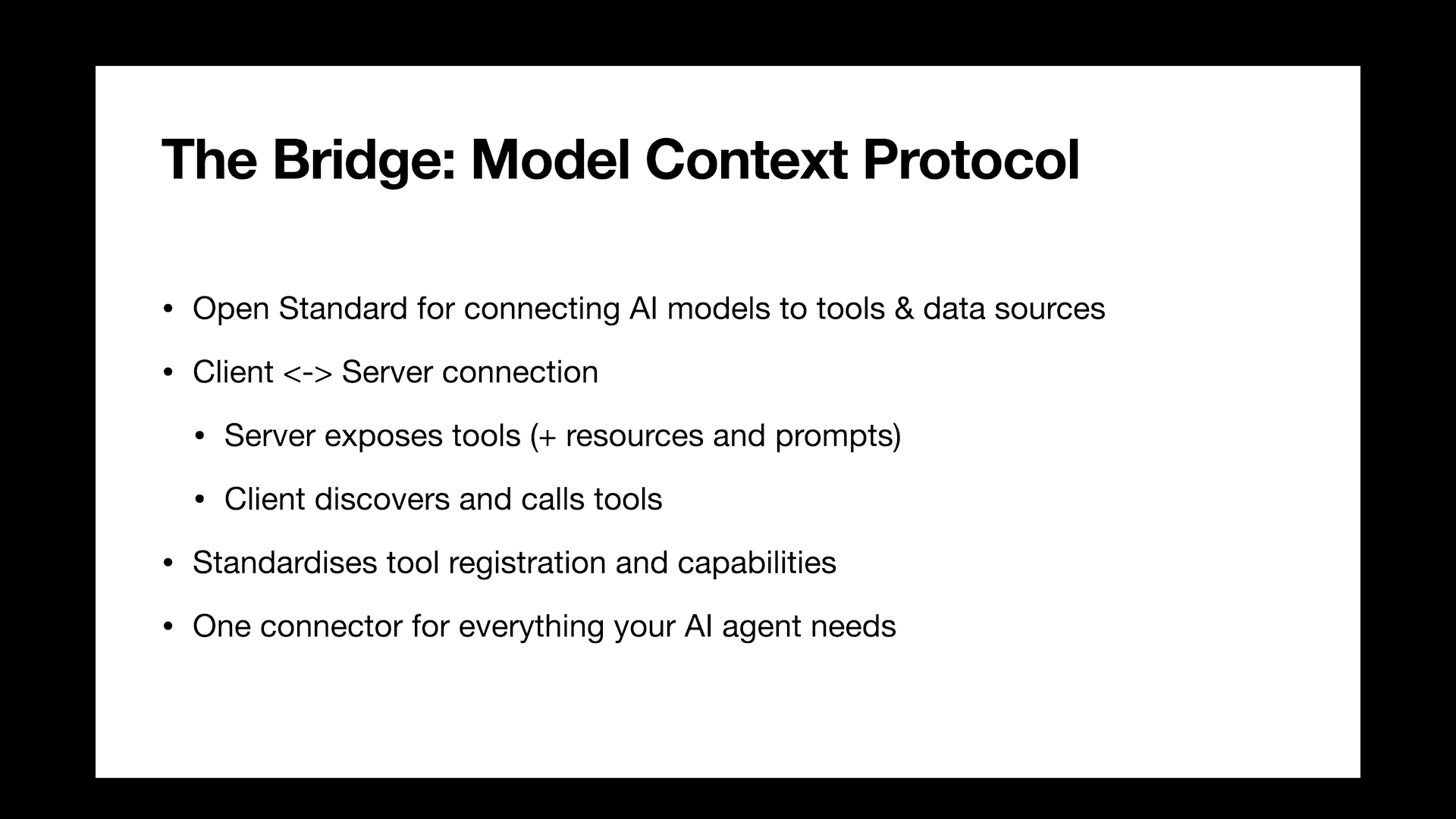
So, yeah, I think that's like super important while we iterate. Things that have worked well for me is cloud code with all MCP servers. I think, you know, GitHub MCP server just makes life life easier. If I'm, you know, doing some infra work, then using, let's say, AWS MCP servers has worked really well. Then cloud code with sub agents.
So there's, like, sub agents repos. I don't have a link here but I can share later. Cloud code with sub agents repos is like it defines some of the sub agents for particular tasks and you could just like deploy them while you're doing while you're doing a particular task and you can deploy them in parallel. Then personalized agents build using Google ADK, most of them have been agents for to help me teach something.
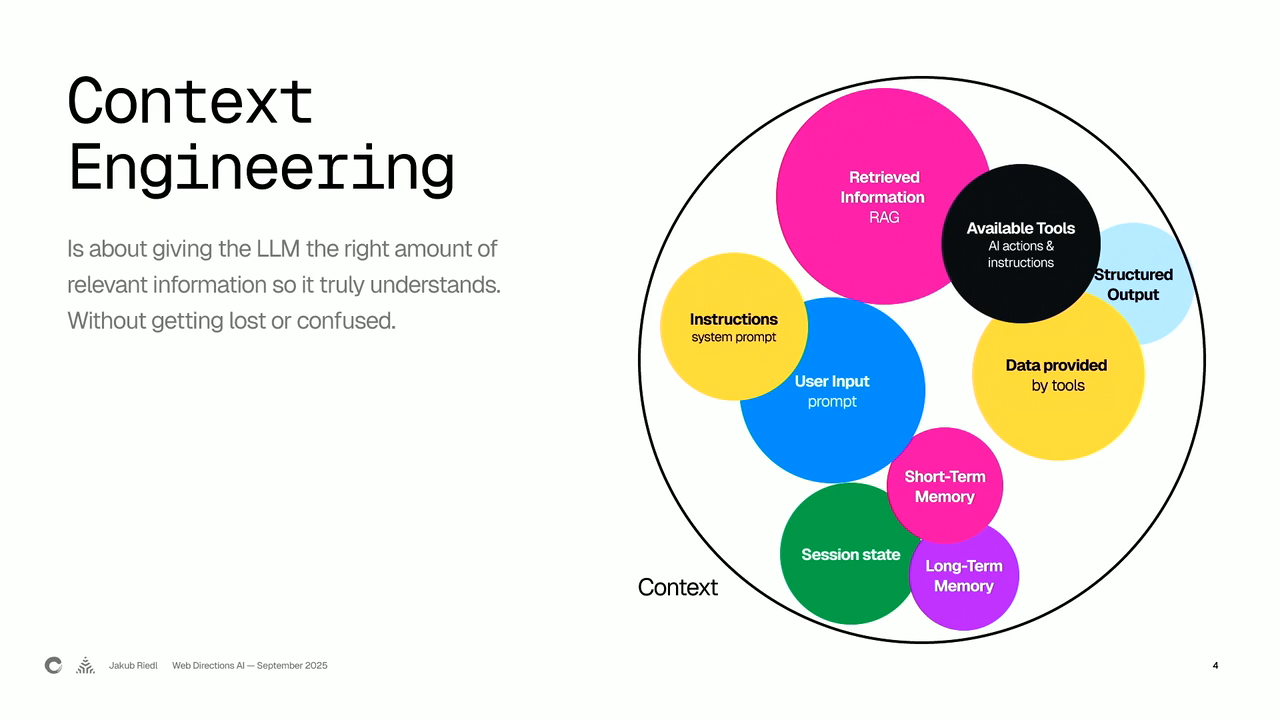
So, like, I built an agent that would ask me a lot of questions and I would, like, iterate with it to help me, you know, learn things. So That's about iteration. Then the second and the most important bit that I wanna talk about is context management and here are some of the patterns that I would love to talk about.
But before that, the first like, one trick that works really well is using sample repos or, like, code examples to develop something that you're like, something new that you're doing. So again, like, taking Google ADK as an example, I gave all the ADK documentation to Claude and then I asked it to do like basically add a feature and it ended up doing it in a like not in a way that I was expecting and it was also wrong. And what I did was that I would I then gave it a sample repo and asked it to, you know, model it after the sample repo and then it just worked perfectly.
Like I didn't even have to iterate on that. It it worked absolutely perfect. So I think that works really well and it saves a lot of time as well if you have a sample repo that kinda aligns with what you're trying to build. So I would highly suggest to start with that. Okay. Then let's talk about this pattern which I try which is the I mean, I use a lot, the clean slate and carryover pattern. So whenever I'm trying to develop let's say three or four features one by one, there is so the the usual workflow is feature one takes in some information from the design that I've done and then it writes back information to a like a running doc.
Right? Then when I'm trying to build feature two which might be little bit related but like sort of independent as compared to feature one, I would just completely start the chat over. Why? Because what I've seen is irrelevant context really distracts the LLM and it can cause the LLM to, you know, overthink.
So in LLM terms, overthinking is like relying more on internal thinking rather than looking for external data to bring in more context and then using that context to build it. So you can see why it's kind of distracting and it it makes the LLM overthink and then it it basically sends it down a rabbit hole. You probably don't want it to go.
So yeah, that's the clean state and carryover pattern. So you define what to carry over and you start the chat again and you basically do the new task in that way. So that's a good way to context manage. The second pattern is the scratch pad pattern. So like if you let me see if I can yeah. So the like, basically what I do here is the the mistakes that we talked about at the start.
Right? So whatever mistakes the LLM is making, you just make sure that it's kinda well documented. And what one way you can do it is like do one markdown file per project. Right? That may or may not work if it's if the project is like really huge, then it can cause a lot of issues there. The other way is just do it per either like per back end like back end, front end or you can do it like per technology. Like one you could you could also do it the hybrid way. Right?
So the way I do it is the second one which is like doing it per technology but then the hybrid way also works pretty well. So you have a general dot m d file for like, you know, general do's and don'ts and then you have it per tech. I mean, yeah, per tech technology like yeah. Just depending on how you go about it.
Okay. So the last part of my talk is the onboarding assistant. This is just give me a second to share it. Okay. So this is something that I just use whenever I need to onboard myself to a new repo and it's pretty simple. It's a little brute force. Trying to see how like, if I can find a better pattern for this. But then what I do is I point Claude code to that repo and then I ask it a bunch of questions.
But I always start with two prompts. One of them is about like architecture. When someone was developing this repo, what were they thinking? Like, I try to get in the mind of the someone like who designed the thing. Right? So what it helps me do is like it helps me become a better developer. It also helps me think about the philosophy of that repo because I I believe like every repo has a philosophy and it like has a feel to it.
So you you kinda wanna get that feel and it's it's yeah. It just spits out beautiful things when you do that. And I do that like, I do the same thing when I want to understand a particular feature or a particular part of the repo. I say that, okay, you're a senior software engineer. What was the intent of the engineer who designed this or who like developed this? And then that way you can understand the pattern.
Like you can understand what the the building blocks of this are. Like how it was built as if you were there. Like you were not there when it was built. Right? You cannot be there. It's like I did that for the PyTorch repo and it it worked pretty well. It's it's a lot of text. I can like, I think we can look at it after the yeah. After the talk.
But you can look at like what it identified. Right? So you can see like it identified let's start a little bit here. Yeah. So it looks at the layered architecture breakdown, the python front end layer, the c plus plus binding layer, the core layer, then back in. I also like the way it's like looked at the data flow patterns, the memory management flow, the operation execution flow and also looks at the architecture patterns and best practices.
So I also try to get best practices out of the repos that I'm looking at. Again, like helps me be a better developer. So with that, I think that's all I wanted to cover. Just want to share the last slide. So like the workflow that I'm kinda aiming towards, the ideal workflow, I think I'm aiming towards these properties of that.
Core properties are improves iteratively. Right now, I'm the one improving it, but ideally I would like to get to a stage where it improves automatically without me in the picture. Repeatable, well documented, very important, very difficult. Yeah. AI integration, obviously, context engineering is a is an evolving problem. Then, yeah, it should be tool agnostic.
Like, it's very difficult to be tool agnostic. I think we still need to try a lot of tools, all the LLMs right now. I don't think LLM is an is a commodity right now, but it might be in the next, like, five five, six years. Human centric, very important. Then some of the workflow design principles, like, I've tried to, like, be scoped and focused whenever I develop something.
It should have some memory. The learning component is still not there, but I think the IDs of the future will probably have that. So it'll have like a personalized learning component there. And then probably like have a collective memory for particular tech stacks that every developer is using. Like that would be really cool. Right? Not just using the documentation as a collective memory, but the the things that developers are doing every day and then learning from those mistakes as a collective memory and using that as a yeah.
Like, kind of self learning loop. And yeah, experiment driven. So most of the things we've talked about are experiment driven. And the way you implement it is having a good repo. You document the trade offs and decisions you make while you're designing and make sure that you manage the context well and then improve from feedback. Thanks. And this is my LinkedIn QR code in case anyone wants to connect and my email.
Thank you.
Technologies & Tools
- LLM
- Google ADK
- Voice AI
- Echo cancellation
- Noise suppression
- IDE
- GitHub MCP Server
- AWS MCP Servers
- PyTorch
Standards & Specs
- Markdown
- MCP
Concepts & Methods
- Deep research
- User journeys
- Functional requirements
- Non-functional requirements
- Discernment
- Subagents
- Sample repository
- Clean Slate and Carryover
- Scratchpad Pattern
- Onboarding assistant
- Context engineering
- Collective memory
- Self-learning loop
Organisations & Products
- Cursor
- Claude
- Gemini Deep Research
- ChatGPT
- Context7
- Claude Code