Supercharged scrolling with CSS
From Ancient Scrolls to Scrollytelling
Lee Meyer connects modern scrolling interfaces to physical scrolls and explains how scrolling can turn an audience into an active participant. He introduces scrollytelling through an ambitious interactive account of the Tunnel Creek avalanche.
Serious Stories and Script-Free Motion
Meyer shows how The New York Times used scrolling to humanize the scale of COVID-19 deaths. He then rebuilds Chris Coyier’s JavaScript-driven animation with a concise CSS scroll timeline, reducing code and avoiding main-thread animation jank.
Timelines, Scope, and Declarative 3D Control
Meyer explains how `animation-timeline: scroll()` maps animation progress to a scrollable ancestor and reviews evolving browser support. He then uses named timelines, timeline scope, custom properties, and pure CSS 3D transforms to control a model from horizontal and vertical scrollers.
Sliders, View Timelines, and Persistent Effects
Styled range inputs and view timelines let Meyer rotate and zoom an X-wing across several dimensions. He then explores scroll-triggered animations and introduces weblinger.css, a small class-based technique for retaining effects after a trigger appears.
Building Pong and Collision Detection in CSS
Meyer combines a range-controlled paddle with an independent ball animation to create a script-free Pong game. Container style queries and range syntax detect collisions, preserve play, and trigger life-loss feedback when the paddle misses.
Scroll-State Affordances and Branching Narratives
Meyer demonstrates scroll state queries that reveal directional affordances only when more content remains available. He extends the same state mechanism into a choose-your-own-adventure demo whose paths lead to combat, escape, and acquiring a lightsaber.
Parallax, Ladders, and Synthetic Scroll Space
Meyer breaks down horizontal parallax layers, direction-aware character movement, and context-dependent overflow controls. Multiple timelines, synthetic scroll space, and `scroll-initial-target` coordinate running and climbing while keeping the implementation declarative.
Composing State into a CSS Game
Paused animations act as state flags that swap sprite sheets, collect the lightsaber, and choose the final cut scene. Meyer combines scroll state queries, style queries, collision detection, and anonymous timelines to orchestrate alternative endings entirely in CSS.
Story, Meaning, and the Right Tool
Meyer interprets the game as a personal story about retreat, adversity, moral positioning, and necessary action. He closes by presenting scrollytelling as a selective design tool whose growing browser support can reduce reliance on libraries without making it appropriate for every story.
Thank you everyone. So I have a feeling some of you might be scrolling on your devices as we speak. So instead, please, I urge you to look up and let's at least scroll together for the next half hour or so. I'm going to be going over Both, as John said, the fact that we, without introducing any libraries or any scripts at all, we can do some unexpected things, starting things based on scroll events, just relying on Chromium-based browser and now Safari as well.
So thanks, Tim, while I was researching, thanks for adding that into Safari in time for my talk. Because I want to give you the idea of why it's compelling, because when you think about it, if you go through history, Not everything that's been built into the browser is something we should be using. For instance, the blink and marquee tags were once built into the browser, but I don't think anybody's going to argue that that's a good design option.
Speaking of history, if you think about scrolling as a more modern way of navigating a text than flipping pages in a book, for example, you would be wrong. It's actually the most ancient form of that humans have was it's based on physical scrolls from ancient Egypt. And on a personal note, as a child being Jewish, my earliest experience of scrolling looked like this.
This is the Torah, the Hebrew version of the Bible. And as you can see here, it can be a more immersive experience than turning pages in a book or interacting with a with a conventional website. So who by a show of hands has seen web pages that do this, that sort of hijack the scrolling experience and do something creative with it?
Yep, a few people. That, what just happened, I like to think it's the talk version of what we can do in web design with scrolling, telling it sort of adds an element of interactivity to the story and almost makes the audience feel like a co-creator rather than a passive consumer of the content. So there's been some compelling examples of this historically.
A really prominent one was in 2012. Whoops, spoilers. Okay, let me. There's this quote I'd like to, from a piece of interactive fiction that I would like to use to set the tone here, read you a story. What fun would that be? I've got a better idea. Let's tell a story together. I'm trying to capture how this design option can make the experience of a webpage more collaborative.
This popularized the idea of scrollytelling. It wasn't probably the first instance of it, but it tells the story of Tunnel Creek avalanches that killed some people and endangered the lives of others. I suppose there's a form reflecting content here because these people involved in this story risked their lives basically for the sake of a very ambitious ski trip.
And for a mainstream article, this at the time was a hugely ambitious way of telling this story. I think for the author, this risk that he took paid off. It won a Pulitzer Prize and was acclaimed as the future of journalism. Fast forward a little bit to 2020. This article appeared in the New York Times when the death toll for COVID in 2020 unfortunately reached 100,000.
And as you can see, there'd really be no way to tell this story without scrollytelling was sort of representing how there's these anonymous silhouettes of people who died. But then as you scroll down and the death toll increases, it's highlighting the individual stories of these people. And how their deaths impacted their family, hence the incalculable loss, capturing the fact that the number 100,000 doesn't really do justice to the tragedy that occurred. So scrolly telling doesn't have to be a gimmick.
It could be used to tell quite a range of quite serious stories. So this is also from 2020. It's a code sample by Chris Coyier, founder of CSS-Tricks. And you can see, I'll show the code shortly, but you can see that there's some JavaScript involved by the tabs that are available in the CodePen. And we see that everything is synced by scrolling up and down. There's a progress bar progressing, the background gets darker, there's a cube which is rotating, which is nice.
Now we're going to keep it with the theme of using the platform and deleting JavaScript wherever we can. We're going to do it without any JavaScript at all. You can see it still works. This is scroll timeline, which has been available in Chromium-based browsers since 2023, I believe. I've been researching and blogging about it since 2024.
I guess that Torus scroll icon at the beginning, I like to think of it as something sacred because I've invested so much time in learning it. Here's the non-scroll timeline code that you have to write. You see that we have to set a custom property, calculate something, have a paused animation, use a negative animation delay, which will offset based on the property that's been set in JavaScript, and God knows what's happening with these last two lines.
Instead of all that, we're going to with scroll timeline morph to this. Put your hands up if you prefer to write that code than the previous code. Yes, I find myself agreeing with your response to my rhetorical question there. I think so too. It's not just about how much code we have to maintain. It's also about this actually, as Jono touched on, the way we've been doing storytelling without this is like a hack.
It relies on main thread animations. If you've got, in that simplistic example, it's okay. But if you've got other interactions happening in the browser in JavaScript, you're going to inevitably get janked. This actually does something that wasn't possible before. I'll explain briefly how it works. We set this property, which ScrollTimeline introduces, called animationTimeline.
Scroll without any arguments is the simplest usage of it, and it's essentially saying that we're going to base the animation of these elements on the progress of the nearest ancestor that's scrollable. That's the idea, or at least if the writing mode is English, it will be the y-axis by default. So very sensible default, and we can do something quite complicated out of the box with it.
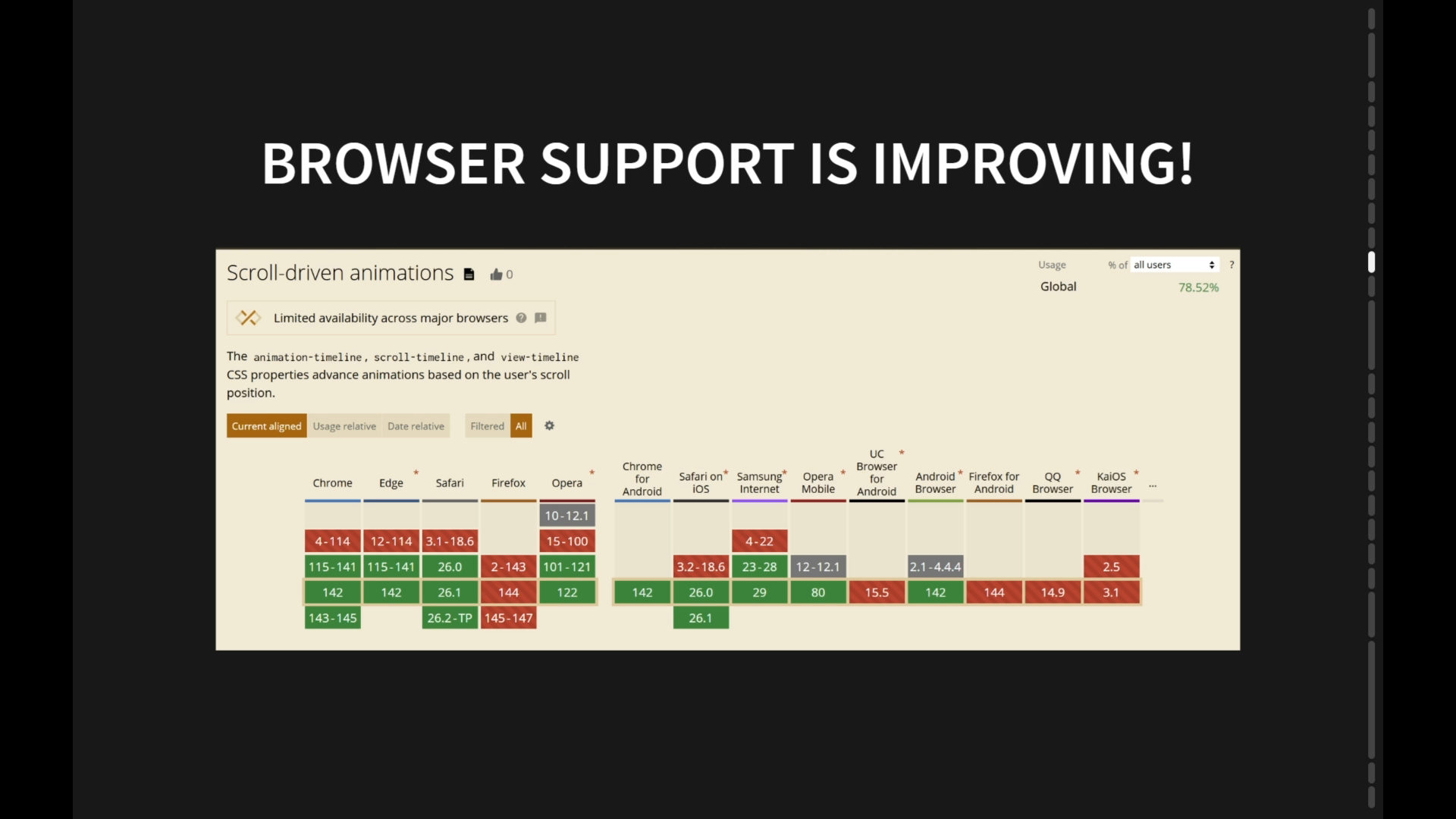
Browser support is improving. Thank you, Tim, again. Firefox is behind, but it's behind the flag, and they're actively working on it. You can see the nightly updates, so we can have lots of optimism that this will be a baseline supported feature. In the future, hopefully in the near future. That was a simple case, but we don't have to have a relationship between the parent and child in order to say that one controls the animation of the other.
We can actually make any scrollable element on the page control any other scrollable element using something called timeline scope. Here's an example of it. Get rid of this for now. This is again just HTML and CSS, nothing up my sleeve. This 3D model is not with 3JS or anything like that, it's just the pure CSS 3D.
We see as we move, we can check the back of the console, the NES console, some rare consoles have a port at the back, the 90s championship version, or we can scroll vertically, and it will affect the same model, but scroll it up and down. It's got other, so it's interesting instructional design possibilities that this opens up. It's really an unprecedented level of interactivity and just pure CSS.
Before this, when I was playing with CSS, the most interactivity you could get is something like checkbox hacks, which basically you're limited to how many possibilities you can pre-render and then you're just using CSS to hide but CSS has always been harvesting common user interface patterns and putting them into CSS. I think the earliest version of that that was interactive was the hover pseudo-element. This is a logical progression of this, and it's all done declaratively. We'll see, we'll look at some of the code now.
We see we have a timeline scope, which is named after the animation timelines. These are named animation timelines, as opposed to the anonymous timelines that we looked at previously. And these two cards, you saw those two narratives, can you control horizontally and vertically. We can control the axis that the animation is going to be based on, and we name the scroll timelines the same as the scope.
Now we have elevated what they do to the body. Since this scene is under the body, we inherit these two angle properties which are animating. That allow us to rotate horizontal or rotate vertical. If the animation is played to the end, it would be 360 degrees either along the x-axis or the y-axis.
You saw that you could do any combination of the two and it works. Which as I said is really exciting because it's unprecedented amount of interactivity just declaratively. This is based on something with Tim, which Tim touched on in his talk, which is the ability to style inputs, in this case, range inputs, because when you think about it in that previous example, in that particular case, it was handy to have a narrative which we could scroll through, but it is almost like you are using those different divs like controls, and potentially we might want just range inputs, just sliders, and we see that we can rotate this X wing, Horizontally, vertically, zoom in and out.
can We keep adding dimensions indefinitely. The reason why this works is something called view timeline, which is similar idea to scroll timeline, but it's based on how an element progresses through its container. In this case, since we're able to style the handle of a range input, as Tim showed, we can attach a view timeline to that, expand the timeline scope to the body, and again, control these different custom CSS properties, which are used by the animations for this X-Wing, and then be able to modify as many arbitrary properties of the animation as we want to.
Now, it almost got me thinking, could this make a game? Isn't that what a game is? It's just an interactive animation. The one thing that would be missing from that would be side effects. In a game, things happen permanently. People lose lives, things explode and stay exploded.
We can do that too. That's called scroll triggered animations. There's no official support in the spec yet, although Bramus at Chrome Dev Team has hinted that it's coming. I won't let that stop me. I'm going to make it anyway. This is a demo based on what used to be a JavaScript library and now can be achieved with just plain CSS.
We can see that as we scroll down, anything on the page can be incremented and even if I scroll back up, it remembers what I did. This is scroll triggered animation. You can do reversible scroll triggered animation with something called the snapped ScrollQuery, which I will be showing a different type of ScrollQuery later.
But this isn't built into the browser just yet. Basically, it's a very small library which I made called weblinger.css, which has been a recurring character in the Lemmya Cinematic Universe of my articles that I've written over the year or so. The idea is that we have this naming convention of CSS classes which we make, This is scroll trigger 1, and then something with an animation we mark as on scroll trigger 1, and it will remain paused until the element appears.
Then I style the trigger to be positioned fixed, meaning the element can never be removed, and that is how we get permanent side effects. With all these pieces of the puzzle put together, we can make a game based on scrolling. Here it is. I'll let myself lose the life for now and then I'll show that we can actually interact with it.
No, AI has not been implemented inside CSS just yet. It's a loop, which we're twitching to make it look like the computer's thinking about what it's playing. But what I find interesting about this when we were talking about the semantic HTML, this markup is nothing special. It doesn't have weird hidden fields or checkboxes. The same kind of markup you would probably write if you were making a pong game in JavaScript, but it is without any scripting, without any libraries. Now I will prove to you that it works.
Here we go. I can play this all day. You would probably get a bit bored. I will be showing these slides at the end so you can play the loop to your heart's content and prove to yourself that it actually works. The reason this works is there are two animations happening. There is the animation of the paddle, which you control, like I showed previously, with the range input.
And then there's this untethered animation. And in order to detect the collision, we use style queries. So I'll show some of that code. Now, this is a nice illustration of how much CSS has evolved. When I wrote this, the container style query syntax was using the same syntax as the feature syntax, meaning you could only do these kind of comparisons. There was no range syntax, but in latest Chrome, we can do this.
Again, hands up if you'd rather write that code than the previous code. Possibly you wouldn't like to write either code, but I'm just trying to show you how far we can take this. It's incredibly powerful, and CSS just becomes more and more expressive, and it's evolving all the time, which is really exciting. The idea just to delve a little bit more Here is the range syntax. If the paddle is within range of the ball, then we leave the animation paused.
While the ball is on our side of the field, we flash green. If the paddle has missed the ball, then we run the life decrement animation and flash the background red. That is how that works. Pure CSS collision detection. Scroll state queries are another great feature that's even newer than Scroll Timeline and only available in Chromium-based browsers for now.
But one really compelling use case is this kind of functionality used to require tricks to get it working. So we have affordances showing if there's any more ability to scroll, and then the scroll bar itself can be relatively unobtrusive. And all we have to do to make it work is write these kind of very similar to container style queries to say whether the container can be scrolled to top, right, bottom, left.
Pretty cool. The browser support for that is, you can see it's only in Chromium-based browsers at the moment, so just something to note, but I believe the other browsers are actively working on it too. Now, normal people would just leave it there and use it for standard use cases, but I wanted to see how far we could take these ideas and put them all together.
I made an observation that since you can style anything based on container scroll state queries, it's a bit of recursive thinking like Ryan was talking about. You could use that to choose where you're allowed to scroll to next. And therefore you can make kind of a scrawly telling choose your own adventure. So I've left this paused for now.
Can I have a show of how I'm gonna when I first start this, I'll have an option whether to try to fight the enemy straight away or run away. Who wants me to try to fight straight away? Okay, who wants me to run away? I can't count. It seems about equal. All right. Let's fight.
I think we're feeling full of heart today, right? Okay, so when we first start this demo, it says scroll left or right to flee or fight. He's undecided because the show of hands was about equal, but eventually he's like, screw this, I'm going to be brave. Oh, no. I made this card pen around Halloween, so that's why even when he's dead, he just keeps slashing away at him.
But if we run it again, this time we'll take the other option. And using scroll state queries, we can detect that we reached the left corner. We can climb up and I'm no longer able. In keeping with the Star Wars imagery, we collect the lightsaber and this time, take that. That will teach him to be red and walking towards me.
Maybe he did not have enough information to actually do that, but that is what he did. Let us break down how this works. The parallax scrolling, so he starts, you might have noticed when he is not running, he has an idle animation. But when we move around, we're able using scroll timelines to set a custom property that tells us which direction we're scrolling, which is why he doesn't moonwalk.
He runs the right way, depending on which direction I'm scrolling in. The parallax scrolling in the background is pretty much what scroll timeline is good at. This time we use scroll, but instead of the anonymous function, instead of passing in nothing, we pass in x, meaning it's going to be based on horizontal scrolling, it being these animations here of moving the sky a little bit, moving the background a little bit more, moving the stuff closer to us a little bit more, and so on.
That's it. That's how we can do parallax scrolling with no libraries just built into the browser. This used to be a big deal. People would reach for React and then a plugin and blah, blah, blah. No more. And here, when I reach the ladder, this is how we detect when he's climbing up and down.
We don't want him to be moving left and right. It wouldn't make sense. So we can set the overflow-y to hidden and the width of the hidden div, which I used to create the scroll bar in the first place, we just collapse. And then he can only climb up and down until he's back on the ground, and then he can run left and right again.
Now, you can see that this isn't exactly documented. It's only hinted at in the MDN docs, but we can have multiple scroll timelines like this, common delimited, and they can play multiple animations, which allow him to climb up and down. This is how we mark something as a scroll state container. This is a ladder, which is a common trick we use for scroll-driven animations. We don't rely on conventional scrolling, but instead we create divs that create enough space for us to scroll as much as we want. Then we assign animation timelines to things and hijack the functionality however we want.
A little bit reminiscent of how we used to do checkbox hacks, where we get rid of-- we only want the behavior of the checkbox, we don't want the actual appearance. So there's an analogy to that. This is new as well. You may have noticed the guy starts at the middle of the page and he can also when we get to the bottom left corner, he can go up, not down.
That's because of this property I set here, scroll-initial-target-nearest. You could do it in the past with a temporary animation that sets the scroll-snap-alignment, but this is heaps easier. A lot of this stuff you could hack together with CSS in the past, but it's really cool that it's becoming much more intuitive, much easier to maintain, less verbose.
This is how we, one way of detecting state in CSS. It is essentially a paused animation, which we run only on certain conditions using either scroll state queries or container and style queries or a mixture of both. Once we have this flag set, we can decide.
What we want to do using scroll state queries. In this case, if the player has the lightsaber, he gets a different sprite sheet which has him carrying the lightsaber around. The lightsaber becomes invisible. We use the collision detection trick that we learned when we made the pong game to decide whether we are going to hide all the scroll bars in order to play the final end game cut scene. If the player has the saber and the Game state is ending. We've detected using the other scroll state using the other start queries, I should say.
We play the attack animation on the player and the death animation on the bad guy and give him the speech bubble. Otherwise, the bad guy wins and mocks us because he's bad. This is a nice illustration of how Scroll timeline and scroll state are good at different things.
This is them working together. What we're saying here is when the player is between the top and the bottom of the screen, but not on the floor or on the top of the building, then we change his animation to be the climbing animation and we give him an anonymous scroll timeline and repeat the animation again and again so he looks like he's climbing fast enough. That's how we can combine these two ideas to really gain a surprising amount of control over scrolling without using anything except what's built into the browsers.
On a personal note, because I started this talk talking about how we can tell meaningful stories using scrollly telling, my wife pointed out to me that this actually had strong analogies to something I was going through in my personal life, the story of this so it starts out when you think about it, he's sort of the only sane choice he has is to allow himself to be backed into a corner. If he doesn't, then this happens.
But he sort of, this time he gets smart, he sort of runs away, rises above the adversity, but then realizes that taking the moral high ground is kind of its own form of a trap. Lowers himself back to his enemy's level, but only does what is necessary. And because we as the audience have been invested in this journey from the beginning, we're kind of on his side and we understand his motivations are not comparable to that of his adversary.
If you'd like to hear more about my story and more about how these different experiments work, then on the next slide, I'll show you how to do that. But my final thoughts, designer Scott Storytelling, Andy Clark posted a great article recently on CSS Tricks that really resonated with me.
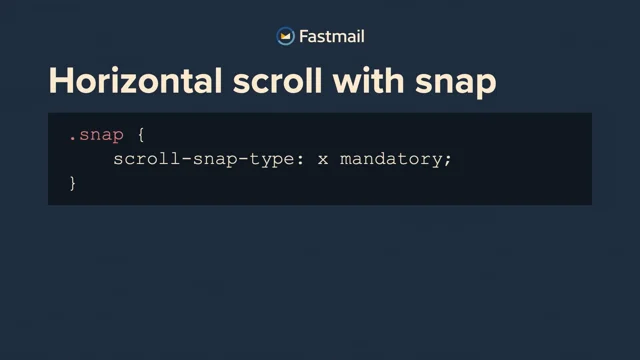
So this is an option to have in your toolbox. It definitely won't fit every case. We can see a range of stories can be told. In the course of researching for this talk, I found one that was about It's a personal violence and how it escalates if you don't do something about it. It was using horizontal scrollie telling to do that with what we have in CSS today, including scroll snap events where we can handle when things snap in JavaScript where we previously couldn't.
A website like that could be built without any reliance on libraries. Just remember it's there for you if you need it and it's built into the browser. Thanks so much. If you'd like to hear more of my story and my thoughts about Dev and Life, feel free to go to my author page on CSS Tricks. Also happy if you hit me up on LinkedIn.
If you'd like to see these slides and go through them in more detail, they're here for you to browse. Thanks very much for listening.
People
- Chris Coyier
- Bramus Van Damme
- Andy Clarke
Technologies & Tools
- JavaScript
- weblinger.css
- React
Standards & Specs
- Marquee element
- ScrollTimeline
- CSS custom properties
- animation-timeline
- Timeline scope
- HTML
- CSS 3D Transforms
- Hover pseudo-class
- Range input
- ViewTimeline
- Container style queries
- Scroll state queries
- scroll-initial-target
- Scroll Snap
Concepts & Methods
- Scrollytelling
- Main thread animation
- Scroll-triggered animation
- Semantic HTML
- CSS collision detection
- Parallax scrolling
Organisations & Products
- Chromium
- Safari
- Pulitzer Prize
- The New York Times
- CSS-Tricks
- CodePen
- Firefox
- MDN Web Docs
Works
- Torah