From Zero to Four Million

With digital products, the saying “you never get a second chance at a first impression” is a cold hard fact. There are many hurdles that prevent a potential user from becoming a passionate user and the way that you onboard them to your product can make or break it.
At Canva, we’re quickly approaching 5 million users, and we’ve learned a thing or two about converting the interested into the engaged. I’d like to share some of our secrets, things you should do and things you should definitely not do to create an engaged user base.
A quick humblebrag… they actually hit six million!
The best thing you can have is passionate users. They are the ones who come back every day; the ones that spread your product by word of mouth.
People get excited using Canva, they feel proud of what they achieve.
People go through phases from hearing about your product, to trying it, through to becoming a passionate user.
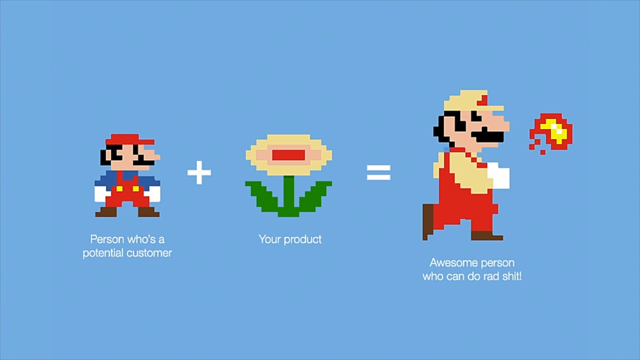
What do users see the first time they try your product? People will spend more time evaluating your competitors. The ideal onboarding flow goes from having a vague idea of what your product does, to thinking it’s great. Don’t tell them about your product – tell them how the combination of them plus your product makes them awesome.
Onboarding has been around as long as software – it used to be a huge user manual you had to read to get anywhere at all. Then tutorials came along – interactive CDROMs. More recently we have the 4-5 static info pages you have to swipe through (noting we mostly swipeswipeswipe get me to the damn product)
Ideally: teach your user to use your product while they use your product.
Canva had some issues when they started. People expected design software to be slow and hard to use; secondly they didn’t think they themselves could design.
Big thing was giving it the title “23 second guide to beautiful design in canva” – that’s hard to resist! Anyone can spare a few seconds.
Building up users’ confidence came next – they wanted people to do things. Initially they thought they’d do a bunch of on-screen guidance, but they didn’t really have the dev time to support it (only two frontenders on staff at that point). So they created a way to get people to use Canva to learn Canva.
“Getting people to drag a hat onto a monkey is really gratifying… monkeys look great with hats.”
The beginner challenge raised their net promoter score from ~5 to 9-10.
Canva also created a game where you found the stars in the product which led people to new features – things they hadn’t tried yet. Progressively revealing the UI as people learned new features.
Trello is another company with a great onboarding experience. It sets you up with boards populated with cards that get you to use parts of the UI or consider use cases for Trello.
Slack uses a chat bot to get users to start trying the product.
Cam is quick to point out they don’t think they’ve got everything perfect with Canva’s onboarding. There are really powerful things they could add on to make a better experience for different types of users – eg. tailoring content to people in different industries, or referring to the search terms that brought the user to Canva.
Look up: useronboard.com