Edge AI with Direct Device Control
Defining Edge AI
The speaker opens by defining Edge AI simply as AI that doesn't run in the cloud, noting that NVIDIA now uses a similarly broad definition of edge computing. This sets the stage for the talk's focus on practical, hardware-constrained AI deployment.
Why Edge AI Is Hard: Core Constraints
The speaker explains that Edge AI is a genuinely difficult engineering discipline due to tiny KV caches, limited context windows, slow prefill times, restricted model architectures, missing hardware kernels, and memory fragmentation. These constraints shape how models must be selected and prompted on local hardware.
High-Level Mitigations for Edge Deployment
The speaker outlines practical strategies for working within edge constraints: preloading and not unloading models, using the smallest viable quantization (Int4 vs Int8), crafting short dynamic system prompts, and favoring single-shot tasks over complex multi-turn interactions. These mitigations address the earlier-described hardware limitations of context and memory management.
Introducing the HID Proxy Project and Hardware
The speaker introduces his 'Only Proxy' project, a HID (Human Interface Device) proxy that emulates a keyboard/mouse using M5 Stack hardware from Shenzhen, popular among hardware hackers and industrial control users. He details the ESP32 module, the need for a separate USB host module (like the Max module) rather than the SoC's own port, and the Exera AX630C system-on-chip with its 12 TOPS INT4 MPU and 3GB inference memory.
Development Environment: PlatformIO vs Arduino
The speaker discusses his original development setup using PlatformIO over Arduino, citing better VS Code integration and superior dependency management for multi-target embedded projects. He notes this was his environment eight weeks prior to the talk, foreshadowing a later revelation that his workflow has since changed.
Choosing the Qwen Model Family for Edge Use
The speaker explains why he favors Alibaba's Qwen model family for edge deployment, noting it was purpose-built for on-device use cases like translation, unlike other small models designed more as hobbyist exercises. He highlights using a 1.5B parameter Qwen model with extremely limited prefill (128-256 tokens) and a 1024-token KV cache.
Working Capabilities: Chat, Shell, Dictation, and Translation
The speaker demonstrates the practical capabilities built into his firmware, including a keyboard/mouse-emulating 'chat with editor' mode that injects into any text editor or shell, a shell-tools mode for generating commands like FFmpeg parameters, and dictation using Whisper and the real-time Zipformer model. He also introduces an experimental use of offline Wikipedia (.zim files) as a deterministic fact-grounding tool for local LLM inference.
The Complete Hardware Package: Keyboard and Case
The speaker describes his complete desktop setup, featuring a custom split keyboard called OnlyKeyboard based on the open-source Silica 54 project, which communicates wirelessly at 2.4GHz to the proxy device and then to his laptop or desktop.
Refactoring with Claude: Benefits and Surprises
The speaker reveals that he actually switched from his stated PlatformIO/VS Code setup to using Claude for a major code refactor, driven by messy code and a desire for better documentation before open-sourcing on GitHub. He details the benefits, including better-factored code, consistent symbol formatting, and surprisingly strong help solving severe dual-core reentrancy problems and low-level hardware debugging issues.
Claude's Quirks: Callback Overuse and Chatty Documentation
The speaker discusses minor drawbacks of using Claude for embedded development, particularly its tendency toward 'OO theater' with excessive anonymous inline callback functions that bloat setup code, and overly chatty documentation that reads like Claude's own thoughts. He explains how custom instructions helped mitigate both issues.
Practical Tips: Routers, Memory Warnings, and Prompt Design
The speaker shares additional practical advice, including using a portable home lab router to avoid reconfiguring Wi-Fi across edge devices, heeding Claude's warnings about flash memory running low, and the importance of experimenting with non-obvious edge-specific prompts, sharing an example system prompt that works well for Qwen despite not following textbook function-calling conventions.
Hardware Lessons and Closing Remarks
The speaker shares a key hardware lesson that a capable ARM CPU with ample memory, like a Raspberry Pi 5 with 16GB RAM, can outperform dedicated TPUs or edge GPUs for many AI tasks. He briefly mentions other ongoing projects (an AI production assistant and StackChan) before closing with his contact information for LinkedIn, GitHub, email, and X.
So Edge AI. What do we mean by Edge AI? There was a really good session, the first session in the sequence, that I recommend everybody watch if they want a lot more detail on some of the things I'm talking about. So I'm just going to define Edge AI today as AI that doesn't run-in the cloud. Pretty simple. In fact, NVIDIA defines it pretty much the same way now. This is from their most recent financial year results, and they're now defining a thing they call edge computing, which is basically everything that isn't on the cloud.
So it's fairly simple definition. Edge AI is objectively hard. I'm not going to lie to anybody in the room. It's actually one of the more difficult engineering disciplines in general, I think. Embedded development is very tricky. But it is a lot of fun, actually. And it's become more fun, which I'll get into in a sec. So really, the question we're trying to answer is what kind of models are going to run well on local hardware?
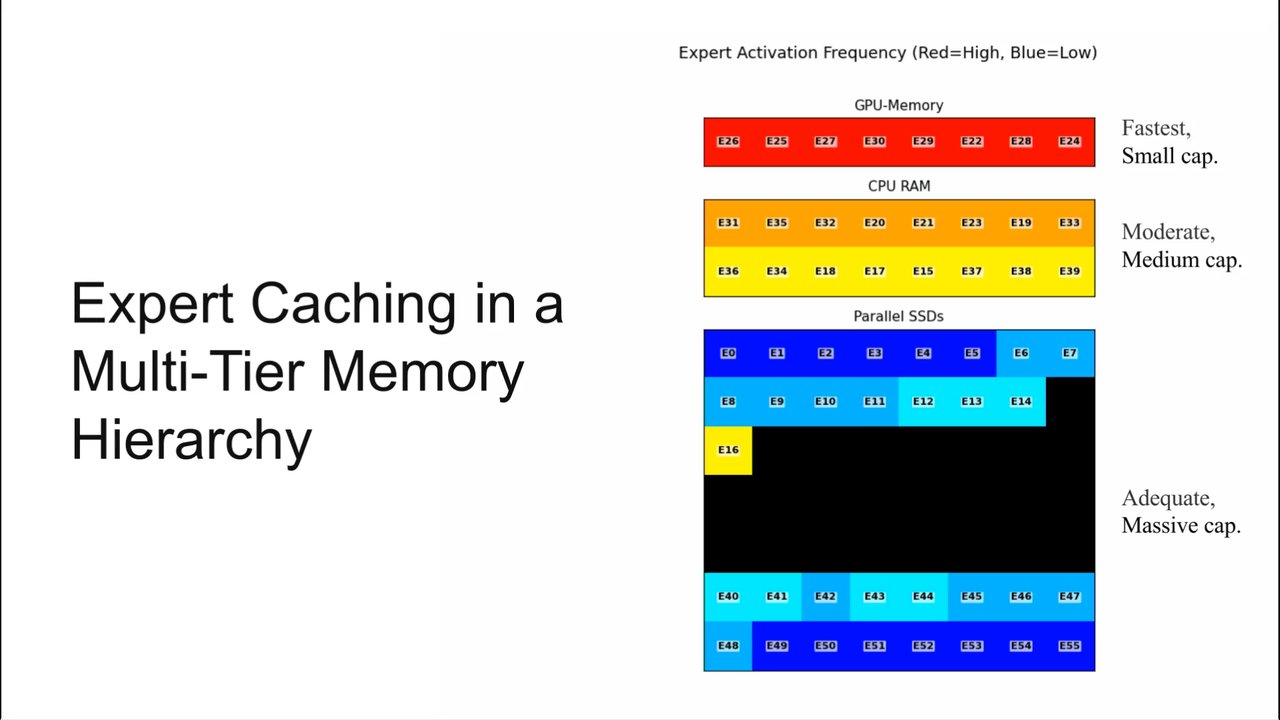
That's the fundamental issue we're trying to sort out. So as we heard in an earlier talk today, quantization is a very big deal in edge AI. So if you're on a mobile phone or some of the devices I'm talking about today, quantization is your friend. But you're going to run up a bunch of impediments. So one is your KV cache is going to be very small.
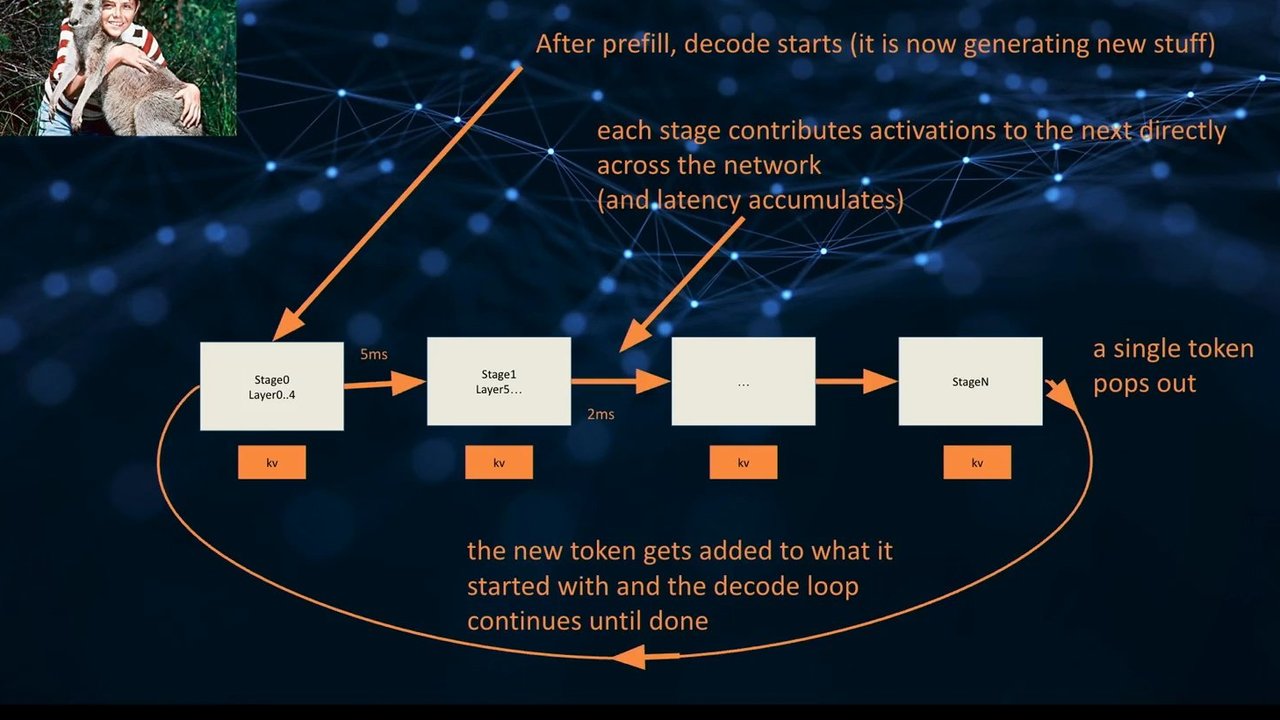
Your context window, basically, is going be very small. And your prefill is going to be relatively tiny on a lot of this hardware, which affects how you do your prompting. So your token rates may not actually be that low, but the issue is going to be the prefilled time. So there's often a little lag as the prefilled occurs.
So that can be an issue in terms of responsiveness with edge models. You have limited model architectures. And we don't have time to go into a lot of detail. As I say, there was an earlier talk on this that was much better. But basically, there's some maths you cannot do on some of this hardware. Depending on the specific hardware you're using, some maths will just not work.
Some kernels, as we call them, are basically not available. So the very latest models are probably not going to work, and you'll probably be using slightly older models, which has some advantages, to be honest, as well. And memory fragmentation is just a huge issue that you have to deal with. So you have to be very careful about the sequencing of how you're using the models.
So let's just start with the very highest level mitigations that everybody should know about. You want to preload models and not unload them. And the order you load models in is somewhat important sometimes as well. You want to use the smallest quant that works. So this morning, earlier on, it was talked about Int four versus Int eight versus the floating point formats.
If Int four works for you and your hardware supports it, you should probably be using it. But if that's not working for your use case, then you're going to go up to Int eight. So that's what I'm talking about there. And very careful and dynamic system prompt generation. So system prompts are not a static thing with edge hardware.
They're not this war and peace system prompts that some of you may have seen leaked publicly. They're very short and to the point, the system prompts. And then in addition to that, you're generally doing single shot tasks. And if you're doing rounds, there's a lot of kind of complexity in how you manage those rounds. So you're all aware now probably of the idea of summarization with chat now, because all the Edge stuff has started doing this.
But on sorry, all the Frontier stuff's been doing this for a while on cloud. But on edge, we've always had the issue with how do we manage the context window, basically. So this is one of the projects that I'm working on at the moment. As a lot of people in the room, probably I don't work on one thing at a time, unfortunately, anymore, but this is definitely one of them.
So this is only proxy. And that's the title of the talk. So what this is is what's called a HID proxy. HID is just keyboards, mice, all those things are HID. They're human interface devices. And there is a very specific protocol that's used with USB and Bluetooth that allows your mouse and your keyboard to sort of negotiate with your computer and say, yes, I'm a keyboard, away we go.
Or yes, I'm a whole bunch of things, a so called composite device, away we go. And the hardware I'm using this is from a now relatively large company actually in Shenzhen called M5 Stack, who are very popular with two communities. One is North Asian hardware hackers, robot hackers, etcetera, especially in Japan. They're absolutely huge in Japan. Most of the chatting I have on X now is with people in Japan or industrial controls.
So if you walk into a factory in Shenzhen, you'll most likely see a module from these guys or some similar companies mounted on the racks where the custom equipment is. So that's the ESP32. Then you'll need some way to be a USB host, which is what a computer is or what a laptop is or what a phone is. There's a few different ways to do this, but in this case I'm using this Max module.
The reason for using this is that there's a very good library with it. This is the most important thing with a lot of edge development is do you have a good support library for the hardware you're using? Because if you have to do that by hand, you're in a world of horrible hurt, so don't do that. So this particular one's from a guy called Oleg, and he's a god and the library's great and everybody uses it.
So I recommend everybody obviously use that library. Why wouldn't I just use the port on the device? If you have a look at that device, and in fact that device over there as well, you will see that they have a USB port on them. So you might say, well, Jeremy, why don't you just plug your dongle in there? Well, for a start, dongles plug better into USB A ports, sorry to be brutal.
And secondly, there's a whole bunch. I will save your sanity by just saying, look into USB host modules. They're cheap and easily available and they're a good idea. Don't try and do this with the SOC port. You'll have a whole world of problems, particularly with your development tools, are probably using that port as how you do your uploads.
So just take care there. And then the guts of the whole thing of this particular device is a thing called an Exera AX630C, which is a system on a chip very like a Raspberry Pi but with an MPU in it. That MPU is quite powerful. It's a 12 tops int four MPU, and it has three gigs in this configuration of inference memory, which is actually quite a lot for an edge device like this.
Right, what development environment am I using? Now I started preparing the slides about eight weeks ago for John, and this was true eight weeks ago. So this is the problem with the industry we're in right now. There is nothing particularly wrong with what I'm about to tell you. It's a good starting point, but I'll explain why I'm bearing the lead a little here because this is not my current development environment exactly. But this is a good start.
So I use a platform called PlatformIO. Are there any PlatformIO users in the room? Sorry, I have to oh, good. Okay, there's a couple of people. Are there any Arduino users in the room? There's a few. Right. Why in fact, were different people, so that's good. So why would I use Platform AI over Arduino? So I'm an Arduino user of ever since Arduino was a thing.
And I love Arduino, I still love Arduino. But if you're starting to use AI tools, it may be and I'm about to contradict myself in a sec, by the way that you want to move on to PlatformIO because it's on Versus Code and therefore all your Versus Code governs magically work. So you get all the Versus Code goodies basically is one of the answers. It's also better at dependency management for complex projects.
So if you have a lot of target architectures, which I have multiple modules I'm actually targeting with these projects, I'm showing you one. But there's a whole range of ESP32 devices I might want to target. And PlatformIO is objectively better for that. In terms of the models, we've talked today already about these sort of quantized models, these smaller models, these small language models some people call them. They're actually still LMs, I think technically, but transformer based models anyway. I'm a big fan of the Quinn family of models for edge use because they were designed for it.
So all of the quantized Quinn models were objectively designed by Alibaba Cloud to run on hardware, unlike some of the other models who are almost like a hobbyist exercise, in my opinion, in making a smaller model. Quen was designed for this. Specifically, Quen was designed for use cases like translation and tasks like that. It's a very good multilingual model, even in this size.
I'm using a 1,500,000,000 parameter model, which is tiny, objectively tiny. But it's a very good model as long as it's used for what it's good at. So the main thing it's not good at is its prefill. So the pre fill is extraordinarily limited. You've got 128 tokens I'll just let everybody ponder that for a sec, how little that is or two fifty six tokens depending on the build I'm using.
And my total KV cache is 1,024 tokens. So anybody who's ever done any LM stuff knows that is objectively tiny. So I'm not building a complicated coding agent with this thing, that's for sure, because I do not have enough context window. So what are the capabilities that objectively work, which I have built into the firmware? And I've got it in my pocket, but I'm not going pull it out, this one out, because there'll be a disaster. I might do that later.
So capabilities that definitely work. Chat with my editor mode. So this device pretends to be a keyboard and pretends to be a mouse. Right? So it can objectively inject a chat client into any editor, VI, VIM. It doesn't care. Right? ED. It really doesn't care what the editor is. And more importantly, shell.
It doesn't care that the thing on the other end is a shell. And in fact, there's a shell tools mode in the in the device that allows you to say something like, I want to encode this video to 480p, and you hit magic carriage return, and it basically says, Okay, this is the FFmpeg command you need with all the parameters. If that's Okay to you, you hit enter and away it goes. You probably just hit enter, right, and away it goes. Why is that useful?
Well, anybody who's tried to ever figure out the man page for FFmpeg will know why you need that. You're probably going to use an LLM to figure out the parameters anyway. And Quen locally is objectively very good at these tasks. It was pretty much designed for these tasks. Dictation is another thing. So there's a bunch of models for this.
Whisper a very excellent model actually for edge use. So a lot of people think about OpenAI models. They're all cloud. They're all whatever. But Whisper is an objectively good local model. It really does a good job at transcription. Its only issue on the sort of hardware I have is the pre fill startup time is a little bit of an issue, and there's a latency basically in the recognition, which you don't necessarily want when you're doing transcription in real time if you want to do dictation as opposed to transcription.
So I use Sherpa model called Zipformer for this one, and that's an excellent model. It's basically real time. It's actually the model that device over there uses as well for the speech recognition. And then spell check works really well and translation works really well because translation is what this device was designed for fundamentally in a way, this model, I should say, was designed for.
And as an experiment, which is really interesting that I'm working at the moment, you can get Wiki as a file. Does everybody in the room know that, by way, that Wikipedia is available as a downloadable file? Pretty much the whole of the language? I've got no show of hands. You can download a file called a.zim file. If you download that file, you have a local copy of Wikipedia.
It doesn't have all the magic images and everything as you'd probably expect, but it doesn't have Wikimedia, but it has Wikipedia. And that is objectively useful for pinning local inference because if your LLM decides this is a fact, it can just go to your tool and it will call Wikipedia, get the result back, and it's completely deterministic, right, because it's Wikipedia.
And that can be excellent for local stuff. This is the complete package as it sits on my desk at home. So this is my not free split keyboard. It's sitting in the middle as you see. Normally, it's actually standing on its back, so I can use it as a touch pad because it does act as a touch mouse as well with the way not this one.
This one that's in my pocket is configured. And basically what's happening is there's 2.4 gigahertz coming out of the two sides of that keyboard. They're going into the device, and then the device is connected to my laptop or my desktop. This is the Kickstarter version that I've shown a few people over time. So this is called OnlyKeyboard.
So OnlyKeyboard is a split keyboard, excuse me, based on the Silica 54 open source project. And the module will sit in the middle, there'll be a case wrapped around it. Excuse me. Lessons learned. So I lied to you before. I said that my development environment was PlatformIO and Versus Code, didn't I? That's a massive fib.
As of about six weeks ago, so just after I started working on this talk, I decided that I needed to refactor my code. Why did I decide I need to refactor my code? Well, frankly, was a bit of a mess, and I want to put it on GitHub. And I wanted to get it onto GitHub before the conference, which did not happen. But anyway, that's another story.
So it had become unwieldy. And I'll get into the advantage. The advantages will show why this was a good idea actually. I wanted better documentation basically fundamentally. And as somebody said previously, documentation is one of the massive wins from this whole exercise. So what did I actually objectively get when I started using Claude those weeks ago? The answer is I got better factored code with some caveats. I'll come back to the caveats in a sec.
I got better documentation with some caveats, but I did get better documentation. I got consistent symbol formatting. In embedded type projects like this, that's fundamental because you're often like grabbing examples from the documentation. And when you're grabbing examples from the documentation, you may be lazy and not reformat the symbols, frankly, because you want to get on with the next step.
So you're going to end up with underscores and camel case mixed and all this sort of nonsense, which just looks horrible, right, like it's a mess. So I got Claude to sort that out for me, and it did, to be honest, a very good job. It also and this is where it gets a bit more surprising. It helped me with some very severe problems with reentrance I was having. So in this particular environment, you have two cores on the device. And the two cores are one is running the system, the real time operating system, and has all the drivers and things in it and has an interrupt across to the other core.
And in the middle of your processing and your main loop, you can just get interrupted. A C method gets called, and then you return to the flow of your code. So if you have you probably I don't know, there's a few people in the room who have done this before, but when that happens, bad stuff happens basically.
And you have to make sure that does not happen. There has to be reentrancy bars basically that stop that from being an issue. So Claude was incredibly helpful in sorting this out, which actually really surprised me because this is a very hard problem in embedded development, frankly. And it's also really good at understanding and controlling hardware. And I've got another project where this is a bit more obvious, which is an AI camera.
And it's remarkably good at understanding the hardware. Once you've gone a few circles through the documentation or whatever, it's very good at understanding the hardware. It helps you with very low level debugging, which is incredibly helpful. So the misses are mild, but there are a few misses. So I suppose the biggest issue is this sort of OO theater thing that you see with embedded code sometimes.
So if any of you are embedded developers, you have most of what you do is hardware. And there's only one of the things you're talking to. So there's a lot of singletons in your code, basically. So it's not really object oriented. It's a namespace with a bunch of functions and static variables if we're being truthful, because those static variables are often actually mapped to actual hardware registers. So there's only one of them, and you have to wrap it in all the locking and everything anyway.
So it's basically a singleton, right? So it's it's a C code, if we're being brutally honest. Claude loves object theatre except in one bizarre area. It it loves to use anonymous inline callback functions all over the place, which is not a style I particularly like. I'd rather have an explicit function for that and put it in, you know what I mean, put it in as the callback.
This bites it because they get bigger and bigger and bigger over time. So you end up with this incredibly hideous setup code. So your main loop is now the most beautiful thing you've ever seen. It's cleaned up. It's gorgeous. It's just got 10 things saying, do this, right? Like just get on with it. Get on with it.
Get on with it. Your main loop's amazing. Like it's the best looking main loop I've ever seen. But your setup function is objectively horrendous now because it's just full of all these horribly bloating functions. So I had to get it to sort that out. And I've now got some instructions so it won't do that anymore because it was really starting to annoy me.
Also the documentation, to be honest with you, with Claude can be very chatty, and it's more like Claude's thoughts on occasions. And you really have to tell it, don't do that. Like, I want documentation for deployers and forkers of my code, is the instruction actually that's now in my instructions. And that fixed the problem by and large.
And the final one, which is a minor one but slightly annoying, is you get a lot of comments about the turns you do during your development. So I would recommend you go and clean those up with a set of instructions as well. A couple of other very quick things. So you probably need a home lab router if you don't already have one. I assume most people who have a home lab have one, but I've got a portable one and the benefit here is that I can take my I have it with me.
I can take my router when I go somewhere else, which means all the devices' Wi Fi doesn't have to be reconfigured, which on edge devices, configuring Wi Fi can be a nightmare if you've got more than a couple of devices because there's no nice setting screen on these devices, and it's it's kind of painful. Right? So Claude's really good at following orders, but pay attention to its warnings when you're in these environments because it will objectively like, you'll start running out of memory for flashing and stuff, and it'll actually warn you and say, by the way, we're getting really low.
Like, the code seems to be getting a bit big. Should we do a refactor? And you're like, nah, don't worry about it. Keep going. And then you can't flash basically because you've run out of space and the upload is not working anymore. And also edge prompts can be really non obvious, and I recommend everybody to really experiment with their edge prompts and actually get some of the frontier elements to help you a bit with this.
Because this is one of my prompts, and this is not an obvious function call prompt by the way. If anybody's built a function call system prompt, this is not what they look like, right? If you read a textbook on it, this is not it. But for Quen, this works really well. Quen's really good at tool use, but that's very minimal.
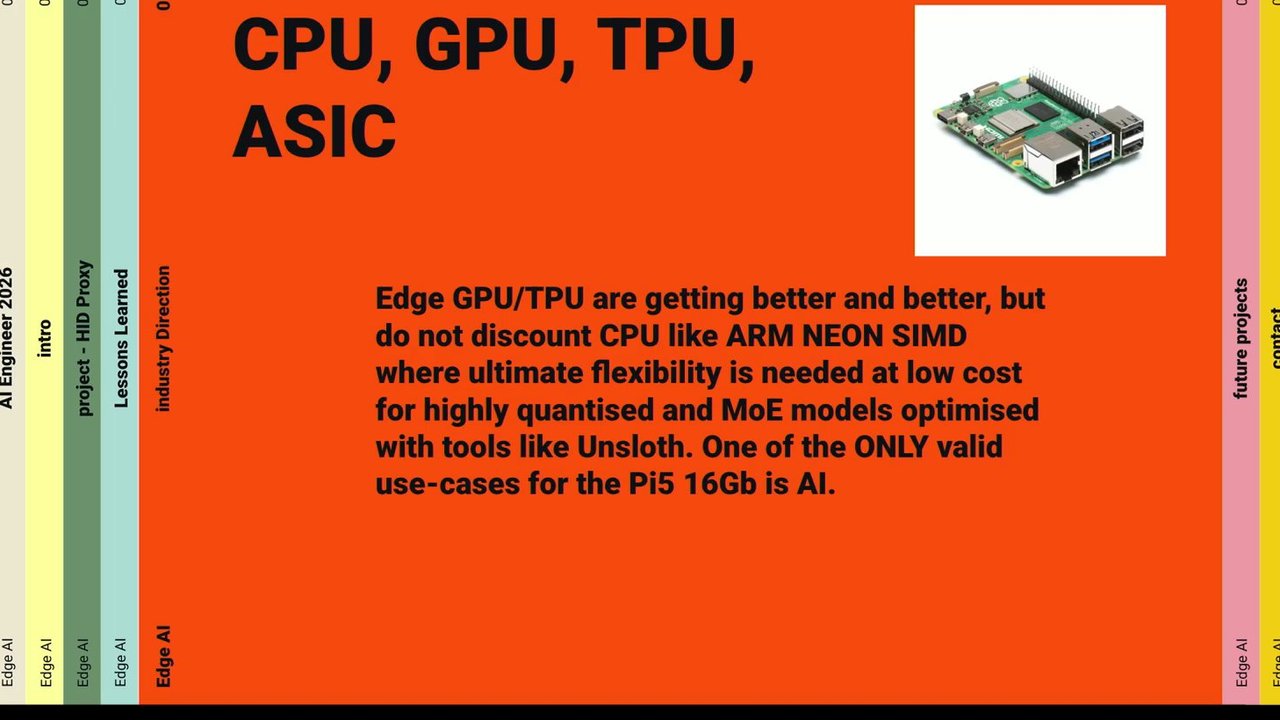
It's tiny. A few lessons learned kind of things. So somebody's already talked about this as well during this conference, but CPUs, GPUs, TPUs, ASICs. Right? So if you're on edge, you're probably thinking I should be using a TPU and or a edge GPU. But the reality is that's not true. And I've learned this kind of the hard way almost with another one of my projects.
Sometimes what you want is a very nice ARM CPU with a lot of memory. And in fact, a Raspberry Pi five with 16 gig of memory, the only reason I would objectively ever buy one again is for AI. So I won't go into that, and I will very briefly touch on this. So these are my other projects.
So I have an AI production assistant I'm working on. StackChan, you can see over here. And I'm also I have to put Clor in my stuff, right? So I'm going to put Clor in my stuff because everybody's doing that. So the proxy is going to have Clor in it. Why not? And that's me. So on the left hand side there, that's my LinkedIn.
If anybody would like to hit me up on LinkedIn and connect, please connect. Don't follow because if you follow, you sometimes miss those, whereas connect I'll respond to. And on the right hand side there is my GitHub, which I will be releasing the stuff onto I promise, but I had to prepare for the talk. And there's an email address if anybody wants to direct me, email me. Feel free to do that on these topics.
And then if you really wanna go on the wild side, that's my x link in the bottom right hand corner there. Thank you very much.
People
- Oleg
Technologies & Tools
- .zim file
- Arduino
- ASIC
- Claude
- CPU
- ESP32
- Exera AX630C
- FFmpeg
- GPU
- PlatformIO
- Qwen
- Raspberry Pi
- Raspberry Pi 5
- Sherpa
- Silica 54
- TPU
- VS Code
- Whisper
- Zipformer
Standards & Specs
- Bluetooth
- HID protocol
- Int4
- Int8
- USB
Concepts & Methods
- Context window
- Edge AI
- KV cache
- Prefill
- Quantization
- Reentrancy
- Singleton pattern
Organisations & Products
- Alibaba Cloud
- GitHub
- M5 Stack
- NVIDIA
- OnlyKeyboard
- OpenAI
- StackChan
- Wikipedia