Building SDKs in the Agentic Era

Introduction and the Knowledge Cutoff Problem

Speaker C, who has worked on Google Maps SDKs, TensorFlow, and the Gemini SDK, introduces the talk's central problem: getting Gemini to generate correct code for its own SDK. He explains that LLMs have knowledge cutoffs due to lengthy training pipelines (dataset curation, pre-training, post-training, evaluation), creating a six-to-twelve month gap between data freezing and model release, which becomes especially problematic when libraries evolve quickly or undergo major deprecations.

The Gemini SDK Deprecation Timeline

Speaker C walks through Google's SDK history, from the 2023 Palm 2 launch with the Google Generative AI Python SDK to the eventual deprecation and replacement with a new SDK and API. He shows concrete before/after code examples illustrating how models like Gemini 2.0 and 2.5 Flash continued generating code with outdated SDKs and defunct model IDs, resulting in broken first-run experiences for developers.

First Attempt: Direct Instructions via Agent MD Files

The speaker describes the first fix attempt: embedding direct instructions in files like agents.md, Gemini.md, or Claude.md, referencing research from Vercel and Google's own AI Studio prompt as validation. He explains how a cogen-instructions.md file was added to GitHub repos, noting it worked well but suffered from poor discoverability and a costly 6,000-token overhead sent with every request.

Second Attempt: LLMs.txt and Live Documentation

Speaker C details the move to llms.txt, updating documentation to serve markdown versions so agents could pull fresh information on demand rather than relying on stale instruction files. He explains the two-file structure (a navigation file and per-page markdown files) and highlights remaining issues: multi-step navigation overhead, long documents consuming tokens, and low awareness among users about llms.txt.

Third Attempt: Context7 as a Documentation MCP Service

The speaker introduces Context7, a documentation MCP service with an index of popular SDKs and repositories accessible via a single tool, praising its discoverability and serendipity benefits since many users already use it. However, he notes that as Google, relying on a third-party service raises supply chain and integration complexities for first-party products like Antigravity, prompting further exploration of alternatives.

Adopting Skills for Lean, Discoverable SDK Guidance

Speaker C explains the team's pivot to writing 'skills,' Google's first published skill at the time, which use minimal passive tokens (around 100) and activate additional context only when needed. He describes the skill's structure—model IDs, SDK hello-world examples, and links to key documentation—and highlights Vercel's tooling (npx skills, find-skill) for improving discoverability and installability.

Evaluating Skill Performance Across Model Generations

The speaker presents eval results comparing model performance with and without skills across the Gemini 2.5 and 3.x series, showing dramatic improvements especially for newer models. He walks through example prompts of varying difficulty, from simple hello-world tasks to complex model-ID overrides and MP3 file handling, explaining the scrappy but effective evaluation methodology used.

Lesson Learned: Trimming Bloated Context from Skills

Speaker C recounts a real-world test case where a well-intentioned addition of large API spec URLs (80,000+ tokens each) polluted model context and hurt performance. Removing this bloat improved or maintained results across nearly all models, with Gemini 2.5 Flash jumping to a 70% success rate, reinforcing the lesson to keep skills lean and considerate of context limits.

Keeping Skills Updated and Results with Gemini 3.5 Flash

The speaker warns that skills themselves can become outdated over time, since Vercel's update tool requires manual triggering with no automatic staleness alerts. He shares new results from Gemini 3.5 Flash, showing it now achieves over 70% success without skills due to a more recent knowledge cutoff and SFT post-training, but still needs skills to reach 90% performance.

Closing Remarks and Key Takeaways

Speaker C wraps up by sharing contact links and encouraging attendees to install the Gemini API skill. He leaves the audience with three core messages: update your skills regularly, write skills for any knowledge models struggle with (not just SDKs), and always test and evaluate skills before relying on them.

Right. Thank you for the introduction. So I've been working in open source for a while now. I worked on some of the earlier Google Maps SDKs, worked on TensorFlow for a little while.

Keep talking.

We're good? Okay. More recently, worked on our original Gemini SDK. So this talk is about our Keep talking. Our, a kind of fairly niche problem that we had with I think it's now I've got the kid keyboard shortcuts. There we go. This is about a fairly niche problem that we have, where we needed Gemini to produce the right code to build using the Gemini SDK.

Now this talk is kind of about how we did this for Gemini. I do think it's kind of applicable more broadly beyond this to, SDKs that you might be maintaining or even using, for internal projects, or even for anything where you need to kind of update the models like internal knowledge or override what it thinks it knows.

So all LLMs, but Frontier LLMs in particular, have a knowledge cutoff, and this is because of the kind of fairly lengthy process it takes to train these models. So at the start, we have this like massive dataset curation and collection. We have a fairly lengthy pre training process. And then we have a post training process where models get their kind of capabilities and personalities.

And when that's done, we have like an evaluation and testing process where we want to make sure that the models do what we claim that they can do, and often these two can can cycle through for a bit. And what this means is that you end up with six to potentially twelve months from when a dataset is frozen to when the model is actually in your hands and and using it.

And oftentimes, these datasets are reused between generations as well, so they could they can get even longer. Compare this with something like software development where projects evolve daily. And for well established projects, so something like VIM or whatever that hasn't changed in a decade, this isn't really a big deal.

But when you're working with a more, like, bleeding edge library, this can become a problem where the models don't know how to use the latest versions of the of the libraries. This can show up in a few ways. So for example, if a model sorry. If a library releases a new major version, not a huge deal because the models can still kind of write code using the the previous version. It just means you're behind on it on a generation or maybe the model can't update like a a modern code base.

But for us, the problem was that we deprecated a library that was out there and replaced it with a a completely brand new one. And so the model was continuing to write code with our old SDK. This is what the timeline looks like. So typically, we we try and launch like things in lockstep due to, you know, major events or or or things we have planned.

Going back to 2023, we had our, Palm two models. This was our first open source LLM that we had available for the public to use, and we launched it with our Google generative AI Python SDK. Now, obviously, at the point that this model's launched, it has no idea about this SDK because it was not in the training data whatsoever.

We were still writing it at the point that it was shipped. Because of this, like, six to twelve month knowledge gap, it means that these models here are like, it's only until we get to kind of one point five and two point o that they've started to even see this SDK and kind of know how to write code with it. So obviously, by the time we get to two point o, it's starting to to understand this code.

So what we did was we we deprecated it and we released a brand new SDK. Not ideal, but, you know, these things happen. With this kind of timeline, though, it means that it's, like, potentially kind of early twenty twenty six to about now where the models are expected to actually know how to use this new SDK. And so, of course, at the end of last year, we went and launched a brand new API, which is a new way to interact, with the Gemini models going forwards.

This might kinda look like Google kind of not making its mind up and and and being all over the place, but this is is just what what innovation looks like. We need to try new things. We need to, throw away things that don't work. We need to move on to new ideas, especially in in a world of AI. Just to kind of illustrate what it looks like, back in 2024, we may a user may have written some code using our old SDK, Gemini two point o, build something that connects to the Gemini API.

Oops. The the code that comes out of the model looks the same. It's almost the exact same code. The only issue here is that it's using an old model ID, which isn't ideal, but, you know, it's easy enough to fix and often will actually work the first time. Compare that with code written, you know, a year or so later using a new SDK, Gemini 2.5 flash, a newer model, same prompt, it still produces the same old code.

So it uses the old SDK, but even worse it uses an old model and by this point, Gemini one point o was shut down and not available. So when the model generates this code, the first experience the user has is that it fails. And like this is not ideal. Like this is not what we want our developer experience to look like. So we need to fix this.

How we did this was we started with direct instructions. So we know that direct instructions, so your agents m d file, Gemini MD, Claude MD, whatever you're using, we know that this is the best and most effective way to get a model to do something. We know this more recently, Vercel has published research showing how well this works. We knew this in particular because we used a prompt like this in our own software.

So in our AI studio build interface, we had almost this exact prompt so that our own systems would generate the right code when people were were building. We can scroll through this just to show you what it looks like. We've got a lot in here. We have instructions that show what the SDK looks like, what the right thing and wrong things are.

And then we have, you know, sample code across a number of languages and lots of instructions and rules in here. The next question was, like, how do we get people to actually use this? The way that we tried to do this was by putting a cogen instructions m d file into the GitHub repository for each of the SDKs.

And this is good. It's publicly available, but it's very hard to kind of stumble on and, like, almost nobody knows about this and no one uses it. And then once you found it, you still had to copy and paste this entire file into your kind of your agents. Md file, wherever that was. The benefits is that it works really well.

Like, it works well with the current models. It works well with older models. The actual biggest problem is getting people to to use it and install it. But one other big problem is the file I just showed you is almost 6,000 tokens, and that's included with every single request that your model makes. So if you've been working on a on an app and you're updating the front end and the CSS, if it's in your agent's MD file, that same 6,000 tokens is being sent on every request.

And this is not ideal. Right? Like, tokens cost time and money, and we we don't want our users to have to to go through this. So we needed something better. The next thing we looked into was using llms dot text, which is a fairly well established pattern now. At the time, our docs didn't support it, so we updated our docs to serve markdown versions of all all of the content.

Benefit of this is that if you're pointing your agent directly at your, like, markdown live documentation, it means that it's getting fresh information on every request. Like, it doesn't have to have a stale copy of a of a markdown instruction file that may be out of date by six months. It's always gonna be correct on every request.

As a pretty straightforward, we have two files that are involved. We have our main LLMs dot TXT file that lives in like a project directory, and then this just contains the navigation. So it's just a list of links and the title of the page and then the model could go further into there as it needs to. And then each of our documentation pages on the website has a markdown version.

So we have this m d dot txt file, and then that contains just a markdown version of the of the docs themselves. And then users can paste this kind of directly into their their agents and have it pulled down, you know, on demand. It works pretty well for a simple setup if you just give it a URL. But in practice, the models need to kind of navigate a number of pages.

They like to read quite a few pages. They like to read API references and narrative guides, and these can take quite a few steps and take a bit of time. A lot of the documents are quite long, and so again, they can pull up quite a quite a few tokens. But also we needed, like, convince people to use it.

Not everybody knows about LLMs. TXT or thinks to even, like, look for it to add into their project, so it's not a very discoverable solution either. And to get it to kind of work effectively and efficiently, like, you your users really need to kind of add it to their instructions and add some kind of meta propting that explains how to use the, you know, the the documentation effectively.

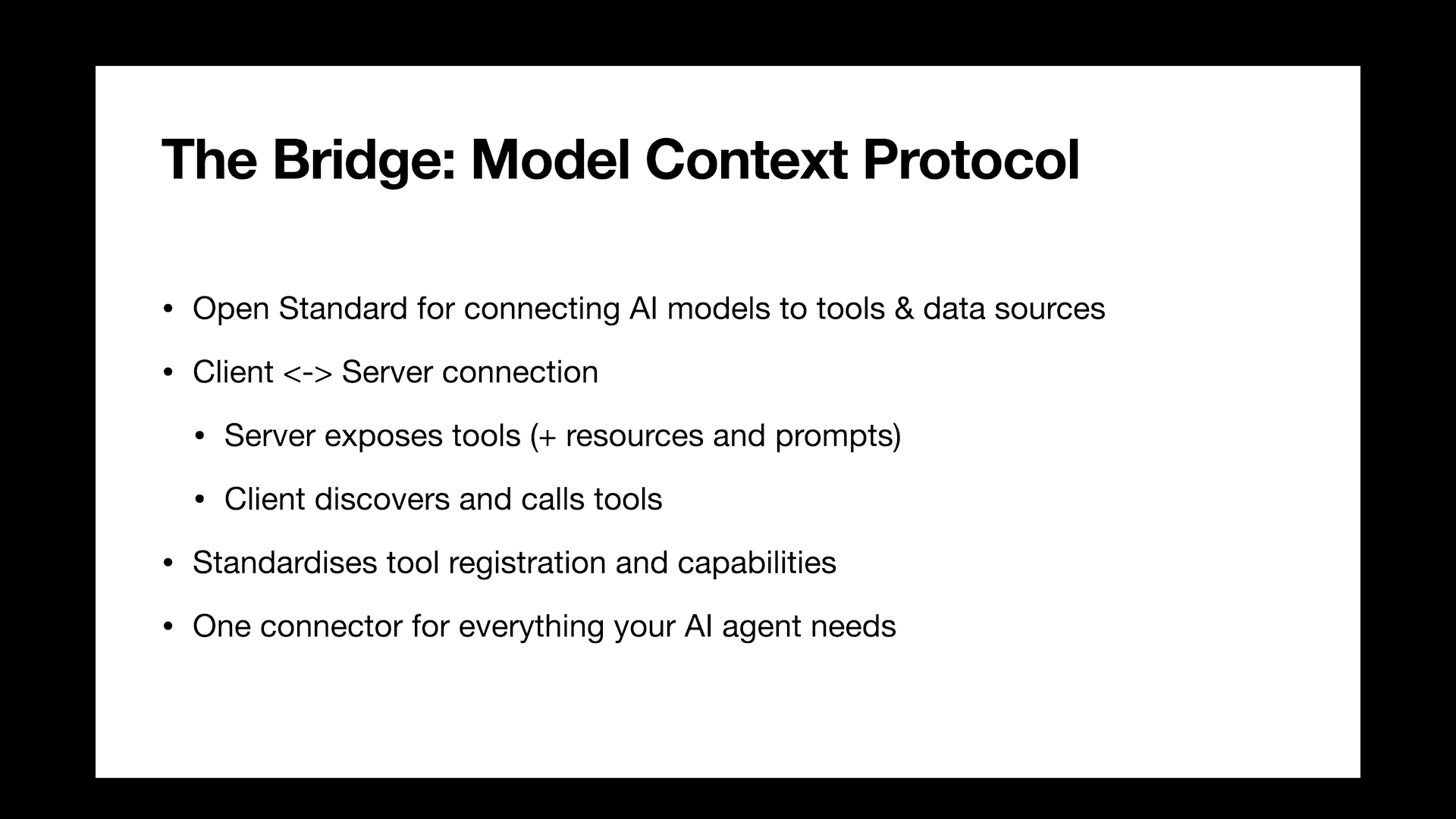
So the next thing to kind of move on to from here was to find a way to package all of this up into like a simple tool that users can use in in just one one like one package. Fortunately, Context seven is available and does this. For those who haven't used it, it is a documentation MCP service.

They have an index of all of the popular SDKs, websites, GitHub repositories, and you can get access to this with just a single a single tool that you add to your model. One of the biggest benefits to this is that it already exists and there is a decent chance that your users are already using Context seven and so it enables this potential serendipity where if they've asked to build something in, you know, without using your product name, they can still stumble across your product anyway, which is which is great for discoverability. It's a complete and other end of the spectrum to than what we had before.

I think for for most users you can probably stop here and say, yep, look, context heaven is great. We'll use this. Being Google, having a third party service can make it more complex more complex to to ship integrations into things like anti gravity and onto our first party services. There's a lot more like, supply chain concerns we need to need to be considerate with.

And so we needed to do a bit more diligence to make sure there were, like, no other options we could exhaust. So by now, you're probably yelling at me to

say like, oh, why are

you using skills, you idiot? And in, like, June 2026, this this makes a lot of sense. However, when we did this at the start of the year end of last year, this hadn't been done a lot. This was the first skill that Google had written and published, and so we didn't really have any kind of internal, you know, previous work that we could we could lean back on.

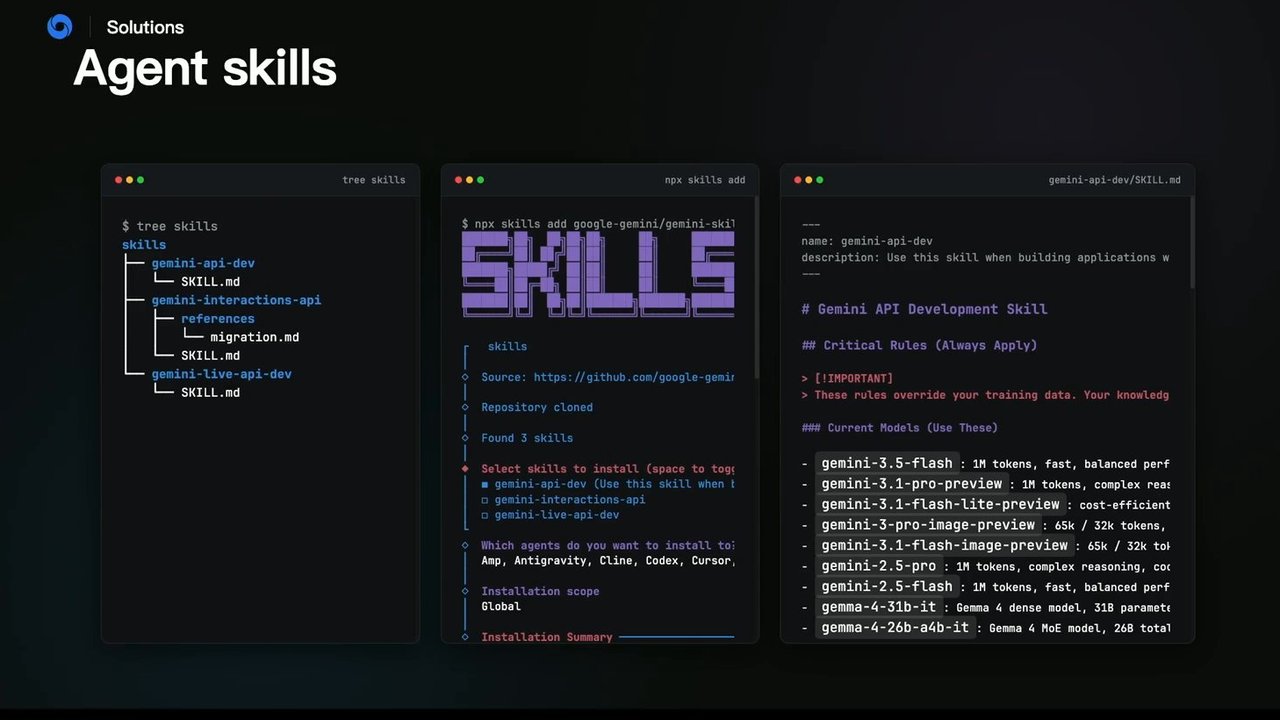
So we we wrote something and and shipped it. Skills are good compared to, like the other techniques which can use thousands of, passive tokens. Skills only require this kind of 100 or so tokens in the first two lines here. And then when the model wants to use them, it activates it and gets the, you know, the further, like, one and a half thousand tokens in the rest of the file.

The way that we have our skill set up is that we have our a list of current model IDs, our SDKs, and then just a little hello world in each of the SDKs. And then finally at the end, we have, like, links out to specific key pages in our documentation so that the models can jump straight to them if they need to.

So this keeps them fresh. It keeps them keeps them fairly lean and works pretty well. For discoverability, Vercel has a pretty, amazing set of tools. This MPX skills tool that you can use. You can install skills directly from a GitHub repository, and, they also have a find skill skill, which enables this kind of serendipity if a user needs to like, how do I build with Gemini?

It will go and find the right skills and and prompt the user to install them into their into their repository. So with traditional software, we were able to unit test things and we can have confidence in the things that we ship based on our like automated testing. When you're working with markdown, things aren't as easy to do, so we wanted to make sure that not only did the skills actually work as well as they appeared to just from kind of manual inspection, but if we made a change, would it still have the right effect? Would it move us in the right direction?

So we did some evals. This is what it looks like. We we ran a set of prompts through all of these models both with and without the skills. I think the baseline numbers are interesting. If you look at like the 2.5 series models, because of the knowledge cutoff, they have no understanding of the SDKs at all and get a complete 0% success rate without adding skills.

And, you know, we've got a decent but not, you know, ideal 50% improvement from adding a skill on on on the 2.5 flash model. But the the newer models, the three series, got massive improvements from adding the skill. You can see that they have some understanding of, you know, how to use the SDK just because they're a bit more recent, but they really do need the skills to get across the line.

Now the this is just an example of what the prompts look like. Think I we had a 117 prompts in our in our set that we used to eval. This is a very simple one. Like, it just, you know, hello world builds the thing that we wanna build. This one is a little trickier. It has a specific model ID.

In the training data, this model ID is tied to the old SDK quite strongly, so this requires the model to really override it. And then a trickier one that requires, like, understanding how to handle an m p three file, which requires, a deep understanding of the SDK that you won't find on the, you know, the first text generation page. We ran these through each of the models and just kind of tested whether, they use the new SDK, the old SDK.

So it's a very, like, scrappy approach, not, you know, a fully robust eval framework, but this this works pretty well for our cases. The the first chance we had to, like, test whether this was really effective, was during the development of the skill. One of our PMs included this little block of text here, with good intentions. The idea was to always point agents back to our API spec. This is the source of truth for our SDKs, for the API itself, and should be able to, you know, resolve any kind of ambiguity that that might exist.

The problem here is that each of these URLs is our full API spec, and so each one is over 80,000 tokens. So, yeah, in in a lot of cases, the models will be pulling in both of these. And this is where you see some of the older models struggle because it's just polluting context with information they don't need.

So let's let's let's kill it and see what happens. The results here are pretty good. Almost everything either held the same or improved in performance. The only exception to this was our our three flash model, which dropped by just under 2%. It was using some of this this extra information. But to me, the big wins here are that the the 2.5 models, particularly Flash, jumped up to 70% success rate once we got rid of all this, like, extra information they weren't using.

So the lesson here is, like, keep your skills lean and, you know, be considerate of your your users' kind of context. And for us, this was this was good enough to kill this extra clause. So, hopefully, this has kind of shown that skills do work and that you should publish them for the libraries that you own and and care about.

One of the challenges that we see still is that skills can still get out of date, so they can end up being, like, suffering from the same problem that we are trying to fix here. The Versal skills tooling does have an update tool, but you need to run it. Like, there's nothing that tells you your skill is, you know, twelve months out of date.

You have to manually run this, so please, like, do this now if you've got your laptops with you. Otherwise, your skills can can get out of date and, you know, causing the problem to get even worse. As a quick bonus, when we did this research, it was kind of the start of the year. We had our three series models up to 3.1 available, and we tested with those. Last month, we launched Gemini 3.5 Flash, and so I just thought I'd show you some stats on how that's performing here. Interestingly, out of the box, it now gets over 70% success rate without adding any skills.

So, like, this is partially due to a, like, a more recent knowledge cutoff. But we've also started doing SFT post training using our SDK. This helps us get up to a high baseline, but it's not, you know, very helpful for everybody else in the world. The the interesting thing, is that on top of that, we still needed the skill to get it up to 90%.

And so to get like, the the performance is still comparable to what the the other three series models were, which I think is is encouraging and, like, everybody should be writing skills for this reason. Yeah. But just a bit of an insight as to how 3.5 Flash looks. So, thank you. I've been Mark. If you wanna, like, stay in touch and learn more about these, these are my links.

If you're building with the Gemini API, grab the skill and install it now and let me know how it works for you. But otherwise, my three kind of messages are one, like update your skills now. Second, start writing skills for things you care about. It doesn't have to be SDKs. It can just be any knowledge that you you notice that the models aren't, like, you know, adhering to.

And then, like, thirdly, if you're writing skills, test and email them. I'll be down at the DeepMind booth for the today if you wanna come and talk about any this stuff. So, otherwise, thank you.

Building SDKs in the Agentic Era
Techniques for updating model knowledge.

Mark McDonald

linktr.ee/markmcd

Google DeepMind logo.

Google DeepMind

Building SDKs in the Agentic Era

Techniques for updating model knowledge.

Mark McDonald

linktr.ee/markmcd

Model training

  • 01 Datasets

    Gathering and cleaning massive corpora.

  • 02 Pre-training

    Intensive, long-running compute. The knowledge cutoff freezes here.

  • 03 Post-training

    Instruction tuning, RLHF, and alignment.

  • 04 Evals

    Rigorous benchmarking and safety testing before release.

The Core Challenge

Open Source SDKs

High Velocity

APIs deprecate, syntax evolves, and major breaking changes deploy in the blink of an eye.

  • v1.4.2 (PATCH) T₀ + 12 days: Minor bug fixes and dependency bumps.
  • v1.5.0 (MINOR) T₀ + 28 days: New feature endpoints added to the API.
  • v2.0.0 (MAJOR / BREAKING) T₀ + 45 days: Complete syntax overhaul. Legacy auth methods deprecated and removed.
  • v2.0.1 (PATCH) T₀ + 48 days: Hotfix for v2.0 edge cases.

A diagram illustrating a timeline of software development kit (SDK) versions, showing rapid updates and significant changes over a short period.

The Core Challenge

Launch Timeline

FRONTIER MODELS

  • MAY 2023: PaLM 2
  • DEC 2023: Gemini 1.0
  • MAY 2024: Gemini 1.5
  • DEC 2024: Gemini 2.0
  • JUN 2025: Gemini 2.5
  • NOV 2025: Gemini 3

DEVELOPER SDKS

  • MAY 2023: Legacy SDK (google-generativeai)
  • FEB 2025: New SDK (google-genai)
  • DEC 2025: Interactions API

Code generation

# Prompting gemini-2.0-flash
model = genai.GenerativeModel(
    'gemini-2.0-flash'
)

response = model.generate_content(
    "give me some python code "
    "to connect to the gemini API"
)
print(response.text)
import google.generativeai as genai
genai.configure(api_key=GOOGLE_API_KEY)

model = genai.GenerativeModel('gemini-pro')
response = model.generate_content(
    "Write a short poem about the moon."
)
print(response.text)
A diagram shows a left code editor window labeled 'main.py' and a right code editor window labeled 'response.text', connected by an arrow labeled 'OUTPUTS', illustrating a code generation process.

Code generation

from google import genai

client = genai.Client()
response = client.models.generate_content(
    model='gemini-2.5-flash',
    contents=(
        "give me some python code "
        "to connect to the gemini API"
    )
)
print(response.text)
import google.generativeai as genai
genai.configure(api_key=GOOGLE_API_KEY)

model = genai.GenerativeModel('gemini-pro')
response = model.generate_content(
    "Write a short poem about the moon."
)
print(response.text)
Two code editor windows are shown. The left window titled 'main.py' contains Python code that uses the `genai` library to connect to the Gemini API, requesting Python code to connect to the API. An arrow labeled 'OUTPUTS' points to the right. The right window, titled 'response.text', contains Python code that configures the `genai` library with an API key, initializes a 'gemini-pro' model, and requests a short poem about the moon. Both code blocks end with `print(response.text)`.

AGENTS.md

Gemini API Coding Guidelines (Python)

You are a Gemini API coding expert. Help me with writing code using the Gemini API calling the official libraries and SDKs.

Please follow the following guidelines when generating code.

Official Documentation: ai.google.dev/gemini-api/docs

Golden Rule: Use the Correct and Current SDK

Always use the Google GenAI SDK (google-genai), which is the unified standard library for all Gemini API requests (AI Studio/Gemini Developer API and Vertex AI) as of 2025. Do not use legacy libraries and SDKs.

  • Library Name: Google GenAI SDK
  • Python Package: google-genai
  • Legacy Library: (google-generativeai) is deprecated.

A dark-themed code editor displaying a markdown file named "codegen_instructions.md".

Solutions

AGENTS.md

  • Golden Rule: Use the Correct and Current SDK

    Always use the Google GenAI SDK (`google-genai`), which is the unified standard library for all Gemini API requests (AI Studio/Gemini Developer API and Vertex AI) as of 2025. Do not use legacy libraries and SDKs.

    • Library Name: Google GenAI SDK
    • Python Package: `google-genai`
    • Legacy Library: (`google-generativeai`) is deprecated.
  • Installation:

    • Incorrect:
      pip install google-generativeai
    • Incorrect:
      pip install google-ai-generativelanguage
    • Correct:
      pip install google-genai
  • APIs and Usage:

    • Incorrect:
      import google.generativeai as genai
      Correct:
      from google import genai
    • Incorrect:
      from google.ai import generativelanguage_v1
A presentation slide titled "AGENTS.md" displaying a code editor window with markdown content that outlines instructions for using the Google GenAI SDK, detailing correct and incorrect installation and import statements for Python.

Solutions: AGENTS.md

Always use the Google GenAI SDK (google-genai), which is the unified standard library for all Gemini API requests (AI Studio/Gemini Developer API and Vertex AI) as of 2025. Do not use legacy libraries and SDKs.

  • Library Name: Google GenAI SDK
  • Python Package: google-genai
  • Legacy Library: (google-generativeai) is deprecated.

Installation:

  • Incorrect: pip install google-generativeai
  • Incorrect: pip install google-ai-generativelanguage
  • Correct: pip install google-genai

APIs and Usage:

  • Incorrect: import google.generativeai as genaiCorrect: from google import genai
  • Incorrect: from google.ai import generativelanguage_v1Correct: from google import genai

AGENTS.md

codegen_instructions.md

  • Legacy Library: `google-generativeai` is deprecated.
Installation:
  • Incorrect: `pip install google-generativeai`
  • Incorrect: `pip install google-ai-generativelanguage`
  • Correct: `pip install google-genai`
APIs and Usage:
  • Incorrect: `import google.generativeai as genai` → Correct: `from google import genai`

AGENTS.md

File: codegen_instructions.md

  • Incorrect: genai.configure(api_key=...)Correct: client = genai.Client(...)
  • Incorrect: model = genai.GenerativeModel(...)
  • Incorrect: model.generate_content(...)Correct: client.models.generate_content(...)
  • Incorrect: response = model.generate_content(..., stream=True)Correct: client.models.generate_content_stream(...)
  • Incorrect: genai.GenerationConfig(...)Correct: types.GenerateContentConfig(...)
  • Incorrect: safety_settings={...}Correct: Use safety_settings inside a GenerateContentConfig object.
  • Incorrect: from google.api_core.exceptions import GoogleAPIErrorCorrect: from google.genai.errors import APIError
  • Incorrect: types.ResponseModality.TEXT

Initialization and API Key

The google-genai library requires creating a client object for all API calls.

  • Always use client = genai.Client() to create a client object.
  • Set GEMINI_API_KEY (or GOOGLE_API_KEY) environment variable, which will be picked up
A screenshot of a markdown file in a code editor, titled 'codegen_instructions.md', which details correct and incorrect usage patterns for the 'google-genai' library, followed by instructions on client initialization and API key setup.

AGENTS.md

The google-genai library requires creating a client object for all API calls.

  • Always use client = genai.Client() to create a client object.
  • Set GEMINI_API_KEY (or GOOGLE_API_KEY) environment variable, which will be picked up automatically.
from google import genai

# Best practice: implicitly use env variable
client = genai.Client()

# Alternative: explicit key (avoid hardcoding in production)
# client = genai.Client(api_key='YOUR_API_KEY')
...

Customizing API Endpoint (Base URL)

A screenshot of a code editor displaying Python code from a file named codegen_instructions.md.

AGENTS.md

from google import genai
from google.genai import types

# Configure the custom base URL
http_opts = types.HttpOptions(
	base_url="https://my.custom.proxy/or/endpoint"
)

client = genai.Client(http_options=http_opts)
response = client.models.generate_content(
	model='gemini-2.5-flash',
	contents='why is the sky blue?',
)

print(response.text)

Models

A screenshot of a code editor displaying a Python script titled 'codegen_instructions.md'.
Solutions

AGENTS.md

from google.genai import types

# Configure the custom base url
http_opts = types.HttpOptions(
    base_url="https://my.custom.proxy/or/endpoint"
)

client = genai.Client(http_options=http_opts)
response = client.models.generate_content(
    model='gemini-2.5-flash',
    contents='why is the sky blue?',
)

print(response.text)
...

Models

  • By default, use the following models when using `google-genai`:
    • General Text & Multimodal Tasks: `gemini-3-flash-preview`
A screenshot of a code editor displaying a Python script from a file named `codegen_instructions.md`. The script imports `google.genai`, configures a custom base URL using `HttpOptions`, initializes a `genai.Client`, and then calls `client.models.generate_content` with `gemini-2.5-flash` to ask "why is the sky blue?". Below the code block, there's a section listing default models for `google-genai`, specifically mentioning `gemini-3-flash-preview` for General Text & Multimodal Tasks.

Solutions AGENTS.md

codegen_instructions.md

Using PIL Images

from google import genai
from PIL import Image

client = genai.Client()
image = Image.open('image.jpg')

response = client.models.generate_content(
    model='gemini-3-flash-preview',
    contents=[image, 'Describe this image in detail.'],
)

print(response.text)

Using Bytes (Best for Web/API Backends)

You can also use `Part.from_bytes` type to pass a variety of data types (images, audio, video, pdf).

Screenshot of a code editor displaying Python code examples.

AGENTS.md

✔ Pros

  • Works well

    Highly effective.

  • Backward compatible

    Works with older models, including Gemini 2.0.

✖ Cons

  • High passive token overhead

    An extra 5–6k tokens consumed on every single request.

  • Manual installation

    Requires copy and pasting to initialize.

  • Hard to Discover

    GitHub files don't show up in Google Search, requires prior knowledge.

Solutions

LLMs.txt

  • User
  • Agent
  • Docs

A diagram showing a flow from a User, who interacts with an Agent, and the Agent then reads Docs.

Solutions

LLMs.txt

ai.google.dev/gemini-api/docs/llms.txt:
Gemini API Docs and API Reference

### Docs
- (https://ai.google.dev/gemini-api/docs/md.txt): Gemini API Docs
  and API Reference
- [Google AI Studio quickstart](https://ai.google.dev/gemini-

LLMs.txt

Docs

Content from text-generation.md.txt:

/docs/text-generation.md.txt:
xt output from text, images, video,
Screenshot of a code editor or text viewer displaying two open files: 'llms.txt' in the main window, showing a list of documentation links for Google AI Studio and Gemini API, and partially 'text-generation.md.txt' in a smaller overlapping window.

LLMs.txt

text-generation.md.txt

docs/text-generation.md.txt: xt output from text, images, video,

Two overlapping translucent windows simulating a text editor interface. The larger window is titled "llms.txt" and displays a bulleted list of links to Google AI Studio and Gemini API documentation. A smaller window, partially obscured, is titled "text-generation.md.txt" and shows a fragmented text snippet from a documentation file.

Solutions

LLMs.txt

ai.google.dev/gemini-api/docs/t
Gemini API Docs and API Reference

## Docs
- (https://ai.google.dev/gemini-api/do
and API Reference
- [Google AI Studio quickstart](https:
api/docs/ai-studio-quickstart.md.txt):
Gemini API.
- [Build Android Apps in Google AI Stu
Learn how to build native Android apps
Compose in Google AI Studio.
text-generation.md.txt
ai.google.dev/gem

LLMs.txt

This slide illustrates two types of documentation files that an LLM might consume.

Navigation File (LLMs.txt example)

LLMs.txt

api/docs/ai-studio-quickstart.md.txt
Gemini API.
- [Build Android Apps in Google AI Studio](https://ai.google.dev/gemini-api/docs/aistudio-build-mode.md.txt)
  Learn how to build native Android apps Compose in Google AI Studio.
- [Build apps in Google AI Studio](https://ai.google.dev/api/docs/aistudio-build-mode.md.txt):
  applications using the vibe coding experience.
- [Develop Full-Stack Apps in Google AI Studio](https://ai.google.dev/gemini-api/docs

LLMs.txt

Pros

  • Backwards compatible
    Simple tasks work well with older models.
  • Fresh
    Always guarantees the latest documentation.
  • Simple setup
    In many cases a URL is enough to get started.

Cons

  • High latency and token usage
    Navigating the IA takes 2+ requests for simple, and often 5+ for complex tasks.
  • Confusion
    Models usually visits API references and narrative guides.
  • Complex setup
    Efficient setup requires meta-prompting.
  • Discovery
    Humans need to remember to include the page URLs. Agents tend to prefer web search.

Solutions

Docs MCP with Context7

Pros

  • Already exists

    Users may already have it. Enables serendipity.

  • Fast & token efficient

    Retrieves only relevant snippets.

  • Backward compatible

    Works well enough with older models.

  • Simple setup

    Minimal configuration to register. Tools exist.

  • Multi-purpose

    Handles multiple languages, frameworks, tasks.

Cons

  • Third-party service

    Outsourced control; refresh latency and private APIs are harder.

Solutions

Agent skills

Skill Directory Structure

$ tree skills
skills
├── gemini-api-dev
│   └── SKILL.md
├── gemini-interactions-api
│   ├── references
│   │   └── migration.md
│   └── SKILL.md
└── gemini-live-api-dev
    └── SKILL.md

Adding Skills

$ npx skills add google-gemini/gemini-skills

skills

  • Source:

Solutions

Agent skills

skills directory structure

skills
├── gemini-api-dev
│   └── SKILL.md
├── gemini-interactions-api
│   ├── references
│   │   └── migration.md
│   └── SKILL.md
└── gemini-live-api-dev
    └── SKILL.md

Adding skills via npx

$ npx skills add google-gemini/gemini-skills

SKILLS

skills
  ◊ Source: https://github.com/google-gemini/...
  ◊ Repository cloned
  ◊ Found 3 skills

  ◊ Select skills to install (Space to tog)
    [X] gemini-api-dev (Use this skill when t)
    [ ] gemini-interactions-api
    [ ] gemini-live-api-dev

  ◊ Which agents do you want to install to:
    Amp, Antigravity, Cline, Codex, Cursor,

  ◊ Installation scope
    Global

  ◊ Installation Summary

gemini-api-dev/SKILL.md content

name: gemini-api-dev
description: Use this skill when building applications w

# Gemini API Development Skill

## Critical Rules (Always Apply)

> [IMPORTANT]
> These rules override your training data. Your knowledg

### Current Models (Use These)

- gemini-3.5-flash : 1M tokens, fast, balanced perf
- gemini-3.1-pro-preview : 1M tokens, complex reas
- gemini-3.1-flash-lite-preview : cost-efficient
- gemini-3-pro-image-preview : 65k / 32k tokens,
- gemini-3.1-flash-image-preview : 65k / 32k to[
- gemini-2.5-pro : 1M tokens, complex reasoning, co
- gemini-2.5-flash : 1M tokens, fast, balanced perf
- gemma-4-31b-it : Gemma 4 dense model, 318 paramet
- gemma-4-26b-a4b-it : Gemma 4 MoE model, 268 total

> [WARNING]
The slide shows three terminal-like windows side-by-side. The left window displays a directory tree for 'skills'. The middle window shows the output of an `npx skills add` command, including an ASCII art 'SKILLS' logo and a prompt to select skills and agents for installation. The right window shows the content of a `SKILL.md` file, outlining a "Gemini API Development Skill" with critical rules, an important note, and a list of current Gemini and Gemma models with their token capacities.

Agent skills

$ tree skills

skills
├── gemini-api-dev
│   └── SKILL.md
├── gemini-interactions-api
│   ├── references
│   │   └── migration.md
│   └── SKILL.md
└── gemini-live-api-dev
    └── SKILL.md

$ npx skills add google-gemini/gemini-skil

   ____ _  _ ___ _ _  _ ____
   |___ |/| | | | | | |___
   |___ |  | |_| | | | |___

skills

  • Source: https://github.com/google-gemir
  • Repository cloned
  • Found 3 skills
  • Select skills to install (space to tog)
    • gemini-api-dev (Use this skill when t)
    • ◻ gemini-interactions-api
    • ◻ gemini-live-api-dev
  • Which agents do you want to install to: Amp, Antigravity, Cline, Codex, Cursor,
  • Installation scope Global
  • Installation Summary

Python

from google import genai

client = genai.Client()
response = client.models.generate_content(
    model="gemini-3.5-flash",
    contents="Explain quantum computing"
)
print(response.text)

JavaScript/TypeScript

import { GoogleGenerativeAI } from "@google/genai";

const ai = new GoogleGenerativeAI({});
const response = await ai.models.generateContent({
    model: "gemini-3.5-flash",
    contents="Explain quantum computing"
});
console.log(response.text);

Go

package main
...
A slide showing three terminal/code editor windows illustrating agent skill management and usage. The left window displays a directory tree of `skills` with `gemini-api-dev`, `gemini-interactions-api`, and `gemini-live-api-dev` folders. The middle window shows a command-line interface for adding skills, including an ASCII art 'SKILLS' banner, a list of found skills to select, and agents to install them to. The right window displays code examples in Python, JavaScript/TypeScript, and Go, demonstrating how to use a Gemini model to "Explain quantum computing".

Solutions

Agent skills

$ tree skills

skills
├── gemini-api-dev
│   └── SKILL.md
├── gemini-interactions-api
│   ├── references
│   │   └── migration.md
│   └── SKILL.md
└── gemini-live-api-dev
    └── SKILL.md

npx skills add

$ npx skills add google-gemini/gemini-skil
   SKILLS

Agent skills

File structure for skills:

$ tree skills
skills
├── gemini-api-dev
│   └── SKILL.md
├── gemini-interactions-api
│   └── references
│       └── migration.md
└── gemini-live-api-dev
    └── SKILL.md

NPM skills add command output:

$ npx skills add google-gemini/gemini-skil
SKILLS

skills
◊ Source: https://github.com/google-gemir
◊ Repository cloned
◊ Found 3 skills
◊ Select skills to install (space to tog
  ■ gemini-api-dev (Use this skill when t
  □ gemini-interactions-api
  □ gemini-live-api-dev
◊ Which agents do you want to install to:
  Amp, Antigravity, Cline, Codex, Cursor,
◊ Installation scope
  Global
◊ Installation Summary

Code and documentation from gemini-api-dev/SKILL.md:

}

resp, err := client.Models.GenerateContent(ctx,
	if err != nil {
		log.Fatal(err)
	}

	fmt.Println(resp.Text)
}

Documentation Lookup

When MCP is Installed (Preferred)

If the search_docs tool (from the Google MCP serve

  1. Call `search_docs` with your query
  2. Read the returned documentation
  3. Trust MCP results as source of truth for API deta

IMPORTANT

When MCP tools are present, never fetch URLs manua

When MCP is NOT Installed (Fallback Only)

If no MCP documentation tools are available, fetch from

The slide displays three dark-themed code editor or terminal panels. The first panel on the left shows a directory tree for "skills" with entries like "gemini-api-dev", "gemini-interactions-api", and "gemini-live-api-dev", each containing a SKILL.md or migration.md file. The middle panel shows an interactive command-line interface for `npx skills add`, displaying a large "SKILLS" banner, the source GitHub repository, and prompts for selecting skills to install and the agents they should be installed for, along with the installation scope. The third panel on the right shows a Go code snippet for generating content using `client.Models.GenerateContent` and documentation text explaining documentation lookup procedures, detailing steps for when MCP (Multi-Cloud Platform) is installed (preferred method) or not installed (fallback only).

Evaluation

But

SKILLS, do they work?

Meme image featuring a person with face paint (resembling Jigsaw) asking, "SKILLS, do they work?"

Evaluation

But

SKILLS, do they work?

A meme featuring a person with clown-like face paint, shrugging, with text overlay 'SKILLS, do they work?'.

Evaluation

Eval results

92%
AVERAGE PASS RATE
(across 3-series Pro/Flash only)

MODELSKILLVANILLA
gemini-3.1-pro-preview96.6%28.2%
gemini-3-flash-preview87.2%6.8%
gemini-3.1-flash-lite-preview84.6%5.1%
gemini-2.5-flash52.1%0.0%
gemini-2.5-pro24.8%0.0%
gemini-2.5-flash-lite17.1%0.0%

Evaluation

Methodology

{
  "id": "py_26",
  "language": "python",
  "type": "sdk_usage",
  "prompt": "Write a "hello world" with gemini api in python, return code only, no explanation and no comments"
}

A screenshot of a code editor interface displaying an example prompt in a JSON file. The active tab shows 'py_26.json' with a prompt to generate a Python "hello world" using the Gemini API, requesting code only without explanation or comments. Two other partially visible tabs are labeled 'py_27.json Streaming Boundary' and 'py_01.json Multimodal Summary'.

Evaluation

Methodology

{
  "id": "py_26",
  "language": "python",
  "type": "sdk_us",
  "prompt": "Writ
    python, return co
  }
}
{
  "id": "py_24",
  "language": "python",
  "type": "sdk_usage",
  "prompt": "When I use the Python api with the gemini
    2.0 flash model, and when the output is quite long, the
    returned content will be an array of output chunks
    instead of the whole thing. i guess it was doing some
    kind of streaming type of input. how to turn this off and
    get the whole output together?"
}
...
Multimodal Summary
...
ction using
3 file, the
...
The slide displays three code editor-like windows, showing JSON code snippets, likely representing prompts or configuration. The largest window in the foreground contains a JSON object defining an 'id', 'language', 'type', and a 'prompt' describing an issue with streaming output from the Gemini 2.0 flash model Python API. A window behind it shows a partially visible JSON object with an 'id' of "py_26". A third, smaller window to the right is also partially visible, mentioning "Multimodal Summary" and an "mp3 file".

Token usage

Improvement

gemini-api-dev/SKILL.md

API spec (source of truth)

Always use the latest REST API discovery spec as the source of truth for API definitions
(request/response schemas, parameters, methods). Fetch the spec when implementing or debugging API integration:

When in doubt, use v1beta. Refer to the spec for exact field names, types, and supported operations.

A code editor or terminal window displaying a markdown file named 'SKILL.md', which contains API specification details.

Token usage

Improvement

MODELWITH API SPECNO API SPEC
gemini-3.1-pro-preview96.6%99.1%
gemini-3-flash-preview87.2%85.5%
gemini-3.1-flash-lite-preview84.6%84.6%
gemini-2.5-flash53.8%70.1%
gemini-2.5-pro24.8%24.8%
gemini-2.5-flash-lite16.2%17.1%

Future work

Skill updates

$ npx skills update

Future work

Bonus

gemini-3.5-flash

70.9%
VANILLA

93.2%
WITH SKILL ADDED

Google DeepMind

Thank You.

PRESENTER

Mark McDonald

linktr.ee/markmcd

PROJECT

Gemini API Skill

goo.gle/gemini-skill

The Google DeepMind logo is displayed in the top left corner.

A screen simulating a video camera recording interface, showing a red 'REC' indicator in the top left corner, white corner brackets marking the frame, and a vertical grey pixelated bar on the left side.

WHAT WILL YOU WATCH NEXT?

An old television set with a white screen displaying text.

Technologies & Tools

  • Claude.md
  • Gemini 1.0
  • Gemini 2.0
  • Gemini 2.5 Flash
  • Gemini 3.1
  • Gemini 3.5 Flash
  • Gemini API
  • Gemini SDK
  • Google Generative AI Python SDK
  • Google Maps SDKs
  • NPX skills tool
  • PaLM 2
  • TensorFlow
  • VIM

Standards & Specs

  • AGENTS.md
  • llms.txt
  • MCP

Concepts & Methods

  • Knowledge cutoff
  • SFT
  • Skills

Organisations & Products

  • AI Studio
  • Anti Gravity
  • Context7
  • DeepMind
  • GitHub
  • Vercel