The Browser Strikes Back: Rethinking the Modern Dev Stack

Why Better Tools Still Produce a Worse Web
Jono Alderson opens with a paradox: web tooling has never been more capable, yet many sites remain slow, fragile, and needlessly complicated. Drawing on his technical SEO work, he argues that outdated assumptions and an avoidance of difficult architectural decisions squander revenue, reach, and development velocity.
From DVDs by Post to Runtimes by Download
The rise of Lovefilm and Netflix illustrates how engineers once designed around unavoidable delays in physical and digital networks. Alderson connects that history to an early web of table layouts, IE6 incompatibilities, and normalized latency, setting up his claim that yesterday’s necessary workarounds have become today’s baggage.
Frameworks as a Browser Compatibility Hack
Alderson compares shipping JavaScript frameworks to mailing a runtime environment because browsers once lacked dependable native capabilities. Polyfills, jQuery, React, and elaborate toolchains solved genuine compatibility problems, but the platform has since caught up while development habits have remained largely unchanged.
Rebuilding the Browser Inside Itself
React and its peers recreate rendering, events, state, routing, and component lifecycles on top of facilities the browser already provides. Alderson argues that layers such as hydration, meta-frameworks, compilers, and bundlers add brittleness while often breaking basic web behavior such as history navigation and progressive rendering.
The Costs to People, Crawlers, and Agents
Framework-heavy sites frustrate users and obstruct search engines, assistive technology, and emerging AI agents with delayed content, inaccessible forms, and non-semantic markup. Alderson contrasts these failures with a mature browser platform offering native layout, animation, components, and state APIs, then challenges the assumption that most websites should be engineered as applications.
Native Forms, Stateful CSS, and Responsive Images
Alderson demonstrates how modern form controls, the :has() selector, CSS carousels, and the HTML picture element replace substantial JavaScript implementations. These primitives preserve touch, keyboard, responsiveness, semantics, and performance while encouraging teams to treat rendered HTML as the product rather than an incidental build artifact.
Instant Navigation Through Speculation Rules
Speculation Rules let browsers prefetch or prerender likely destinations during the brief interval before a user clicks. Alderson explains how URL patterns, selectors, and eagerness controls can improve perceived speed and Core Web Vitals, while warning that the technique depends on semantic links, fast servers, strong caching, and sensible abuse protection.
Caching, Storage, and Compile Hints
Native cache-control directives, edge caching, browser storage, and service workers can cooperate without framework-specific caching pipelines. Alderson urges teams to tune cache behavior by context and introduces Chrome’s explicit compile hints as a pragmatic performance gain for sites that still depend heavily on JavaScript.
Let the Browser Skip and Schedule Work
Scroll timelines, hidden-until-found content, content visibility, containment, and Intersection Observer move rendering and visibility work back into optimized browser systems. Alderson shows how these features can reduce initial painting, avoid floods of scroll events, preserve accessibility, and support targeted loading, while the back-forward cache restores prior pages almost instantly.
View Transitions Make Websites Feel Like Apps
View Transitions create smooth, app-like movement between ordinary URLs with a small amount of CSS and no client-side routing runtime. Alderson presents them as a decisive argument for native websites, emphasizing that browser primitives compose cleanly and retain built-in focus, reflow, screen-reader, performance, and resilience behavior.
Server Rendering and the Return to Primitives
Alderson argues that server-rendered HTML gives browsers the complete response needed to prioritize, cache, and progressively render resources effectively. He is not anti-framework, but calls for frameworks to handle proportionate business logic while native HTML, CSS, HTTP, and browser APIs handle presentation, navigation, and delivery.
Build Less and Trust the Browser More
The closing appeal connects semantic HTML and accessibility with discoverability by both humans and machines, alongside growing legal obligations. Alderson recommends checking Baseline support, reaching for web primitives before dependencies, and reserving SPA architectures for the shrinking set of experiences that truly require persistent, complex client state.
I guess a few apologies first. One is that John, so some of this will just repeat what he said. Two is I usually walk around and flow my hands a lot more, but I'm somewhere around 26 hours jet lagged, so I'm going to stand here and just glance at my notes occasionally so I don't fall asleep. But yeah, I'm going to talk about how I also also too pessimistic about the state of the web for many of the same reasons that John outlined.
I think we have the most incredible tooling and capabilities that we've ever had. I think we are on the verge of a revolution in how and what we consume and make and build and all those good exciting things. Yet, as John said, most of the web that we interact with on a day-to-day basis, and indeed most of the web that we build, is unequivocally shit.
And remains so, and has been for many decades. And I want to explore some of why that might be, why I think it might potentially get worse in the coming years as the tooling, in fact, gets easier and explores some of the implications. So as a technical SEO nerd, I spend a lot of my time looking at websites and poking around and trying to understand how to make it easier for external systems and search engines like Google and increasingly third-party LLMs, agentic crawlers and whatever's coming on the horizon, trying to make it easier for those systems to discover and consume and understand content and context on the web.
And that touches a lot of different areas, from CDNs and infrastructure to HTTP headers, to unpicking render-blocking JavaScript, to subsetting glyph sets, to, I don't know, user agent wrangling, delving into the shadow DOM, and pretty much any aspect of how the things we built are built, because all of these things can and often do in interesting and unpredictable ways affect how systems like Google can interpret, extract and comprehend our content and connect users to those ultimately.
Now, I look at a lot of websites, ranging from small businesses and local bakers and yada yada, up to some of the world's largest and most complicated international enterprises. And I see the same patterns and the same problems and the same things again and again and again. I see slow, over-engineered, complex sites hemorrhaging potential in revenue, in users, in opportunity cost to competitors, in velocity, all costing a fortune to develop and maintain and build and being over complex to the point where none of it seemingly makes sense on the surface.
All, I think, unnecessarily, and just because none of us collectively have been grown up to have the hard conversations that we need to have as the world and the web evolves. I think we are all-ish, maybe not so many of the people here, but generally as a kind of web community stuck in the past, the kind of past that John described, where we still think about building things in pre-CSS in tables and splicing and the need to ship libraries, yada yada, I'll come on to some of this, but I think we're stuck in a world that maybe no longer applies for us today.
Let's explore. Not so long ago, the future came through the post. If you wanted to watch a film, you didn't fire up Netflix and click a button and stream it. You ordered it three days ago. You'd click on a website, pick a title, decide what you were going to watch at the weekend, and it would be shipped via the post, a DVD, a whole movie on a physical medium sent to you through a postal service.
Now, this sounds ridiculous, but back then, this was magic. And we found it perfectly normal as end users to expect that delay, to plan ahead, and we normalized that whole experience. And we enjoyed it, we celebrated it, et cetera. This is way before Netflix. In 2002, in the UK, Lovefilm pioneered this concept before Netflix started, before broadband was a mainstream commodity.
And they solved real problems in the market. They solved frustrations with late fees, with scratched disks, with queues at Blockbuster. It was clever, it was convenient, and it worked. They were one of the first companies to prove that the internet at scale could be used to move atoms as well as bits and bytes outside of conventional e-commerce.
Their model depended on a world where waiting was fine. Five years later, Netflix had shipped over a billion DVDs. They perfected the logistics behind this, and this is important, bear with me, the envelopes, the warehouses, the returns, and the shipping. At its peak, this was cutting-edge internet commerce.
People were amazed that you could rent a movie without having to leave the sofa. Nobody complained that it was slow. Waiting was a fundamental part of how the technology worked. Now, whilst this was happening and Netflix was reinventing the movie ecosystem, we were reinventing how we built the web. 2002 to 2007-ish, give or take, was the age of geocities, of Myspace, of animated GIFs that weighed more than your homepage.
We were writing table-based layouts, we were using inline styles, we were writing JavaScript that maybe just about worked in one browser if you polyfilled it hard enough, if you were lucky. IE6 was the box, CSS2 had just arrived, and we were discovering new ways to make everything fragile in an ecosystem that was still evolving. Memories are good.
And just like users waiting for their DVDs in advance, users expected to wait. 20-second load times, fine. Spinners, loading bars, skeleton layouts, flash loading pages, they were fashion statements. We romanticized latency. It was part of the charm of the web at the time. Maybe that's rose-tinted glasses.
Once people experience instant, however, They never looked back. Now, what I want to explore is the idea that when you think about it, mailing DVDs to the end user on demand was a technical hack. The network, physical reality, wasn't fast enough, so Netflix built their own distribution layer.
They didn't fight the limitations of the system, they engineered around them. And that's exactly what we did and continue to do, you're going to hate me, with JavaScript frameworks. The browsers weren't ready, so we mailed our own runtime environments. And this is problematic for many reasons.
If you've been in this field for more than a few years, which I'm sure all of you had, you've probably mailed disks in some way as part of a solution. We've shipped polyfills and frameworks and shims and bundles instead of relying on the native browser capabilities. JQuery once upon a time to make browsers even agree on what the concept of a click was, because my word, that was difficult.
We built React to make UIs interactive before the DOM had the frameworks and the APIs and the capabilities to do it. We wrote loaders for images, for fonts, for animations, because the browser didn't have any of those concepts. And we weren't over engineering at the time. We were surviving, and we were doing what was necessary to achieve some degree of consistency and compliance across a fragmented ecosystem.
Because back then, the browser wasn't something that you could trust. Every vendor was doing their own thing. I'm sure many of us remember the browser wars. They were interesting times. You needed something like jQuery to do even basic browser manipulation. There were no CSS grids. There was no native lazy loading. So we built our own systems. Whole tool chains to fill those gaps.
And we used libraries and tool chains, things like, I don't know, SIFR, a flash-based font loading system to avoid flashes of white. Who remembers SIFR? Those are the bad times. It was the only way to make the, imagine loading a font with Flash that was the only option that we had to make the web work. But then, and the bit that we seem to have missed broadly, is the infrastructure caught up.
Internet speeds soared, browsers standardized, CSS matured, JavaScript engines became fast, and the same way that streaming DVDs became obsolete, the modern browser made most of the stuff that we had been doing and yet continue to do obsolete. So what did we do in the meantime? We kept mailing disks.
We never stopped posting DVDs. Even when streaming, I don't know how far this analogy goes, even when streaming became possible, we just found new ways to make the mailing system more sophisticated and more complicated. We built better envelopes and faster couriers and cleverer tracking systems. That's what modern JavaScript website frameworks have become.
They are incredible feats of engineering, but they are logistics and potentially unnecessarily so. We're optimizing the postal system when we could just stream. I really don't know how far that analogy goes, not much further. I get it. I'm talking to a room full of web people and saying that JavaScript libraries are inherently legacy and problematic, and you're all going to start throwing stones at me in a minute.
What do I know as an SEO nerd? Well, I'm also a reasonable engineer and web developer, and I've been in this game since, late '90s, I guess. I know that, and as John touched on, I know full well that frameworks can be good and can make teams faster and safer and more resilient and more consistent. And I know that developer experience is a concept is super, super important, maybe not as important as user experience, but still super important.
I know that abstraction and dependency chains are critical for complex, large, collaborative processes with multiple moving parts, I understand. But what if we could get all of the benefits of that world and that complexity without needing to ship a runtime, without needing to post a DVD, because runtimes are universally problematic.
They come with downsides and trade-offs that there aren't really many good answers for. We improve developer experience, we double down on a pattern of development that doesn't always produce the best outcomes for users, even though it might be easier and more consistent and cleaner to build with. And potentially increasingly so, I think that those patterns of development of relying on JavaScript libraries and tool chains first before we think about user experience, and Baba will come some examples, I think that those modalities and approaches might be harmful in ways that we haven't really predicted. Take React, for example, as I'm sure everybody knows and loves. React doesn't use the browser.
It builds its own browser inside the browser. It creates its own DOM, its own event model, its own component lifecycle. And when you say this out loud, it sounds insane. It decides when and how and what to render. And it constantly negotiates with the real browser, and it sets a very modern, very available APIs underneath, and a kind of constant back and forth overhead. It's like renting a car and then pushing it everywhere because you don't trust the engine or putting it inside.
The analogy breaks down because this is so insane. And worse, every framework does this differently. We have invented an entire alphabet soup of acronyms to try and describe how to make this manageable and to turn the thing we've created back into something that looks more sensible. We have CSR and SSR and SSG and IG and streaming and hydration and resumability, all of which are just things that the browser already does. It's like a committee meeting that never ends, just to make sure that something the browser can already do, render HTML in a structure, manage states and handle navigation, is done with a whole extra layer of complexity.
We are rebuilding the browser inside of the browser, and then wondering why it's slow and brittle and why we are ill-equipped for what's coming next. The problem isn't that we over-engineered the web. The problem is that we use frameworks to provide incredible scaffolding, which makes us faster and smarter, I get it. It systematically improves foundations, it increases access, it helps us build collaborativity, all of those things are good.
But we overachieved and over-invested strategically in the wrong direction. Frameworks give us discipline and design systems and testing and state management, things that the browser didn't, but increasingly now does. And things like state and testing and component and isolation, and yes, even developer experience are now things which the browser is getting very, very good at just solving without the need for all that extra overhead. Now the world that we built for and the world in which we needed and relied on all of those hacks I don't think it exists anymore.
Because now we continue to optimize in the wrong direction. We have frameworks that manage frameworks. We have meta frameworks like Next and Remix and Astro, all layering on top of each other to solve problems that we created by abstracting on abstraction too far. We've turned the runtime into a router, the router into a compiler, the compiler into a CDN.
It's brilliant. It's exhausting. Each layer adds complexity and tooling and build steps and breaking changes. It's like stacking DVD players on top of each other and wondering why the picture doesn't get clearer. We call this modern. And my God, you can tell when you're interacting with websites built with this kind of tooling by teams who mean well but don't know what they don't know.
And I see half of you in the room smiling because you've all experienced this. What happens when you click the back button? Anything. No idea. Maybe the page reloads empty. Maybe it takes you back a step. Maybe it takes you back four steps. Maybe it takes you somewhere else entirely, maybe nothing happens at all. We are so reliant on these fragile tips of the iceberg built by people who don't know what they do, who are fighting against what the browser would have done natively beautifully.
It's a gamble. What if we just rely on the browser to do all of that naturally? Because now instead of maintaining routers and hydration and histories and hydration states just to reinvent things that APIs like, I don't know, window.history have already solved, what if we stopped fighting the browser? And started using it. We seem to have forgotten that browsers are increasingly, surprisingly, very, very good at shipping and delivering HTML and CSS, and yes, maybe even some JavaScript. It fetches, parses, paints, and reacts all on its own.
It renders progressively, it has in-built caching. It recovers, it's resilient in ways that SPAs aren't. We've just buried all of that under an increasingly large mountain of abstraction, which again, I don't think we necessarily need now. We've forgotten that the web's native state is resilient. We've built elaborate infrastructure. We have Webpack, Vite, Babel, what else?
Rollup. Entire ecosystems designed to move and ship these bundles. Linters, transpilers, hydration managers, all to make the browser do what it can already do now. It's astonishing, but it is just logistics. And as a result of this, to John's point, The web is objectively bad today. I look at a lot of websites.
I have never seen a good one. It's slow, it's cumbersome, it's brittle, it's expensive. We've normalized that when I try and add something to the car, I have to try and do it twice, and then it's lost my state, and then when I try and go back it, ba-ba-ba-ba-ba-ba-ba-ba-ba-ba-ba-ba-ba. All of this is normal? Why is that? Why are we okay with that?
The problem, I think, is that all of this is going to come back and bite us tomorrow. When you're listening to the talks tomorrow in particular about how AI agents are going to interact with the web and the things we should be building and how they're going to work and the operating models, et cetera, consider the challenges that these systems are going to have when they try and consume the modern web in its current state, when they run into inaccessible forms, when they try to consume Div Soup spat out by a JavaScript framework that they've never considered semantic HTML. The problems are going to compound in ways that we can't predict and businesses are going to lose out.
Absolutely terrifying. These systems won't wait to download 12 megabyte of JavaScript before rendering content on a page. They won't struggle through these forms and processes to make decisions and actions on behalf of users. And never mind the agents. What about people and humans who are tired and frustrated of waiting for 15 seconds for a page to become interactive before the hero element can load, blah, blah, blah, blah, blah, blah, blah.
Again, we've all normalized this, but as technology increases and improves and AI systems become faster and better, we will get more frustrated, and we won't tolerate this kind of thing as users. The good bit, the optimism, is that in the background, whilst all of this was unfolding, the browser did grow up and mature. Now we have native layouts, animations, state APIs, flexbox, grid, container queries, scroll timelines, transitions, web components, many of the things that people are going to talk about later today.
I don't think we have looked up for long enough to notice or understand all of these new capabilities. When I'm out there looking at websites and teams, big organizations and small, many of them haven't even heard of things like view transitions, which John talked about earlier, which I will talk about in a minute, which will also be talked about later.
These technologies, even though they've been around for three years now for view transitions, teams out in the world aren't using them because they are so stuck in their abstraction on abstraction modality that when you start to talk about going back to primitives, it's just impossible to even conceive how that would look. The browser is sitting there, we're capable and able to do the things we need it to do, but we are still stuck in a world where shipping DVDs is our default mode.
I would like to challenge you with an idea, and this might well get me sterned. When Angular took off in the early 2010s, maybe 2011, and we first started meaningfully using JavaScript as a backend language in the mainstream for web development, and Node evolved, et cetera, we stopped talking about websites. And started talking about apps.
Now, it's an interesting distinction, but I think those are different things, at least they were. But what happened was in the business world, many stakeholders and CMOs and business leaders discovered that apps were nice and fast and shiny and reactive, and their websites were slow and cumbersome and horrible. So they started asking for things to look and behave like apps.
And in that moment, the entire ecology of the web changed, and we brought in new people with different skills and different ideas about how engineering, development, and Software development worked, and we stopped building websites, we started building applications. Now, I get there is a world where building an app makes sense for highly interactive, stateful things with complex interactions, but most of the things on the web, at least in terms of the breadth of things that exist and the scale of things that are consumed, are not apps, aren't even remotely app-like.
They are definitely, arguably, in my opinion, definitely websites. And the kind of tooling and technology and systems and approach and mental models that we should have when we're differentiating between those might have some quite significant impact on what and how we build. Controversial, I know. So this is where the plot flips. For years, we have treated the browser as the villain, something that we needed to attack and defeat and work around.
Now the platform, the browser, has become the hero. Modern browsers are generally faster, generally standardized. Privacy conscious, packed with APIs that you probably haven't played with in the wild. There are 100 things which we ought to be doing, which we are still relying on JavaScript libraries and frameworks for. Things that we have faked historically. I mentioned CFF for font loading, but that's far from the only example. Things like, hello, excellent. So check this, forms are awesome.
Everybody hates forms, but we now get native date pickers with native input matching. I'm asking, how cool is that? We get accent color, we get stylable dropdowns, we get color pickers, we get native ranges. More exciting, and I think particularly when we start to talk about engineering rather than just front end, not that they're cautious, we get pseudo selectors for state and has as a pseudo selector is particularly interesting. This allows you to traverse backup structures and evaluate state.
Let me give you an example. We can style a form container based on whether one of the fields is invalid. And that doesn't sound profound if you're coming from a world where we do all this with JavaScript abstraction. We have event listeners for interaction states and blah blah Blah blah. Yes, but you're using 20 megabyte of JavaScript to do that.
Whereas this is native, this is business logic in css. This is profoundly game changing. Imagine the amount of stuff that you can repair and the amount of cool stuff you can build when your CSS knows about the state of the content of the things in it. It's a very different way of thinking, but it's super exciting. Yeah, talk to Tim later, he's doing cool talk on this.
Also worth checking out Pure CSS Carousels, and I'm sure you've seen some bits of the demos of these types of things, but I don't think it's really until you start interrogating just how far you can push these things, it gets exciting. This is a few examples of Pure CSS Carousels, so Swipers, thumbnail pickers for product images. This is a really common pattern on e-commerce pages.
You've seen stuff like this. This is all inherently touch-native, keyboard-native, scroll-friendly, and it doesn't block the main thread, and it doesn't require 8 meg of JavaScript to download. This just works. Sleek, dragging, scroll animations, 3D transitions, just HTML and CSS. No more jQuery, no more, I'm too cool for jQuery, so I shipped a 12-meg runtime.
None of that. We built entire React components and stacks and stacks to build exactly this kind of component. This is 20 lines of CSS, so incredibly powerful. Remember when we wrote JavaScript to load images responsibly? Remember when you were all still writing JavaScript to load images responsibly, to switch out the source attribute with a data source placeholder?
Really, really good for performance. It's terrible. It's an obnoxious anti-pattern that needs to die. Yet many websites in the wild still keep using it. Now the picture element in native HTML, nice semantic code. Universally supported by every browser that matters, just makes this work. You tell the browsers all of the options, all of the different sizes, all the different rotations and requirements that you have, and it just solves it. No fighting with breakpoints, no listening to viewport changes and resize events, non-blur actions, and checking if stuff's in the viewport.
None of that. You just do something like this. You say, I have an image that has multiple different scenarios. It has a wide layout option, it has a mobile art directed tool version for mobile, it has a fallback that's responsive on all devices, and the browser just looks at this and picks the right one for this context.
This is just HTML, there's not even any CSS here. Don't need mountains of JavaScript loading equals lazy supported. There's different sizes and layouts for the different source subsets. There's media queries, which could also be extended to support supports dark mode, prefers reduced animation, devices horizontal versus landscape, you can extend this, you can adapt it. This is what every image on the internet should look like.
None of them do. They're all nightmare JavaScript deloaders with pseudo properties waiting to be shifted out when the viewport, blah blah blah blah blah. Overheads and overheads of megabytes and megabytes. The one downside of this, I will acknowledge, is this gets quite verbose. And it is definitely, when you, there's 18 different scenarios, gets far more complex and dense when you've got multiple source set options for multiple DPis, and now we have 3x screens and 4x screens, this gets quite long.
And yes, arguably that's a lot longer than a nice tidy JavaScript shim might be. However, all of this is in the initial rendered server-side DOM. So it compresses down to almost nothing because these strings are almost repeating each other. So the actual overhead in bytes shipped down the wire of this is almost zero. And then the impact on loading is almost zero because you're not waiting for any JavaScript to fire and the browser intelligently and automatically in almost instantly just picks the right option.
This is really cool. And I will also accept that there are arguments that people will say, yes, but we can use JavaScript libraries and React frameworks to do component-based stuff to output this sort of code. Yes, you can, but nobody does. Because if you're on those ecosystems and those modalities and ways of thinking, you've already stopped looking at the HTML output.
This kind of stuff requires an attention to detail, which requires, I think, largely that you actually think about the HTML as the output rather than a byproduct. And that's quite hard to do when you're in a component-centric ecosystem. Remember when we invented prefetch plugins for JavaScript? How many people are running complex React apps that try and automatically load the next page when people start to do navigation and stuff?
Nobody. You're all my heroes. Excellent. Because this is the stuff that frameworks promised. When the CMO said, Make it feel like an app, a big part of that was, when they click a link, I don't want it to wait, reload the page, nasty, et cetera. Some of you may have, anyone played with speculation rules? Not as many as I would hope, that's interesting.
So now we can automatically predict and prefetch or pre-render the next page. So as a user moves their mouse over a link, in the 200 or so milliseconds that it takes for somebody to press and depress the button, we can already have the browser going to fetch the next page, and bring it back and cache it in the browser. This is phenomenally powerful.
Now your pages feel like they load instantly. And if you're wanting a tactical hack, Core Web Vitals is obviously a big deal, or less of a big deal, depending on who you talk to. But it definitely does have an impact on UX and conversion rate and SEO. And the nice thing about Core Web Vitals is it's measuring the lived experience of people's speed on the web.
So if there's pages that they're navigating to load instantly, because they were loading in the background in ways that didn't drain their resources, they didn't notice. Then you get green on all your core web vitals, at least for everything except the first hit. This is a great way to speed up your website without actually having to do much work.
As long as your website is already fast, if it takes two and a half seconds for your server to respond and serve as a page, you are going to DDoS yourself as people move their mouse across the screen. Make sure you've got strong caching and loading in place for this. And then go all in. Go absolutely crazy. Here's a mix of prefetch and prerender rules matching on a mix of URL patterns or selector states and classes and properties. You can describe quite complexly and verbosely here are the types of links and pages and scenarios and contexts that I want to automatically load before the user has to do the navigation action.
And you can even define the eagerness at the bottom, see the difference between moderate and conservative, how quickly should the browser commit to loading this? Should it always just load everything, bad idea? Should it never load anything, probably somewhere in the middle as the user is moving their mouse over a link, start doing it. The problem with this is if you're working in a React JavaScript library component-centric ecosystem, at best you've probably got your own horrendous preloading infrastructure which won't play nicely with this.
And at worst, you're probably using divs with attributes that aren't actually links at all. This very much relies on websites looking and working like websites to function. Like, I want actual semantic links in my code. I want destination URLs that actually take the user where they go that aren't appending or changing things in transit, et cetera. Interestingly, one of the things that you should keep an eye on this for is we are very close to getting native support for prefetching GET forms. So everybody's internal site search probably uses a GET request. You can almost soon prefetch the search results page, which is probably one of the slowest experiences you have, which is probably a nightmare to cache, et cetera.
Do all that in the background. Also, interestingly, there are HTTP headers that you can sniff to detect if a page was loaded via a speculation rule, which is valuable for a whole bunch of reasons, not least of which is things like deciding if you want your analytics to fire, and also probably protecting yourselves from all sorts of nasty cross-site speculation rule DDoS attacks, which I definitely won't talk about over drinks later.
Caching is another big book there, something that we should look at. We built entire service worker, SWR libraries, caching pipelines, and reinvented how browser HTTP headers work. If you understand how native cache control headers work and can use things like stale whilst we validate, you can probably bin 50 megabytes of JavaScript. None of the major mainstream frameworks do this particularly well today. Isn't that astounding?
If you want to be looking at template by template and page by page and scenario by scenario logic around, what should we cache? Should this be cached for public or private? For how long? When does it revalidate? Is there a difference between the local browser cache and any remote caches like EdgeCDN and Cloudflare? How long should all of that be?
If you're actually spending a bit of attention to detail and configuring that and tailoring it, you are so far ahead of what the frameworks and libraries do today. That you'll beat all of your competitors into the dust. The nice thing about this particularly is all of this works together. So when you define proper cache control headers and you use speculation rules and a bunch of the other stuff we're going to talk about, all of these things just work in a way that they almost definitely don't if you've got a React nightmare trying to do the same thing with spec, blah, blah, blah, blah, blah.
No, no, that stuff plays nicely. This just does. The future isn't more complex caching layers and component centered architecture, it's less. I think stripping back to the point where we accept that the core fundamental interaction between users is a client recording a request to a server and making sure that the request and the response are well formed and take advantage of the APIs that are there is going to be far more efficient than trying to bundle stuff on and after that. Interestingly, all of the expensive CDN frameworks that offer stuff like this, say, a copy of a cell, aren't magic.
They are expensive. They're just using the same primitives as this. And less opinionated CDNs like Cloudflare and Fastly might give you a far simpler setup. But again, all of these things are just building on the same primitives and then wrapping them in abstraction on abstraction and charging you for it. We've spent a decade pretending that browsers couldn't solve for storage.
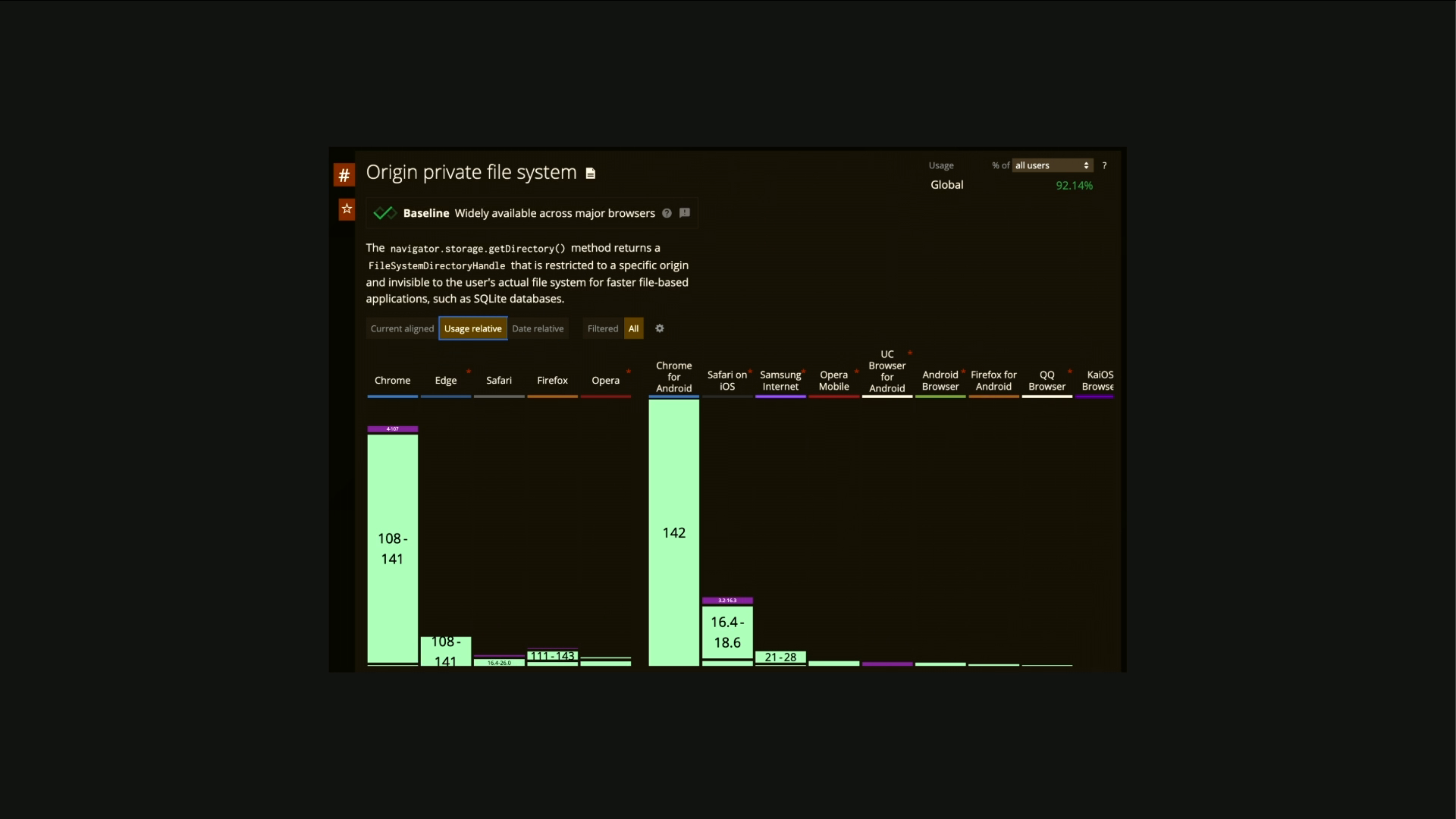
They ship with full database systems, key value stores, file systems, all sandboxed, all secure, all fast. You can store API responses, you can store user preferences, you can store entire pages with no plugins, with no frameworks, with no add-ons. The browser is your local store. There's a talk later or tomorrow about offline building.
This is super interesting, especially when you pair this with service workers and speculations and caching headers, all of this stuff just becomes instant. That's quite nice. 10 minutes to go. Hands up if you've seen this. No one, not even John. I love this. Since April 2025, Chrome has supported explicit compile hints.
If you are loading JavaScript that you know is going to be used on the page, which is almost always the page with React monstrosities, you can tell Chrome to prioritize it. You can add that all functions called on load line at the top of the compiled file. And on average, according to the research, I think this might be optimistic, but even then, you can save 630 milliseconds on the 80% of websites that they child on.
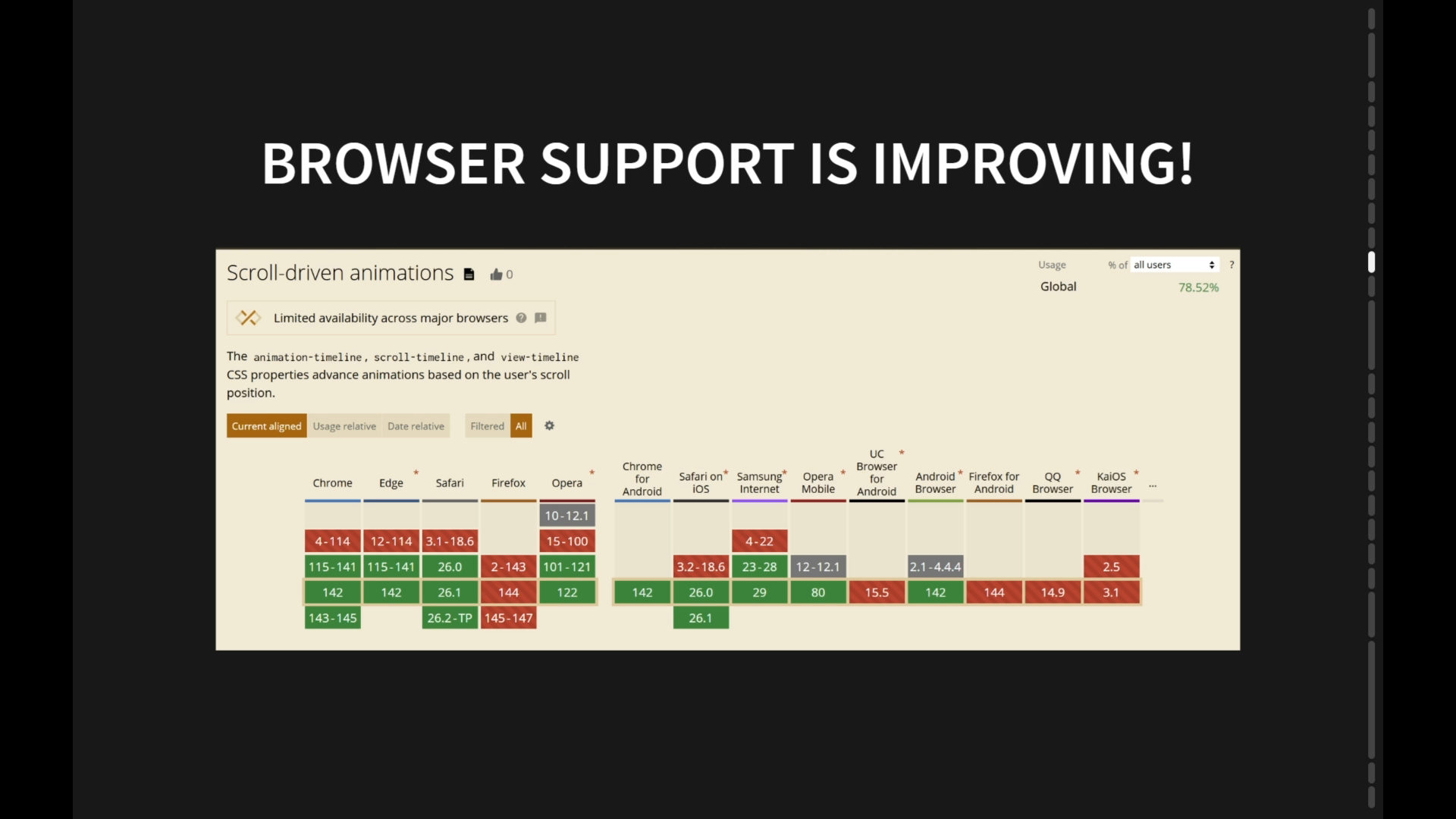
Now, admittedly, many of the websites that have JavaScript that almost always loads on all page, but there's an interesting subset there. But this is such an easy hack for making sites faster if you can't do any of the good stuff. And there's a talk later today or tomorrow about scrolling in CSS. This is a big deal. Nobody is using scroll timeline or view timeline.
Everybody is still doing event listeners for changing viewports, for bouncing, for tab activations, et cetera. All of that can go in the bin, and you can just use five lines of CSS. Hidden until found is quite a nice replacement for a whole bunch of JavaScript stuff. This operates the same way as display none, except it's inherently accessible. So if I do like a control or command F and search for string on the page, and I'm using hidden until found, This will reveal it, which is super important when you consider things like screen readers and users with assistive needs and SEO and LLMs, et cetera, that want to parse and consume the content and might have opinions if it looks like it's explicitly hidden via CSS. It's a really nice way to bake in accessibility without needing polyfills and shims and ARIA descriptors, et cetera, all of which you're gonna use a library to generate, which is gonna add five meg to the runtime of the page.
What's interesting about this is it uses visibility hidden, under the hood. Has anybody played with this? So much, so many toys. This is incredibly powerful. This is essentially a form of lazy rendering for anything. So this is a screenshot of Chrome Developer Tools for a popular hotel booking website that you're probably familiar with.
You can just about make out that there is a rendering phase that takes 211 milliseconds, which is Just over the time it takes a human to blink and probably five or 6% on the conversion rate, depending on which research you read, 75% of the stuff that that's rendering, I know because I've checked, is off screen down here somewhere. The browser is using resources in a render blocking phrase at the beginning whilst it's rendering the page to paint stuff that isn't even visible. You can use content visibility auto and contain intrinsic sight to defer the painting.
Now, this is only gonna help if paint is your bottleneck. It's gonna have marginal impact if painting isn't the issue, but for complex pages with lots of images or colors or CSS effects like blurring, et cetera, this can have a huge impact on things like first input delay on how flexible and fluid the page feels initially, how quickly the critical path loads.
You do need to roughly estimate the size of the component that you're wanting to load, otherwise you'll get some weird jank with the scroll bar as the page discovers how big it actually is. But you can do a much more sophisticated example of this with things like media queries, you can tailor stuff, et cetera, this is super powerful. Also, if you're going to be super nerdy, nobody is using contain. This is so, so powerful for many of the same reasons. If you've got a complex page with lots of moving parts, either metaphorically or literally, you can tell the browser this element should never paint outside of itself.
This element will never change size, and it can adjust its rendering and animation strategies in order to manage that more effectively. Similarly, will change transform pair together. This is really nice. I see people either not use this at all or overuse it. This is one of the best hacks you can use to say, I know that when a user mouses over this component, it's going to change size or it's going to rotate or it's going to change color. If you tell the browser that in advance, it can prepare a bunch of resources, it can move stuff to a different layer, it can do a bunch of GPE optimization.
This is a hugely impactful way to make those kinds of interactions more performant. If you use it on everything, you will just destroy your browser because it's now having to treat everything as its own layer. Almost lastly, Who's using intersectional service? A few of you. Nice. Excellent. So in the React component world, we still very much use things like document listeners for resize events, et cetera, for checking if things are visible, and we debounce those if we remember, which nobody ever does. So as the user scrolls, you're firing off a trillion JavaScript events, and everybody dies.
This is much nicer. This is an inherent native API for saying, is this thing visible? And you can be much more sophisticated than that. You can do, is it 20% visible? Is it within 200 pixels of the current viewport? How long has it been on the screen for? Has 20% of it been on the screen for more than five seconds? This is super interesting for analytics, tracking and testing, but also just for lazy loading components.
I use this on CSS for a comments form on my website. I wait until the user has scrolled down until they're nearly at the footer and then load all the extra CSS that I don't really need to be loading at the top of the page because most users are going to bounce off my blog. This is phenomenally powerful.
Again, this is just native. This is what five lines that replaces megabytes and megabytes of React gubbins. Skipping some of this because we're short on time, but the back-forward cache is super important to look into this if you haven't already. When users navigate back and forwards, if you haven't created a JavaScript monstrosity, the browser will try and automatically restore the existing state that we're in before.
This is super important because it's then an instant load and not reloading the page and all of its assets. It does have some interesting implications on business logic that that nobody thinks about. If I go back a page and the page is instantly reloaded, should that fire a page view in my analytics? What happens if it was a thank you page on a form?
What if they go forwards? There is some requirements to think about the business logic in this, but you can wrap some of your logic in this event persisted syntax and then do different business logic depending on what you want to do. Should I fire my analytics? I don't know, it's up to you. Super interesting. Lastly, Ish, John mentioned view transitions.
I think this is the most exciting thing that's happened to the web ever. Again, I think so much of the badness that we have on the modern web today is because we approach it with the wrong modality. We build apps first because business leaders and stakeholders say, build me something that feels like an app. And a huge part of that motivation is to get something that feels like this, something that when I click on links and stuff, there is a kind of animated, smooth transition and not that unload/reload experience that we're all used to on the native web.
This is the native web. These transitions are just a user navigating from one URL to another without using any JavaScript. View transitions lets you do, and John said, we've been talking about this for three years and nobody is using it still. It's been stable and solid in the universe for about a year now, I think, baseline. This is a few lines of CSS, just uses native CSS animations, and this is the simplest possible implementation of this just about.
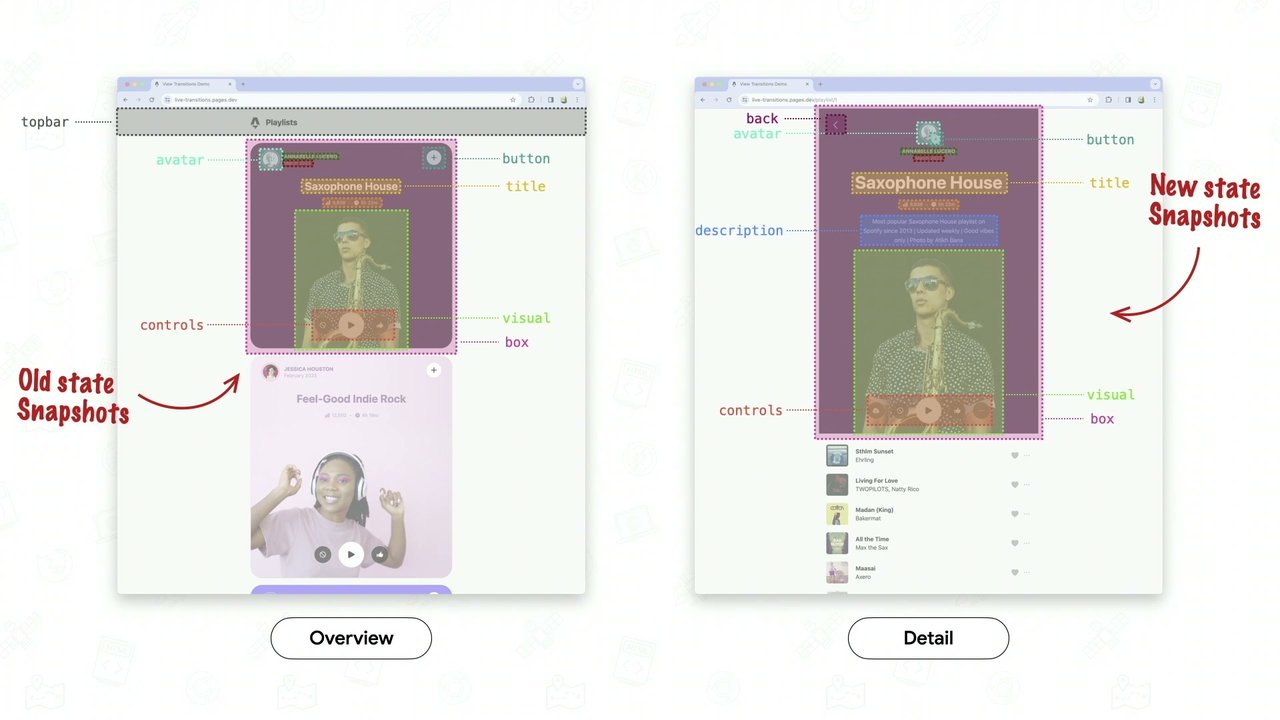
You can see the URL changing at the top. These are just page navigations. So the browser takes a snapshot of the current state, it fires the CSS transitions, and then it replaces it with a new state. This looks like an app. It feels like an app. Why would I ship 12 meg of JavaScript to build this when I can do five lines of CSS?
This is the game changer. I think this kills almost every argument to use SPAs for anything other than actual complex apps with statefulness, etc. Why would you build an SPA when this is far better, faster, easier, simpler? The performance on this is incredible. It's astounding. It's so sleek. And as John mentioned, this is really funny.
React doesn't even have this yet. It's still experimental. It's coming soon, but even then it's going to be janky AF because it has to integrate with React's entire way of thinking, which is we built a browser and the browser and we're polyfilling on the blah, blah, blah, blah. I don't think, I think these directions are converging. I think that as the frameworks get more and more complex and more and more abstracted and more and more componentized in order to support their way of working and thinking and selling to all the people who use it, I think that the native web becomes cleaner and cleaner and faster.
And again, the nice thing about all of this, why I'm interested in particular in showing you these things, is these work perfectly together. Without jank, without version control, without need for massive testing pipelines and build processes and version control and linting and transpiling, caching, storage, view transitions, containment in section observers, speculation rules all just work.
And they make it phenomenally easy. No shit, phenomenally easy to build fast, performant, resilient, accessible stuff. Websites, not apps. These tools aren't just faster and better and shinier and newer, but they are faster and more accessible and simpler. The browser already knows about things like focus state, tab order, screen reader support, reflow. And when we replace that with JavaScript frameworks as a default way of thinking, we lose all the stuff that we get for free. Accessibility and performance and maintainability are native features that we keep binning. Because we used to have to, but maybe we don't now. I think increasingly native wins every time, and those paths diverge. Every time we replace a JavaScript feature with a native feature, everything gets simpler and faster and better.
Less code, fewer dependencies, less mess. Here's what 50-ish lines of JavaScript might have looked like for a very simple accordion in 2015. A kind of click to hide this, click to show this type functionality. And this is extremely optimistic. I've seen examples in the wild which are 20 times this much code for an incredibly simple piece of functionality.
It would have been far worse in 2014 because we didn't get query selector all until 2015, thanks jQuery. This would have been much simpler if I'd used jQuery, but then you all would have hated me even more. But the point is there are trade-offs and trade-offs and trade-offs here, whereas this today just works. We don't need to rebuild the platform and rebuild the browser to create reliable, intuitive, performant, semantic solutions.
We just need to use the browser. The other big part of doing this right requires that we bend the mentality that the client should be where we're doing this work. We have to render on the server, not the client. Browsers are optimized to deliver and ship HTML in the initial response.
They always happen. All of the inherent heuristics that but the browser will do to try and work out how do I make this work? How do I make it fast? How do I prioritize the resources in the right order? How do I make sure it's cached? How do I support all of these things rely on it shipping the code in the response, not shipping a 20 meg framework in a JavaScript file that's going to load up, blah, blah, blah, blah, blah. As soon as we move to that modality, all of this stuff just stops working natively.
SSR first architectures are just better. This is why React, et cetera, and modern SPAs are starting to get back to the world that PHP solved 20 years ago and saying, actually, you know what? Maybe it does matter what the initial HTTP header is in the response. Maybe it does matter that we understand what's going to be in the footer when we ship the header, because all of these things are connected. And if we want the browser to be able to natively optimize that in ways that are better and faster and more accessible, then we need to understand what the package is before we ship it. If we're mailing DVDs, bad analogy, keep going, then none of that works.
I am not anti-framework. I understand that frameworks have a place when we use them in the right scenarios and in proportion. I think that frameworks need to learn to trust the browser and not to replace it. Let the browser handle layout and paint and animation and let the React apps deal with business logic and scenarios and statefulness.
I think every line of code that we move back from libraries and shims back to native makes the web a better place. I think the problem with many of the best practices that we inherit today are that we're still optimizing for HTTP 1.1, for IE6, for a bandwidth problem that no longer exists. Things like combining all of your CSS files into one, bad, splintering it into 100 files, bad.
But we're just doing best practice because the platforms and the frameworks and their ecosystems tell us that this is the best way to do it. JavaScript pre-loaders, imagine the image data SRC anti-pattern I talked about, I see everywhere. All of this delays discovery, it breaks caching, building complex media loaders that never quite work right. We forgot that browsers already knew how to do this.
I think that when Netflix started streaming, the magic wasn't just that it was fast, it's that it was delightfully lightweight. No packaging, no postage, no disks, no overhead, no cumbersome. We can do the same thing with the web. Interestingly, according to the HTTP archive, and the median JavaScript payload for eight websites from their subset of whatever percentage of the top million sites, is now 460 kilobytes gzipped.
And that's up 44% in the last three years. So when we look at all this tooling that's just available natively, and then you look at the reality of what people are doing, they are making the web worse. We are making it slower, because we are using the wrong tools for the job. For the job. Speed and performance are a side effect of simplicity.
It's not something we retrofit. So I think semantic SEO, semantic SEO, that's another thing. Semantic HTML should be cool again. I don't think it was ever uncool, but we seem to have forgotten about it. I think the race to build frameworks on top of frameworks, the actual HTML output became so abstracted and so far away from anyone's responsibility or even awareness It just becomes an output of a build pipeline and not something that somebody crafts.
And I'm not saying that we need to spend days and days minutely tweaking every single HTML tag. It is fine to skip and optimize and then be efficient in places. But even just occasionally looking at the code that's being produced might be a good start. And I'm not a purist, but it has to be. It doesn't matter how it looks.
What matters is that somebody is looking at it and thinking about it, and it's not just an artifact. In fact, that's output from a system. Headings aren't just big attacks. We all understand the importance of semantic markup, the importance of semantic markup. But it's only going to become more important tomorrow as we consider again the impact of things like agentic browsers and LLMs, et cetera. Even if they're not explicitly reading and understanding semantic HTML because they're tokenizing everything, I know, I know.
But the act of thinking about and structuring your HTML in a way that's not just div, div, div, tail, and class, tail, and class, div, div, div, div, div, will produce cleaner and more easily understandable code. And this isn't about nostalgia or purism. It's about the importance of clarity in a world where, again, half of your audience and increasingly more than half aren't humans.
And if the role of websites is to essentially market to and influence humans, and that's gradually changing to marketing to and influencing systems, the code is more important than ever. The final output, not less important. Developer experience is indeed important. And abstraction and collaboration, et cetera, are indeed important. But the final output is more important than it's ever been.
So I want you to join the rebellion. I think the browser was the bottleneck. It was the enemy. But now it's the engine, and we need to start treating it as such. I think we need to build less. I think we need to ship less. I think we need to rely on the browser and use the natives that it now provides.
Check out baseline.dev. I haven't already talked about that. This is the new kind of you're familiar with, can I use this? Baseline.dev is like the official version of that. It's a whole bunch of the big players involved in it. All of these capabilities and APIs are well documented, and now you can see which browsers support what. All of this is now readily available.
Please stop overpackaging your code. Stop solving solved logistics problems. We don't need to ship a postal system to ship our posts anymore. We can just stream, and that analogy really doesn't work at this stage. These are what our audience is expecting. I've talked about the importance of this for AI. John mentioned this in his intro, that when we talk about the importance of this for accessibility, yes, we're talking about users who have requirements where they can't necessarily easily read or access or consume conventional content on the web, and they need to read text versions or whatever. But we're also talking about accessibility to machines.
Accessibility in its broader sense, right? If we're not building websites and content that can be accessed, what is the point? This is growing increasingly important, especially in Europe, where it's now essentially a legal requirement for your website to be accessible. This is only going to increase. The US are picking up on it. Other countries are starting to legislate much more aggressively about this.
If you're using libraries to produce 12 megabytes of div soup, you're going to get sued sooner or later. We've talked about this. AI readiness is the same as browser readiness. Humans and machines are a mixed audience now. I think I'm not saying that you have to react, have to reject frameworks. I'm not saying that React is evil.
There are interesting options and interesting applications of these toolkits and different modalities and ideologies like HTMX is quite interesting, they've floored in many other ways. React isn't necessarily evil, et cetera. But I'm saying it's imperative that we collectively rediscover the web's primitives and that we reach for those primitives before we reach to the libraries and stacks and stacks of abstractions that we're used to relying on. And then there's moments where you think, I need a carousel rather than going composer, whatever, whatever dependency chain of nightmare that you're going to have to ship to the users.
Just remember that there are ways that you can do almost all of this, almost all of this natively. And I think the only thing you can't do yet with the combination of all of these things other than do truly stateful complex apps, persistent stuff across pages. So if you've got, I don't know, a video playing in the bottom right or some audio that you want to keep going across view transitions, etc, then that's not really feasible yet.
But I would argue that almost all of those use cases are UX anti-patterns and probably going to start going away because ad blockers and privacy, etc, etc. So really there are fewer and fewer reasons to reach for SPAs rather than just writes and PHP. So please Build less and trust more. The ally, your bowser, is now our ally, not our enemy.
Thank you very much.
Technologies & Tools
- LLMs
- CDNs
- jQuery
- React
- SIFR
- Next.js
- Remix
- Astro
- Webpack
- Vite
- Babel
- Rollup
- Angular
- Node.js
- Back-forward cache
- HTMX
Standards & Specs
- HTTP headers
- Shadow DOM
- CSS2
- DOM
- CSS Grid
- History API
- Flexbox
- Container Queries
- Web Components
- View Transitions
- :has()
- Picture element
- Speculation Rules
- Cache-Control
- stale-while-revalidate
- Service Worker
- content-visibility
- Intersection Observer
Concepts & Methods
- Browser Wars
- Server-side rendering
- Static site generation
- Hydration
- Semantic HTML
- Core Web Vitals
- Compile hints
Organisations & Products
- Netflix
- Lovefilm
- Blockbuster
- Internet Explorer 6
- Cloudflare
- Fastly
- HTTP Archive
- Baseline