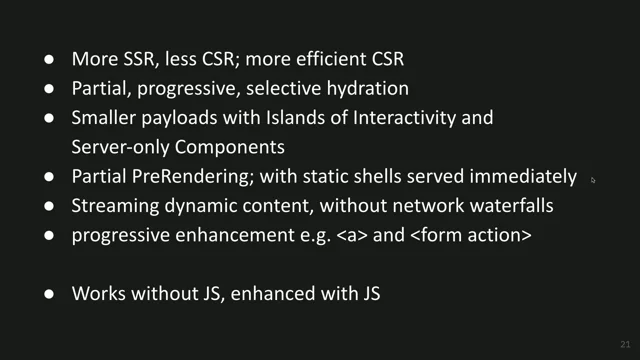
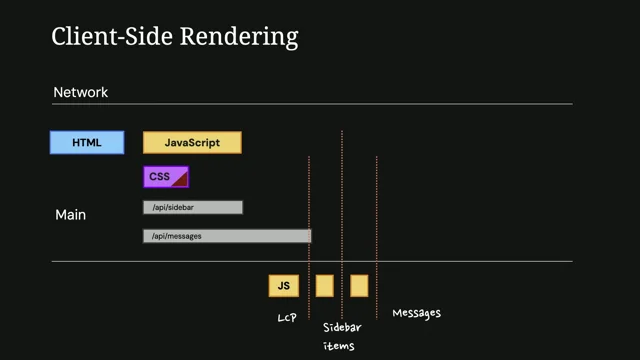
Speculations about webperf
Setting the Stage: Barry’s Background and the Performance Theme
The emcee introduces Barry Pollard of Chrome DevRel, and Barry quickly outlines his work across Core Web Vitals, the Chrome UX Report (CrUX), DevTools, Lighthouse, PageSpeed Insights, and the Web Vitals JS library. He frames the session around practical, platform-native ways to speed up navigations, previewing a focus on simplicity and progressive enhancement. This context sets up the talk’s central theme: turning battle-tested patterns into easy, reliable web platform features, culminating in the Speculation Rules API.
Small Attributes, Big Wins: Lazy-Loading, Fetch Priority, and Scheduler Yield
Barry demonstrates how simple, native affordances can move the needle: loading="lazy" for images/iframes, fetchpriority="high" for LCP elements (on both the image and its preload), and the one-liner await scheduler.yield() to improve INP by yielding to rendering or input. He stresses progressive enhancement—non-supporting browsers harmlessly ignore these hints—while recounting common pitfalls like forgetting to mirror fetchpriority on preloads. This segment connects to the talk’s theme by showcasing “low-effort, high impact” platform features that replace brittle, library-heavy approaches.
From Primitives to Platform: Rethinking the Extensible Web Cycle
Reflecting on the Extensible Web Manifesto, Barry argues we under-deliver on the “standardize the proven patterns” step, leaving developers stuck with sharp-edged primitives and heavy wrappers. He points to service workers (Workbox), Web Components (Lit), IndexedDB (idb), and even Core Web Vitals as examples where libraries smooth rough edges but fragment and age in place. By contrast, platform features auto-update and simplify usage, reinforcing his case for promoting stable, proven patterns into native, ergonomic APIs. This sets the rationale for the Speculation Rules API as a standardized, built-in version of long-standing prefetch techniques.
Speculation Rules 101: Built‑In Prefetching With Declarative JSON
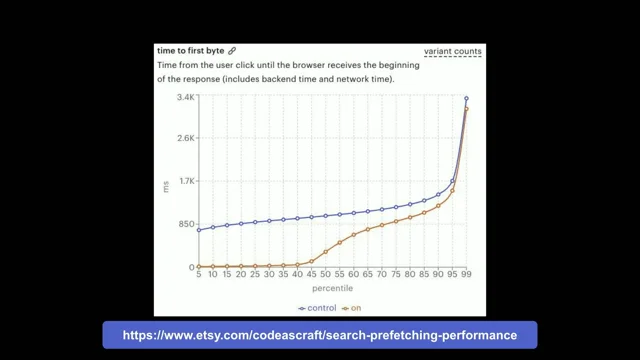
Barry traces prefetch’s history—from link rel=prefetch and popular libraries (Quicklink, Instant.Page) to framework-native behaviors—and introduces the Speculation Rules API as the platform-native evolution. He shows simple JSON rules that prefetch fixed URLs or match internal links via where clauses, with exclusions (e.g., WooCommerce admin, add-to-cart, nofollow) and a tunable eagerness spectrum (immediate, eager, moderate, conservative). He highlights “hover” and “mousedown” behaviors now built into the browser and cites Etsy’s TTFB graphs showing large fractions of zero-TTFB navigations, tying the API to real user-perceived speedups.
True Prerendering: Instant Pages and Real‑World Results
Barry distinguishes real prerendering (pixels rendered in a hidden page) from server-side pre-rendered HTML that still must fetch subresources and paint at navigation time. With a one-word change (prerender), the rule yields instant transitions on click, as seen on scalemates.com, where LCP drops to ~0.4s through aggressive prerender. He notes constraints: the API targets document navigations, not SPA-internal routing, though it can bridge mixed sites (e.g., prerendering a login or checkout document that hosts an SPA).
Know the Dragons: Cost, State, Analytics, and Staleness Risks
Barry catalogues risks: elevated server/CDN/client costs; unsafe actions (logout, add-to-cart) triggered by GET links; measurement side effects; and stale content, all amplified for prerender versus prefetch. He shares Shopify’s deep dive, where broad rollout surfaced browser bugs, platform quirks, and customer edge cases, yet still delivered consistent 120–180 ms wins at scale. He points to his “Guide to Implementing Speculation Rules for More Complex Sites” for teams planning careful, staged deployments.
Mitigations That Work: Limits, Caching, Detection, and Clear‑Site‑Data
Barry outlines guardrails: Chrome caps in-memory candidates and skips cross‑origin iframes; honors Save‑Data, low‑memory, background tabs; and uses the HTTP cache for speculative resources. He shows server controls via Sec-Purpose and named rule tags to accept/deny speculation dynamically (e.g., shedding optional rules during peak load). For measurement/ads, major vendors delay beaconing until activation, and developers can hold client work in prerender. To fight staleness, Clear-Site-Data can purge prefetch/prerender caches after state changes, and a prerenderingchange event lets pages reconcile state on activation. He repeatedly recommends starting with prefetch as the lower-risk on-ramp.
A Middle Path: “Prerender‑Until‑Script” for Safer Speed
To balance risk and reward, Barry announces Prerender-Until-Script: prerender begins, but halts before executing scripts while the preload scanner gathers subresources. Script‑light pages effectively fully prerender; script‑heavy head blocks earlier but still warms resources, making activation fast. He notes it’s enabled behind a flag now, entering an origin trial in January, with shipping targeted shortly after—an incremental step toward broader, safer adoption.
Mobile Matters: Viewport Heuristics and Eagerness Tuning
Because “hover” doesn’t exist on touch, Barry shows new mobile viewport heuristics (Chrome 138) that predict intent as users scroll and pause, enabling on-device “hover‑like” speculation; a demo on the Web Almanac shows prerenders rotating as links come into focus. He reports real gains (up to ~1 s) from these heuristics on Scalemates, and previews a more eager variant (Chrome 143) that considers any in‑viewport anchor with a shorter delay. He closes with practical guidance: use immediate for deterministic next steps, eager/moderate for likely choices, conservative for safety; pick prefetch, prerender‑until‑script, or prerender based on your risk/reward appetite.
Beyond Chrome: Safari and Firefox Paths, Plus Adoption at Scale
Anticipating “Chrome‑only” concerns, Barry recounts how Yoav Weiss implemented Speculation Rules in WebKit (Safari Technology Preview, behind a flag) by collaborating with the Safari team, and notes Mozilla’s active bug and planned work. He surveys adoption: WordPress and Shopify ship conservative rules by default; Google Search mixes eager and hover; Akamai offers one‑click enablement; Etsy is expanding rollout; vendors like Speed Kit, Ray‑Ban, and Dida deploy prerender for instant-feel pages. Chrome metrics show ~12% of navigations and ~12% of origins using Speculation Rules, with a notable jump after WordPress enabled it.
Audience Q&A I: Risk Levels, Shipping to Safari, and Iframe Behavior
Barry reiterates that prerender yields the biggest wins but carries higher risk, while prefetch is safer but more modest. On cross‑engine support, he credits Yoav’s WebKit contribution and notes that organizations like Igalia can be contracted to build features vendors are willing to ship. He clarifies iframe handling: first‑party iframes can load, while third‑party iframes do not prerender (for cost and privacy), with emerging mechanisms for same‑site cross‑origin cases via opt‑in headers. This discussion reinforces the platform’s pragmatic guardrails and collaboration model across browsers.
Audience Q&A II: Analytics Signals, Caching Semantics, Rules Targeting, and Safe Methods
Barry confirms servers can detect speculation via the Sec-Purpose header on the HTML document, while indicating he’ll verify propagation to subresources; many analytics/ad vendors already suppress side effects until activation. He explains cache behavior: speculation obeys Cache-Control, prefetch entries live about five minutes, and prerenders behave like “hidden tabs” that stay valid even if the source would now be stale. On rule targeting, he clarifies that where clauses evaluate links on the current page (the caller), not on the destination. He closes by urging correct HTTP semantics—reserve GET for safe actions—to avoid accidental state changes during speculation, citing WooCommerce fixes as a cautionary tale aligned with the talk’s “do it right in the platform” message.
Barry Pollard, another We're just an embarrassment of riches here at this event. We've got so many great members of the Chrome team who I know you've been speaking to around and about the place, But Barry also hails from the Chrome team. He's based in Cork in Ireland and he does lots of work with performance tooling and is going to talk to us about something that I confess I knew nothing about until I read about this talk coming up.
It's not brand new, is it? I mean, I think in the abstract it talks about things that have been added to this in the last year. So I'm at least a year out of date, but that's about right for me. I don't like to be too close to the bleeding edge, but. But yeah, the Speculation API is something that I knew nothing about. I was having a few interesting chats with people during lunch. I mean, I knew a little bit about prefetching and kind of giving hints to the browser to try and increase performance of navigation, but this is something that was completely new to me, so I'm very excited to learn more about it. And here, here the things that I didn't know from before and the things that have evolved in the last year as well. So we're ready for the off, I think. Are you ready to give him a big round of applause? You are. You look ready. A big round of applause please. Barry Pollard, thank you very much. Thank you very much. Are we all awake? Are we having the post lunch snooze? I will try to keep you a little bit awake and not put you further deep into that coma. My name's Barry Pollard. I work on the Chrome Dev Rel team. I work on a few things you might have heard of. So I'm the deal with the core Web Vitals initiative. I do a lot of the documentation. You might have seen my smiling face at the top of the LCP documentation and various sorts of things.
I also look after the Chrome User Experience Report or crux, so I give out a monthly update on the email about that and try to give some guidance on how things have changed over the last month. I work on Chrome DevTools and there's a lot of other people from Dev Tools here, so I hope you'll be speaking to them. If not, grab them this afternoon, let them know what's working for you, what things you'd like to see improve in DevTools. I also work with the Lighthouse and PageSpeed Insights teams. I now maintain the Web Vitals JS library that Phil Walgreen created. And when I get spare time after all that, I look at various other web performance APIs. Sorry, including the one we're going to talk about today. As well as that, I'm part of the W3C web performance working Group and I also look after the HTTP archive and its annual Web Almanac publication. Very pleased to see a few slides showing that you can find me tune the web on most socials.
I'm more active on blue sky and that sort of thing, but still keep an eye on other things. So if any of that interests you, come and see me afterwards. Or if you've got any questions about those or feel free to ping me afterwards. Today I'm going to start talking about this thing the Loading equals Lazy Attribute this is one of my favorite additions to the web platform over the last few years because of its simplicity and its ease of use. Just by adding this attribute to your image elements you can lazy load it. And by that I presume you all know that means if they're off screen they won't load until you actually scroll down and show that.
That used to require both a JavaScript library or you could try and custom code it with an intersection observer. But honestly, it was too much effort and mangling hacking around with this, so the browser didn't try and load it anyway. You had to change it to a data source instead of a source. It was just really, really messy. Now you can get that just by simply adding an attribute to your image element.
And this is now cross browser available and you can sit there and say okay, maybe it doesn't have all the things that we had in the old ways of doing it. You can't customize your viewport, you can't say. You can say Chrome loads too eagerly, Firefox loads too lazily whichever way you want to choose. But for most people this just works.
And it's simple and most people are using this and usage of those libraries have just dropped off the cliff. You can also use it in iframes. Again, just said dead simple and it does. Like that means they're just loaded lazily.
And I love this. It's just part of the web platform now and anyone can use it. You can use it even if you're using a JavaScript framework or whether you're hand carving HTML blocks of bytes.
Another similar one is a fetchpriority high attribute.
This allows you to just give a hint to the browser.
You can put it on your LCP element and say this is a high priority fetch it earlier and there's huge amount of complexity behind this and how it works and stuff like that, but we've simplified that all down to a simple attribute that you can add to your image element. Pat Meanin, who created this and is running around here somewhere, calls this a cheat code for lcp.
And again, it's just a simple attribute of HTML.
You can also put it on your link attributes. So if you're preloading your LCP elements because you can't find them because they're hidden away, later you can add it to this. And this, by the way, is a mistake. I see quite often people put first priority I on the image element, but forget to put it on the preload element. And if the preload element is the first one you see, that's what the browser is using. We've done some work to try and at least bump the priority later whenever the image comes. But please, please, please put it on the link element if that's the first thing that you're using to actually load the element. But either way, little gotchas aside the gap, it's a simple attribute moving away from the attributes in JavaScript and last year we added Scheduler Yield, that's now available in Chrome and also Firefox. And it's a simple way to improve imp by just adding one line of code, awaitshedger yield. You sprinkle this throughout your code and it gives the browser a little chance to breathe. And during that breathing time it can address more important things. And that could be rendering a frame or dealing with an input. So it really helps interaction to next paint because it prioritizes interactions or paints all with a simple line of code or truth be told, slightly more complex line of code because it's not quite baseline widely available yet. So this line of code is a progressive enhancement.
You can put it in here. Browsers Safari that don't support it will simply ignore it. Browsers that do will yield and give a nicer high INP score. And these sorts of things I absolutely love because simple to use progressive enhanced progressive enhancement built in APIs are the best. That's a very important quote from a very important person, which would be me at this conference today at about 1450 ish timing.
Harry yesterday talked about the arrogance of quoting yourself.
No one's ever quoted themselves from their own presentation. So about 12 years ago, a bunch of very smart people published the Extensible Web Manifesto, which is a new paradigm. Think about how we should implement web platform features.
And the idea was that we can't tell the future and we're terrible at guessing how web platforms should be viewed. So he came up with this idea and I don't like it, which is an interesting thing to say when at least one of the authors I know is in this room. So we'll see. I think one of the most important parts of the platform of the Web Extension Manifesto, which basically sums it up is this.
The web platform should develop, describe and test new high level features in JavaScript and allow web developers to iterate on them before they become standardized. This creates a virtuous cycle between standards and developers. And the virtuous cycle was emphasis in the web extensive manifesto. And the reason I don't like it is because I think they highlighted the wrong part.
I think this bit is more important before they become standardized.
The idea of the extensible Web manifesto virtuous cycle is we build low level primitives in the browser, things that have got jagged edges and we're not quite sure how to use. We iterate in userland and JavaScript, decide best practices and patterns emerge as we see how best to use these sorts of things. And then we've standardized these into the web platform. And it's this last point that I don't think we do enough. Almost to the point of it's very rare to see it. Those last three examples that I gave are great examples where we've seen it. We've taken a lot of complexity and things that were done in JavaScript and we've put it down into the platform in three very easy to use attributes or APIs. And I know why this is.
There's always more work to do. If you can already do it in Userlab, you can. What's the gain? You're not going to gain anything. You're not adding anything new to the platform you can already do. This new stuff is cooler as well to work on, gets you better bonuses and that sort of thing. And standardization takes time and effort. So I can understand why we do it, but I'm still a bit annoyed. It's a bit of a shame because if we take these three random APIs, have anyone in the room used service workers web components indexeddb okay, I don't know about you, but I hate service workers. They're just horrible to use.
Most people don't even use them. About 33% of service worker usage is through the Workbox API, which my team owns and we don't do a great job of owning it. By the way, web components, you can use them, they work. They're kind of this, but most people use them through lit or don't use them at all and just use a library and through that sort of thing. Index DB the best way of using it is idb, which is a library created by Jake Archbill. And I love this indexeddb with usability. I mean that pretty much just says it all. And you can argue also here's a controversial one because my teammates aren't going to like this one core web vitals. I think they're too hard to use if you don't use it through web vitals js which library I look after, then there's lots of hard edges that can cut you and stuff like that. And I would love if it was a lot easier to do that to just say give me lcp, give me inp.
Why do you have to get event timing and figure those sorts of things out?
And the problem with adding little libraries here and there is you end up with this meme. It's very easy to do that. And not just that this is web vitals. Last seven days we got quarter of a million downloads. I'm pretty happy with that. That's pretty good. You know we're doing this not bad. But when you look back, that's quarter million downloads for the latest version.
185,000 downloads are still on version 5, so they're not automatically upgrading version 4. 4.5 million.
So that's a whole load of enhancements, bug fixes and stuff like that that people aren't getting. And it only gets worse as we look further back. Version 2, which didn't even have INP 1.5 million. Version 0.2 doesn't even have the CLS Windling effect 1 million. So a lot of people, when they put a library in, they never upgrade it. They don't get any benefits of anything new. Whereas these guys, they're part of the web platform.
We aggressively force updates upon you in the browser to annoying factor sometimes of this Chrome is updated, please restart and stuff like that.
But you automatically get any improvements, any bug fixes and stuff like that, right? So that rather long winded introduction is why I'm now going to explain about the main topic here. Link rel Prefetch has been around for a while. I was tempted to ask you, but I'm guessing most of you get it wrong. This has been around since Chrome 8 in 2010.
Firefox has had it even earlier 2006 and even Safari have had it for the last five years behind a flag.
And I don't think they're ever going to unflag that. It's really quite irritating.
And they led to things Prefetching is not New things Rails for Ruby on Rails I prefetched from quite an early days on hover. Quicklink is a library created by Adios Mani and some of the other Chrome team that again allows you to prefetch pages on hover or on click.
Instant Page is a tiny little JavaScript snippet. You can add it to your website again just on hover or on click.
You get a tiny little imperceptible gain that improves things. And it's not just standard these things. Every single JavaScript framework does this sort of thing. Or maybe not by default.
Very easy to add where again you hover over a link, it will just automatically go and fetch it. But we don't have this in the web platform or certainly didn't. But now I'll bring it on to the main topic, which is the Speculation Rules API, a new API from the Chrome team.
Limited availability at the minute, but trust me, I'm going to talk about that.
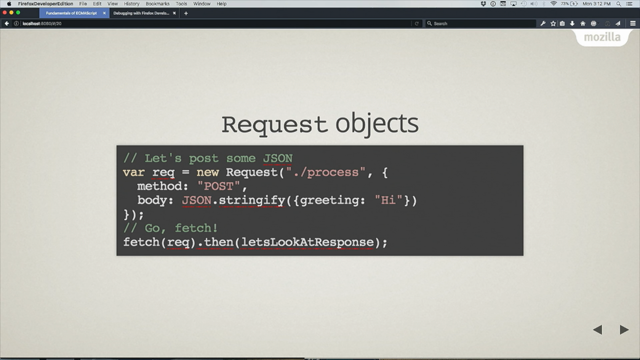
I published this blog post whenever we first started making it ready for everyone to use. This was back in 2022, so I can understand Phil having forgot about it because I'm sure he reads all my blog posts vigorously whenever he did it. But it was three years ago, so it's been out there for a while and we've been slowly improving it over the last three years, making it more ready. We added fantastic dev tools support over the last year we've added some more things to take off some of the more rough edges and make it even more usable. And that's what I wanted to talk about today. For those that haven't seen it, Speculation Rules allows you to write a rule in JSON.
This is the simplest sort of thing. This says prefetch next HTML and next2html. You just take this whole script tag, put it in your HTML. You can also do it from an HTTP header and actually grab some JSON files. That's kind of the basic sort of thing this one not that different to link rel prefetch but where it gets is more powerful things. You can add a where clause and say find links on the document that match. In this case all internal links, all sort of same origin link. And it's clever enough to know that if you put the full URL in front of it and it's still a same site link, then it'll grab that.
But you can also write more complex rules. This rule's for WordPress and you can say, look, fetch all the same site links but ignore WP admin because we don't want to prefetch those. Also don't ignore add to cart URLs or anything that's got decorated with a do not prefetch class.
Anything is a rel nofollow. If we don't want bots and search engines to follow, good chance that we don't want to actually speculate it. You can see you can have href matches which kind of matches what the URL looks like, or select matches that kind of matches CSS classes.
We also have an eagerness setting and there's four values for this.
So immediate is as soon as the page loads, eager is on hover for about 10 milliseconds, moderate on hover for about 200 milliseconds and conservative is kind of wait until you're actually clicking those things. Now these are deliberately vague in the spec. So these are Chrome's defaults for these four values and we have changed them a little bit over time.
Eager in particular, we've done a bit of work that so now we can have that thing that I was talking about with those libraries built right into the browser. So on hover or on mouse down can simply add it by literally just adding this to your code. So if any of you have a static website or anything like that, I would suggest this is fairly safe to do. If you have a more complex website or an application, we'll talk about it. There's some things Etsy recently published a blog post, excuse me a second on their implementation and they used that hover and the prefetch sort of thing. This is their timed first byte graph for those that can't read it. The blue is their control and the orange at the bottom is whenever, whenever they've got speculation rules enabled. And you can see here that they got try and go here right up until about the nearly 50th percentile, 40, 45th percentile, they got a zero TTFB.
And I can tell you from looking at hundreds of websites for lcp, TTFB is often the main cause of slow lcp. Either that's because actual TTFP the server slow or redirects or other sorts of things.
So to get that down to zero means that they've just bought themselves a whole lot of time. You can also see their time to first byte is about 800 milliseconds or something like that. So again they've saved 800 milliseconds off their LCP that they can get there.
You can even fully pre render a page on hover for an instant page load. That's done with this rule. You can see it looks exactly the same as the old rule, except it's just got pre render instead of prefetch. So it's very simple decorative API.
When I say prerender, I mean prerender, by the way, because there's some JavaScript people out there with their pre render, which means generate HTML server side, which is fine and it's good and it's faster than giving JavaScript. But after that you got to send it to the browser, you got to browse, parse the HTML, you got to generate the pixels. Oh, forgot. You got to get all the sub resources and load those and then the content is shown. Whereas with speculation rules, when you pre render, you generate the pixels. We do all that in the background.
I kind of say it's like kind of right clicking a tab and opening it in a secret hidden tab and whenever you click on it, it's done there.
scalemates.com, which Tim Verique says is the world's fastest scale modeling website, they've aggressively put in prerender such to the point of they have a 0.5 second LCP.
He told me recently it's actually gone further down the gap. It is now 404 milliseconds, which I think is pretty close to LCP not found. He spent a lot of time optimizing this, but I think in the last year or so he's kind of really got to those sub second LCP times purely from speculation rules.
I've messed up my slides. That's another one. Yeah, we'll see how this works.
So that's easy peasy, isn't it? Right, well, and I'm going to have to go back here because that slides in the wrong order. Come back here. There are a few provisos, a few quid pro quos. There are some problems. First of all, I saw some hands up earlier about React developers. Speculation rules is meant for document loads, so it's not meant for SBAs. As I say, a lot of JavaScript drivers have those sort of things built in. They can't get the full pre render, even if they claim they can, by the way. But yes, you can't use it for that. Where it can help, however, is if you've got a site that's a mix of these. So if you've got a landing page that then loads a big app in the background, you can speculate that. Or if your login page or your checkout page is an embedded spa, but the page before it isn't, then you can speculate and do that but within the spa.
That's out of the browser control. So no, those aren't included in that.
There are also be some dragons for the pirates in the audience here. There are some risks to speculation rules on prefetch Pretend you haven't seen this slide before. By the way, server load can go up more.
If you're prefetching three pages for every page that you load, suddenly you're loading four times as many pages. CDS end costs can go up as well. If you're speculating for the same reason client costs as well. So as well as costing yourself stuff, it's kind of rude to just put extra make your users download extra stuff. Logout links.
I suggest you don't prefetch or pre render those if it's going to log the user out. It kind of confuses them. Similarly with add to cart and fileinks, which by the way you shouldn't do links get things are supposed to be safe by the HTML spec, but apparently not everyone in the world follows the HTML specifically. Or sorry, the HTTP spec. Stale content is another risk. So if you fetch something, you update the cart and now you load that page and it said you had three items and a minute ago I had four items. Or you're sitting there watching news about the Dutch elections and then you finally click on it and you find out you've got your five minute old news.
Pre render has all those risks and some more.
So the cost to the client is even more so there's analytics and ads often kick off. I mean that can happen with Prefetch as well, but typically they're done on client side whenever the JavaScript's run. Also, anything that alters client side state can cause problems. Still, content can be of even more problems because anything that you Fetch with your JavaScript APIs now you have more chance of being out of the date. So yes, there are some risks. Like how was I supposed to know there would be consequences to my actions? If you want a real deep dive into some of the risks, Henri Elvetica runs a podcast stream and the Shopify team, including Yoav and Matush. Hopefully I got that roughly right. Thank you.
Did a real deep dive into their implementation of it and they discovered lots and lots of issues. Now they have rolled it out to their entire platform and yeah, they discovered browser bugs, they discovered bugs in their own platform they discovered weird things that their customers were doing on the Shopify platform that they hadn't realized they'd done before. They spent a lot of time doing it.
The good thing is I'm now fairly confident, Touchwood, that we've addressed all the main browser bugs and so they've done the hard work and got it through for you there. They also published a blog post with some of the impact of some of the things and these three graphs are in order times first byte, first first contentful paint and largest contentful paint.
Now they are quite conservative in it. They're still looking at it, but they kind of do that click button action. So they only get only 120 to 180 millisecond saving, depending on desktop or mobile.
But what I love about these graphs is the consistency of all of them. They're not Some people are getting it slower, some people are getting faster. Every single person is getting it faster by pretty much the same amount. And to roll something out across the entire Shopify platform and see 120 to 180 milliseconds, it may sound small, but that's huge because that's on aggregate for the whole P75 I have a blog post on the Guide to Implementing Speculation Rules for More Complex Sites. It's a fascinating title, but let me tell you, the article is even better. So if you want to know some of these things, have a read of that. Some of the things you can take care of and you can consider whenever you're rolling out out to okay, if we go back to the risks, we can classify them. Oh, there's where that extra slide was supposed to be. My animation's gone.
There's costs which I'll represent with money bags here. There's analytics and measurement potential issues. There's a few oh, we've actually broken something and then there's just stale content or feels like we've been asleep. And we can talk about through these quite quickly on the cost mitigations. We have limits in chrome, so for URLs we allow quite high limits.
I think personally maybe a little too high, but for those hover ones or those click ones, we just keep two in memory at the same time. Now you can hover one, hover a second one, hover a third one. The first one will be dropped out of memory. If you hover that again, the next oldest one will be dropped out of memory so you can keep rehovering it. This kind of keeps the memory sort of things. So Chrome already gets accused of being a memory hog. So that kind of keeps it down a little bit.
Cross origin iframes are not pre rendered. So if you've got a YouTube embed or Google Maps embed or a Google recaptcha embed or God forbid you're using some other one other than Google, they won't be re rendered and they're quite often quite heavy bits of content. So until you click on it, when you click on it then it will be rendered. So that saves quite a bit time.
We also respect save data, energy saver, low memory. If you open a tab in the background we won't speculate during any of these times. So often speculating is actually a lot lighter than people think.
You load a full page and see in browser devtool you start panicking. But this will cut it down quite a bit. We also honor the HTTP cache. That's both. Whenever we speculate we check if there's anything in the cache and then also whenever we download anything speculative nature, if it's got the cache control headers we will shove it in there.
So even if you don't go to it now and you hunt around the website and then you eventually go back to that page, you might have saved time anyway.
You can also do server side detection and rejection. I was just speaking to Harry just before this and he mentioned that they're looking using speculation tags.
So each of your rules you can put a name on it effectively and we'll send that back to the server as a speculating and you could have plugin ones or whatever or platform ones. So shopify ones and you say I'm gonna allow shopify, want to turn it off but we're gonna allow the other one tags through or he was talking about Black Friday. You might have critical ones to speculate or optional ones. And as you see server load going up on Black Friday maybe you wanna drop the optional ones and not speculate. And then if it goes really high maybe you drop all of the speculations and just deal with real traffic. And prefetch is less risky than pre render so you can start with that one. Measurement mitigations.
So most drum providers already account for this. We are reaching out to analytics providers and also ad providers. This by the way on the right here is a list. Google Analytics, Google Publisher tag pre bid which is most of the ads run through. They all support speculation rules. They will hold back any sort of beaconing or loading of ads until you actually go on the page. If any of you work for another third party provider and you want to get on this list, we are keeping that and we've got links from our docs. I'd love to hear from you and add it in. Or if you're worried about this, Prefetch is less risky than prerender on the side effects.
You can exclude URLs with the where clause. You can say prefetch everything except that logite URL. Or you can flip it around and move to an inclusion or sort of opt in model. And Shopify did this.
They started off with excluding and then they found more and more URLs that they didn't realize. So they said fine, we're just going to only speculate products.
We know those are safe to speculate. Everything else doesn't get it. Now you can build that up over time. You can also detect speculation. You can do that server side with a set purpose header or that tags header that I talked about or client side. There's various JavaScript APIs so you can sit there and say don't load this. If you're in pre rendering mode, hold it back until the actual page is clicked and prefetched if you have not heard is less risky than pre render. So you can start with that. For stale content in the last year we launched Clear Site Data so you can have send this header with either prefetch cache or pre render cache. So you can send this. If you have an API call saying add to basket on the response to that you can say, yep, I've added to basket by the way, clear all your speculations. They're out of date, they're gone. Respeculate if you want, but anything you've got in memory at the minute, get rid of. There is also prerendering change event. So as the page is activated you can, I don't know, update the basket, do whatever you need to do and say, hey, let's check that everything we've got is up to date and prefetch is less risky than prerender. Now you might have noticed me once or twice or four times saying prefetch is less risky than prerender.
I don't know if that slipped by there, but you've basically got two options. Pre fetch is low risk, kind of low reward to be honest. Pre render, high risk, high reward. So you've got to choose between those two sorts of things. It would be nice if there was a middle ground somewhere between these two options.
And do you know whose fault it is that prerender is so risky?
Anyone? Anyone? Hey.
Oh, JavaScript the cause of and solution to too many of life's problems. Or if Tim hadn't stolen my meme Old Man Shakes his fist@ JavaScript we were introduced a new we're introducing a new option called Pre Render until Script. You'll never guess what it does, because it's quite an obscure name, but what it does it'll prefetch the document, it'll start to render, it'll pause rendering when the scripts are encountered. So scripts are not executed at all, but the preload scanner will carry on and actually find all the other sub resources. This means if you have a page with no JavaScript on it, then congratulations, I believe you're one of three on the Internet. It will pre render in total. If you have a page with all your scripts in the footer, it will pre render pretty much in total and you'll get the full content. Or if you're like most sites and you jam your head full of JavaScript, it will stop there. It will stop pretty early, but you'll still at least get the rest of the resources loaded. And then when you click on it, the page is pretty much ready to go and at least ready to execute the JavaScript and to use it. It's completely different than the other options, by the way. You just add this extra Pre Render until Script option in there. This is available in origin trials starting in January, so you can flip a flag in Chrome and actually test it out and have a play with it. January, we're looking to do an origin trial where you can add a bit of code to your website and say enable this for my users, even if it's not enabled by default in Chrome.
And then we're hoping to ship shortly after that, assuming that that goes successfully. Next thing, hover. Great for desktop, many of you hover on your mobile.
Not so much a thing on that, is it?
So we have introduced mobile viewport heuristics. Now I'm not going to go through these, but basically as you're scrolling up and down, we will sit there and try to guess. If you stop scrolling and the link is so big and it's within close time of the center of the screen or wherever you flip from, then we're going to say, hey, they're probably going to click on this link. So it's kind of the hover equivalent for mobile.
This has shipped already in Chrome 138 and I think I have a video here. So this is the web almanac that I look after and as I'm scrolling up it will start to pre render these links and drop out the old ones and continue to add new ones as you go through it. This doesn't work in devtools, by the way, unless you've got an Android phone plugged in. So if you're trying to replicate this, make sure you do the remote debugging. So that gives you kind of the hover moderate sort of functionality. Going back to Tim's site, he's enabled this and he used to get about 180 milliseconds time.
Sorry, we'll not use that fancy thing on the first third of the graph there. He got about 180 milliseconds on mobile, so even though he had hover, it didn't really do anything because there is no hover. So as soon as you click on it, he's got that. And that's kind of similar to what Shopify saw. But since this went live in Chrome, he's suddenly seeing up to a second now, which is more than enough time to pre render his entire website quickly.
We're also changing the viewport heuristics for eager, so it will be basically the same thing but just more eager. So it will go for any anchor in the viewport. The moderate one looks for links of a certain size, so we don't pre render terms and condition links and stuff like that people are unlikely to go for. We also only wait 100 milliseconds rather than 200.500millisecon. That number, by the way, is not set in stone. We're still doing some experiments and do that, but that's shipping in Chrome 1.4.3 though after we shipped it, we might still tweak that 100 milliseconds time.
So yeah, you have these different eagerness levels. You can go for it immediately if you know what the next page is going to be.
So if you're on a learning course and you're in step three, I think there's a pretty good chance they're going to go to step four.
If you're on a media website or News website and 50% of your users click the first headline article, maybe you want to pre render that. Eager is. Yeah, if you're pretty confident and you've got light load, if you've got everything edge cached and you think fairly light load, you might do that. Other techniques that I've seen is pre fetching on eager and then pre rendering on the moderate whenever people actually start interacting with the link, or if you want to be really careful, or certainly at the Beginning maybe go conservative, which is on my Stein or Touchdown is equivalent on mobile. And we have these different speculation types. Prefetch, Prerender until Script coming out next year, and Prerender, which give you a low, medium or high risk, reward and cost.
So that's pretty much speculation rules. API.
Back to this limited availability problem, because I know what you're probably all thinking, oh, Great, another ChromeNY API. We prefer to call them Chrome first, by the way, not Chrome only.
I want to introduce this young gentleman. This, by the way, is Yoav Veith. He's the one with the long face, by the way. He works at Shopify and they were so impressed with the improvements that they did that they wanted this in Safari because that's a lot of their traffic that they get on mobile.
So rather than doing the normal thing, which you and I would do, moan about it, wait for it to come up, maybe, maybe at worst case, raise a bug and ask them to put it in it, he just got bored and just went and implemented the whole thing. He spoke to the Safari team, he did an awful lot of work and he got it merged into Safari. If you launch Safari Tech Preview now and go into the developer tools, big shout out to Yoav and I would love to see more people doing this. Now, Yoav is very special. He used to work on the Chrome team.
He's been committing to WebKit and Chrome for a long time. So we're not all Yoav, but this is fantastic. So I was gonna ask for a round of applause, but you already beat me to it. Now, I want to be clear, there's still an awful lot of work to be done. It's behind the flag.
There's more things at the minute, so in conservative, prefetch and that sort of thing.
But this is very exciting to actually see it.
Mozilla are also working on it, so here's the bug to follow. They tell me they're going to start working on it this quarter or certainly into the next quarter and stuff like that. So, yeah, by perf. Now, 2026, we might have this across all browsers. It is potentially.
We'll get this in Interop 2026. That'll be exciting.
Lastly, who's using Speculation Rules?
All these people, and there is a madness to the ordering here.
WordPress and Shopify have both gone with that conservative stuff.
For now, we're trying to persuade them WordPress are considering moving to that moderate thing, as are Shopify, but they have rolled it across their entire platform and we'll see the impact particularly of WordPress in a minute the middle row are going more for that sort of moderate hover thing.
So Google search uses it quite a bit. What they do is they eagerly prefetch the first two blue links and then for the remaining eight blue links they'll wait for you to hover over it. Because most people click on one of those first two akamai, they don't roll out by thing but they made it very easy, made it one click install and there's good documentation on how to do it. Etsy as I say rolled out in their search pages and they're looking to roll out more and more. Speedkit who are here today have rolled out to a lot of clients. They've rolled out pre render. So this bottom row is the Prerender people. Ray Ban have rolled out to Prerender. They've got a big media rich website that takes quite a while to load to be honest. But as you hover over it it's pre rendering in the background making it seem quicker. And Dyda have rolled out to all their people pre render and everyone on the Dyda platform.
So you can see this and these are Chrome usage graphs.
So on the left is actual navigation. So it's kind of heavily weighted to the busy sites that go Google searches, the Facebooks of the world.
So we're seeing about 12% of page loads in the whole of Chrome are using speculation rules.
On the right is more sort of origin weighted. So this is all sort of treats all the sites evenly. That big jump is when WordPress turned it on. So WordPress is about 30, 40% of the web depending how you measure it. So again we're seeing now about 12% of websites are using speculation rules.
So my ask for you, My takeaway action is look in speculation rules for your site. There's lots of resources in this. I'll share the slides at the end and that sort of thing or come and speak to myself or any of the people here that have implemented it because there's two ways to make your website faster. One is make it faster, two is cheat and just start it earlier and the second is an awful lot easier and then finally just to bring it back.
I like these sorts of things. Let's bring things more into the web platform with low level and high level APIs. And that's not because I hate JavaScript libraries or something. I want them to go away and play with it and play with the next things. But I think we've got to take those learnings Bring it back, make their bundle sizes lighter, and then just experiment on the next thing and build upon these APIs. And that's all I've got to say. So thank you very much.
Thank you. Barry, would you like to. Do you want to take a seat?
Can we chat for a moment? Is that all right?
Fabulous. Okay. I'm learning a lot as we go, and I apologize for being so far behind the curve, but it's an exciting time.
The first question I have is, so we got pre fetch and pre render. I wondered if one of them was more risky than the other. Well, I think I covered that quite well. So, yes, pre render, definitely good stuff. And also a quick follow up in a similar vein, sometimes we have frustration with WebKit, sometimes falling behind a little bit. It seems like there's a solution. Can we just have. Is there a way that we can just get Yoav to implement all of the gaps? I think that's the fastest way to it. On a serious point, though, there is other people like Agalia who will gladly implement things if you pay them. No, it is still Safari that owns it. So if you want to implement something they don't agree with, then it won't happen. So I think not only credit to Yoav for doing the actual coding, but also to speaking to the web people and getting there and doing that. But yeah, that is an option.
You don't have to do it yourself, but if you want to do it, you can hire someone to do it and there's a couple of people there, and if not, just poke Yoav in the break and he'll do it for you.
It's a very sensible question to an incredibly glib. A very sensible answer to an incredibly good question. A more sensible question. So Aziz sent in a question. He's asking about speculation rules and how well do they work for iframes and loading things in iframes as well.
So, no, at the moment, we don't load third party iframes. You will load first party iframes. So if it's your site, iframe itself, for some weird reason, that will load. But third party, we don't. And that's partly for the. I'd say the cost of doing it, partly for the privacy reasons.
People haven't actually clicked on this link. So it's okay to kind of prefetch within the same origin once you start and get to other things. It's a bit dicey. It gets a bit dicey, yeah. And I mean, I also had a question about. I mean, you covered Sorry, go on. Sorry. One other thing is I only covered sort of the basics here.
There is some other things where if you have. Oh God, I gotta remember now. Different origin, same site.
So you are blog.example.com and you want to load widget.example.com there is ways of you have to set certain headers and stuff like that. Say this one is. I do want to pre render.
So we're experimenting with that. Okay, I see, I see. I got you. Okay.
Also I mean you mentioned setting headers there and in fact I think you've answered the majority of the question I had here with that already.
But I'm still going to dig in a little bit because you know I was really that my first thought about this was well can analytics tools and servers understand about this and exclude that? And I think you covered that mentioned how they can. Is that also the case for. So if we're building something ourselves on the server and we can look for the. I think it was the presec header. Was that the right header? Sec purpose header. Okay, we could look for that header. Is that also honored on if you were doing a pre render all of the dependencies of that as well. So.
No, I don't think so. No. It's certainly on the HTML document, but no, I don't think it's on the resource. I need to double check that. Okay, so there's a potential that something we might have some things that we. We still would need to handle or care about. Yeah, I'll need to double check that. Okay. All right. Well there we go. Curve ball.
Also, you know you mentioned about how long caching caching the responses here and I think you mentioned the eagerness dictates how many items will live in the cache.
No, not so much there. It's more how early we will get it.
So we will prefetch or pre render or whatever and we'll use the HTTP cache.
So if you want to prefetch a page it will first check. Have I got that page already? Oh, I do. Great. Don't need to make a network, right?
Or oh no I don't. I need to get it. Or if you're pre rendering I get it and all its sub resources then we'll say well on our cache control headers and say this is cacheable. Bung it in the cache in case anyone else needs it later. So we get a lot of people saying oh well you know I covered this link. I didn't. I'm on. I'm buying shoes.
I Hover Shoe 1, don't go there. Hover Shoe 2 and then click Shu 2. Is Shu 1 free render completely wasted?
Often not because it's got the same JavaScript, it's got the same logo, it's got a lot of the same content, so that'll be used. Okay, do we have to worry about how long we keep things around in the cache and how long someone speculatively or not actually going and navigating something could that prime the cache with something that would be. So again, by the time we get started, yeah, we will obey the cache control header.
So typically this is usually more of a problem for the document, the HTML document itself. But if you have an API call and it's not cacheable, we won't put it in the cache and it's basically zero. It will be used for that pre render. Again, the easiest way of thinking about it is you right click and open it in a new tab. So similarly as the HTML document, so link rel prefetch only works through the HTTP cache. So if it's not cacheable and you prefetch it, you just wasted your time where speculation rules will say, okay, I'm going to open this hidden tab and I'm going to use it even though it's not cacheable for prefetch, we only keep it 5 minutes for pre rendered wiki forever. So again, it's kind of think about it as if you right click and open it. When you go to it, it doesn't go, hey, it's out of date, it's just still content. And it's the same with speculation rules. Okay, okay, okay, thank you very much. Okay, I've got a question from Mike here as well about the exclude URLs.
So yeah, the exclude URLs using the where that you talked about from speculation. Is that the URL on which the speculation happens or the URL for the speculator to exclude from prefetch?
Oh goodness me. I think I get the question. Do you do?
Yeah. So can you reframe it so that I do as well? If you're the calling page, you would say the rule is speculate everything but not log out. So the calling page has the rule in it and it defines what links on its own page.
If you're using the where clause, it's going to allow you to speculate on what it's not going to allow. So it's not. So it's kind of bullying algorithm.
Okay, Mike, was that correct? Is that the question you wanted? Is Mike in the room? Yeah, I see Loads of people nodding. Okay, answered the question correctly.
Phew. Okay, great. Thank you very much.
I think maybe my last question also is, can we use this as a way of teaching a lesson to or flushing out people who use honor a get request for dangerous things?
I mean, that's an incredibly glib question. I'm not really being genuine. That strikes me as being something that's a little bit risky. It is. We discovered it was WordPress actually name and shame up here. Their e commerce platform WooCommerce had and they did some strange things. They were like so add to basket was a get request, but they had a rel nofollow so search engines at least didn't get it. Or they added a random URL param and if it didn't match cookie, it didn't get it or something.
It was something weird like that. And we were just like, what?
Why? So we've actually some of the other team at Google who used to work with WordPress submitted patches to fix that stupid thing. So yeah, we've already seen some things. Good question. But yeah, we've already fixed that's happening as well. And I guess it's a lesson for us all to make sure that we think about what are the HTTP verbs that we're using and how we're making use of it. Yeah, I mean, I'm kind of glibs.
I'm assuming that everyone knows the HTTP spec back to front, but link gets should be safe. Yeah, get should be safe and link should be safe because crawlers are out there, they exist and AI bots maybe aren't encoded as well and stuff like that. So yeah, please, please, please, if you're going to change something, make it a post, make it a button, make it something else, don't make it a link. Fantastic. Barry, thank you so much for the talk and for the time chatting. Another big round of applause, I think, please, for Barry Pollard. Thank you very much. Cheers. Thank you.
- Speculation API
- Core Web Vitals
- Chrome User Experience Report (CrUX)
- Chrome DevTools
- Lighthouse
- PageSpeed Insights
- Web Vitals JS Library
- W3C Web Performance Working Group
- HTTP Archive
- Loading=Lazy Attribute
- Intersection Observer
- Fetchpriority High Attribute
- Scheduler Yield
- Interaction to Next Paint (INP)
- Extensible Web Manifesto
- Service Workers
- Web Components
- IndexedDB
- Workbox API
- Web Vitals JS
- Link Rel Prefetch
- Quicklink Library
- Instant Page JavaScript Snippet
- Speculation Rules API
- JSON Speculation Rules
- Eagerness Setting
- Time to First Byte (TTFB)
- Pre-rendering
- Single Page Applications (SPAs)
- Server Load Considerations
- Henri Helvetica's Podcast on Speculation Rules
- Largest Contentful Paint (LCP)
- Clear Site Data Header
- Pre-render Until Script
- Mobile Viewport Heuristics
- Eagerness Levels
- Prefetch and Prerender Types
- Yoav Weiss's Contribution to Safari
- Mozilla's Work on Speculation Rules
- WordPress and Shopify Implementations
The Speculations Rules API introduces a declarative way to prefetch and prerender future navigations. Learn the latest features, safe deployment strategies, and what’s coming next.