Fine-grained everything
Setting the Stage: Fine‑Grained Everything and the Svelte Vision
The host introduces Rich Harris with a nod to his background in visual journalism and open‑source tooling before Rich takes the stage to frame the talk, Fine Grained Everything. Rich briefly outlines Svelte and SvelteKit, their philosophy, and the community momentum behind the projects while emphasizing shared values around the open web. He positions the talk as a practical exploration of what resilient, accessible, and delightful apps should feel like. This opening connects the audience to the broader theme: moving beyond hype to concrete improvements in developer experience and user performance.
Challenging the Virtual DOM: From Compilation to React’s Own Compiler
Rich recounts Svelte’s origin story as a compiler‑first framework and revisits his 2019 critique of virtual DOM diffing, illustrating the wasted work of re‑running code to change a “4” to a “5.” He notes the industry’s shift in understanding—React is fast enough but often needs manual optimization—and highlights React’s new compiler as validation of Svelte’s early ideas. This segment sets up the performance narrative: pushing work ahead of time pays off, but there’s more to fix than DOM updates.
Embracing Signals: Fine‑Grained Reactivity and Svelte 5
Rich explains where pure compilation falls short—especially with arrays and objects—and credits Ryan Carniato and Solid for popularizing fine‑grained reactivity via signals. He shows how Svelte 5 marries signals with compilation so granular updates feel like plain JavaScript while remaining precise and fast. The pivot culminates in a bigger realization tied to the talk’s thesis: DOM rendering is largely solved; the true frontier is data.
Taming Data Latency: Waterfalls, SSR, and Why It’s Essential
Rich walks through the distributed reality of modern apps—CDNs, origins, databases, and the client—showing how SPA waterfalls hurt real users on real networks. He demonstrates how SSR and pre‑rendering in SvelteKit front‑load work and ship initial data, improving speed and resilience beyond SEO concerns. He then flags SSR’s limit: it fixes first paint, not subsequent navigations, setting up the need for better client‑server data coordination.
RSCs Under the Microscope: Cleaner DX, Costly Payloads
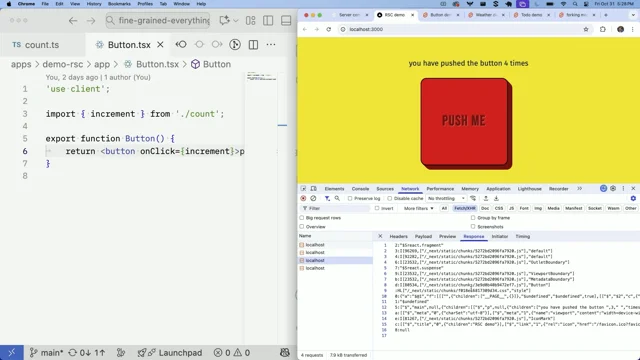
Using a Next.js demo, Rich shows React Server Components in action with use server and use client, highlighting type‑safe reads and writes without manual JSON. He praises the model for eliminating client‑server waterfalls but inspects the network payload to reveal a critical inefficiency: each small state change ships a page‑scaled RSC blob and recomputes on the server. Rich underscores the mismatch—big work and bytes to increment a counter—which motivates a more fine‑grained alternative.
Remote Functions in SvelteKit: Small Payloads, Big Wins
Rich demonstrates SvelteKit’s remote functions: queries for reads, commands for writes, and built‑in validation (Valibot) for safe, typed client‑server communication. He wires a counter to server state, shows automatic caching and parallelization of pure awaits, and contrasts a 0.3 KB response against the larger RSC payload. He then adds optimistic UI with override semantics and automatic rollback on failure, illustrating fine‑grained updates aligned to exactly what changed. This hands‑on segment embodies the talk’s theme by minimizing work and bytes while improving UX.
Batching Queries for Smarter Fetching: A Weather Demo
Rich presents a weather app where expanding multiple cities initially triggers multiple requests, then refactors it using a query batch API so related fetches coalesce into one server call. The batched request includes only data not already on screen, reducing external API hits and costs. He argues this model preserves a clean separation between view and data logic while achieving optimal loading behavior without manual orchestration.
Making Forms Pleasant: Typed Validation, Enhancements, and Optimistic UI
Rich walks through form ergonomics in SvelteKit: schema‑driven validation with typed fields, secure handling of sensitive inputs, and attribute helpers that wire up names, types, ARIA states, and rehydrated values. In a todo app, he shows nested schemas, numeric constraints, and live value displays that eliminate FormData pitfalls. After revealing an intentional server delay, he adds enhance with an override to optimistically toggle items and update priorities instantly while background requests sync and roll back on error. The result is less boilerplate, better accessibility, and a snappier UX.
Async Svelte in Practice: Coordinated Data, Forking, and Out‑of‑Order Rendering
Rich summarizes the design goals: component‑scoped data, coordinated async updates, real type safety, dead‑simple ergonomics, and speed with tiny payloads. He introduces Async Svelte—awaits inside components plus remote functions—then showcases forking, which prefetches on hover and commits on click for near‑instant navigations without redundant work. He also explains out‑of‑order rendering, where the compiler eagerly renders independent parts (like comments vs. post) and stitches updates together. The segment illustrates how Svelte’s compiler plus a fine‑grained signal graph unlocks coordination patterns that make apps feel faster with less code.
Beyond MPAs: Measured Performance vs. Felt Speed
Rich defends the React team’s work before critiquing MPA defaults—using Astro as a proxy—for redoing whole‑page work on every navigation, even when assets are cached. He contrasts an MPA version of the Svelte docs against the default SvelteKit experience with client‑side routing, remote functions, forking, and caching, showing instant navigations and fewer network trips that MPAs cannot match. Closing the loop, he urges the audience to value perceived speed and practical coordination—caching, preloading, parallel fetches, optimistic UI—over dogma, and to demand tools that make fine‑grained everything achievable by default.
I'm really excited to be able to introduce Rich. I mean, I thought.
I kind of think of Rich Harris as a very creative thinker.
I think we've probably, most of us have encountered his work around the web.
But I think of Rich as the person who I saw his job title once upon a time was a visual journalist, which I think equates to makes really cool shit on news websites. I don't know if that's a fair summary. Maybe it's doing him a slight disservice, but after working at the Guardian and the New York Times and living in New York now, he's made all kinds of really inspiring content and kind of visualizations that I thought were very clever.
But then we'll probably know him more from his work on tools like Rollup and Svelte, which of course is a very efficient framework for doing very kind of lean and efficient updates in the browser.
Just really wonderful talks that I've seen him give about those and the finer details of how those things work. And this is a talk about, you know, fine grained everything. So should we welcome him to the stage?
Are you good to go for one more giant round of applause? Let's do it.
A massive round of applause. Rich Harris, everyone.
Hi, everyone, I'm Rich richharris.dev on Bluesky. If you're also on Bluesky. And I am so happy to be at my first ever performance now, hopefully the first. This is a really special community and I've learned so much from all of the other speakers, everyone else that I've spoken to. I did think it was a bit weird that Harry staged a photo to make it look like he paid back that €20. I'm joking, of course.
He's a man of his word. Anyway, I am very aware that this is the end of a long two days and I am the one thing standing between you and a Heineken. So let's all have a little stretch, wiggle our toes, take a deep breath and power through to the finish line. This is the final talk.
It's called Fine Grained Everything.
I'm here representing a project called Svelte. For those of you who are not familiar, Svelte is a declarative component framework similar in spirit to React and Solid and VUE and things of that nature, albeit with a few philosophical differences. In addition to Svelte itself, we maintain a full stack application meta framework called sveltekit, which is our vision for what building resilient, accessible and delightful apps should should feel like it is an incomplete vision. We have a lot of work still to do, and some of that work is what I'm here to talk about today. If you haven't tried Svelte before, you should. It's a project that many of your fellow developers are very excited about. This is the State of JavaScript survey, where we've been the most interesting framework for the last six years running. Now look, I'm not oblivious. I understand that shilling a JavaScript framework here of all places, is like selling hot dogs to vegans. But I promise you, we are on the same team. We care a lot about the open web and about making it easier for more people to build robust performant websites. So please hold your pitchforks.
I've been working on the project for nine years. It all started with an idea. What if you could have a declarative component framework like React, but instead of doing a lot of work in the browser, we could build a compiler that did as much work as possible ahead of time.
But we really came onto the scene in 2019 when we launched Svelte 3 and I presented the idea at a conference called you gotta love front end.
This clip gives you some idea of why we didn't like the React way of doing things. So the virtual DOM is regenerated each time, and then React's job is to reconcile what came before with what came after.
So let's see what this process looks like. First we look at the top level element. It was a div, it's still a div, so we keep it. Then we need to look at the attributes. It had a class name app, it still has a class name app, so we keep it. Then we look at the children. It had an H1, it still has an H1, so we keep it.
Then we look at what's inside the H1, some text. It hasn't changed, we keep it. Look at the input. It's still an input. We keep it. The value hasn't changed, we keep it. Look at a button. It's still a button. We keep it.
Its text has changed. So we need to apply that to the DOM.
All that work to change a 4 to a 5.
As engineers, we should be offended at all that inefficiency. But that's not the bad part. The bad part is that we keep running this code over and over again every time there is any state change at all. We need to redeclare these functions that close over that local state. And he's right. A lot of that talk holds up pretty well. The front end world has largely come around to the idea that React is one of the slower and bulkier ways to update the dom.
Back then, you would often hear people say things like React is fast because it has a virtual dom. Nowadays, people understand that React's performance is good enough most of the time, despite its approach to rendering, but as soon as you need to move a lot of pixels at 60 frames per second, you're probably going to have to start doing manual optimizations. The idea of running your code again and again and again is rightly seen as being very inefficient, but you don't need to take my word for it. You can just ask the React team. Earlier this month they shipped version 1.0 of the React compiler, which auto memoizes your component code to avoid re running it more often than it needs to. I consider this the ultimate vindication of our ideas.
There are also some things we got wrong. Firstly, we overestimated what you can do with a compiler. Unless you have incredibly sophisticated static analysis, it's hard to know which actions will affect which state and which state will result in what DOM updates.
Compiler driven reactivity is much faster than the traditional React approach, but it breaks down when you make changes to objects and arrays. Because if, for example, you toggle the property of an individual to do, you have to invalidate the entire todos array, checking to see if any of the other todos have changed. In recent years, a new consensus has emerged, mostly thanks to this guy. This is Ryan Carniado, the creator of Solid and incidentally one of the kindest and most authentic people in web development. His whole deal is that the way to achieve optimal performance is with fine grained reactivity.
The idea is that you model your data using something called signals, each of which represents an atomic value, and when those signal values change, we know exactly what updates need to happen.
Svelte 5 was released a year ago and we are fully on board with this program. We use signals with our compiler to make fine grained reactivity automatic, but in a way that feels like using normal JavaScript values.
So our previous example becomes this we declared the todos array as state using this special syntax we call Arune, and Svelte creates signals for the properties inside it. Now, when we toggle or edit, nothing else needs to care about it. That's fine grained reactivity.
But there's another more fundamental thing we got wrong.
Like every framework, we've always been fixated on how fast you can update the dom, and fine grained reactivity is just the latest chapter of that, and at this point we can all declare victory. The gap between signal powered reactivity and what you can achieve writing low level DOM updates by hand is small enough that there's really not much left to do.
Rendering and reactivity are solved problems, and this is why every new framework released in the last few years has failed to gain any traction. Except for Astro, which has cleverly focused on a very different set of problems. All the while, React was working on something else.
The biggest performance problem they saw was not the dom, it was the data. Data is not a solved problem.
When you build a web app, you're building a distributed system in which a small computer on an often flaky network has to communicate with a bunch of different servers. Nadia's talk already covered it in more detail. But to recap, if you're building a client side single page app, it might look something like this.
The user requests a page which results in an empty HTML shell delivered from a CDN server near them. The HTML imports your app's JavaScript and CSS. Those JS and CSS files might import other JS and CSS files, and they don't do anything until they are all loaded.
Once they are loaded we can start the app, but before we can actually show anything to the user, we probably need some data so the user makes a request to your server. This time the request can't be handled by a CDN because the response is personalized and so it needs to go to your origin server, which could be a long way from the user. The origin server needs to consult a database, hopefully within the same data center, and once it has that, it can respond with the data. But based on that response the app might need to get more data, and this is pretty common during initialization.
Mobile devices these days are generally pretty powerful, but latency is still a real problem. So when you have these waterfalls it tends to result in a really janky user experience.
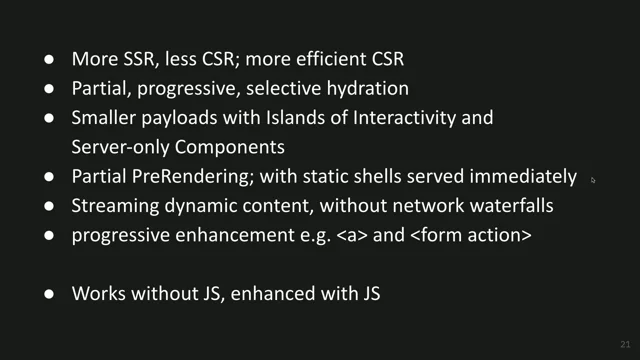
Server side rendering goes a long way towards solving this. If you use a framework with SSR like Sveltekit, then the HTML response will have done most of the work already. You will have content for the user to look at. You'll have link elements that preload all the JS and CSS assets that you're about to import, and the response will contain the initial data so that we can turn it into an interactive client side app without needing to go back to the network for static content. You can even pre render the HTML at build time and put it on a CDN so that it's close to the user. There's a common misconception that SSR is something that you only need if you care about search engine optimization, and this is wrong. SSR is about performance and resilience. If you care about performance, if you care about your users, then SSR is not optional. It is absolutely essential.
But it's also not the complete solution, because it only affects the first load.
What the React team found was that in many apps, one of two things will happen. Either components load data independently of each other, in which case you experience loading spinners popping in and out like a game of Whack a Mole, or you fetch as you render and loading data sequentially as you navigate to a page, and you start hitting those dreaded waterfalls.
As Nadia showed earlier, the way React would have us solve this is with something called server components. So let's see what that looks like in the context of a Next app, which is today the most common way to to use RSCs.
All right, so here we have a button on a page. When I push the button, it increments a counter. There are three files that we need to understand in this application. We have page tsx, which tells next when a user visits this page, this is what should get rendered. We have count ts, which contains our server side state, along with some functions for manipulating and reading that state. And then we have button tsx, which contains the logic for responding to user events. Now, obviously a real app would have a database. You wouldn't just be yeeting count into memory. But for illustrative purposes, it is good enough. You'll notice that in count TS we have this Use server directive at the top. This tells the bundler this code will always run on the server, and it means that you can't have anything client side in the code that's contained in there.
Meanwhile, button TSX defines the button, and because it has interaction, it has this Use client directive. You might think that you can put the button inside the page TSX because it's the same kind of thing, but it's actually not. A client component can do interactive things a server component cannot.
Now, I'm a bit of a React skeptic, but I actually think this is pretty cool. For the sake of a few lines of code, we've managed to get server side state being synchronized with the client side app that we can write to with full type safety without having to muck about with JSON right within our components.
And this paradigm doesn't eliminate waterfalls. Like, you'll still do database queries sequentially, but it does Eliminate client server waterfalls, which are the most costly kind. There are some things I don't super love about this approach, though. Firstly, I think it's a bit confusing having this split between server and client components, where your server components can do the reads, but only your client components can do the writes. And your server components can be async, and your client components can have state and interactions. There's a lot of rules that you need to learn, a lot of patterns that you need to adopt in order to be able to successfully compose these things together. And what I think we've found, at least the consensus among the developers that I've spoken to, is that this is just too difficult. It's too confusing.
Ultimately, though, that's just about experience and education.
My main concern is something a little bit more fundamental.
If you look at the network tab here, let's see what happens when I push this button.
You can see that it's sending down the RSC payload and it contains a bunch of stuff. This is the production version of the app.
We're not looking at development luxuries.
This is the bare minimum. And you can see that it includes all of this stuff, basically the entire page in RSC form.
So each time we press the button, we have an additional 2 kilobytes of data. All that work just to change a 4 to a 5.
As engineers, we should be offended at all that inefficiency.
But that's not even the bad part. The bad part is that we keep running this code over and over again anytime that state changes, or even if it hasn't changed. But this time, that computation is happening on your server, the server that you're paying for.
So obviously two kilobytes is not a lot, but this is for a very, very simple page. And the size of that payload scales with the page, not with the amount of data that's changed.
Okay, so let's take a look at what the Sveltekit equivalent would look like.
So it's the exact same app. When I push the button, the count goes up. Please hold your applause.
Actually, I'm cheating. This is just client side state. See, doing let count equals state zero, and then I do count plus equals one.
That's how you update state in a svelte component. But if I refresh the page, all my hard work is gone. I had to start again from zero. So let's turn this into server side state. Next to my page component, I have a file called Count Remote ts. That remote tells Faultkit that this is going to be A file with remote functions that must only ever run on the server. So we'll do let count equals zero and then we'll expose it through something that we call a query export const getcount equals query.
And then we'll just return count like so.
And then back in our page component, we can replace these occurrences of count with await, getcount, refresh the page and see that it is in fact working.
Now, you might look at this code with horror. I have two sequential await expressions. Maybe this guy doesn't know what he's doing.
It's okay for two reasons. So normally, obviously if you had sequential awaits, that wouldn't be good. You don't want to go to the network, get the data, and then immediately hit the second await, get count and go back to the network, get the data. Again, that wouldn't make any sense at all. But because these expressions are inside our template, we know that they are pure. Therefore we know that it's okay to run these expressions in parallel.
We can do promise all behind the scenes for your benefit. But even if we didn't, in this case it would be okay because this get count query is pointing to a specific resource. And Sveltekit understands that if you refer to that in multiple places, it's the same object. So these two things are cached based on what's currently used on the screen at the moment.
Okay, so clicking the button doesn't do anything right now because we haven't wired it up. So let's, let's fix that back in here. We need the opposite of a query. We need a command called increment.
Now I want to be able to pass some data to my command.
And you have to be careful when you're passing data from the client to the server, because it could be an out of date client, or it could even be someone trying to mine Bitcoin on your server or something like that. So it's very important that we validate all of this stuff ahead of time. So I'm going to import a validation library called valibot. People here familiar with things like valibot and Zod and other schema validation libraries, this is a way of making sure that some data passed in matches what you expect.
It will error if it doesn't. And then at the end of it you get type safety.
So I'm going to say that the input to this command is a number.
I'm going to take that number D and just add it to count.
And then back in my page I replace that Count plus equals one with increment one.
Okay, still doesn't do anything. Although if I refresh the page, it is actually updating the state on the server. That's because we haven't told it what needs to update as a result of that action. So back in our command we will say get count refresh.
Now when I push that button, it updates kind of nice. And if you look at the network tab down there, you will see that the payload is much, much smaller. It's 0.3 kilobytes and it consists of just go away consists of just this information about the result and information about the queries that were updated as a result of making that change. What if we had to deal with a slow network? It's all well and good when you're doing it on a local machine, but reality is not like that. What if we simulate a slow network by turning this into an async component? Adding an await sleep all of a sudden starts to feel a little bit unsatisfying.
Well, there's a few ways that we could think about that. We could add some UI based on what updates are pending. There's an increment pending property that we could use. But in this case we kind of know what data we are going to get back from the server. We are just adding one.
Think of like adding a fave to a tweet or something like that.
You want the state to be driven by the server so that it reflects everyone else's fav as. But you kind of know that when you click it it's just going to go up by one. And we can communicate that to Sveltekit by saying that this updates getcount with an override.
So now we can get rid of our client sidestate. We don't need that anymore.
Press the button and you'll see that it's updating while the network activity happens in the background. And if something were to go wrong, this were to fail?
Oh no.
Then as I push the button, we'll apply the update optimistically and any that fail, they all succeeded. Any that fail will get rolled back just like remove from the stack of updates as it happens.
So with not a lot of code, we're able to solve a lot of the challenges that we face when building these sorts of distributed systems.
All right, let's take a look at another demo. Let's take a look at this weather demo. If I refresh the page, you can see in the network tab nothing is actually being fetched because all of the data that is needed to render.
This was included in, in the initial page load, but if I want to look at one of the other cities, then it's going to need to go and get some data because you haven't added everything just in case. So if I want to see what's happening in Paris and I click on it, then you'll see that it does make a request. I'm not going to show you what's happening in that request. It's not very interesting. But then what happens if I want to EXPAND ALL OTHER 3 By clicking this Show all button, it makes three more requests.
I mean, it's okay, it's okay, but it's not ideal.
It's not ideal for two things. Number one, having the multiple requests in the first place is. It's fine, like HTTP 2, whatever, but it's not fine when you get to the server and then the server has to make three onward requests to the external API, because those are requests that count towards your monthly quota and you might have to pay for them.
And at this point you might think you see rich. This is why React server components exist. Like you're doing all of the stuff in one place. Maybe it's a lot easier to batch things up there, and you could, but you would have to figure out the batching logic yourself and then you would face another problem, which is how do you combine that with the client side state? If I toggle between Celsius and Fahrenheit, I've been living in the US for a long time now, so Fahrenheit actually makes more sense to me. Believe it or not, it's hard to combine those things.
Like you can do it, but it's probably going to take you the afternoon.
So let's see if there's a way that we can get the optimal data loading behavior here while still being able to combine client and server side state easily. I'm going to bring up my inspector so that I can see where this is being driven from. And we can see that in this component we're calling another query getforecast, trying to make this big enough that you can see it, and that's just deferring to an external API.
So what we want to do is have all of the requests be treated as a single batch. And we can do that with the query batch API.
This time, instead of passing in an individual city, we're going to receive an array of cities.
So instead of destructuring it, we get the whole lot and then instead of returning the data, we'll Return a function that returns some data for each item in cities. So for each city, we'll return the data that matches the input.
And so now if we, if we load this, if I open Paris again, it's a request, but then if I look at the other three, it's just one more request. And that request will only include data for New York, Amsterdam and Singapore, because we already have data for London and Paris on the page. To us, this is just a much better model. There's a reason that developers have long embraced a separation between model and view logic.
Who here has seen a To do app before?
A few of you, all right, but have you seen the sequel To Do? To. To. To do. To do.
Okay, who. Who here is a web developer, works with forms?
Who here, as a web developer, likes working with forms?
All right, A lot fewer hands. Yeah, forms are kind of a nuisance. We've come up with a way of dealing with forms that we think is a little bit nice, hopefully. So let's take a look at this one. This is my login form.
You see that it's a form element onto which I'm spreading a variety of properties. This login object has attributes like the method equals post the action so that it knows what to communicate with, and an onsubmithandler so that it can handle the submit logic if JavaScript is available without needing to reload the page. If we take a look at the implementation of login here, you'll see that it's very much like the command that we saw in the previous demo, except this time it's a form and the validation schema is a little bit more complicated. Instead of just being a number, it's an object with three properties, email, password, and action, corresponding to the form controls.
The underscore in front of password is because this is sensitive data and that just ensures that Sveltekit will never send that back to the user. If, for example, you submitted some invalid data and it repopulated the form with it on a page reload.
So in addition to saying what types of things these are, we're able to express some constraints. Like your email has to be a valid email, your password has to have five or more characters, and your action can only be one of login or register. And then inside here we get type safety because it's been narrowed by that validation schema. So back in the component, once we have that, we can start spreading the fields onto the inputs. Login fields has a few different properties that correspond to the things in the schema so you get type safety.
Again, if I were to misspell that I would get a red squiggly it would tell me to to fix that. And this as attribute spreads attributes. Sorry, this as function spreads attributes onto the element. We have the name which connects it to the form so that we are able to get the data on the server. We have the type of the input so that the browser is able to render it correctly and give you some ahead of time help.
We have ARIA invalid which will become false if invalid data is submitted and we have a value that will be used to repopulate the form following a full page reload if there was some invalid data. And then below that if there are any issues we can just render those straight away. So if I log in here demofelt.dev and then I put in a password that is too short, immediately you can see that it pops up and we have some CSS that's being applied because we have that ARIA invalid attribute on the control.
Alright, but I know my password so I am going to log in.
Let me add a couple of todos with different priorities.
Number two is particularly urgent. Number three not so much.
Of course this is just a form, so if JavaScript was disabled you would not get the stupid springy animation, but it would still work.
Here I have created in priority we can sort it as we like. And because we are using query parameters, this will also work without JavaScript.
Now if you look at the schema behind this form, it is a little bit more involved this time. Still an object, but this time we have a nested object inside here, this attributes object and inside that we have a priority property which is a number. If you have dealt with the form data object, I am sure many of you have, then you will know that it is a real pain to deal with when you when you're trying to do anything involving remotely complex data because it just has keys and values, some of those keys might be repeated. You don't know, there's no way of knowing that. You don't know the difference between an array of length one and a thing that only has one item.
Everything is either a string or file or null. So dealing with numeric values is kind of difficult. It's just a very not great API by the standards of modern affordances with typescripts and everything. So rather than exposing form data directly, we go through this validation process and give you a tight object that you can work with. That's pretty nice. And so because we know this priority value is numeric we're able to do things like say it has to be a number or a range input. If I try and make this a text input, then again I'm going to get squigglies.
And then immediately below we can actually reference the current value of that in the form. So as I drag the slider back and forth, you can see the number changing to the right of it. All of these just little quality of life things that make it a little bit nicer to work with forms. And if you had to do all this manually, you would be writing so much code and it would not be very fun. All right, let's toggle some of these. Oh man, that was a bit slow about this one.
Yeesh. Let's see what's going on to do item.
Okay, so this is the form in question.
Toggle is an instance of the toggle to do form. Oh yeah, someone left an awake sleep in there. Happens all the time. Well, we could fix that. We could just make the back end magically faster, but it's actually more interesting to solve it on the front end. So we'll go back to our todo item and we're going to add what we call enhance and do toggle enhance.
We're going to pass in the submit function there and this time we'll call submit. And just like before with our increment command, we can do update the get todos query again with an override and it's going to receive the previous value of the todos array and we'll just map over it like so if T ID is the same as the one that we're currently concerned with, then we'll just clone it and toggle the done state. Otherwise we'll just return the object as is. And if I've done this right, big if, then when I click these, it will update immediately.
Thank you. And you'll see you would do the same thing with a priority, it's updating the whole ui, everything that depends on these things. As this is happening, you can see the network activity going on in the background and it all just synchronize and handles error states and stuff automatically for So we on the SVELTE team, we've been eagerly following all of the work that's been going on around REACT server components and things like it and the overall trends that are happening in the front end world. But instead of copying them, we went back to first principles and asked ourselves what are the problems that we're really trying to solve and can we come up with solutions to have a better set of trade offs that take advantage of Svelte's unique capabilities as a compiler.
So the problems are this. First, we want components to be able to manage their own data requirements. Historically, front end frameworks have dealt with data by loading it outside the rendering process and passing it into components as props. But that's a really limiting approach. A lot of problems in the same way that components manage their dependencies on CSS, on JavaScript modules, on other components and so on, a component that can get its own data is much more useful and powerful than one that can't.
Secondly, asynchronous work needs to be coordinated. If you have separate components that get data independently of each other in response to the same user interaction, you almost always want them to update simultaneously.
We have all seen websites with loading spinners that pop in and out, and it's a really horrible user experience. It's very hard for independent components, perhaps built by different teams, to manage this stuff amongst themselves.
So it becomes the framework's job, our job, to coordinate everything.
Thirdly, we want real type safety. In 2025, it's not enough to deal with JSON anymore. Programmers expect to get type checking, autocomplete, inline documentation. Beyond that, when you're passing data between client and server, it's really important that you have guarantees that it's the right shape. So validation is super important. Fourthly, should be dead simple to use. No awkward constraints around putting reads in your server components and writes in your client components and can I do async here?
And whatever. Something I believe very deeply is that computers should work for us, not the other way around. And finally, we want it to be fast. We want to eliminate waterfalls, we want to anticipate the users needs by getting data ready exactly when they need it. We want to minimize the amount of work that needs to happen both in the browser and on the server. We want tiny payloads, not huge blobs of JSON.
In other words, we don't just want fine grained reactivity, we want fine grained everything. And so for the last year we've gone deep on this problem and the solutions. I realize now my slides are horribly out of order because this was supposed to come before the demo. But the solution that we've come up with is Async Svelte, which allows you to use Await inside your components and the remote functions that I just showed you.
So does this mean forms are fun now?
No, forms will never be fun, but at least now you can spend a little bit less time building the damn things. As we've been building all this stuff, we've encountered some really interesting challenges, and I think we've made some pretty novel contributions. I'll give you two examples that we just shipped this week. The first is something we call forking. When a user is navigating around your app, they'll touch or hover over a link for a couple of hundred milliseconds before the click event is registered. We can use that time to start fetching the data they're about to need. But if the data dependencies are inside the components, we need to render the components to figure out what they are. But we can't render the components and show the components until we know for a fact that the user does in fact want to navigate. So instead we apply the state change inside a fork. If the user does navigate, we can commit the fork, and if they don't, we can discard it.
You can have as many simultaneous forks as you need, along with as many overlapping state changes as the user can generate, and they will all be cleanly merged together as they resolve. Kind of like merging git branches, but without the possibility of merge conflicts. Typically, you won't use this API yourself. It's done for you by Sveltekit.
What's interesting about our implementation is that we. Sorry, excuse me. There we go. Is that we do the bare minimum amount of work to show the update without needing to redo it if another fork is created. So here I have the three wise monkeys, and if I click one of these links, it takes 500 milliseconds for the monkey to appear because our render logic down here has a set timeout 500 to simulate a slow network. And inside my root I have await render monkey. We see that again if we click on the next one takes 500 milliseconds, but typically users aren't that fast. I'll hover over the link and then I'll click it, and then I'll click it.
And when you do that, the navigation feels instantaneous.
But I've only rendered the block containing all of this code once. Once it's there, it's there.
And we don't need to keep recreating it for every subsequent navigation.
This is something that I think is only really possible if you have both a fine grained signal graph and a compiler. In other words, the reason that I think we're the first people to do this is I don't think anyone else can. Although I look forward to being proven wrong. It's very efficient in terms of both CPU and memory. Another trick that's really hard to pull off is out of order rendering. Imagine you have a component that gets some data and renders a child component that also gets some data.
For example, you might have a blog post with a component that gets the post itself, and then a child component that handles the comments. In React, you get the blog post data and then you'll render the child component. That's just how it works. Code runs from top to bottom. If you want to avoid that, then you have to come up with sophisticated preloading strategies which makes everything more tightly coupled. You can't just make changes to the comments component or delete it altogether without that having an impact on the preloading logic. But Svelte is different because we're a compiler and the compiler can see that the comments component doesn't depend on the post data. So rather than running the code from top to bottom, it can render individual parts of your component eagerly so that everything is ready for the user sooner. Then once the data is ready, we can render the rest of it all in one coordinated update. There's nothing that you, the developer need to do to make this work. The computer is working for you, not the other way around.
Some to DOS remaining. We have caching API, automatic refreshing, syncing between tabs, streaming file uploads, some real time streaming stuff, some designs around this that we're all very excited about, very solvable problems that we haven't yet got round to.
So I've been quite critical of React during this talk. I think I should clarify that if anything I I am a React fan.
I think the team has some of the smartest minds in web development doing some of the most interesting work and I want to take a moment to defend them.
Because yes, compared to Svelte's fine grained everything, RSC payloads are a little chunky. But you know what's even more extravagant?
Getting an entirely new document every time you click on a link, even though most of the content and assets are the same.
Take Astro for example. Wait, did he say Astro?
I liked him when he was talking shit about React. But Astro, they're the good guys. Yeah, they are good guys and gals. I mentioned them earlier in fact as the one framework in the last five years that has made an impact because they have focused on developer needs like content management that have largely been overlooked by everyone else. And everyone loves Astro. I love Astro.
Just like React, it is built by friendly, dedicated people who are committed to improving the open web. There are lots of great Reasons to use Astro it's feature rich, it's easy to use, it has a great community, works great with svelte. Performance is not one of those reasons. I know, right? Surprise Pikachu face Performance is one of the things Astro is known for. It ships 0 kilobytes of JavaScript by default. It says so right on the homepage. But you know what?
0 kilobytes of JavaScript is not a feature.
Lighthouse scores are not a feature. Core web vitals are not a feature. The feature is how it feels to use the app.
And as we've seen in this talk, we can use JavaScript to make apps feel faster by being more intentional about the work we do. We've heard a lot about metrics in these two days, but I am giving you permission to use your eyes and your own judgment when making decisions about performance.
Because this isn't really about Astro. It's about the category of website that is designed for building, namely MPAs or multi page apps. Astro just happens to be the best implementation of that idea. When you click on a link in an mpa, the browser has a lot of work to do. It has to go to the server to get some fresh HTML, which is usually mostly the same as the current document. It has to unload the existing document from memory, parse the new one, looking for hints that it needs to start loading other resources, and then it needs to go and get all of those as well. Often those resources will exist in the cache so they can be reused, but they still need to be parsed and evaluated. If you have ads or analytics or things like that, and you probably do, they all need to run all over again.
Multi page apps are really expensive, but they feel cheap. This is the svelte docs, except I've disabled client side routing to make it an MPA. In fact, I've disabled all of the JavaScript except a little snippet that prefetches the next page to make navigation as fast as possible. It's very easy to do all this in Sveltekit.
It's very configurable, but I don't recommend it. And this is why every navigation on this simulated fast 4G connection is painfully slow, even though it's serving pre rendered static content from my local machine and the browser's cache has been primed. And this is the svelte docs with client side routing remote functions.
Excuse me, client side routing remote functions and forking. In other words the default out of the box behavior to make it a fair fight. I've actually disabled the cache this time. And yet the difference is night and day. And because this content is static, Sveltekit is able to automatically cache it for the lifetime of the deployment across repeat visits.
So for those last few links we didn't go to the network at all after clicking on them, the content was available in the next frame.
That's something you fundamentally cannot do with an mpa.
It is disallowed by the laws of physics. So by adding just a little bit of JavaScript, we've dramatically improved the user experience and dramatically reduced the amount of work that needs to be done both by the browser and by the server. All we need to do is fetch a small data payload and update the middle of the page. That's fine grained everything.
There is an unfortunate mentality in web performance circles that the platform is the only thing you need to learn, and that anything that's layered between you and it is inherently detrimental to the user experience.
And it is true that there is no shortage of bad SBAs to use as evidence, but ultimately it's a myth. We can do better. Used well, modern JavaScript frameworks can make web apps that are richer, more accessible and more delightful. Automatic caching, preloading, parallel fetches, granular updates, optimistic UI, validating client server communication, and all the other things that we've covered in this talk are fiendishly difficult to do well by hand. So if you're someone who believes that JavaScript was a mistake, hang on to your skepticism.
Demand the best from your tools. But I hope this talk has given you a reason to examine that idea more closely. Thank you.
- Rollup
- Svelte
- SvelteKit
- Svelte 3
- Virtual DOM
- React Compiler
- Fine-grained reactivity
- Signals
- Astro
- Server-side rendering (SSR)
- Pre-rendering
- Loading spinners
- Waterfalls
- Server components
- Next.js
- Use server directive
- Use client directive
- Remote functions
- Promise.all
- Valibot
- Schema validation libraries
- Network simulation
- Optimistic UI
- Query batch API
- Form validation
- ARIA attributes
- Type safety
- FormData API
- Enhance function
- Async Svelte
- Forking
- Out of order rendering
- Automatic caching
- Streaming file uploads
- Multi-page apps (MPAs)
- Client-side routing
- Granular updates
- Optimistic UI
Modern frameworks like Svelte are fast thanks to signal‑based fine‑grained reactivity, but performance is more than 60fps. This talk covers new approaches to build fast, reliable, data‑efficient apps.