React Rendering Techniques: Comparing Initial Load Performance
Setting the Stage: Nadia’s Background and Talk Goals
The host welcomes Nadia—fresh off a long trip—and hands over to her lighthearted opening about presenting to a hungry, pre-lunch crowd. Nadia outlines her experience across React, Atlassian, performance deep dives, and authoring books on React performance, establishing credibility for a technical investigation. She frames the overall theme: understanding React rendering and performance through clear mental models rather than hype. This context prepares the audience for a pragmatic comparison of rendering models.
Framing the Performance Investigation and Plan
Nadia introduces React Server Components (RSC) as a hot topic often associated with performance benefits and challenges the audience to examine how and when those gains actually materialize. She argues that to judge RSC fairly, you first need a solid model of how React renders and fetches data on both client and server. Nadia then lays out a stepwise plan: measure a client-rendered SPA, add SSR, add SSR with server-side data fetching, and finally adopt server components and streaming, including comparisons across frameworks like Next.js. This plan anchors the talk in measurable, apples-to-apples performance results.
Test App and Measurement Method
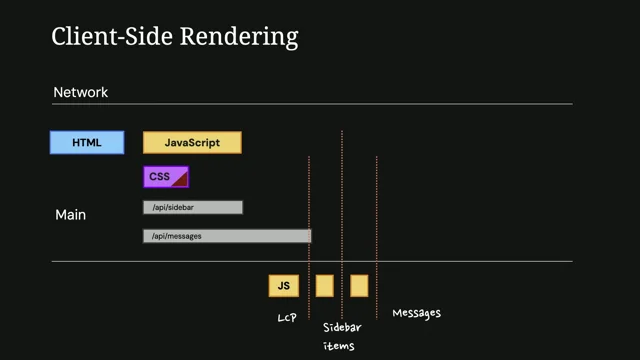
Nadia presents a simple inbox SPA as the “guinea pig,” with a fast sidebar (≈100 ms) and a slow messages endpoint (≈1 s) to simulate realistic data loads. She details the measurement approach in Chrome DevTools—tracking when the shell appears (LCP), when the sidebar renders, and when messages appear—under throttled device and network conditions with cache disabled. This rigorous setup ensures the baseline and each subsequent migration are compared fairly on initial load behavior and data timing. The focus stays on the inbox route to keep readings consistent.
SPA Baseline: Results and Trade‑offs
Nadia explains client-side rendering: the server ships an empty container, the browser downloads and runs JS, React boots, then data fetching swaps placeholders with content. Her baseline numbers show roughly 4 seconds to first visible content, then ~600 ms for the sidebar and ~400 ms for messages—harsh under worst-case throttling but often mitigated by caching and code splitting. She also highlights why she still “loves SPAs”: they’re cheap to run, easy to ship, and deliver ultra-fast in-app transitions (≈80 ms), while acknowledging the initial load and SEO drawbacks. This segment sets a realistic starting point for later SSR comparisons.
How SSR Works: From Virtual DOM to HTML
Nadia walks through React’s component tree and virtual DOM, then shows how server-side rendering precomputes HTML with renderToString instead of producing DOM in the browser. She demonstrates how simply swapping the empty div with server-rendered HTML changes what appears first: CSS completion now drives visibility rather than JavaScript boot. This gives users meaningful content earlier, but React must still hydrate to attach events. Nadia frames this as a foundational shift in when the page becomes visible without yet altering data-fetching behavior.
SSR with Data Fetching: Implementation and Impact
Nadia then moves data fetching to the server: await data on the server, pass it as props, and inject it into the HTML so the client starts “complete.” She notes the trade-off: LCP shifts slightly later due to server-side promises, but placeholders vanish and dynamic content appears faster overall. In her app, the interactivity gap emerges—about 2.5–3 seconds where the UI is visible but not yet interactive—because the JavaScript bundle and hydration still gate event handling. The result is a better first paint and data timing, paid for by a temporary “broken” feeling until hydration completes.
Framework Profiles: Next.js Pages vs App Router (No RSC)
Comparing frameworks, Nadia shows how Next.js Pages uses code splitting that slightly slows CSS due to bandwidth contention but can speed other aspects overall. Next.js App Router (without server components) aggressively delays JavaScript to prioritize CSS, yielding the best LCP in her tests while pushing other milestones later. She emphasizes that many perceived “framework performance differences” stem from bundling, code splitting, and resource prioritization choices rather than core SSR mechanics. The takeaway is to examine loading priorities when switching frameworks.
Introducing Server Components: RSC Payloads and Bundle Size Realities
Nadia explains the core idea of Server Components: keep non-interactive component code on the server and send only an RSC payload—data describing the UI tree—so the client can reconstruct without shipping all the code. This can theoretically eliminate large dependencies from the client bundle when components are server-only. After migrating to Next.js App Router and removing use client where possible, she sees a login page shrink from ~46 KB to just a few bytes, but her interactive messages page remains unchanged. The key lesson: mixed apps see bundle wins mainly on static or near-static pages; interactive client components still ship to the browser.
Streaming and Async Server Components: Refactors and Suspense
Nadia introduces streaming, where the server sends critical HTML immediately and streams subsequent chunks as data resolves, mirroring client-side progressive rendering but without waiting for client JS. This requires moving data fetching into async server components and carefully keeping their parents server-side; client components can’t be async or fetch in render without causing issues. She underscores the ambiguity problem: code alone doesn’t reveal whether a component is client or server, which can lead to leaks or infinite loops if misclassified. Finally, she shows that Suspense boundaries determine chunking; without them, streaming degrades to classic SSR blocking.
What Streaming Changes—and What It Doesn’t
With correct Suspense placement, Nadia’s traces show a continuous HTML stream as chunks arrive, confirming streaming is active. The improvements appear primarily in the timing of dynamic content, not in LCP, which remains similar to SSR unless JS is reprioritized. Crucially, the non-interactive gap persists because the JS bundle and hydration haven’t changed. Nadia’s measurements ground the theory: streaming helps progressive data display, but does not, by itself, make the page interactive sooner.
Key Takeaways: Choosing CSR, SSR, or RSC
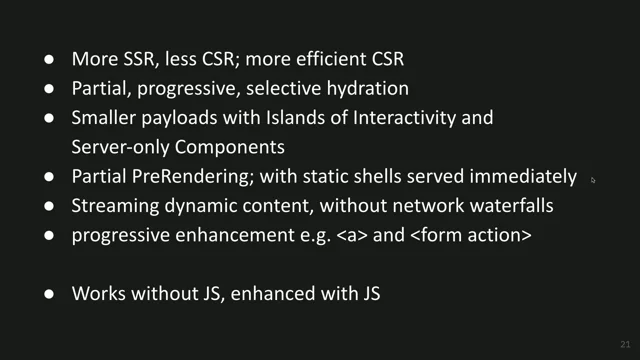
Nadia synthesizes the results: CSR defers everything to the client and yields fast transitions but weak initial load and SEO; SSR pulls UI work forward for faster first paint but introduces a hydration gap; adding server-side data fetching removes placeholders at a small LCP cost. Server Components can cut bundles only when most UI is server-only and, paired with streaming and proper Suspense, can accelerate dynamic data display. She cautions that in mixed apps, RSC rarely improves LCP or the hydration gap, and meaningful gains require a server-first architecture with limited interactivity. Nadia closes by sharing a link to her full write-up and code for further exploration.
Q&A: Caching, Component Ambiguity, Streaming, and Architecture Choices
In Q&A, Nadia explains that caching varies by framework—Next.js can pre-render and cache aggressively by default, while other stacks may require manual strategies aligned with backend capabilities. She elaborates on component ambiguity risks: what looks “server-only” could become client-rendered and leak secrets or trigger infinite loops if data fetching assumptions change. On why streaming didn’t reduce the interactivity gap, Nadia notes the measurements show no improvement in her setup despite the theory of selective hydration—an area where framework behavior matters. She advises teams to choose architecture based on team size and expertise: for many, a simpler SSR setup (e.g., Vite + Router + Query with SSR) is safer, starting server-ready if SEO or future SSR is likely, while RSC shines only if you can keep most of the UI server-only.
We'll invite Nadia to get plugged in as we talk for a minute.
I think Nadia might be the speaker who's traveled the furthest. Surely I'm coming from Australia. Can anyone beat Australia? I don't know how you would.
I mean, I think we'll have to get maps out for that, but. But we're ever so grateful that Nadia has traveled all this way to be with us and fought through the long journey and the jet lag and the rest of it to be. To be with us here today. I'm really, I'm very excited about this talk because I care a lot about like choosing different rendering models.
I feel like I've worked in lots of different projects over the years that have rendered things differently or returned HTML differently, however you want to talk about it. And there are lots and lots of choices now, and so choosing between those is tricky across all of the tools and frameworks and technologies, let alone just within the React space where there are lots of options as well. So understanding the differences between them and how to choose is an important thing.
Nadia's well positioned to speak about this for us because she's done loads of work in the React space in the past now working on different component libraries and different tools for building things with React in lots of different ways. Also spent a long time working at Atlassian building kind of the framework there for tools that many of us enjoy using and hefty work there as well. So sorry this is turning into a roast and that wasn't the intention at all. I meant to vig you up. How am I spoiling your intro? Okay, well, I'll get off the stage as we give a giant welcome please. Vanadi Makrovic okay, I got time slot before lunch and I am presenting about React in form of hungry performance developers. What can possibly go wrong? Hi, I'm Nadia and today I'm talking about React rendering and performance.
A few random facts to add to that list is I've been a developer for a very long time now. I worked in different companies, different products. I spent a few years on, as he mentioned, on everyone's favorite product called called Jira.
And when I'm getting back home, I'm starting a new role as a principal engineer in a startup.
Yeah, that's kind of cool. I also have hobbies.
For example, I love to travel, but also I'm a little bit lazy. So because of that I managed once to relocate from Australia to Austria just because it was easier to spell. Speaking of hobbies, I'm bit of a nerd. And one of my very special hobbies is to investigate how things work and then write the results down. I spent the last few years investigating everything that I could about front end performance and React. And also I got so good at those investigations that I ended up with a whole bunch of deep dives and articles about React and performance in my blog, and even two books on the topic of, you guessed it, React and performance.
So let's talk a little bit about React. Do we have any developers here who work with React from time to time? Oh wow, that's a lot of people. Keep your hands up if you heard of React server components.
Everyone. Everyone here. So that's completely not a surprise because React server components have been the hottest topic in the last few years in React community. But also in addition to being the fanciest new toy, server components are quite often mentioned in the context of performance, as in they are supposed to be really good for performance. And the main promise is actually quite interesting because we push more work to the server, we ship less JavaScript, we fetch data early, and then our initial load gets faster as a result. But how exactly does this happen?
And how much of a performance improvement can I expect?
So this is what I want to investigate with you today.
Here's the kicker though. I cannot just use server components in isolation like React feature. It's not a React feature that I can just turn on and off. It's a highly complicated technology, deeply integrated into modern bundlers and frameworks, and it's almost impossible to replicate at home, at least with a reasonable amount of effort.
And also, it's not the simplest feature to understand either.
To actually make sense of it and how it works, especially in performance context, it's almost mandatory to have a very clear mental model of how React normally renders and fetches data both on the server and the client, by the way, because we had the idea of server rendering for years. So what exactly is the difference between normal server rendering and server components?
So here's the plan for the talk.
I built a single page app spa with multiple client routes and client side data fetching. I'm going to measure its performance as a baseline and talk a little bit about pros and cons.
Then I'm going to move this up to a basic SSR server side rendering and then spend some time with measurements, pros and cons there, then to a more complicated SSR with data fetching and then again look into pros and cons and finally convert the app to server components and show you the result.
This way we will be able to see what you can gain and what you pay in terms of performance when adding server side rendering to a previously client side rendered app.
What can I expect if I already have SSR and my framework suddenly adds server component support, which happens right now with so many of them. And as a bonus, what can I expect if I already have an SSR based app already implemented and I decide to migrate to Next JS App Router, which is one of the most popular framework these days and server components by default.
Sorry, forgot. Okay, so here is my guinea pig app. I have a few pages implemented them. It's very interactive, it's quite nice.
For the purpose of today's measurements, I will be focusing exclusively on the Inbox page that is happening right now.
It has a list of messages and when you click on the message even a rudimentary editor appears which is already kind of works.
Items in the sidebar are fetched from a quite fast endpoint, it takes around 100 milliseconds to execute.
Messages on the list are fetched from quite slow endpoint and takes like a second to execute. Just to imitate somewhat real world conditions.
I'm going to use Chrome dev tools to measure initial load. I hope the audience is familiar with the picture so I don't need to explain it. I am mostly interested in what is happening in the network panel here for for the duration of the talk.
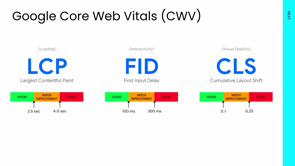
The metrics I'm interested in today are when the page itself with the placeholders becomes visible, which happens to correspond to LCP Largest Contentful Paint. When the sidebar items become visible, it's somewhere here. And then when the messages themselves become visible, it's somewhere here.
And finally I'm going to use those settings to mutate slower devices because we want to test the worst case scenario. As always, disable cache checkbox to imitate the very first time the user opens the page. Okay, so that's the setup.
Let's finally investigate and measure stuff.
But first let's start with the baseline and lay the foundation. What exactly is client side rendering? What is at the foundation of any spa?
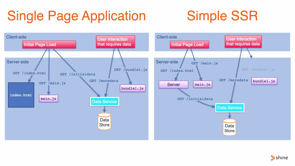
From an implementation point of view, it means that when your browser requests the Inbox URL here, the server responds with HTML that looks like this.
Everyone loved this picture. Completely empty div.
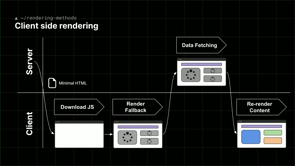
To transform this empty div into a beautiful page that we see in front of you, the browser has to do a lot of work before you see anything useful. It needs to Download CSS and JavaScript, it needs to parse JavaScript, React needs to initialize itself and then finally the UI shows up on the screen.
And even that is not the end because after that React kicks off data fetching. We wait for the network and when the data comes in, React re renders and swaps the placeholders with the real content.
If I record the real performance of my app, it looks like this and it's pretty much identical to what I showed you before.
And finally, numbers. So those are the numbers for initial load of my beautiful app. It takes around 4 seconds until I see anything at all, then another 600 milliseconds to see the sidebar, and then another 400 for the messages, which looks kind of terrible. Probably in theory it is, but not exactly because first of all this is the worst case scenario. Everything is throttled.
And also in real life we will probably be reducing JavaScript by being creative with code splitting, tree shaking and other bundle size reduction strategies. We probably will be prefetching this data some way. And also if the user is not the first time visit to the page, all the static resources will be cached and the numbers will reduce to minimum.
In the case of this app, caching resources on the browser drops the numbers from this to this, which is not that terrible anymore.
And now I'm going to say something that might get me kicked out from this conference. I love spas. I think they're great. I think they're really cool.
They are incredibly cheap and they are very easy to start with. You can implement a very complicated, highly interactive app, upload it to some cheap cdn, have literally millions of users and still pay next to nothing in terms of dollars.
Plus, no backend means, no problems with scaling, no problems with backend expertise. It's just a breeze that makes them ideal for any kind of study project like student projects or for startups where you have limited expertise.
You need to do everything. And also speed of delivery trumps absolutely everything.
Plus, since we are at the performance conference, let's talk about performance. And spa transitions are still unbeatable in terms of speed. In case of my app, transitioning between different Pages takes just 80 milliseconds. It's really hard to beat this number with multi page transitions. But yeah, let's be honest, there are downsides.
Performance picking because this beautiful picture comes at the cost of initial load.
Because the core of this type of rendering is always the same. The time when the content appears on the screen depends entirely on JavaScript. So LCP will suffer and also search, indexing and also social media sharing will suffer.
Because social media bots, they really don't like empty HTML as a content. Those problems is what kicked off the boom in SSR frameworks and static site generators for React a really long time ago. The idea there is quite simple. So instead of sending this empty div and asking the browser to build everything, we render this page to HTML on the server first.
How it happens when it comes to React is really interesting, at least for me. So you also will know it right now.
So from implementation point of view, any React app is a hierarchical structure of components.
A component is just a function like this.
This function returns react elements, and react elements are essentially just objects that are similar sh those objects. They contain references to other components or to DOM elements that are supposed to be rendered by this particular component.
So the entire app can be represented as a tree like this, which is called virtual dom.
The point here that I'm trying to make is any React code starts with one single component that is at the beginning of this all. It's called an entry.
And from this entry, React builds recursively the tree of objects by recursively calling all those functions until it reaches the end of the tree. The end result is a hierarchical representation of every element that you see on the page in the form of an object in the browser environment.
We take this entry point, which is the app component over there in pink, we pass it through some sort of rendering function, in this case hydrate root and this will produce relevant object and then it will be converted to relevant DOM nodes. It's almost like this. So eventually what happens is those DOM nodes, they are just appended as append child to the root element that we get by id.
So we can do this in the browser. So what about on the server? What if instead of all of this, we could do just this and React could produce actual HTML string instead of DOM nodes that we can then return from the server, which is totally possible. And actually this is actual API. And this is exactly how it works. If I implement this for my really basic client side rendering server, that's literally it, what I need to serve my beautiful app. The server can remain as simple.
I just need to add render to string, prerender my entire app, and then find and replace the empty DIV with the HTML that I already have.
Now the server can return the full HTML of the page, the empty div is no more. And with that small change, my app becomes server rendered while still being spa. The performance profile in this case shifts to this.
Now that we have some meaningful HTML, the site becomes visible when the css, which is critical resource is downloaded and we don't need to wait for JavaScript anymore.
However, everything else except for this small change remains exactly the same as it was before. The JavaScript bundle is unchanged. The browser still needs to download everything it did before. It needs to attach event handlers to the already existing HTML that was sent from the server and then make components interactive While we wait for all this JavaScript, the page is already visible, but since there is no JavaScript, nothing that is supposed to be interactive works because we still need it.
So we have to wait to finish downloading and for React to initialize itself. This toggle, for example, there will be a period on the page where I click on it and nothing happens. This unfortunate gap in interactivity is the price you have to pay in terms of performance when you introduce SSR. And in case of my app this gap is 2.5 seconds. It's almost 3 seconds when the app is visible but appears broken because nothing works.
There is another slightly problematic area here.
Data fetching. In this version it still runs on the client because we haven't changed anything at all.
It's triggered by React. So those two data related numbers remain exactly where they were. But do they really have to stay there because we already messing with the server.
So why not move the data fetch in there? At least we will reduce latency probably and know that serious bandwidth limitations.
So surely it will be faster. This is of course also possible and it's also relatively easy to implement on the server. We need to await for the data normal promises. Then we extract this data from the promises, we pass it to react as normal props because every React app is just a component or is just a function.
And then we need to inject this data into HTML itself so that the client version can then initialize itself properly.
Something like this. Then a little bit of work on the upside that I'm not going to show today since it's really not relevant.
And finally it actually works. Performance profile in this case will move like this. The LCP will shift slightly to the right because now we have to wait for promises on the server, but the client site weight is gone and the entire page will be visible right away without any placeholders or annoying loading states.
Those are the numbers for my page when I did all of this.
As you can expect, the initial load for client side is the worst among three of them. Adding just a simple SSR to this just reduces initial load but it doesn't affect anything related to dynamic data.
And then when we move fetching to the server, this Dynamic data numbers slightly worse than the LCP because we're waiting for promises, but the time when the sidebar items and messages appear on the screen is now reduced by half even more.
This comes at the cost of introducing a server, and also at the cost of introducing two and a half second gap of no interactivity on the page. But in real life, very few people will be implementing SSR manually because it actually gets quite complicated than what I showed you today really soon because at the very least you need to implement routing and some idea of different entry points for every single page so you don't fetch irrelevant data like messages on pages that don't actually need it.
So what I'm saying here is in this case you probably will use some sort of SSR framework, so regardless of the framework and its implementation, the performance profile will look exactly the same for all of them. If you're using ssr, the difference will be only in how the framework handles JavaScript and CSS.
For example, if I migrate my custom simple solution to Next JS Pages Router, which is the old slightly deprecated version of Next js, the profile will change to this. As you can see more JavaScript files at the same time because next JS is much smarter with code splitting, so because of this it steals a little bit of bandwidth from css.
So LCP will become slightly worse, but all other numbers I would expect to become slightly better. If I migrate my page to uprouter, which is the latest version of Next JS in SSR mode without any server components, the profile will look like this.
This framework does some really Clever prioritization for JavaScript, so all the JavaScript is delayed. As a result, CSS load is much faster, so the HCP in this case will become the best of all of them, but everything else will be also delayed.
And those are the numbers that show exactly this.
As you can see, LCP number is the best because of the delayed JavaScript, but everything else is also quite bad because of the delayed JavaScript. So in this case even Next JS pages slightly wins.
Also, comparing numbers like this shows how much difference code splitting and data fetching, static resources or prioritization can have.
So when you switch into different frameworks, chances are you will have different results because of this, not because of some internal implementation.
Okay, so that's SSR and SSR is cool.
But there are still two issues that bother me with this.
First, so much JavaScript we all hate JavaScript, and because of so much JavaScript, no interactivity gap.
So do we really need all this JavaScript on the page, especially in React. Because when I look at a navigation component, for example, in my app, it looks like this. It's just markup wrapped in a function. It's div, links, classes, no interactivity, no nothing. Yet it still is shipped in JavaScript bundle because it's still React. The only reason this code is in JavaScript is because React needs to understand the entire tree of components in order to construct a virtual DOM to map that virtual DOM to what we see on the screen.
In any of the SSR implementations, the process of extracting this tree virtual DOM from React app happens exactly twice. First it happens on the server when we generate HTML and then it starts all over again on the client. Because React needs to entire tree to attach event listeners to the service supplied HTML.
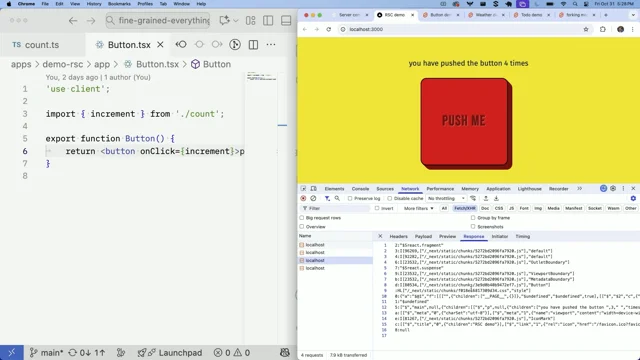
This is where server components come in. The idea behind them is this. Let's extract this code from JavaScript bundle and keep it on the server and instead let's generate on the server this virtual DOM data that React can then use to recreate it on the client without actually generating the tree itself. And so it then can start work as usual, we can send this data together with HTML, thus reducing the amount of JavaScript we need to send to the browser. This data, slightly transformed and embedded in script tag that looks like this is what is called RST payload React Server Components Payload in theory, something like this could be really huge for bundle sizes.
Because imagine for example, this component needs some really heavy library to generate this layout, like five megabytes.
I don't know why, but it could happen. If this is implemented as a server component, all of this will stay on the server and the browser never gets the 5 megabytes.
It only receives the actual layout that it needs to render.
In practice, since I already migrated my app to Next JS App Router, I can finally test it.
Because App Router is one of the very few frameworks right now that are fully compatible with server components.
From the code perspective, it means that I have a bunch of Use Client directives everywhere, which turns every component that uses it and every component inside of it into client components, and those will be included in the bundle and sent to the browser.
To convert my app to server components, I need to remove Use Client and keep it only in components where I actually have interactivity. So in components with states, for example.
So I did a bit of refactoring in my app, did exactly that, and here is the result.
I'm not sure whether you can see it, but the static login page, which was just a layout dropped from 46 kilobytes to just a couple of bytes, which is kind of cool. That means it works a few other pages changed a little bit. Shared chunks where all the common libraries didn't change at all. Unfortunately they're still going to the browser and the messages page, the one that I care about for this investigation unfortunately also didn't change at all, which is slightly underwhelming for the purpose of this investigation.
I was hoping for more and as you can imagine, this zero change had exactly zero impact on my measurements.
So this is the first takeaway about server components in mixed apps where you have some server components and some client components.
Server components may barely touch your bundle. You will see real wins only on almost static pages or completely static pages where everything can actually be server only.
However, this is not the end of the story of server components.
There is another aspect to investigate which is data fetching, because why exactly would I include it there otherwise?
So remember the classic normal SSR flow with data fetching we first wait for all the data on the server, we then pass it to a function render to string to extract the HTML, and then we send this HTML as a big chunk to the browser.
The user suddenly sees the entire website.
From the code perspective, we're waiting for promises, waiting for HTML, sending it to the browser. But what if instead of all of this, we could do something completely different? What if we could trigger the data fetching and immediately without waiting for promises. What if we could render and send some critical HTML to the browser?
The user in this case will immediately see a partial website with placeholders, with placeholders for data.
Then we could repeat exactly the same when the sidebar data comes through and send relevant information as another small chunk. Then we could do exactly the same for the messages. Basically, can we do something like this?
It's actually pretty much the same flow of data that we have on the client side only completely buried on the server.
And in theory it could be much faster since we don't need to wait for any client side JavaScript for any of this.
This is exactly what you get when you combine the idea of server components with streaming. From actual implementation point of view, it looks like this. So instead of all this data fetching on the server, all of this goes away and turns into something like this.
We use react provided API rendertop stream which emits HTML and RSC payload in chunks as soon as each chunk is ready. There is no need to wait for promises it's not going to work, so don't take screenshots.
Secondly the data fetching from the server moves directly to client side components, which means I need to refactor this to something like this component becomes async and then data fetching moves directly into the component's body. So this part is really hard.
Not because it's just hard to move two promises around, but because as soon as I do that, I need to make sure that this component and then every single component that renders this component so in the hierarchical tree stays a server component. Because the complicated part is client components cannot be async and cannot fetch in render body without big trouble, which means they can cause infinite loops.
So when rewriting data fetching, I need to be really, really careful not to accidentally turn any of the components into client components.
Which is a bit of a problem to say the least.
Because look at this component.
Can you guess from its code whether it's client or server component? You cannot, because there is no way to tell. It can be server, it can be client, it can be both.
It depends entirely on the parent that renders it.
And this ambiguity and increasing complexity is the huge price you have to pay for server components.
And speaking of increasing in complexity, I am not done yet with implementation.
There is one last step. I need to wrap parts of my app that I want to be chunked in special component called suspense. Suspense boundaries are how react decides streaming chunks.
So in this code, basically all the chunks will be guarded by Suspense, not anything else.
Without suspense, React will treat the whole react tree as one huge chunk critical chunk. We'll wait for everything and you will end up with exactly the same blocking profile as classic ssr. So for example, let's say I forgot about Suspense during my migration, which actually happens quite a lot because not everyone understands how all of this works. The end result will be exactly the same as if I had it in SSR mode where I fetch the data at the page level, exactly the same numbers. If I add Suspense correctly, the numbers finally change to be like this.
The recorded profile is also fascinating for this one.
If I stretch it a little bit more with slower endpoints, you will see this huge HTML line at the very top.
This is the server holding the connection to the browser and streaming chunks when they become ready.
So this profile will be the big differentiator if you not sure whether streaming for you worked or not. Because the classic SSR will have HTML, CSS, JavaScript and that's it.
Those are the numbers together within the same framework for comparison. As you can see, the real difference shows when data fetching is involved because without data Fetching and dynamic items, the LCP is exactly the same as if with normal SSR with client side fetching, and the gap unfortunately remains exactly the same because JavaScript bundle hasn't changed.
Okay, so a little bit of summary for this train of thought and the information dump Client side rendering the browser gets an empty shell, downloads and executes JavaScript, and then JavaScript decides when the LCP is triggered and when the dynamic item shows up.
If we introduce simple ssr, we pre run the react part on the server, generate the HTML in advance, inject it in the previously empty shell, and send it to the browser.
If I want to drastically improve initial load, introducing a simple SSR will do exactly that. It will behave gloriously. However, if data is still fetched on the server, nothing will change in that regard, it will still depend on the presence of JavaScript in exactly the same way. Plus unfortunately SSR introduces the no interactivity gap when the UI is visible but still not interactive. If I move data fetching from the client to the server it will make the LCP a little bit worse since we need to wait for the promises on the server now. But on the plus side, the dynamic items now can be rendered on the server much faster and the UI will appear as a finished experience right away before the users without any loading states and placeholders. So sometimes it even might be considered a much better user experience. In some cases the non interactive gap still remains with or without data fetching because it depends entirely on JavaScript.
Now moving to Server Components Server components are executed on the server. The code stays on the server, only the layout returned from the components is sent to the browser in the form of RSC payload. Server components can be async. Because of that we can fetch data there, keep the logic of this data on the server, and only again send the layout with injected data to the client.
When fetching data on the server, we need to pair it with streaming, which will allow us to send chunks of HTML and RC payload as soon as the data is ready. And in theory this could lead to improved time when we see those dynamically fetched elements. However, to achieve that this is crucial. We should not forget about suspense component because this component is used to separate chunks and nothing else. If you forget about it, the entire app will be treated as one chunk and the end result will be indistinguishable from the traditional ssr. So the little tip to the performance engineers if you happen to investigate an app based on server components, and if people complain that it's way too slow, check whether they use suspense Correctly, because chances are they are not.
Since the code of the server components stays on the server and never sent to the client. In theory, it could help with bundle sizes.
In practice, it really depends on whether your app can be completely static or it's a mix of server and client components. The only time the bundle size significantly reduced is when there are no client components. The actual performance wins. Show up only for data fetching, not lcp.
The gap remains the same as traditional ssr.
So if you considering switching from normal SSR to server components, consider why you're doing that. Because chances are you will not improve performance unless you refactor the entire app.
And in short summary, performance improvements with server components only show up when you re architecture the entire app with server first mentality for your remote data and only if this app has very limited interactivity. So it's kind of very limited use case for them.
In any other use case, most likely performance will be the same as normal traditional ssr.
If you want to read this entire investigation in the form of coherent article, this is the link. It has code to all those apps available on GitHub if you want to play around with all of them. So check it out and thank you for listening. Hope you enjoyed the talk.
Thank you so much. Nadia, we got a chance for a couple of questions. So do you want to join me on the seat of destiny?
I don't really want to. I'm hungry. We're waiting for lunch. I love the honesty where we're getting hungry. Okay, come on everyone. I won't keep you for terribly long, but thank you so much for a talk, which I think for the first time I found myself really identifying a lot with social media bots. You use the expression social media bots really don't like empty HTML content. And I was thinking, yeah, I relate to that. I like real content as well. Okay, we know your secret identity. Yeah, my secret identity. I'm the web crawler.
Okay, so a few questions. I mean, there's so much to take in there and there's so many options and so much choice. It's kind of difficult to choose. I think we'll get to that in a moment, I guess.
But one of the questions that did come in was about caching strategies because, you know, we're making requests now potentially from the clients to different services, either our own auto, third party services.
We may be making requests on the server side for those things as well. Are there good?
How well does the caching strategies kind of map across to things like ssr?
Because it feels like that's a good opportunity to me for if we're making requests to data services on the server.
Depending on the kind of app, maybe there's chances to cache those things and, and speed things up even more.
Is that something that's kind of easy to implement or easy to reason about when building kind of server side components?
That's a very long question. It was a long question. I spoke for a long time. In terms of a possible answer. Yeah.
I think the question mostly from USA was how does caching work with SSR adoption? I mean, is that something that's easy to implement with the tools that we have available?
It really depends on the framework, as far as I know. So for example, Next js, they recently announced some caching components and they do insane amount of pre rendering.
So every dynamic data by default will be fetched during build time and they will just pre render everything for you and you need to opt out for this. So you don't even need to cache anything. It will be just a pure HTML from their perspective. Right.
In other frameworks, you would have to do it by yourself manually, I think.
And that would really depend on the backend. Yeah. Yeah, okay. That's fair enough. And you know, there are other choices as well that we've got to make. I mean, actually, I want to talk about ambiguity.
You mentioned, you know, you showed a component and you said, is this a client side or a server side component? And you mentioned that. Yeah. You don't know.
And so I think you kind of said that's the kind of price you pay.
That's the cost. It's funny because I looked at that and I thought, is that a real opportunity? Is that that's maybe a good thing. So maybe I've got a simplistic view of this, but I kind of think back to the idea of I'm going to use a buzzword. Isomorphic rendering. Right.
Isomorphic JavaScript. So you can have things that the code's the same on the client and the server. So I thought that's an opportunity. But you mentioned that's a potential problem. Is that just to do with how you reason about the code and how you understand what the code is doing and where. Or were there other drawbacks that I didn't understand about that, as you called that out?
So the problem with this ambiguity. So in theory it's kind of cool. Code maybe should be independent. In practice, you don't really want to accidentally leak something that you think is backend to the client. I see. And if you think that the component is on the server and from its implementation you have no way to tell.
And it inputs something like a secret, and then suddenly it becomes a client component and is served to the client. And then you leaked very important information or by accident you make this component client component and then component down the line from it fetches data in a server way and then you ended up with just infinite loop that's bumps your server.
I see. Okay. So as the complexity of these components, I'm perhaps thinking more simplistically about a component that receives data from somewhere and it renders it. But when there's more logic within the components, that's where some of those issues could arise. Okay, that makes sense to me. Thank you for.
Thank you for clearing up that slight lack of understanding for me. So there's also a question from Thomas about streaming and he asks why is the gap the same with streaming? Shouldn't selective hydration with streaming enabled help with reducing the time for the page to become interactive? Okay, I need to pause that question.
I don't know why, because it's the question. Not to me, but to next js okay, it's there. You can measure it. It's exactly the same. In theory, it should have helped, but it didn't.
Okay, okay, fair enough. So I also have a question about how people make these choices. I mean, you showed quite a lot of options that we have and the various ways that they can perform in different ways.
And you've been building component libraries and you've been building tools for other people to build on and what have you. When people are designing the architecture of their application? I mean, you showed a very rich kind of email client there, which of course lends itself to a particular architecture. And different sites, I guess, would have different architectures.
Do you advise people to. What kind of questions should people be asking when they're trying to make that choice? Is it purely about use case or are there other questions that people should ask when they're trying to choose from all of these options? If we're still staying within React. Yeah, sure. Okay, let's assume we're staying within React making that assumption. Yeah, sure. Then in this case, the very first question is how many people are in your team going to be messing with this code? Because if it's just one person project, then sure, go for server components. It's possible to squeeze every single performance benefit. If you have more developers, and especially if not all of them are very experienced with React modern features, then they will be very confused by all of this. Chances are they will make mistakes and then server components will become really hard to reason with.
So in this case, I would default to something much simpler like Vite plus Tack router and Tunstack query.
If you were looking for frameworks and maybe implement SSR right away. They allow that because it's much harder to transition from client to SSR than from SSR to anything else.
Okay. Because when you implement in client only, you, there are limitations. So for example, you don't have access to window when you're inside server environment because there is no browser. Some libraries you would need to guard, some libraries you would need to type, guard, window usages, document usages, stuff like that. So if you foresee that your app will need ssr, then start with SSR right away. And if your app is open to the web, then definitely start with ssr because.
Yeah. Because the social media bots will love you.
Absolutely. Yeah. And I guess the more you can. More you can deliver as content first the better. Right. And then. And then build on there as need be.
Fantastic. Well, thank you for a wonderful talk. Hungry?
Yes. Okay. All right. Great stuff. Okay. Thank you so much for a wonderful talk. Nadia, everybody. Thank you.
- React
- React Server Components
- Single Page Application (SPA)
- Client-side Data Fetching
- Server-side Rendering (SSR)
- Next.js App Router
- Chrome DevTools
- Largest Contentful Paint (LCP)
- Disable Cache Checkbox
- Client-side Rendering
- Empty Div in HTML
- JavaScript Parsing
- Code Splitting
- Tree Shaking
- Content Delivery Network (CDN)
- Multi-page Transitions
- Render to String
- Virtual DOM
- Hydrate Root
- Pre-rendering
- Event Handlers
- Promise-based Data Fetching
- Routing in SSR
- Next.js Pages Router
- JavaScript Prioritization
- Server Components
- React Server Components Payload (RSC Payload)
- Use Client Directive
- Bundle Size Reduction
- Data Fetching in Server Components
- Streaming in Server Components
- Render to Pipeable Stream
- Suspense Component
- Suspense Boundaries
- Streaming HTML Chunks
- Selective Hydration
- Server-first Architecture
- Caching in SSR
- Isomorphic Rendering
- Vite
- TanStack Query